-
Logo
-
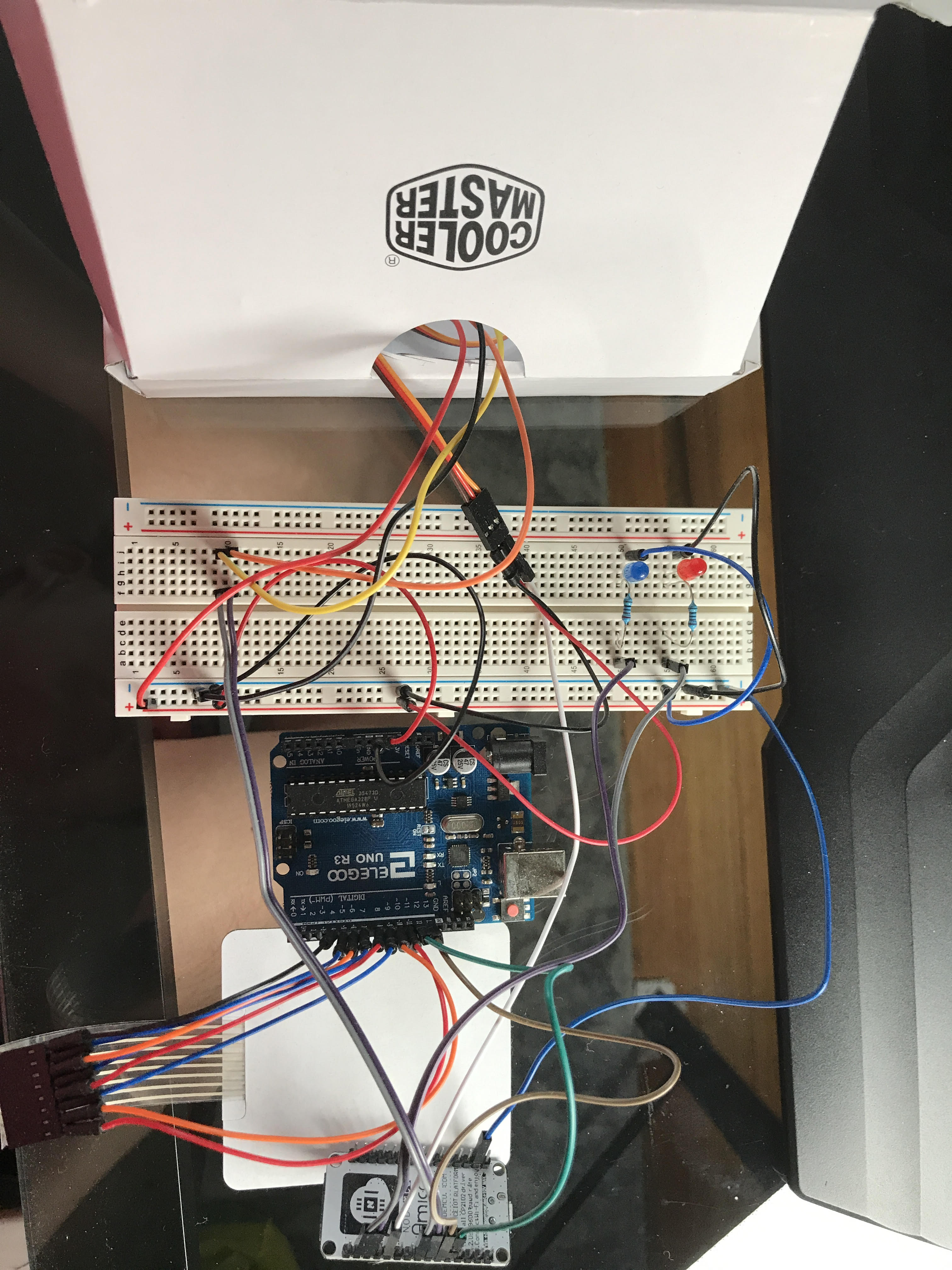
Complete Breadboard Circuit
-
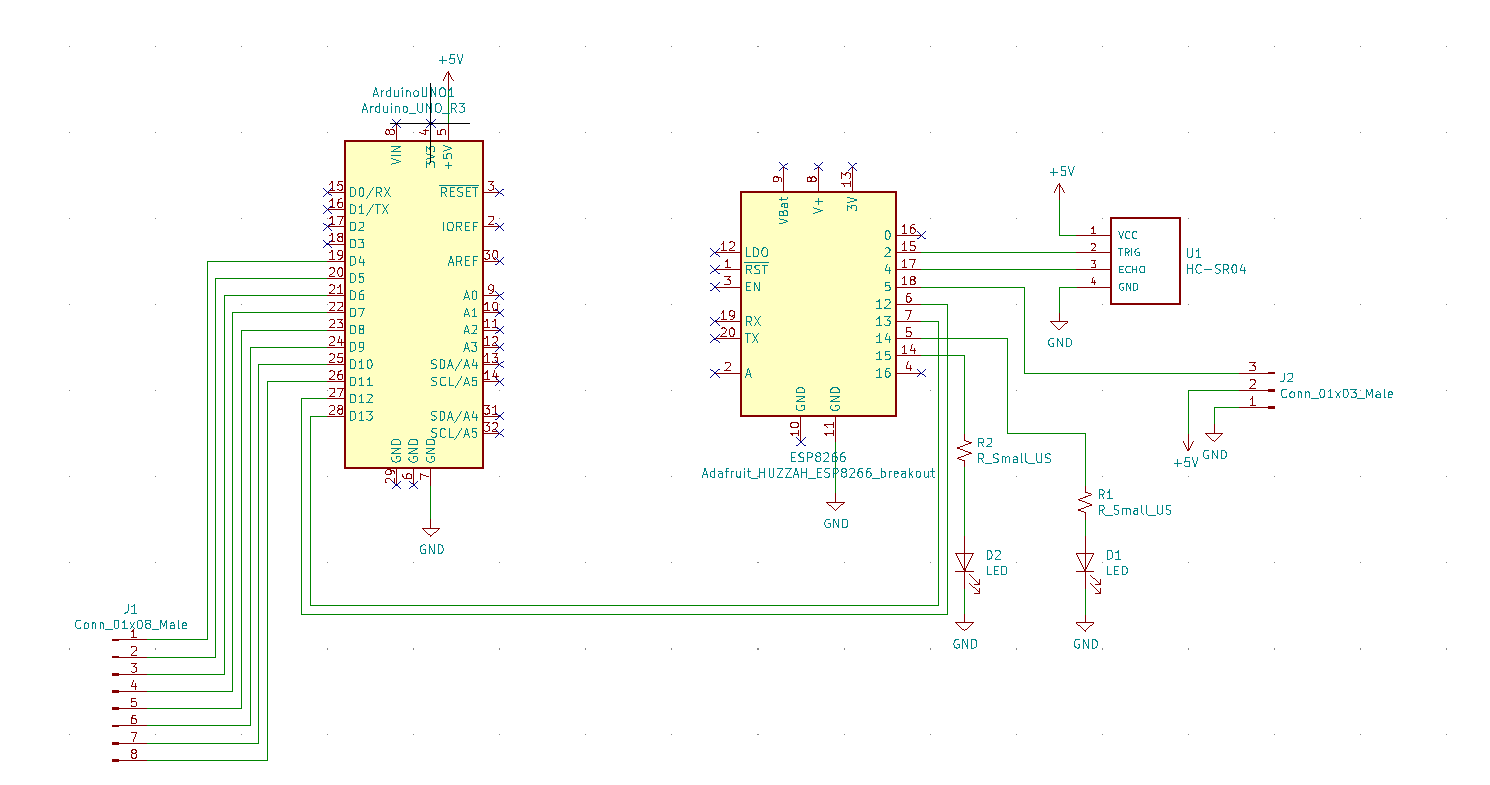
Wiring Schematic
-
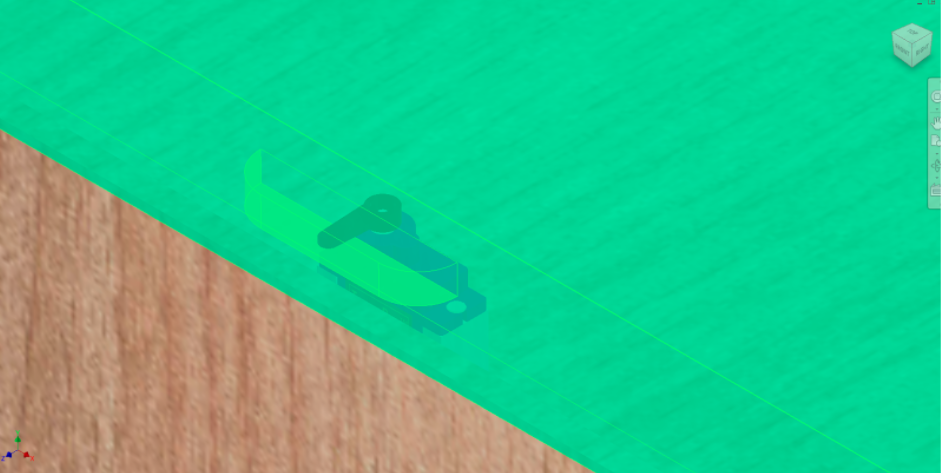
Locking Mechanism
Inspiration
Now that we're all in quarantine, more and more of our shopping is done online and delivered straight to our doors. However, this means that your packages can be left unattended and vulnerable for hours! The Smart Safe changes that.
What it does
The Smart Safe is a mailbox that only you and the package delivery service can access. The Smart Safe has a keypad with customizable password that you can set from your phone. When the mailman gets to your door, he puts in the password and drops the package off, then locks it by pressing # or * on the keypad. Then a sensor notifies you when your package was received via email. Then when you get around to it, you can automatically unlock the safe from your phone and go retrieve your package. You can also add in an optional camera feed so you can see the package in the safe. A sensor also tells you if your package gets removed from the safe, so you always know where it is!
Work Distribution
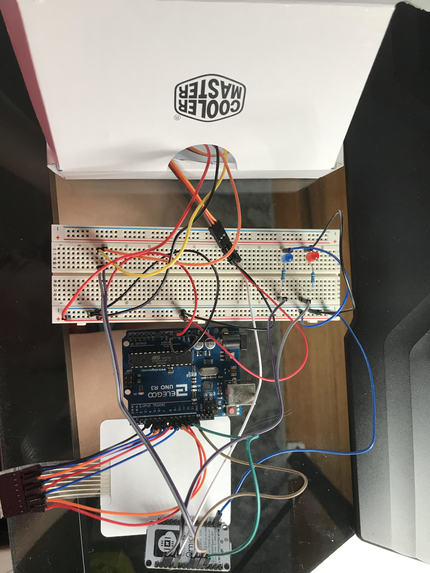
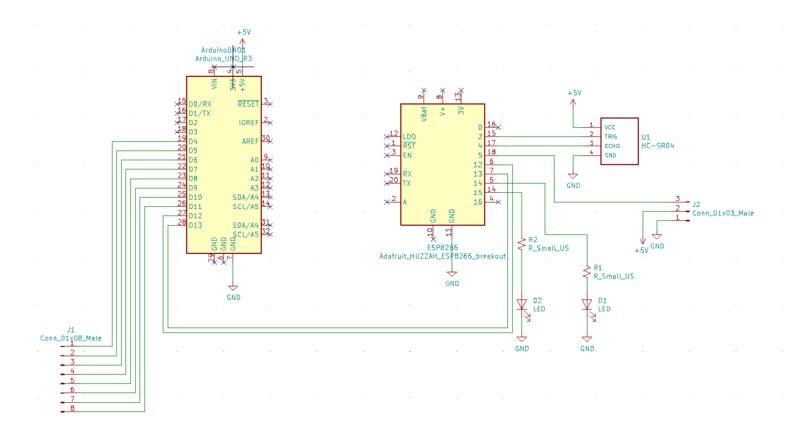
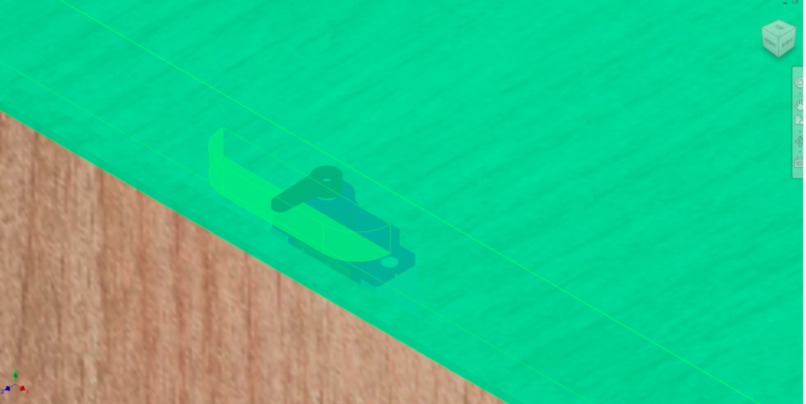
Ani did the programming, bread boarding, and demonstration video. Cameron made the locking mechanism, box design, and the wiring diagram.
Code
Arduino Keypad:
#include
#include
#include
#include
SoftwareSerial linkSerial(12,13);

Servo ServoMotor;
String password = "809202";
String password1;
int position = 0;
const byte ROWS = 4;
const byte COLS = 4;
String lockstate;
char keys[ROWS][COLS] = {
  {'1', '2', '3', 'A'},
  {'4', '5', '6', 'B'},
  {'7', '8', '9', 'C'},
  {'*', '0', '#', 'D'}
};

byte rowPins[ROWS] = { 11, 10, 9, 8 };//Pin may change according to sutability
byte colPins[COLS] = { 7, 6, 5, 4 };
Keypad keypad = Keypad( makeKeymap(keys), rowPins, colPins, ROWS, COLS );

void LockedPosition(int locked)
{
  if (locked)
  {
    ServoMotor.write(0);
  }
  else
  {
    ServoMotor.write(90);
  }
}

void sendJson(String s)

{

  StaticJsonDocument<200> doc3;
  doc3["lock"] = s;

  serializeJson(doc3, linkSerial);

  delay(100);

}

void setup()
{
 // ServoMotor.attach(3);
  LockedPosition(true);
  Serial.begin(115200);
  while (!Serial) continue;

  // Initialize the "link" serial port
  // Use the lowest possible data rate to reduce error ratio
  linkSerial.begin(4800);
  lockstate = "closed";
  Serial.println(lockstate);
  sendJson(lockstate);


}

void loop()
{

  Serial.println(password);
   if (linkSerial.available())
  {
    // Allocate the JSON document
    // This one must be bigger than for the sender because it must store the strings
    StaticJsonDocument<300> doc2;


    // Read the JSON document from the "link" serial port
    DeserializationError err = deserializeJson(doc2, linkSerial);

    if (err == DeserializationError::Ok)
    {

      password1 = doc2["password"].as();

      if (password1.length() > 0)
      {
        password = password1;
      }
    }
    else
    {
      // Print error to the "debug" serial port
      Serial.print("deserializeJson() returned ");
      Serial.println(err.c_str());

      // Flush all bytes in the "link" serial port buffer
      while (linkSerial.available() > 0)
        linkSerial.read();
    }
  }


  char key = keypad.getKey();
  if (key == '*' || key == '#')
  {
    lockstate = "closed";
    Serial.println(lockstate);
    position = 0;
  //  LockedPosition(true);
    sendJson(lockstate);


  }
  if (key == password.charAt(position))
  {
    position ++;
  }
  if (position == 6)
  {
    lockstate = "open";
    Serial.println(lockstate);
 //   LockedPosition(false);
    sendJson(lockstate);


  }


  delay(100);


}
Node MCU
#include
#include
#include
#define BLYNK_PRINT Serial
#define trigPin 14    //D5 in Node MCU
#define echoPin 12    //D6 in Node MCU

#include
#include

Servo ServoMotor;

// Declare the "link" serial port
// Please see SoftwareSerial library for detail
SoftwareSerial linkSerial(13, 15); // RX, TX
int redLED = 5; //D1
int greenLED = 4; //D2
String lockstate;
String oldLockState = "closed";

int lockAction = 0;
int oldLockAction = 0;
int objectDetected = 0;
int newObjectDetected;

String password;
String newPassword;

const char *ssid =  "SSID";     // replace with your wifi ssid and wpa2 key
const char *pass =  "PASS";

char auth[] = "Blynk Auth Token";

bool valid;

BlynkTimer timer;

// This function sends Arduino's up time every second to Virtual Pin (5).
// In the app, Widget's reading frequency should be set to PUSH. This means
// that you define how often to send data to Blynk App.
void myTimerEvent()
{
  if (lockstate == "open")
  {
    Blynk.virtualWrite(V1, 1);
  }

  else
  {
    Blynk.virtualWrite(V1, 0);
  }


  long duration , distance;
  digitalWrite (trigPin , LOW ); // start trig at 0
  delayMicroseconds (2);
  digitalWrite (trigPin , HIGH ); //The rising edge of trig pulse
  delayMicroseconds (10); // decides duration of trig pulse
  digitalWrite (trigPin , LOW ); //falling edge of the trig pulse
  // NOTE: echo pin reads HIGH till it receives the reflected signal
  duration = pulseIn (echoPin , HIGH ); // Reading the duration for which echoPin was HIGH gives
  //you the time the sensor receives a reflected signal at the echo pin
  distance = (duration / 2) / 29.1; //Calculate the distance of the reflecting surface in cm


   if (distance<12 && distance>=0){
    Blynk.virtualWrite(V0, 1);
    newObjectDetected = 1;
    if (objectDetected != newObjectDetected)
    {

      objectDetected = newObjectDetected;
      Blynk.email("[email protected]", "SmartSafe: New Package Detected", "It looks like you received a package! Check SmartSafe");
    }
   }

   if (distance >=12)
   {
    Blynk.virtualWrite(V0, 0);
    newObjectDetected = 0;

    if (objectDetected != newObjectDetected)
    {

      objectDetected = newObjectDetected;
      Blynk.email("[email protected]", "SmartSafe: Package Removed", "A package was removed from SmartSafe. If you do not recognize this activity, your package may have been stolen! Check SmartSafe!");
    }
   }
}

BLYNK_WRITE(V2)
{
  lockAction = param.asInt(); // assigning incoming value from pin V1 to a variable

  if (oldLockAction != lockAction)
  {
    oldLockAction = lockAction;
    LockedPosition(lockAction);

    if (lockAction == 0)
    {
      lockstate = "closed";
    }

    else
    {
      lockstate = "open";
    }
  }
}


boolean isValidNumber(String str){
   for(byte i=0;i doc2;
  doc2["password"] = s;

  serializeJson(doc2, linkSerial);

  delay(100);

}

void LockedPosition(int locked)
{
  if (locked)
  {
    ServoMotor.write(0);
  }
  else
  {
    ServoMotor.write(90);
  }
}


void setup() {
  // Initialize "debug" serial port
  // The data rate must be much higher than the "link" serial port
  Serial.begin(115200);
  ServoMotor.attach(2);
  while (!Serial) continue;


  WiFi.begin(ssid, pass);
   Blynk.begin(auth, ssid, pass);

  while (WiFi.status() != WL_CONNECTED)
 {
        delay(500);
        Serial.print(".");
 }
  Serial.println("");
  Serial.println("WiFi connected");


  // Initialize the "link" serial port
  // Use the lowest possible data rate to reduce error ratio
  linkSerial.begin(4800);
  lockstate = "closed";
  pinMode(redLED, OUTPUT);
  pinMode(greenLED, OUTPUT);
  pinMode (trigPin , OUTPUT );
  pinMode (echoPin , INPUT );
  LockedPosition(false);
  timer.setInterval(100L, myTimerEvent);

}

void loop() {
  timer.run();
  Blynk.run();
  Serial.println(lockstate);
  if (linkSerial.available())
  {
    // Allocate the JSON document
    // This one must be bigger than for the sender because it must store the strings
    StaticJsonDocument<300> doc;


    // Read the JSON document from the "link" serial port
    DeserializationError err = deserializeJson(doc, linkSerial);

    if (err == DeserializationError::Ok)
    {
      // Print the values
      // (we must use as() to resolve the ambiguity)
      Serial.print("lockstate = ");
      Serial.println(doc["lock"].as());


      lockstate = doc["lock"].as();
    }
    else
    {
      // Print error to the "debug" serial port
      Serial.print("deserializeJson() returned ");
      Serial.println(err.c_str());

      // Flush all bytes in the "link" serial port buffer
      while (linkSerial.available() > 0)
        linkSerial.read();
    }
  }

  if (lockstate == "open")

  {
    digitalWrite(greenLED, HIGH);
    digitalWrite(redLED, LOW);

  }


  if (lockstate == "closed")

  {
    digitalWrite(greenLED, LOW);
    digitalWrite(redLED, HIGH);
  }


  if (lockstate != oldLockState )

  {
    Serial.println("Here");
    oldLockState = lockstate;
    if (oldLockState == "open")
    {
      LockedPosition(false);
    }

    else
    {
      LockedPosition(true);
    }
  }


   sendpassJson(password);


  }
Built With
- arduino
- nodemcu

Log in or sign up for Devpost to join the conversation.