Inspiration
As a student, I spend countless hours watching online lectures. I realized how often I'd get distracted or look away for a moment, only to miss a key piece of information and have to constantly rewind. I was inspired to create an intelligent assistant that could act as a focus partner, something that would automatically pause the video for me, but only when I was truly disengaged. The real challenge, and the core of the project, was making it smart enough to distinguish between looking away in distraction versus looking down to take notes, which is also a vital part of learning.
What it does
This project was a deep dive into practical Python application development, combining computer vision, graphical user interfaces, and system-level process management.
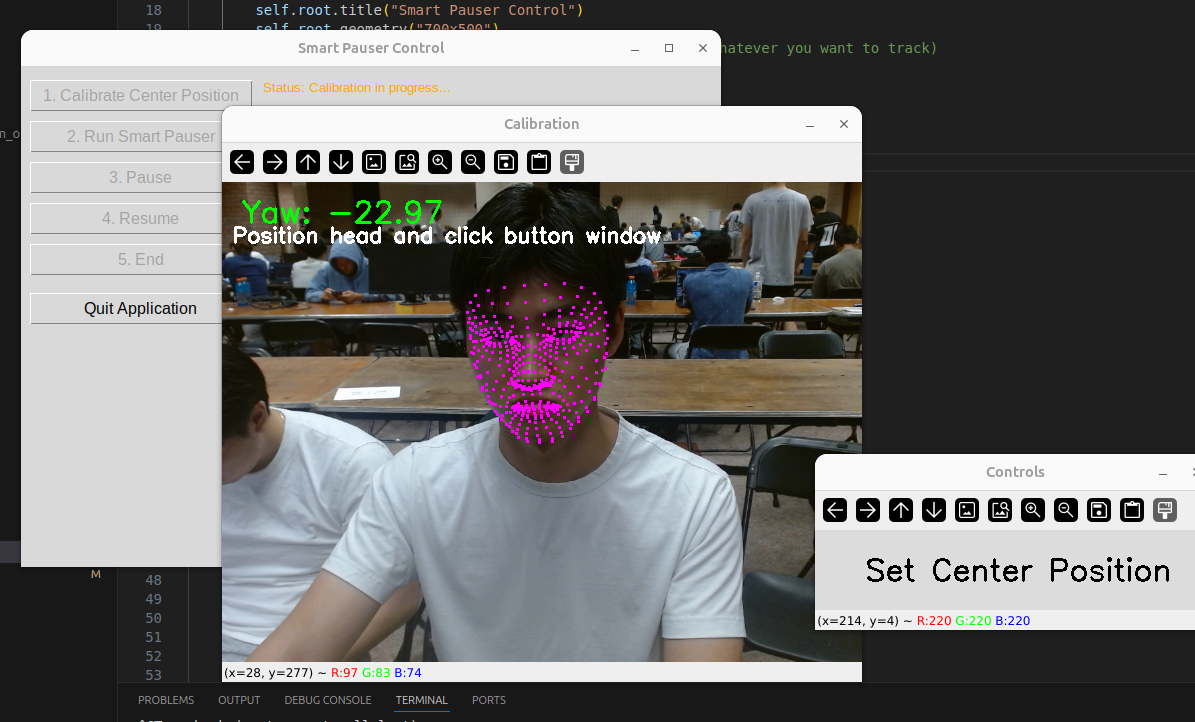
The core of the application is a computer vision pipeline built with OpenCV and a hardware-accelerated version of Google's MediaPipe framework (fdlite and memryx). We learned how to process a live webcam feed, detect 468 facial landmarks, and then use those points to calculate the head's 3D orientation in real-time. By applying some 3D-to-2D projection math with cv.solvePnP, we were able to isolate the head's yaw (left-right angle) to determine if I was looking at the screen.
To control video playback, we used pynput to simulate a spacebar keypress, the universal command for pause/play.
The initial version worked, but the hardcoded thresholds for "looking away" were unreliable. To solve this, we built a multi-script application:
A GUI Control Panel (runner.py) using Python's native Tkinter library.
A Calibration Script (calibrate.py) that launches a temporary camera feed, allowing the user to set their personal "center" yaw.
The main Smart Pauser Script (pause.py) that receives the calibrated value and runs the core logic.
How we built it
Connecting these pieces was the most challenging and educational part of the project.
Inter-Process Communication: We had to learn how to make the GUI parent process communicate with the computer vision child processes. We successfully passed the calibrated yaw value from calibrate.py back to the GUI by capturing its standard output (stdout), and then passed that value to pause.py as a command-line argument. This involved solving subtle but critical issues like output buffering by using flush=True.
GUI Freezing: Our initial attempts to run the scripts caused the Tkinter GUI to freeze. We learned that long-running tasks must be moved to a separate background thread to keep the UI responsive. The final, most stable solution involved a non-blocking "polling" method, where the main GUI loop periodically checks on the child process without getting stuck.
System Permissions: The biggest hurdle was getting the script to control other applications on Linux. We learned about the security differences between X11 and Wayland display servers and solved the permission errors by adding my user to the input group, which avoids the need to run the script with sudo.
Library Pathing: The fdlite library had a bug where it couldn't find its own helper models. I solved this by "patching" the library's internal path at runtime, making my application more robust and portable.
Through these challenges, we learned how to architect a complete application, manage asynchronous operations, and debug complex, system-level interactions.
Challenges we ran into
Our biggest challenge was bridging the gap between a high-performance computer vision pipeline and a responsive user interface. The memryx library's asynchronous nature was powerful but difficult to debug; we faced race conditions and deadlocks that would cause the camera feed to freeze or the entire application to crash silently. It took a significant collaborative effort of code reviews and debugging to stabilize the data flow between the face detection and landmark detection stages.
Furthermore, we wrestled with complex operating system-level issues. Making our app work on Linux required us to understand the deep-seated differences between X11 and Wayland, debug system permissions, and find workarounds for library bugs that relied on fragile file paths.
Accomplishments that we're proud of
We are incredibly proud of building a complete, end-to-end application that solves a real-world problem for students. The user-friendly calibration system is a major accomplishment; instead of forcing users to adapt to the software, our software adapts to them, which makes the experience personal and reliable.
Architecting the three-script system (GUI, calibrator, and pauser) was a complex task, but it resulted in a clean and stable application. We are also proud of our persistence in debugging the low-level system issues. Overcoming these hurdles demonstrated our team's ability to solve problems that went far beyond typical application code.
What we learned
This project was a masterclass in practical systems programming. We learned how to design and manage a multi-process application, ensuring reliable communication between a parent GUI and its children. We gained a deep, hands-on understanding of operating system concepts like threading, process signals, user permissions, and the security models of display servers.
Working with the asynchronous hardware pipeline taught us invaluable lessons in debugging complex race conditions and developing thread-safe UI updates in Tkinter. Most importantly, we learned how to work together as a team to tackle a multifaceted problem, breaking it down into manageable components and integrating them into a cohesive final product.
What's next for Smart Pause
Our immediate goal is to make the note-taking detection even more intelligent by incorporating head pitch (up-down angle). This will allow the app to more accurately distinguish between looking at notes on a desk versus looking at a phone.
Looking further ahead, we plan to add cross-platform support for Windows, which will require us to replace the Unix-specific process signals with a more universal solution. For ultimate accuracy, we want to explore implementing true gaze tracking by analyzing the pupil's position within the eye. Finally, we envision creating application-specific profiles, allowing users to tune the pauser's sensitivity for different activities, from fast-paced lectures to movies.


Log in or sign up for Devpost to join the conversation.