-
-
smart power strip
Inspiration
- What is “Standby Power”? Electricity consumed by appliances and electronics while switched off or in standby mode According to the U.S. Department of Energy, standby power can account for 5-10% of residential electricity use in the United States. Source_EnergyGov
- How to reduce it? Unplug devices that are not in use or switch off the power strip.
What it does
Shut the power off from the power strip, to minimize the standby power.
Setup Follow instructions displayed on the console to turn each device ON and OFF. The microcontroller measures the corresponding current levels and automatically determines the threshold current for each device. State 1: Active The power strip is ON, and the connected devices are actively operating. If the current exceeds a predefined threshold, the system remains in the Active state. State 2: Idle Check The power strip is ON, but the device current is low. Instead of turning off immediately, the system monitors whether the low current persists for a certain period. This prevents false detection when the user is temporarily inactive or when the load briefly decreases. State 3: Power Cut If the low-current state persists for a sufficient duration, the system determines that the device is in standby or not in use, and turns OFF the relay to cut the power. State 4: Wake-up While the power strip is OFF, the system detects user presence using a motion sensor. It then turns the relay ON and waits for a short period. If the device current increases within this time, the system assumes actual usage has started and transitions to the Active state. If no current change is detected, it returns to the OFF state, assuming there is no user intent.
How we built it
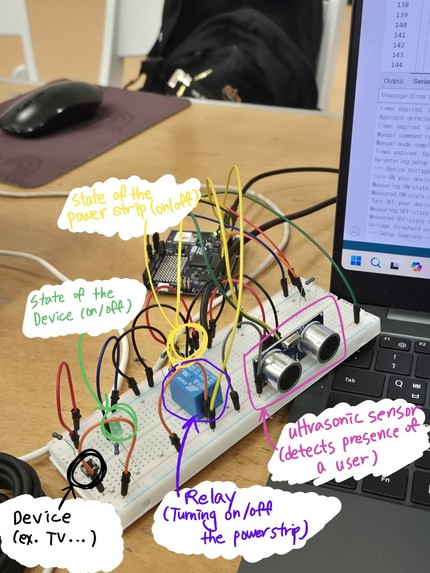
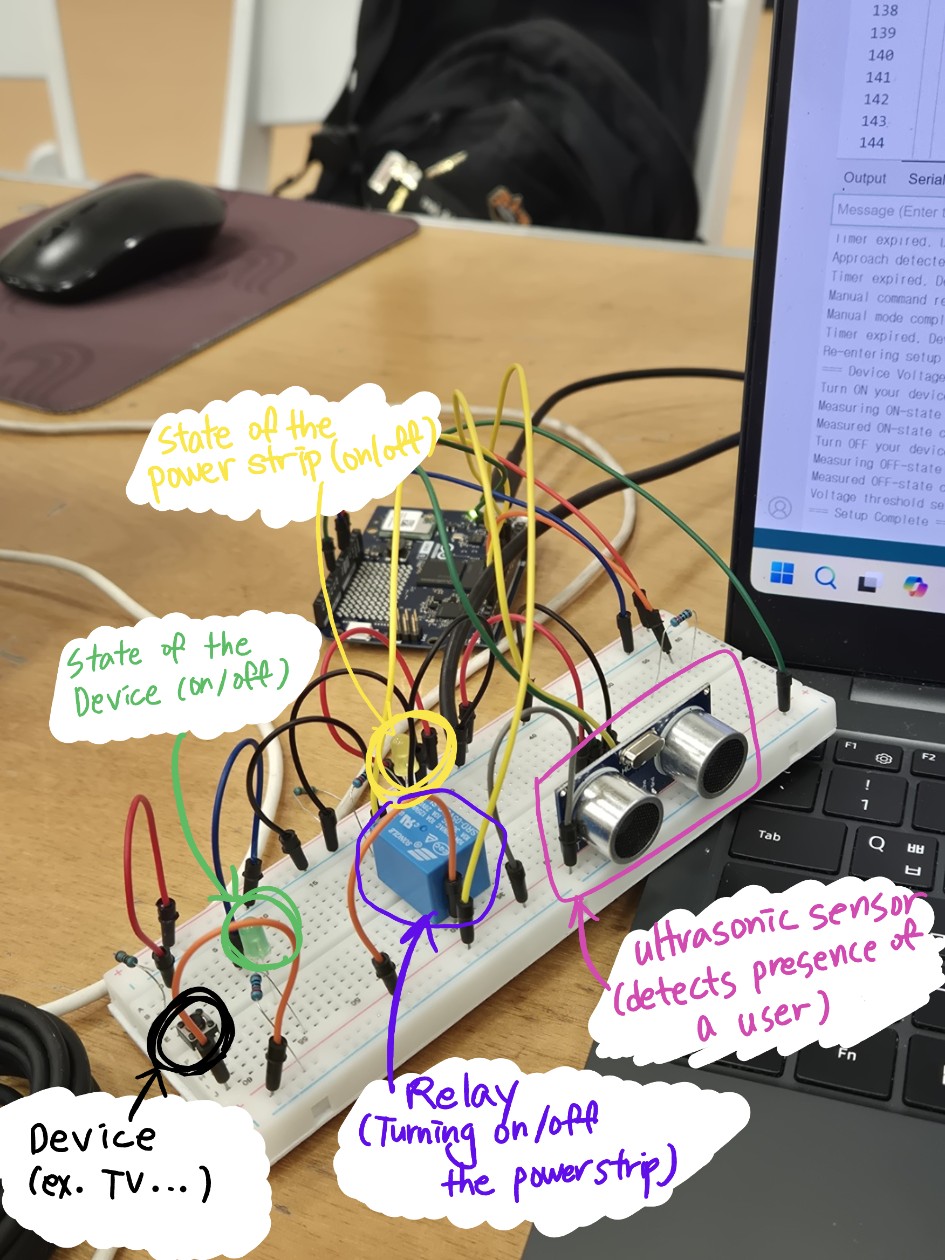
Started with the idea that the current drawn into the device is significantly low when the device is not in use. We read the voltage value (representing the current) from Arduino analog input, and set the threshold (detecting if the device is in use or not) for each device. If the device is not in use, turn off the power.
Also, used an ultrasonic sensor to detect the presence of a user. If there is no user nearby, turn off the power.
Challenges we ran into
At first, we tried to detect the power rather than current, since that is more precise. Also, we tried to make it with the actual power strip. However, since no wattmeter is provided and working with the actual power strip is too dangerous, we decided to demonstrate it with an external power supply. And then, we wanted to supply and sense the current. But since no current source is provided and no mosfet to generate current from a voltage, we decided to use voltage, representing current for the system.
Accomplishments that we're proud of
- Fully Automated Power Control No need to manually turn switches on or off. The system automatically manages power based on device usage and user presence.
- Device-Specific Current Thresholding Each device has different current characteristics for active and idle states. Our system assigns individual current thresholds to accurately distinguish between active and standby modes.
What we learned
Standby power accounts significant amount of power use. (5-10% of residential electricity use in the U.S.)
What's next for Smart Power Strip
Use wattmeter and make it with the actual power strip.


Log in or sign up for Devpost to join the conversation.