Inspiration
The idea for Smart Pantry came from a simple everyday problem: forgetting what groceries I have at home, buying duplicates, and letting food go to waste. I wanted to create something that not only helped manage pantry items but also encouraged smarter and more sustainable food habits. The concept was especially inspired by housewives and home cooks, who handle daily meal planning and kitchen management—often without digital support. As someone who loves building tech for real-life problems, this app felt like the perfect project to work on.
What it does
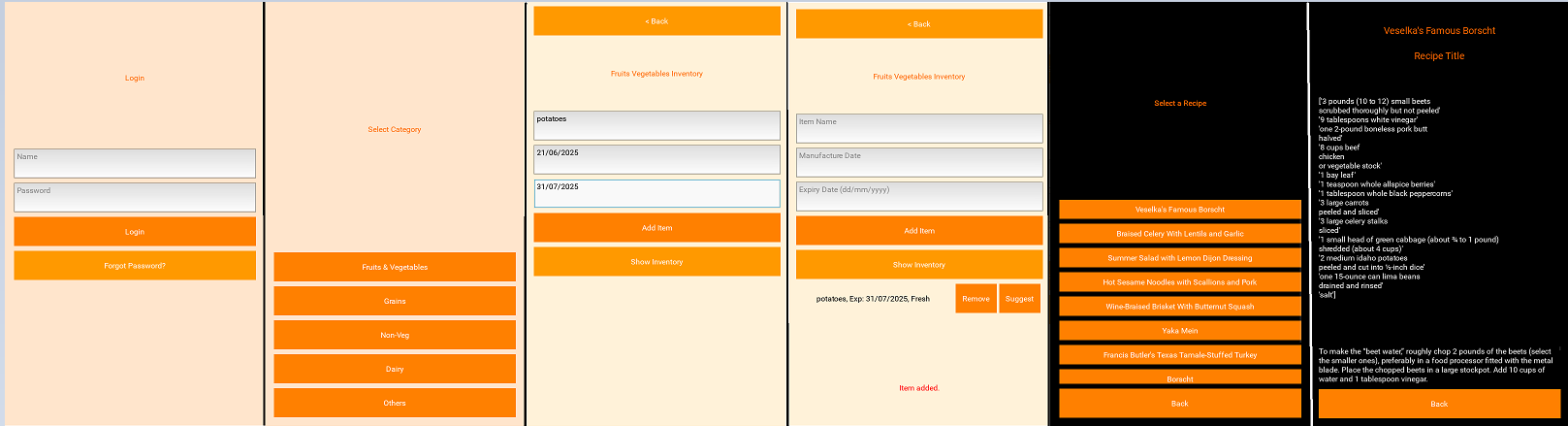
Smart Pantry tracks groceries, auto-estimates expiry, sends alerts, and suggests recipes based on what’s in your kitchen thus cutting waste, saving money, and simplifying daily cooking.
How we built it
- User Authentication Flow
- Created screens for password creation, login, and reset.
- Stored user credentials securely in a .json file.
- Category-Based Inventory System
- Designed buttons for 5 food categories: Fruits & Vegetables, Grains, Non-Veg, Dairy Products, Others.
- Each category leads to its own inventory screen.
- Pantry Item Entry & Display
- Users can add items with details like name, quantity, and expiry date.
- Items are displayed in a clean, scrollable layout.
- Recipe Suggestion Feature
- Each item has a "Suggest Recipe" button (future scope: link to recipes based on available ingredients).
- Navigation & UI
- Used Kivy’s BoxLayout and ScreenManager for layout and navigation.
- Added "Back" buttons for smooth screen transitions.
Challenges we ran into
- Managing screen transitions without breaking the user flow took a lot of debugging.
- Storing and retrieving category-wise items required careful JSON structuring and dynamic loading.
- Balancing functionality and UI simplicity — making sure the app was useful without overwhelming the user.
- Kivy's layout system had a learning curve, especially for creating responsive designs.
Accomplishments that we're proud of
- Built a fully functional multi-screen app using Python and Kivy with a clean, intuitive UI.
- Created a smart category-wise inventory system that helps users organize pantry items efficiently.
- Designed features with real-world impact, especially for housewives and home managers to reduce food waste and plan better.
- Implemented secure user authentication with options to create, log in, and reset passwords.
- Developed reusable and scalable code using structured layouts and JSON for data handling.
- Turned a personal frustration into a practical solution, which can genuinely help improve everyday kitchen management. *Learned new tools and frameworks under a time crunch, proving adaptability and focus during a hackathon.
- Kept the design user-first, ensuring it’s simple enough for non-tech users to navigate easily.
What we learned
- This project became a great learning experience in many areas:
- Kivy framework for building Python-based mobile apps with multiple screens and user input.
- ScreenManager for navigating between Login, Inventory, Recipe Suggestion, and other screens.
- How to structure a project with .kv files for UI and .py files for logic.
- Working with JSON for data storage (user info, pantry items).
- Improving UI/UX for smoother navigation and better visual layout.
What's next for Smart Pantry
It’s still a work in progress with many features I want to add, like barcode scanning, meal planning, and notifications. But this first version already helped me grow as a developer and made me more confident in using Python for real-world apps. How is this as inspiration and a kind of journey


Log in or sign up for Devpost to join the conversation.