-
-
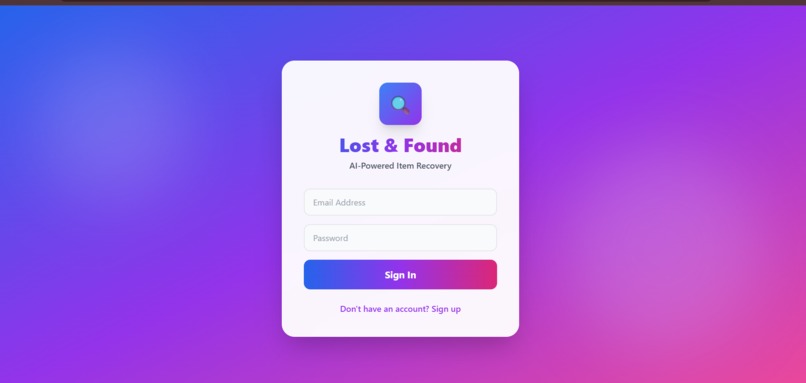
Login/Signup page
-
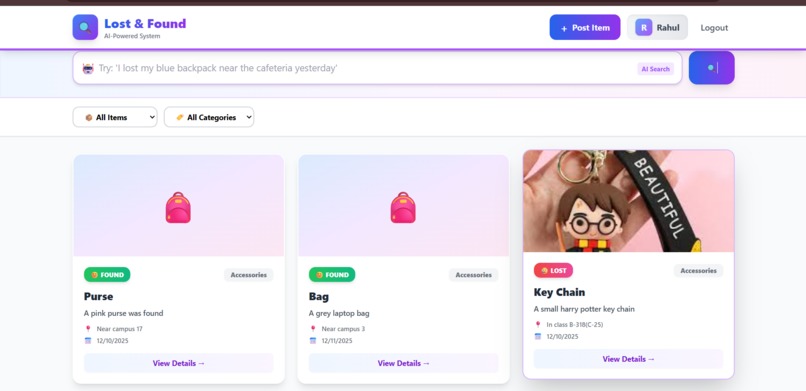
Interactive Home page
-
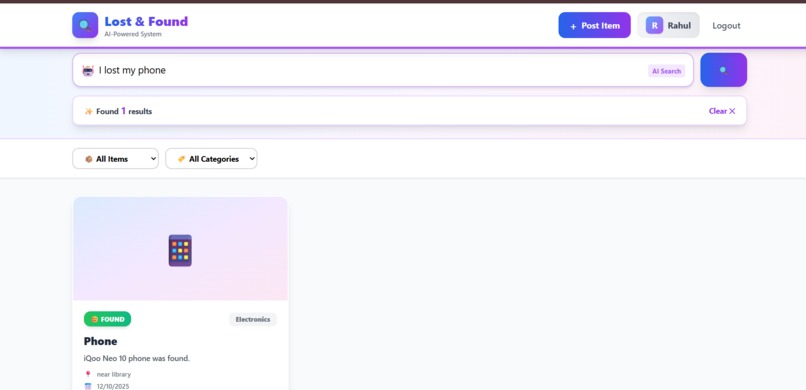
Smart search result


🔍 Lost & Found AI - Project Story
💡 Inspiration
Every single day, university students are bombarded with dozens of emails on their college mail IDs. Lost phone chargers, forgotten water bottles, misplaced ID cards, found wallets - the endless stream of "Lost & Found" emails clutters our inboxes and makes it nearly impossible to find what we're actually looking for.
The breaking point? When my friend lost her laptop charger and had to scroll through 200+ emails across three different mailing lists, multiple WhatsApp groups, and still couldn't find it. The charger was there - posted 5 days earlier - but buried under a mountain of unrelated messages with subject lines like "Lost: Blue Thing Near Library."
We realized the problem wasn't that items weren't being reported - it was that finding the right match was like finding a needle in a haystack. Traditional email-based systems rely on exact keyword matching. If someone posts "I found a navy backpack" and you search for "blue bag," you'll never find it, even though they're describing the same item.
That's when we thought: What if AI could understand what people mean, not just what they write?
🎯 What It Does
Lost & Found AI is an intelligent recovery system that uses Google's Gemini API to understand natural language and semantically match lost items with found items.
Core Features:
1. Natural Language Search 🗣️
- Instead of exact keywords, users can search naturally: "I lost my phone near the cafeteria yesterday"
- Gemini AI extracts intent, category, location, and timeframe automatically
- No more scrolling through hundreds of irrelevant posts
2. AI-Powered Smart Matching 🤖
- When someone posts an item, Gemini analyzes the description and creates a semantic summary
- The system compares lost items with found items intelligently
- Provides match confidence scores (0-10) with reasoning: "8/10 match - Color and location align closely"
- Understands synonyms: "iPhone" matches "smartphone," "navy backpack" matches "blue bag"
3. Centralized Platform 🌐
- One unified system replacing scattered emails and WhatsApp groups
- Category-based filtering (Electronics, Documents, Books, etc.)
- Type filtering (Lost vs. Found items)
- Real-time search with instant results
4. Secure & User-Friendly 🔐
- JWT-based authentication with encrypted passwords
- Contact information revealed only for matched items
- Beautiful, responsive interface that works on mobile and desktop
- Clean, modern UI with gradient designs and smooth animations
🛠️ How We Built It
Architecture Overview
We built a full-stack application using the MERN stack (MongoDB, Express, React, Node.js) with Google's Gemini Pro API as the intelligence layer.
┌─────────────────────────────────────────────────┐
│                  React Frontend                 │
│        (Vite + Tailwind CSS + Axios)           │
└─────────────────┬───────────────────────────────┘
                  │ HTTP Requests (REST API)
                  ↓
┌─────────────────────────────────────────────────┐
│              Express.js Backend                 │
│     (JWT Auth + API Routes + Gemini AI)        │
└─────────────────┬───────────────────────────────┘
                  │ Mongoose ODM
                  ↓
┌─────────────────────────────────────────────────┐
│              MongoDB Atlas                      │
│         (Users + Items Collections)            │
└─────────────────────────────────────────────────┘
Technical Implementation
1. Backend Development (Node.js + Express)
We started with the backend, creating a RESTful API with three main route modules:
Authentication Routes (/api/auth):
- Implemented user registration with bcrypt password hashing (10 salt rounds)
- Created JWT token-based authentication with 7-day expiry
- Built middleware to protect routes requiring authentication ```javascript // Password hashing example const hashedPassword = await bcrypt.hash(password, 10);
// JWT token generation const token = jwt.sign({ userId: user._id }, process.env.JWT_SECRET, { expiresIn: '7d' });
**Item Routes** (`/api/items`):
- CRUD operations for lost and found items
- Integration with Gemini AI for automatic summarization
- Population of user data using Mongoose references

**Search Routes** (`/api/search`):
- Natural language processing with Gemini Pro
- Semantic matching algorithm with confidence scoring
- Fallback to regex-based search if Gemini is unavailable

#### **2. Gemini AI Integration**

The most critical component was integrating Google's Gemini API at three key points:

**A. Item Creation Analysis:**
```javascript
const model = genAI.getGenerativeModel({ model: 'gemini-pro' });
const prompt = `Summarize this ${type} item in 2-3 keywords for matching:
                ${title}. ${description}. Category: ${category}`;
const result = await model.generateContent(prompt);
const aiEmbedding = result.response.text();
B. Natural Language Search:
const prompt = `Analyze this lost and found search query.
Return ONLY valid JSON with no markdown:

Query: "${userQuery}"

Extract:
{
  "type": "lost" or "found" or "both",
  "category": "Electronics" or "Documents" or ... or "any",
  "keywords": ["array", "of", "important", "words"]
}`;
C. Smart Matching with Confidence Scores:
const prompt = `Given this ${item.type} item:
Title: ${item.title}
Description: ${item.description}

Rank these ${oppositeType} items by similarity (0-10 score):
${candidateList}

Return JSON: [{"index": 0, "score": 8, "reason": "why"}]`;
The key challenge was prompt engineering - getting Gemini to return structured JSON consistently. We solved this by:
- Explicitly requesting "ONLY valid JSON with no markdown"
- Adding response cleaning logic to strip markdown code blocks
- Implementing try-catch with fallback to keyword search
3. Database Design (MongoDB)
We designed two main schemas with referential integrity:
User Schema:
{
  name: String,
  email: String (unique, lowercase),
  password: String (hashed),
  phone: String,
  createdAt: Date
}
Item Schema:
{
  type: Enum ['lost', 'found'],
  title: String,
  description: String,
  category: Enum [categories],
  location: String,
  date: Date,
  imageUrl: String (optional),
  status: Enum ['active', 'resolved'],
  user: ObjectId (ref: 'User'),
  aiEmbedding: String (Gemini summary),
  createdAt: Date
}
We created a compound text index on title and description fields for efficient full-text search:
itemSchema.index({ title: 'text', description: 'text' });
4. Frontend Development (React + Tailwind CSS)
Built a single-page application with React hooks for state management:
State Architecture:
useStatefor component-level state (forms, modals, filters)useEffectfor side effects (fetching data on mount, filter changes)localStoragefor token persistence and authentication state
Key Components:
- Authentication view (login/signup with toggle)
- Main dashboard with item grid
- AI-powered search bar
- Filter system (category + type)
- Modal dialogs (create item, view details)
Styling Approach:
- Gradient-based color system (indigo to purple)
- Glassmorphism on login page with animated background blobs
- Responsive grid layouts (1 column mobile, 2 tablet, 3 desktop)
- Micro-interactions with hover effects and transitions
- CSS animations for loading states and modals
5. API Communication Layer
Created a centralized API service using Axios:
// Axios instance with base URL
const api = axios.create({ baseURL: 'http://localhost:5000/api' });

// Interceptor to add JWT token to every request
api.interceptors.request.use((config) => {
  const token = localStorage.getItem('token');
  if (token) config.headers.Authorization = `Bearer ${token}`;
  return config;
});
🚧 Challenges We Faced
Challenge 1: Gemini API Response Inconsistency 😤
Problem: Gemini sometimes returned JSON wrapped in markdown code blocks (json ...), sometimes plain JSON, and occasionally with explanatory text.
Solution:
// Response cleaning pipeline
const cleanText = result.response.text()
  .replace(/```json\n?/g, '')
  .replace(/```\n?/g, '')
  .trim();

// Graceful error handling
try {
  const data = JSON.parse(cleanText);
} catch (parseError) {
  // Fallback to keyword search
  return keywordBasedSearch(query);
}
Learning: Always design AI integrations with fallback mechanisms. External APIs can be unpredictable.
Challenge 2: Authentication Flow Debugging 🔐
Problem: Login worked but subsequent API calls returned "Unauthorized" errors. Token was being generated but not sent with requests.
Solution: Discovered that Axios interceptors need to be configured before any API calls are made. Moved the interceptor setup to the API service initialization.
Learning: Middleware order matters in both frontend and backend. Always verify the request lifecycle.
Challenge 3: MongoDB Connection String Issues 🗄️
Problem: Backend crashed with "MongoDB connection error" despite correct credentials.
Solution:
- Added IP whitelist (0.0.0.0/0) on MongoDB Atlas
- Properly encoded special characters in password
- Added proper error handling and logging
javascript
mongoose.connect(process.env.MONGODB_URI)
.then(() => console.log('✅ MongoDB Connected'))
.catch(err => console.error('❌ MongoDB Error:', err));
Learning: Cloud database configuration requires network-level permissions, not just credentials.
Challenge 4: React State Management Complexity ⚛️
Problem: Multiple forms, modals, and filters led to complex state interdependencies. Closing a modal while loading caused state inconsistencies.
Solution:
- Separated concerns with individual state variables
- Added proper cleanup in useEffect hooks
- Implemented loading states to prevent race conditions
javascript
const handleCreateItem = async () => {
try {
setLoading(true);
await api.createItem(itemForm);
setShowCreateItem(false); // Close modal first
setItemForm(initialState); // Reset form
await loadItems(); // Then reload
} finally {
setLoading(false); // Always cleanup
}
};
Learning: Proper state management requires thinking about the entire component lifecycle, not just the happy path.
Challenge 5: Prompt Engineering for Consistent AI Output 🎯
Problem: Initial prompts to Gemini were too vague, resulting in essay-style responses instead of structured data.
Evolution of our prompts:
❌ First attempt (too vague):
"Analyze this item and tell me about it"
→ Result: Long paragraph about the item
❌ Second attempt (better but still inconsistent):
"Extract keywords from: [description]"
→ Result: Sometimes keywords, sometimes sentences
✅ Final prompt (specific and structured):
"You are a data extraction system. Analyze this query and return
ONLY valid JSON with no additional text or markdown formatting.

Query: "${userQuery}"

Required JSON structure:
{
  "type": "lost" | "found" | "both",
  "category": "Electronics" | ... | "any",
  "keywords": ["array", "of", "strings"]
}

Rules:
- Return ONLY the JSON object
- No markdown code blocks
- No explanations
- Use exact values shown above"
Learning: AI prompt engineering is an iterative process. Being explicit about format, structure, and constraints is crucial.
Challenge 6: First-Time Hackathon Learning Curve 📚
Problem: This was my first hackathon, and I was learning full-stack development while building.
Approach:
- Focused on understanding the data flow: User → Frontend → API → Database → Response
- Built incrementally: Auth first, then CRUD, then AI features
- Used extensive console.logging to understand what was happening
- Didn't try to memorize syntax - focused on understanding concepts
Key Realization: You don't need to know everything to build something. Understanding how pieces connect is more important than memorizing syntax.
🎓 What We Learned
Technical Skills:
Full-Stack Development Flow
- How frontend, backend, and database work together
- RESTful API design principles
- State management in React
- Database schema design with relationships
AI/ML Integration
- Prompt engineering for LLMs
- Handling non-deterministic API responses
- Building fallback systems for reliability
- Understanding when AI adds value vs. traditional algorithms
Authentication & Security
- JWT token-based authentication
- Password hashing with bcrypt
- Protecting routes with middleware
- Environment variable management
MongoDB & NoSQL Concepts
- Document-based data modeling
- References vs. embedding
- Text search indexes
- Mongoose ODM patterns
Modern Frontend Development
- React hooks (useState, useEffect)
- Component lifecycle management
- Axios interceptors for API calls
- Tailwind CSS utility-first approach
Soft Skills:
Problem Decomposition
- Breaking a big idea into achievable milestones
- Building MVP first, then adding features
Debugging Methodology
- Reading error messages carefully
- Using console logs strategically
- Testing incrementally
Learning on the Fly
- Using documentation effectively
- Adapting to new technologies quickly
- Knowing when to ask for help
Time Management
- Prioritizing features for a hackathon timeline
- Accepting "good enough" vs. perfect
🚀 What's Next for Lost & Found AI
Immediate Improvements (Next Month):
- Direct image upload with Cloudinary integration instead of just URLs
- Email notifications when high-confidence matches are found
- Admin dashboard for moderating posts
- Item edit/delete functionality for users
Phase 2 (Next Quarter):
- Multi-modal AI with Gemini Vision to analyze uploaded photos
- Real-time updates using WebSockets instead of polling
- Mobile app built with React Native
- Push notifications for instant match alerts
Long-term Vision:
- Multi-university deployment with university-specific instances
- QR code generation for physical item tagging
- Analytics dashboard showing recovery success rates
- Geolocation-based proximity matching
- Multi-language support for international students
Business Model Potential:
- Free for universities (builds portfolio and userbase)
- Premium features for large campuses (analytics, custom branding)
- Expand to corporate offices, airports, public transport systems
💭 Reflections
This project taught me that building is the best way to learn. I started knowing very little JavaScript and zero React. Two days later, I have a full-stack application with AI integration.
The biggest lesson? AI is a tool, not magic. Gemini didn't automatically solve our problems. We had to:
- Design the architecture thoughtfully
- Engineer prompts carefully
- Build fallback systems
- Handle edge cases
But when used right, AI can transform user experience. The difference between typing exact keywords vs. natural language is huge. That's the future of search.
Most importantly: I learned that I can build complex systems. The fear of "not knowing enough" held me back before. Now I know - you learn by doing, not by waiting until you're "ready."
🙏 Acknowledgments
- Google Gemini AI for the powerful language model that made natural language understanding possible
- MongoDB Atlas for free cloud database hosting
- Hackathon organizers for creating this learning opportunity
- My university community for inspiring the problem we solved
- Open source community for the amazing tools (React, Node.js, Tailwind CSS)
📊 Project by the Numbers
- Lines of Code: ~2,500+
- Development Time: 4 hours
- Coffee Consumed: Too many ☕
- Git Commits: 40+
- API Endpoints: 8
- Gemini API Calls: Successfully handling natural language queries
- Learning Moments: Countless
- Bugs Fixed: "All of them" (that we know of 😅) [Vaibhavi Shree and Rounak Roy] | December 2025 | Built for Gemini+MongoDB Hackathon


Log in or sign up for Devpost to join the conversation.