-
-
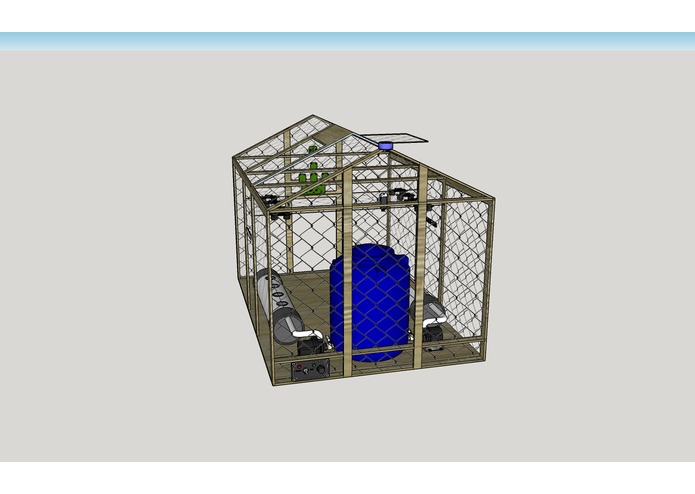
Hardware Design using SketchUp
-
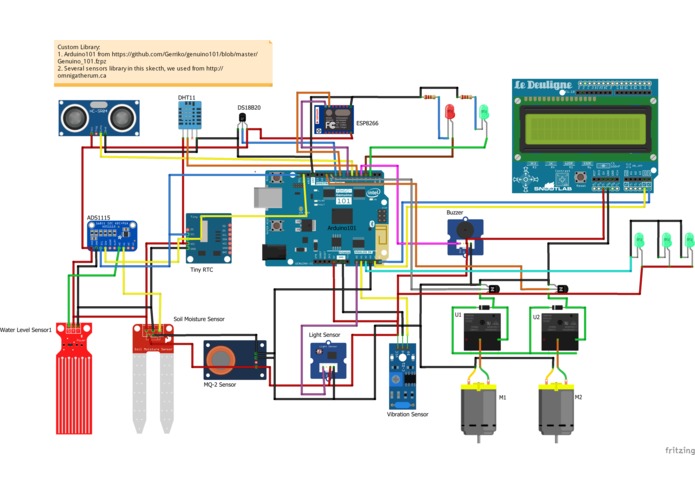
Pin Configuration in Arduino101 with sensors (Newest)
-
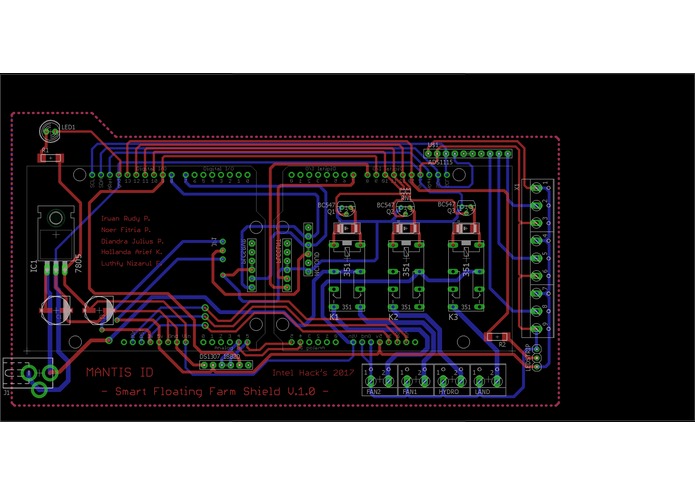
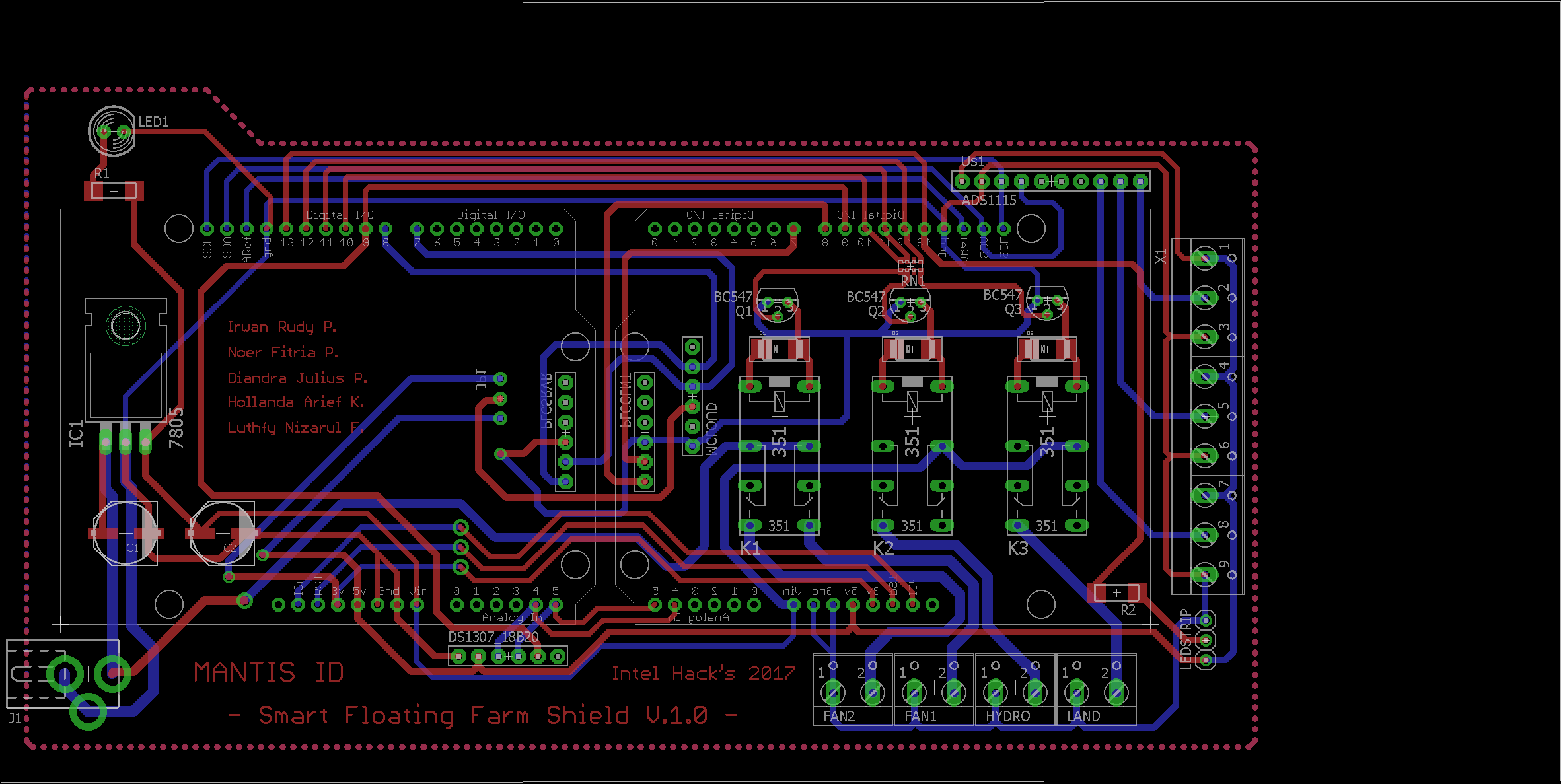
Smart Floating Farm Custom Shield
-
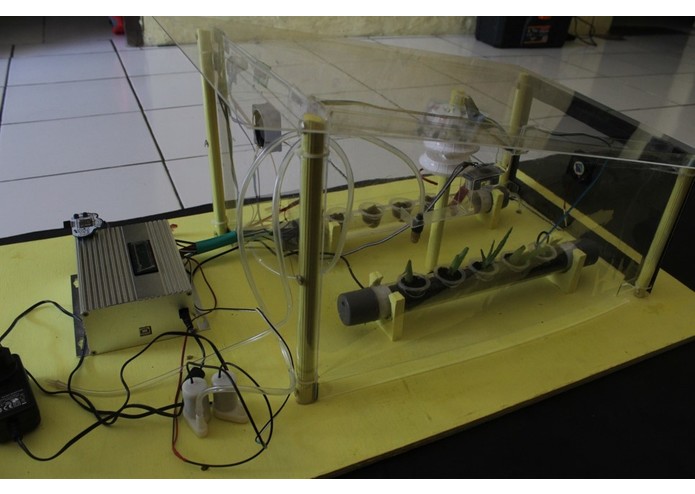
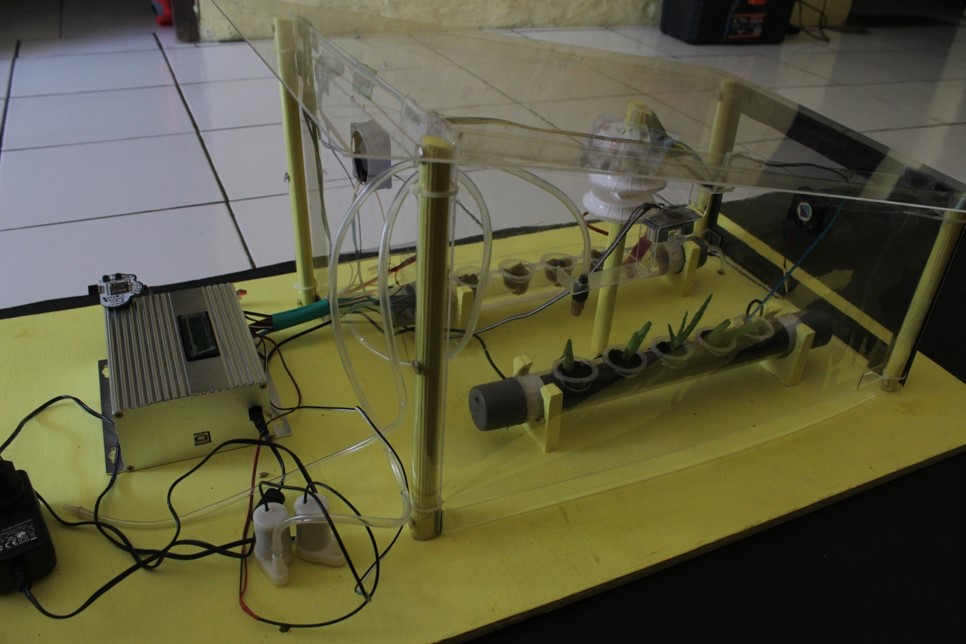
Smart Floating Farm side view
-
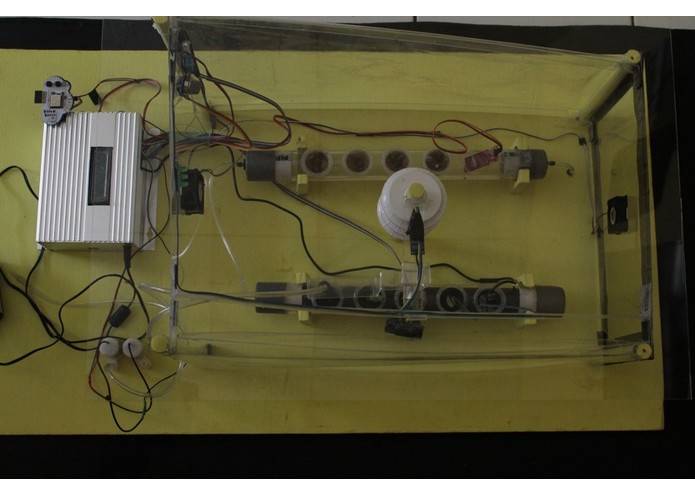
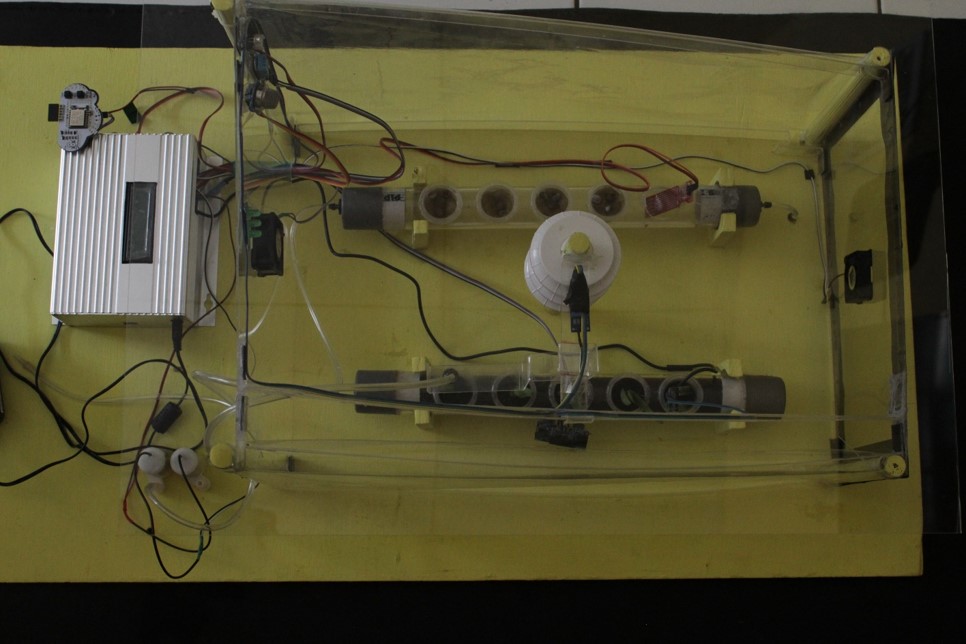
Smart Floating Farm top view
-
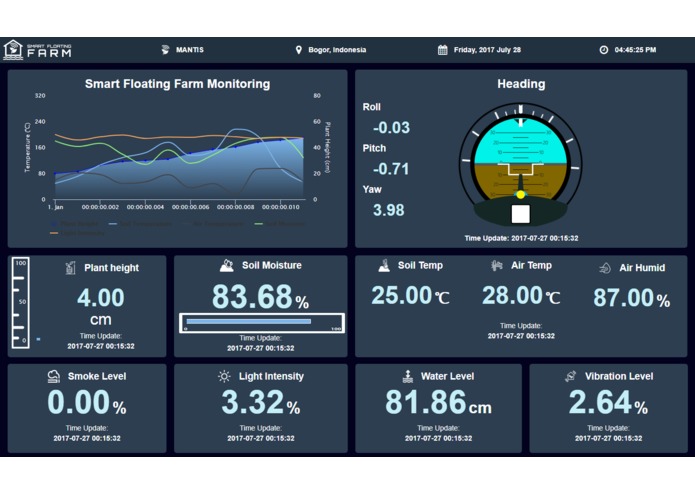
Dashboard Smarf Floating Farm

Inspiration
We want to help people
We see that local people in Coastal area and Remote Islands having difficulty in planting horticulture because they face the problem of land limitations. We have an idea about making floating platform so people can grow their vegetables at coastal area. We inspired by GROASIS, Seawater Greenhouse, and Hamster Ball-Shaped Solarball. They can grow plants at desert area and have a pure water using desalination process. Hopefully this platform can help local people to reduce their dependence on supply from mainland, help them make their own food independence and also help to make more money from selling the harvest vegetables. We also can manage these process with supllying seed, provide consultation to user, and preparing the market to sell the vegetables.
What it does
SMART FLOATING FARM (SFF) PLATFORM BUILD TO RECORD, MONITOR, AND MAKE DECISION BASED ON THE RECORD.
Initialize sensors and output
This platform will initialize serial, lcd, RTC (real time clock), sensors, and motor. If RTC cannot be detected, LCD will display error and user must fix it. After RTC is ok, Arduino101 will check communication with ESP8266. Arduino101 send "AT" and wait "OK" from ESP8266.
Get threshold from Server
After receiving "OK", Arduino will command ESP8266 as station mode and get parameter threshold from Server. These threshold value used to ensure plants are in the range that has been determined by the user. SFF send GET method to server (This link used to receive sensors threshold). Parameter threshold will be saved as variable.
Sensor Measurement
This platform record these parameters : soil moisture & temperature, greenhouse temperature & humidity, greenhouse smoke detection, vibration, plant height, time, and light intensity.
Sending Data to Server
Data from sensor compiled as String and send it to Web by ESP8266 using POST method (Go to this link to send data to WebServer; Visit this link to see data that received by WebServer from Platform).
Output Action
Arduino101 check data measurement with threshold received from Server. Based on these threshold, platform will give command automatically to activate LED indicator, water pump, exhaust fan and LED lamps based on sensors reading. After 10 seconds, platform will delay few minutes before the next measurement. While waiting, Arduino101 measure gyro value.
Smart Floating Farm Dashboard
User can see data send to Server using this dashboard. This dashboard will give all information from sensor graphically. All data can be found at irwanrudy github repo.

Smart Floating Farm Dashboard/GUI
How we built it
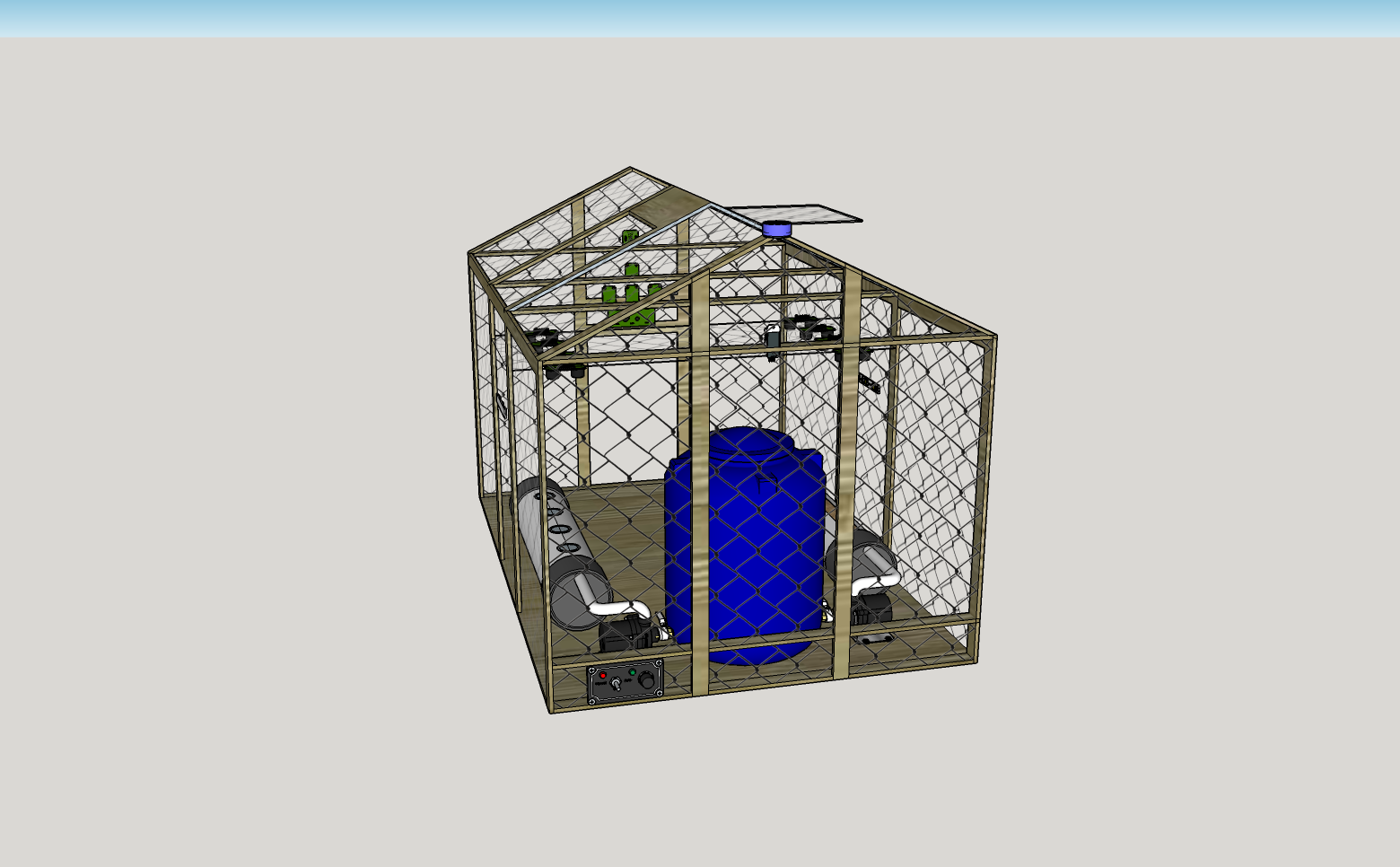
Google SketchUp
Google SketchUp used to make the platform 3D design. We have made 3D model of Smart Floating Farm. We simplify our model for Intel hackathon.

Smart Floating Farm 3D Design
We make dashboard with HTML5, CSS3, and Javascript. To add style we use Bootstrap and make interactive chart use Highcharts. We make it eye-catching for everyone that using the dashboard.
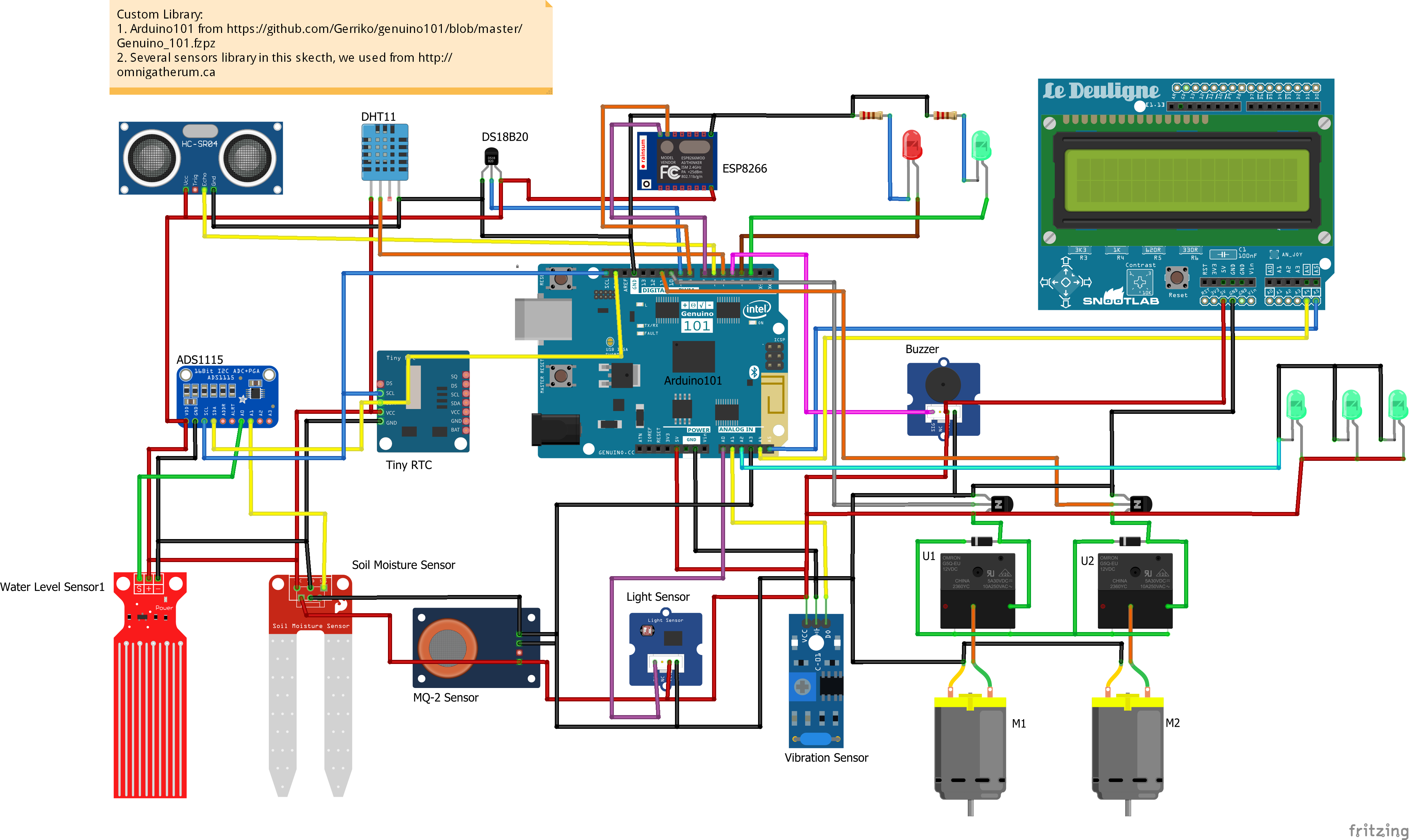
Fritzing
Fritzing used for the design of electronics hardware to support us in sensors configuration with Arduino101. We used internal and external libraries to make this visualization.

Smart Floating Farm Sensors and Outputs Configuration-Fritzing design
Arduino IDE
We use Arduino IDE to built the firmware. We use libraries from internal Arduino IDE and from internet. For external library, we used SEEED RGB LCD , Adafruit DHT11 , Adafruit RTC , Adafruit ADS1115 , MQ02 Gas Sensor, Dallas DS18B20 , Rotation from Gyro & Accelerometer, Time Alarm , and Time Lib . For internal library, we used Wire, pitches.h, CurieIMU and Software Serial. We used Mario Bros Tune developed by Dipto Pratyaksa to play sound at the beginning. IMU rotation angle we got from Erikyo. SFF Arduino sketch can be found at MANTIS GITHUB.
Eagle Layout
We build our own shield to make easier in pin connection. We used Eagle Software to build the schematic and board.
 .
.
Smart Floating Farm Custom Shield
Challenges we ran into
When we start submit our idea to Intel, we decide to use SIM900 GSM Module because we have some problem with ESP8266. As time goes by, we facing problem with Software Serial communication between SIM900 and Arduino101. SIM900 using 5 volt in communication and Arduino101 using 3.3 volt. We thought this difference in voltage maybe the main problem why Software Serial wasn't work. After that, we decide switch to ESP8266. We used Custom ESp8266 module from GeraiCerdas named MCCloud. ESP8266 using 3.3 volt as main voltage, same with Arduino101. But Unfortunately, we still facing the same problem. We tried to solve this problem by searching in the internet but no luck. Suddenly, we tried switch the keyword from Arduino101 to Arduino Due. Voila, we got the solution. We add pinMode (rx, INPUT) and pinMode (tx, OUTPUT) to ensure Software Serial works.
We also encountered problem with relay. We used this relay. The problem is relay must powered by 5 volt so relay can switch from OFF to ON. we come with solution using pinMode (relay_pin, INPUT) and connect one relay pin to 5 volt and the other to Arduino101 Digital Pin. With pinMode we ensure that the voltage through relay will 5 volt.
Sometimes, we connect sensor wrong so we must soldered again. We tried to write down in a paper the wire color and the pin, so we can remember and not wrong soldering the sensor.
Arduino101 have problem when we upload the firmware. We often press MASTER_RESET button to upload the firmware. Arduino101 also must powered by adapter before connect it to computer. We experience our Arduino101 died and cannot recognized by computer. We dont know the fault because we never did something wrong to Arduino101. We think it is because the board. Board getting hot when we connect it to adapter. But, after we have another Arduino101, it is OK until right now.
We encountered challenge to understand AT Command from ESP8266. Article from luciorocha, alselectro, fuho, Electrodragon, and ReiLabs very helpfull to make us understand how to use ESP8266. Before we connect ESP8266 with Arduino101, we tried AT Command using UART to TTL adapter.

UART to TTL
Trying GET and POST method was very challenging because we must communicate between Arduino division and IT division to decide the link for getting threshold and sending data.
Arduino101 cannot use every external exist library in the internet. We came with problem when we use custom/indie library such as DS1307 library and I2C LCD 16x2.
IMU Arduino101 must be updated all time. When we tried to make delay about five minutes, Arduino101 cant get the gyro real value. So we decide to read gyro value in the delay time to ensure we get the right gyro value.
For dashboard challenge is make live chart using Highcharts. Because the technology is new for us, so we need to learn deeply to make it live. It can be see at SFF dashboard.
Accomplishments that we're proud of
- We able to understand and using ESP AT Command using GET and POST method.
- We able to use Arduino101 Internal IMU. We can get pitch, roll, and heading value.
- We able to understand how to use Software Serial properly.
- We able to use sensors and output from Grove Seeed and using Seeed library especially RGB LCD.
- We able to build relationship with Makedonia Makerspace. Makedonia provide us several sensor such as MQ02, water level, RTC, and ESP8266 for free. Makedonia push and encourage MANTIS to develop more IoT instrument, while they will help to provide components and information about IoT event.
- We able to understand how chart library work on
- We learn new technology to make live and interactive chart
- We able to make API for our innovation
- And finally we proud with our prototype that will resolve real problem especially in coastal and remote island
What we learned
ARDUINO
We learn how to include Arduino101 with Board manager. We also learn how to use external library that compatible with Arduino101.
ESP8266
We learned so much how use ESP8266 as wifi module.Our knowledge elevated very much in ESP8266 AT Command. We understand how to use AT command for getting threshold and sending sensors data.
API
We can make API to send and get data using internet network event there is not enough network on the site.
HIGHCHARTS
We learn about Highcharts techonlogy and make interactive live data. Integrate technology between API and Highcharts.
What's next for Smart Floating Farm
Smart Floating Farm has to transform into real appropriate platform which support sustainable agriculture in remote areas and limited access also. It should be realized precisely through combination with mariculture platform by build the indoor vertical farm above fish cages. In addition, smart floating farm will be realized for urban farming in smaller form, by using mini-dome concept with limited amount and type of plants in order to make stand-alone and full monitoring from a distance. Smart floating farm and its information technology system can be applicable for indoor land based farming in this moment to develop future farming prediction of growing season and automatic harvesting concept.


Log in or sign up for Devpost to join the conversation.