What inspired me
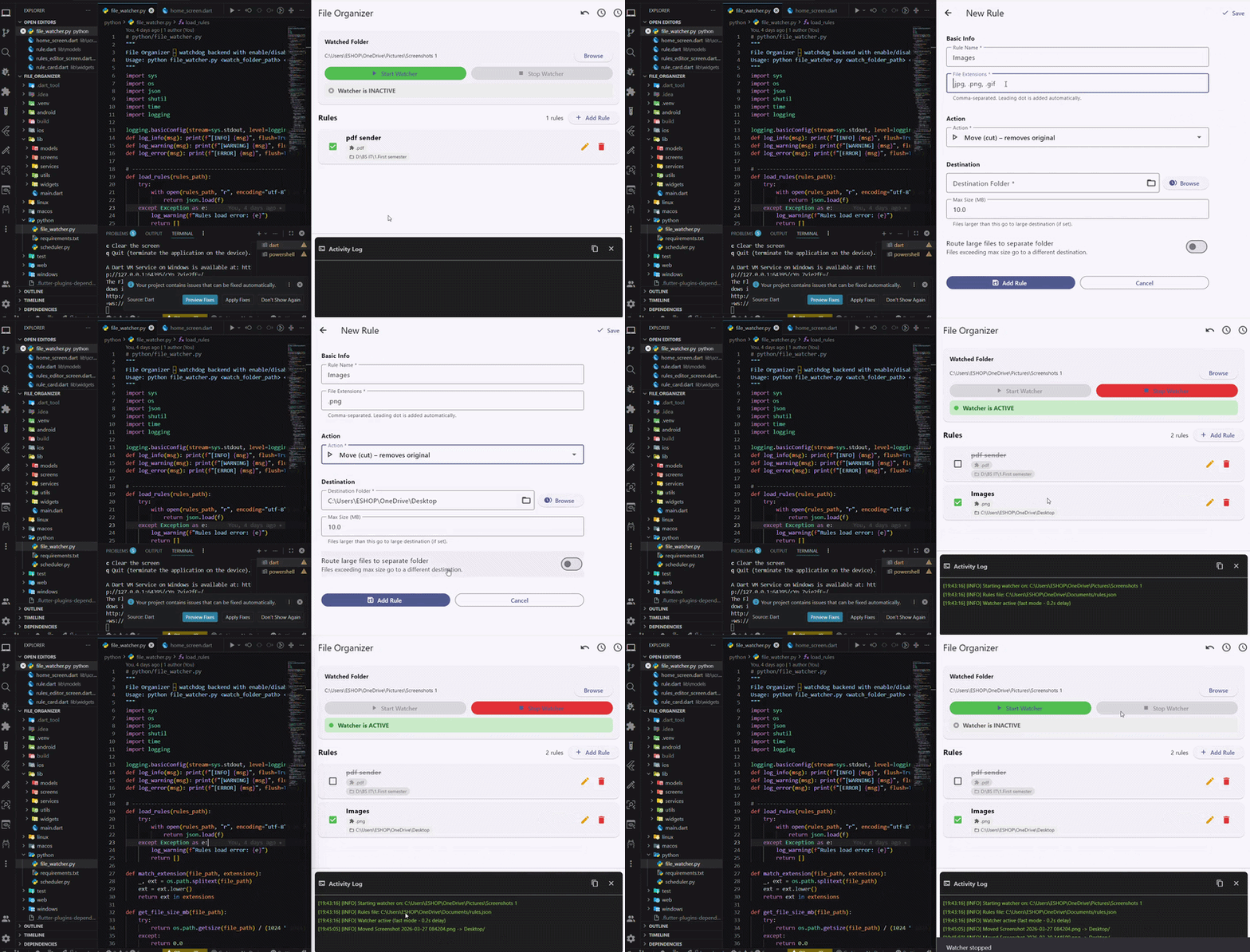
Every day, my Downloads and Desktop folders turn into a mess – screenshots, PDFs, Word files, large images, and random documents all mixed together. Manually sorting them wastes time and feels tedious. I wanted a tool that watches a folder and automatically organizes files based on my own rules (like moving images larger than 2MB to a "Large Images" folder). That’s why I built File Organizer Desktop App.
What I learned
This project taught me:
- Desktop app development with Flutter (Windows/macOS/Linux)
- Python + watchdog library to monitor file system events in real time
- Inter-process communication – running a Python script as a subprocess from Flutter and capturing its output
- Handling file paths and permissions gracefully across different operating systems
- Designing a simple rule system using JSON (extensions, destination folders, size limits)
Most importantly, I learned that a “small” utility app still requires careful planning – especially around error handling and user feedback.
How I built it
Tech stack:
- Frontend: Flutter (Dart)
- Backend logic: Python 3 + watchdog + shutil
- Rules storage: JSON file
- Communication: Flutter launches Python script with command‑line arguments and reads stdout/stderr
Key steps:
- Wrote a Python script that monitors a given folder using
watchdog.observers. When a new file appears, it checks custom rules (extension, file size) and moves the file to the appropriate subfolder (creating it if needed). - Built a Flutter desktop UI with:
- Folder picker (to select which folder to watch)
- Rules editor (add/edit/delete rules – extensions, destination, max size, large destination)
- Start/Stop buttons
- Live log area showing what the Python script does
- Integrated them: Flutter starts the Python script with
Process.start()and passes the selected folder and rules file path. The script prints its actions, and Flutter displays them. - Packaged the Python script as an executable (PyInstaller) so users don’t need Python installed.
Challenges I faced
1. Running Python from Flutter on different OS
Paths and Python commands differ (Windows: python.exe, Linux/macOS: python3). I solved this by detecting the platform and using the correct executable, plus bundling a pre‑built .exe for Windows.
2. Real‑time log streaming
At first, logs appeared only after the script finished. I learned to listen to stdout as a stream and update the UI with setState (or a simple StreamBuilder).
3. Rule conflicts
What if a file matches two rules? I prioritised the first matching rule. Also, moving files that are still being written (e.g., large download) caused errors. I added a retry mechanism with a short delay.
4. User‑friendly rule editing
JSON is powerful but not intuitive. I built a simple form in Flutter that writes/reads rules.json, so the user never has to touch raw JSON.
Despite these challenges, the final app works smoothly and saves me (and hopefully others) from manual file sorting every day.

Log in or sign up for Devpost to join the conversation.