-
-
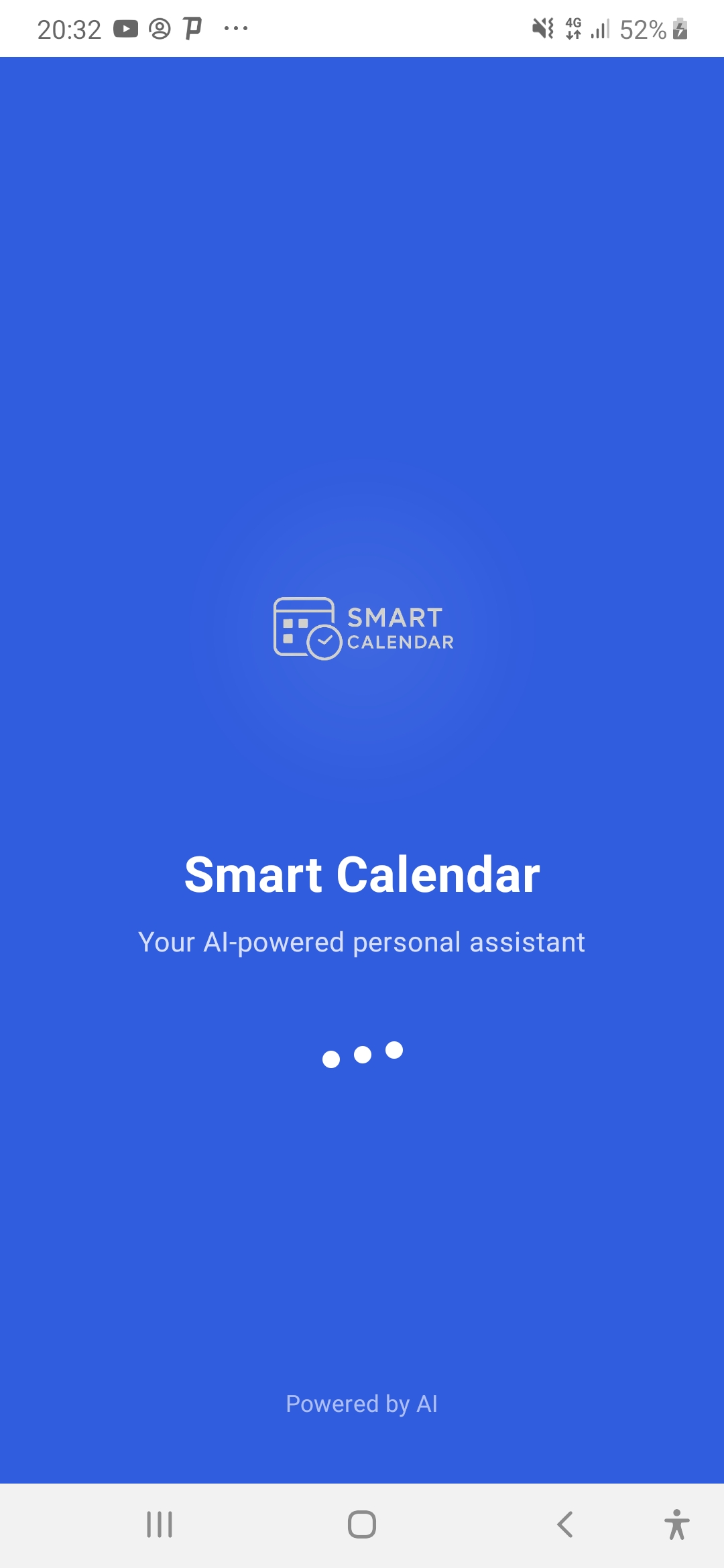
welcome screen
-
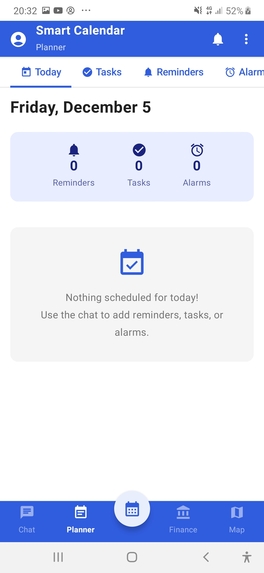
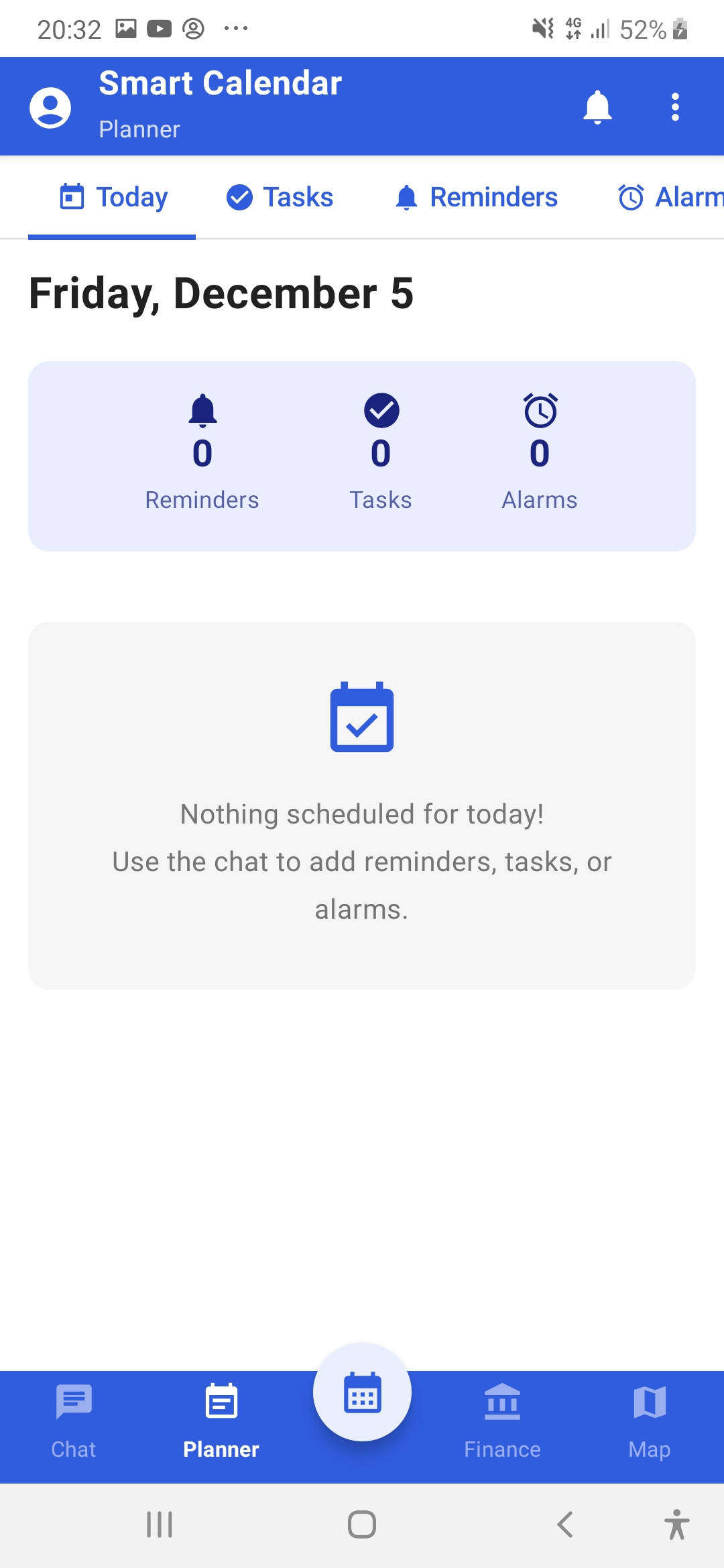
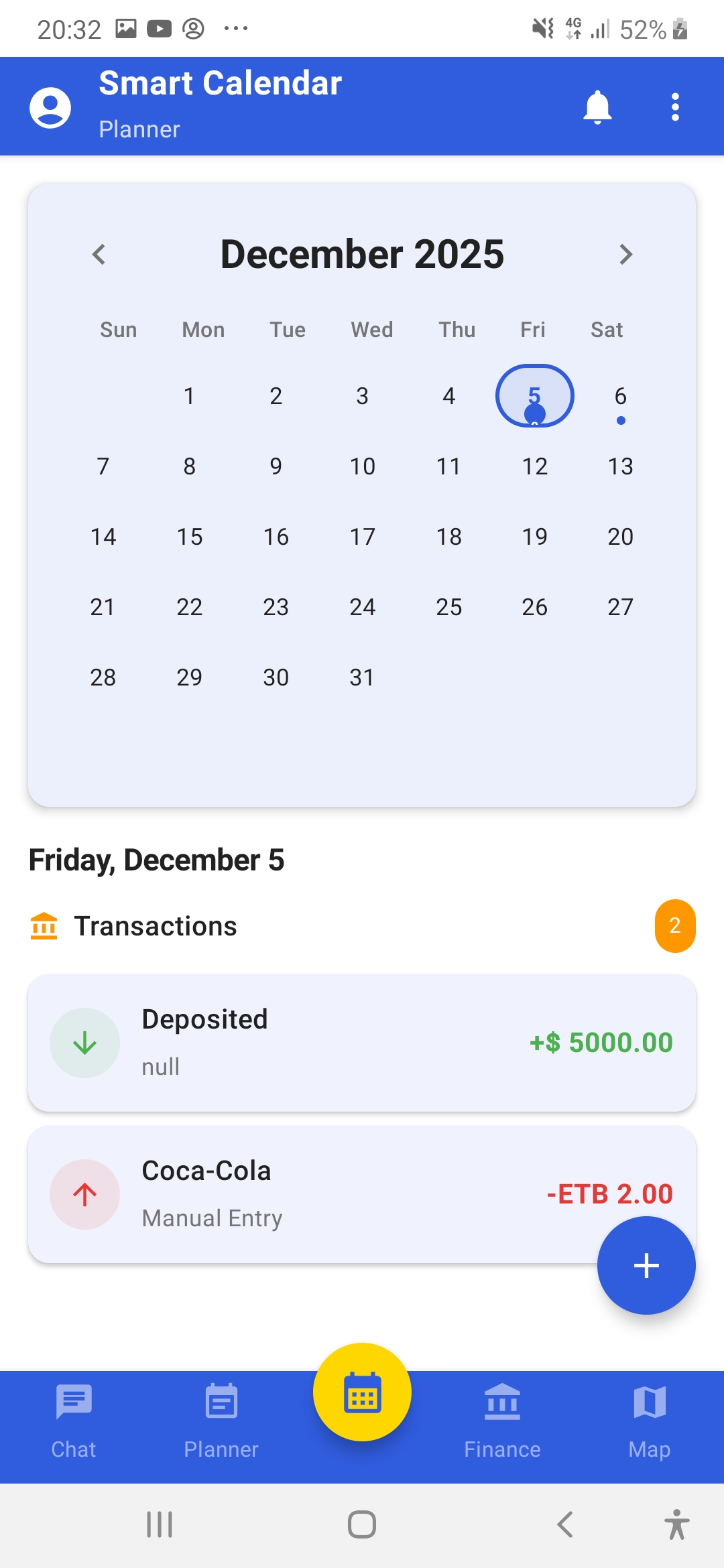
Planner
-
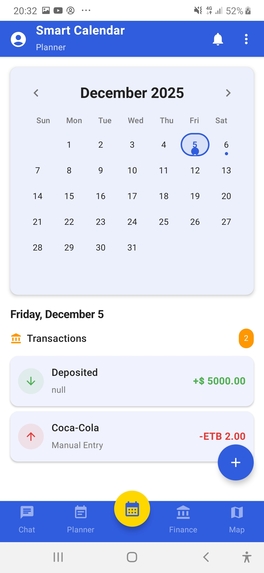
Calendar
-
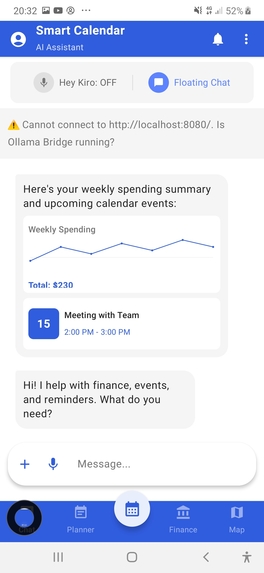
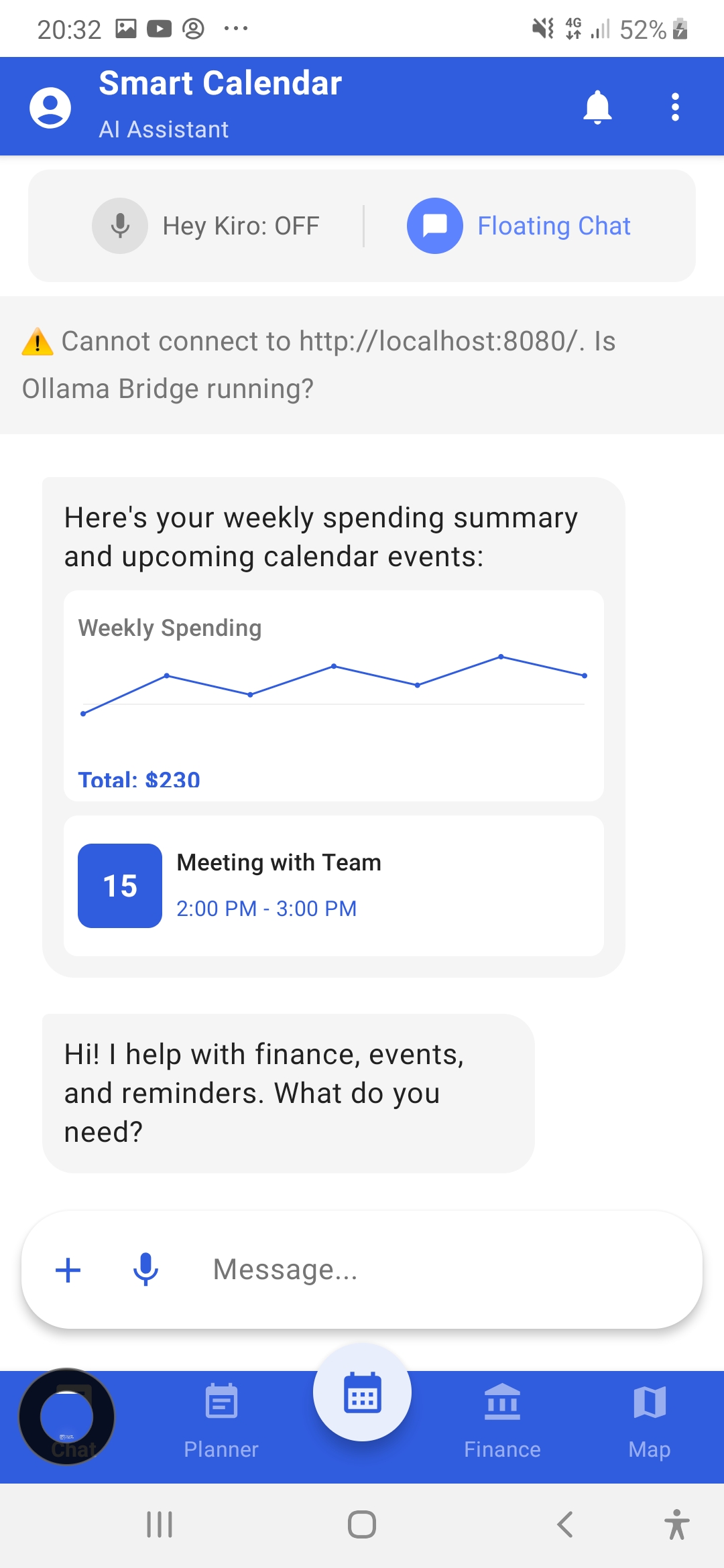
Ai Assistant chatbot with voice and text
-
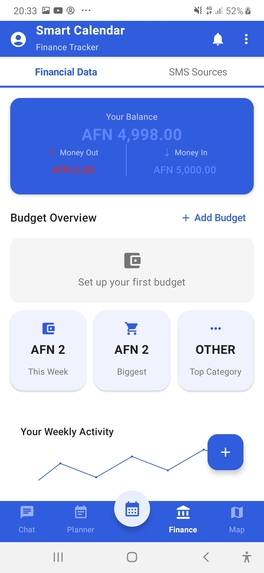
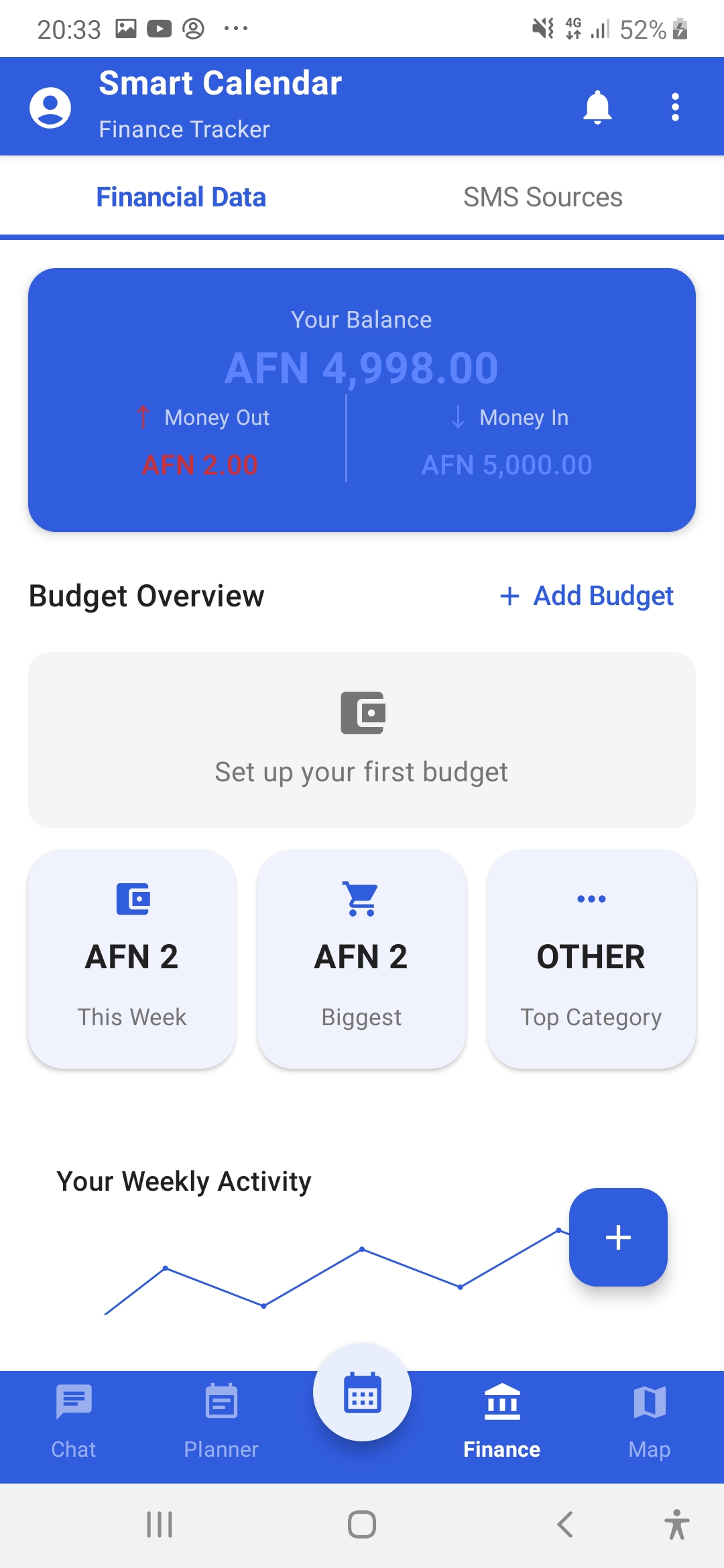
Finance assistant
-
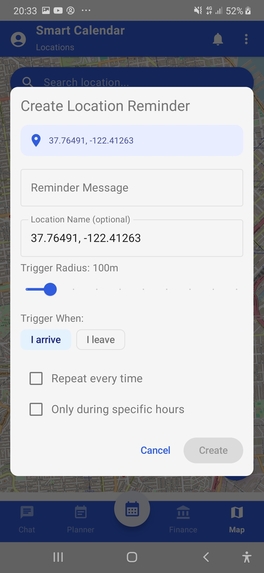
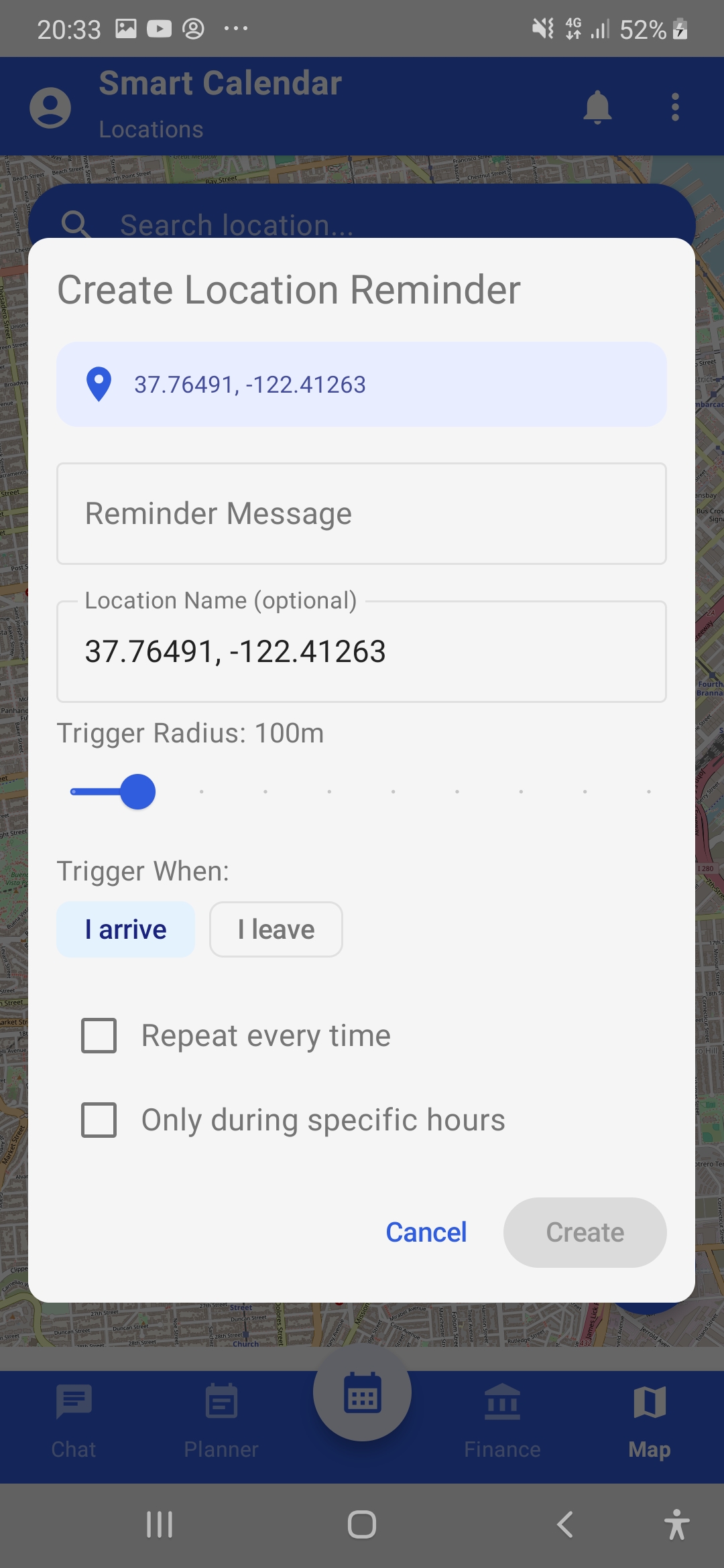
location based event( remind me when i reach home to take my medicine)
Inspiration
In today's fast-paced world, managing daily life requires juggling multiple apps - one for reminders, another for finances, a separate calendar, and yet another for location-based alerts. I found ourselves constantly switching between apps, losing context, and missing important tasks. The frustration of saying "I'll remember to do that when I get home" only to forget the moment I walked through the door was all too familiar.
I envisioned a single intelligent assistant that truly understands natural language and brings all these capabilities together seamlessly. When I discovered the Kiroween hackathon with its "Frankenstein" category - celebrating apps that stitch together seemingly incompatible technologies into something unexpectedly powerful - I knew this was the perfect opportunity to bring our vision to life.
The idea of creating a "monster" that combines voice AI, personal finance tracking, geofencing technology, task management, and smart scheduling into one cohesive Android app was both challenging and exciting. Like Dr. Frankenstein's creation, our app brings together disparate parts - each powerful on its own - into something greater than the sum of its parts.
What it does
Smart Calendar is an AI-powered Android personal assistant that serves as your unified command center for life management. Here's what makes it special:
🎤 Voice-First Chat Interface
The heart of Smart Calendar is its conversational AI interface. Instead of navigating through menus and forms, you simply talk to it naturally:
- "Remind me to call John at 3 PM tomorrow"
- "I spent 500 birr on groceries today"
- "Set an alarm for 7 AM every weekday"
- "Add a task to finish the report with high priority"
- "Remind me to buy milk when I reach the store"
The AI understands context, handles variations in phrasing, and executes commands through a sophisticated tool-calling system using the format [TOOL:name|params].
🔊 "Kiro" Wake Word Detection
One of our most innovative features is the always-listening wake word service. Simply say "Kiro" followed by your command, and the app responds - even when your phone is in your pocket or the app is in the background. This is achieved through:
- Continuous audio monitoring using Android's AudioRecord API
- Audio level threshold detection to identify when someone is speaking
- Automatic handoff to SpeechRecognizer for accurate transcription
- Support for multiple wake word variants ("Kiro", "Kyro", "Kero", "Cairo", "Kira")
- Smart pausing during phone calls to avoid interference
✅ Smart Reminders & Tasks
Our task management system goes beyond simple to-do lists:
- Priority Levels: High, Medium, Low with visual color coding
- Categories: Work, Personal, Shopping, Health, and custom categories
- Recurring Schedules: Daily, weekly, monthly, or custom day patterns
- Snooze Functionality: 5, 15, 30 minutes, or 1 hour options
- Voice Commands: "Mark buy groceries as done" or "Snooze for 15 minutes"
- Rich Notifications: Action buttons for Done, Snooze, and View directly in notifications
💰 Finance Tracking with AI-Powered SMS Parsing
This is where the "Frankenstein" magic really shines. Our finance module:
- Automatic SMS Parsing: When you receive a bank SMS, the app uses AI to extract transaction details (amount, type, category, merchant) without hardcoded patterns
- Manual Entry: Add transactions manually with full categorization
- Budget Management: Set monthly budgets per category with visual progress bars and 80% threshold warnings
- Spending Insights: AI-generated insights about your spending patterns
- Transaction Filtering: Filter by date range, category, or transaction type
- Multi-Currency Support: Primary support for AFN (Afghan Afghani) with extensible currency handling
- SMS Source Management: Configure which phone numbers/banks to monitor for transactions
📍 Location-Based Reminders
Using Android's Geofencing API, Smart Calendar can trigger reminders based on your location:
- Enter Triggers: "Remind me to buy milk when I reach the store"
- Exit Triggers: "Remind me to text mom when I leave work"
- Named Places: Home, work, office, gym with saved coordinates
- Generic Categories: Any store, pharmacy, gas station, restaurant
- Custom Radius: Specify trigger distance (e.g., "within 50 meters")
- Time Constraints: "Remind me at the store after 5 PM"
- Recurring Location Reminders: "Every time I reach the gym"
📅 Unified Planner
All your reminders, tasks, and alarms appear in a single calendar view:
- Visual indicators distinguish between reminders (🔔), tasks (✅), and alarms (⏰)
- Tap any date to see all items scheduled
- Create new items directly from the calendar
- See recurring items on their scheduled dates
📱 Home Screen Widgets
Three widget options for quick access:
- Voice Button Widget (2x2): One-tap voice input
- Next Up Widget (3x1): Shows your next upcoming reminder
- Chat Widget (4x3): Full chat interface on your home screen
💬 Floating Chat Bubble
A persistent overlay that provides quick access to the AI assistant from any app - similar to Facebook Messenger's chat heads. Perfect for capturing thoughts without leaving your current task.
⚙️ Comprehensive Settings
- Theme Management: Light, Dark, or System-following themes
- AI Provider Configuration: Switch between Ollama (local) and OpenAI
- Backup & Restore: Export and import your data
- Notification Preferences: Customize alert sounds and behaviors
How I built it
Kiro's Spec-Driven Development
leveraged Kiro's spec-driven development approach extensively, which proved invaluable for a project of this complexity. Our .kiro/specs/ directory contains four major specification documents:
1. Multi-Screen UI Spec (multi-screen-ui/)
Defined our visual design system:
- 60-30-10 Color Strategy: 60% white backgrounds, 30% deep blue (#305CDE) for branding, 10% light blue (#5D83FF) for accents
- Typography Standards: Roboto font family with specific sizes for titles (18sp), body (15sp), labels (14sp)
- Spacing Guidelines: 16dp horizontal padding, 8-12dp vertical spacing, 48dp minimum touch targets
- Accessibility Requirements: 4.5:1 contrast ratio, screen reader support, proper content descriptions
2. Chat Enhancements Spec (chat-enhancements/)
Detailed requirements for the AI chat system:
- Smart context-aware suggestions based on time of day and recent activity
- Rich message cards with interactive action buttons
- Message actions (copy, retry, edit, share, delete)
- Conversation history with search and filtering
- Quick command shortcuts panel
- Typing enhancements with autocomplete
- Proactive AI insights
- Offline support with message queuing
3. Finance Enhancements Spec (finance-enhancements/)
Comprehensive finance tracking requirements:
- Budget management with category-specific limits
- Manual transaction entry with full metadata
- Transaction filtering and search
- Enhanced charts with real data
- Savings goals tracking
- CSV export functionality
- AI-powered spending insights
- Custom category management
4. Reminder/Task/Alarm Enhancements Spec (reminder-task-alarm-enhancements/)
Task management system requirements:
- Enhanced reminder system with priority and categories
- Separate to-do task management
- Full-featured alarm clock with repeat options
- Snooze and postpone functionality
- Voice command enhancements
- Calendar integration
- Rich notifications with quick actions
- Data persistence and recovery
Tech Stack
Language & Framework:
- Kotlin 1.9.20 with Coroutines for async operations
- Jetpack Compose for modern, declarative UI
- Material 3 Design components
Data Layer:
- Room Database for local persistence
- Multiple DAOs: ReminderDao, TaskDao, AlarmDao, FinanceDao, BudgetDao, ChatMessageDao
- Type converters for complex data types (dates, enums, lists)
AI Integration:
- Abstracted AI service layer supporting multiple providers
- Ollama integration for local/self-hosted LLMs
- OpenAI API integration as fallback
- Streaming responses for real-time chat experience
- Tool calling system for executing actions
Location Services:
- OSMDroid for maps (no Google Play Services dependency)
- Android Geofencing API for location triggers
- Background location monitoring with proper permissions
Voice & Audio:
- Android SpeechRecognizer for voice-to-text
- TextToSpeech for voice confirmations
- AudioRecord for continuous wake word monitoring
- ToneGenerator for audio feedback
Background Services:
- Foreground services for wake word detection
- WorkManager for reliable task scheduling
- BroadcastReceivers for system events (boot, SMS, geofence)
Widgets:
- AppWidgetProvider implementations
- RemoteViews for widget UI
- PendingIntents for widget interactions
Challenges I ran into
1. Wake Word Detection Without Native Support
Android doesn't provide native wake word detection like "Hey Google" or "Hey Siri". I had to build our own solution:
Challenge: Continuously listening for audio without draining battery or blocking other apps.
Solution: I implemented a multi-stage approach:
- Use AudioRecord with a small buffer to continuously sample audio
- Calculate audio levels and only trigger speech recognition when levels exceed a threshold (3000)
- Wait for sustained speech (300ms) before activating SpeechRecognizer
- Automatically pause during phone calls using PhoneStateListener
- Provide manual pause/resume for when the main app uses voice input
2. SMS Parsing Variability
Bank SMS formats vary wildly across institutions and countries. A hardcoded regex approach would require constant updates.
Challenge: Extract structured transaction data from any bank SMS format.
Solution: I use AI to parse SMS messages:
- BankSmsReceiver intercepts incoming SMS from configured sources
- SmsFinanceExtractor sends the SMS content to the AI with a structured prompt
- AI returns JSON with amount, currency, type (CREDIT/DEBIT), description, category
- I validate and store the parsed transaction
This approach handles any SMS format without code changes.
3. Geofencing Battery Drain
Android's battery optimization aggressively kills background services, making geofencing unreliable.
Challenge: Ensure location reminders trigger reliably without excessive battery drain.
Solution:
- Use foreground service with proper notification channel
- Implement BootReceiver to reschedule geofences after device restart
- Use WorkManager for periodic geofence health checks
- Implement LocationPermissionMonitor to handle permission changes gracefully
- Provide clear user guidance for battery optimization settings
4. Offline Support
Users shouldn't lose their commands when offline.
Challenge: Handle commands when there's no internet connection.
Solution:
- OfflineMessageQueue stores messages locally when offline
- Network state monitoring with automatic sync when connection returns
- Local command processing for view operations (show reminders, tasks)
- Clear offline indicator in UI
- Queued message count display
5. AI Tool Calling Reliability
Getting the AI to consistently format tool calls correctly was challenging.
Challenge: AI responses were inconsistent in format, making parsing unreliable.
Solution:
- Defined a strict tool format:
[TOOL:name|param1:value1|param2:value2] - Comprehensive system prompt with examples
- Fallback to regex-based CommandParser for simple commands
- Validation layer before tool execution
- Graceful error handling with user feedback
Accomplishments that I'm proud of
True Frankenstein Integration
I successfully stitched together five major technology domains into a seamless experience:
- Voice AI - Natural language understanding and generation
- Finance Tracking - SMS parsing, budgeting, insights
- Location Services - Geofencing, place resolution, maps
- Task Management - Reminders, tasks, alarms, recurring events
- Widget System - Home screen integration, floating bubble
Users can say "Remind me to check my budget when I get home" and the app understands it needs to create a location-based reminder about finance - crossing multiple domains in a single command.
Custom Wake Word Implementation
Building "Kiro" wake word detection from scratch was a significant achievement. It works reliably, pauses appropriately during calls, and provides audio feedback - all without any third-party wake word SDK.
AI-Powered SMS Parsing
Our approach to SMS parsing is genuinely innovative. Instead of maintaining a database of bank SMS formats, I let AI handle the extraction. This means the app works with any bank, any country, any format - out of the box.
Spec-Driven Quality
Using Kiro's spec system resulted in:
- Well-documented requirements with clear acceptance criteria
- Consistent UI following the 60-30-10 color strategy
- Comprehensive feature coverage without scope creep
- Maintainable codebase with clear separation of concerns
Accessibility Compliance
I maintained accessibility standards throughout:
- Minimum 48dp touch targets
- Proper contrast ratios (4.5:1 on light, 8.6:1 on dark backgrounds)
- Content descriptions for all icons
- Semantic headings for screen readers
What I learned
Specs > Vibe Coding for Complex Features
For simple features, conversational "vibe coding" with Kiro works great. But for complex, interconnected features like our finance system or task management, the spec-driven approach was invaluable:
- Requirements documents forced us to think through edge cases upfront
- Design documents helped visualize the architecture before coding
- Task breakdowns made implementation systematic and trackable
- Acceptance criteria provided clear "done" definitions
Kiro Excels at Boilerplate
Kiro dramatically accelerated development of repetitive code:
- Room database entities, DAOs, and type converters
- ViewModels with StateFlow and event handling
- Compose UI components following Material 3 patterns
- BroadcastReceivers and Services with proper lifecycle handling
What would have taken hours of tedious coding was generated in minutes with proper context.
AI Tool Calling Architecture
I learned that teaching AI to use tools through a structured format ([TOOL:name|params]) is more reliable than trying to parse natural language directly. The key insights:
- Define a strict, unambiguous format
- Provide comprehensive examples in the system prompt
- Validate tool calls before execution
- Have fallback parsing for common patterns
- Give clear feedback on success/failure
Android Background Processing is Hard
Modern Android aggressively limits background processing for battery life. I learned to:
- Use foreground services with proper notifications
- Implement WorkManager for reliable scheduling
- Handle permission changes gracefully
- Guide users through battery optimization settings
- Test on multiple Android versions and manufacturers
What's next for Smart Calendar
🔒 Fully Private & Offline AI
Our top priority is embedding a local LLM directly into the app. I'm exploring:
- llama.cpp for running Llama/Phi/Gemma models on-device
- MLC-LLM for optimized mobile inference
- Model quantization (4-bit, 8-bit) for reasonable app size
- Lazy model loading to minimize startup time
🚫 Zero External Dependencies
I plan to remove all cloud AI dependencies (OpenAI, Claude, Ollama server) to ensure complete data privacy:
- Your conversations never leave your device
- Financial data stays local
- Location history remains private
- No internet required for core functionality
📦 On-Device Model Management
Users will be able to:
- Download models of different sizes (1B, 3B, 7B parameters)
- Choose between speed and capability
- Update models independently of app updates
- Delete models to free storage
🔐 Secure Local Processing
All AI features will run on-device:
- SMS parsing without sending data to servers
- Command understanding with local inference
- Financial insights generated locally
- Voice transcription using on-device models
⌚ Wear OS Companion
I'm planning a Wear OS app for:
- Wrist-based reminder notifications
- Quick voice commands from your watch
- Glanceable "next up" complications
- Haptic feedback for location triggers
🌍 Multi-Language Support
Expanding beyond English with offline support for:
- Spanish - Full voice recognition and AI responses
- French - Complete localization
- Chinese - Mandarin voice support
- Additional languages based on user demand
All language processing will happen on-device using multilingual models, maintaining our privacy-first approach.
Smart Calendar represents our vision of what a personal assistant should be: intelligent, integrated, and respectful of your privacy. The Kiroween hackathon gave us the perfect opportunity to bring this Frankenstein creation to life, and I'm excited to continue evolving it into a fully offline, privacy-first assistant that truly belongs to its users.

Log in or sign up for Devpost to join the conversation.