Inspiration
Traditional calendars require too many clicks, forms, and dropdowns just to log a simple event. We wanted to eliminate this friction by creating a frictionless, human-centric scheduler where users can simply type or say, "Quiz next Wednesday at 10 AM," and instantly see it appear on the calendar grid.
What it does
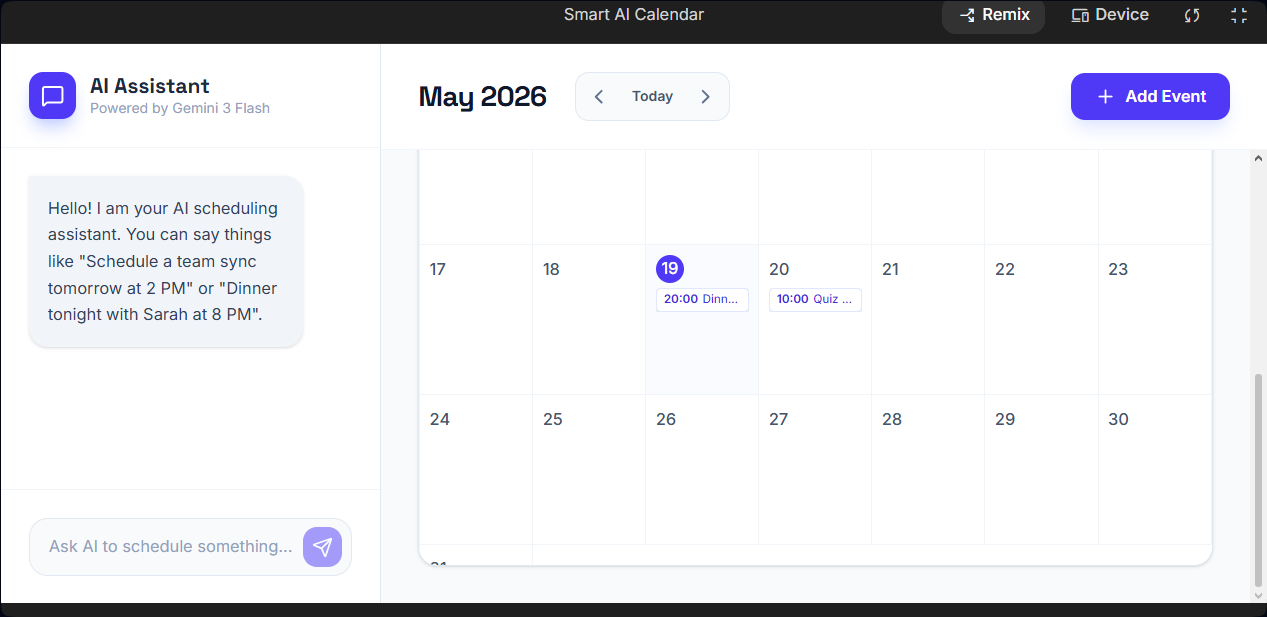
Smart Calendar AI combines an interactive monthly planner with an intelligent chatbot sidebar.
- Conversational Scheduling: Users can chat naturally with an AI assistant to create tasks and events.
- Instant UI Rendering: The system processes text, maps events directly onto the calendar grid with visual badges, and stores data using
localStorage. - Hover Details: Hovering over any task badge reveals a tooltip containing the full event description and timing information.
- Hybrid Control: Includes a Manual Event modal for users who prefer traditional form-based input.
How I built it
- The Interface: Built using vanilla HTML5, CSS layout principles, and Tailwind CSS to create a responsive and modern dashboard experience.
- The AI Compiler: Powered by the Gemini 3 Flash API through the Google Gen AI SDK. We configured it with strict system instructions and
responseMimeType: "application/json"so the model behaves as a structured text-to-JSON engine instead of generating unnecessary conversational output.
Challenges I ran into
- Relative Time Anchoring: The AI model could not inherently understand references like "tomorrow" or "next Wednesday." We solved this by dynamically injecting real-world date and time context into every API request.
- Schema Breaking: Follow-up prompts such as "can you show me that?" occasionally broke the strict JSON structure. We addressed this by designing a flexible error-handling state within the JSON schema that allowed conversational replies without crashing the calendar system.
Accomplishments that I'm proud of
- Successfully transforming a large language model into a reliable structured backend data processor.
- Building a lightweight and smooth calendar grid system using vanilla JavaScript without relying on heavy third-party calendar libraries.
What I learned
I gained deep experience in structured prompt engineering, client-side persistence, and dynamic UI rendering. I also explored grid layout algorithms and date alignment logic required to correctly position months inside a calendar system, utilizing the modular arithmetic formula:
$$\text{Grid Column Offset} = \text{First Day of Month} \pmod 7$$
What's next for Smart Calendar App
- Voice-to-Text Input: Integrating the Web Audio API so users can schedule events completely hands-free.
- Smart Conflict Resolution: Allowing the AI to detect overlapping schedules and suggest alternative time slots automatically.
Built With
- ai
- css3
- es6+
- gemini
- gen
- html5
- javascript
- localstorage
- tailwind
