-
-
logo
-
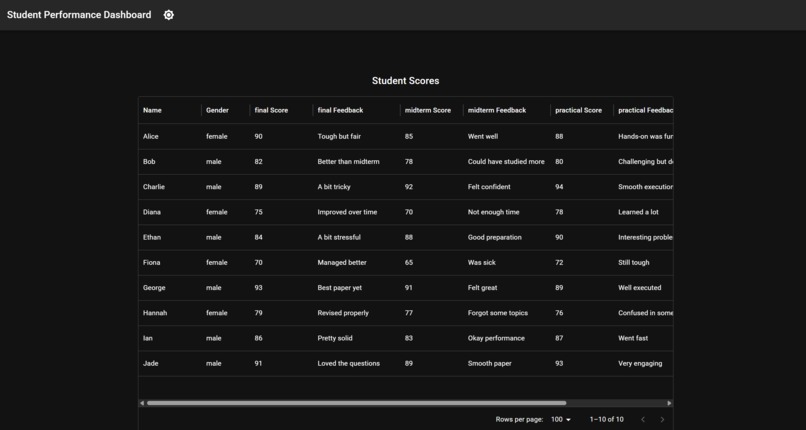
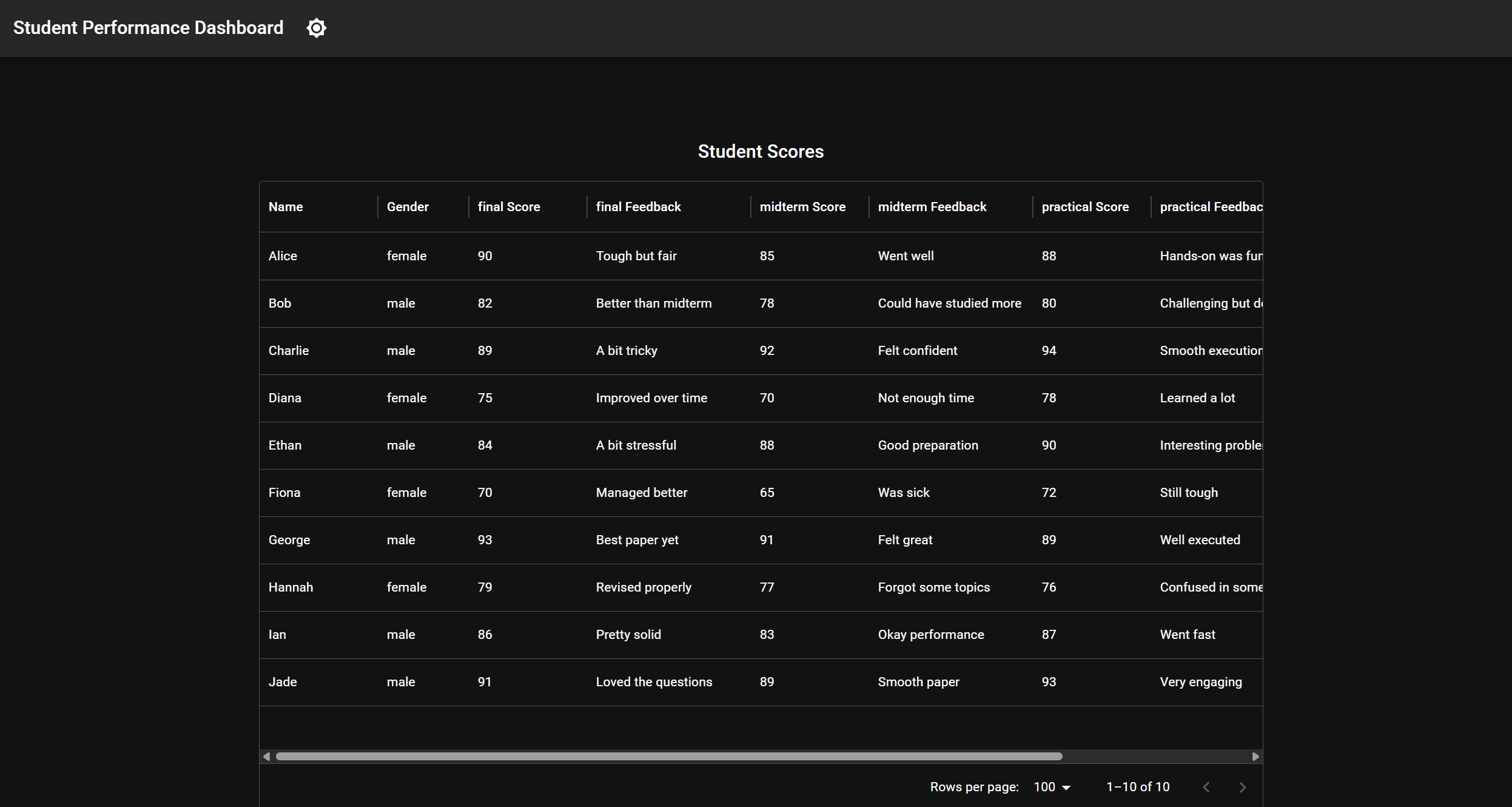
Main Dashboard
Project Title: EduPlus
Short Description:
EduPlus is an AI-powered adaptive learning platform that helps teachers personalize and pace lessons effectively. It provides real-time class-level and individual learning insights to enhance teaching and student outcomes.
Project Description
Chosen Problem Statement:
Theme 2: Knowledge and collaboration
Problem Statement 1:
Situation: Traditional education systems often adopt a one-size-fits-all approach, leaving students who learn differently or at varying speeds behind. According to UNESCO (2023), approximately 260 million students globally fail to achieve minimum proficiency levels due to inflexible educational methodologies
Challenge: Develop an AI-powered adaptive learning platform capable of dynamically adjusting lesson difficulty, content type, and pacing in real time, based on continuous assessment of each student's progress, learning preferences, and unique needs. Consider integrating multimodal learning (visual, auditory, kinesthetic) and a robust analytics dashboard that allows teachers to monitor student development. How would the system handle diverse educational standards across regions, ensure data privacy, and maintain learner motivation over extended periods?
Solution Overview:
EduPlus is an AI-powered adaptive learning platform that empowers teachers to deliver more effective and personalized instruction. The platform features a comprehensive dashboard that visualizes class-wide performance trends and highlights individual student progress in real-time. By integrating with large language models (LLMs), EduPlus generates intelligent insights such as areas where students are struggling, patterns in engagement, and personalized suggestions for both teaching strategies and content pacing.
At the class level, EduPlus analyzes aggregated performance data to recommend optimal pacing and difficulty levels, ensuring that lessons are aligned with the collective learning needs of the class. At the individual level, it offers targeted feedback and learning strategies tailored to each student’s unique progress, knowledge gaps, and learning preferences. This dual-layered feedback system helps instructors make informed, data-driven decisions, fostering a more inclusive and supportive learning environment.
Technical Implementation
Frontend: We used React.js for building a responsive, component-based user interface and Material UI (MUI) for accessible and consistent design elements. Vite serves as the build tool and development server, enabling faster hot module replacement and improved development experience. The frontend includes dashboards for both class-wide insights and individual student feedback, dynamically visualizing real-time data.
Backend: The backend is powered by Flask, providing RESTful APIs to handle user interactions and data processing. We use LangChain to orchestrate prompt flows and manage interactions with large language models, enabling natural language understanding and personalized AI suggestions. The Gemini API is used to generate insights based on student data and assist teachers with feedback generation and pacing recommendations.
Development Process
Problem Understanding & Ideation We began by identifying the core challenge: the lack of real-time, adaptive tools to support both class-wide and personalized teaching. After extensive brainstorming, we prioritized features that would give educators actionable insights into student learning progress.
Product Structure & Feature Planning We defined the high-level product structure, breaking down the system into modular components—such as performance dashboards, AI feedback generation, and LLM integration. Clear separation of concerns allowed for parallel development and easier testing.
Architecture Design & Tech Stack Selection We established the overall architecture of the application, choosing a modern tech stack (React + Vite for frontend, Flask + LangChain for backend) to ensure scalability and responsiveness. We also designed key workflows for data flow, user interaction, and AI response generation.
Backend Development We built a scalable Flask backend to manage data ingestion, API endpoints, and AI integration. LangChain and Gemini API were integrated to handle intelligent insight generation and adapt content based on student progress.
Frontend Development & Integration The frontend was developed with React and styled using MUI. Vite was used for rapid development and build optimization. We then integrated it with the backend via RESTful APIs, ensuring a seamless user experience across class dashboards and personalized student views.
Challenges and Learning Points
Ideation and Problem Identification One of the initial challenges was narrowing down a broad educational problem into a specific, impactful solution. We spent considerable time analyzing current gaps in classroom teaching tools, especially around adaptivity and personalization. It was difficult to strike a balance between building a tool that's useful for teachers while not overwhelming them with excessive data. This process taught us the importance of user-centric thinking and refining our scope through feedback and iteration.
Learning New Tools and Technologies Throughout development, we had to quickly get up to speed with several new tools and frameworks:
Material UI (MUI): While it significantly improved our frontend design, learning its theming system and component customization posed initial hurdles.
LangChain: Integrating LangChain introduced us to the concept of prompt chaining and managing structured outputs from LLMs. It was a valuable learning experience in orchestrating LLM workflows effectively.
Prompt Engineering: Designing prompts that generated useful and accurate educational feedback was non-trivial. Experimenting with different prompt formats helped us understand how to retrieve relevant context and fine-tune outputs for better clarity and relevance.
Network Programming: Establishing seamless communication between the frontend and backend required troubleshooting CORS issues, handling async operations, and ensuring robust API design. This improved our understanding of cross-origin communication and RESTful best practices.
Future Improvement
Support for Streaming Responses Currently, the backend processes and returns responses in a traditional request-response cycle. In future iterations, we plan to explore alternative network protocols such as WebSockets or Server-Sent Events (SSE) to support real-time streaming of AI-generated feedback. This would improve interactivity, especially during longer generation tasks like summarizing class performance or providing detailed student analysis.
Enhanced Retrieval-Augmented Generation (RAG) While we currently use prompt-based interactions with LLMs, we aim to integrate vector stores (e.g., FAISS or Chroma) to enable more robust and context-aware RAG. This would allow the system to store and retrieve relevant past interactions, lesson materials, or student history, improving the accuracy and personalization of generated content.
UI/UX Enhancements Although the current frontend is functional, we recognize the need to further beautify the interface to enhance usability and visual appeal. Future improvements include adding better data visualizations (e.g., charts, graphs), animations for smooth transitions, and accessibility features to ensure the platform is inclusive for all users.
GitHub Repo Link
https://github.com/CYX22222003/LifeHack2025
How to start
Prerequisite:
node v18, v20+
python 3.10+
Gemini API Key (https://ai.google.dev/gemini-api/docs/api-key )
Set up:
- Clone GitHub repo
- Obtain a free Gemini API Key https://ai.google.dev/gemini-api/docs/api-key
- Add a .env file with a key named GOOGLE_API_KEY to backend/app folder
GOOGLE_API_KEY=your-api-key-here - Set up frontend
- Navigate to frontend/app folder, run
npm install.
- Navigate to frontend/app folder, run
- Set up backend
- Navigate to backend folder
- Set up python virtual environment
python -m venv .venv - Activate virtual environment. On Windows:
.venv\Scripts\activate. On MacOS:source .venv/bin/activate - Install dependencies
pip install -r requirements.txt
- Navigate to backend folder, start backend by running
python run.py - Navigate to frontend/app folder, start frontend by running
npm run dev - Open the URL shown in the terminal in the browser
- Try the dashboard
Contributors:
- Chen Yixun
- Deng Tianle
- Feng Yilong
- Lei Jianwen


Log in or sign up for Devpost to join the conversation.