Project Story
About the Project
- This project was inspired by the need to simplify daily scheduling and reduce the effort of manually adding events to a calendar.
- I wanted to combine the power of AI (Gemini) with a practical productivity tool that understands natural language like a human conversation.
- The goal was to build a smart calendar where users can simply type messages in Bangla or English, and the system automatically creates events in a Google Calendar-like interface.
How I Built It
- I built the project as a single-page web application using HTML, CSS, and JavaScript only.
- No frontend frameworks or backend were used; everything runs in the browser.
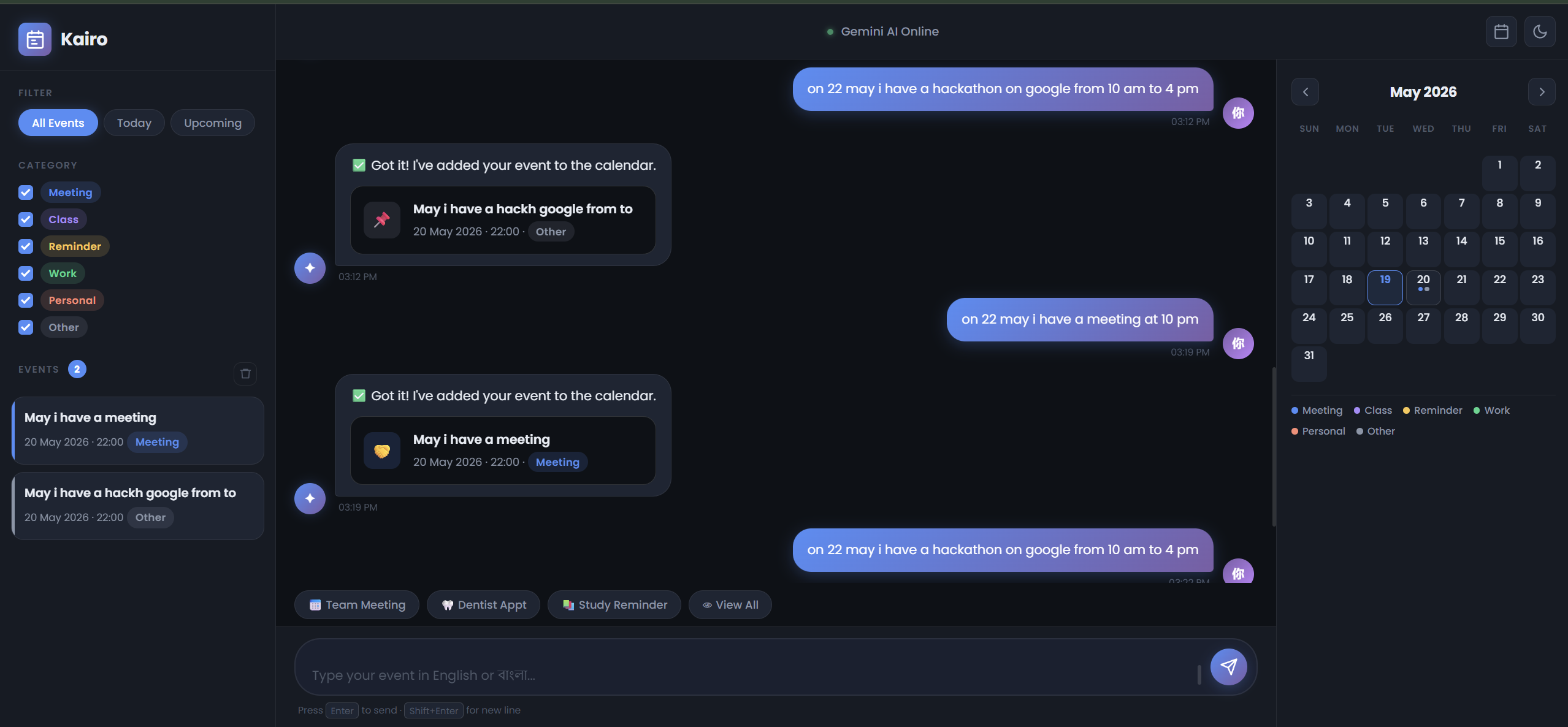
- The application is divided into two main sections:
- Chat interface (for user input)
- Calendar UI (for displaying events in a monthly grid)
- Gemini API is used to process user input and extract structured event data in JSON format.
- The system flow is:
- User message → Gemini API → Structured JSON → JavaScript processing → localStorage → Calendar UI update
What I Learned
- How to integrate Gemini API into a frontend project effectively
- How to design prompts to get consistent JSON outputs from AI
- How to build a dynamic calendar UI using vanilla JavaScript
- How to manage state using localStorage
- How to handle real-world date and time formatting issues in JavaScript
Challenges Faced
Date shifting bug:
- Events were incorrectly moving to the next day due to JavaScript timezone conversion issues
- Solved by strictly using "YYYY-MM-DD" string format and avoiding toISOString() and UTC conversion
AI response formatting:
- Gemini sometimes returned extra text instead of pure JSON
- Solved by enforcing strict system prompt rules to return only JSON output
UI and data synchronization:
- Keeping chat input, AI response, and calendar updates in sync required careful function structuring
Final Outcome
- A fully functional AI-powered calendar assistant
- Users can create events through simple chat messages
- Events are displayed in a Google Calendar-style interface
- No manual scheduling required, everything is automated using AI
Built With
- api
- apis
- application
- backend
- browser
- calendar
- event
- gemini
- html5
- javascript
- language
- localstorage
- platform
- saving
- services
- storage
- structured
- vanila
- web

Log in or sign up for Devpost to join the conversation.