-
-
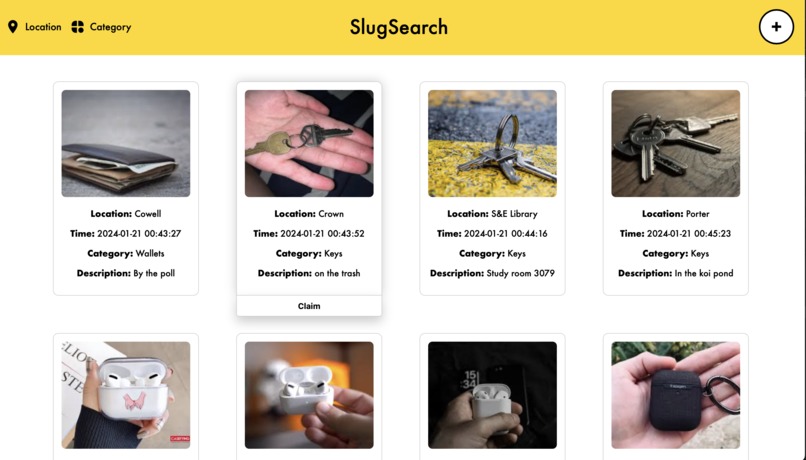
website full of lost items
-
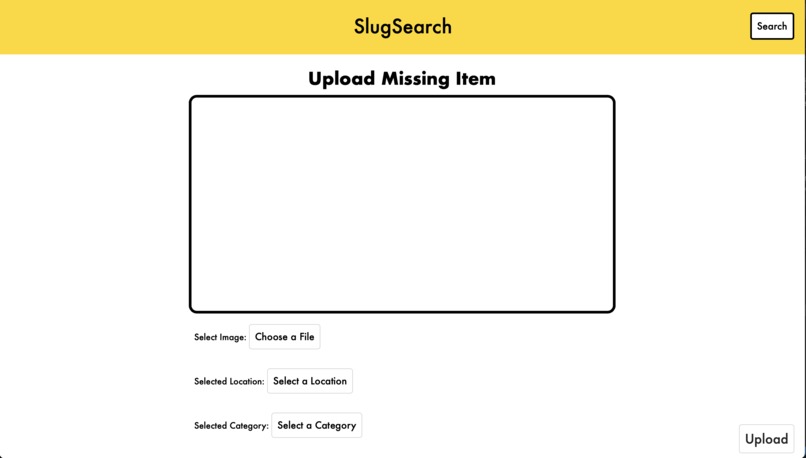
Upload area of website
Inspiration
One week ago I lost my air pods on my walk back from the gym. Throughout the week I searched up and down the path I took looking for where it could have gone but I never saw my beloved earphones again. Losing things is common everywhere but a problem unique to Santa Cruz is someone returning the item, but the owner not knowing where the item was returned. With so many buildings, each with their own Lost and Found, it is too easy to lose items and never see them again.
What it does
Instead of having a lost and found in each building, SlugSearch creates a centralized Lost and Found where students can post and find lost items.
How we built it
We used Visual Studio Code to create a front-end in HTML, back-end in Python, Flask to connect front to back end, Css for formatting, and Javascript for a few functions.
Challenges we ran into
We had three major challenges. The first was learning how to program in HTML because neither of us had used it before. The second challenge was using SQL for our database because neither of us used that either. The final challenge was figuring out how to connect the HTML front-end to the Python back-end.
Accomplishments that we're proud of
We are proud of how nice the user interface looks, how accessible the website is, and how much we learned over this experience.
What we learned
We learned a lot of languages on the fly like HTML, CSS, and Javascript. We also learned how to connect front-end programming in HTML to back-end programming in Python programming using Flask.
What's next for SlugSearch
SlugSearch is implementing AI using Google Bard to allow users to only take a picture of the item and allow the AI to fill in all the information automatically, including; what the object is, and its description. We will also create a mobile app to make SlugSearch more accessible and convenient.

Log in or sign up for Devpost to join the conversation.