-
-
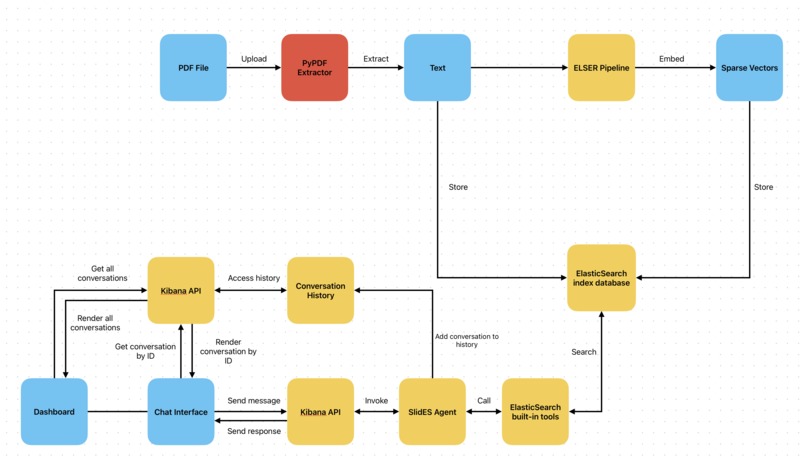
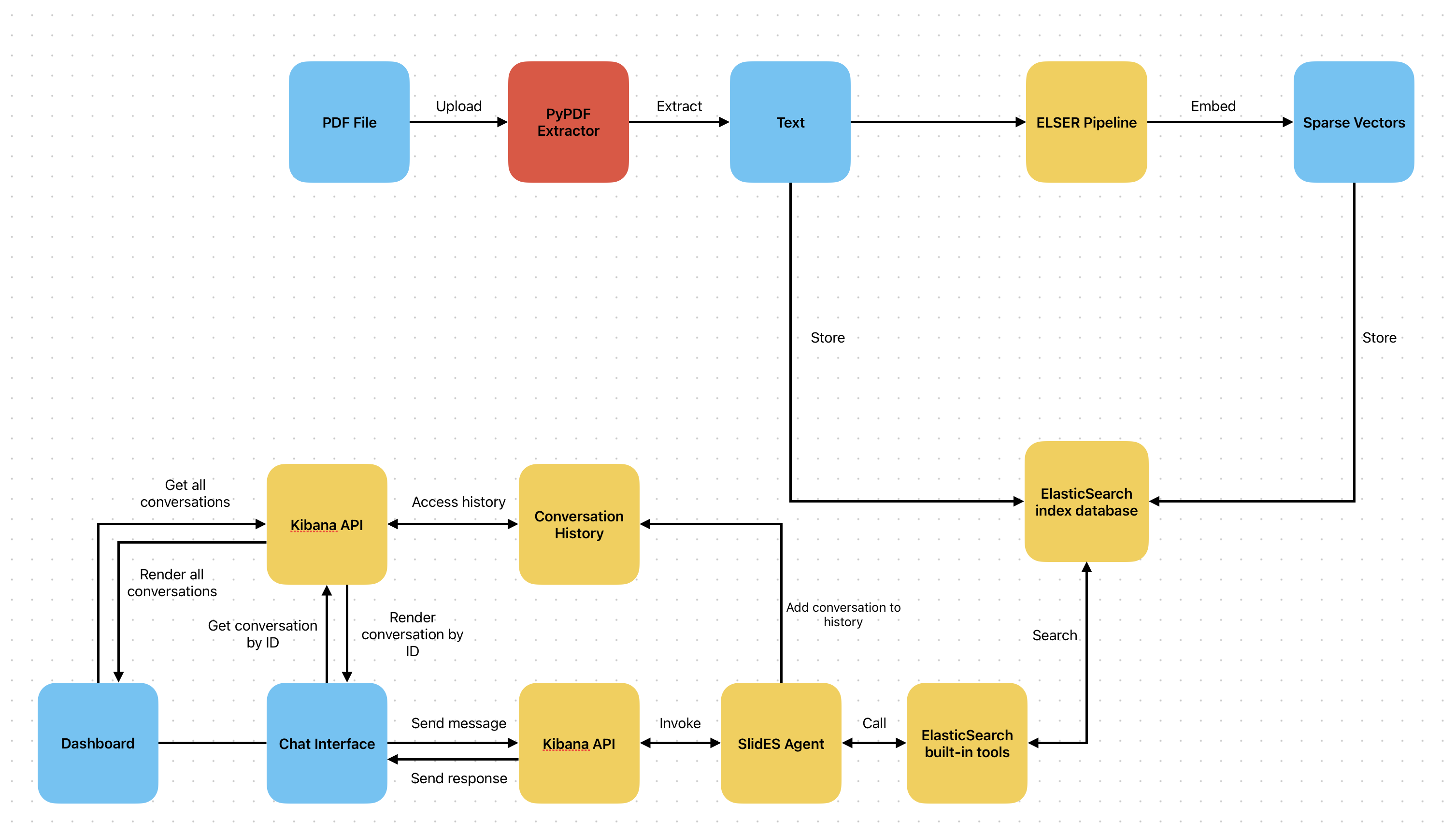
SlidES Architecture
Problem
Most college professors use lecture slides to teach, and many college students rely on lecture slides to study with. As a college student myself, I view lecture slides as a reliable source of content. However, there are multiple issues I face.
- Storing slides can be decentralized and unorganized: Often, I would download lecture slides, and it would get lost with other files in my local computer, making it hard to manage and find.
- Manually searching and scrolling through slides: Whenever I needed to look for certain information, I had to search and scroll through multiple slides because it was hard to find where exact information was located, which killed a lot of time.
This is where SlidES comes in! I made the -es suffix capitalized to emphasize ElasticSearch aka ES :)
What SlidES does
SlidES is a platform where you organize your lecture slides by uploading them as PDF files in a singular, centralized place. You can ask the SlidES Agent questions about information that you need from your lecture slides or generate notes. Using Elastic Search’s built-in agent search tool, it looks through slides in the index database, find relevant content, and responds with the information you need, which would take countless hours humans to do.
Features
- Upload lecture slides as PDF files and add them in a course (optional)
- Create courses to group lecture slides
- Move uploaded lectures to created, existing courses
- Edit and delete courses
- Create notes as markdown and add notes to folders
- Create folders to group notes
- Edit and delete folders
- View and delete chat conversation history
- Chat to SlidES Agent (ElasticSearch Agent Builder)
- Add and create the Agent’s response into notes
ElasticSearch features
- Index databases: I used multiple index databases to store lecture slides, courses, notes, and folders
- Agent Builder: Using Agent Builder, I created my own agent and gave it instructions to only search for notes and lectures slides in the index databases in order to answer certain questions about it and generate notes
- Kibana API: With Kibana’s API, I invoked my agent using the
/api/agent_builder/converseendpoint which delivers real time streaming responses, which are rendered onto my UI. I also used the API to get all conversation history, get a conversation by ID, and delete a conversation by ID. - Ingest Pipeline: Using Kibana’s Dev Tools, I created an ingest pipeline using
.elser_model_2to convert extracted text from lecture slide PDFs into sparse vectors
How it’s built
- Frontend: Next.js, Shadcn, Tailwind
- Backend: FastAPI, Kibana API
- Database: ElasticSearch’s index database
Built With
- elasticsearch
- fastapi
- next.js

Log in or sign up for Devpost to join the conversation.