-
-
Network setup
Inspiration
Our inspiration originates from the difficulty and inconvenience in using majority of the currently available sleep cycle applications as they require users to manually log in their sleep time and they are non-inclusive to all types of sleeping habits.
What it does
SleepSense allows an easy and friendly user experience with sleep tracking integrated with Apple Watch, iOS, and Philips Hue light bulb. The application automatically turns off the Philip Hue smart light as the Apple Watch detects the user has fallen asleep, and it tracks the closest sleep schedule to the user's set alarm so that the light bulb will gradually brighten as the user approaches to their alarm clock and naturally wakes them up while making sure the users are waken up in their light sleep cycle. The light bulb will also turn on with a very dim light if the user wakes up in the middle of the night, and update the sleep schedule at the same time.
How we built it
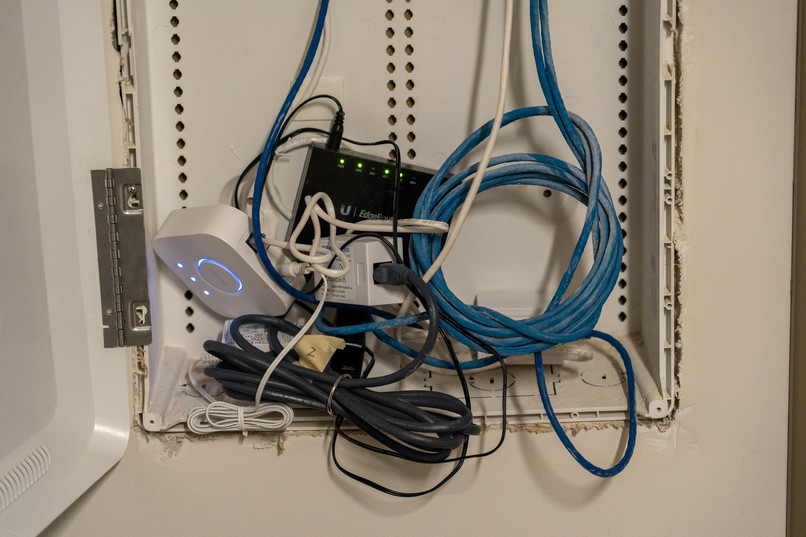
The hardware is a Philips Hue smart IoT lightbulb connected to a Hue Hub, which is in turn connected via ethernet to an EdgeRouter which ties into the apartment WiFi. It was extremely difficult to set up the networking in such adverse conditions but we managed to make it work with an unwise amount of adapters.
The frontend of the application, such as the Apple Watch and iOS user interface, is built in Xcode and swift. It communicates via HTTP by sending JSON POST requests to the backend to control the state of the light, secured by an API key.
The backend of the application is written in TypeScript on node.js, using the Express.js framework to handle routing. A service was built to receive POST requests and then use the Philips hue API to modify the state of the light. Then an internet reverse proxy service written in Rust was used to forward TCP packets over a public server to my local machine, so that the Apple Watch could send network requests while connected to any network.
Challenges we ran into
Some of the challenges we ran into include the difficulty of working with the closed Apple environment as none of the team members own a developer membership program. Since the capability feature like healthkit requires a membership program, this makes the process of accessing health related data, namely the sleeping activity data such as deep sleep and rapid eye movement, significantly more difficult. Therefore, this project includes plenty of workarounds in regards to accessing sleeping data. Another challenge that came with the hardware component of our project was that the Philip Hue bridge needs to be connected to the Wifi router that our devices were connected to which then caused a lot of inconvenience.
Accomplishments that we're proud of
- setting up the network and pairing the hub to the webserver
- Making the Apple Watch able to control the lightbulb over the internet
- getting the app to run on the Apple Watch
- filming a promotional video
What we learned
One of the lessons learned is to definitely do the research on the program and hardware that we plan on using ahead of time, as the majority of our bugs and obstacles rised from our lack of research and knowledge on the environment and components that we decided to build the project on.
What's next for SleepSense
SleepSense can still be significantly improved in the sense of improving our frontend aesthetics, optimizing the method in accessing users' data, adding more features and customizations with the smart light bulb, and more security features on the backend.

Log in or sign up for Devpost to join the conversation.