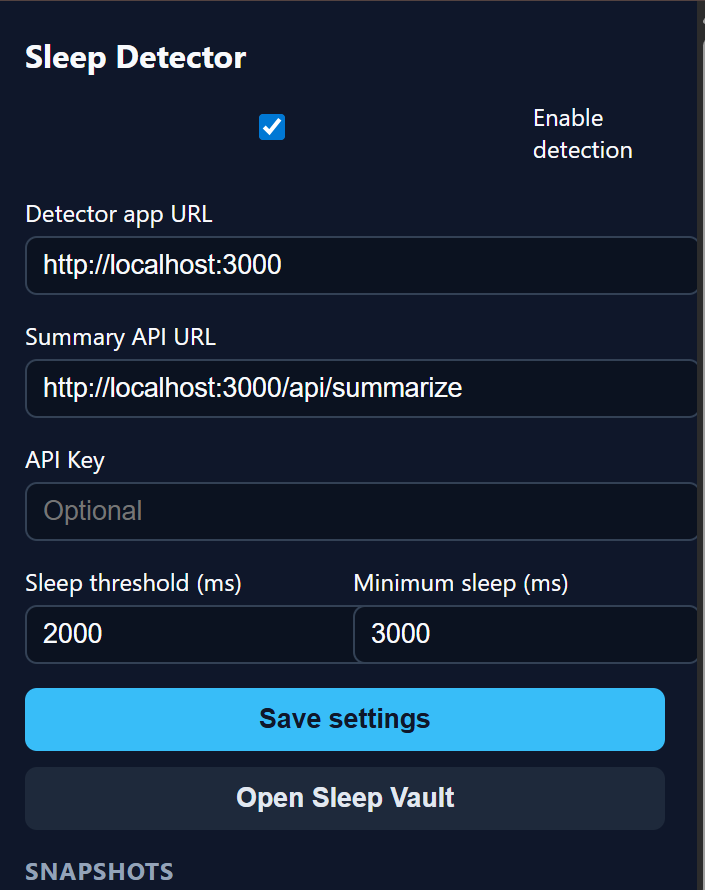
We kept drifting off during long lectures and late‑night videos, then scrambling to catch up on what we missed. We wanted something playful that would wake us up and also help us recover the parts we slept through.
What it does Sleep Detector watches for closed eyes using the laptop camera. When you doze off, it marks the exact time window, captures fun snapshots with meme filters, and later summarizes the missed segment. A companion dashboard (“Sleep Vault”) stores your summaries and snapshots, while a game‑style stats page tracks how often you fell asleep and your longest naps.
How we built it We split it into a Chrome extension + Next.js app. The extension runs on any tab, controls settings, and handles audio/caption capture. The web app provides the camera‑based detection and a polished UI for the vault and stats. We wired them together with a hidden detector iframe and lightweight APIs for storing summaries and snapshots.
Challenges The hardest part was getting audio summaries without relying on captions. Some sites block audio capture, so we built multiple fallbacks and ended up using a tab‑capture pipeline. We also hit storage limits from saving images, so we compressed snapshots and capped history to keep the extension fast and reliable.
What we’re proud of We’re proud that it works across real sites, saves highlights automatically, and turns a sleepy habit into something fun. The end‑to‑end flow from detection to summary to dashboard feels like a complete product, not just a prototype.
What we learned We learned a lot about browser privacy constraints, media capture, and building resilient data flows between an extension and a web app. Most importantly, we learned how to quickly iterate on UX until it felt delightful and demo‑ready.


Log in or sign up for Devpost to join the conversation.