Inspiration
I was tired of the standard "grid of images" e-commerce experience. Basketball is a kinetic, tactile sport, but buying a ball online usually feels static and boring.
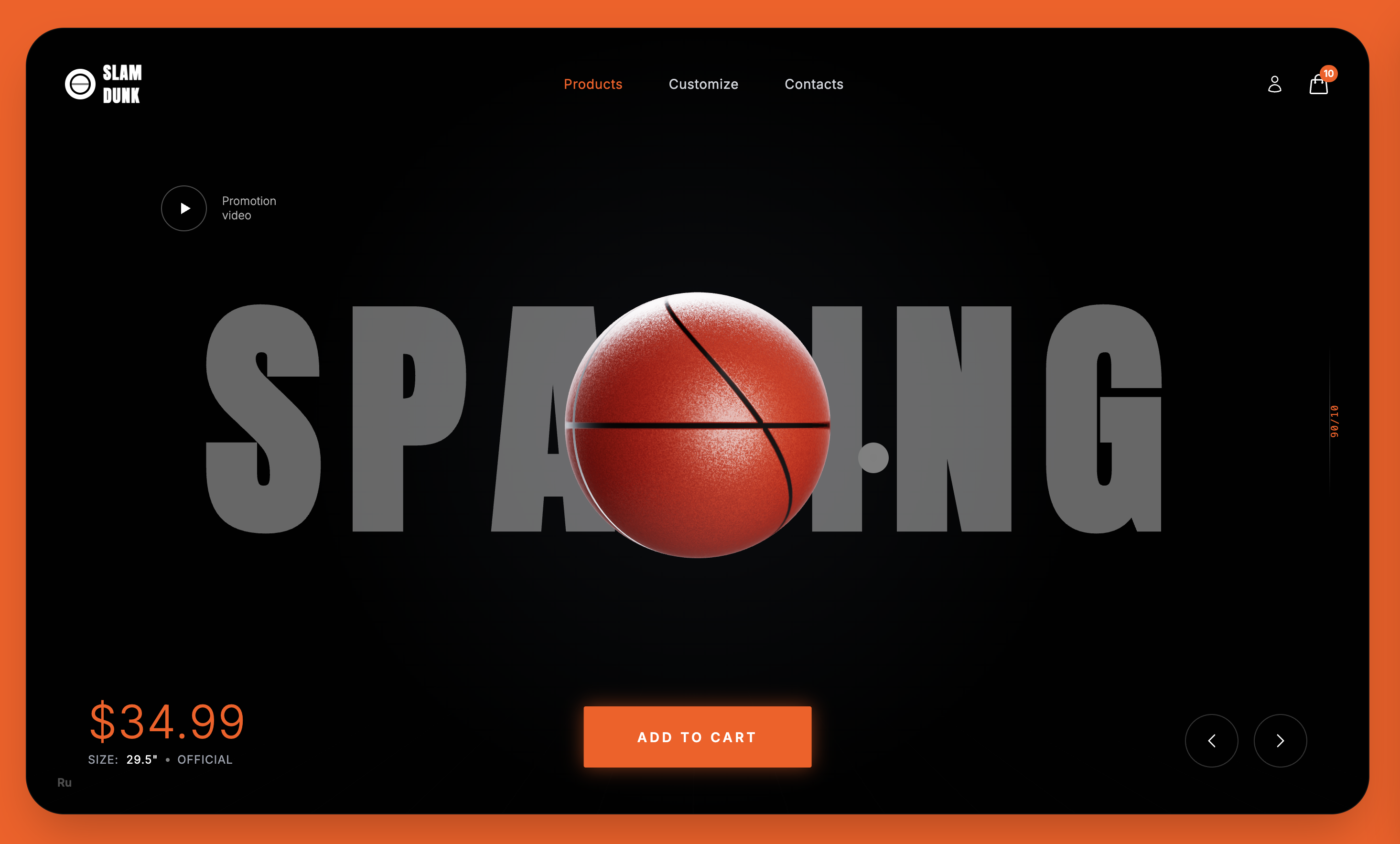
I wanted to build a web experience that felt as premium and dynamic as a high-end automotive configurator. My goal was to prove I could create a cinematic, console-quality 3D experience in the browser without using a single external asset file, no JPEGs, no GLBs, and no MP3s, relying entirely on code and math.
What it does
Slam Dunk 3D is an immersive product journey that decouples the scroll bar from the page. As users scroll, they don't just move down a page; they scrub through a 3D timeline.
Storytelling: The basketball physically moves, rotates, and morphs through different stages (Hero, Aerodynamics, Physics, Podium) based on scroll position.
Real-time Customization: Users can enter the "Custom Lab" to modify colors, patterns, and grip textures, seeing changes instantly on the 3D model.
Procedural Audio: Clicking and hovering triggers sound effects generated live by the browser, not audio files.
Physics-Based UI: When a user clicks "Add to Cart," the 3D ball physically flies out of the WebGL scene and arcs into the 2D DOM shopping cart icon.
How we built it
I built the core application using React 19, Three.js (React Three Fiber), and GSAP for animations. However, the complex graphics and math logic were developed with Gemini via Google AI Studio as my specialized technical co-pilot.
Procedural Textures (Zero Images): I asked Gemini to help me write an HTML5 Canvas script to mathematically generate the basketball's pebbled leather surface and seam lines. It provided the noise algorithms to create the "bump" map without needing to load a heavy texture file.
AI-Generated Shaders: The configurator features a swirling, reactive nebula background. I am not a GLSL expert, so I described the visual I wanted to Gemini, and it wrote the custom Vertex and Fragment shaders, including the Simplex noise functions required to animate the plasma effect.
Vector Mathematics: The "Add to Cart" animation required calculating a parabolic flight path from a 3D coordinate (inside the Canvas) to a 2D screen coordinate (the HTML UI icon). I used Gemini to work out the Vector3 projection logic and Bezier curves to make the flight path look natural across different screen sizes.
Synthesized Audio: Instead of downloading sound assets, I asked Gemini how to create sound effects using the Web Audio API. It gave me the precise oscillator frequency ramps and gain node timings to synthesize "swoosh" and "click" sounds programmatically.
Challenges we ran into
First of all it was doing heavy math. Generating 2K resolution noise textures on the fly initially caused frame drops. I used Gemini to analyze my loops, and it suggested optimizing the canvas context calls and lowering the resolution dynamically for mobile devices.
And another major challenge was syncing 3D and 2D. Keeping the 3D sphere perfectly aligned with the floating HTML text (the "Scrollytelling" aspect) was difficult across different aspect ratios. I had to tell Gemini to build a custom hook that constantly recalculated the 3D viewport width to match the CSS container.
Accomplishments that we're proud of
The "Zero Asset" Architecture: The entire site is under 3MB because it generates its own assets.
The Seamless Handoff: I am particularly proud of the "Add to Cart" animation where the object seamlessly transitions from being a 3D scene element to a UI particle.
The Custom Shader: Successfully implementing a raw GLSL shader in React Three Fiber that reacts to the user's color selection.
What we learned
I learned that the browser is an incredibly powerful graphics engine if you treat it like one. By combining React's state management with raw math, you can create experiences that feel "native."
Most importantly, I learned how to effectively use Gemini not just to write boilerplate code, but to solve complex mathematical and graphical problems (like GLSL and Audio Synthesis) that were previously outside my skillset.
What's next for Slam Dunk 3D
Many things but I'm currently working on these,
AI-Generated Engraving: Using Gemini to allow users to type a prompt (e.g., "Dragon scales") and generating a bump map texture to emboss onto the ball in real-time.
Multiplayer Physics: Adding a feature where users can "throw" balls into a shared digital hoop with other visitors on the site.


Log in or sign up for Devpost to join the conversation.