-
-
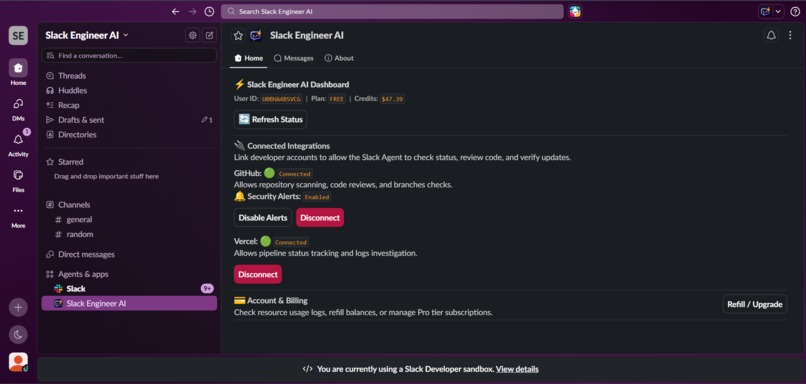
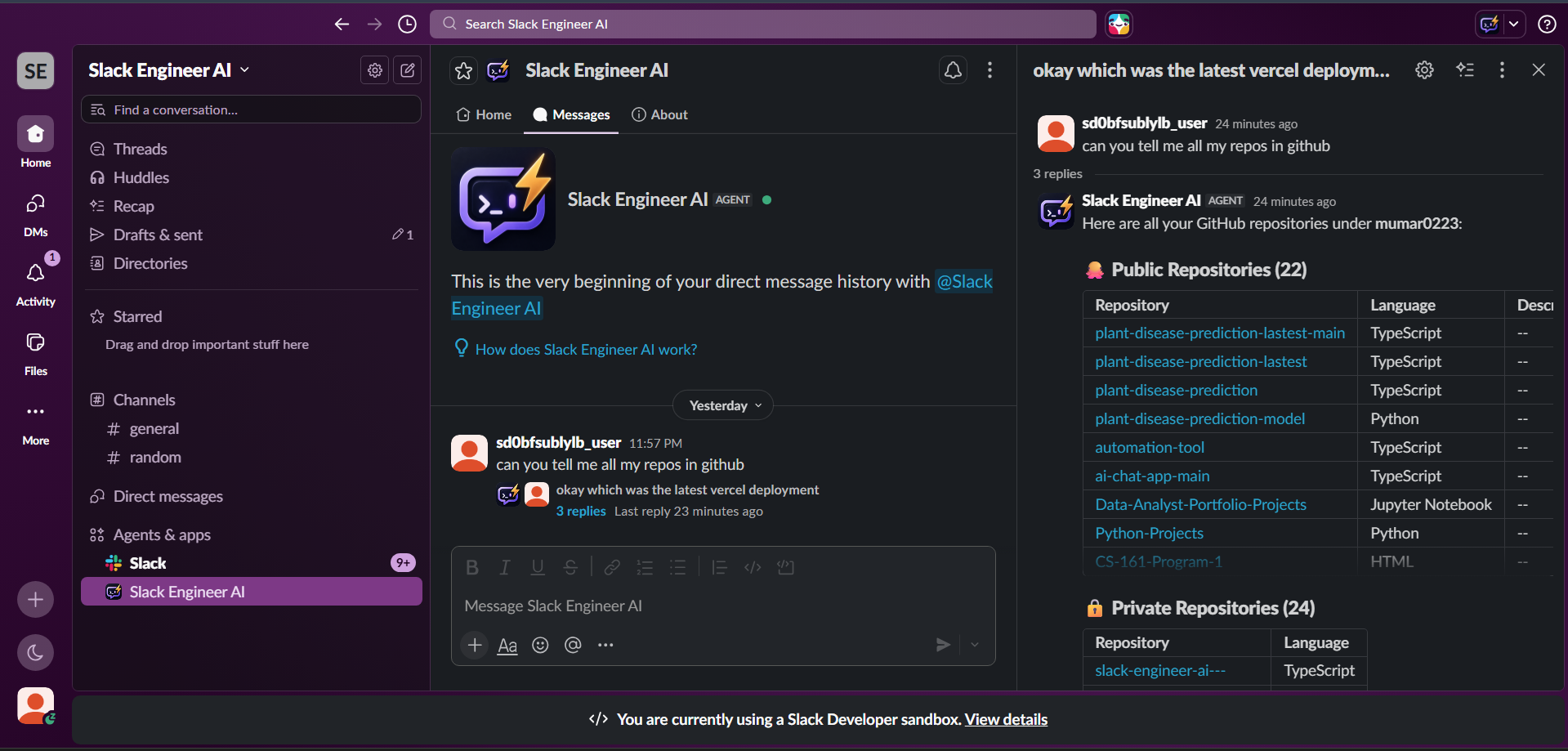
Home Screen
-
-
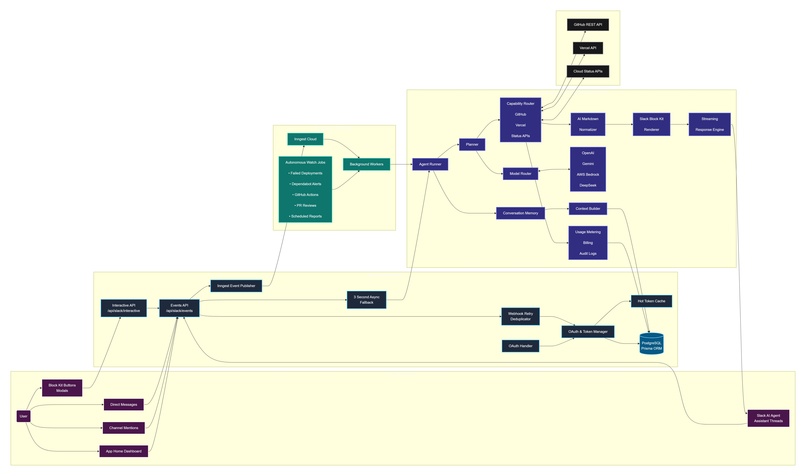
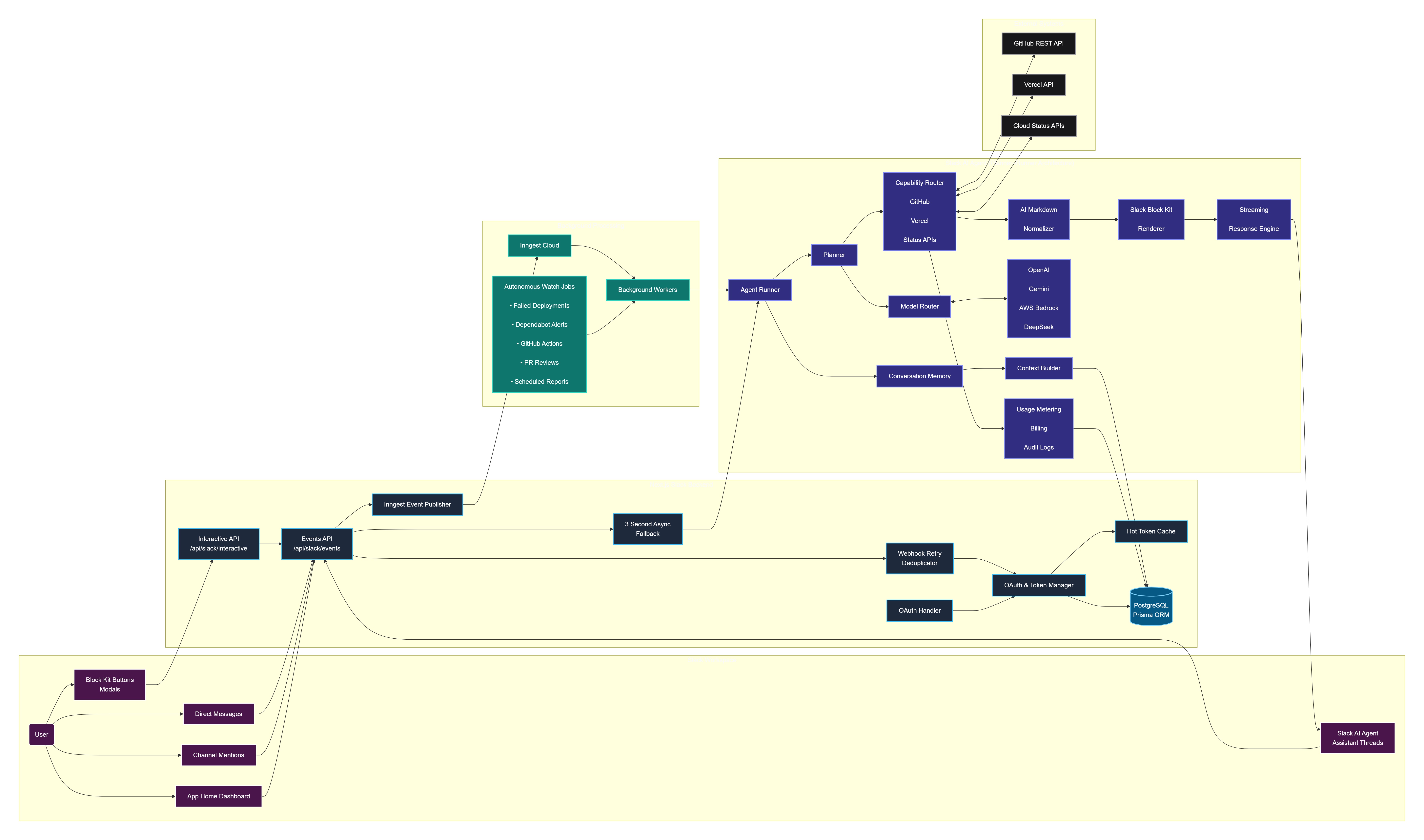
Architecture diagram
📖 Slack Engineer AI
Inspiration
Modern engineering teams don't just lose time writing code—they lose time switching between tools.
A single production incident often requires developers to inspect GitHub pull requests, analyze Vercel deployment logs, investigate cloud provider outages, review security alerts, and search through multiple Slack conversations to understand what changed. Every context switch interrupts focus, delays incident resolution, and increases operational overhead.
We asked ourselves a simple question:
What if DevOps lived where engineering conversations already happen?
Instead of building another chatbot, we built Slack Engineer AI—an autonomous AI engineering teammate that lives entirely inside Slack.
Unlike traditional assistants that simply answer questions, Slack Engineer AI continuously monitors engineering systems, reasons across operational context, diagnoses deployment failures, watches security events, schedules engineering briefings, and proactively assists development teams without requiring them to leave Slack.
Our vision is to transform Slack into an AI-powered DevOps command center, where engineering teams can monitor, automate, diagnose, and collaborate from a single conversational workspace.
🚀 What it does
Slack Engineer AI is an autonomous DevOps and Security Operations agent built natively for Slack.
Developers interact naturally through Direct Messages, Assistant Threads, channel mentions, App Home dashboards, and interactive Block Kit interfaces.
Behind the scenes, the agent follows a Planner–Runner architecture that understands user intent, dynamically selects capabilities, executes engineering tools, gathers operational context, and streams rich interactive responses back into Slack.
Unlike traditional chatbots, Slack Engineer AI is both reactive and proactive.
It responds to engineering questions while continuously monitoring infrastructure, deployments, GitHub repositories, security alerts, and scheduled automation workflows in the background.
🔄 Example Workflow
- A Vercel deployment fails.
- Slack Engineer AI automatically detects the failure.
- It retrieves deployment logs.
- It analyzes the stack trace using AI.
- It checks related GitHub commits and Pull Requests.
- It verifies whether cloud providers or third-party services are experiencing outages.
- It generates a natural-language explanation.
- The response is converted into interactive Slack Block Kit components.
- The report is streamed back into Slack together with recommended remediation steps.
Instead of manually switching across dashboards, engineers receive a complete operational diagnosis directly inside Slack.
🤖 Autonomous DevOps Agent
Developers can simply ask:
- "Why did production fail?"
- "Show my open pull requests."
- "Deploy the latest version."
- "Check GitHub Actions."
- "Explain this deployment failure."
- "Is AWS currently experiencing an outage?"
Slack Engineer AI automatically plans the workflow, selects the required capabilities, executes tools, and continuously streams progress updates while work is being performed.
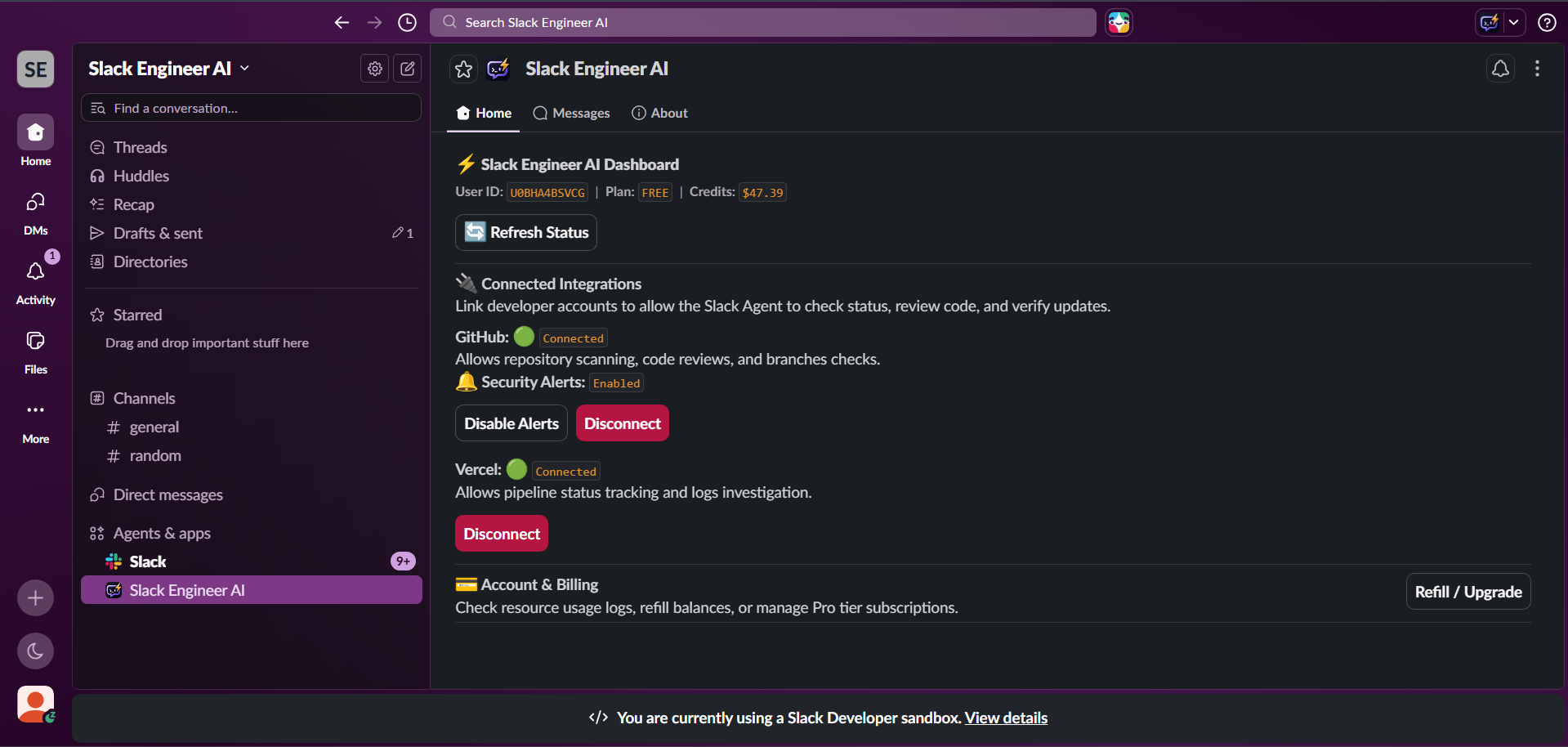
🏠 Interactive App Home Dashboard
The App Home acts as the engineering control center.
Users can:
- Connect GitHub and Vercel using OAuth
- Configure autonomous monitoring
- Enable recurring engineering reports
- Select AI providers
- Configure scheduled jobs
- Manage preferences
- View connected integrations
🐙 GitHub Operations
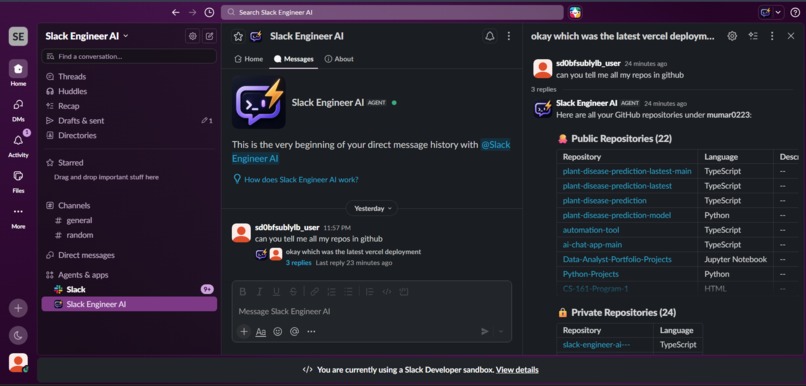
Slack Engineer AI provides conversational GitHub management directly from Slack.
Capabilities include:
- Repository browsing
- Pull Request inspection
- Issue analysis
- Commit history
- GitHub Actions monitoring
- Reviewer assignments
- Repository statistics
▲ Vercel Operations
Engineering teams can:
- Monitor deployments
- Trigger deployments
- Retrieve build logs
- Inspect deployment history
- Explain failed deployments using AI
One of our favorite capabilities is Explain Vercel Failure.
Whenever a deployment fails, Slack Engineer AI automatically retrieves deployment logs, analyzes the stack trace, determines the likely root cause, and posts a concise explanation together with recommended fixes directly inside Slack.
☁️ Infrastructure Health Intelligence
Slack Engineer AI continuously checks engineering infrastructure across:
- AWS
- Azure
- Google Cloud
- Cloudflare
- GitHub
- OpenAI
- Anthropic
- Vercel
Instead of manually checking multiple status pages, engineers receive infrastructure diagnostics directly inside Slack.
🔒 Autonomous Security Monitoring
Background AI workflows continuously monitor:
- Dependabot security alerts
- Failed GitHub Actions
- Broken deployments
- Pull Request assignments
- Infrastructure incidents
Whenever issues occur, Slack Engineer AI proactively alerts engineering teams with supporting context and recommended actions.
⏰ Autonomous Scheduling & Engineering Briefings
Slack Engineer AI doesn't wait for users to ask questions.
Using a built-in scheduling engine powered by Inngest, the agent automatically delivers recurring engineering briefings directly into Slack.
Supported scheduled workflows include:
- Daily engineering summaries
- Deployment health reports
- Infrastructure status updates
- Security vulnerability digests
- Pull Request activity reports
- Scheduled engineering reports
- Custom cron-based automation workflows
Schedules are timezone-aware and configurable through the App Home dashboard, ensuring engineering teams receive operational information at the appropriate local time.
🧠 Multi-Model AI Support
Users can dynamically switch between multiple AI providers without losing conversational context.
Supported providers include:
- OpenAI
- Google Gemini
- AWS Bedrock
- DeepSeek
The Planner–Runner architecture dynamically routes capabilities while preserving engineering context regardless of the selected model.
🏗️ How we built it
Slack Engineer AI combines Slack AI capabilities, Slack Platform APIs, Slack Block Kit, Next.js, Vercel AI SDK, Inngest, PostgreSQL, and Prisma ORM to create an autonomous engineering platform specifically designed around Slack's interaction model.
1. Native Slack Experience
The application is built entirely around Slack.
The user experience includes:
- Assistant Threads
- Direct Messages
- Channel Mentions
- App Home
- Interactive Modals
- Block Kit
- OAuth Authentication
Slack events are received through Next.js API Routes:
/api/slack/events/api/slack/interactive
allowing every interaction to feel like a native Slack experience.
2. Planner–Runner Agent Architecture
Instead of directly sending prompts to an LLM, Slack Engineer AI implements a structured Planner–Runner agent.
The execution pipeline consists of:
- Conversation Memory
- Context Builder
- Planner
- Dynamic Model Router
- Capability Router
- Tool Execution
- AI Markdown Generation
- Markdown Normalization
- Slack Block Kit Rendering
- Streaming Response Engine
Rather than following predefined workflows, the planner dynamically determines which capabilities should be executed based on the engineering task.
3. AI Rendering Pipeline
Large language models naturally generate Markdown.
Slack, however, provides significantly richer user experiences using Block Kit.
To bridge that gap, we built a custom rendering pipeline:
AI Response
      │
      ▼
Markdown Generation
      │
      ▼
Markdown Normalization
      │
      ▼
Slack Block Kit Renderer
      │
      ▼
Interactive Components
      │
      ▼
Streaming Response Engine
      │
      ▼
Slack Assistant Threads
This allows AI-generated content to appear as native Slack cards, buttons, sections, tables, and interactive layouts instead of plain text.
4. Background Automation & Scheduling
Slack requires webhook requests to complete within approximately three seconds.
Long-running reasoning therefore executes asynchronously using Inngest.
Background workers power:
- Failed Deployment Analysis
- GitHub Actions Monitoring
- Dependabot Monitoring
- Infrastructure Health Checks
- Scheduled Engineering Reports
- Cron-based Automation
- Timezone-aware Engineering Briefings
Rather than simply reacting to user prompts, Slack Engineer AI continuously monitors engineering systems and proactively delivers actionable information.
5. Persistent Engineering Context
PostgreSQL together with Prisma stores:
- OAuth connections
- User preferences
- AI provider configuration
- Conversation history
- Usage logs
- Billing credits
- Audit logs
- Scheduled jobs
Persistent context enables long-term engineering memory while maintaining continuity across conversations and autonomous workflows.
6. Multi-Provider AI Routing
Slack Engineer AI abstracts multiple AI providers behind a unified capability layer.
Users can switch between OpenAI, Gemini, AWS Bedrock, and DeepSeek without restarting conversations or changing workflows.
The planner dynamically routes requests while preserving engineering context across providers.
⚙️ Challenges we ran into
Building an autonomous engineering agent inside Slack required solving several technical challenges beyond simply integrating an LLM.
1. Slack's Three-Second Response Requirement
Slack expects webhook requests to return within approximately three seconds.
However, engineering tasks such as deployment diagnostics, GitHub analysis, AI planning, infrastructure monitoring, and log processing frequently require much longer.
Instead of performing expensive operations synchronously, we designed an event-driven architecture that separates immediate Slack acknowledgements from long-running AI workflows.
The execution pipeline became:
Slack Event
      │
      ▼
Immediate Response
      │
      ▼
Inngest Background Worker
      │
      ▼
Planner–Runner Agent
      │
      ▼
Streaming Results Back to Slack
This architecture keeps Slack responsive while allowing the AI agent to continue reasoning in the background.
2. Trigger ID Expiration
Slack interactive modals require a valid trigger_id, which expires within only a few seconds.
Database lookups occasionally delayed modal creation enough for trigger IDs to expire.
To solve this, we implemented a fast-path cache using Promise.race().
If the database lookup takes too long, the application immediately falls back to cached credentials while continuing the database lookup asynchronously.
This significantly improved modal reliability without sacrificing security.
3. Reliable Webhook Processing
Slack automatically retries webhook deliveries whenever acknowledgements are delayed.
Without protection, the same deployment event could execute expensive AI workflows multiple times.
To prevent duplicate executions, we implemented a webhook deduplication layer that safely ignores repeated Slack retry events while allowing legitimate requests to continue.
4. Planner–Runner Tool Orchestration
To improve reliability and control, we designed a Planner–Runner architecture where the planner first determines which capabilities are required before executing engineering tools.
This separation allows the agent to:
- Plan multiple engineering steps
- Dynamically select capabilities
- Maintain conversation context
- Execute several tools during a single request
- Generate a unified response from multiple data sources
The result is a significantly more reliable autonomous agent compared with traditional prompt-based chatbots.
5. AI Response Rendering
Large language models naturally generate Markdown.
Slack, however, renders rich interactive experiences using Block Kit.
To bridge this gap, we built a custom rendering pipeline that transforms AI-generated Markdown into native Slack components before streaming responses.
This allows every response to feel like a native Slack application rather than generated text.
6. Multi-Provider AI Routing
Every AI provider exposes different APIs, capabilities, and token limits.
Slack Engineer AI supports:
- OpenAI
- Google Gemini
- AWS Bedrock
- DeepSeek
We built a unified capability layer allowing users to switch providers dynamically without losing conversational context or interrupting ongoing workflows.
7. Autonomous Scheduling
Unlike reactive assistants, Slack Engineer AI also performs scheduled automation.
Designing recurring engineering reports introduced additional challenges including:
- Cron scheduling
- Background execution
- Timezone-aware delivery
- Failure retries
- Reliable report generation
Using Inngest allowed scheduled engineering briefings to execute independently from user interactions while remaining highly reliable.
8. Dynamic Tool Loading & LLM Context Window Constraints
Exposing over 40 distinct DevOps and monitoring tools directly to the LLM presents a severe architectural challenge. Declaring 40+ full JSON schemas in the system prompt would exhaust the LLM's context window, escalate token billing costs, increase network latency, and distract the model's reasoning capabilities.
Our Solution (Dynamic Capability Catalog): To solve this constraint, we designed a custom Dynamic Capability System. Instead of loading all tools at startup, the AI is initialized with only 4 top-level meta-tools:
search_capabilities– Allows the LLM to search the capability index by keyword.get_capability_schema– Dynamically retrieves the exact JSON parameter schema for a specific capability on-demand.execute_capability– Executes the selected capability with the validated argument schema.create_schedule– Registers cron schedules to execute capabilities in the background.
When a user triggers the assistant, the LLM first calls search_capabilities to locate relevant tools (e.g. checking PRs or fetching logs), requests the schema definition for only those specific tools, and then calls execute_capability to run the task. This dynamic mechanism reduces the tool context window overhead from a massive list of 40+ schemas to just a single on-demand schema declaration.
🏆 Accomplishments that we're proud of
Rather than building another conversational chatbot, we built an autonomous engineering teammate capable of proactively monitoring software systems and assisting development teams directly inside Slack.
Some accomplishments we're especially proud of include:
- Built a Planner–Runner agent architecture capable of dynamic reasoning and capability selection.
- Developed a custom AI Markdown → Slack Block Kit rendering pipeline.
- Built a real-time streaming response engine that progressively renders AI-generated Block Kit interfaces inside Slack Assistant Threads while background tools continue executing.
- Built an interactive App Home dashboard for OAuth, AI configuration, and operational controls.
- Built secure OAuth integrations for GitHub and Vercel, allowing users to connect engineering systems directly from Slack App Home.
- Implemented autonomous deployment monitoring using background Inngest workflows.
- Created AI-powered deployment diagnostics that automatically explain failed Vercel builds.
- Added GitHub repository, Pull Request, issue, and GitHub Actions integration.
- Built infrastructure monitoring across AWS, Azure, Google Cloud, Cloudflare, GitHub, OpenAI, Anthropic, and Vercel.
- Built a timezone-aware scheduling engine supporting cron-based automation, recurring engineering briefings, infrastructure health reports, deployment summaries, and security digests.
- Designed a proactive AI agent that continuously monitors engineering systems and delivers actionable insights without requiring user interaction.
- Designed a multi-provider AI routing system supporting OpenAI, Gemini, AWS Bedrock, and DeepSeek.
- Built reliable webhook deduplication for resilient Slack integrations.
- Created an event-driven architecture capable of satisfying Slack's strict latency requirements while supporting complex AI reasoning.
⭐ Explain Vercel Failure
Our favorite capability is Explain Vercel Failure.
Whenever a deployment fails, Slack Engineer AI automatically:
- Detects the failed deployment.
- Retrieves deployment logs.
- Extracts relevant stack traces.
- Identifies the probable root cause.
- Generates a human-readable explanation.
- Recommends possible fixes.
- Delivers the complete diagnosis directly into Slack.
Instead of manually inspecting logs, developers receive actionable remediation guidance within seconds.
📚 What we learned
Building Slack Engineer AI reinforced that successful AI agents require significantly more than simply connecting an LLM to an API.
Some of our biggest lessons included:
- Designing around Slack's strict interaction latency.
- Separating user interactions from long-running background reasoning.
- Building reliable event-driven systems instead of synchronous request pipelines.
- Optimizing context assembly to reduce token usage while improving response quality.
- Transforming AI-generated Markdown into polished Slack-native Block Kit interfaces.
- Maintaining long-term conversational context across multiple AI providers.
- Designing timezone-aware scheduling systems that deliver information when users actually need it.
- Building autonomous agents that proactively assist engineering teams rather than waiting for user prompts.
- Creating AI systems that remain transparent, reliable, and trustworthy during production workflows.
Perhaps the biggest lesson was this:
Great AI agents don't replace engineering teams—they remove operational friction so engineers can focus on solving problems instead of searching for information.
🚀 What's next for Slack Engineer AI
Slack Engineer AI was designed as the foundation for autonomous software operations.
Our roadmap includes:
- AI-generated Pull Requests that automatically remediate security vulnerabilities.
- Native deployment integrations for AWS ECS, AWS Lambda, Google Cloud Run, Azure App Services, Kubernetes, and Docker-based platforms.
- Enterprise approval workflows before production deployments or infrastructure changes.
- Expanded observability integrations including Datadog, Grafana, Prometheus, OpenTelemetry, and Elastic.
- Long-term engineering memory capable of reasoning across historical deployments, incidents, infrastructure events, and previous conversations.
- AI-generated engineering standups summarizing deployments, pull requests, incidents, and infrastructure health.
- Enterprise governance, audit logging, permission-aware execution, and role-based access controls.
- Slack Connect support for cross-organization incident collaboration.
- Autonomous engineering agents capable of coordinating multi-step remediation workflows with minimal human intervention.
🌟 Vision
Our long-term vision is simple:
Our vision is to transform Slack into the autonomous operating system for modern engineering organizations—where AI continuously monitors infrastructure, reasons across engineering context, orchestrates workflows, explains failures, and proactively assists developers before incidents become outages.
Built With
- ai
- api
- bedrock
- deepseek
- github
- inngest
- next.js
- oauth
- postgresql
- slack
- typescript
- vercel


Log in or sign up for Devpost to join the conversation.