Slack Data Wizard — Devpost Story
Inspiration
I'm a data engineer, and even for me, answering a simple data question is bothersome: connect to one more platform, wait for a console, click past gadgets I never asked for. Most days I just want to ask the question — and send the answer to the person who needs it. Then I noticed something: the question was already being asked, every day, in Slack. "Hey, how many signups did we get?" is already a Slack message — it just gets sent to a human who does the work by hand. So I stopped trying to bring people to the data, and brought the data team into Slack. The people who own the data — the office manager with the signup sheet, the clinic administrator with a folder of scanned invoices — will never open a BI console. But they already have Slack open.
What it does
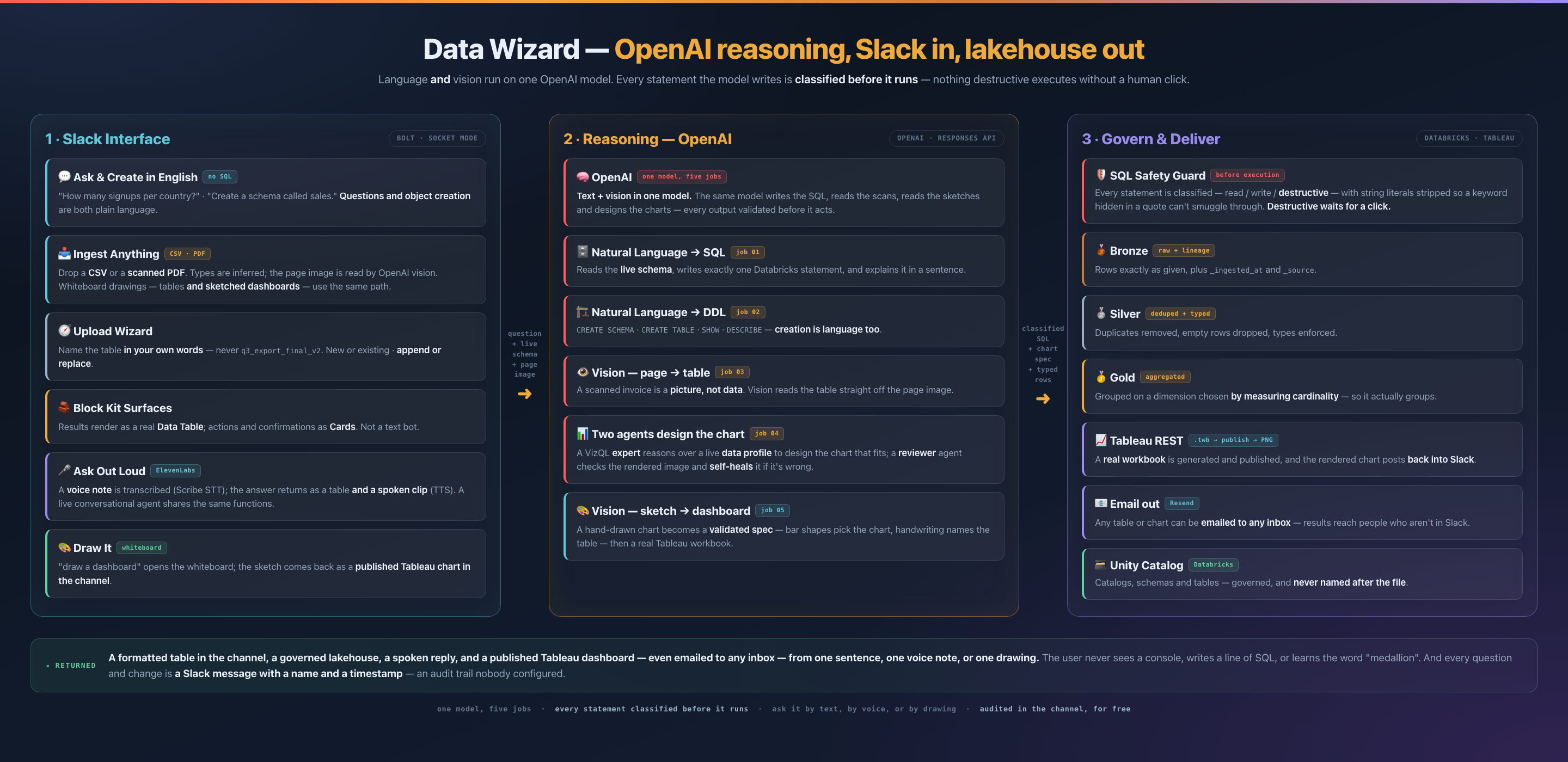
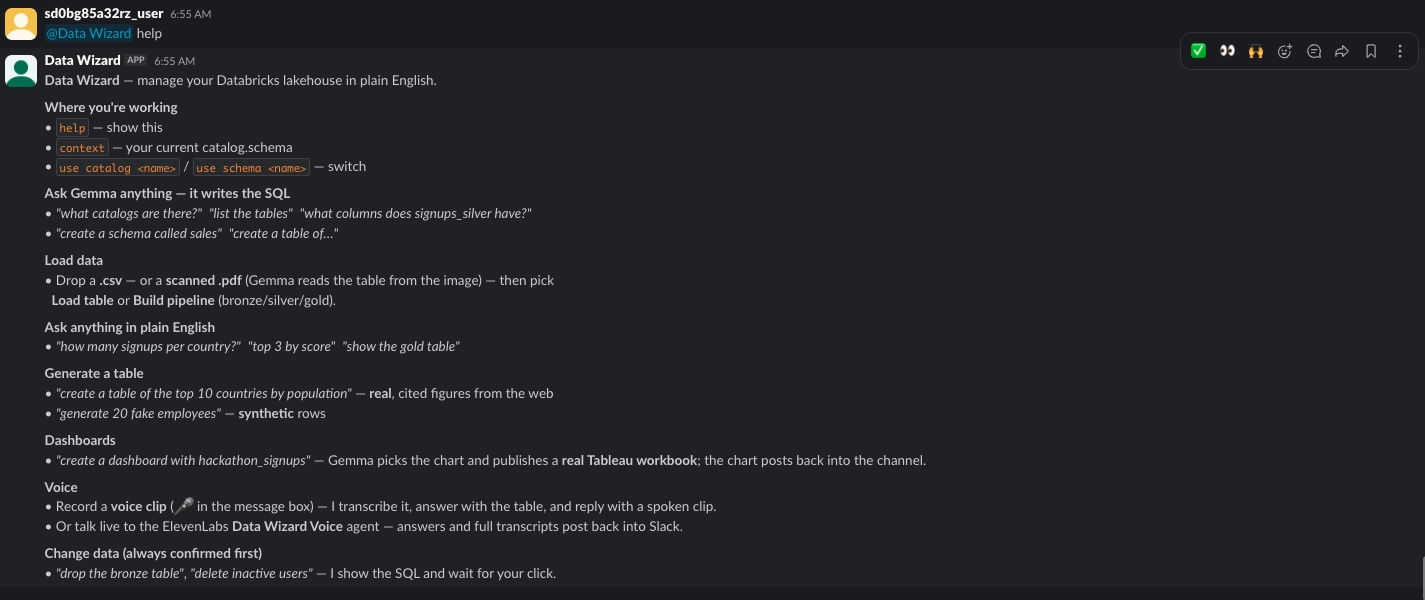
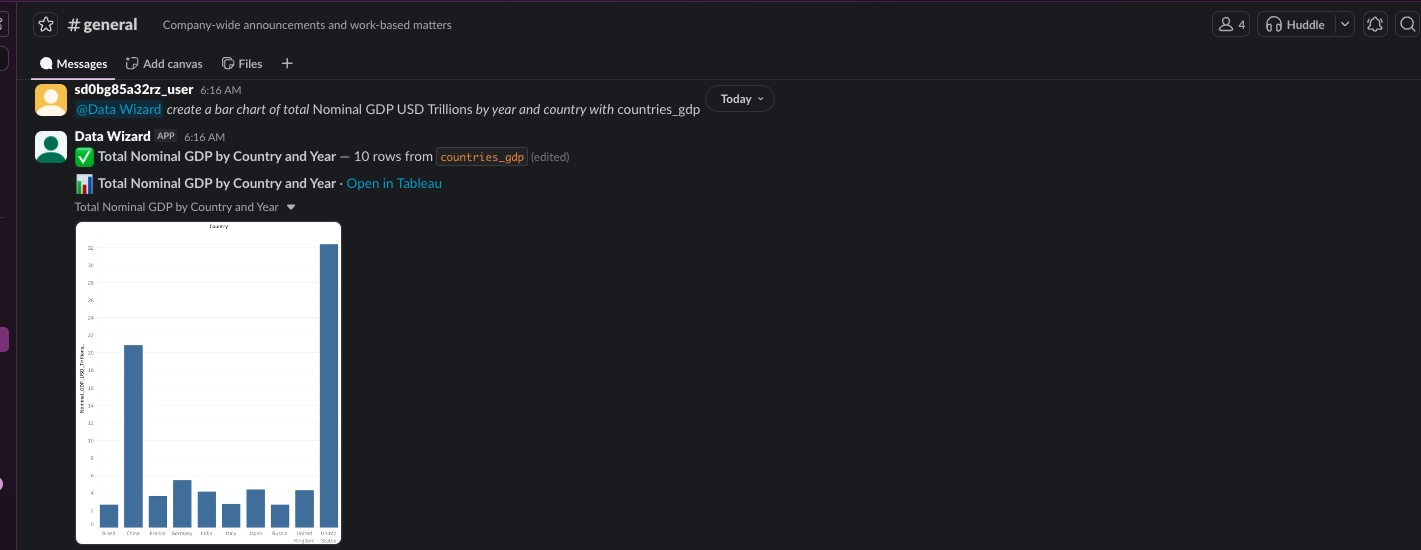
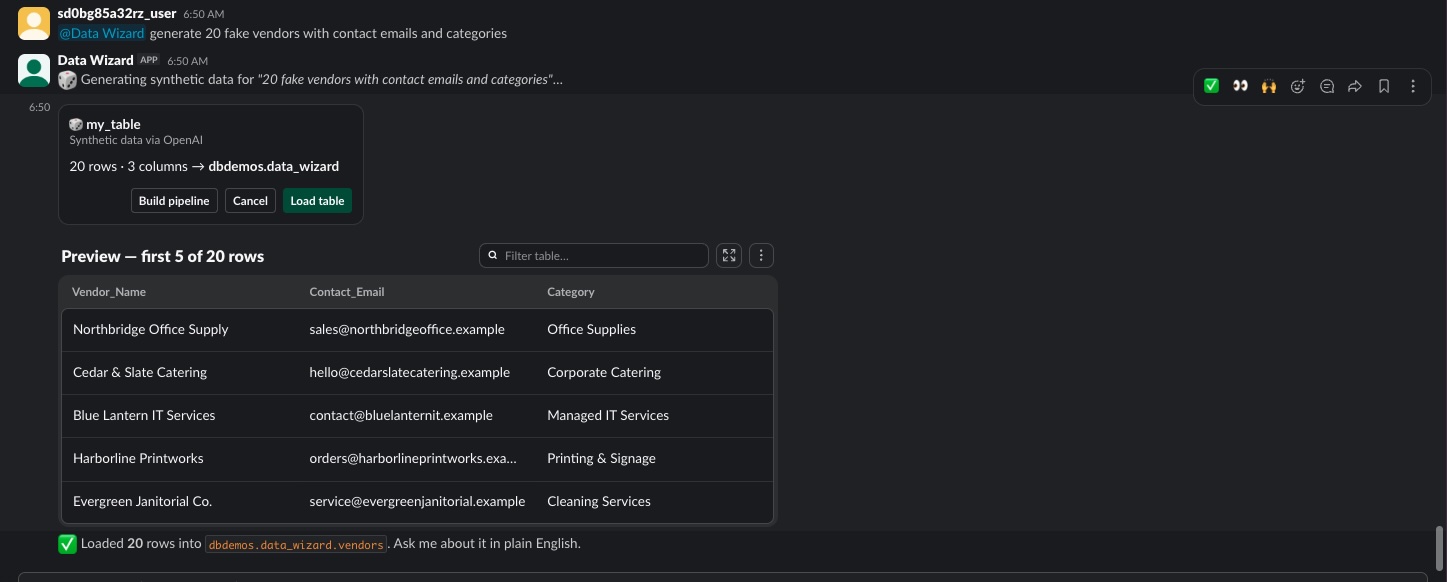
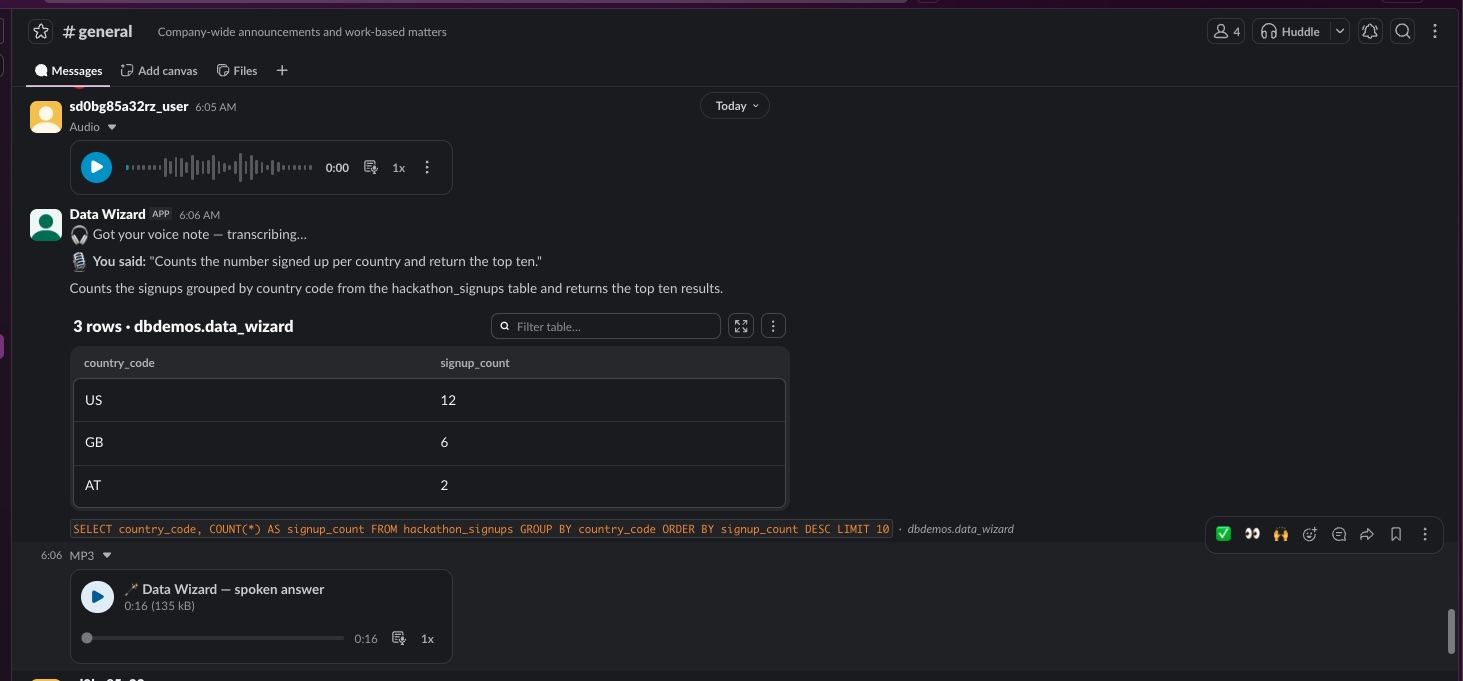
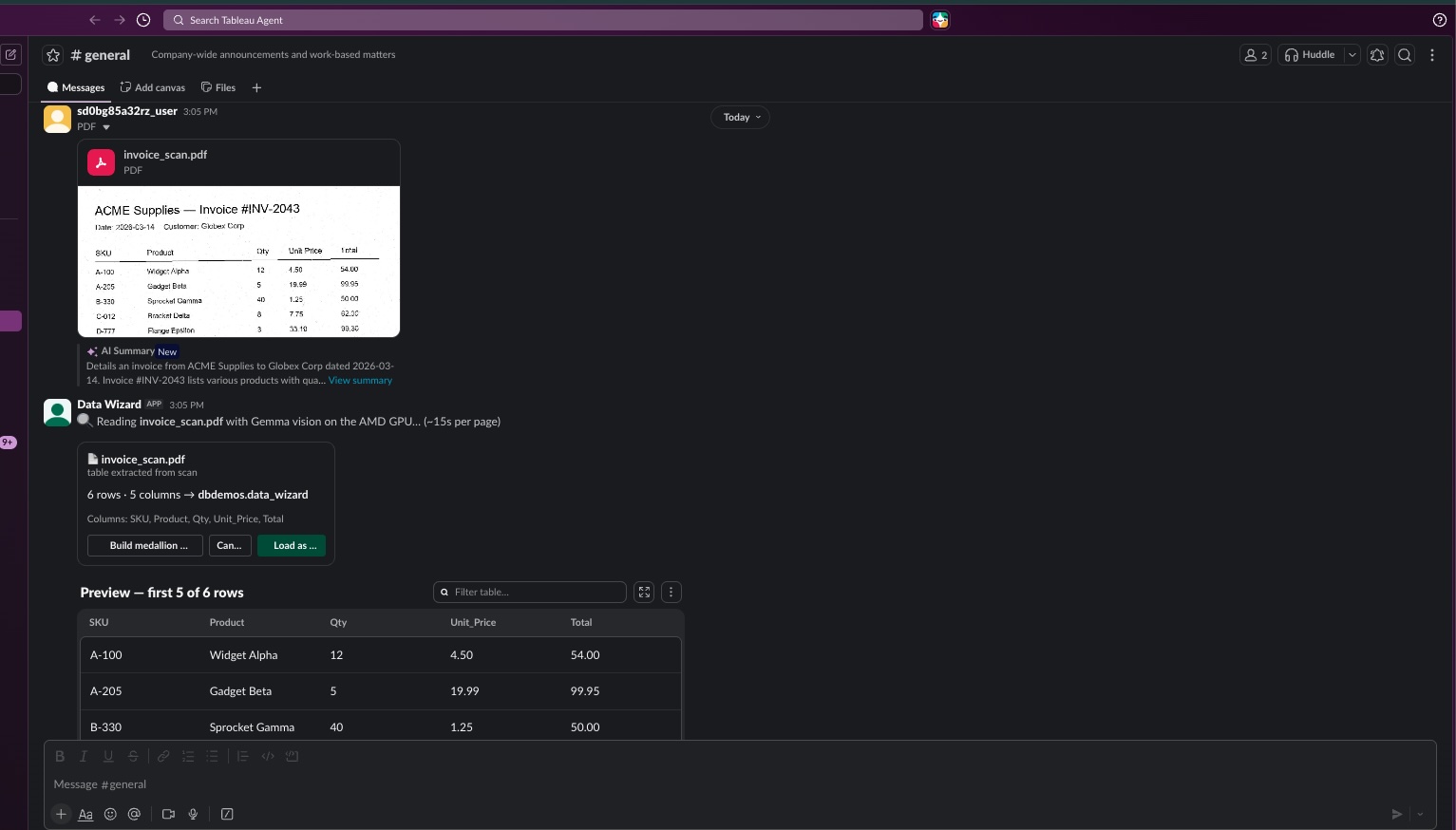
Data Wizard is a data team living inside Slack. In one channel you can: drop a CSV and get a typed table named in your own words; drop a scanned PDF and have OpenAI vision read the table off the page image; say "draw a table" or "draw a dashboard" and sketch it on a whiteboard — vision reads the drawing itself and, for dashboards, publishes a real Tableau workbook that posts back into the channel; ask anything in plain English and OpenAI writes and runs the SQL against Databricks; say "build a medallion pipeline" and get bronze/silver/gold with lineage; ask for "the top 10 countries by population" and get real, cited figures via Perplexity, or synthetic test rows via OpenAI; record a voice note and ElevenLabs transcribes it, answers with a table, and replies with a spoken clip. Every destructive statement is shown, explained, and waits for a human click — even when asked by voice.
How we built it
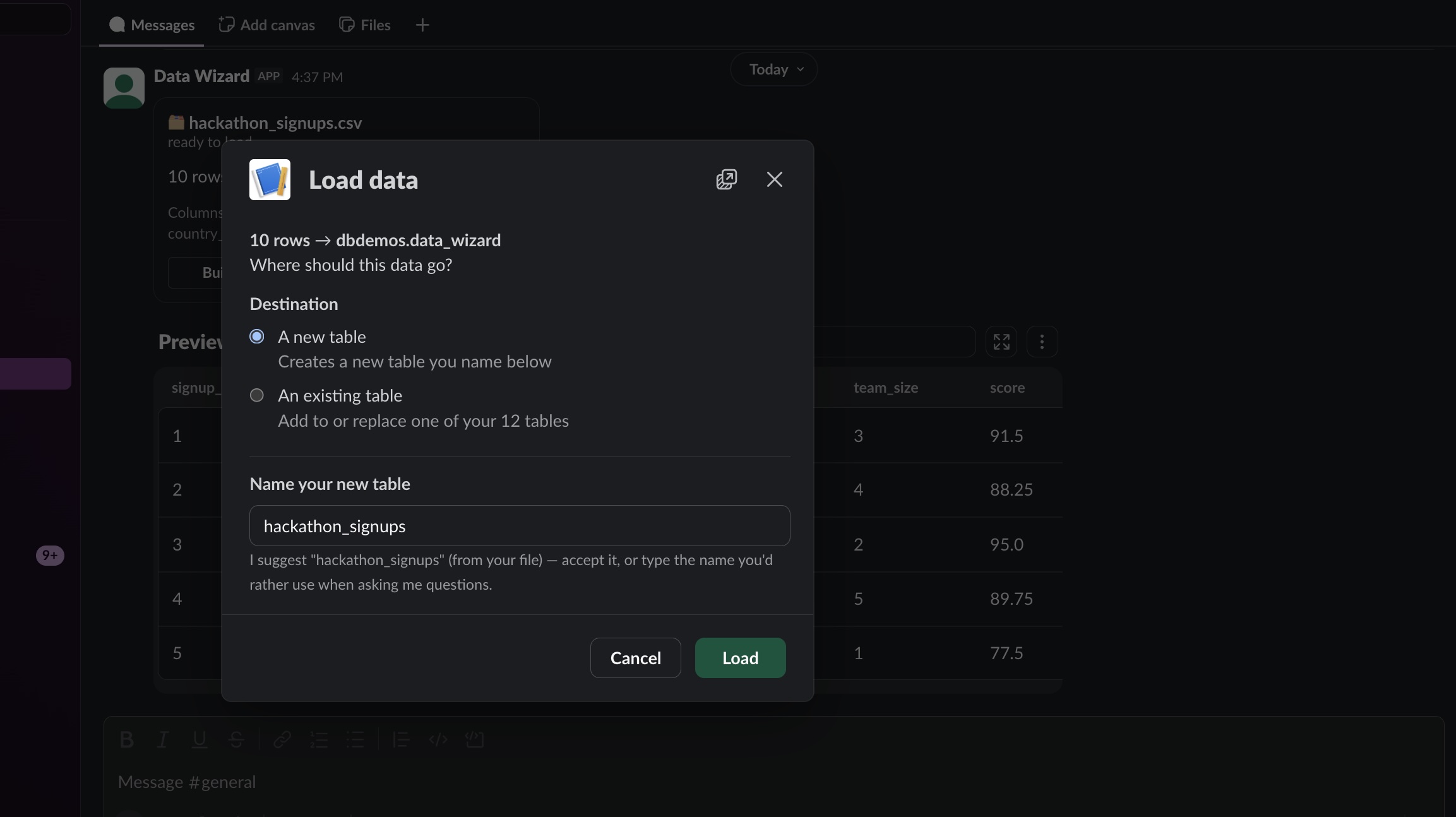
Slack is the frame everything hangs on. I built the app with Bolt for JavaScript in Socket Mode, and I leaned hard into real Slack surfaces instead of a text bot: the new Block Kit agent components — Data Table for results and Card for actions — with a classic-blocks fallback when a surface doesn't support them; modals for the "where does this data go?" decision (new table vs. existing, append vs. replace); events (file_shared, app_mention, message) as the entry points; and the Web API to post charts and spoken replies back into the channel. Around that Slack core: OpenAI (Responses API) does all reasoning and vision — NL→SQL, DDL, chart specs, scanned pages, whiteboard sketches; Databricks (Unity Catalog + serverless SQL warehouse) is the lakehouse; the Tableau REST API turns a generated .twb into a published workbook and a PNG rendered back into Slack; ElevenLabs covers voice in both directions (Scribe speech-to-text for voice notes, TTS for spoken replies, plus a conversational agent wired to the same query functions by webhook); Perplexity grounds real-data tables with citations; an MCP server exposes the same tools to Claude, Cursor and ChatGPT; and a small Express whiteboard app hosts the drawing canvas, because Slack can't — with the channel ID carried in the link so the finished chart comes home to the right conversation.
Challenges we ran into
Almost every hard problem was a Slack platform constraint that forced a better design. Slack has no <canvas> and no iframes — so drawing had to live in an external web app, and I made it feel native anyway: the bot posts a link button carrying the channel ID, and the result posts itself back into the thread of work. A trigger_id dies three seconds after a button click, but listing tables on a cold Databricks warehouse takes longer — so the modal opens instantly as a placeholder and fills itself in with views.update. My bot's own spoken-answer MP3s re-triggered file_shared and would have had it transcribing itself in an infinite loop — one guard on the bot's user ID fixed it. Slack's built-in voice-clip transcription is free but slow and sometimes absent, so I poll it briefly and fall back to ElevenLabs Scribe. And because Databricks has no per-statement read-only role, I built my own SQL safety classifier — it strips comments and string literals so a keyword smuggled inside a quote can't fool it, and it passes 26 adversarial cases.
Accomplishments that we're proud of
The sketch-to-dashboard flow, verified end-to-end: four wobbly hand-drawn bars and a table name in marker became a real, published Tableau workbook posted back into Slack — no SQL, no chart builder, no analytics vocabulary. Voice working in both directions inside Slack: a voice note in, a table plus a spoken clip out. The whole journey — file to lakehouse to dashboard — happening in four Slack messages, on real Block Kit surfaces that degrade gracefully. And a safety layer I'd genuinely trust in front of non-technical users: nothing destructive has ever executed without a click.
What we learned
Meet people on the surface they already have open — the best interface is the one nobody has to adopt. Slack's constraints are features in disguise: because every interaction is a message, I got an audit trail with names and timestamps for free, and because surfaces are declarative, I was forced into clean confirmation flows instead of hidden state. I learned that the model is the operator, not a feature — and that the moment reasoning is good enough, the remaining product work is trust: previews before loads, validation against live schemas, confirmation before destruction. And I learned the external-app-plus-post-back pattern that lets Slack apps do things Slack itself can't host.
What's next for Slack Data Wizard
Ship it to the Slack App Directory with OAuth so any workspace can install it in a click. Scheduled digests — "post the gold table to #leadership every Monday" — so answers arrive before the question. Per-channel memory of catalog and schema context, so teams keep their own workspace of tables. Richer sketch understanding: multi-chart dashboards from one drawing, and photos of physical whiteboards from a phone. And pilots with the users this was always for — clinics, billing offices, and small firms that have data, have Slack, and have never had a data team.

Log in or sign up for Devpost to join the conversation.