-
-
New Slack Actions Bot [ sab refers to slack-actions-bot ]
-
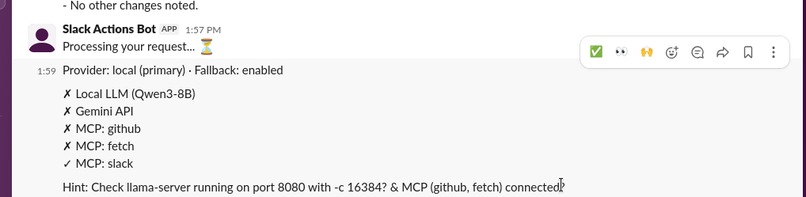
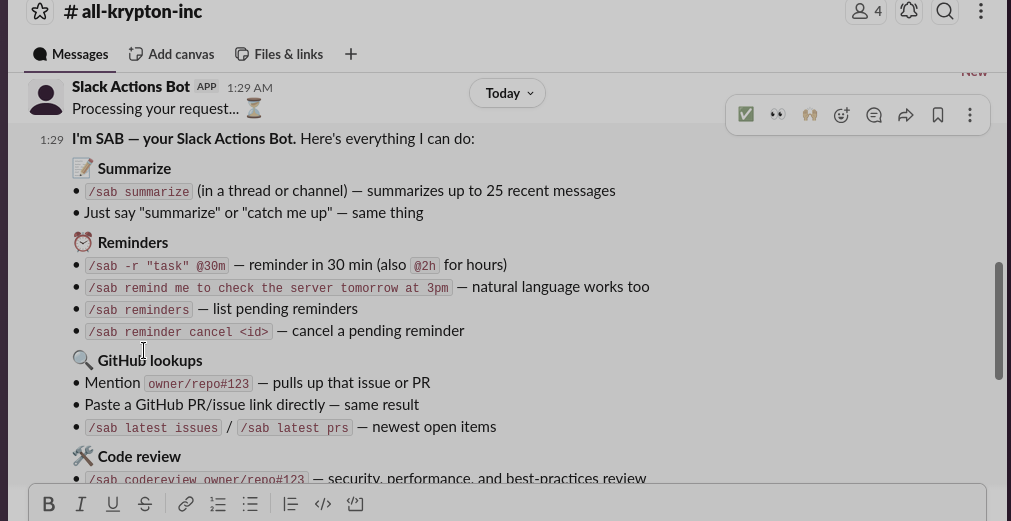
/sab test
-
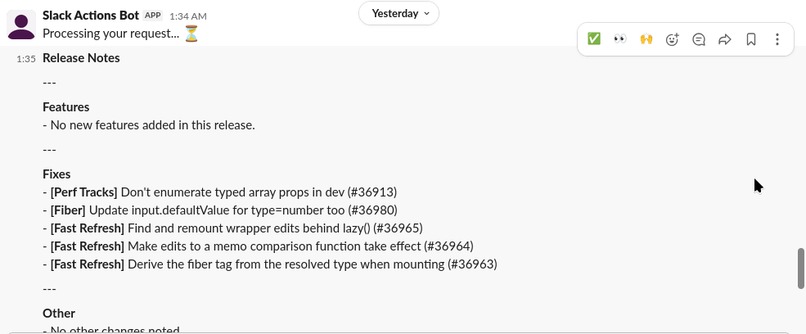
/sab release notes owner/repo
-
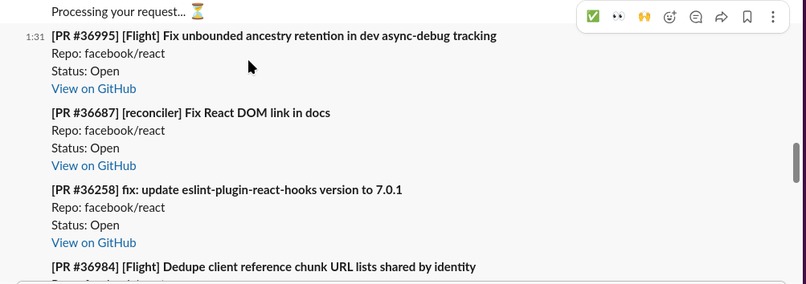
/sab latest prs
-

/sab -r "task" @30m
-
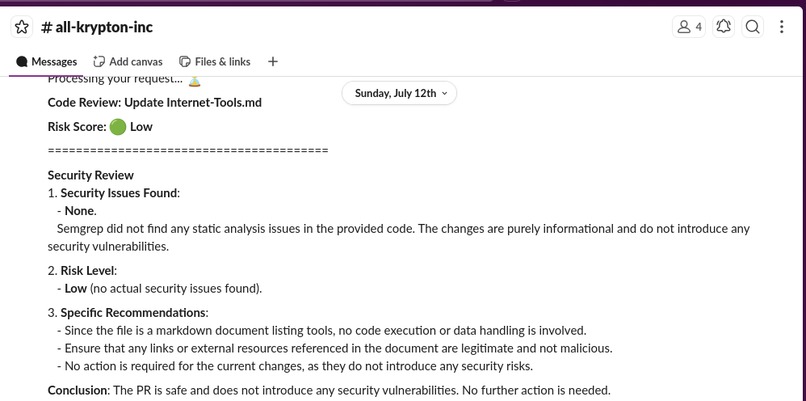
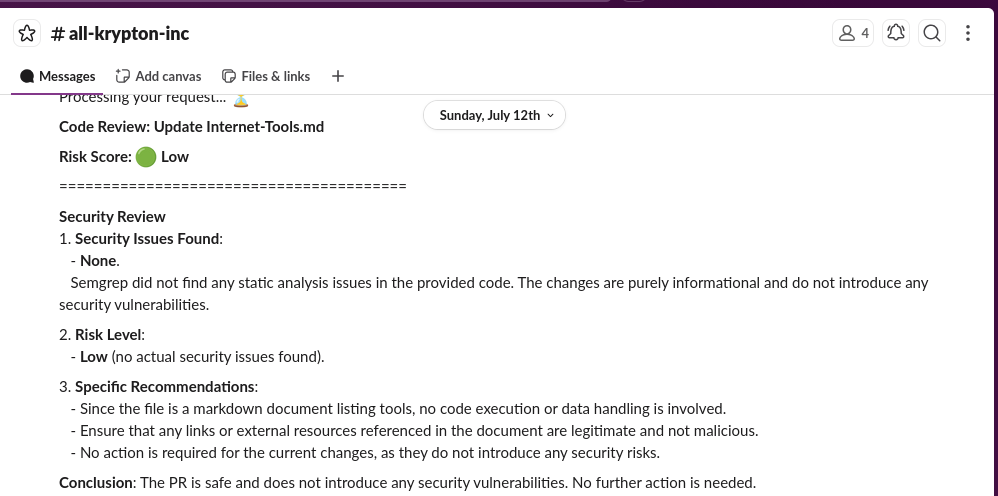
/sab codereview owner/repo#123
-
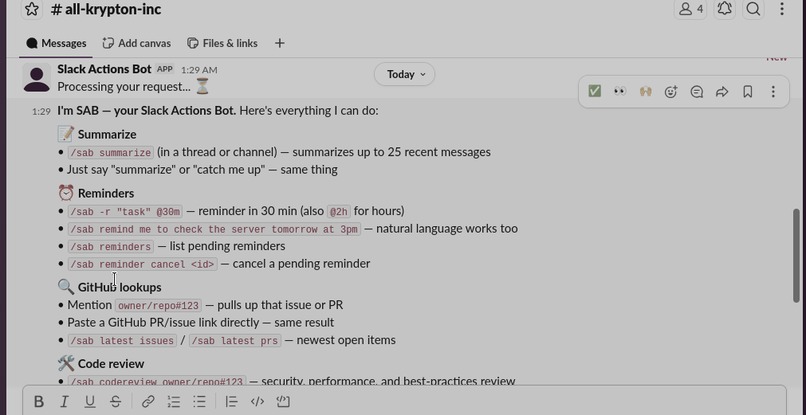
/sab or "what can you do" Static command list
-
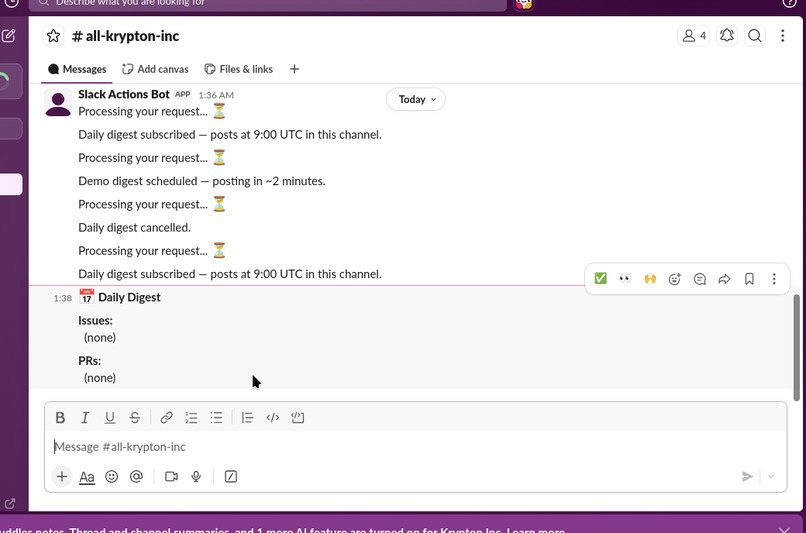
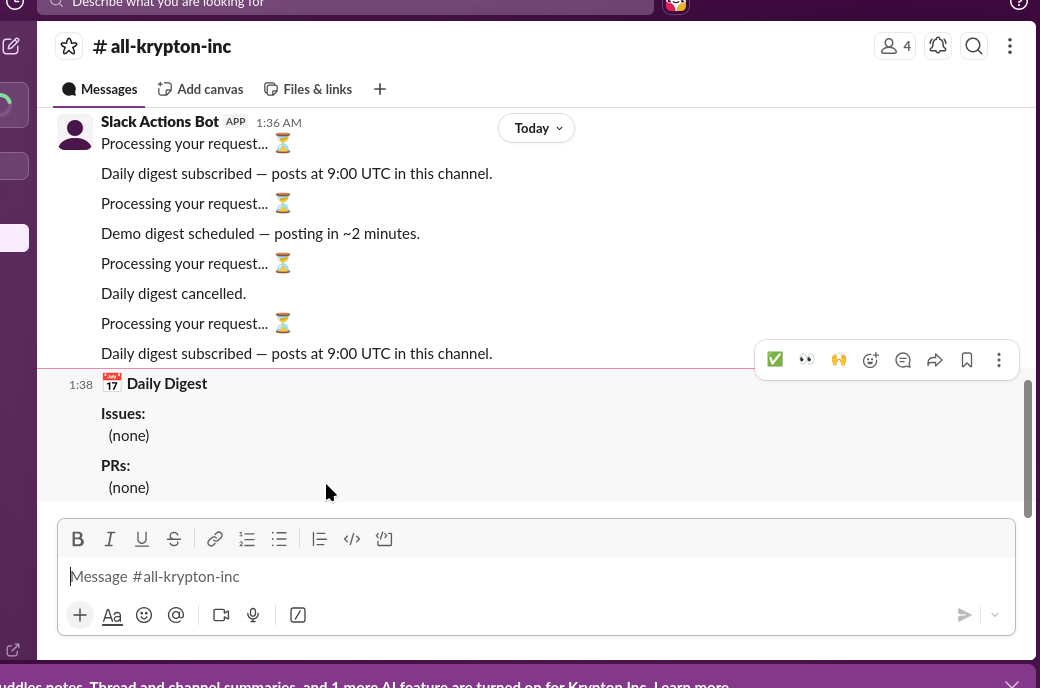
/sab digest subscribe , /sab digest demo and /sab digest unsubscribe
-
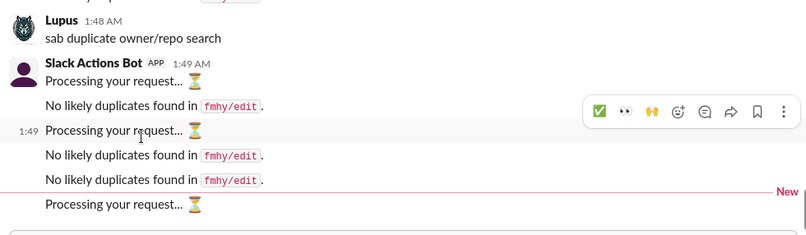
/sab release notes owner/repo

Inspiration
You already know that we see Slack bots everywhere, and they play an important role in organizations and among developers using the Slack platform. We wanted to create a Slack bot that is different from the existing options on the market. As you know, most Slack bots rely on Cloud AI for operation, but our Slack bot runs a local LLM through a Llama server, making it budget-friendly. One of the main benefits of using a self-hosted LLM is that your data remains in your hands and is private.
Our Slack bot also uses the Tavily API key for web searches, allowing it to provide accurate results and compete with frontier models. Additionally, our Slack bot is budget-friendly, privacy-conscious, easy to use, and requires minimal setup. You need to install Llama servers; if that's not possible, you can add a Gemini API key, which is free with a Google account, although we do not recommend that option. Furthermore, it utilizes the Tavily API key and installs dependencies that other Slack bots lack.
What It Does
Our Slack Advanced Actions Bot is a feature-rich Slack bot powered by a local Qwen3-8B LLM and Model Context Protocol (MCP) integration. Key features include:
Natural Language Summarization —
/sab summarize #channelproduces concise summaries using the LLM to generate the summary, grounded with anti-hallucination techniques.Smart Reminders —
/sab remind me to stand up in 30 minspersists across restarts via an SQLite server. You can list reminders using/sab reminders, which shows all pending reminders with IDs. You can even cancel unwanted pending reminders by using/sab reminder cancel <id>, which cancels the reminders by job ID.Code Review —
/sab codereview owner/repo#42runs an LLM response on the repo with a 3-agent parallel pipeline (Security, Performance, Best Practices) grounded by Semgrep static analysis. This can be useful for developers seeking insights into their projects, and it provides a PR Risk Score: 🔴 High / 🟡 Medium / 🟢 Low from Semgrep + LLM.Learning Paths —
/sab learn <topic>generates structured curricula with real resource URLs verified via Tavily search. The LLM generates the response using Tavily results, working as a 3-agent process: research → structure → resources.GitHub Integration —
/sab github owner/repofetches open issues and PRs with rate-limit tracking and public repo support (no token needed). A token is only required for private repos.Real-Time Workspace Search —
/sab search <query>utilizes Slack's Assistant RTS API for quickly finding something in a channel.Daily Digest —
/sab subscribefor automated daily summaries.
7.5 Digest Demo — /sab digest demo generates a preview digest in approximately 2 minutes.
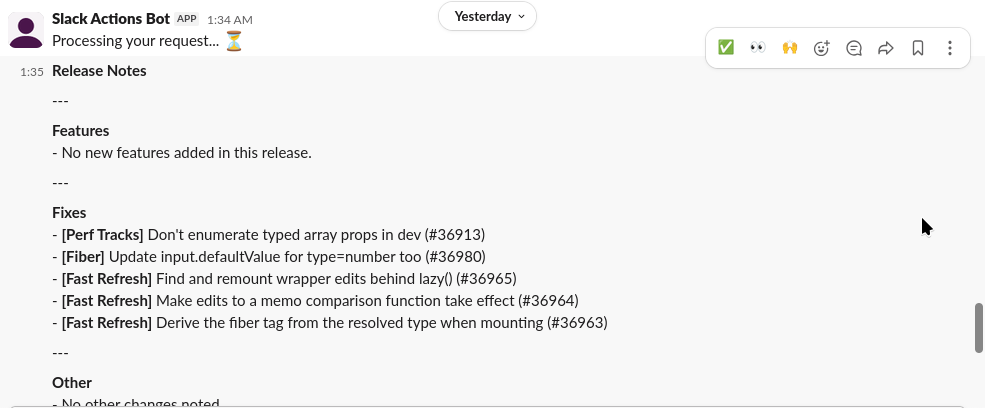
Release Notes —
/sab release_notes owner/repogroups merged PRs by type and generates notes from merged PRs using the LLM, providing a quick recap of the PRs.Duplicate Check —
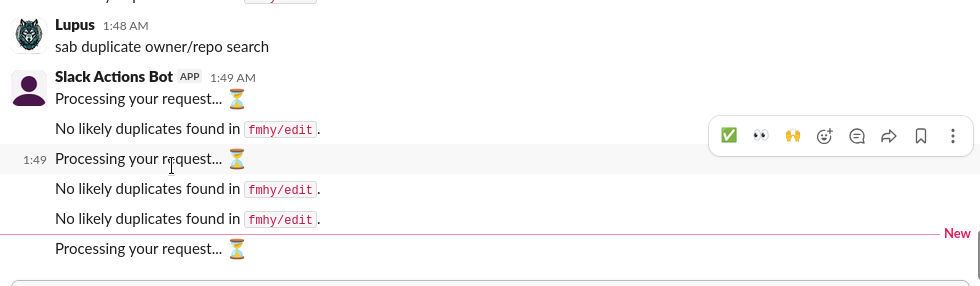
/sab duplicate_check owner/repoflags similar open issues, which can save users time when finding issues with similar titles.MCP Extensibility — Three MCP servers (GitHub, Fetch, and our custom Slack server) provide tool access and gracefully fall back to direct API calls if MCP is unavailable. This is unlikely, but we added this feature for safety, ensuring that user work doesn't get interrupted during rush hours or heavy workloads.
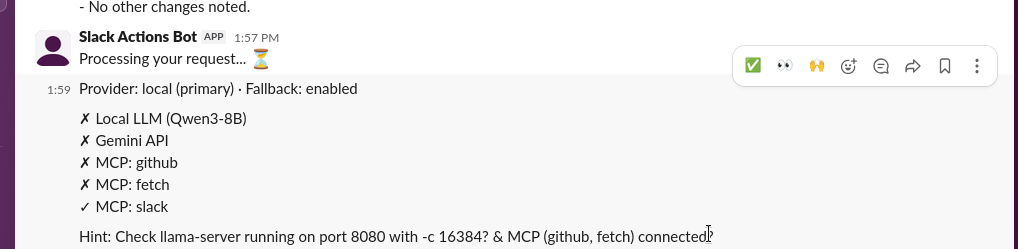
System Diagnostics — By typing
/sab test, it checks the LLM provider and all 3 MCP sessions to see if the MCP servers are online. It even checks if the LLM is running, which is useful for troubleshooting.Latest Issues — By typing
/sab latest issues, it uses the GitHub MCP server to generate a list of the newest open issues across all repos, including private ones if the user has set a GitHub token. This helps users save time by showing them in the Slack app instead of having to open GitHub.
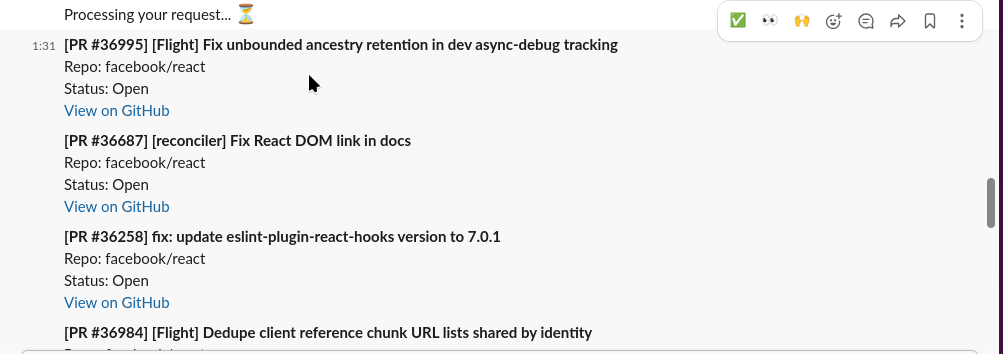
12.5 Latest PRs — By typing /sab latest prs, it uses the GitHub MCP server to generate a list of the newest open PRs across all repos, including private ones if the user has set a GitHub token. This helps users save time by showing them in the Slack app instead of having to open GitHub.
How We Built It
We built the Slack Advanced Actions Bot using a modern, agent-based architecture centered around LangGraph, which orchestrates a 26-node workflow with intent classification, conditional routing, and parallel multi-agent execution for complex tasks such as code reviews. The bot runs Qwen3-8B locally through the llama.cpp server (llama-server), utilizing a quantized Q4_K_M.gguf model with --parallel 4 for concurrent inference. By running it locally, we eliminate API costs while keeping all data on the local machine. To improve reliability, the bot supports an OpenAI-compatible remote LLM fallback with automatic failover when the local model is unavailable, ensuring that our users' workflows do not stop and continue functioning seamlessly.
For external tool integration, we use the Model Context Protocol (MCP) with three MCP servers (GitHub, Fetch, and a custom Slack server), managed through an AsyncExitStack, a dedicated background event loop, a thread-safe synchronous facade, and cached tool discovery using TTLCache. Slack integration is powered by Slack Bolt running in Socket Mode, with background execution via ThreadPoolExecutor, event deduplication, retry-aware rate-limit handling, and support for Slack Real-Time Search (RTS) using Slack's official tools.
Code review quality is enhanced using Semgrep with the pinned p/security-audit ruleset, providing grounded static analysis without network lookups before passing findings to specialized LLM review agents. Persistent reminders and scheduled GitHub digests are implemented using SQLite and APScheduler, while the GitHub REST API provides repository, issue, and pull request data with intelligent caching and rate-limit awareness. For learning workflows, the bot integrates Tavily Search using a Tavily API key, which has a free tier, to retrieve verified web resources that complement GitHub documentation. Additional libraries such as dateparser enable natural language reminder scheduling, difflib provides typo-tolerant command matching, and Pydantic ensures type-safe state management throughout the LangGraph workflow.
Tech Stack
- LangGraph — StateGraph workflow orchestration with conditional routing, fan-out/fan-in execution, and multi-agent coordination.
- Slack Bolt — Socket Mode event handling, background processing, deduplication, and Slack Real-Time Search integration.
- llama.cpp (
llama-server) — Local Qwen3-8B (Q4_K_M.gguf) inference with concurrent execution (--parallel 4). - Remote LLM (OpenAI-compatible) — Automatic fallback for improved reliability when the local model is unavailable.
- Model Context Protocol (MCP) — GitHub, Fetch, and custom Slack MCP servers with thread-safe tool access.
- GitHub REST API — Repository, issue, and pull request operations with TTL caching and rate-limit handling.
- Semgrep — Grounded security-focused static analysis using the pinned
p/security-auditruleset. - SQLite + APScheduler — Persistent reminders and scheduled daily GitHub digests.
- Tavily Search API — Verified real-time web search for learning resources.
- Slack Real-Time Search (RTS) — Workspace search with contextual message retrieval.
- dateparser — Natural language date and time parsing.
- difflib — Typo-tolerant command matching and intent correction.
- Pydantic — Type-safe workflow state models.
- cachetools (TTLCache) — Intelligent caching for GitHub repositories and MCP tool discovery.
- ThreadPoolExecutor & threading — Background execution to satisfy Slack's 3-second acknowledgment requirement while running long-running LLM tasks. ## Challenges We Encountered
During the development of this project, we ran into several problems that we would like to mention below:
Choosing the Right LLM Model — During development, we had a hard time figuring out which model to choose for our bot. Initially, we decided to use a cloud model API key, but we realized that the API key would get exhausted during the development and testing phases and would not be a suitable candidate. Therefore, we opted for a great open-source Hugging Face model to run locally. However, we also faced challenges in selecting a Hugging Face model due to the vast variety of models and options available to us. Many models offered great speed and generation time but lacked accuracy and correctness, while others had excellent accuracy but took longer to generate responses. The best candidate was Qwen3-8B, which is fast, has great speed, excels at summarization, and is one of the few models that can run stably on our hardware during development .
Context Window Starvation — Running the llama-server with -c 4096 caused HTTP 400 errors on long code review prompts. We solved this with prompt truncation (3000 character cap, 5 files max) and a boot-time context size check. We faced this issue many times during development, and now the context size is set to 16384 for the best results.
Thread-Unsafe Globals — Module-level variables (_last_fetch_via_mcp, _last_semgrep_findings) were corrupted under concurrent load. We refactored the code to return values threaded through BotState.
MCP Cold-Start Latency — The first MCP server connection took 60-120 seconds. This was solved with background daemon thread initialization and TTLCache pre-warming, which we believe will save a lot of time when we restart the servers after recent changes.
LLM 503 at Boot — The Qwen3 model loads asynchronously. We added automatic retry with a 3-second backoff to avoid being closed out in one attempt.
Slack API Rate Limits — Non-Marketplace apps are capped at approximately 15 messages per request. We built respect for the Retry-After header and implemented over-fetch buffering, which was one of the most challenging difficulties we faced.
Semgrep Auto-Download Stalls — The command
--config=autowas blocked on the network. We pinned it to p/security-audit for offline reliability, ensuring it even works offline.MCP Session Corruption — The eviction logic now runs health checks before disconnecting to prevent session corruption.
Accomplishments We're Proud Of
MCP Server Integration — We built a custom Slack MCP server and connected three MCP providers (GitHub, Fetch, Slack) with a graceful fallback to direct API calls when MCP is unavailable. This was the most challenging task we implemented correctly, and it works flawlessly.
3-Agent Parallel Code Review — Our fan-out architecture with Semgrep grounding produces risk-scored reviews (🔴/🟡/🟢) in seconds, allowing users to know which issues to focus on first. We are saving significant time with scored reviews instead of having users figure it out by reading everything.
237 Tests Passing — We created a comprehensive unit and end-to-end test suite covering every feature, including edge cases like concurrent deduplication, LLM fallback chains, and MCP timeout handling. This extensive testing helped us identify many issues and determine which features didn't work.
Zero Cloud AI Dependency — All LLM reasoning runs locally; the bot operates fully offline after the initial setup. We added a Gemini API key as a fallback for users who prefer not to set up a local LLM server.
25+ Bugs Fixed — We addressed thread safety, rate-limit resilience, input sanitization, and error handling across 12 files using end-to-end tests and unit tests, which helped us find those bugs.
Production-Ready Architecture — We designed the entire project to be user-friendly, budget-conscious, and privacy-friendly. We also implemented SQLite persistence, background initialization, graceful degradation, and comprehensive error handling to provide users with the best experience possible.
What We Learned
During the project, we learned many important lessons, which we would like to list below:
Unit Tests and End-to-End Tests Are Important and Powerful — During development, one of our developers was reading Software Mistakes and Tradeoffs: How to Make Good by Tomasz Lelek and Jon Skeet, where they learned about unit tests and end-to-end tests. This knowledge helped us understand the importance of testing. Throughout development, we conducted numerous unit tests and end-to-end tests, which helped us identify major bugs and issues, as well as minor ones. This significantly improved our bot, and we would like to thank the authors of Software Mistakes and Tradeoffs: How to Make Good. Without them, we would have had a hard time finding bugs and issues.
MCP Is Powerful but Fragile — Cold-start latency, session corruption, and asynchronous event loop management require careful engineering. We had a challenging time implementing MCP servers and creating our custom Slack server, but we learned many valuable lessons about MCP servers during this project.
Local LLMs Are Viable for Production Bots — When you design prompts around their constraints (context window, no cloud fallback), local LLMs can be powerful if you choose the correct model, yielding great results.
Thread Safety in Python Requires Discipline — Module-level globals seem harmless until ThreadPoolExecutor enters the picture. This was also one of the important lessons we learned.
Semgrep's Pinned Rulesets Are Dramatically Faster — Using
--config=autofor CI/hackathon use cases is significantly slower. Learning this could help us in future projects.
What's Next for the Slack Advanced Actions Bot
Here are our future plans for our Slack Advanced Actions Bot:
Add more tools and features to enhance our Slack Advanced Actions Bot.
Expand the MCP server ecosystem to include more integrations, such as databases, calendars, and Jira.
Add conversation memory across sessions so the bot can remember past messages and conversations.
Deploy to a dedicated server with a persistent llama-server. This would likely run on a VPS and could be a paid feature for premium users, generating a small income source for us from this project.
Open-source the custom Slack MCP server for the community so more users can utilize our custom MCP server without facing difficulties in creating their own and encountering similar issues.


Log in or sign up for Devpost to join the conversation.