-
-
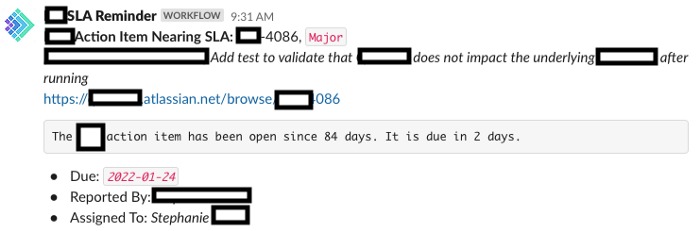
Slack SLA Message
Inspiration
Within my team and across the engineering organization, we have SLA’s to meet to stay on top of resolving customer issues, security vulnerabilities, taking action items to prevent incidents from happening in the future, etc…
It’s definitely not straightforward to stay on top of those SLA’s, especially since the issues come at different points and have their own SLA’s, ranging from one day to 90 days. The standard process is to surface them in reports or weekly emails. This requires us to stay proactive and look at the details to make sure nothing slips through.
This is where Slack alert messages come in handy, as they inform you what you need to know without actively looking. For it to be effective, the alert message in Slack should have a very clear call to action and it should not be noisy.
What it does
It’s a simple Jira + Slack integration that will help you stay on top of SLA's with minimal effort.
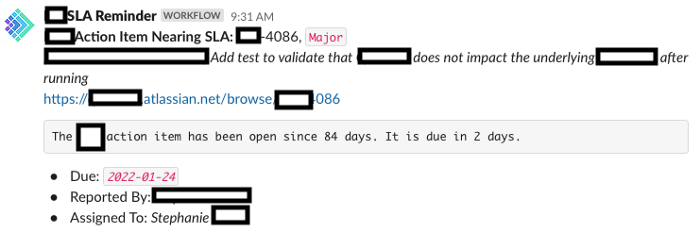
It automates away the act of worrying about SLA's by sending your team a Slack message for any item nearing SLA, so you or your team can tag each other and respond with next steps on how you will meet this SLA.
How we built it
Using both Jira Automations and Slack Workflow builder.
First, you need to configure the schedule and Jira query to find the needle in the haystack of issues using Jira automations.
Then, using Slack's workflow builder, you create a new workflow that starts with a webhook, and you specify all the parameters you need to display in the Slack alert message.
Finally, you take the webhook Url and pass all the necessary parameters from Jira.
Challenges we ran into
Challenge 1
Jira out of the box integration to send messages to Slack requires Jira admin permissions. Within an organization with thousands of people, it’s not possible for most people to have that permission, which makes the feature un-usable. As a result, to build that integration, you need to be familiar with forming web requests and also use your creativity to connect the dots. It’s very unlikely that folks would “discover” those capabilities between the Jira and Slack systems on their own.
Challenge 2
If you want to build something to last, you need to make sure it’s accessible to others on your team. Unfortunately, you cannot manage permissions and give others access to your Slack Workflow. Say you leave the company and your account gets de-provisioned, the team would lose the value you’ve created for them. That’s why steps like this need to be documented and the workflow builder exported in a known place so you could easily hand off to others. The other catch is that you also don’t get to collaborate with others on it, so you become the bottleneck making the changes on the Slack side of things (luckily, I did not need to change it yet because it is very reusable).
Also, in the future, if we want to introduce new types of messages, to empower others on the team to continue to add value on top, they’d have to create their own workflows, which in the long run, increases the chances that parts of the solution are lost.
A recipe for tribal knowledge if you don’t put in the effort to fill the gap.
Challenge 3
This solution does not scale beyond a single team. The same process needs to be followed by each team. Luckily, it’s working for us because the steps have been communicated and people see value in the solution and are applying it. Ideally, you’d have an easy way to to just point to the Jira project and Slack channel, then reuse the whole workflow (from Jira to Slack) across all teams, so it’s a click of a button away rather than a 1 hour process.
Challenge 4
Slack Workflow builder doesn’t support formatted Slack text messages (Markdown) that get passed directly into a single variable called “message”. As a result, you’ll need to do all the formatting manually and pass everything you want to format in the message as its own variable. This makes the message formatting a bit more static and requires a bit more extra effort creating the workflow at the beginning.
I don’t see a reason why this won’t be supported in the Workflow builder given that it’s supported in the Slack APIs.
Accomplishments that we're proud of
It works!
As simple as this looks, I've applied this on my team and it's tremendously helped us stay consistently on top of SLA's and heavily reduced the collective cognitive load in our organization for keeping track of SLA's.
What we learned
Knowledge is NOT power, but relevant, concise, timely and actionable knowledge IS.
What's next for SLA Monitor
Although this works, it’s not very scalable. Whoever applies it on their team, they need to spend those initial 1-2 hours to set it up. Ideally, this would be a simple app that people could enable for their team channel and Jira project with a few clicks.


Log in or sign up for Devpost to join the conversation.