-
-
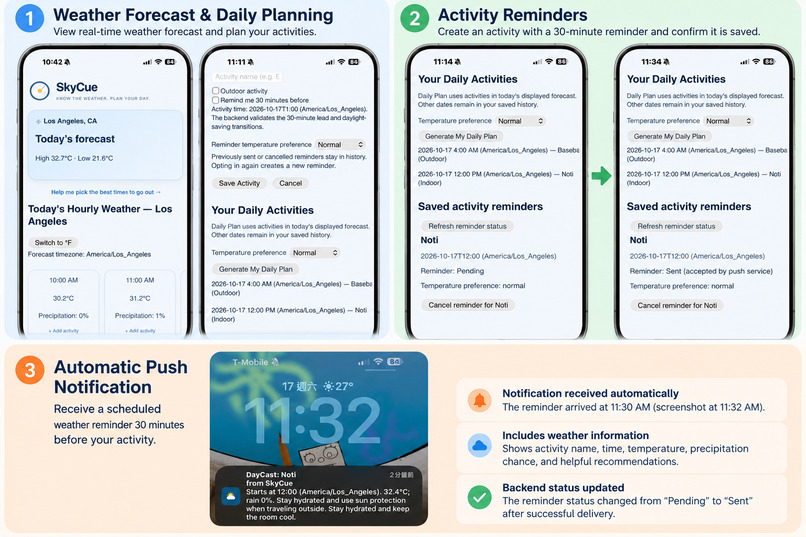
SkyCue helps you plan smarter with real-time weather forecasts, personalized daily plans, and automatic weather-based activity reminders.
-
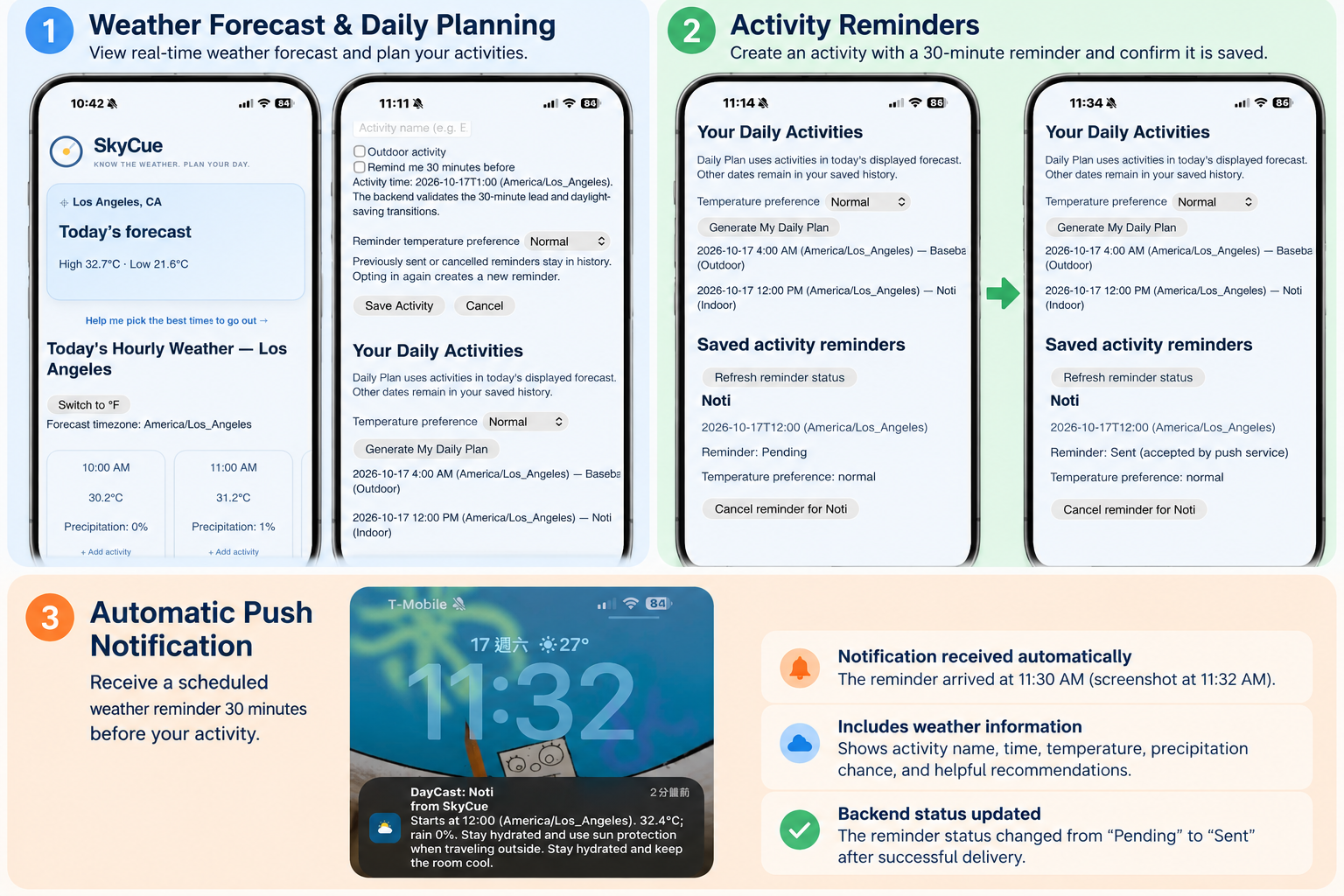
SkyCue — Know the Weather. Plan Your Day.
n
Inspiration
When we first moved to California as international students, one thing that surprised us was how much the temperature could change throughout the day. We would leave home in the morning feeling cold, only to find ourselves sweating by the afternoon.
On top of that, we were used to Celsius, so seeing temperatures in Fahrenheit made it even harder to figure out what to wear or how to prepare for the day.
We realized that checking the weather wasn't always enough. Even when we knew the temperature, we still had to figure out how it would affect our plans.
That's what inspired us to build SkyCue, a personal weather assistant that connects the forecast with your daily activities.
We wanted to create something simple that could answer one question:
"Given today's weather and my plans, what should I prepare for?"
What It Does
SkyCue is a mobile-friendly Progressive Web App (PWA) that helps users turn weather forecasts into practical, personalized advice based on their daily activities and comfort preferences.
Users can explore an hourly weather timeline, switch between Celsius and Fahrenheit, and add activities to specific time slots.
By identifying whether an activity is indoors or outdoors and setting their personal temperature preferences, users can receive recommendations tailored to their plans and comfort levels.
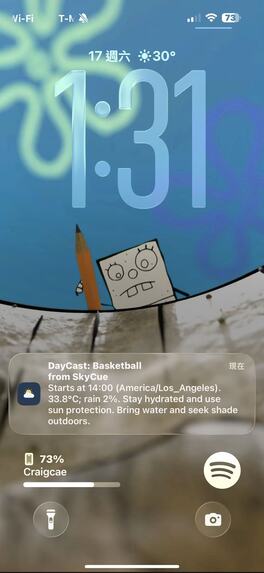
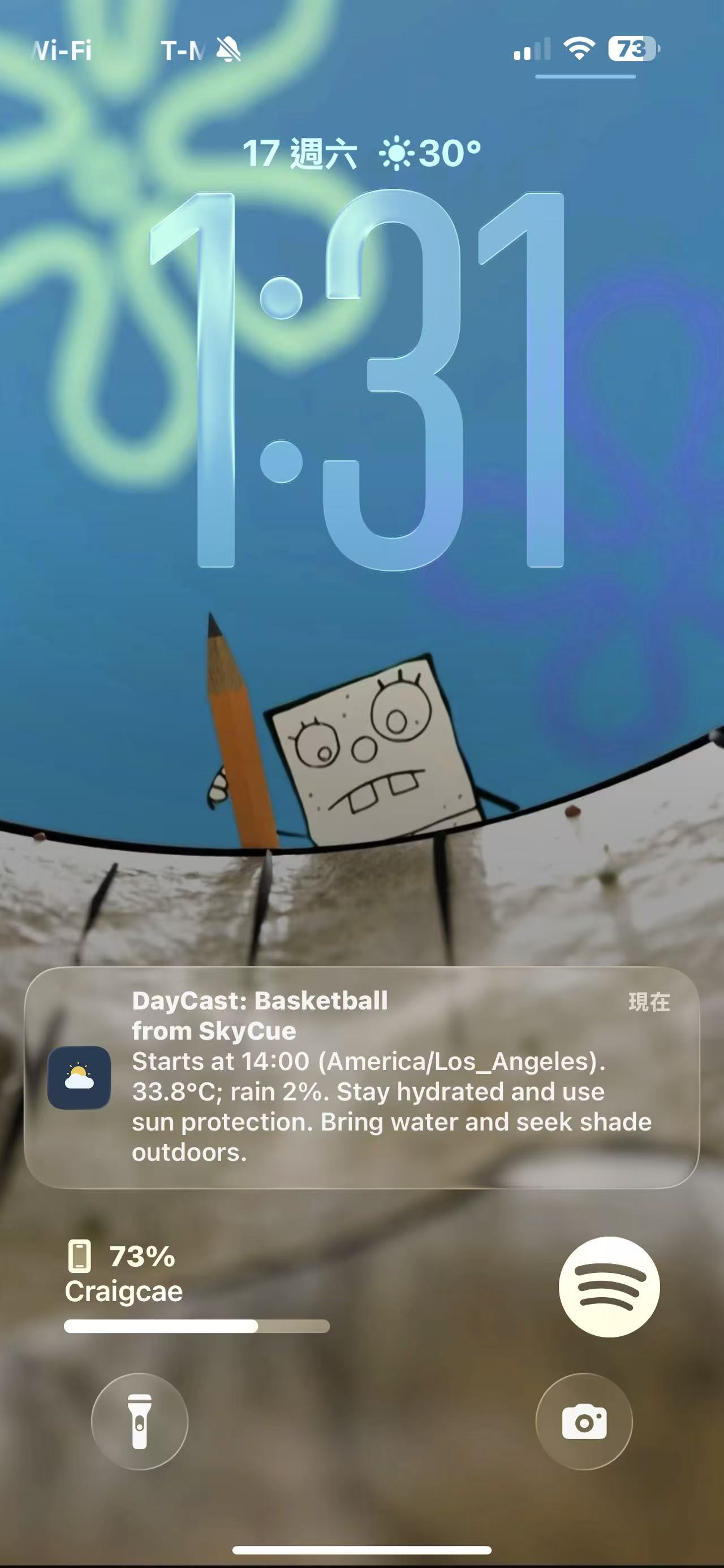
For example, someone planning to play basketball outdoors on a hot afternoon might receive advice to bring water and prepare for the sun. Someone who is especially sensitive to cold might receive different recommendations for an outdoor morning activity.
SkyCue also supports mobile push notification subscriptions, activity reminder settings, and test notifications. We have implemented a scheduling system designed to send weather-aware reminders before upcoming activities.
Traditional weather apps tell you what the weather will be like. SkyCue helps you prepare for what you actually plan to do.
How We Built It
We built SkyCue using React, JavaScript, and Vite for the frontend, with Python and FastAPI powering the backend.
We designed the application as a Progressive Web App using a Service Worker to support a more app-like experience on mobile devices.
For weather data, we integrated the Open-Meteo API, which provides hourly forecasts that our backend processes and connects to user activities through REST API endpoints.
Our recommendation system uses rule-based logic to generate practical suggestions based on forecast conditions, scheduled activities, and personal comfort preferences.
We used PostgreSQL to manage push subscriptions and activity reminders, alongside SQLite for the original task data.
For notifications, we implemented the Web Push API and VAPID, allowing supported devices to subscribe to push notifications. We also developed a GitHub Actions scheduling workflow and an alternative HTTP-triggered approach, giving us flexible options for running notification checks.
We deployed the frontend on Vercel and the backend on Render, using GitHub for version control and team collaboration.
Our four-person team collaborated on frontend and backend development, integration, testing, and product design.
Challenges We Faced
1. Notification Scheduling and Free-Tier Limitations
One of our biggest challenges was building an automatic notification system using free cloud services.
Initially, we considered using a background worker on Render, but its free-tier limitations made this approach impractical.
To overcome this, we developed a GitHub Actions scheduling workflow and an alternative HTTP-triggered approach, giving us flexible options for running notification checks without a continuously running background worker.
Instead of requiring a continuously running server, our scheduling system is designed to check for upcoming activities every five minutes.
We also implemented a 15-minute catch-up window to account for delayed executions, along with safeguards to prevent duplicate notifications.
Although we successfully tested mobile push notifications, verifying consistent automatic delivery in the deployed environment remains an important final step.
This challenge taught us how to balance reliability, efficiency, and cost while working within real-world cloud service limitations.
2. Improving the Weather Timeline Experience
Another challenge was making weather information intuitive and easy to navigate.
Initially, our hourly weather timeline did not automatically start from the current time. This meant users had to scroll through earlier hours to find the forecast they actually needed.
We improved the frontend by adjusting the timeline to begin at the current hour based on the selected location's local time.
For example, if someone is viewing the forecast for Los Angeles at 3 PM Los Angeles time, the timeline starts at 3 PM instead of midnight.
This improvement made the application more convenient and helped users access relevant weather information more quickly.
Accomplishments That We're Proud Of
We're proud that our four-person team turned an everyday problem into a working full-stack application within the limited time of a hackathon.
We successfully connected hourly weather forecasts with user-planned activities, personal comfort preferences, and practical recommendations in a mobile-friendly interface.
We're especially proud of implementing mobile push notification functionality, developing a cost-conscious scheduling solution, and improving the weather timeline based on usability problems we discovered during development.
Most importantly, we built something that goes beyond simply displaying weather information. We wanted to make weather forecasts feel personal, useful, and connected to real everyday decisions.
What We Learned
Throughout this hackathon, we gained hands-on experience with React, FastAPI, REST APIs, databases, cloud deployment, Progressive Web Apps, and Web Push notifications.
We learned how frontend and backend systems communicate, how weather data can be translated into personalized recommendations, and how cloud service limitations influence technical decisions.
We also discovered that building notifications involves more than sending a message. It requires careful consideration of scheduling, delayed execution, duplicate prevention, and device compatibility.
Beyond technical skills, we learned how much small interface improvements can affect the overall user experience.
Working together under time pressure taught us how to prioritize features, communicate across different responsibilities, and turn an initial idea into a functioning prototype.
What's Next for SkyCue
Our biggest next step is calendar integration. Instead of manually entering every activity, users could connect their calendars so SkyCue can automatically understand their upcoming plans and provide weather-based reminders.
For example, if someone has an outdoor basketball game scheduled for 4 PM, SkyCue could check the forecast and remind them to bring water, prepare for the sun, or adjust their plans if the weather changes.
We also hope to make our notifications more reliable and our recommendations more personalized.
Ultimately, we want SkyCue to become a daily companion that helps people prepare for their plans without having to constantly check the weather.
SkyCue — Know the weather. Plan your day.
Built With
- css
- fastapi
- github
- html
- javascript
- neon
- postgresql
- progressive-web-app-(pwa)
- python
- react
- render
- vercel
- vite
- web-push-api

Log in or sign up for Devpost to join the conversation.