-
-

Skin Moment: pick the moment you are in (before I buy, after a breakout, is it working?), add one photo, get your measured skin and plan
-
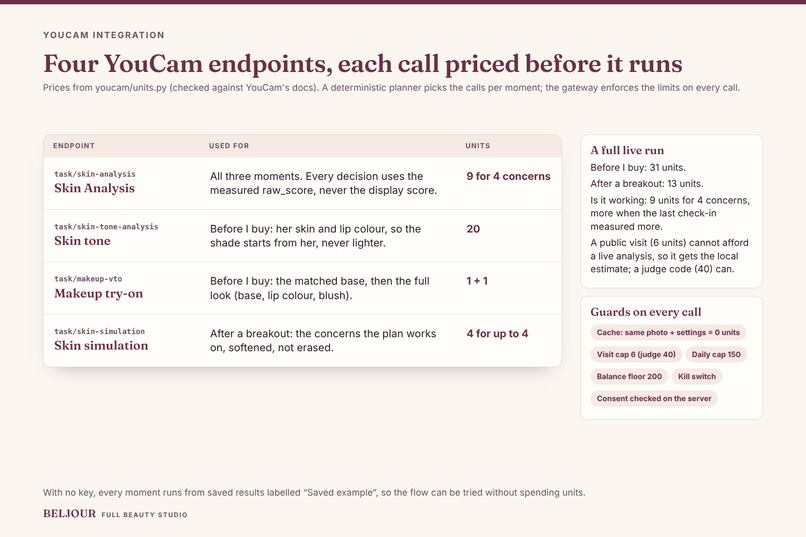
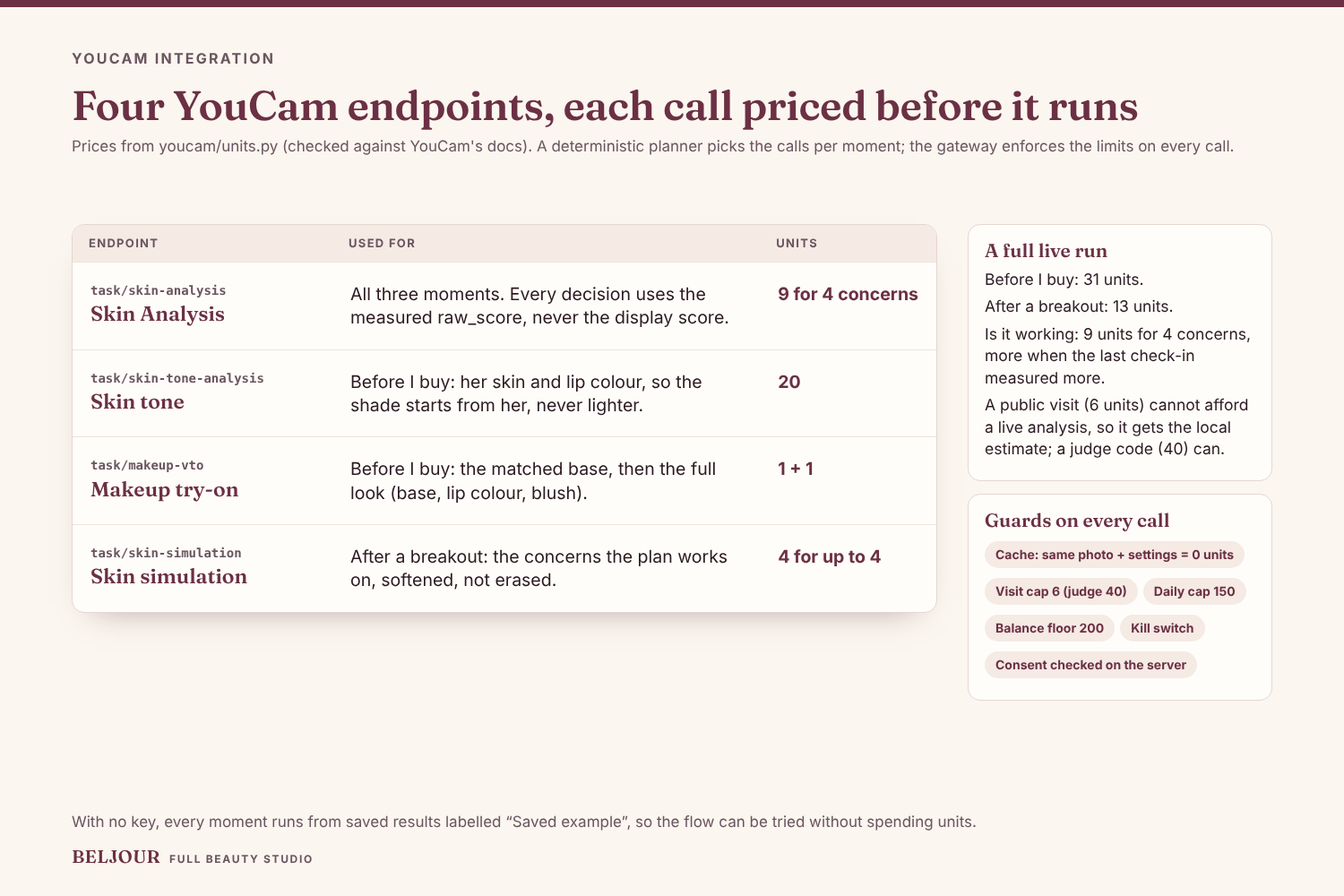
Four YouCam endpoints: Skin Analysis (9 units for 4 concerns), skin tone (20), makeup try-on (1 each) and skin simulation.
-
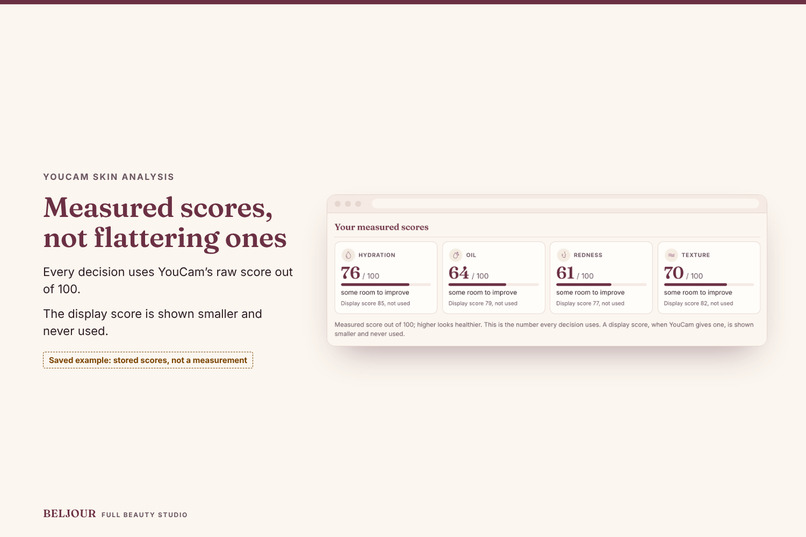
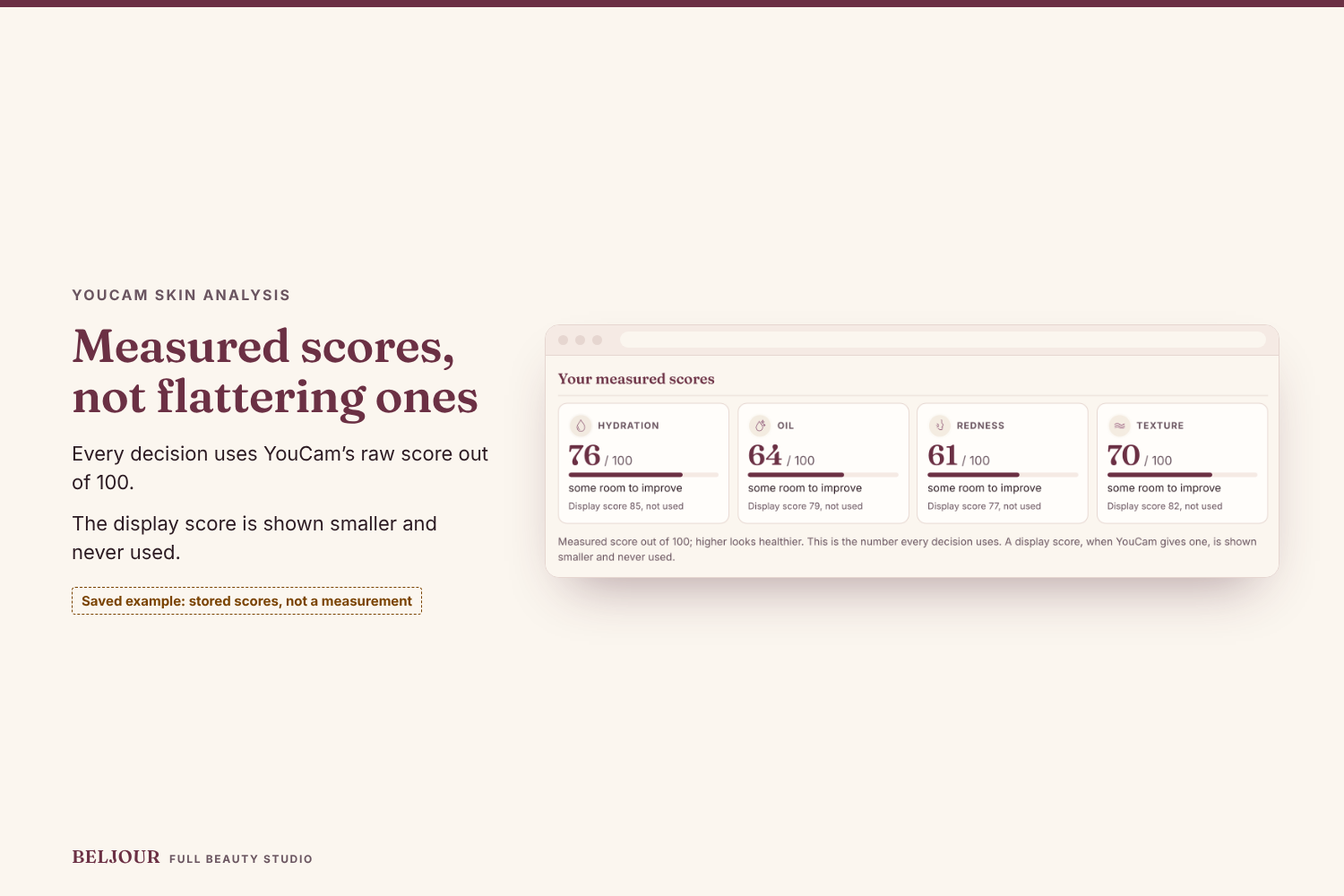
Every decision uses YouCam Skin Analysis' raw score out of 100; the display score is shown smaller and never used. Saved example.
-
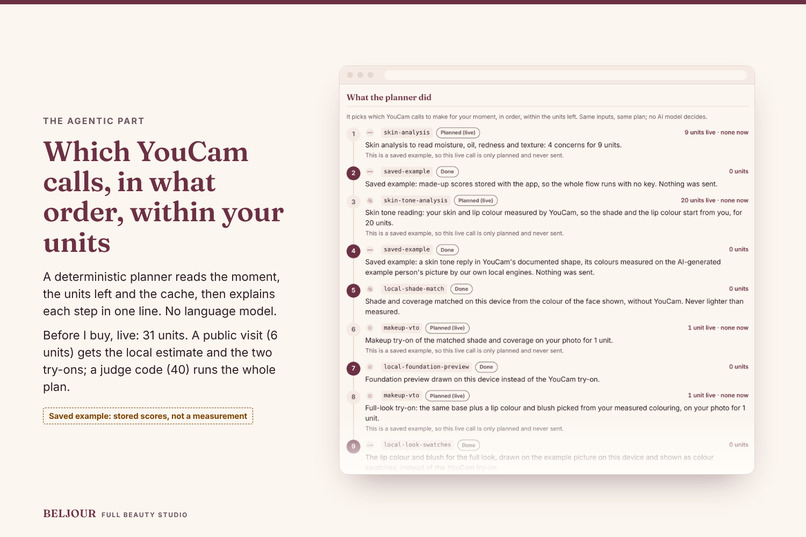
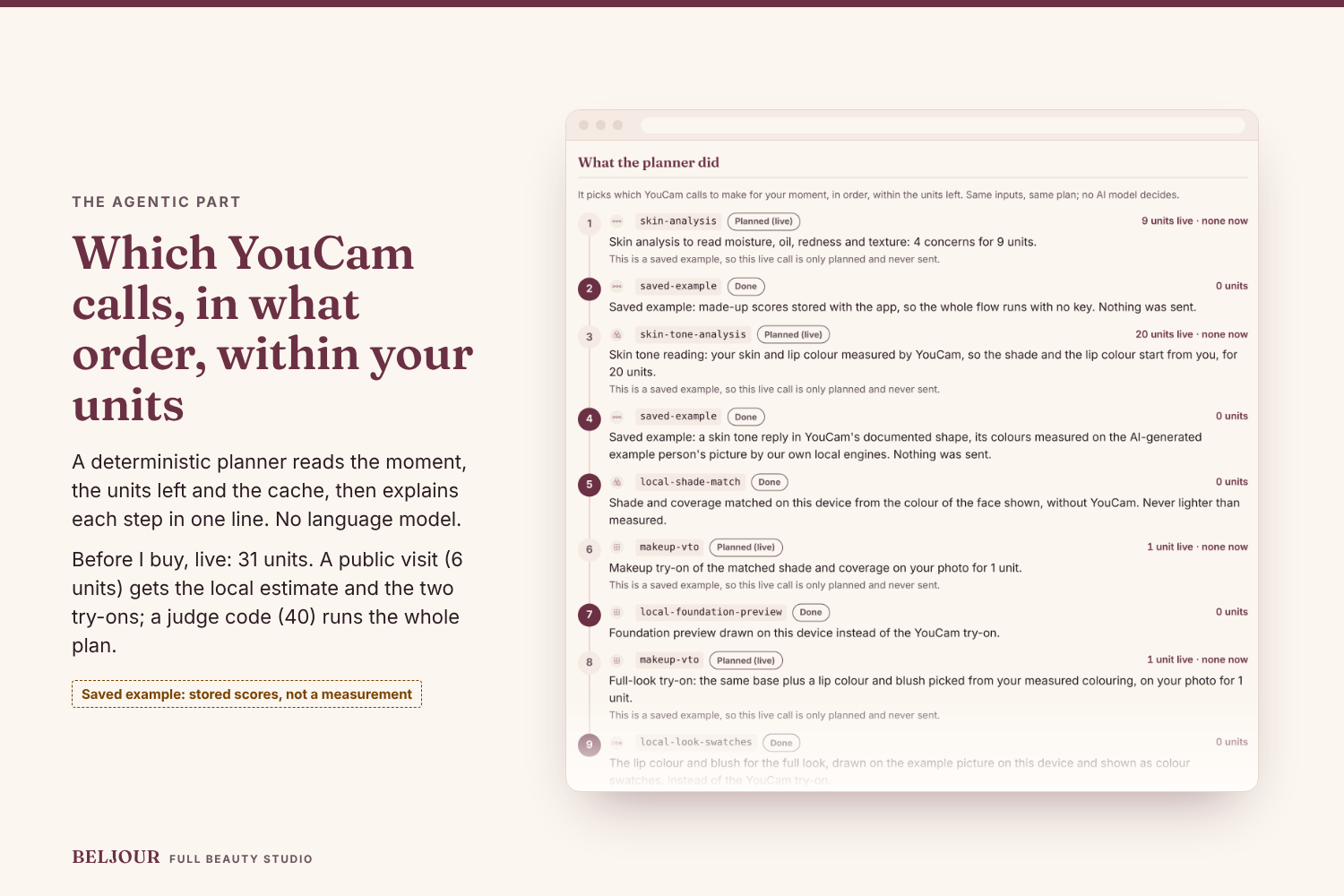
The agentic part: a deterministic planner chooses which YouCam calls to make, in what order, within the units left, and explains steps.
-
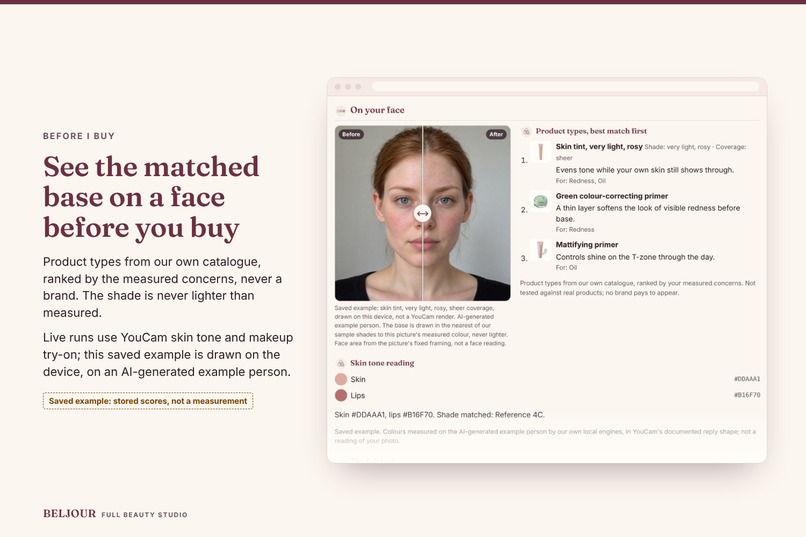
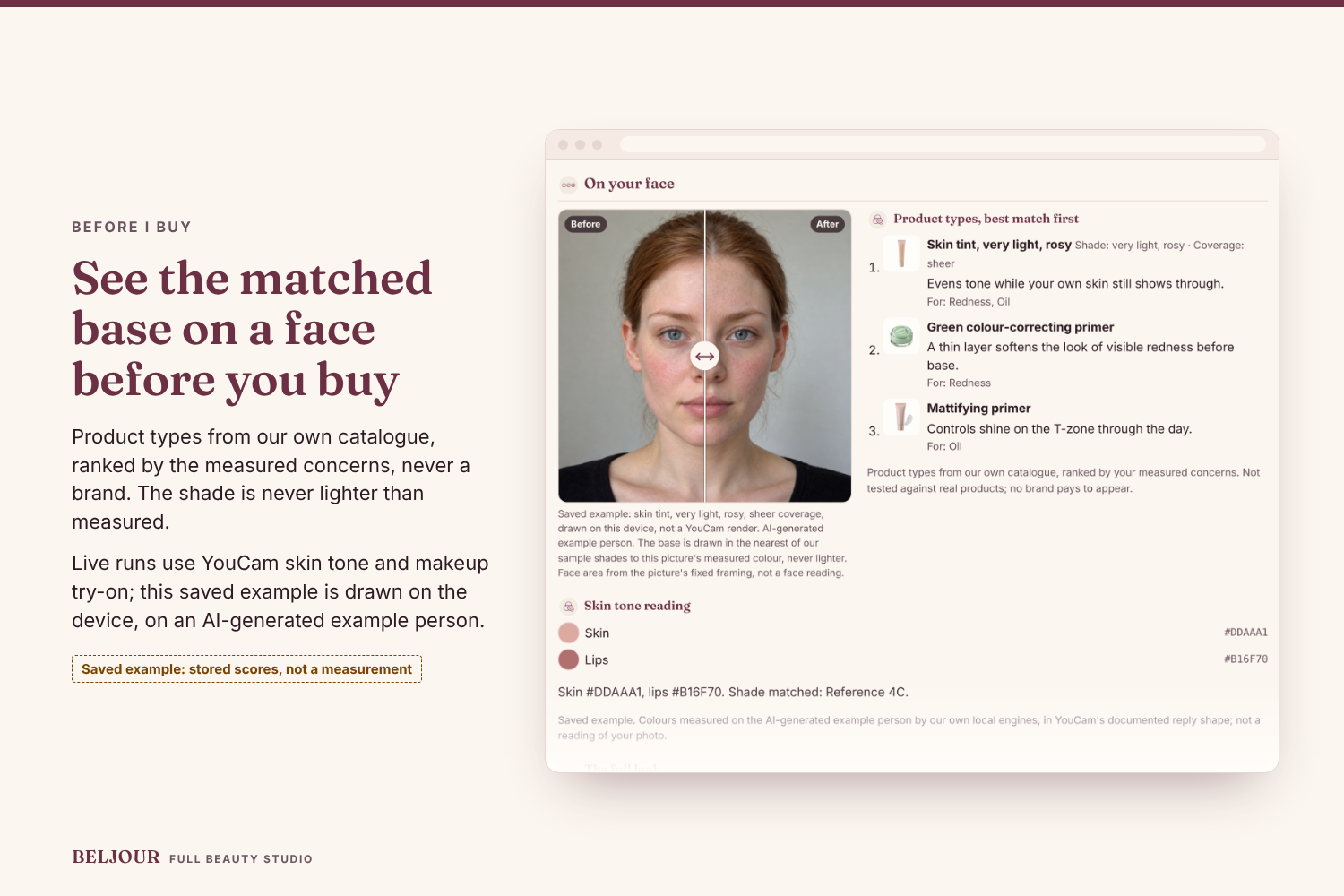
Before I buy: product types from our own catalogue, ranked by the measured concerns, and the matched base, never lighter than measured.
-
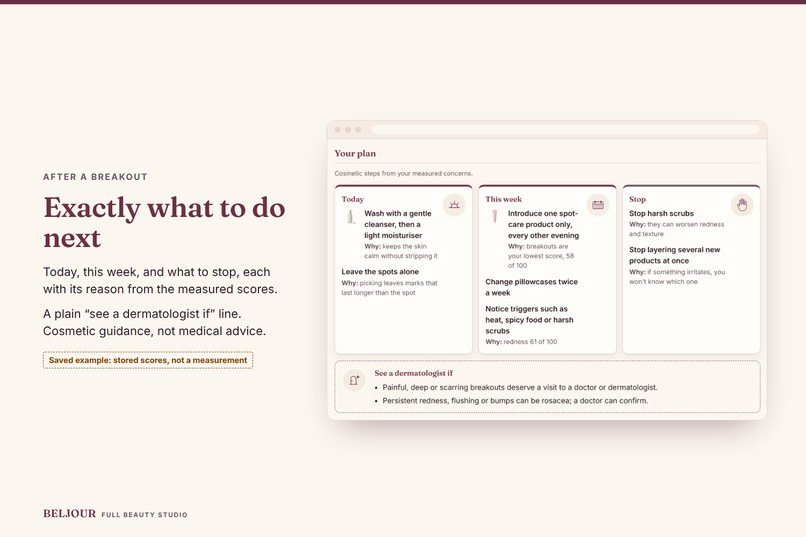
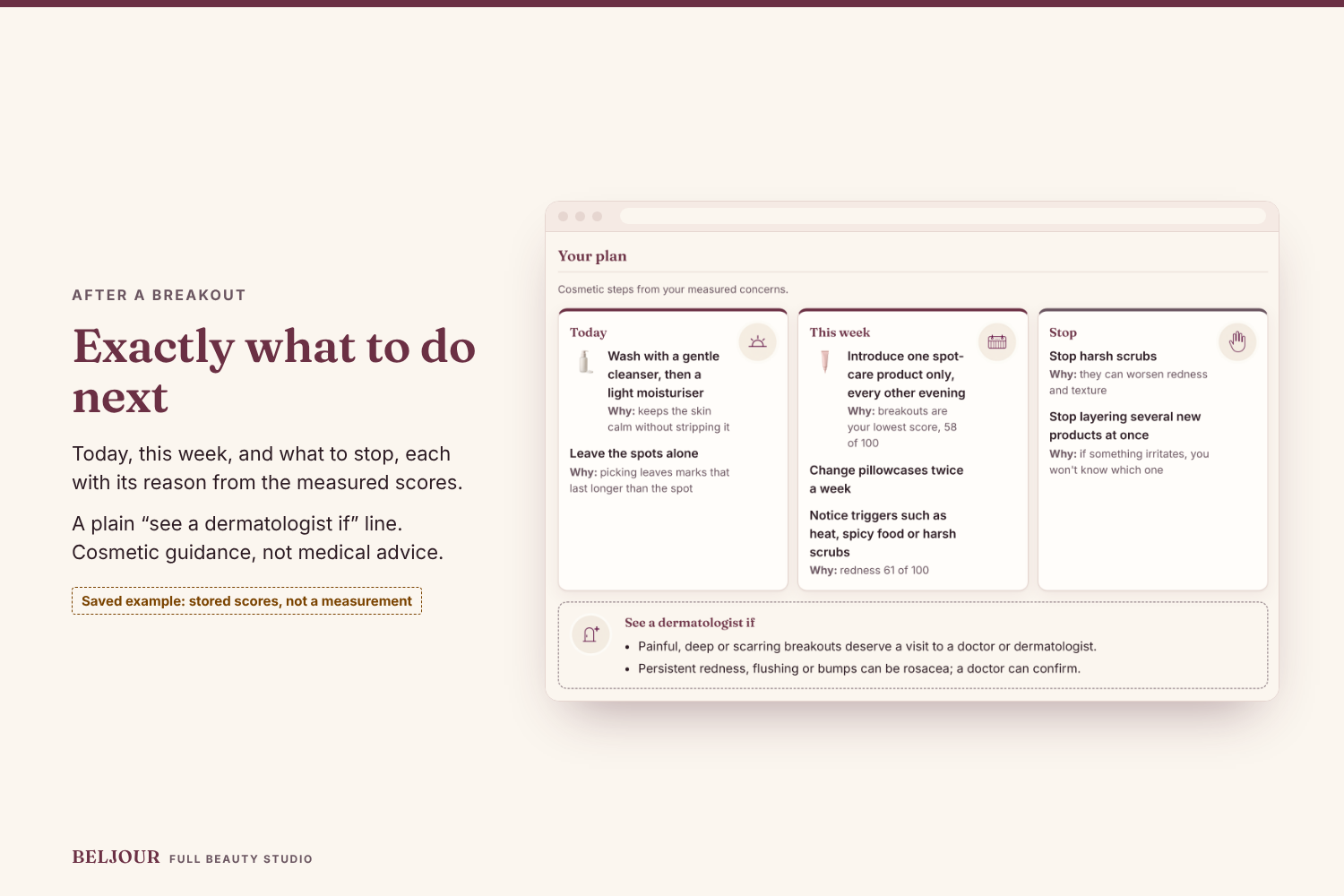
After a breakout: one plan, what to do today, this week and what to stop, each with its reason, plus when to see a dermatologist.
-
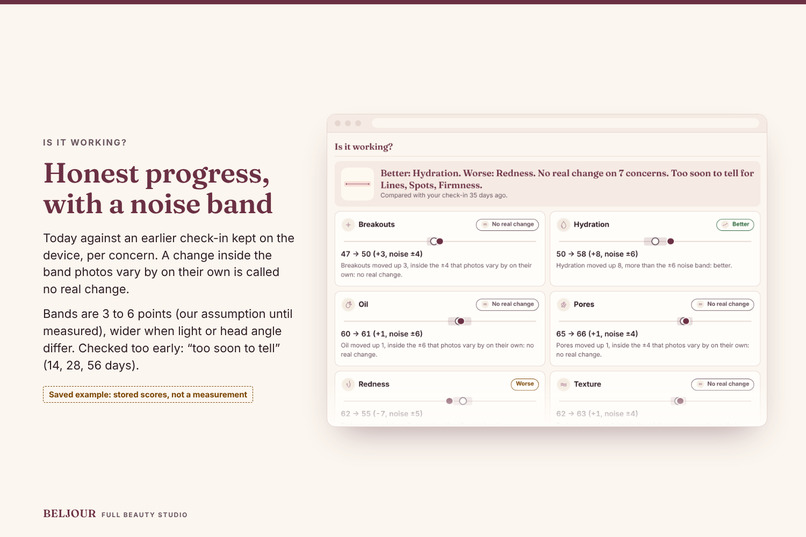
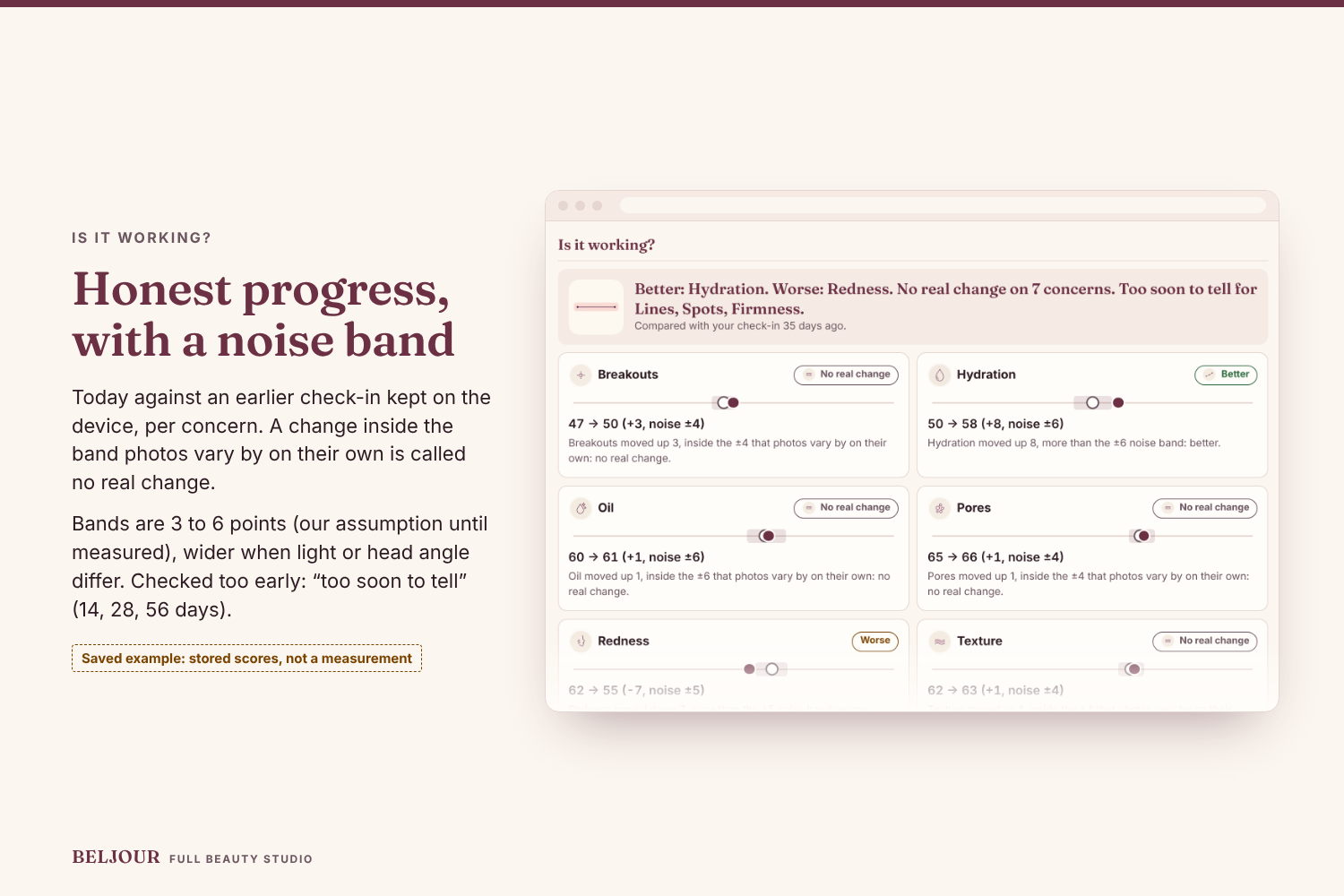
Is it working? Today against an earlier check-in kept on the device, per concern, with a noise band, so a small change is no real change.
-
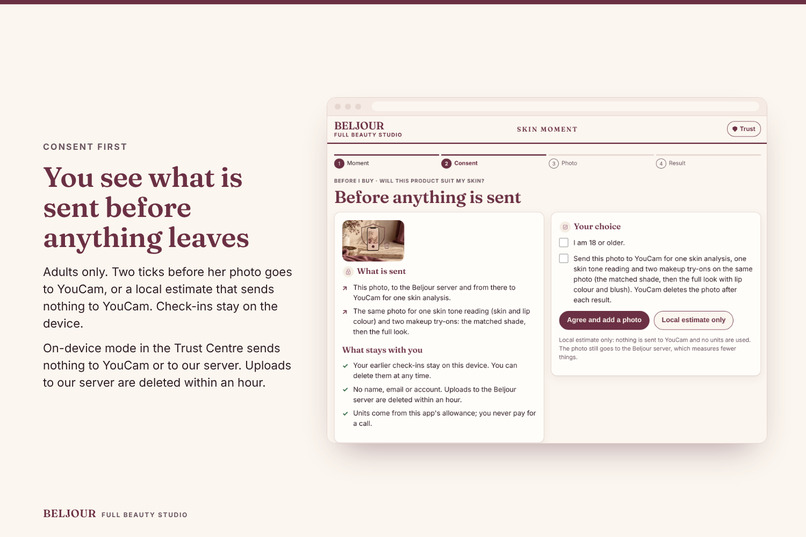
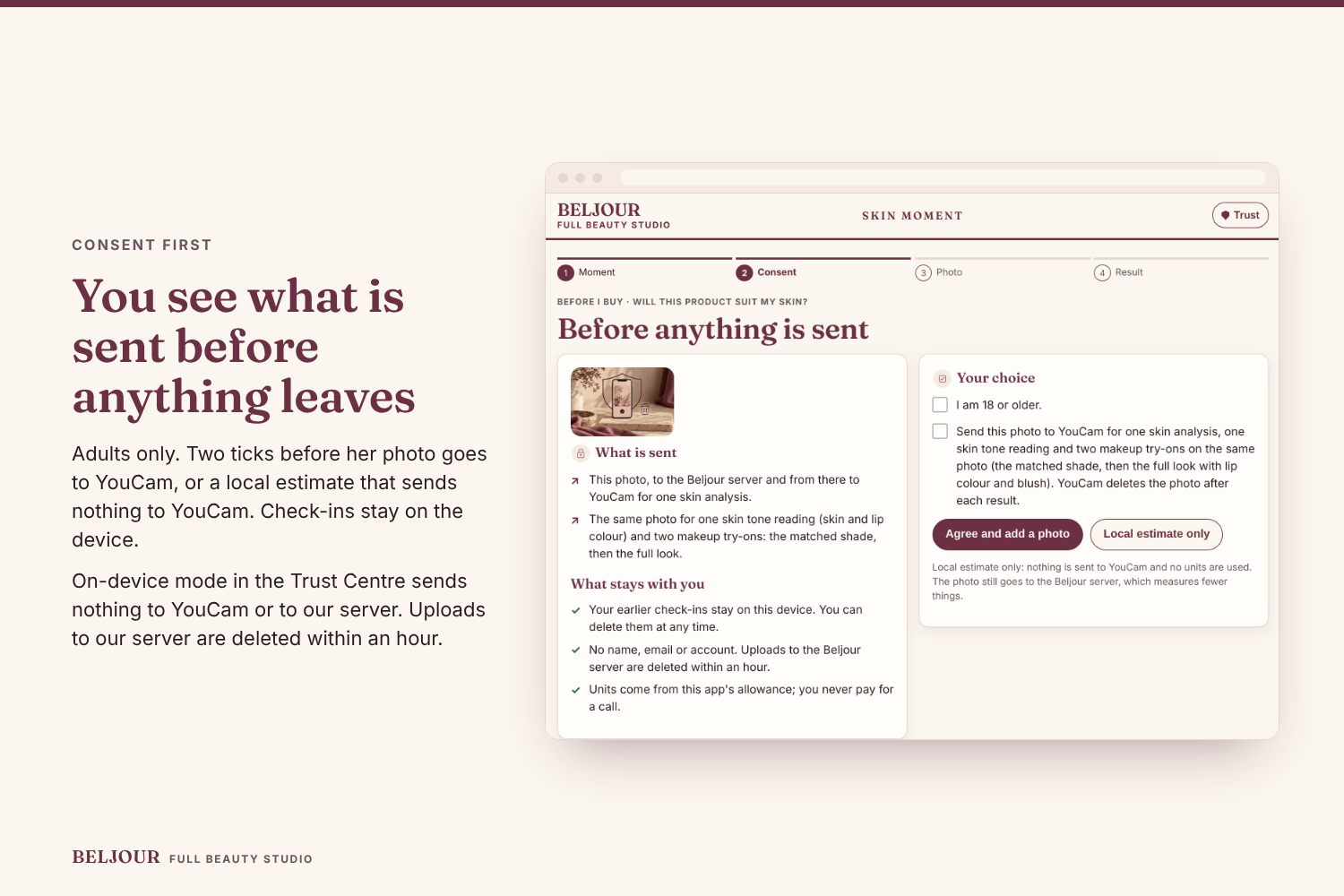
Consent first: a plain list of what is sent to YouCam, or a local estimate that sends nothing to YouCam; check-ins stay on the device.
-
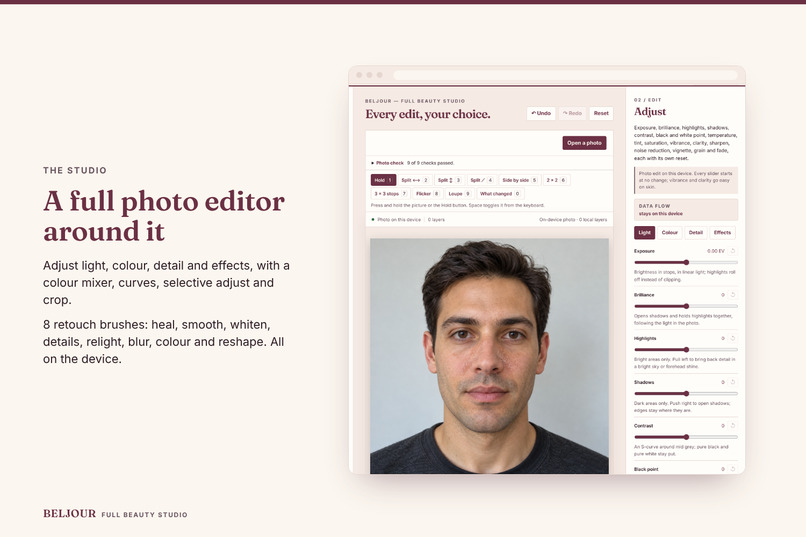
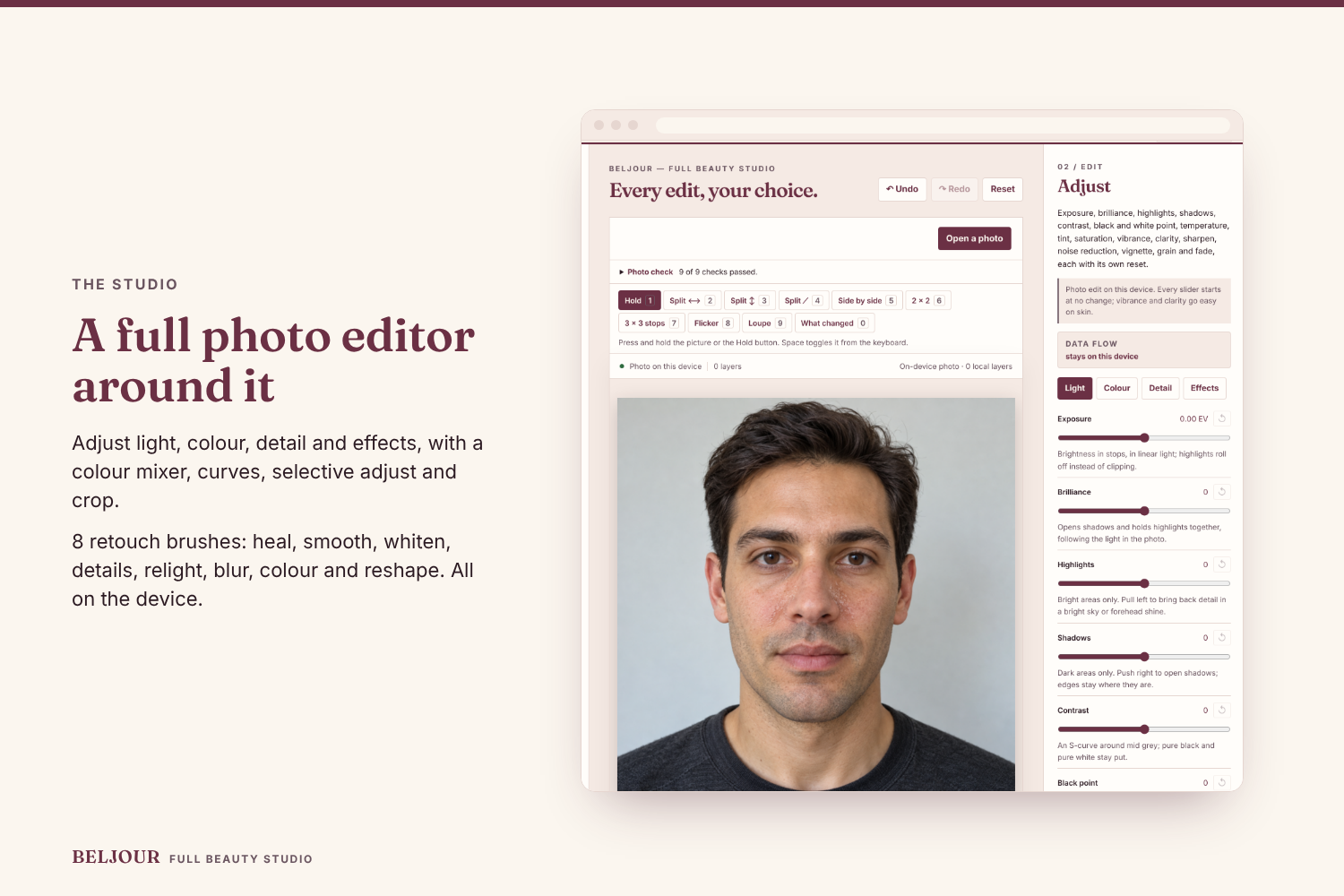
The Studio around it: Adjust (light, colour, detail, effects), colour mixer, curves, selective adjust, crop and eight retouch brushes.
-
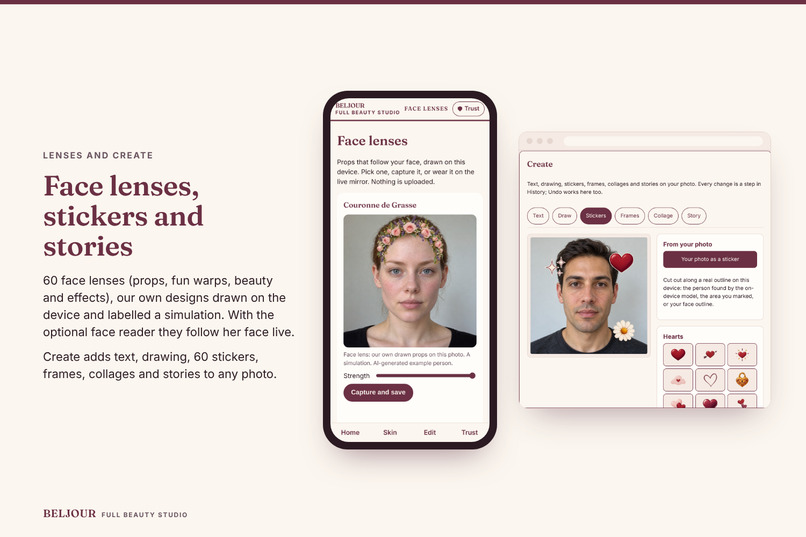
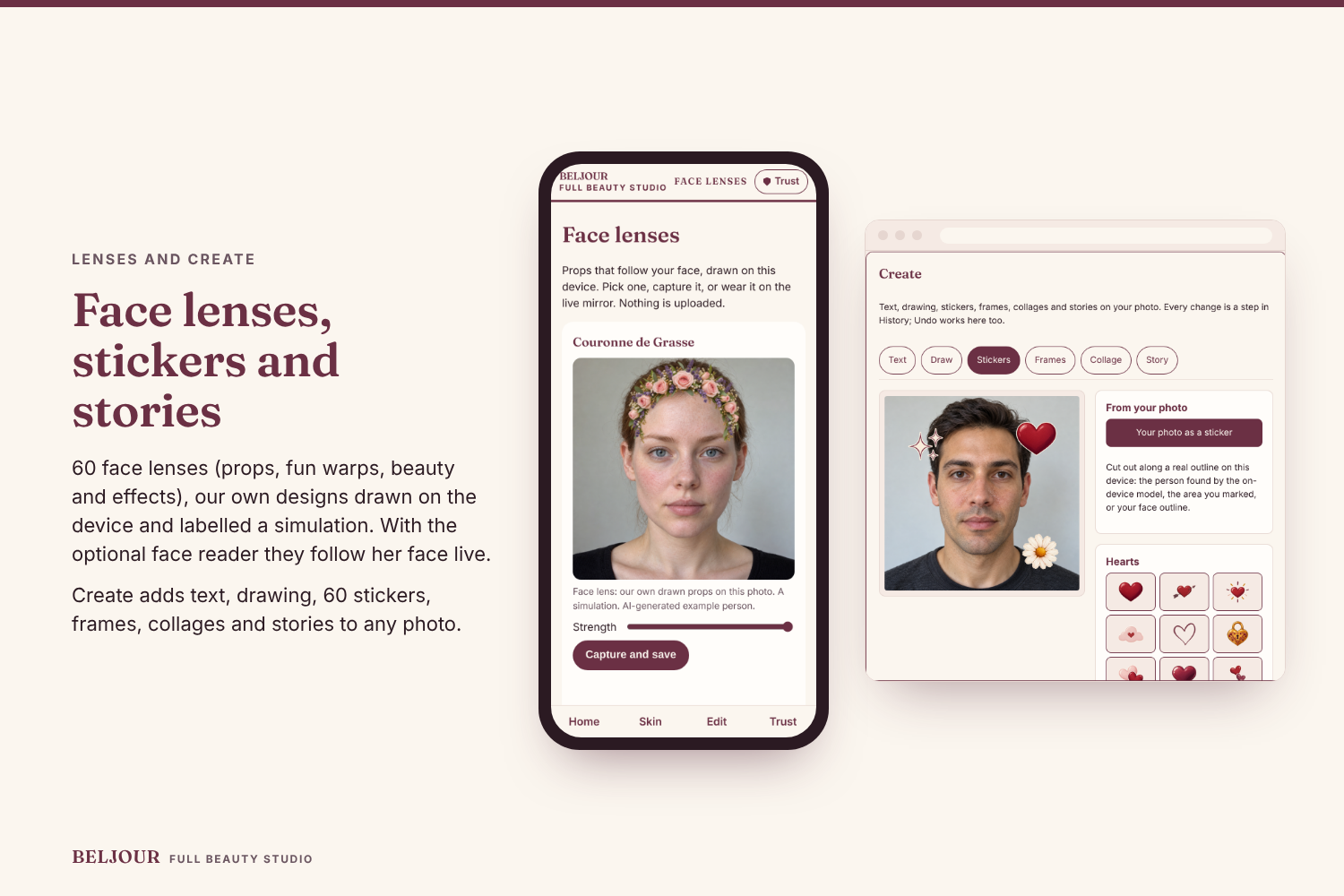
60 face lenses in our own designs, labelled simulations, and Create: text, drawing, 60 stickers, frames, collages and stories.
-
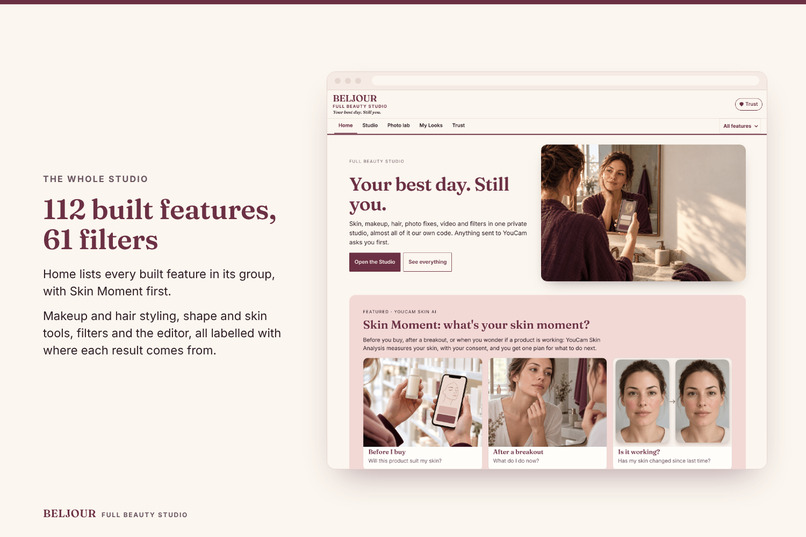
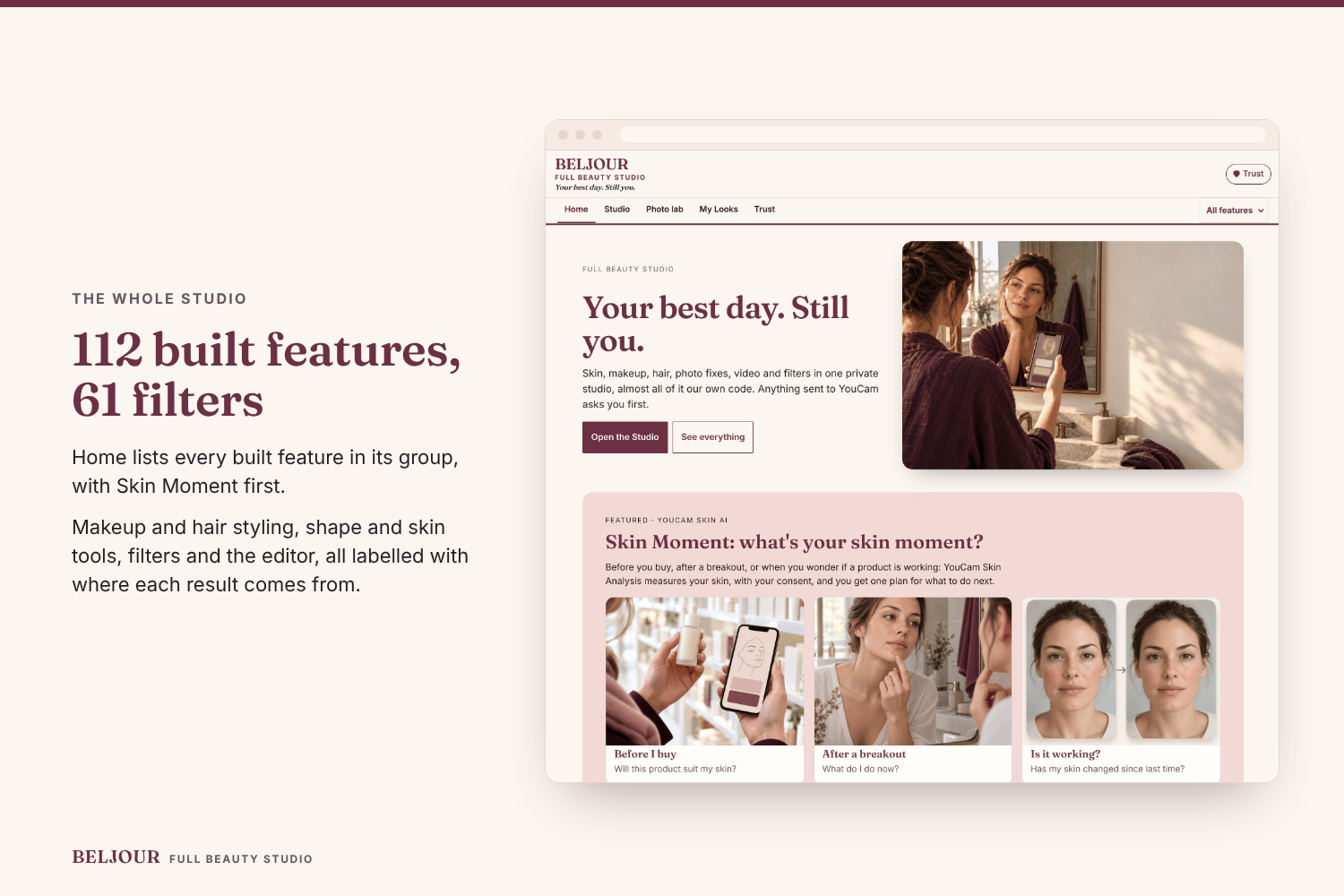
The whole studio on one Home page: 121 built features in 10 groups and 61 filters, with Skin Moment featured first and the Arena score.
-
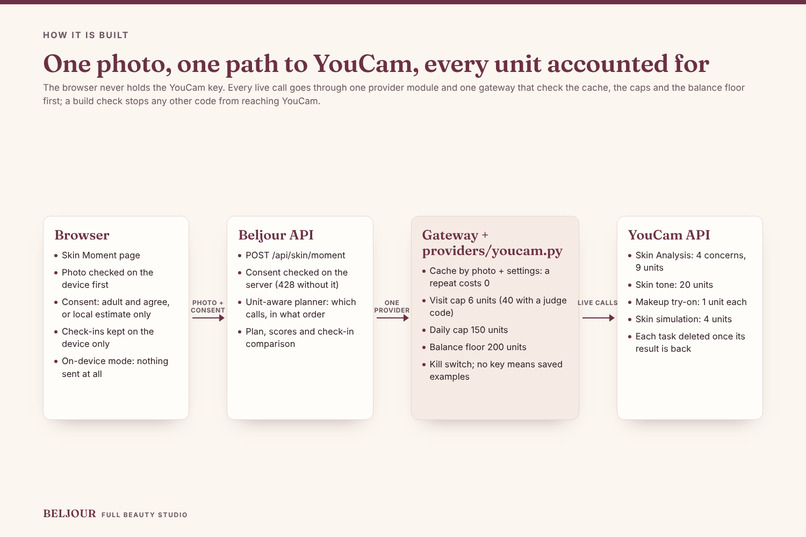
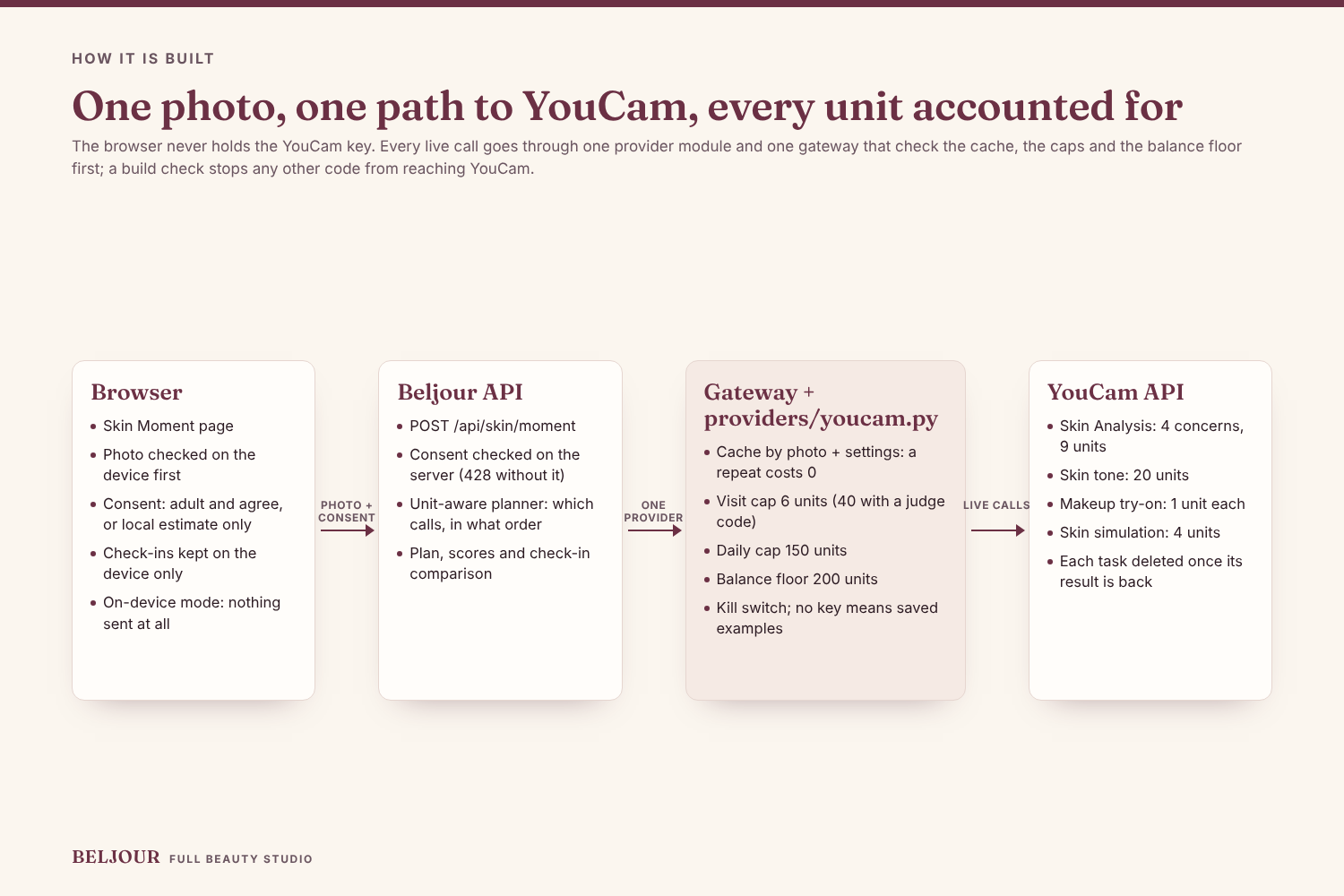
How it is built: browser, our API, one gateway and one YouCam provider that check the cache, caps and balance floor before any call.
-
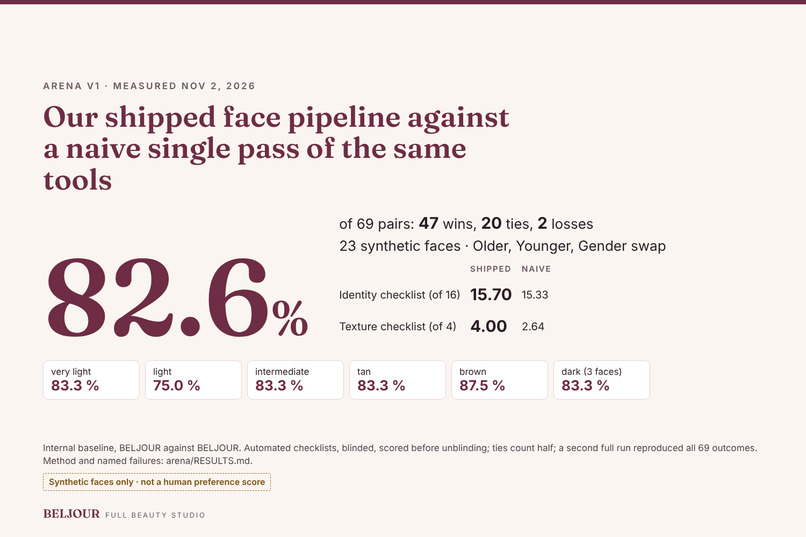
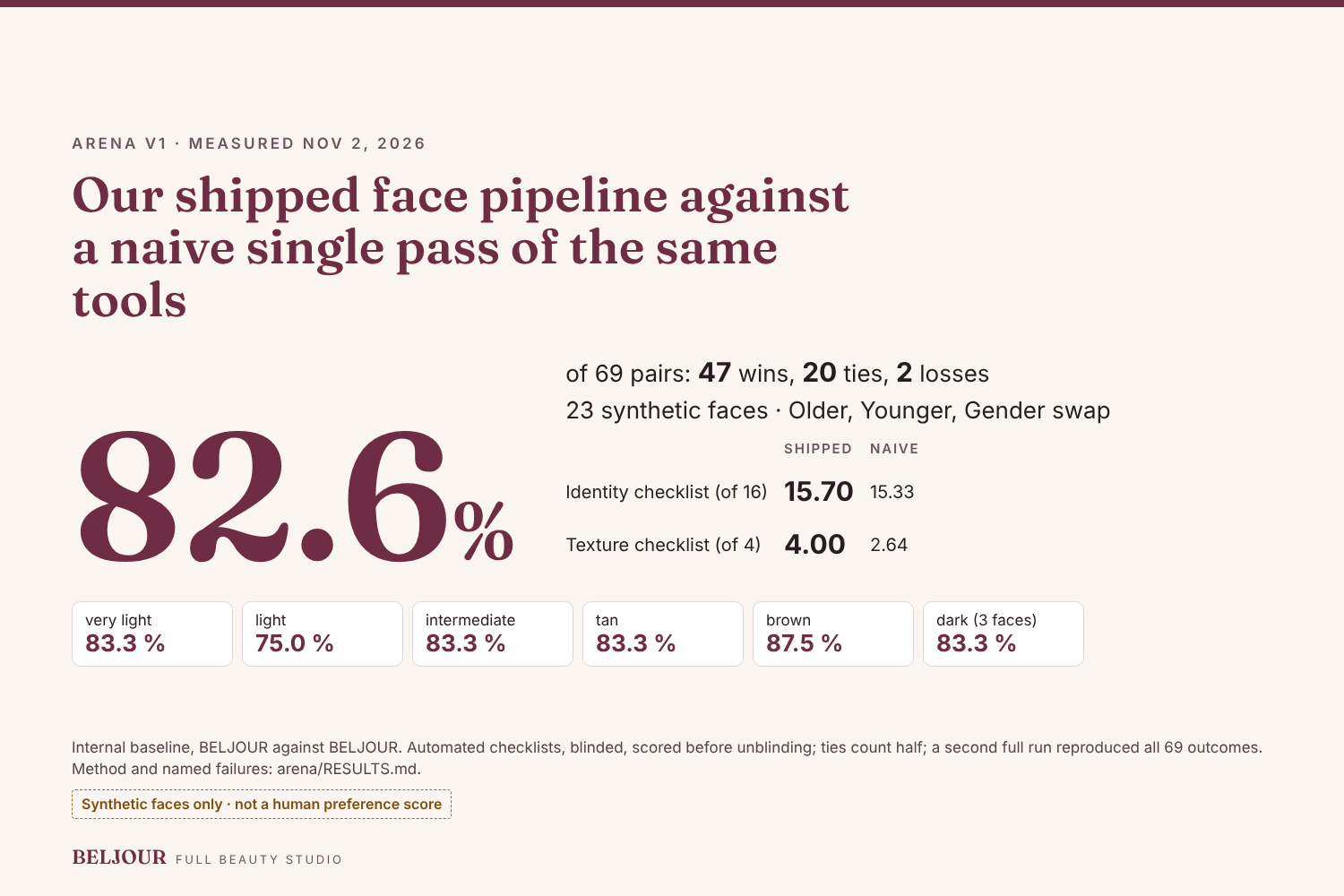
Arena v1: our shipped face pipeline beats a naive single pass in 82.6 % of 69 pairs. Synthetic faces, automated checklists, blinded.

Inspiration
People don't think about their skin on a schedule. They wonder about it at three moments: standing at a shelf deciding whether a product will suit them, the morning after a breakout, and weeks into a new product, looking in the mirror and asking whether it is doing anything. Most skin apps give a score and a long routine. Neither answers the question she has at that moment, and a score that always looks a little better than last time tells her nothing about whether the product works.
What it does
Skin Moment is one page. She picks her moment and adds a photo.
- Before I buy. YouCam Skin Analysis measures four concerns: moisture, oiliness, redness and texture. Generic product types from our own invented catalogue (no real brands) are ranked by those measured concerns. YouCam's skin tone reading measures her skin and lip colour, and the shade is matched to it, never lighter than measured. YouCam makeup try-on then shows that shade on her own face, and a second try-on shows the full look (the same base, a lip colour and a blush picked from her measured colouring) before she spends money.
- After a breakout. A Skin Analysis of acne, redness, texture and pores drives a short plan: what to do today, what to do this week and what to stop. A YouCam skin preview shows the concerns the plan works on softened, not erased, labelled a simulation. The wording is cosmetic, every plan says "not medical advice", and a plain line says when to see a dermatologist.
- Is it working? Today's analysis is compared with an earlier one kept only on her device, concern by concern. A change smaller than the noise band is called "no real change" rather than progress. A concern checked before it has had time to change is marked "Too soon to tell", with the days it needs: 14 for oil, hydration and redness, 28 for most others and 56 for lines, spots and firmness. The saved example, 35 days apart, shows that for lines, spots and firmness.
Every moment ends with one plan: what to do next, in plain words.
Skin Moment sits inside Beljour, a larger beauty studio, and the Home page is the hub for all of it. The feature registry lists every built feature in its groups (age, hair, skin and makeup, face shape, photo fixes, studio looks, video, fun, pro tools, women-first) and the filters; Home lists each one with the current count, written from the registry so it cannot drift, and links to the screen that runs it. Every built feature opens on a screen today. Among them: a photo editor (Adjust, colour mixer, curves, selective adjust, crop and eight retouch brushes), Create (text, drawing, 60 stickers, frames, collages and stories) and 60 face lenses; with the optional face reader installed, the lenses follow the face on a photo, a clip or the live mirror, and without it they run on the example people. Most use our own code; YouCam is used for makeup and hair try-on and for the Skin Moment calls at the centre of this entry, each with consent.
How we built it
Four YouCam endpoints, five calls in one full run, each through one provider module and a gateway. No other code may reach YouCam, and a build check enforces that. Each photo goes to YouCam only after a consent check on the server, and the server checks it again before every call. Endpoint names, request fields and prices were checked against the YouCam docs on Oct 29, 2026.
| Moment | Call | Endpoint | Units | What she sees |
|---|---|---|---|---|
| Before I buy, after a breakout, is it working | Skin Analysis, 4 concerns | POST /s2s/v2.0/task/skin-analysis |
9 (12 for 5 to 8) | Measured scores. We rank and compare by raw_score, not ui_score, which YouCam's docs describe as adjusted upward. |
| Before I buy | Skin tone reading | POST /s2s/v2.0/task/skin-tone-analysis |
20 | Her skin and lip colour. The foundation shade is matched to it, at the darker of YouCam's and our own reading, so it is never lighter than either. |
| Before I buy | Makeup try-on, the base | POST /s2s/v2.0/task/makeup-vto |
1 | The matched shade on her photo. Coverage follows her measured redness and texture; concealer in the same shade is added where redness is low, with under-eye brightening off. |
| Before I buy | Makeup try-on, the full look | POST /s2s/v2.0/task/makeup-vto |
1 | The same base plus a lip colour near her measured lip colour and a blush from her undertone, both deeper than her skin. The colours also show as swatches when the render does not run. |
| After a breakout | Skin preview | POST /s2s/v2.0/task/skin-simulation |
4 | Her photo with the concerns the plan works on softened, not erased (strength 0.2 to 0.6). Radiance, spots and dark circles are never asked for by default, because each brightens skin. Labelled a simulation, not a promise. |
Each task is polled at GET /s2s/v2.0/task/<endpoint>/<task_id> and deleted at POST /s2s/v2.0/task/delete as soon as its result is back; the photo is uploaded with POST /s2s/v2.0/file and a PUT to the signed link; the balance comes from GET /s2s/v1.0/client/credit (free). Skin tone and the skin preview run only inside Skin Moment, on its own channel behind BELJOUR_YOUCAM_SKIN; every other route still refuses them. The two try-ons go the styling path under the same unit caps.
Unit cost of the full live run. api/scripts/skin_moment_live.py runs each moment once: before I buy 9 + 20 + 1 + 1 = 31, after a breakout 9 + 4 = 13, is it working 0 (it reuses the before-I-buy analysis of the same photo from the cache). Total: 44 units, which is also the script's default limit. A judge-code visit is capped at 40, so it runs before I buy in full and then gets a breakout analysis without the preview; the planner says so in one line.
- A unit-aware planner. Given her moment, the units left and what is already cached, it decides which YouCam calls to make and in which order, explains each step in one line, and never plans past the caps. For before I buy, the two 1-unit try-ons are kept first because they are what she sees; the 20-unit tone reading is added only when it fits beside them. The skin preview waits for measured concerns. When units are short it cuts a check-in to fewer concerns, or skips a call and names the local fallback. It is deterministic code: no language model, no extra keys.
- Safety around every call. Before each call: the result cache (a repeat on the same photo and settings costs 0 units), a kill switch, a per-visit cap (6 for a public visit, 40 with a judge code), a daily cap of 150 and a balance floor of 500 on the hosted demo. A task ledger never retries a create call whose reply was lost, so one photo is never charged twice. A public visit gets the local estimate plus the two 1-unit try-ons (2 units).
- A fallback that always answers. With no key, no units or no consent, the app uses a local estimate of skin tone and depth, made without YouCam, and says so. With no key at all, the whole flow runs from saved results labelled "Saved example", so judges can try it without spending units. For the skin tone reading, the try-on and the skin preview, those saved results are built from the reply shapes in YouCam's docs, with made-up values and no image, and say so.
The non-obvious part is the third moment. A skin analysis API is usually used to describe skin once. We use it as a measuring instrument over time, with the noise band stated, so the app can honestly say "this product is not changing anything yet."
Challenges we ran into
- About 1,000 units for the whole hackathon. One Skin Analysis costs 9 units for up to four concerns, 12 for up to eight and 14 for up to twelve; each moment asks for four by default, and a check-in asks for the concerns measured last time. The skin tone reading costs 20, so it is the first call the planner drops when units are short. A public visit is capped at 6 units, so only a visit with a judge code (40 units) gets live analysis. The caps, the cache and the planner exist because a single bug could otherwise spend the budget.
- Honest comparison. Two photos of the same face never give identical scores. Calling every small move "progress" would be easy and wrong, so the comparison uses a noise band. Its width is our assumption until it is measured on repeat photos of real faces. It is widened when the two photos differ in light or head angle.
- A slow live call must not waste units. YouCam may start (and charge for) an analysis that outlasts our wait. The call now keeps running in the background, so its result still lands in the cache and asking again is free, and a unit hold is released on every kind of error. Photo decoding runs off the request loop.
- Consent and privacy. Her photo goes to YouCam only after she agrees: the server checks the consent (adult, agreed, this photo) before any YouCam call. Check-in history is kept in her browser as numbers and dates, with no photos.
Accomplishments that we're proud of
- A measured number for "it still looks like her". Arena v1 put our shipped face pipeline against a naive single pass of the same tools on 23 synthetic faces in six skin-tone bands (Older, Younger and Gender swap, 69 pairs). Each output was mapped again and scored on a 16-point identity checklist and a 4-point texture checklist, blinded, then unblinded. The shipped pipeline won 47, tied 20 and lost 2: 82.6 %, ties counted half. Identity 15.70 vs 15.33 of 16; texture 4.00 vs 2.64 of 4; every skin-tone band at 75 % or more. A second full run gave the same 69 outcomes. It is an internal baseline scored by automated checklists, not a human preference score. The 69 pairs are blind in the apps Arena page for anyone to judge.
- A complete flow from photo to plan, with the same page in demo mode and live mode.
- The planner prices every live call before it runs, and the app keeps working, with a plain message, when a cap stops a call.
- Advice that stays cosmetic and never lightens skin by default.
What we learned
- Building the Arena found two real defects before any judge did: Younger left a pale rim along the jaw and neck, and on the deepest skin it made the eyes read taller. Both are fixed, and the published number is from the fixed code.
- Treating units as a budget the code must respect shaped the design more than any screen did.
- The measured score and the display score can tell different stories. Using the measured one is what makes "is it working?" a fair question.
What's next
- Measure the noise band on repeat photos of consenting adults instead of assuming it.
- Let her name the product she is testing, so each check-in is tied to one product and one start date.
- Check the plan's wording with a dermatologist before any public launch.
Notes for judges
- Arena v1, the measured number: 82.6 % of 69 pairs for our shipped face pipeline against a naive single pass of the same tools (synthetic faces, automated checklists, blinded). Method, tables and the 2 losses by name: arena/RESULTS.md. Judge the pairs yourself in arena.html, "Judge the face-tool set".
- Run it in two minutes without a key: docs/JUDGE-QUICKSTART.md, or "For judges" at the top of the README.
- The code repository is private; John Khan has shared it with the organisers.
- The product catalogue is invented, with generic types and our own names, and is not tested against real products.
- Skin results are cosmetic information, not medical advice.
My contribution
Skin Moment — and the Beljour studio around it — is a solo build, mine end to end. I conceived the product and designed its three moments and the rules they run by: rank and match on the measured score, never the flattering display score; match the foundation to the measured skin, never lighter; and call any change inside the noise band "no real change." I made every product and architecture decision behind it, including the deterministic unit-aware planner, the caps and balance floor that keep this demo alive for every judge, the result cache and task ledger, and the consent gate that runs before any photo is sent. I directed and verified the build against the live, deployed product — the verification walks, the automated Studio checks and the live YouCam runs in the demo video are that checking made visible — and I prepared this submission.
— John Khan
Built With
- api
- fastapi
- httpx
- mediapipe
- numpy
- opencv
- pillow
- playwright
- python
- tasks
- typescript
- uvicorn
- vision
- youcam