-
-
Logo
-
Dashboard
SkillForge
Show it once. Learn it anywhere.
Inspiration
Learning a hands-on skill often leaves you asking one question: “Does mine look right?”
Videos show you what to do, but they cannot look at your attempt and explain what needs fixing. Instructors can provide that feedback, but they cannot always be beside every learner.
We built SkillForge to make practical knowledge easier to share: capture a demonstration once, turn it into a reusable tutorial, and give learners visual feedback as they practice.
What it does
SkillForge connects teaching and learning through two modes.
Teach Mode: An instructor demonstrates a physical task and captures checkpoints after each step, with optional notes. Gemini analyzes those images in order and generates a structured tutorial containing instructions, reference images, visual success criteria, and safety notes.
Learn Mode: A learner follows that tutorial with a live camera view beside the instructor’s reference. When they click Verify step, SkillForge captures their current work and asks Gemini to compare it against the expected state.
The assessment returns one of three outcomes:
- PASS: The visible criteria are met, and the learner advances.
- FAIL: The learner stays on the step and receives feedback explaining the mismatch and what to change.
- UNCERTAIN: The view does not support a confident assessment, so the learner is asked for a clearer angle or further inspection.
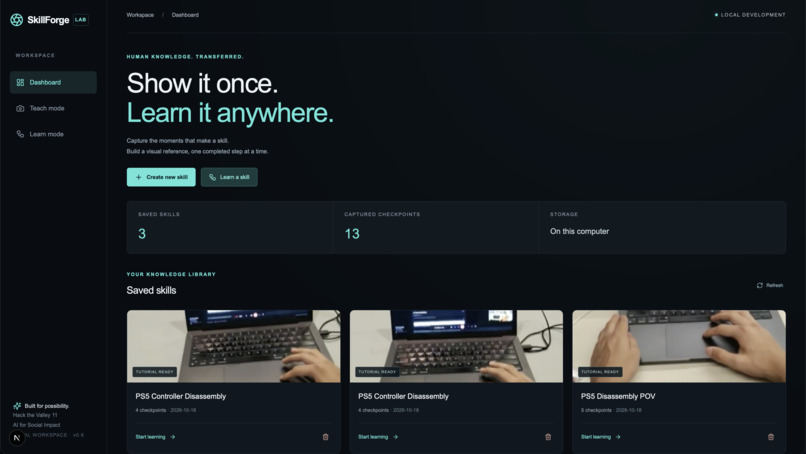
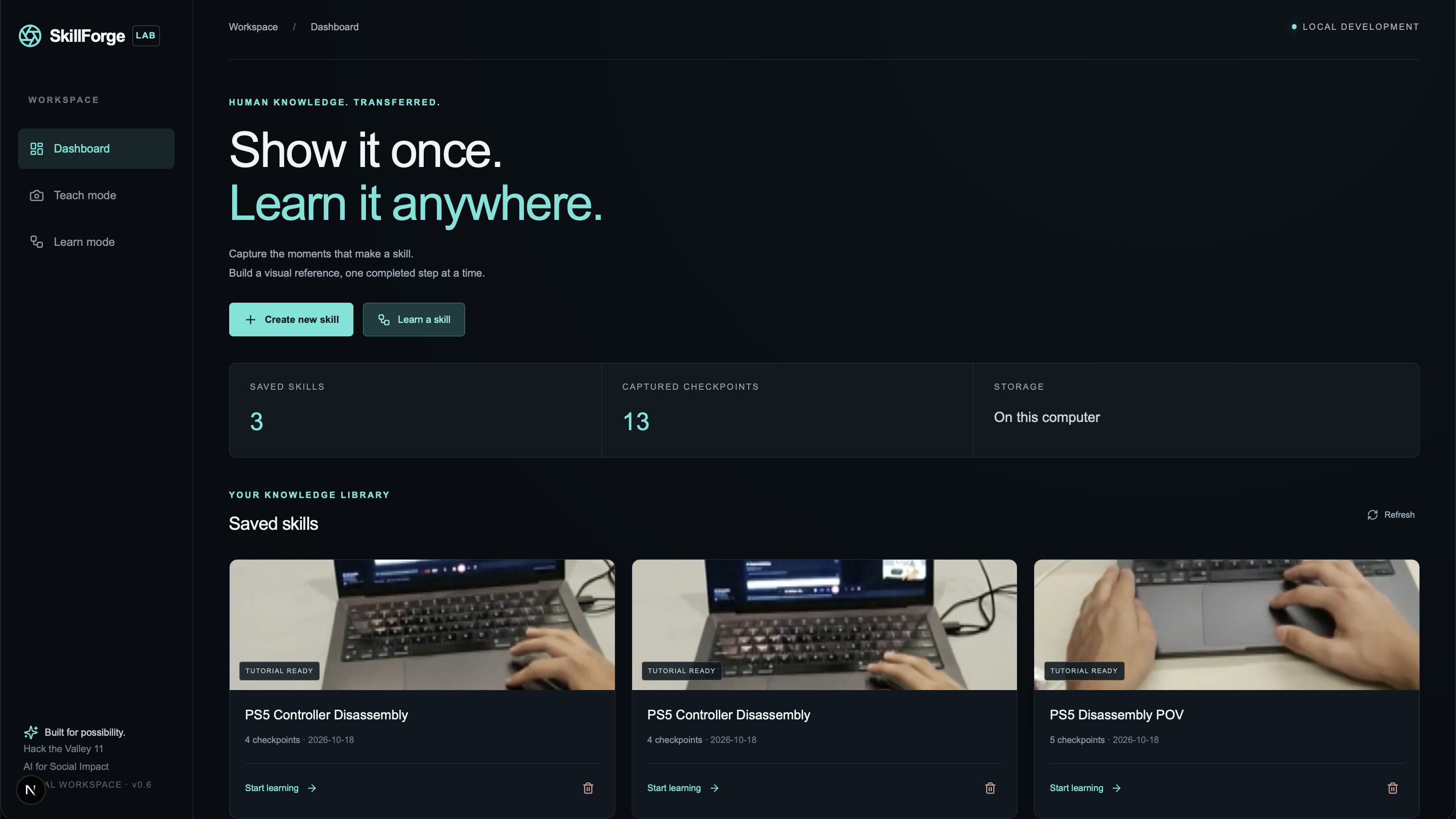
Learners can inspect the exact instructor and learner images behind each assessment. Our demonstration uses a four-checkpoint PS5 controller disassembly tutorial.
How we built it
Our frontend uses Next.js, React, TypeScript, and Tailwind CSS, with Lucide icons. It brings together the skill library, checkpoint editor, live camera preview, tutorial timeline, and visual feedback.
The backend uses Python and FastAPI, with OpenCV for webcam and GoPro capture. Demonstrations, reference images, and generated tutorials persist locally as JSON and JPEG files.
We integrated Google Gemini through the official Google GenAI Python SDK for two core tasks:
- Turning ordered demonstration images into structured tutorials.
- Comparing a learner’s captured image with the instructor’s reference and step criteria.
We validate model responses with Pydantic before saving tutorials or updating progress. The backend controls learning progression, rejects stale or duplicate assessments, and treats low-confidence passes as uncertain.
Our Meta Ray-Ban workaround
We wanted the first-person perspective of Meta Ray-Ban glasses so instructors could show what they were doing while keeping their hands free.
Our working solution routes the glasses’ view through a WhatsApp video call, then bridges that incoming video into SkillForge.
We built a native Swift command-line helper using Apple’s ScreenCaptureKit. It captures the selected WhatsApp call window, crops it to the incoming glasses video, and forwards JPEG frames to our local FastAPI backend at approximately two frames per second.
The pipeline is:
Meta Ray-Ban glasses → WhatsApp video call → Swift ScreenCaptureKit bridge → FastAPI → SkillForge
A shared camera interface lets that feed power the same preview, teaching checkpoints, and learner verification used by a webcam or GoPro.
This is an indirect video bridge, rather than a direct Meta SDK integration. It let us build a working first-person input path while keeping the rest of the product independent of the camera hardware.
Challenges we ran into
Making AI feedback trustworthy. A plausible response is not enough to justify advancing a learner. We added structured output validation, explicit uncertainty, and backend-controlled progress. Assessments explain the expected state, the observed state, and the suggested correction.
Keeping camera input fresh. Camera disconnects, temporary GoPro read failures, and interrupted forwarding could otherwise leave an old image on screen. We added bounded recovery and frame freshness checks so stale input becomes unavailable.
Building the glasses bridge. Capturing a video-call window continuously required more than taking repeated screenshots. We moved to a persistent ScreenCaptureKit stream and added configurable cropping, explicit window selection, and source switching.
Separating API access from working inference. A successful model connection check did not guarantee successful image generation. We diagnosed provider availability and structured-output issues separately, then validated the integration with real image requests.
Accomplishments that we’re proud of
- Built a working capture → generate → learn → verify workflow using real Gemini responses.
- Turned physical demonstrations into persistent tutorials with visual references.
- Produced actionable PASS, FAIL, and UNCERTAIN feedback with inspectable image comparisons.
- Integrated webcam, GoPro, and the WhatsApp Ray-Ban bridge into one camera workflow.
- Added automated coverage for progression, invalid AI responses, stale results, camera freshness, and recovery behavior.
What we learned
Teaching a physical skill requires more than describing the next action. Learners also need a clear picture of success and useful feedback when their attempt differs.
We also learned to distinguish what a camera can observe from what it cannot establish. SkillForge assesses visible states; it cannot prove hidden mechanical or electrical correctness, or determine whether someone used the right technique between checkpoints. Making that uncertainty explicit shaped both our AI integration and our interface.
What’s next for SkillForge
We want to expand beyond our controller demonstration into more repair, assembly, and workshop tasks, then evaluate feedback across different learners, camera angles, and lighting conditions.
Our next priorities are longer hardware trials, durable learning progress, easier camera setup, and user testing to understand where visual feedback helps most. We also want to explore a more direct wearable integration to simplify the first-person experience.
Our goal is to make an instructor’s practical knowledge available whenever someone is ready to practice.
Built with
Next.js · React · TypeScript · Tailwind CSS · Python · FastAPI · Uvicorn · OpenCV · Google Gemini API · Google GenAI SDK · Pydantic · Swift · Apple ScreenCaptureKit · Meta Ray-Ban glasses · WhatsApp · GoPro · JSON/JPEG storage


Log in or sign up for Devpost to join the conversation.