SketchMotion 🎨✨
Welcome to the era of Gemini 3.
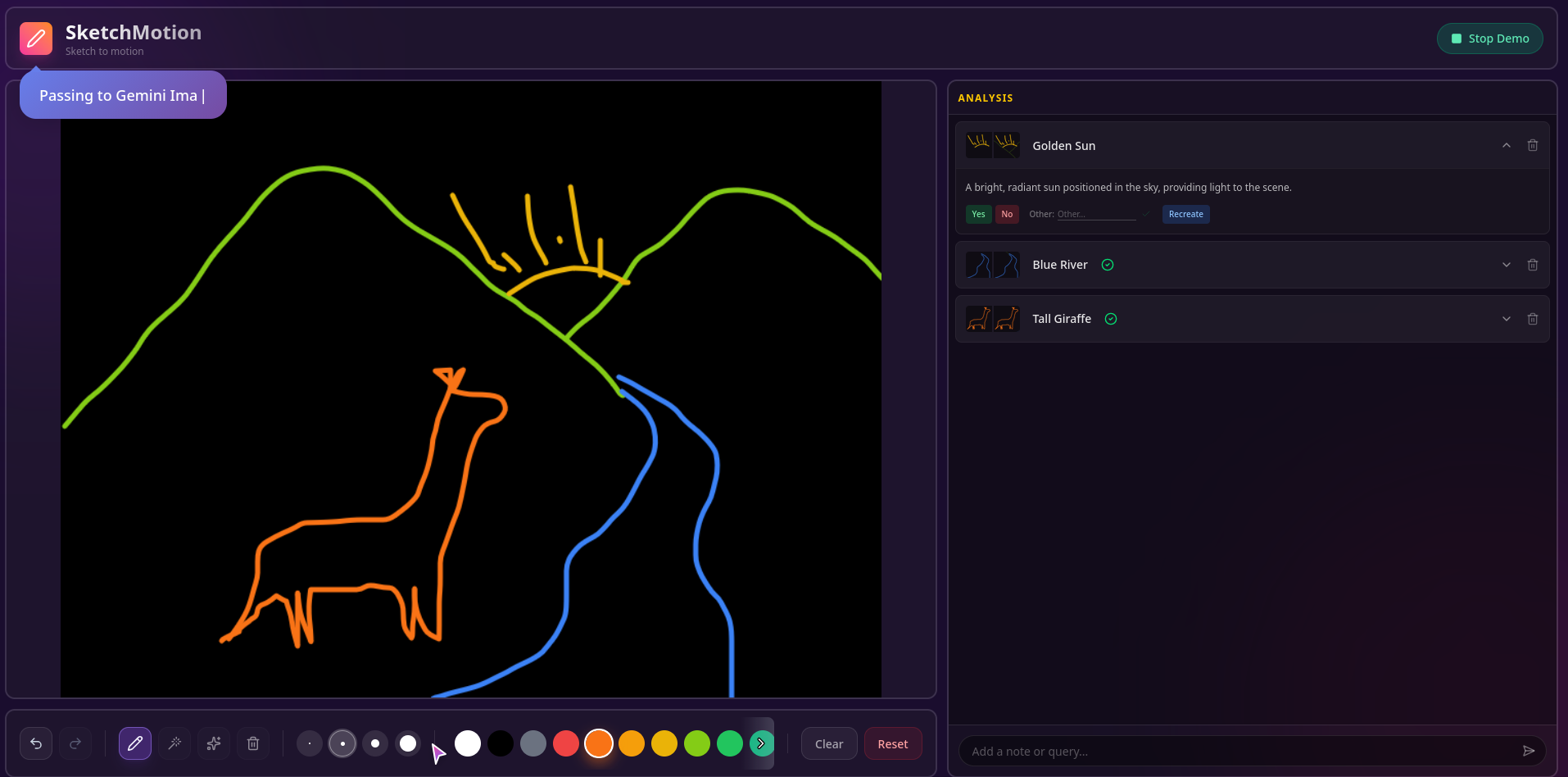
SketchMotion is an iterative human-in-the-loop context building sketch suggestions tool built for the Gemini 3 Global Hackathon. It transforms the solitary act of sketching into a collaborative dialogue with AI, where your rough ideas are understood, refined, and brought to life in real-time.
📚 Table of Contents
- About the Project
- Gemini 3 Integration
- System Architecture
- Data Flow & Logic
- Installation & Setup
- Usage Guide
🚀 About the Project
Traditional AI tools often feel like black boxes: you give an input, you get an output. SketchMotion changes this paradigm by introducing an interactive feedback loop.
Instead of guessing what you want from a single prompt, SketchMotion watches you draw, predicts your intent in real-time, and asks for verification. This "context building" approach ensures that the AI understands the nuance of your specific creation, leading to far more accurate and relevant results than simple one-shot generation.
💎 Gemini 3 Integration
SketchMotion is powered by the Gemini 3 Model Family, leveraging specific models for different stages of the user experience to optimize for both speed and intelligence.
| Feature | Model | Why? |
|---|---|---|
| Real-time Visual Reasoning | Gemini 3 Flash ⚡ | We utilize Flash's multimodal capabilities to not just "see" pixels, but to reason about spatial relationships. It differentiates between a "circle" that is a wheel vs. a "circle" that is a sun based on the surrounding context. |
| Deep Contextual Analysis | Gemini 3 Pro 🧠 | When ambiguity is high, Pro steps in. It handles the "Reasoning" phase of our pipeline, synthesizing user feedback history with visual data to construct a coherent scene graph. |
| Hi-Fi Generation | Gemini Image Generation 🎨 | A specialized pipeline that transforms the crude sketch into professional assets. It uses the verified context to build a highly specific prompt, ensuring the output matches the user's intent perfectly. |
The Gemini Pipeline
We treat the Gemini 3 API not just as a classifier, but as a Collaborative Reasoning Engine.
                                  ┌─────────────────────┐
                                  │   👁️ Dual-View     │
                                  │      Input          │
                                  └──────────┬──────────┘
                                             │
                              Intent + Context
                                             │
                                             ▼
                                  ┌─────────────────────┐
                           ┌──────┤   🧠 Reasoning      │
                           │      │      Engine         │
                           │      └──────────┬──────────┘
                           │                 │
                    Gemini 3 Pro      Dynamic Constraints
                           │                 │
                           │                 ▼
                           │      ┌─────────────────────┐
                           └─────▶│  🔄 Prompt          │
                                  │    Engineering      │
                                  └──────────┬──────────┘
                                             │
                                             ▼
                                  ┌─────────────────────┐
                                  │   💡 Suggestion     │
                                  └──────────┬──────────┘
                                             │
                                             ▼
                                        ┌─────────┐
                                        │Verified?│
                                        └────┬────┘
                                   ┌─────────┼─────────┐
                                 Yes                  No
                                   │                   │
                                   ▼                   ▼
                        ┌──────────────────┐  ┌──────────────────┐
                        │  ✅ Lock to      │  │ 📝 Self-         │
                        │     Graph        │  │    Correction    │
                        └──────────────────┘  └────────┬─────────┘
                                                       │
                                               Inject 'NOT X'
                                                       │
                                                       └──────────┐
                                                                  │
                                                                  ▼
                                                         (back to Prompt
                                                          Engineering)
Contextual Prompt Construction: Every time Gemini analyzes a stroke, it doesn't just look at the image. It reads the Session Context Graph.
- Ingest: Gemini receives the intent image (bright strokes) vs context image (dim strokes).
- Recall: It pulls previous affirmations. Example: "User already confirmed the 'green circle' is a 'tree'."
- Synthesize: It constructs a dynamic prompt: > "Analyze the bright strokes. CONTEXT: The green circle nearby is a TREE. Therefore, is this bright stroke likely a falling apple or a bird? NOTE: User previously rejected 'cloud'."
- Predict: It returns a result that is logically consistent with the established scene.
🏗️ System Architecture
The application is built on a Serverless/Edge Architecture to ensure low latency for global users. The frontend handles real-time interactions and heuristic processing, while the edge backend manages AI orchestration and session state.
  ┌──────────────┐
  │  🎨 Client   │
  │     UI       │
  └──────┬───────┘
         │
         │ 1. Stroke Data
         │
         ▼
  ┌──────────────┐         2. Analyze Prompt      ┌──────────────┐
  │   ⚡ Edge    │──────────────────────────────▶│  🧠 Gemini   │
  │     API      │                                │   3 API      │
  └──────┬───────┘◀──────────────────────────────└──────────────┘
         │                    3. Result
         │
         │ 4. Suggestion
         │
         ▼
  ┌──────────────┐
  │  🎨 Client   │◀──────────────┐
  │     UI       │                │
  └──────────────┘                │
         │                        │
         │ 5. Feedback            │
         │                        │
         ▼                        │
  ┌──────────────┐                │
  │   ⚡ Edge    │                │
  │     API      │                │
  └──────┬───────┘                │
         │                        │
         │ Context Memory         │
         │                        │
         ▼                        │
  ┌──────────────┐                │
  │  🗄️ Session  │                │
  │      KV      │────────────────┘
  └──────────────┘
Component Breakdown
Client (Svelte 5 & Canvas):
- Handles high-frequency input (60fps drawing).
- Runs the Heuristic Grouping Engine locally to minimize API calls.
- Manages the "Optimistic UI" for instant feedback.
Edge API (Cloudflare Workers):
- Acts as the orchestration layer.
- Implements Rate Limiting and Session Management.
- Constructs complex, multi-modal prompts for Gemini.
Session Memory (Cloudflare KV):
- Stores the "Mind Map" of the current drawing session.
- Persists user confirmations ("This is a cat", "This is NOT a dog") to guide future AI predictions.
🔄 Data Flow & Logic
1. The Stroke Lifecycle
Every line you draw goes through a rigorous normalization process before it ever sees an AI.
- Raw Input: Pointer events are captured.
- Smoothing: Catmull-Rom splines are applied to smooth wobbly lines.
- Feature Extraction: We calculate geometric properties for every stroke:
- Temporal: When was it drawn?
- Spatial: Center of mass, bounding box.
- Kinematic: Speed and acceleration.
2. Smart Grouping Engine
To prevent sending random noise to the AI, we implemented a custom Heuristic Clustering Algorithm that runs entirely in the browser. It groups strokes into "Candidates" based on likelihood of belonging to the same object.
                    ┌──────────────┐
                    │ Raw Strokes  │
                    └──────┬───────┘
                           │
                           ▼
                    ┌──────────────┐
                    │ Wait < 1s?   │
                    └──────┬───────┘
                     ┌─────┴─────┐
                   Yes           No
                     │             │
                     ▼             ▼
              ┌──────────────┐  ┌──────────────┐
              │  Distance >  │  │  New Group   │
              │  Threshold?  │  └──────────────┘
              └──────┬───────┘
               ┌─────┴─────┐
             Yes           No
               │             │
               ▼             ▼
        ┌──────────────┐  ┌──────────────┐
        │  New Group   │  │  Enclosed or │
        └──────────────┘  │  Connected?  │
                          └──────┬───────┘
                           ┌─────┴─────┐
                         Yes           No
                           │             │
                           ▼             ▼
                    ┌──────────────┐  ┌──────────────┐
                    │ MERGE Group  │  │  New Group   │
                    └──────▲───────┘  └──────┬───────┘
                           │                 │
                           │    Missed something?
                           │                 │
                           │                 ▼
                           │          ┌──────────────┐
                           │          │   Gemini     │
                           │          │   Semantic   │
                           │          │    Check     │
                           │          └──────┬───────┘
                           │                 │
                           │   "Merge Suggestion"
                           │                 │
                           └─────────────────┘
- Temporal Coherence: Strokes drawn in quick succession are likely related.
- Spatial Containment: A small stroke inside a larger one (like an eye in a face) is automatically grouped.
- Kinematic Similarity: Strokes drawn with similar speed and pressure are grouped.
🤖 AI Semantic Correction (The Safety Net)
Heuristics aren't perfect. Sometimes, you draw a flock of birds, and the algorithm misses one. Or you draw a Giraffe, and the spots aren't grouped with the body.
When Gemini analyzes the scene, it performs a Semantic Integrity Check:
- Color-Coded Context: We pass the full scene to Gemini where every existing group has a unique color outline ID.
- Visual Reasoning: Gemini looks at the image and reasons: "Hey, these 3 separate groups (circles) are actually spots inside this larger group (Giraffe body)."
- Merge/Split Suggestions: The API returns explicit instructions to MERGE Group A, B, and C, or SPLIT Group D.
- Example 1: Merging a stray "bird" stroke back into the "Flock" group.
- Example 2: Merging "spots" + "body" + "neck" into a single "Giraffe" entity.
3. AI Analysis Loop
Once the grouping engine identifies a stable Candidate, the AI Analysis Loop begins. This is a two-pass visual analysis system.
- Intent Image Generation: The client generates a specific image containing only the candidate strokes (bright white on black).
- Context Image Generation: A second image is generated showing the rest of the sketch (dimmed gray), providing spatial context.
- Prompt Construction: The Edge API combines these images with the Session History.
    User                System              Gemini
     │                     │                   │
     │  Draws Strokes      │                   │
     ├────────────────────▶│                   │
     │                     │                   │
     │                     │  Groups Strokes   │
     │                     ├──────────┐        │
     │                     │          │        │
     │                     │◀─────────┘        │
     │                     │                   │
     │                     │ Analyze (Intent + │
     │                     │     Context)      │
     │                     ├──────────────────▶│
     │                     │                   │
     │                     │                   │ Suggestion:
     │                     │                   │  "Wheel"
     │                     │◀──────────────────┤
     │                     │                   │
     │ "Is this a Wheel?" │                   │
     │◀────────────────────┤                   │
     │                     │                   │
     │       "YES"         │                   │
     ├────────────────────▶│                   │
     │                     │                   │
     │                     │ Lock Context      │
     │                     │   ("Wheel")       │
     │                     ├──────────┐        │
     │                     │          │        │
     │                     │◀─────────┘        │
     │                     │                   │
4. Context & Memory
The "Secret Sauce" of SketchMotion is its memory. The system builds a graph of known truths about the sketch.
- Positive Reinforcement: When you verify a prediction ("Yes, it's a tree"), that information is locked. The AI will assume that object is a tree in all future requests, helping it understand scale and perspective.
- Negative Constraints: When you reject a prediction ("No, it's not a car"), that label is added to a Negative Constraint List for that specific group. Future prompts effectively say: "Analyze this. We know for a fact it is NOT a car."
🔮 Future Roadmap: Multimodal Video Analysis
We are currently exploring Gemini 3's Video Input capabilities to take this to the next level. Static images lose the temporal information of a sketch.
- Video as Context: Instead of sending a static PNG, we plan to stream the drawing process as a video to Gemini.
- Dynamic Intent Recognition: By analyzing the speed and hesitation of strokes, Gemini can infer intent.
- Fast, jagged lines → "Grass" or "Rough Texture"
- Slow, careful curves → "Cloud" or "Smooth Surface"
- Motion cues for Animation: Understanding how a user draws a line (e.g., the direction of a wave) can automatically dictate how that object should be animated in the final output.
🎮 Usage Guide
The Workflow
- Draw: Sketch naturally. The Smart Grouping will automatically collect your strokes.
- Verify: Look for the floating label. Click Check (✓) to confirm the AI's guess.
- Correct: Click Cross (✗) if it's wrong. The AI will immediately re-analyze with your feedback in mind.
- Iterate: As you confirm more objects, the AI's understanding of the scene improves ("Oh, that's a tree next to the house I already know about").
- Finalize: Use the Generate tool to turn your verified sketch into a polished asset.
Built With
- cloudflare-kv
- cloudflare-workers
- gemini-3-flash-api
- gemini-3-pro-api
- gemini-image-generation-api
- google-ai-sdk
- html5-canvas-api
- node.js
- pnpm
- svelte-5
- typescript
- vite


Log in or sign up for Devpost to join the conversation.