Inspiration
# SketchBot

## Tagline
A camera-guided drawing robot that turns prompts and uploads into drawable line art, localizes paper and robot pose with AprilTags, previews the drawing live on the page, and drives an ESP32-based plotter in a local-first workflow.

## Elevator Pitch
SketchBot is a local-first drawing robot system that helps a user go from idea to physical sketch with much less guesswork. A user can upload an image or enter a prompt, SketchBot converts that into simplified black-and-white line art, detects the drawing surface and robot using AprilTags, overlays the intended drawing directly onto the live camera view for verification, and connects to an ESP32-based robot controller over Wi‑Fi/WebSocket. The goal is to make robot drawing more reliable, debuggable, and safe by grounding the system in real camera feedback instead of assumptions.

## What It Does
SketchBot combines computer vision, a live dashboard, AI-assisted prompt-to-line-art generation, and embedded robot control into one workflow.

A user can:
- upload an image or type a prompt
- generate simplified drawable artwork
- see saved task previews in the dashboard
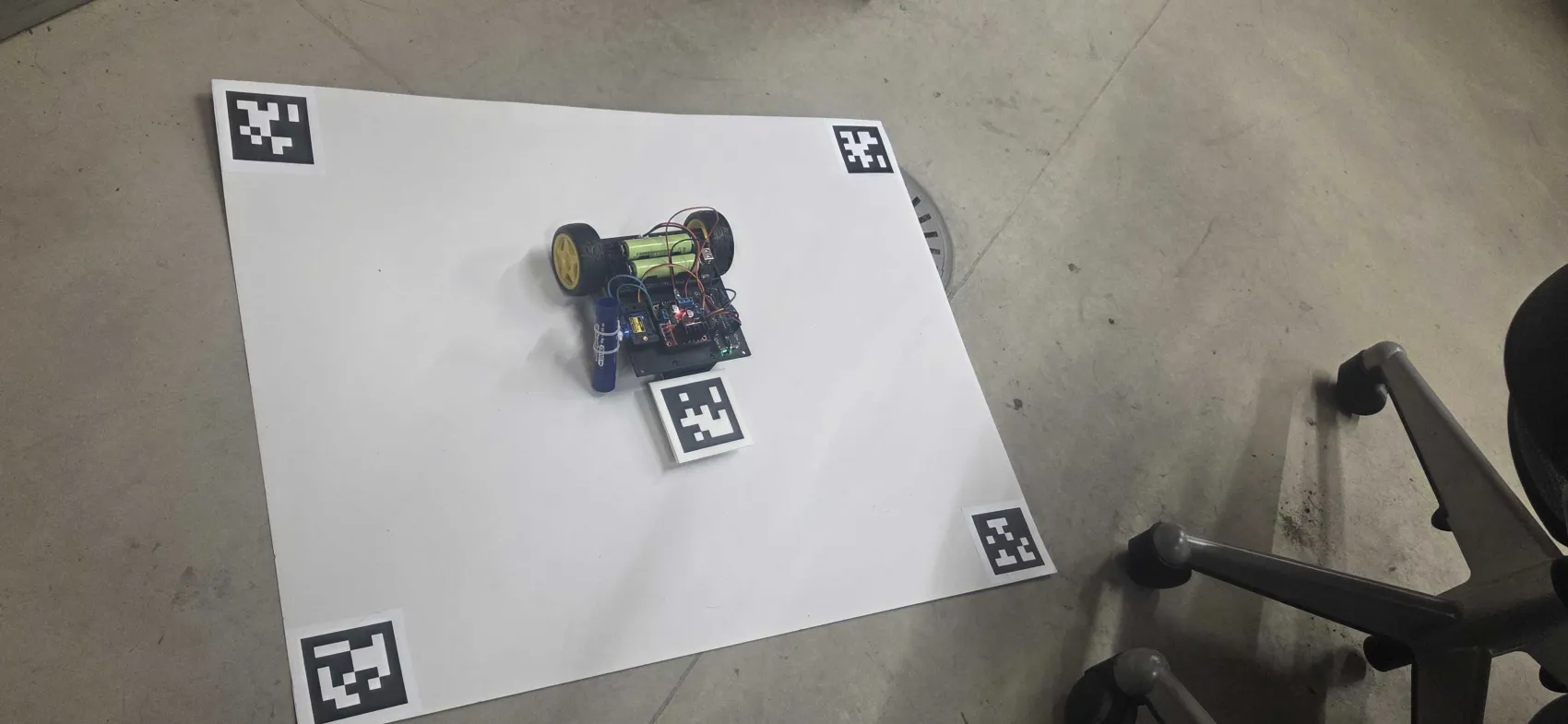
- detect the paper canvas using 4 AprilTags
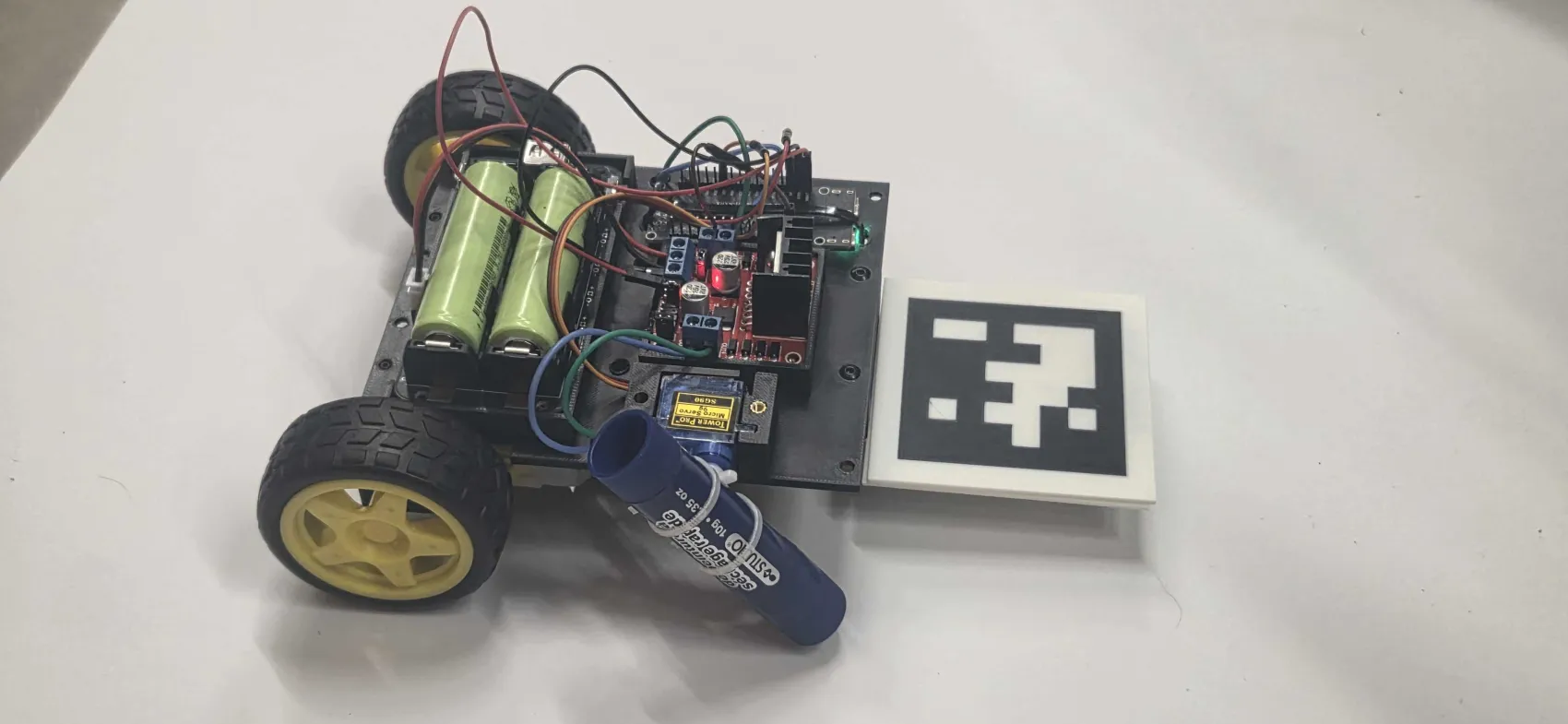
- detect the robot pose using a robot-mounted AprilTag
- view a live camera feed with the intended drawing warped onto the actual page
- connect to an ESP32-C5 robot controller over Wi‑Fi/WebSocket
- monitor robot state and readiness through both the dashboard and onboard RGB LED behavior

The system is designed to be **local-first**, so it works well on a laptop/Pi + phone hotspot + ESP32 setup without depending on fragile public tunneling.

## Problem
Typical hobby robot drawing setups are fragile:
- the robot often assumes it knows where the page is
- image generation outputs are not always robot-friendly
- there is little visual confirmation before motion starts
- networking becomes brittle outside one hardcoded home LAN
- debugging robot state is frustrating when the UI, camera, and firmware disagree

SketchBot addresses this by making the camera and live state the source of truth:
- detect the real page
- detect the real robot
- preview the actual mapped drawing on the real paper
- avoid misleading partial overlays
- expose connection state more clearly
- keep the whole stack usable on a local hotspot

## Inspiration
We wanted to build a drawing robot that feels less like a blind machine and more like a supervised physical system. Instead of telling a robot to draw and hoping the coordinates are right, we wanted a workflow where the system can actually *see* the page, *see* the robot, and show the user what it intends to draw before execution.

The project was also motivated by the gap between AI-generated visuals and robot-executable artwork. A robot does not need a pretty poster—it needs simplified, centered, drawable line art and trustworthy physical alignment.

## How We Built It
SketchBot is built as a monorepo with three main parts:

### 1. Backend
A Python/FastAPI backend handles:
- system state
- AprilTag detection
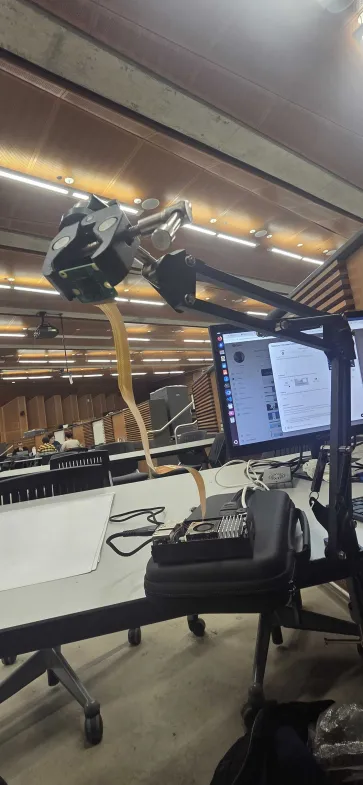
- camera frame processing
- overlay warping / homography preview
- task persistence
- prompt-to-SVG generation flow
- robot WebSocket communication

Key backend responsibilities:
- detect AprilTags using OpenCV ArUco AprilTag support
- infer the paper corners from the outer corners of tags 0–3
- normalize corner ordering to avoid crossed quads
- warp the generated/uploaded image to the real paper region
- persist tasks in JSON for quick retrieval/history
- talk to the ESP32 over `/ws/robot`

### 2. Frontend
A Next.js dashboard provides:
- live view
- AprilTag/canvas status
- robot status
- task creation from uploads or prompts
- saved task history
- direct previews/thumbnails of generated/uploaded assets
- immediate overlay refresh after generation/upload/load

We also made the frontend hotspot-friendly by removing brittle hardcoded IP assumptions and deriving backend addresses more safely.

### 3. Firmware
The robot controller runs on an **ESP32-C5** using **ESP-IDF**.

Firmware responsibilities include:
- connect to Wi‑Fi
- connect to backend via WebSocket
- send `hello`, heartbeat, and telemetry messages
- receive commands from the backend
- expose clearer onboard RGB LED state

The firmware uses a HAL/controller-style structure for clarity and future motion expansion.

## Technical Stack
- **Frontend:** Next.js / React
- **Backend:** FastAPI / Python
- **Vision:** OpenCV AprilTag via ArUco dictionary `DICT_APRILTAG_36h11`
- **Embedded:** ESP-IDF on ESP32-C5
- **Realtime communication:** WebSocket
- **AI generation:** OpenAI-backed SVG line-art generation
- **Persistence:** local JSON task store
- **Deployment model:** local-first, with Vercel used only for frontend preview

## Key Features

### Camera-based canvas localization
The page is detected only when all 4 canvas AprilTags are visible:
- Tag 0 = top-left
- Tag 1 = top-right
- Tag 2 = bottom-right
- Tag 3 = bottom-left
- Tag 4 = robot body

This avoids misleading partial overlays.

### Live overlay preview
Generated/uploaded art is warped onto the detected page using the live camera frame, so the user can verify:
- placement
- scale
- orientation
- overall fit

before moving toward execution.

### Robot-friendly art generation
We tightened the generation pipeline to create:
- black-on-white SVG
- no captions
- no text labels
- no framed poster outputs
- simpler, more drawable line art

### Saved previews/history
Instead of relying only on the live overlay, the dashboard now includes:
- current overlay preview
- saved task thumbnails/history

This makes debugging and iteration much easier.

### Local-first networking
SketchBot is designed to run with:
- backend on laptop/Pi
- frontend on laptop/host
- ESP32 on the same hotspot/LAN

This avoids public tunnel fragility during active robot development.

### Clearer connection semantics
We improved the robot connection model so dashboard state and LED behavior better reflect true readiness.

## Challenges We Ran Into

### 1. Firmware target / ESP-IDF setup
The firmware was initially targeting the wrong ESP architecture, and we had to properly retarget for **ESP32-C5**.

### 2. ESP-IDF component resolution
Dependencies like:
- `esp_websocket_client`
- `cJSON`
- `led_strip`

had to be correctly added through the ESP-IDF component manager.

### 3. Firmware size limit
Adding RGB LED support pushed the image past the default app partition, so we had to switch to a **large single-app partition layout**.

### 4. Board LED behavior
The onboard RGB LED did not behave like a simple discrete RGB LED. We used a reference ESP project as hardware truth and discovered it was actually a WS2812-style LED using `led_strip`, with a board-specific GPIO and GRB order.

### 5. Overlay geometry bugs
Early overlay attempts were wrong because:
- frame size assumptions were inaccurate
- page corners were inferred from tag centers instead of outer corners
- corner ordering sometimes self-crossed

We fixed this by:
- recording real camera frame dimensions
- using outer tag corners
- normalizing corner order before warping

### 6. Misleading AI generation outputs
The model was technically returning SVG, but often as useless “poster/card” outputs with text labels rather than drawable line art. We had to strengthen the prompt and replace the fallback behavior.

### 7. UI state freshness
New prompts initially required a manual page refresh before the overlay updated. We fixed the frontend flow to refresh state immediately after generation/upload/load.

### 8. Local networking reality
We originally explored a public-tunnel path, but free ngrok introduced browser interstitial issues that broke normal frontend/backend behavior. That pushed us toward the more robust **local-first hotspot workflow**.

## Accomplishments We’re Proud Of
- Built a full working multi-part stack across frontend, backend, computer vision, and embedded firmware
- Got AprilTag-based page detection working live
- Reached stable 4-tag canvas lock with 100% localization
- Successfully connected the ESP32-C5 to the backend over Wi‑Fi/WebSocket on a phone hotspot
- Implemented live overlay warping onto the real detected page
- Added task previews and history thumbnails for much better usability
- Improved generated SVG outputs so they’re closer to actual robot-friendly line art
- Solved board-specific RGB LED behavior on the ESP32-C5
- Kept the system local-first and actually usable in a real hackathon setup

## What We Learned
- In physical systems, the camera and live telemetry should be treated as truth, not assumptions
- Debuggability matters as much as capability
- AI generation needs strong output constraints when a physical robot is the downstream consumer
- Embedded “small details” like LED type, color order, and partition tables can become major blockers
- Local-first architecture is often the fastest path to a reliable demo

## What’s Next
Next steps for SketchBot include:
- full motion execution of the planned drawing path
- robot heading calibration so robot orientation matches the intended page frame precisely
- better path planning and stroke ordering for cleaner pen motion
- a stronger command/ack execution pipeline
- richer connection diagnostics in the dashboard
- improved fault and recovery behavior
- more robust backend deployment on a Pi or edge host
- optional remote/secure access once the local stack is fully stable

## Use Cases
- educational robotics
- computer vision + embedded systems demos
- prompt-to-plotter workflows
- interactive drawing installations
- maker/hackathon robot art systems

## Why It Matters
SketchBot is not just “a robot that draws.” It is an attempt to make physical robot drawing **observable, debuggable, and trustworthy**. By combining live localization, preview before execution, local-first networking, and robot-friendly generation, it reduces the gap between digital intent and physical action.

## Short Description
SketchBot is a camera-guided drawing robot platform that turns prompts and uploads into simplified line art, localizes the page and robot with AprilTags, previews the drawing live on the real canvas, and connects to an ESP32-based robot controller over Wi‑Fi/WebSocket in a local-first workflow.

## One-Line Pitch
SketchBot helps a drawing robot see the paper, preview the sketch, and only then move.
What it does
How I built it
Challenges I ran into
Accomplishments that I'm proud of
What I learned
What's next for SketchBot

Log in or sign up for Devpost to join the conversation.