-
-
-
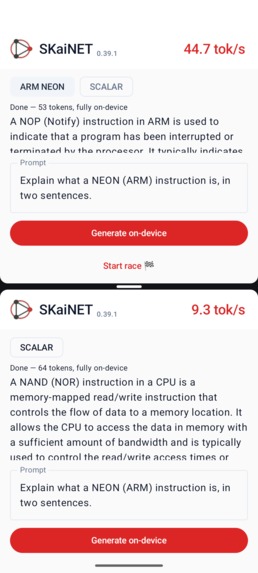
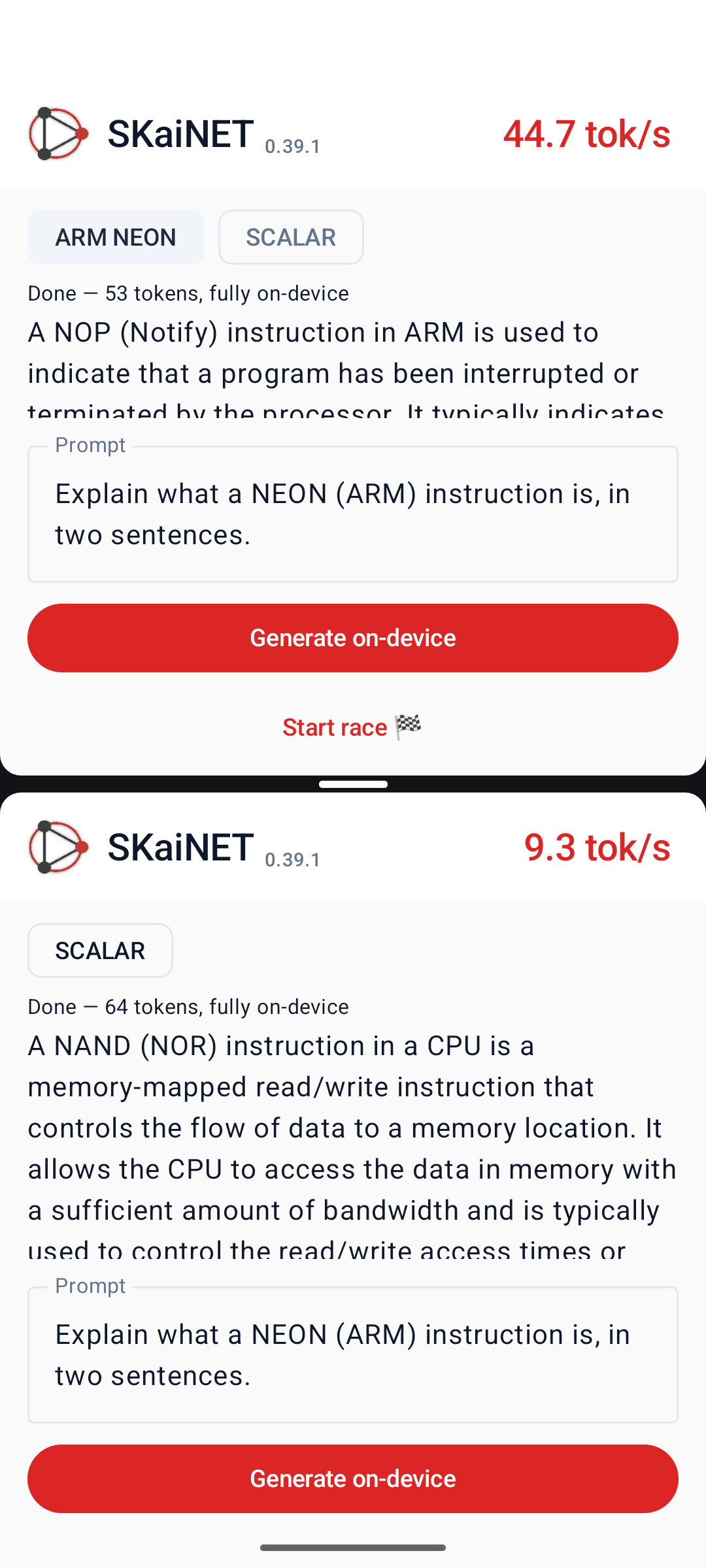
Split race app screenshot (Emulator)
TL;DR — Mobile AI track.
We made SKaiNET's Android LLM inference 4.5× faster end-to-end on a real Pixel 8a by moving quantized matmul onto hand-written Arm NEON kernels (SKaiNET 0.39.0), then removing the runtime bottlenecks those kernels exposed (SKaiNET 0.39.1) — both shipped during this challenge and live on Maven Central today. You can judge it yourself, on your own phone, in about two minutes — see "How to reproduce" below.
Repos: SKaiNET · SKaiNET-transformers · AndroidNeonLlmDemo. Maven Central: sk.ainet:skainet-bom:0.39.1, sk.ainet.transformers:skainet-transformers-bom:0.39.1.
Built during this challenge
| Before (start of summer) | SKaiNET was essentially unusable for LLM inference on Android. Loading a ~138 MiB Q8_0 GGUF cost ~145 MB against Android's 256 MB ART heap cap, and decode ran at roughly 1 tok/s (#921, #920). |
| During the challenge | Shipped SKaiNET 0.39.0 (Aug 10) — hand-written NEON matmul kernels through a JNI bridge, streaming GGUF loading. Shipped SKaiNET 0.39.1 (Aug 11) — FP32 fast paths and cached op dispatch to remove the runtime overhead the fast kernels exposed. Built and shipped AndroidNeonLlmDemo as the reference consumer for both. |
| Result | ~1 tok/s → ~19.5 tok/s end-to-end on a real Pixel 8a, fully on-device — a 4.5× jump from the runtime work in 0.39.1 alone, on top of the kernel work in 0.39.0. Both releases are live on Maven Central today, usable by anyone. |
This is a significant update to an existing project, made during the submission window — both version numbers above are real Maven Central releases, not internal branches.
How to reproduce / judge this
You need a real ARM64 Android phone (an x86 emulator falls back to scalar and there's nothing to compare; an arm64 emulator works too — we used one on Apple Silicon).
- Clone this repo, then from
demo-app/:sh ./gradlew :app:installDebugThe SmolLM2-135M Q8_0 GGUF (~138 MiB) ships bundled inside the APK's assets, so this needs no network access — no Hugging Face download, no token, nothing to wait on. - Open SKaiNET Demo on the phone. Expect: a top bar reading "SKaiNET 0.39.1", a kernel-tier chip that already reads "ARM NEON" (auto-selected for your CPU), and a pre-filled prompt.
- Tap Generate on-device. Expect: status shows "Loading model…" for a couple of seconds, then "Generating" with a live "X.X tok/s" counter climbing in the top-right as text streams in. On a modern arm64 phone this settles somewhere in the high-teens to twenties (we measured ~18.5–20.6 tok/s solo on a Pixel 8a). Status ends "Done — N tokens, fully on-device."
- Tap the SCALAR chip. Expect: status changes to "Kernel mode: scalar — model reloads on next run."
- Tap Generate on-device again with the same prompt. Expect: the counter climbs much more slowly this time — a few tok/s (we measured ~4.4 tok/s on the same Pixel 8a). Same model, same phone, same prompt — only the kernel path changed.
- For the visual version: tap "Race against scalar (split screen)" once (arms it, opens a second window, preloads both), then tap "Start race 🏁". Expect: two windows generate the same prompt at the same instant — the top (NEON) window visibly finishes first, the bottom (SCALAR) window is still crawling.
- Optional, for hard numbers instead of eyeballing the UI: run
adb logcat -s SKAINET_DEMO:*while generating. Expect a line likeproviders=[native-jni, native-jni, scalar]after a NEON run (orproviders=[scalar]after a scalar-pinned run), followed by a[KernelProfile] matmul time breakdownblock showing exactly which kernel ran and for how long — not just a UI counter, but proof of which code path executed.
A short (30–60s) video of step 6 — the split-screen race — is the fastest way to see this without installing anything; script/shot list already exists in demo-video-script.md Scene 1. [VIDEO LINK — TODO]
Inspiration
SKaiNET is a Kotlin Multiplatform AI framework. You define a model once in a Kotlin DSL and can run it anywhere Kotlin runs. Android is an especially important target: it has millions of developers, billions of devices and those devices run on Arm CPUs.
At the start of this summer, though, SKaiNET was barely usable for LLM inference on Android.
The problem was not the hardware. Even a mid-range phone has 64-bit Armv8/v9 cores with NEON, FP16, and often dot-product extensions. The problem was that SKaiNET was not using that hardware directly.
Everything went through ART. Tensors lived as managed arrays on a heap capped at 256 MB, while scalar math was JIT-compiled by a runtime primarily designed for application code. Issue #921 showed the problem clearly: SmolLM2-135M in Q8_0 is a ~138 MiB GGUF, but simply loading it used around 145 MB of managed heap. In #920, we also measured generation at roughly 1 token per second.
The bottleneck was not the silicon — it was that SKaiNET was still treating Android primarily as a managed runtime.
That led us to a simple change in perspective:
Android is an Arm platform first. Kotlin would remain the public API and runtime. For the compute-heavy parts, we would talk to the Arm hardware directly.
What it does
During the challenge, we shipped two SKaiNET releases and built a demo application to make the improvements measurable on a real Android device.
SKaiNET 0.39.0 added hand-written NEON kernels through a JNI bridge. It includes Q8_0, Q4_0, Q4_K, Q5_K, and Q6_K matmul kernels written in C.
The Android package ships two native .so variants:
armv8-aas the baselinearmv8.2-a+fp16+dotprodfor newer CPUs
The appropriate version is selected at runtime for the device.
We also changed GGUF loading to use streaming FileChannel access. This removed the out-of-memory failures caused by loading model data into the managed heap.
On a real phone, Pixel 8a, the Q8_0 decode kernel reached roughly 24 tok/s compared with 3.8 tok/s for the scalar implementation, a 6.4× improvement.
SKaiNET 0.39.1 focused on what happened around the kernels.
Once matmul became faster, profiling showed that it accounted for only about 12% of total generation time. Most of the remaining cost came from eager-operation overhead.
We added FP32 primitive fast paths and cached operation dispatch. After those changes, generation became matmul-bound at roughly 59% of wall time, with an approximately 4.5× end-to-end improvement.
We also built AndroidNeonLlmDemo.
The app runs SmolLM2-135M Q8_0 fully on-device and needs only a few lines of Kotlin integration.
It includes a NEON | SCALAR switch that changes the kernel registry at runtime. This makes it possible to compare both implementations on the same phone, with the same APK, model, and prompt.
There is also a live tok/s counter and a split-screen race mode that starts the NEON and scalar versions simultaneously in two processes.
The screenshot in the gallery shows this directly: the top window uses the hand-written NEON kernels, while the bottom window is pinned to the scalar implementation.
Benchmark methodology
- Device: Google Pixel 8a ("akita"), Android 17, arm64-v8a (Tensor G3 — NEON, FP16, dot-product, i8mm, SVE2)
- SKaiNET version: 0.39.1, engine + transformers, lock-step, from Maven Central
- Model: SmolLM2-135M-Instruct, Q8_0 GGUF (
unsloth/SmolLM2-135M-Instruct-GGUF), 144,811,072 bytes (~138.1 MiB), bundled in the APK's assets — no network involved in any measured run - Prompt: "Explain what a NEON instruction is, in two sentences." — 21 prompt tokens
- Generated tokens per run: 64–65 (NEON), 44 (scalar) — generation runs to end-of-sequence, not a fixed token count
- Reported statistic: decode tokens/second = (tokens emitted − 1) ÷ (time of last token − time of first token). This is the app's own live counter formula; it deliberately excludes prefill and the first token's latency.
- Runs: 2 solo NEON generations on the Pixel 8a (first cold, right after app launch; second warm), averaged to ~19.5 tok/s. 1 scalar generation, captured via the split-screen race — its decode window had no concurrent NEON activity, since the NEON side had already finished — at ~4.4 tok/s. This is a small sample; treat it as a real, reproducible data point rather than a statistically tight benchmark. More repeated runs are on our list.
- Warm-up: none formalized — the cold vs. warm NEON runs above bracket the range a judge would actually see running this cold, which we think is more honest than hiding the first run.
- Thermal/power: not instrumented. Phone at room temperature, screen on, no other foreground load, single ~3–10s generations — unlikely to trigger sustained throttling, but not verified with a thermal probe.
End-to-end results
Measured using the same app, GGUF file, and prompt with SKaiNET 0.39.1. Real hardware first — the emulator is a secondary cross-check, not the headline number.
| Configuration | Kernel path | Decode |
|---|---|---|
| Pixel 8a (real device), NEON | JNI NEON (hand-written C) | ~19.5 tok/s |
| Pixel 8a (real device), scalar pinned | scalar implementation | ~4.4 tok/s |
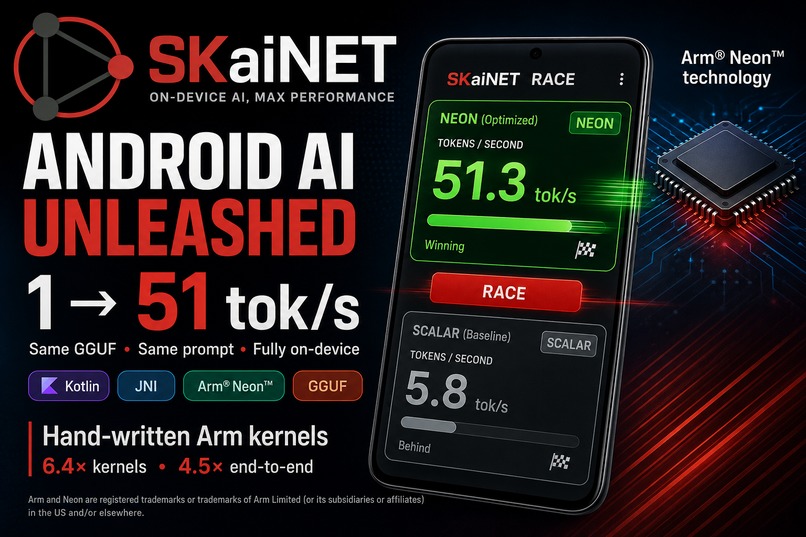
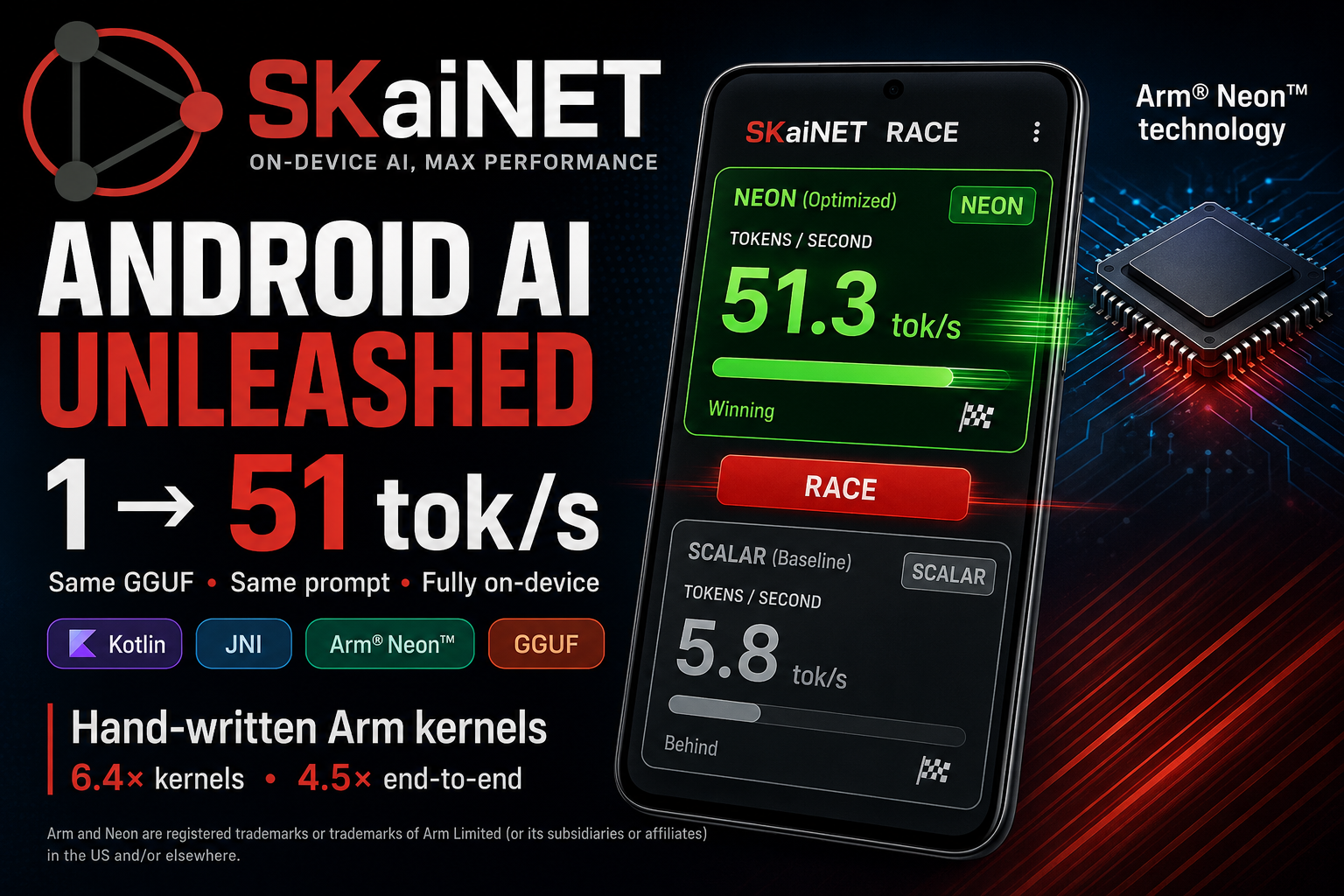
| arm64 emulator (Apple Silicon), NEON | JNI NEON (hand-written C) | 51 tok/s |
| arm64 emulator (Apple Silicon), scalar pinned | scalar implementation | 5.8 tok/s |
The NEON-to-scalar difference is roughly 4.4 to 4.5× in both environments. Seeing a similar ratio on real hardware and in the emulator gave us more confidence that the result was not specific to either setup.
The app also includes a built-in kernel profiler that reports accounting after every generation.
With NEON enabled, 100% of matmul time is spent inside the JNI kernels.
On the Pixel 8a, matmul takes roughly 48.5 ms per decoded token with NEON compared with 322.7 ms using the scalar path, or about 6.7× faster. That is close to the 6.4× improvement from the standalone kernel benchmark.
At the application level, including tokenization, sampling, runtime overhead, and JNI calls, the same phone reaches about 19.5 tok/s with NEON and 4.4 tok/s with the scalar implementation, a 4.5× difference.
This was one of the main lessons from version 0.39.1: improving the kernels is important, but it only helps if the rest of the runtime can keep up.
The macOS JVM and Kotlin/Native comparison is discussed separately in the "What's next" section.
How we built it
1. Storage: keep model weights out of the managed heap
GGUF loading on Android now uses thread-safe positional FileChannel reads.
Instead of materializing the entire model in managed memory, packed weights are read as needed. The Q8_0 block layout stored in the GGUF file is already the format consumed by the kernels, so there is no need to repack or fully dequantize the weights.
Fully dequantizing SmolLM2-135M would require around 540 MB, which is well beyond the available managed heap.
Longer-term we are moving model weights to file-backed (mmap) storage so they no longer live in the managed heap. The concrete target is that a 600 MB Q4_K model should load while Android is still using its default 256 MB heap limit.
2. JNI bridge
The skainet-backend-jni-cpu AAR exposes a deliberately small JNI surface.
It ships two native library tiers: a baseline armv8-a NEON build that works across ARM64 devices, and an armv8.2-a+fp16+dotprod build for CPUs that support those extensions.
The correct version is chosen at runtime using /proc/cpuinfo.
This allows the same APK to support anything from an older Armv8.0 phone to a current Armv9 device.
The native libraries are built with NDK r28 and use 16 KB page alignment for current Android requirements.
3. Hand-written NEON kernels
The Q8_0 kernel processes 16 int8 values at a time using vld1q_s8, widens them through vmovl, accumulates with fused multiply-add using vfmaq_f32, and applies the FP16 scale once per 32-element block.
The Q4_0 kernel first unpacks its nibbles using vand and vshr, then feeds them into the same FMA pipeline.
One important optimization was less about individual instructions and more about memory access.
We changed the loop order so weight bytes are read sequentially. This matters on efficiency cores such as the Cortex-A55, where strided access causes significantly more cache misses.
That turned out to matter more in practice than several instruction-level optimizations we tried.
Each native kernel also has a scalar reference implementation. CI runs the ARM builds under qemu-aarch64 with -march=armv8.2-a+fp16+dotprod so the optimized paths remain covered by correctness tests.
4. Optimizing the runtime around the kernels
After the first kernel improvements, we profiled complete generation instead of assuming matmul was still the main bottleneck.
It was not.
Matmul had fallen to around 12% of wall time, while the eager execution layer was now responsible for most of the remaining cost.
For SKaiNET 0.39.1, we added FP32 primitive fast paths for common eager operations and cached operation dispatch.
The same workload increased from roughly 11 tok/s to around 51 tok/s without changing the native matmul kernel itself.
After these changes, generation became matmul-bound again, which is where we wanted the runtime to be.
5. Keeping the public API in Kotlin
None of the native implementation details have to appear in application code.
// create execution context
val ctx = DirectCpuExecutionContext.create()
// open model file
val openGguf = { AndroidRandomAccessSource.open(gguf.path) }
// setup loader
val weights = DecoderGgufWeightLoader(
    source = openGguf,
    quantPolicy = QuantPolicy.NATIVE_OPTIMIZED,
    architectures = setOf("llama", "mistral"),
).loadToMapStreaming<FP32, Float>(ctx)
// create runtime
val runtime = OptimizedLLMRuntime(
    network = LlamaNetworkLoader.fromWeights(weights),
    context = ctx,
    mode = OptimizedLLMMode.DIRECT,
    bosTokenId = weights.metadata.bosTokenId,
)
// create tokenizer
val tokenizer = openGguf().use(TokenizerFactory::fromGgufSource)
// generate ...
runtime.generateUntilStop(
    tokenizer.encode(prompt),
    maxTokens,
    tokenizer.eosTokenId
)
Kernel providers register through a priority SPI: ServiceLoader on ART and explicit registration on Kotlin/Native.
This means the DSL, model loaders, and sampling code stay multiplatform. The Arm implementation simply becomes the highest-priority provider when the device supports it.
The demo application can also download its model directly from the Hugging Face Hub through SKaiNET's hf:// data-source resolver.
Challenges we ran into
Managed memory was the first major limitation. Large primitive arrays quickly consume Android's available heap. Streaming model loading solved the immediate problem, while we plan support for file-backed model storage.
Efficiency cores changed how we optimized the kernels. On a Cortex-A55, sequential memory access had a larger impact than some of the more obvious instruction-level optimizations. Testing only on the fastest core would have hidden this.
Kernel benchmarks were not enough. After achieving the 6.4× kernel improvement, end-to-end profiling showed that most application time was being spent somewhere else. The next major improvement came from the runtime surrounding the kernels.
That experience is also why the demo contains its own per-generation kernel profiler. We wanted to be able to see exactly which implementation was running and where the time was going.
Building a real demo exposed integration bugs. Using the library through the same path as an application developer revealed several issues that were not obvious from isolated tests. These included ServiceLoader wiring that existed only for JVM, a download-cache policy that buffered whole models in memory, and Android registry pinning that was being overridden by the operations factory.
Supporting many generations of Arm CPUs requires careful dispatch. The same APK needs to work on both older Armv8 devices and newer CPUs with dot-product support. Running +dotprod instructions on an unsupported CPU would result in a SIGILL, so each tier is selected explicitly and tested separately.
Accomplishments we're proud of
During the challenge, we shipped two releases that took the system from roughly 1 tok/s to as much as 51 tok/s, depending on the test environment.
Both releases are available on Maven Central with version-locked engine and transformers packages.
The same C kernel source is now used across the Arm platforms we target:
Android uses JNI, macOS/JVM uses FFM, and embedded Linux with linuxArm64 uses Kotlin/Native cinterop.
We also wanted the demo to make the performance difference easy to verify rather than asking people to trust benchmark numbers. The A/B switch, live tok/s display, split-screen mode, and kernel accounting all use the same model and application path for both implementations.
From an application developer's perspective, the setup remains small: a Gradle dependency and a few lines of Kotlin.
There is no Python step, no model conversion pipeline, and no C++ toolchain required in the application build. The input is a GGUF file, and the output is generated tokens.
What we learned
Modern Arm mobile CPUs are capable of running much more AI computation than our original Android implementation allowed.
The main bottleneck was not the processor itself. It was the layers between the model and the NEON execution path.
We had to improve both sides of that problem.
First, hand-written kernels made the compute-heavy operations roughly 6.4× faster. Then, once those kernels exposed other runtime bottlenecks, changes around eager execution improved end-to-end performance by another large margin.
We also learned not to optimize only for the fastest cores.
Cache behavior on an in-order Cortex-A55 had a real effect on the design of the kernels, and some changes that looked less impressive on paper produced better results on actual mobile hardware.
What's next
macOS and iOS Kotlin/Native kernels.
Our cross-platform comparison made the current gap clear. The pure-native macOS CLI currently decodes at around 10 tok/s using the scalar implementation, compared with roughly 62 tok/s on the JVM using the same C kernels through FFM.
Adding a macosArm64 cinterop target to the kernel klib should allow Kotlin/Native to use the same optimized implementation. The embedding pattern already exists for linuxArm64, and the same work would provide a path toward iOS support.
Finish file-backed weights.
Make file-backed (mmap) weights the default path (SKEEP-002). This includes zero-copy JNI access and the ability to run 1B+ parameter models without needing a larger managed heap.
Add an int8 activation path.
Quantizing activations per token would allow Q8_0 workloads to use the sdot and i8mm integer execution units already available on the dot-product tier.
Explore SME2.
For newer Armv9 devices, we want to evaluate SME2 and compare the resulting implementation directly with Arm KleidiAI micro-kernels.
Useful links
- SKaiNET — https://github.com/SKaiNET-developers/SKaiNET
- Android demo app — https://github.com/SKaiNET-developers/SKaiNET-examples/tree/2026_08_arm_android/AndroidNeonLlmDemo
- SKEEP-002 proposal — https://github.com/SKaiNET-developers/SKaiNET/blob/develop/docs/modules/skeep/pages/002-android-offheap-tensor-storage.adoc
Everything is open source
- MIT
- Apache 2

Log in or sign up for Devpost to join the conversation.