-
-
Database Design
Inspiration
Two of the biggest factors of making business decisions are time and risk. Both are the factors in whether you make a profit or fall behind, and it’s something businesses have to balance constantly. Companies that deal in construction or field work have to especially manage these factors, as sending a crew out to a job site when it rains out costs the Per Diem to keep them out there, and a work day that turns south fast can turn into workplace accidents that invite a lot of trouble.
What it does
SiteSentinel calculates the risk at each job site and estimates what a bad day would cost an outgoing crew. It pairs that with a live dashboard and a hazard-reporting app that works offline for crews in remote areas. Several of us have worked in the field, so we kept everything as simple as possible.
Site risk monitoring: Every job site is stored as a geographic point in PostGIS. The backend combines live and forecast weather from Open-Meteo, active warnings from the National Weather Service, and FEMA flood zones into a 0–10 hazard score for today and tomorrow. Each score shows which factors are driving it. Flood checks flag river and floodplain sites after heavy rain.
AI reports for managers (Gemini): For each manager’s sites, the backend gathers current conditions, hazard scores, active alerts, recent crew reports and flood risk. Google’s Gemini turns that into a plain-language email: an overview, a ranked “Needs attention” list, and an “All clear” line. Gemini may only use the data it’s given, and managers who cover the same sites share one call to keep costs down. If Gemini is unavailable, a built-in summary goes out instead.
Crew SMS: Managers can text a site’s whole crew a status update or flood warning through Twilio.
Offline-first crew app: The installable web app caches every page and every site’s data on first launch, so it opens with no signal. Hazard reports (photo, description and GPS pin) are saved to IndexedDB on the phone and upload automatically once signal returns, with no duplicates.
How we built it
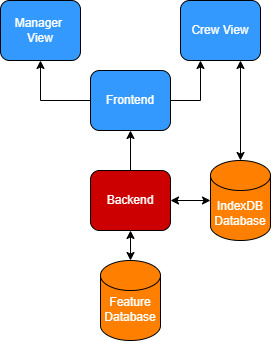
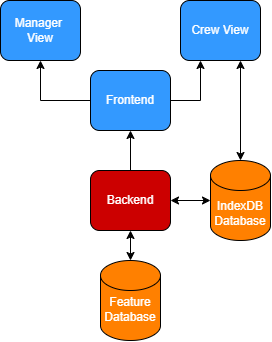
Feature Database: A PostGresSQL instance hosted on Supabase. It has been extended with the POSTGIS extension to natively handle spatial queries. It holds data on weather data, site locations and information, and which workers are associated with which site.
Backend: Written in python and implemented with the Fastapi framework, and hosted online using Vercel, handles giving relevant location data to the Feature Database so nearby and relevant features can be used, and furthermore utilizes our model to rank the severity of a location.
Frontend: The frontend was written in Typescript with the React Framework also hosted in Vercel. Handles making data viewable, alongside parsing crew member reports back to the feature database. Furthermore is a PWA, which enables “downloading” of the website, which enables offline first functionality for crew members in poor service locations. Manager View: Default view for desktop applications, represents all sites and the risk factors associated with each site. Enables the addition and removal of crew members on a site, and allows to view the summary that will be pushed out each day Crew Member View: Default view for Mobile Applications: Designed to be simple as possible, defaults to grabbing the details of the nearest site. Furthermore works completely offline, with sending all reports to the IndexDB before syncing with the Feature Database
IndexDB Database: Browser based database which enables offline storage of hazard reports which are then queued to upload to the feature database system based off service availability.
Challenges and Compromises:
Supabase has a limit of 5GB for its database, and while for most of the datasets we wanted to use this was fine, public endangered species shapefiles were gigantic, being about 2 gb per species classifications. This was way too large for our database, so we opted for this demo to not include them.
For SMS messaging, there are no free ways to send data through text message with the sole exception of twilio, and it was heavily restricted to template messages. We opted to simply use these template messages even though it’s not optimal, as they represent a proof of concept of the feature we would properly employ with an operating budget.

Log in or sign up for Devpost to join the conversation.