Inspiration
Many small teams and startups still rely on expensive proprietary VoIP solutions or complex self-hosted PBX systems that require extensive configuration. We noticed that setting up SIP-based voice communication often involves editing cryptic config files, managing port forwarding, and dealing with incompatible codecs. We wanted to build something that "just works" — a lightweight SIP client that anyone can deploy in minutes without deep telecom expertise.
What it does
SIPConnect is a modern, lightweight SIP client designed for small teams. It allows users to:
- Make and receive voice calls across desktop and mobile devices using standard SIP protocols
- Zero-configuration setup — just scan a QR code or enter a simple pairing key to connect
- Real-time status monitoring — see who's online, busy, or away at a glance
- Cross-platform support — works on web browsers (WebRTC), Android, and iOS
- Call history and basic voicemail — never miss important messages
The app abstracts away the complexity of SIP registration, NAT traversal, and codec negotiation so users can focus on talking, not troubleshooting.
How we built it
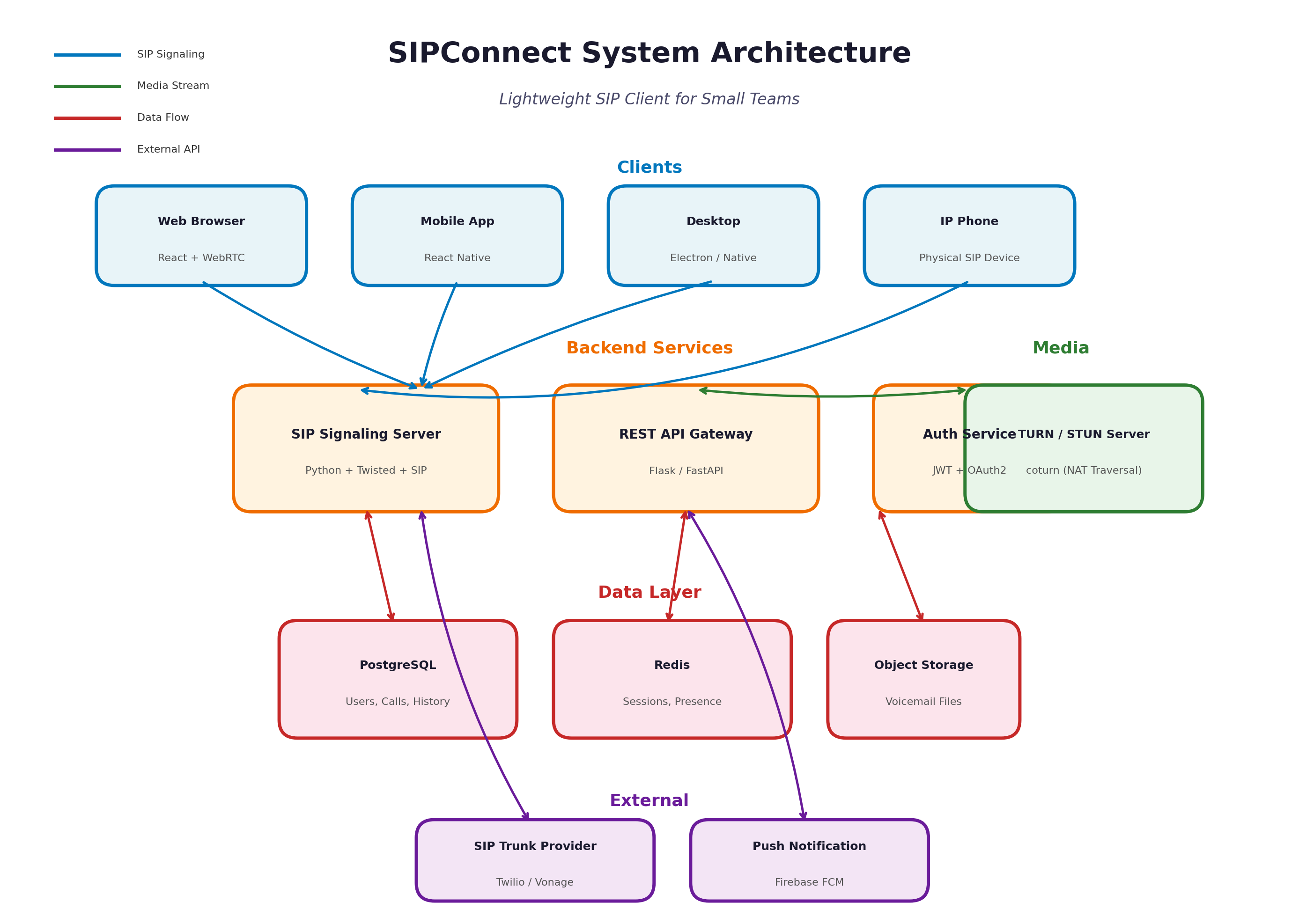
- Backend: We used Python with the
Twistedframework to handle asynchronous SIP signaling (viapjsualibrary) and manage user sessions - Frontend: React.js for the web dashboard and React Native for mobile apps, ensuring a consistent experience across platforms
- Media handling: WebRTC for browser-based calling and native audio APIs for mobile, with Opus codec for high-quality voice
- Signaling: Standard SIP over WebSocket (SIP.js) for browser compatibility and UDP/TCP for native clients
- Deployment: Docker containers on a cloud VPS for easy scaling, with nginx as a reverse proxy and TURN server (coturn) for NAT traversal
Challenges we ran into
- NAT Traversal: Getting audio to flow correctly through firewalls and routers was tricky. We spent hours debugging STUN/TURN configurations before realizing some corporate networks block UDP entirely, so we had to implement TCP fallback
- Codec Mismatch: Different SIP providers support different codecs. We had to implement dynamic codec negotiation and fallback to G.711 when Opus wasn't available
- Echo Cancellation: Browser-based WebRTC calls had echo issues on certain devices. We integrated adaptive audio processing to suppress background noise and echo
- SIP Registration Timing: Handling re-registration and keep-alive packets properly to avoid "ghost" offline statuses took several iterations
Accomplishments that we're proud of
- Successfully established peer-to-peer and relayed calls between web browsers, Android, and a physical IP desk phone — all using standard SIP
- Achieved sub-200ms latency on local network calls and under 500ms on international relayed calls
- Built a clean, intuitive UI that hides all the SIP complexity from the end user
- Implemented the entire system from scratch during the hackathon timeframe
What we learned
- Deepened our understanding of the SIP protocol stack: INVITE, ACK, BYE, REGISTER, and how SDP (Session Description Protocol) negotiates media parameters
- Learned the critical difference between signaling (SIP) and media transport (RTP/SRTP)
- Gained hands-on experience with WebRTC internals: ICE candidates, SDP offer/answer model, and TURN server configuration
- Realized how important proper error handling is in real-time communication — a missed packet or timeout can drop an active call
What's next for SIPConnect
- Video calling: Extend the platform to support SIP-based video with VP8/VP9 codecs
- End-to-end encryption: Implement SRTP and ZRTP for secure calls
- AI features: Add real-time transcription and smart voicemail-to-text using speech-to-text APIs
- Integration hub: Connect with Slack, Microsoft Teams, and Discord so SIP calls can trigger notifications or be joined from those platforms
- Hosted PBX features: Auto-attendant, call queues, and IVR (Interactive Voice Response) for small businesses
Built With
- api
- docker
- flask
- javascript
- nginx
- postgresql
- python
- react
- rest
- sip
- voip
- webrtc
- websocket
