Simplemoji 😁
An application where you can have all the emojis with easy and quick access


[!NOTE] The shortcut with which you launch the application must be configured on your own according to the WindowManager you have
Features
- 🔎 Searchbar
- 👋 Tone emoji selector
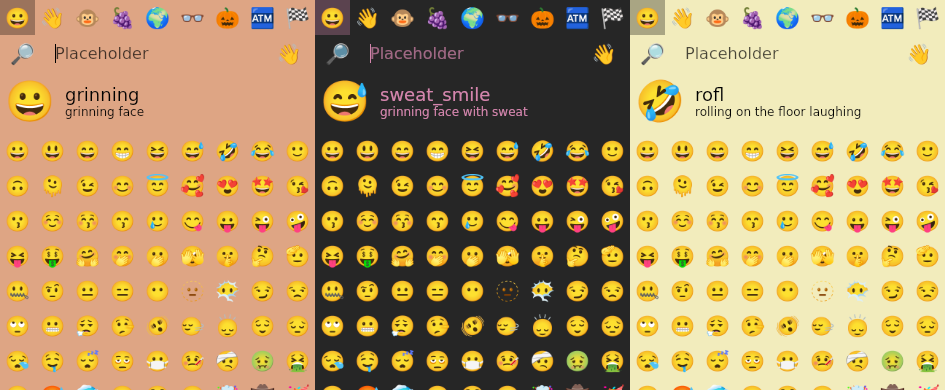
- 👁️ Preview block
- 🗺️ Keyboard Navigation (Tab/Shift Tab/Arrows/Space/Enter)
- 📊 Fuzzy Search Support
- 🔣 Customizable Emoji Font
- ©️ Copy to clipboard
- 🎨 Custom UI Colors
- ⚡ Blazing Fast
- 🐧 Linux (X11/Wayland)
🎨 Custom UI Colors
For this we use the arguments of the application, for example
simplemoji -m '#000' -b '#DEA584'
simplemoji -m '#d485ad' --background-color '#262626'
simplemoji --primary-color '#c9cbd1' --background-color '#f2ecbc'
💽 Installation
Requirements:
- Install Noto Color Emoji font on your system
Options:
🙇 Usage
Fast Application for look your amazing emojis write in Rust

Usage: simplemoji [OPTIONS]

Options:
  -t, --tone <TONE>
          [possible values: default, light, medium-light, medium, medium-dark, dark]
  -d, --debug
          Show debug keys
  -f, --font <FONT>
          The font use for render emojis
  -s, --show-search

  -z, --fuzzing-search
          Use fuzzing search algorithms
  -p, --show-preview

  -o, --close-on-copy

  -x, --no-close
          By default the application closes automatically when it is out of focus, this option disables
          that behavior
  -b, --background-color <BACKGROUND_COLOR>
          Background color in hex (RGB, RGBA, RRGGBB, RRGGBBAA)
  -m, --primary-color <PRIMARY_COLOR>
          Primary color in hex (RGB, RGBA, RRGGBB, RRGGBBAA)
  -c, --copy-command <COPY_COMMAND>
          This is the command that will be executed to copy the emoji
  -h, --help
          Print help
  -V, --version
          Print version

Log in or sign up for Devpost to join the conversation.