🌱 SimpleGardeningCalendar
A privacy-first, client-side gardening calendar application that helps you manage planting schedules, track plant growth, and maintain your garden without sacrificing your data privacy.
🎯 Inspiration
As a gardener, I often struggled with timing my plantings perfectly, remembering care schedules, and keeping track of my garden's progress throughout the seasons. I constantly forgot when I planted things and found it difficult to track them correctly. Traditional gardening apps often require sacrificing privacy by storing personal data on remote servers. This inspired me to create a privacy-first gardening calendar that keeps all my data local while helping me remember and manage my garden activities.
✨ What it does
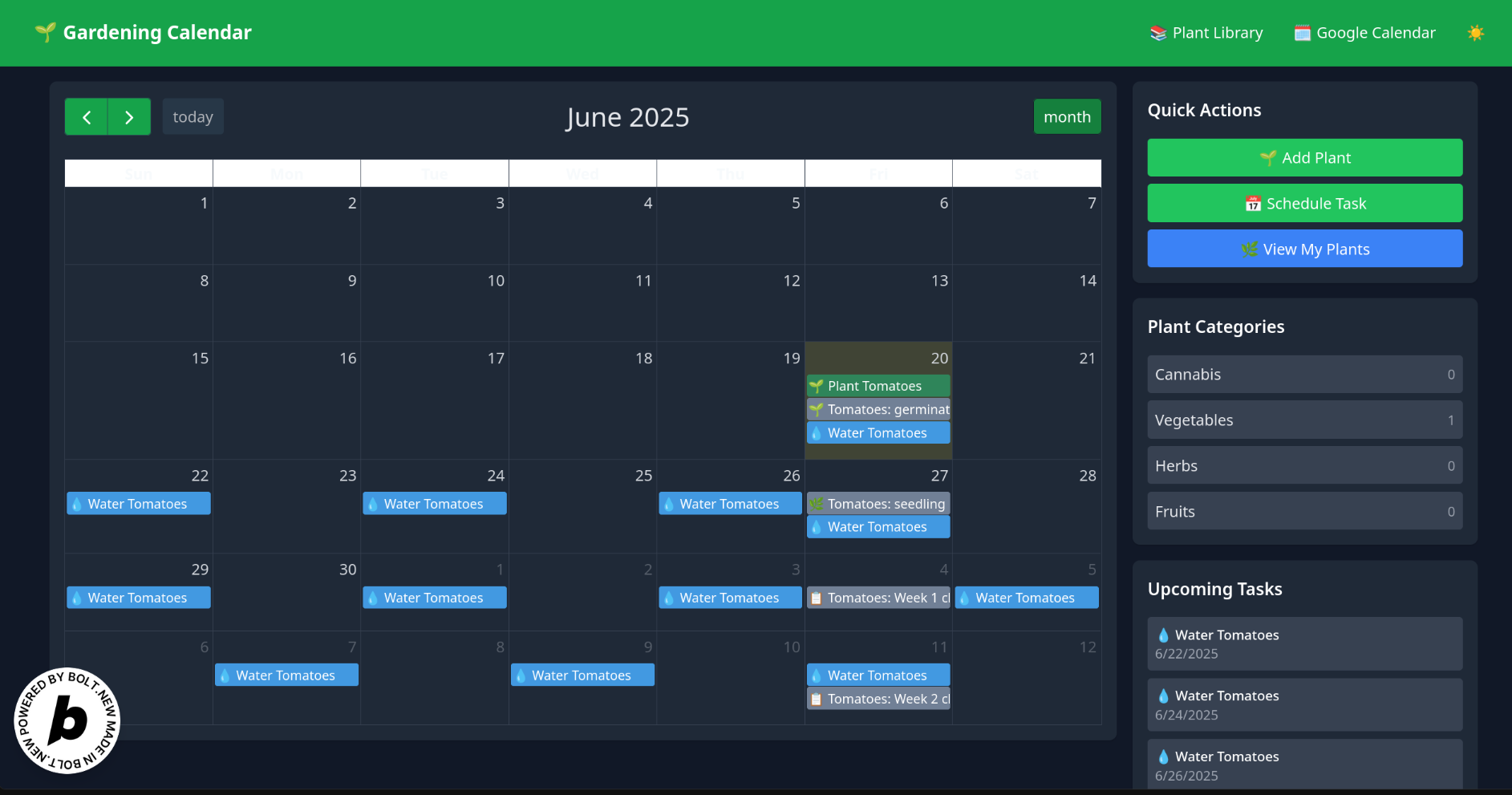
SimpleGardeningCalendar is a comprehensive client-side web application that helps you manage your planting schedules and track plant growth.
🚀 Currently Implemented Features
- 📅 Interactive Garden Calendar: Year-round planning with FullCalendar.js integration and responsive design
- 🌿 Plant Tracking System: Add plants, monitor growth stages, and track planting dates with detailed phase management
- 🔔 Smart Care Reminders: Set up watering, fertilizing, pruning, and harvesting schedules with intelligent event generation
- 📚 Comprehensive Plant Database: Local database with 50+ plants, care requirements, and problem solutions
- 🔄 Google Calendar Sync: Optional synchronization with Google Calendar (privacy-controlled)
- 💾 Data Export/Import: JSON-based data management with local storage and backup capabilities
- 🌍 Multi-Language Support: Full internationalization with 5 languages (DE, EN, FR, ES, IT)
- 📱 Responsive Design: Mobile-first design that works seamlessly across all devices
- 🌙 Dark/Light Mode: Complete theme system with automatic detection
- 🔒 Privacy-First Design: All data processing happens in the browser using IndexedDB and localStorage
🎯 Planned Features (not yet implemented)
- 🌤️ Weather Integration: Local weather data and microclimate support
- 🤖 AI-Powered Suggestions: Smart planting recommendations based on conditions and history
- 👥 Community Templates: Pre-built gardening plans organized by region and climate
🛠️ How I built it
The application is built using a modern, privacy-focused architecture with careful attention to performance and user experience:
Frontend Architecture
- Vanilla JavaScript (ES6+): Modern JavaScript without framework dependencies
- Tailwind CSS: Utility-first CSS framework for responsive design
- Custom CSS: Themed components with CSS variables for dark/light modes
- Vite: Fast development and optimized production builds
Storage & Data Management
- IndexedDB: Client-side database for complex gardening data relationships
- localStorage: Simple key-value storage for user preferences
- JSON Import/Export: Complete data portability and backup functionality
- Zero Server Dependencies: Everything runs in the browser
Calendar & UI Components
- FullCalendar.js: Professional calendar integration with custom styling
- Responsive Design: Mobile-first approach with breakpoints at 768px and 480px
- Touch Optimization: 44px minimum touch targets for mobile devices
- Progressive Enhancement: Works offline with optional cloud sync
Internationalization (i18n)
- Flat Dot Notation: Organized translation keys like
'problems.common.rootRot.name' - Modular Structure: Separate files for UI, categories, problems, and plant data
- Dynamic Loading: Language switching without page reload
- Parameter Substitution: Support for dynamic content like
{count} events found - Fallback System: Graceful degradation when translations are missing
🚧 Challenges I ran into
🏗️ Client-Side Architecture
Designing a fully functional gardening app that runs entirely in the browser without server-side processing required careful consideration of data management and performance optimization. The biggest challenge was creating a robust local storage system that could handle complex gardening data relationships without a traditional database.
🔒 Privacy vs Functionality
Balancing advanced features like AI-powered suggestions with strict privacy requirements meant implementing user-initiated API calls rather than automatic data sharing. Every external service integration is opt-in and user-controlled.
📱 Cross-Platform Compatibility
Ensuring the calendar works seamlessly across desktop, tablet, and mobile devices required extensive responsive design work. The mobile experience was particularly challenging, requiring touch optimization and careful event sizing.
🌍 Translation System Organization
The biggest hurdle was organizing translations without bloating the codebase. I solved this by:
- Using flat dot notation for clear key organization
- Separating concerns (UI, categories, problems, plants)
- Implementing a modular loading system
- Creating a robust fallback mechanism
⚡ Performance Optimization
Managing large datasets and complex calculations entirely in the browser required careful optimization of:
- Database queries and indexing
- Calendar event rendering
- Translation loading and caching
- Memory management for plant data
🏆 Accomplishments that I am proud of
- 🔒 Zero-Server Architecture: Successfully created a fully functional application that maintains complete privacy while offering advanced features
- 📱 Responsive Excellence: Achieved perfect mobile experience with touch optimization and adaptive layouts
- 🌍 Internationalization: Built a comprehensive translation system supporting 5 languages with 1000+ translation keys
- 🌿 Plant Lifecycle Tracking: Implemented a sophisticated system with growth stages, health monitoring, and harvest prediction
- 🔄 Offline-First Design: Created an application that works completely offline with optional cloud synchronization
- 🎨 Design System: Developed a cohesive design language with dark/light themes and consistent UI patterns
📚 What I learned
🔒 Privacy-First Development
How to build sophisticated web applications that respect user privacy by processing all data locally while still offering powerful features.
💾 Browser Storage Technologies
Deep understanding of localStorage and IndexedDB for complex data relationships, efficient querying, and data persistence strategies.
🌍 Internationalization Best Practices
- Flat key organization for maintainability
- Modular translation loading for performance
- Parameter substitution for dynamic content
- Fallback systems for missing translations
- Cultural considerations in UI design
📱 Progressive Web App Principles
Creating applications that work seamlessly offline and across all device types with responsive design and touch optimization.
⚡ Performance Optimization
Techniques for managing large datasets, complex calculations, and smooth user interactions entirely in the browser.
🎨 Design Systems
Building consistent, accessible, and beautiful user interfaces that work across different screen sizes and user preferences.
🚀 What's next for SimpleGardeningCalendar
🤖 AI-Powered Features
- Smart planting recommendations based on local conditions
- Predictive care scheduling using historical data
- Plant health monitoring and problem detection
🌤️ Weather Integration
- Local weather data integration for planting recommendations
- Microclimate support for different garden zones
- Frost and heat warning systems
📱 Enhanced Mobile Experience
- Progressive Web App (PWA) capabilities
- Offline-first improvements
- Advanced touch gestures and interactions
📊 Analytics & Insights
- Track garden performance and success rates
- Yield prediction and optimization
- Seasonal trend analysis
👥 Community Features
- Share and import garden templates
- Community-driven plant database expansion
- Regional gardening advice and tips
🔄 Advanced Sync Options
- Cloud backup while maintaining privacy-first approach
- Multi-device synchronization
- Collaborative garden planning
Built with ❤️ and a passion for privacy-first gardening technology
Built With
- bolt.new
- cursor

Log in or sign up for Devpost to join the conversation.