Inspiration
Honestly, I was basically trying to set up my own web page and create a few posts to generate engagement slowly, but I was surprised to find no simple API to help with that. When looking for something to help me, I found Google's Blogger API, which was complicated, I also found Ghost API, which was even more complicated, then I saw the possibility of using Wordpress, but I wanted to use my own React frontend with it.
With the rise of AI and generated content online, I thought it would, maybe, be a good idea to have an API for people to manage publications, posts, articles and similar content easily. It would have to be something that would provide flexbility for someone to use for oneself or even to create something on top of it, but it also had to be simple.
So I created it! It has very few endpoints for now, but you're able to start posting quickly and without worrying about complicated structures.
What it does
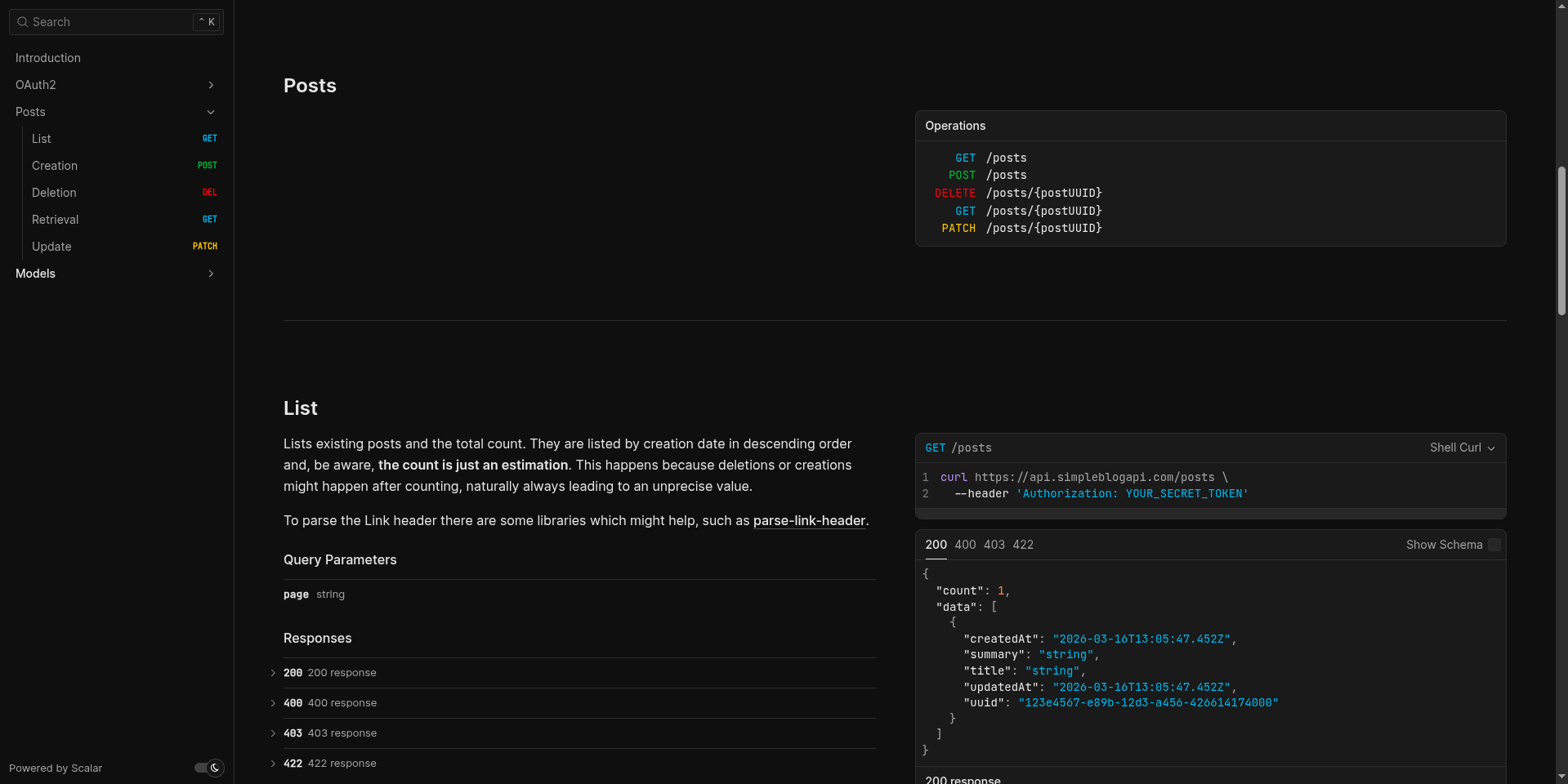
It has very basic functionalities for now, but you'll be able to create, update, delete, get or list posts from the API. However, before doing that, you make a request to the token creation endpoint with the credentials received and then it will reply with an access token which will last for one hour and allow you to operate the API freely.
How I built it
I've built it mostly relying on great products, which also have a very friendly free tier and used Node with TypeScript for the coding part. From the beginning, the code is hosted in Lambda functions, using Docker images. Each endpoint represents a Lambda function and is exposed to the web through AWS API Gateway.
To make things easier, deployment is automated using CircleCI, so every time I push some code, things get tested, linted and deployed automatically. Each function is deployed separately, using CodeDeploy, and has a version published before being released. To keep track of the most recent release, a Lambda alias is used to point to the "LIVE" version.
The connection between AWS API Gateway and the Lambda function happens through this alias. So, if the alias is pointing to the most recent version, the requests should flow to the most recent version released.
To store data sent through the API, it uses Supabase, and this is no coincidence. If you're using Lambda functions, you don't want to create a new connection to the database every time someone makes a request and Supabase solves it by providing a shared pooler, which can manage connections without eventually reaching the maximum number of connections or slowing down every request. Still on the database matter, to store the connection URL safely and other secrets, AWS SSM Parameter Store does it almost for free, since there are low decryption costs.
Finally, when someone wants to interact with the API, all one needs to do is create an access token in the available endpoint and use it to make subsequent requests. Under the hood there'll be AWS Cognito managing authentication and machine-to-machine tokens, since the API requires authorization. Also, in front of the requests coming to the API, there'll be Fastly, caching requests and reducing latency to approximately 20 milliseconds, when retrieving from cache.
There are more details to the infrastructure which were skipped for brevity's sake, but everything related to it is stored along the code repository using Terraform. Along with TypeScript, having infrastructure as code, allows me to keep track of what's being changed at all times.
Challenges I ran into
The documentation part was somewhat challenging. Since I'm not using any framework, the documentation is generated from AWS API Gateway, which needs to be deployed using HCL. So, I had to create a module which would document the API as I added more endpoints. Generating documentation from AWS API Gateway is far from optimal, but with some effort, other bug fixes and a few tweaks, it became possible to have something decent.
Building the infrastructure itself was also challenging. Defining what it will be like was pretty easy, but when you get to build it, there are so many details, caveats, and other things which get in the way that it starts to get on your nerves. For example, tweaking VCL scripts in Fastly to have the desired caching strategy, writing bash scripts to automate deployment, which run fine locally, but fail in CircleCI, and many other things.
And hardest part, in my opinion,is being your own Product Owner, Software Engineer, QA Engineer, Site Reliability Engineer and anything else. Everything takes time and when you have to think and build every single detail by yourself, it takes even more. Add that to the fact this API was built while off from work and you have the cherry on top of the time-management-issues cake.
What I learned
A lot more with Terraform, system architecture, AWS and pretty much from any problem I had to solve to get it to a minimum viable product. However, I think there's more to learn about entrepreneurship and the market.
What's next for Simple Blog API
I don't know, maybe this is it, just learning something from it or maybe there's more to explore.
Built With
- amazon-web-services
- fastly
- javascript
- lambda
- node.js
- postgresql
- python
- supabase
- terraform
- typescript

Log in or sign up for Devpost to join the conversation.