-
-
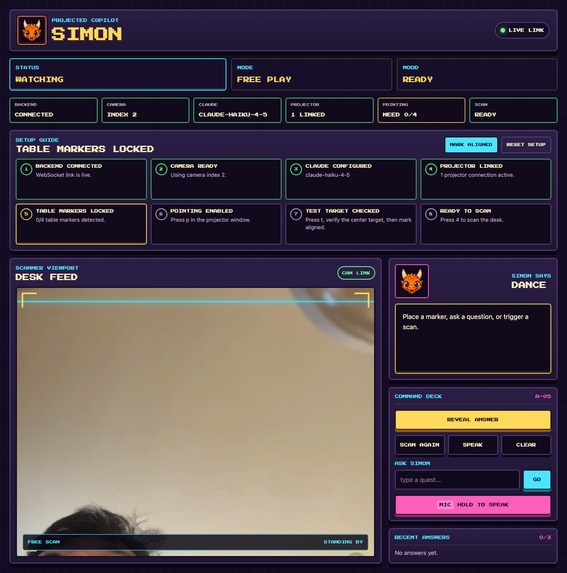
dashboard
-
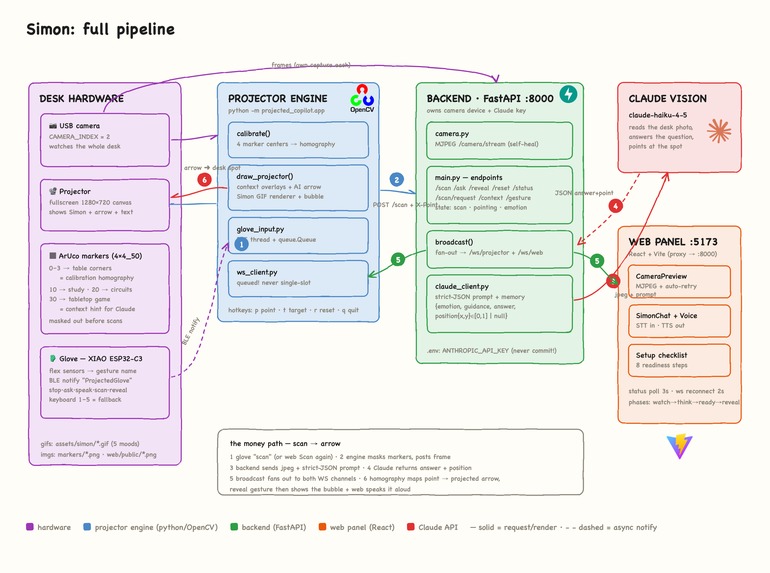
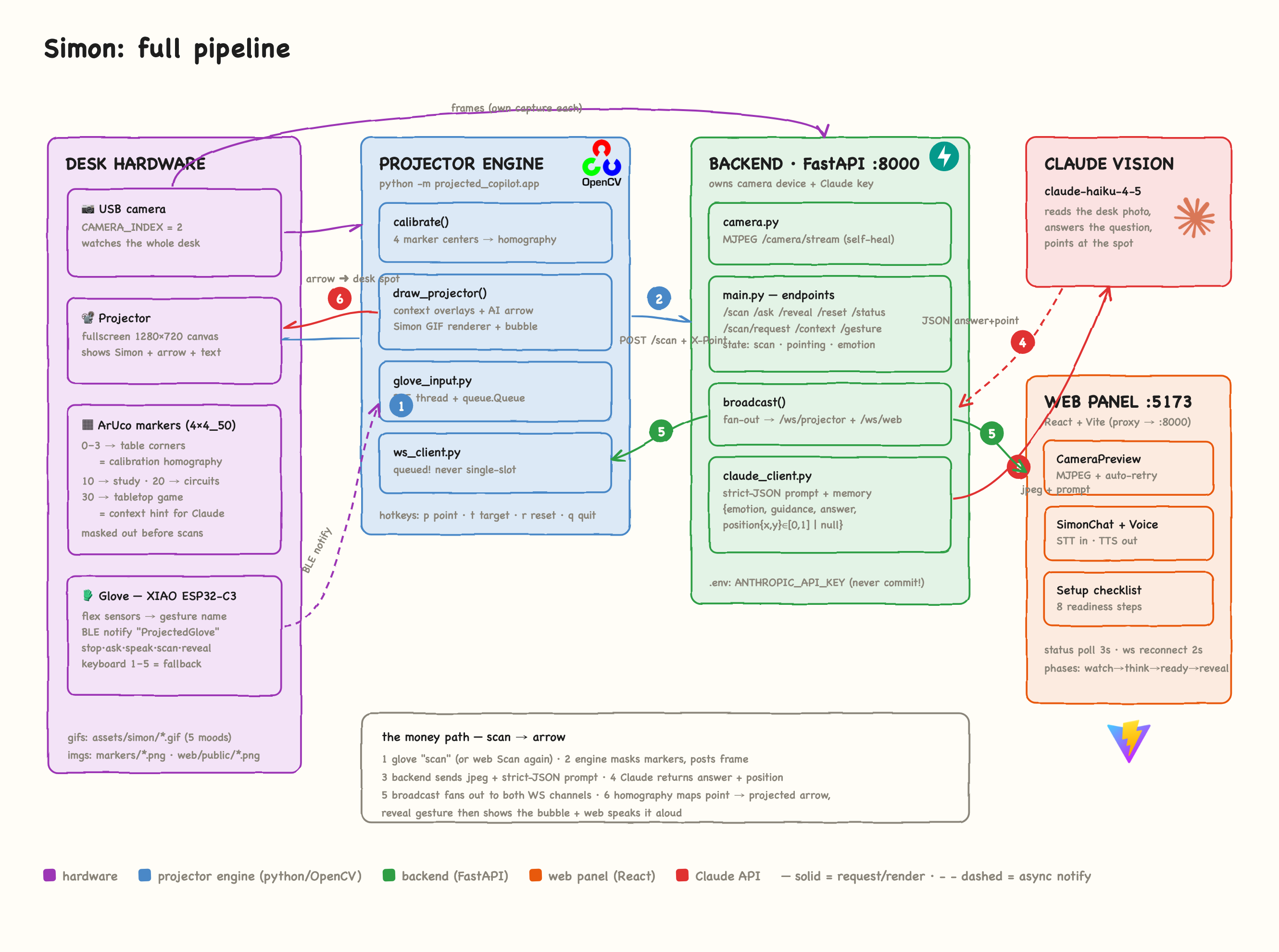
pipeline
-
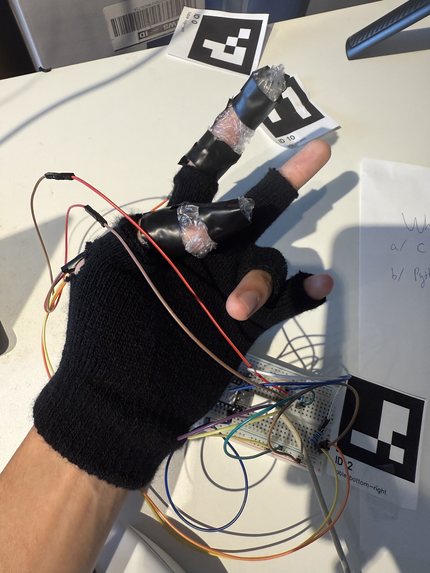
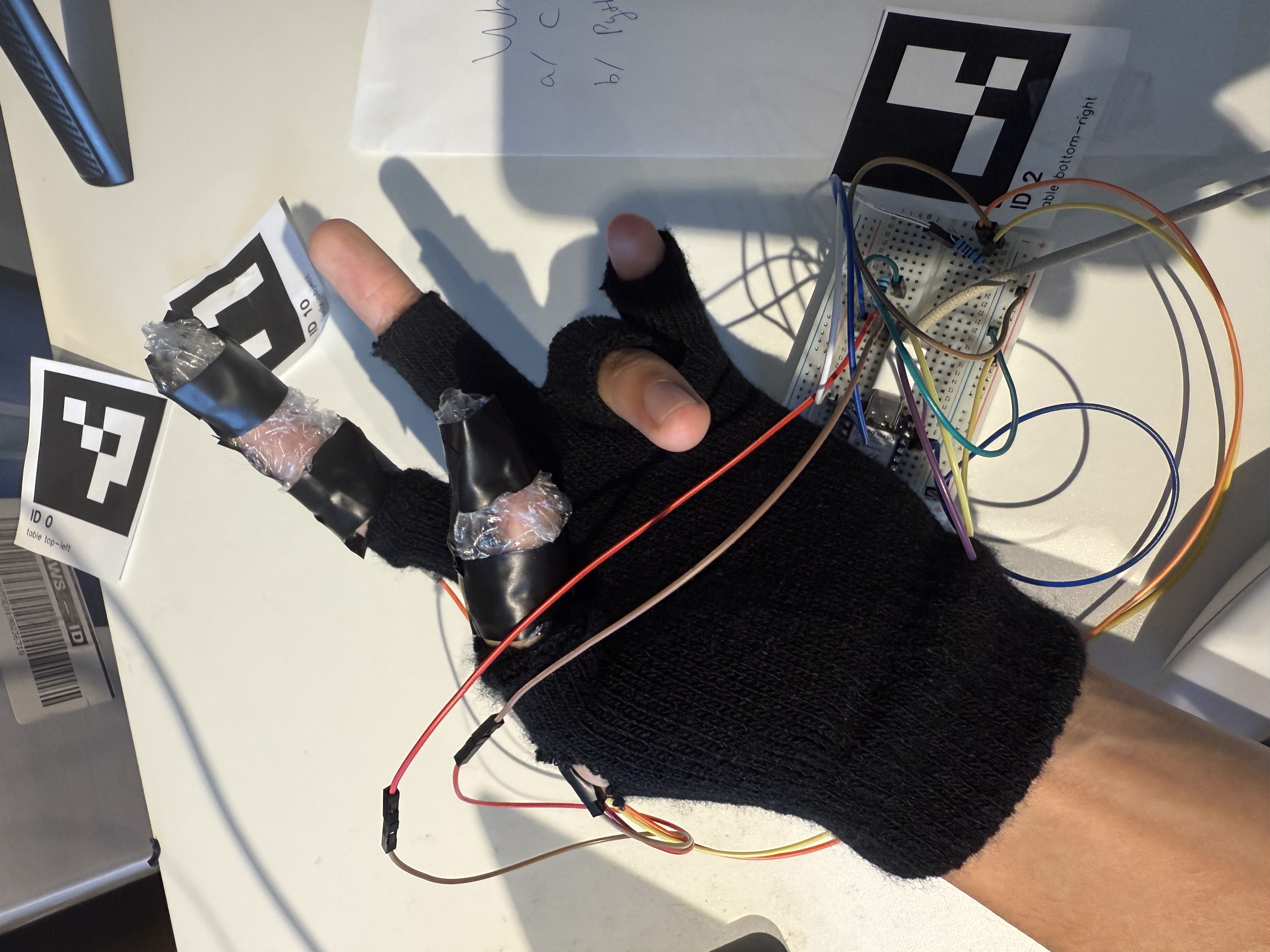
glove
Inspiration
Screens pull you away from your work. I wanted AI help that lands on the desk itself — on the worksheet you're stuck on, the breadboard wire that's misplaced, the board-game rule in dispute — without touching a keyboard or looking at a monitor.
What it does
- Point a webcam at any desk and drop four printed ArUco markers on the corners: the system auto-calibrates a camera→projector homography, turning the desk into a display.
- Place a context marker (study / electronics / tabletop) and Simon, an animated pixel dragon projected onto the desk, adapts what he looks for.
- Flex a finger on the wireless glove (ESP32-C3 + flex sensors over BLE) to trigger a scan. Claude Vision reads the desk and answers.
- Claude returns not just an answer but a normalized (x, y) position — the projector maps it through the homography and pulses an arrow at the exact spot on the paper the answer refers to.
- A second gesture reveals the answer in a projected speech bubble while a web panel speaks it aloud (Web Speech API) and takes voice follow-up questions.
- Conversation memory means rescanning the same desk skips what's already answered — Simon only points at new things.
How I built it
Three processes joined by one FastAPI backend, all messages flowing through a single WebSocket broadcast():
- Projector engine (Python + OpenCV): owns the fullscreen projected canvas, ArUco detection (
DICT_4X4_50), homography calibration from the four table markers, the pulsing arrow overlay, and Simon's GIF emotion renderer (Pillow). Hotkeys 1–5 mirror every glove gesture so the whole app works with zero hardware. - FastAPI backend: owns the camera device (MJPEG stream), the Claude API (
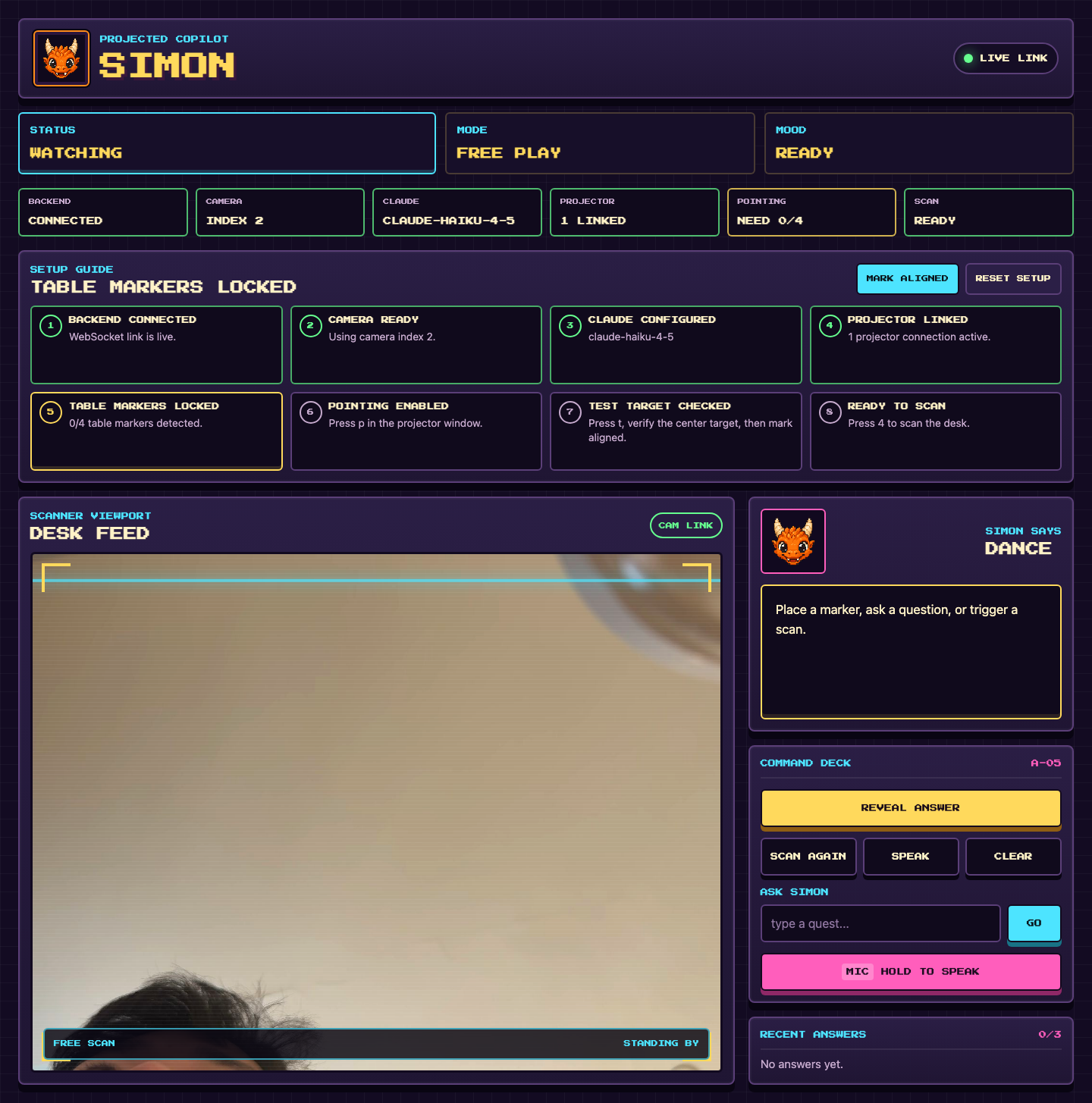
claude-haiku-4-5for speed), conversation history, and fan-out over two WebSocket channels (/ws/projector,/ws/web). The prompt demands a single strict JSON object:{emotion, guidance ≤100 chars, answer, position{x,y}∈[0,1]}. - React web panel (Vite): live camera preview, readiness strip, guided setup checklist, scan history, TTS voice, and speech-to-text questions.
- Glove firmware (Arduino, Seeed XIAO ESP32-C3): flex sensors → gesture names notified over a custom BLE service; the host side is a thread-safe queue with automatic reconnect.
Markers placed on the desk are masked out of the frame before it's sent to Claude, so the model describes your work, not the fiducials.
Disclosure: the concept and the glove hardware were prototyped before the event; all code in the submitted repository was written during the hackathon.
The math that makes the arrow land
Claude answers in camera space — a normalized point $(u, v) \in [0,1]^2$ on the frame it saw. The arrow is drawn in projector space. The four corner markers give me four point correspondences, which pin down the $3\times3$ perspective homography $H$ between the two planes:
$$ \begin{bmatrix} x' \ y' \ w \end{bmatrix} = H \begin{bmatrix} u \cdot W_c \ v \cdot H_c \ 1 \end{bmatrix}, \qquad (x_{proj},\, y_{proj}) = \left( \frac{x'}{w},\, \frac{y'}{w} \right) $$
where $(W_c, H_c)$ is the camera frame size and $H$ comes from cv2.getPerspectiveTransform on the four marker centers. Four correspondences are exactly enough because $H$ has 8 degrees of freedom (9 entries, scale-invariant) and each point pair contributes 2 constraints: $4 \times 2 = 8$. The result: a coordinate imagined by a language model lands on a physical piece of paper with pixel-level accuracy.
Challenges I ran into
- Camera-space → projector-space: Claude sees the camera frame, but the arrow is drawn by the projector. Solved with the homography above — the model's normalized position lands on the physical paper.
- WebSocket message clobbering: a frequent status echo could overwrite a scan result before the frame loop polled it. Fixed by making every WS client a queue, never a "latest message" slot — with a regression test.
- Prompting for coordinates: getting a vision model to return a useful point reliably took a strict single-JSON contract, clamping every coordinate to $[0,1]$, and a graceful "no point" path (with a visible warning) when the model declines.
- Fragile live demos: the MJPEG
<img>never retries on its own (auto-remount with cache-buster), the stream never closes on transient capture failures, and every gesture has a keyboard fallback.
Accomplishments that I'm proud of
- The money shot: ask a question by flexing a finger, and a projected arrow lands on the exact line of the worksheet the answer refers to.
- End-to-end custom hardware: I built and flashed my own BLE glove and it degrades gracefully to keyboard when it's off.
- 66 passing tests around the fiddly parts: homography math, JSON parsing, scan state machine, glove queue, WS queueing.
What I learned
Vision LLMs can ground answers spatially if you design the contract for it; projection mapping turns that grounding into a physical UX; and every hardware demo needs a software fallback for when Bluetooth betrays you on stage.
What's next for Projected Copilot
Hardware:
- Untethered glove — swap USB power for a small LiPo cell with a charging/protection board, so the glove is fully mobile and lasts a whole study session on one charge.
- A real rig, not a pile of books — replace the improvised camera-and-projector stack with a reusable folding mount (3D-printed brackets on an adjustable arm) so setup drops from "balance everything carefully" to "unfold, plug in, calibrate."
Software:
- Multi-arrow answers — let Claude return several labeled points and project a numbered arrow on each ("every wiring mistake on this breadboard").
- Pen tracking — Simon reacts as you write, checking answers the moment your pen lifts.
- Projector-native UI — answer history and controls rendered on the desk itself, so the laptop can stay closed.
Try it out
- Repo: https://github.com/Trik-mink/Simon
- Quick start: print
markers/markers_sheet.png, add an Anthropic API key toserver/.env, run./start.sh. No glove needed — keys1–5simulate every gesture.
Built With
- anthropic
- arduino
- aruco
- ble
- claude
- esp32-c3
- fastapi
- opencv
- python
- react
- vite
- web-speech-api
- websockets


Log in or sign up for Devpost to join the conversation.