-
-
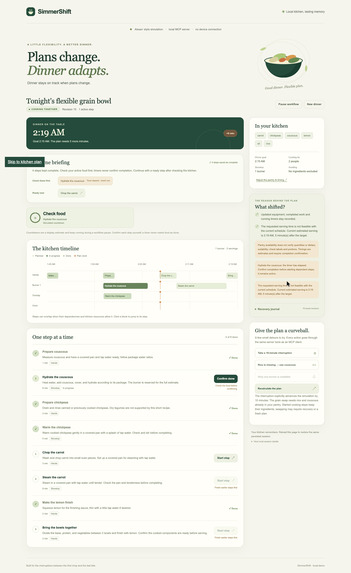
Recovery timeline in the local Alexa+ simulation. Synthetic kitchen data; no Alexa device connection.
Inspiration
Dinner rarely follows the original plan. Someone needs attention, an ingredient is missing, or a burner is occupied. A static recipe leaves the cook to work out which steps still matter and whether everything can finish together. The goal was an assistant that remembers progress and helps recover the plan.
What it does
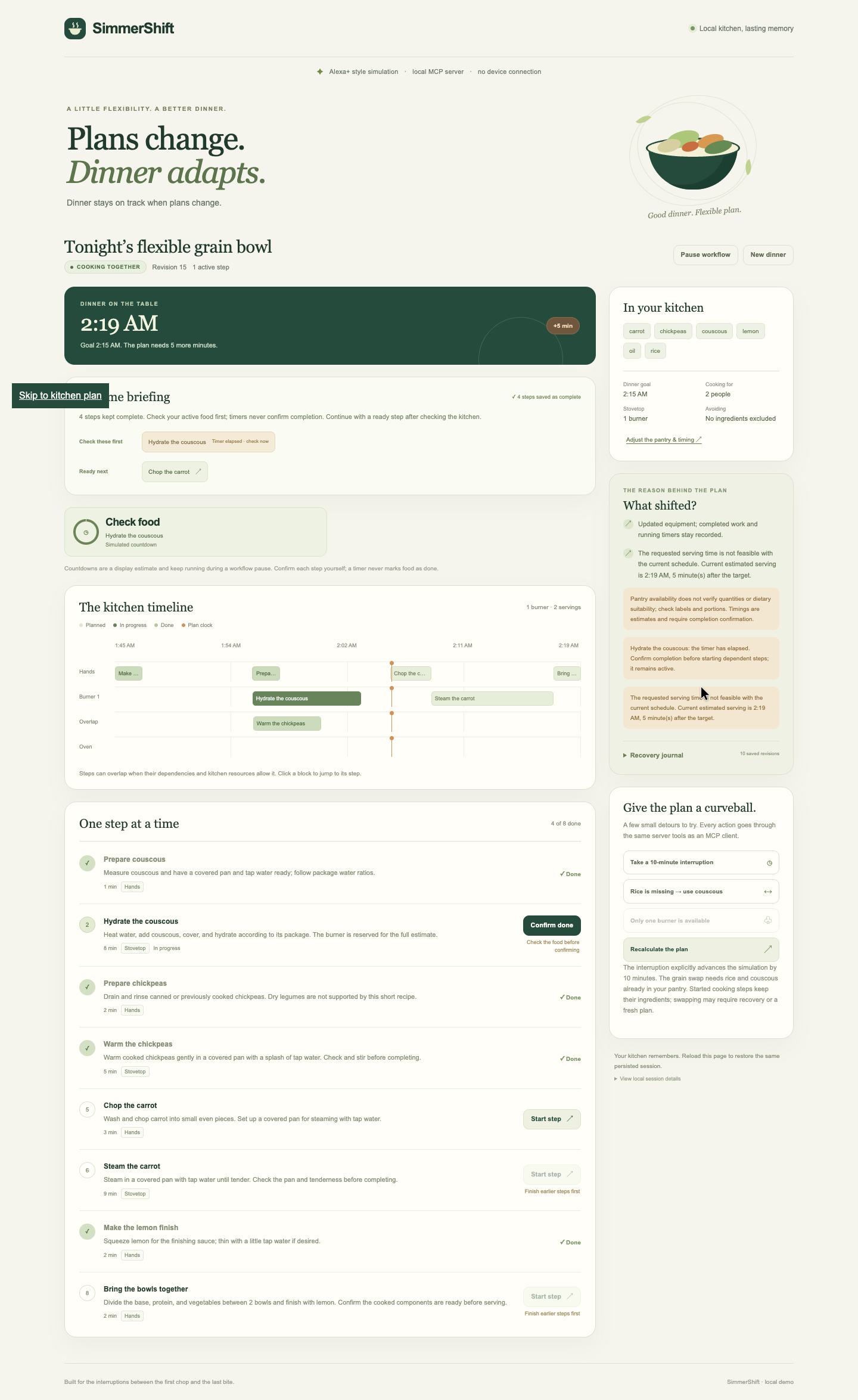
SimmerShift recovers dinner after an interruption. It keeps finished and started work, tracks independent timers, and reschedules remaining steps around available equipment and a serving target. When rice has not yet been prepared and the pantry contains suitable couscous, the engine can automatically switch bases if that meaningfully improves a late finish. It explains the choice and reports any remaining delay.
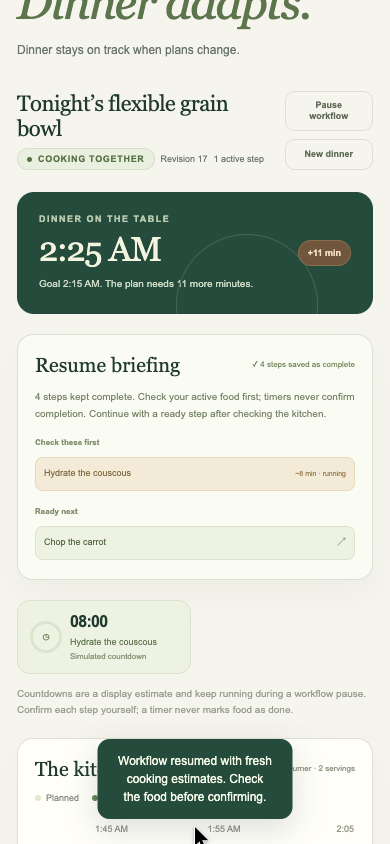
A resume briefing highlights active timers, kept progress, and ready next actions. A persistent recovery journal preserves the reasons for changes rather than losing them on the next operation. The cooking session, including progress and explanations, can be reopened after a server restart. Request IDs make a duplicate mutation retry safe, while revisions protect against stale edits.
The first version focuses on one curated plant-based meal family. The chosen entry route is the alternate simulated Alexa+ experience in a local timeline interface. The real local MCP server is tested engineering support for this workflow; this project has not been onboarded to or tested with real Alexa+.
How we built it
The implementation uses TypeScript, the official MCP server/client/Node transport packages, Zod schemas, and Node's built-in SQLite. The server explicitly supports MCP protocol 2025-11-25. A deterministic engine selects available components and schedules their dependency graph without a runtime language-model call. The web demo and MCP tools share the same session service. Idempotency receipts and revision checks make retries and concurrent edits explicit rather than silently overwriting progress.
The recipe assumptions are white rice and canned or already cooked legumes. A persisted logical clock supports simulated interruption minutes for the demo; the video labels the time advance explicitly.
The timeline interface calls a local REST adapter; it is not itself an MCP client. Actual official MCP client tests separately initialize, discover, and call the server tools.
Challenges we ran into
The hardest product decision is what a pause means in a kitchen. A software pause cannot pause a stove. SimmerShift records a workflow interruption while retaining running timer deadlines and an advancing display. Any equipment change must be supplied by the person. Another challenge is preserving valid progress during substitution: a faster ingredient can only rescue the plan before preparation has started, and its benefit must be checked against the entire resource schedule.
Accomplishments we are proud of
The recovery workflow makes and explains a real scheduling decision: it can choose pantry-listed couscous before rice preparation begins, preserve completed work, and recalculate the remaining meal around a lost burner. SQLite persists progress, timers, duplicate-request receipts, and the recovery journal. Recorded local verification on October 6, 2026 passed 45 tests, eight official-MCP-client scenario assertions, TypeScript checks, build, and UI review.
What we learned
A workflow pause must not pretend to pause the kitchen. Running timers keep their deadlines, elapsed timers still require confirmation, and resuming heated food requires a report of what happened to the heat. Comparing a complete schedule also matters: a faster ingredient only helps if it improves the meal's resource-constrained finish. Retry safety and durable explanations are part of a useful assistant experience.
What is next
Expand the recipe catalog and substitution rules, validate recovery briefings with cooks, and test onboarding with an actual Alexa+ client when access permits. Remote deployment, authentication, and measured client behavior are future work for a real add-on.
Scope and demo limitations
This version covers one curated plant-based meal family. It does not validate allergies or nutrition. Timers do not control appliances or automatically confirm food readiness. The video uses synthetic pantry data, simulated clock advances, and manual step confirmation. It demonstrates the web simulation; it does not show physical cooking, microphone interaction, an Alexa connection, server restart, page reload, or completed serving. Restart and complete-workflow behavior are covered by separate automated evidence.
Product feedback
Alexa+ is the simulated interaction target. No Alexa+ device or service SDK was used or tested; feedback below reflects the tools actually used for implementation and delivery.
Official MCP TypeScript SDK
Use: register tools, serve Streamable HTTP, and run the official client. Worked well: 2025-11-25 negotiation, eight-tool discovery, calls, and restart recovery passed. Needs work: clearer migration/HTTP entry-point guidance would help; initially guessed documentation paths failed. Onboarding: current split-package docs and installed types resolved older-example assumptions. Build again: yes, for typed tool contracts and protocol-level tests.
Zod
Use: shared structured-input schemas. Worked well: tests rejected invalid portions, equipment, timestamps, and malformed inputs. Needs work: no library-specific failure was observed; recipe conflicts still require domain validation. Onboarding: explicit schemas fit both tool adapters. Build again: yes, to keep input contracts consistent.
Node.js and built-in SQLite
Use: local HTTP runtime, sessions, mutation receipts, and journal storage. Worked well: database/process restarts retained state; atomic failures preserved the meal. Needs work: no runtime/database-specific failure was observed. Onboarding: Node 24+ avoided a separate database service. Build again: yes, for a reproducible durable local workflow.
TypeScript and tsx
Use: typecheck, build, and development/test execution. Worked well: checks and build passed. Needs work: an earlier runner's IPC pipe was denied by the execution sandbox; updating tsx removed an old development-dependency advisory. Onboarding: node --import tsx worked around the local restriction. Build again: yes, with current versions and a committed lockfile.
Playwright CLI and isolated Chrome
Use: desktop/mobile interaction checks and capture. Worked well: final QA reported zero console errors/warnings and no page overflow. Needs work: cached-browser version mismatch and transient npx metadata needed local setup workarounds, not an Amazon/MCP fix. Onboarding: a dedicated temporary CLI installation and isolated Chrome session completed setup. Build again: yes, for repeatable UI verification.
FFmpeg and ffprobe
Use: inspect, caption, edit, and decode-check the demo. Worked well: the 85.50-second H.264 cut passed full decode and sampled-frame review. Needs work: no tool-specific failure was observed; editorial review was still needed to distinguish visible footage from separate test evidence. Onboarding: local command-line tools required no account. Build again: yes, for inspectable video metadata and provenance.
Git, GitHub, and gh
Use: versioning, public MIT publication, and remote verification. Worked well: commit/tree checks matched the reviewed source and assets. Needs work: local TLS failures interrupted uploads; this was environment friction, not an application or GitHub product finding. Onboarding: an existing GitHub account was used to publish the source with a visible MIT license. Build again: yes, for reproducible source review and access.
Codex
Use: development-only assistance with implementation, tests, and documentation. Worked well: changes could be checked against executable tests and inspectable evidence. Needs work: restricted execution required environment-specific file, loopback, and network workarounds. Onboarding: project constraints and the local workspace guided the build. Build again: yes, with independent checks. The shipped runtime is deterministic and makes no runtime LLM calls.
Testing instructions
Use Node.js 24 or later and npm. No credentials, model account, separate database service, or payment are required. Initial dependency installation needs npm registry access.
Clone the public repository and open its folder:
git clone https://github.com/prakharsingh1/simmershift
cd simmershift
npm ci
npm run check
npm run dev
Open http://127.0.0.1:4317. Create a pantry bowl with the demo pantry and a serving target. Complete a non-base preparation step, simulate an interruption, and inspect the revised plan, timers, and recovery journal. Start ready cooking steps; change a pantry or equipment constraint to inspect recovery. If heated food is active, resume requires a report of whether the heat stayed unchanged or changed. Restart the server and reopen the saved session to inspect persistence.
Run npm run demo separately for eight scenario assertions through the official MCP SDK client. It writes demo/recovery.json. The MCP endpoint is http://127.0.0.1:4317/mcp; the web UI uses a separate local REST adapter. SQLite persists the session locally.
Supporting materials
Development friction log
https://github.com/prakharsingh1/simmershift/blob/main/docs/FRICTION_LOG.md
Main project image — recovery timeline
https://raw.githubusercontent.com/prakharsingh1/simmershift/main/demo/assets/02-recovery.png
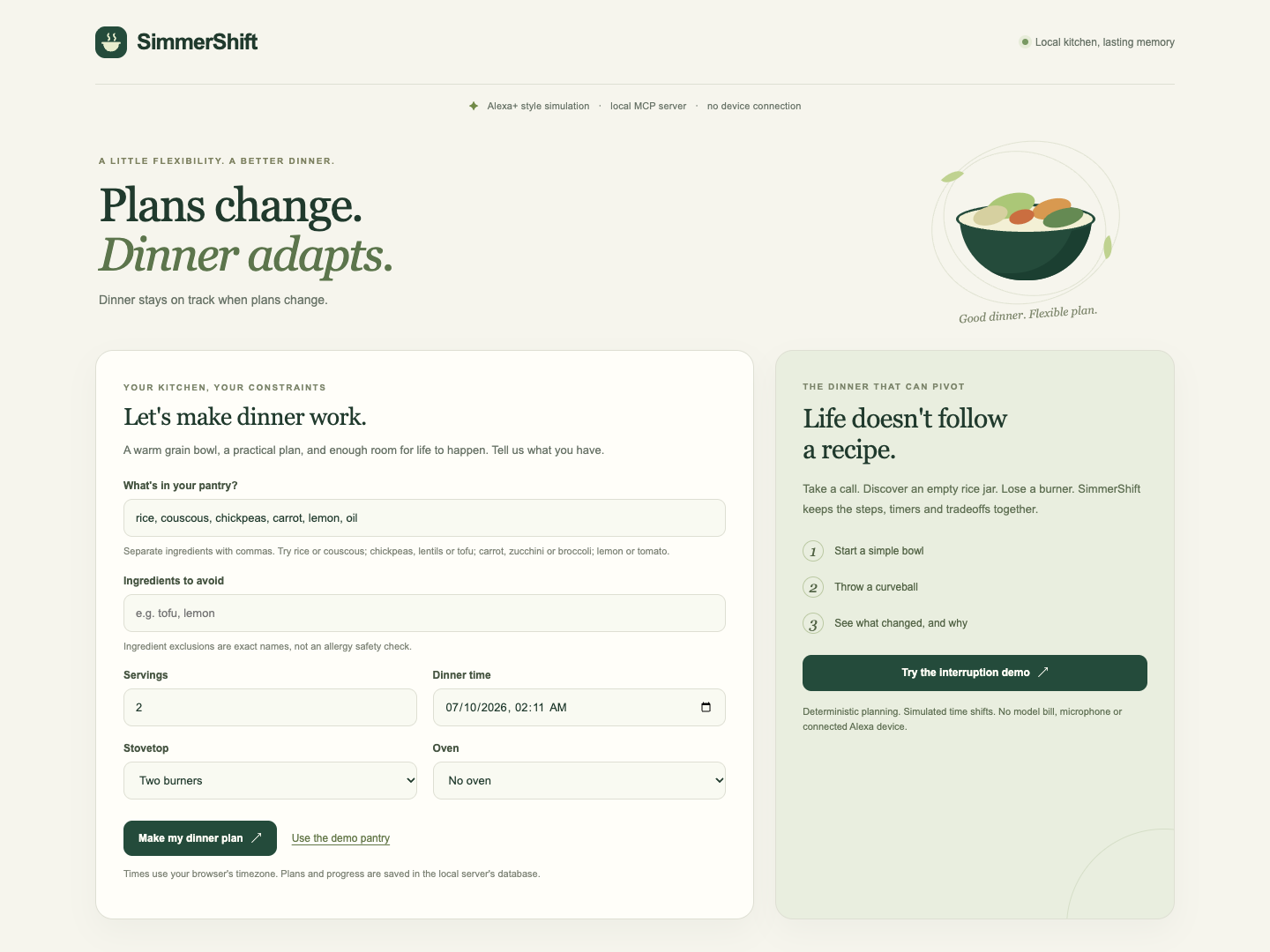
Additional image — setup
https://raw.githubusercontent.com/prakharsingh1/simmershift/main/demo/assets/01-setup.png
Additional image — mobile layout
https://raw.githubusercontent.com/prakharsingh1/simmershift/main/demo/assets/03-mobile.png
Built With
- css
- html
- javascript
- model-context-protocol
- node.js
- sqlite
- typescript
- zod

Log in or sign up for Devpost to join the conversation.