SimIDE (Simulation + IDE)
Inspiration
When I was studying Data Structures and Algorithms (DSA) in university, most explanations relied on static pseudocode, slides, and diagrams.
As a visual learner, reading:
temp = head->next;
head->next = prev;
prev = head;
meant drawing memory boxes and pointer arrows on paper just to understand what the program was doing.
I wanted a tool that could connect the code I was writing with the structures it created in memory—inside the same editor.
The Build with AI: Basics hackathon gave me the opportunity to build SimIDE (Simulation + Integrated Development Environment).
The project has since grown beyond watching algorithms execute. Students can now build supported structures visually, see the corresponding C++ code update, and import guided tutorials from GitHub.
What it does
SimIDE is a Visual Studio Code extension that brings interactive data structure visualization, native C++ debugging, and visual code creation into the IDE sidebar.
It supports three connected learning experiences: exploring existing code, building structures visually, and following guided tutorials.
Visualize Real C++ Execution
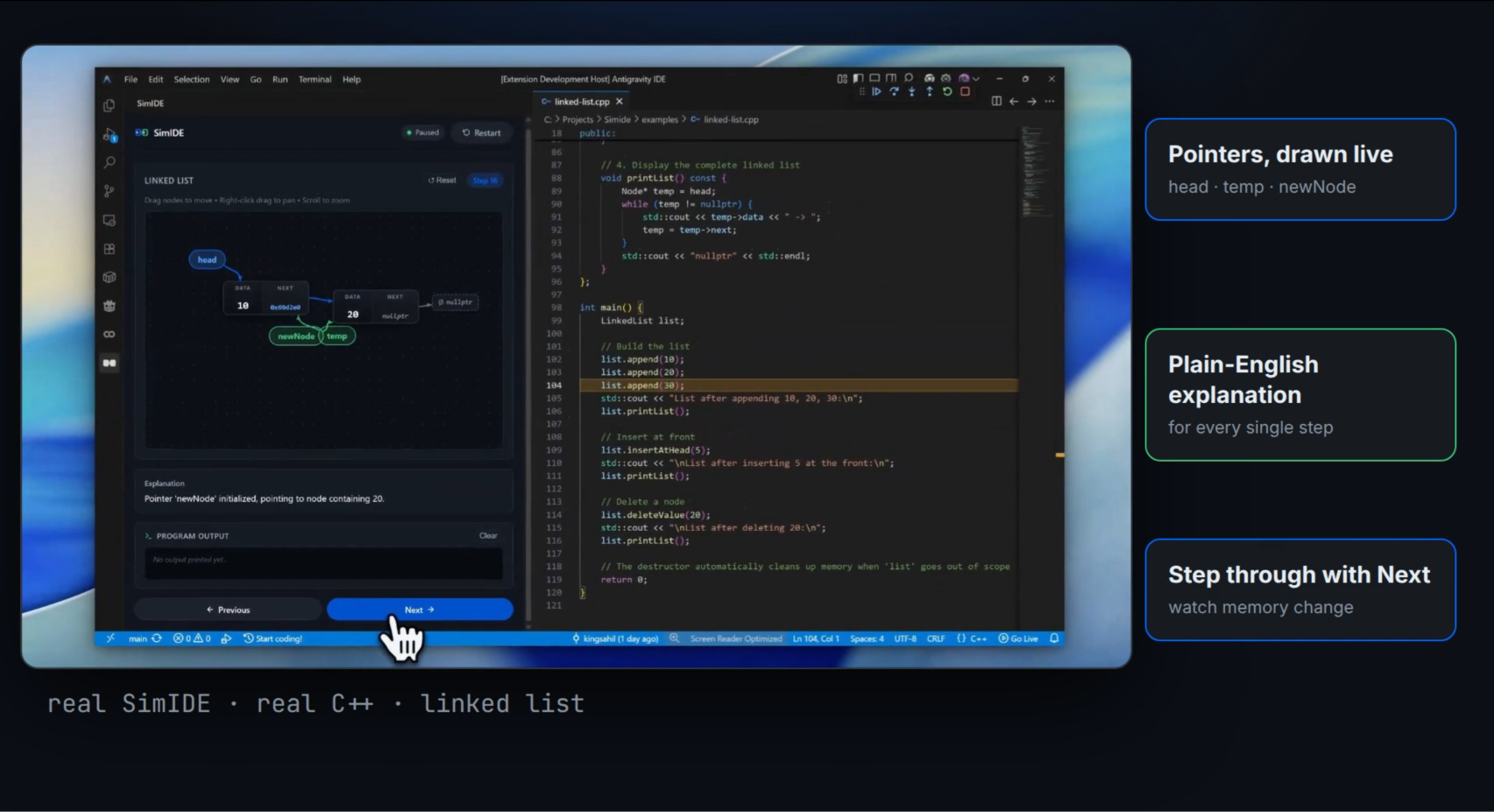
Open a supported, compilable C++ program and click Visualize.
With a compatible compiler, debugger, and debug adapter installed, SimIDE handles compilation and debugger launch without requiring a handwritten launch configuration.
As the program advances, SimIDE inspects runtime variables and pointer relationships, updates the diagram, and generates plain-English explanations of supported changes.
Explore Seven Data Structure Categories
- Linked lists: Inspect allocation, linking, traversal, reversal, deletion, pointer aliasing, and supported doubly linked relationships.
- Binary trees and BSTs: Explore parent-child relationships, hierarchical layouts, and traversal highlights.
- Arrays: Follow element updates, swaps, and index movements.
- Stacks: Observe push/pop behavior, the top index, and capacity indicators.
- Circular queues: Track front and rear positions and buffer wrap-around.
- Graphs: Explore vertex-edge relationships through force-directed diagrams.
- Strings: Inspect
std::stringand C-style character arrays, character values, ASCII labels, null terminators, two-pointer movements, and supported sliding-window patterns.
These visualizations recognize supported representations and coding patterns; compatibility depends on the program’s structure and available debugger information.
Create Structures Visually
Creative Mode starts with a blank canvas and a starter C++ file.
Students can add linked-list nodes, change values, connect or disconnect nodes, delete nodes, and create supported stacks and queues. Visual actions update the backing C++ source.
For example, connecting one node’s next field to another can generate:
first->next = second;
Edits to supported code patterns also update the Creative Mode canvas. This lets students explore the relationship between a diagram and its implementation in both directions.
Import Guided Tutorials from GitHub
SimIDE can import compatible tutorial repositories containing a simide.json manifest, C++ lesson files, and Markdown guides.
Students can select lessons, read explanations, and step through the accompanying programs within the sidebar.
Educators also have an authoring guide, a manifest schema, and a command-line validator for checking tutorial structure, source warnings, and compilation.
Review Execution History
SimIDE saves execution snapshots so learners can move backward through earlier states and replay them.
Previous reviews recorded snapshots; it does not reverse the running C++ process. After reviewing history, learners can return to the latest state and continue debugging.
Manipulate the Canvas
The canvas supports draggable nodes, background dragging, pan, zoom, and layout reset.
Linked-list and graph diagrams use force-based layouts, while arrays, strings, stacks, queues, and trees use arrangements suited to their structure.
A program-output panel and step explanations help connect visual changes with execution.
How we built it
We built SimIDE with TypeScript, the VS Code Extension API, native C++ tooling, D3 force layouts, and a webview interface.
Native Debugging Pipeline
The execution workflow follows four stages:
C++ source
    ↓
Compilation with debug symbols
    ↓
Native debugger through VS Code’s Debug Adapter Protocol
    ↓
Runtime state extraction → snapshots → visualizations and explanations
The compiler uses debug-friendly flags such as -g -O0 -std=c++17. The debugger integration supports configurations for C/C++ tools, Native Debug, and CodeLLDB, depending on the installed environment.
At debugger pauses, the extraction layer queries stack frames, variables, expressions, and pointer targets. It converts those results into a shared snapshot model for the webview.
Source Discovery and Clang-Assisted Editing
SimIDE combines runtime inspection with source-pattern discovery to identify supported variables and structures.
We also integrated Clang AST parsing into the visual node-to-code linker. Compiler-generated source ranges help locate symbols and insertion points for supported wiring edits.
The current implementation uses both approaches: runtime discovery still includes regular expressions and heuristics, while Clang supports AST-guided editing.
Visual-to-Code Synchronization
Creative Mode connects canvas actions to source-editing operations. A source-change listener then parses supported code patterns and refreshes the visual state.
This required coordinating editor changes, canvas updates, and generated code so that the two views stayed understandable and consistent.
Tutorial Infrastructure
We added a tutorial manager, manifest validation, GitHub import handling, lesson navigation, and Markdown guide display.
Tutorial source auditing provides warnings about sensitive constructs. It is a screening step, not a guarantee that imported native code is safe.
AI-Assisted Engineering
Using the hackathon’s structured AI workflow, we worked through scope, requirements, specifications, implementation, and verification.
AI helped break the project into smaller engineering problems: debugger orchestration, memory extraction, rendering, source editing, and tutorial ingestion.
The most useful part was turning broad ideas into concrete behaviors and edge cases that we could inspect and test.
Challenges we ran into
Keeping Debugger State and Visual State Aligned
A debugger usually pauses before the highlighted statement executes. Learners, however, need to understand the effect of the statement that just ran.
We had to coordinate source locations, execution events, and snapshots so explanations matched the state being displayed.
Recent debugging work has also focused on startup pauses in imported tutorial files, source-path resolution, and duplicate debugger-event handling.
Handling Pointer Lifetimes and Cycles
Uninitialized pointers, detached allocations, aliases, and cyclic structures make memory visualization difficult.
We introduced declaration-line guards, visited-address tracking, and bounded traversal to reduce premature rendering and prevent repeated pointer traversal.
These safeguards improve inspection without assuming that every pointer value represents valid memory.
Preserving Structures Across Function Calls
When execution enters a helper function, important variables may remain in the caller’s frame.
The extraction layer needs to inspect relevant frames and recover roots so a list or tree remains visible while students follow a traversal or mutation.
Rendering Strings Correctly
Strings introduced different challenges from linked structures: character buffers, null terminators, function parameters, index badges, and sliding-window ranges.
We added dedicated extraction, change detection, explanations, and rendering. We also corrected cases where strings inherited linked-list labels or were hidden by linked-list rendering checks.
Making Visual Editing Produce Useful Code
Creating a diagram is only part of Creative Mode. Each supported action must also produce a meaningful source change.
We built dedicated operations for node creation, connection, disconnection, value changes, deletion, and supported stack and queue creation.
Accomplishments that we're proud of
Connecting Execution, Visualization, and Creation
SimIDE now lets students approach a concept from multiple directions: write code and inspect its behavior, build a structure visually and inspect its code, or follow a guided lesson.
Expanding Beyond Pointer Diagrams
Adding arrays, stacks, queues, graphs, and strings gives students more ways to explore DSA concepts in one environment.
String visualization is especially useful for making two-pointer and sliding-window algorithms visible at the character level.
Giving Educators a Tutorial Format
GitHub-based lessons make SimIDE more than a collection of bundled examples. Educators can organize code and explanations into reusable learning material.
Building on Real Runtime State
The execution visualizations come from native debugger inspection. Students can connect source statements with actual runtime values and pointer relationships.
What we learned
We learned how much educational tooling depends on details that ordinary applications rarely expose: debugger stop timing, stack-frame scope, pointer lifetimes, compiler symbols, and source locations.
We also learned that different structures need different visual languages. A linked list benefits from movable nodes and arrows; a string benefits from indexed character tiles; a queue needs clear front and rear positions.
Creative Mode reinforced another lesson: generating code is easier than keeping generated code, user edits, and visual state synchronized.
Throughout the project, AI was most useful when we gave it clear requirements, examined its assumptions, and verified behavior in small increments.
What's next for SimIDE
Broader C++ Compatibility
Improve discovery across more naming conventions, containers, class layouts, and multi-file programs, while extending compiler-assisted analysis.
Richer Creative Mode
Expand visual editing to more structures and operations, with clearer feedback when code falls outside supported patterns.
A Larger Tutorial Library
Develop more community-authored lessons, improve authoring tools, and make guided learning easier to share.
Complexity Exploration
Add operation counters and experiments across input sizes so students can compare measured behavior with theoretical complexity.
Additional Languages
Explore Python, Java, Rust, and Go through language-specific inspection and debugger integrations.
Our goal is to make the connection between code and behavior easier to see, explore, and understand.
With SimIDE, students can watch a structure change—and begin building it themselves.
Built With
- c++
- css3
- d3.js
- debug-adapter-protocol
- esbuild
- gdb
- html5
- javascript
- lldb
- node.js
- npm
- typescript
- visual-studio-code
- vs-code-extension-api


Log in or sign up for Devpost to join the conversation.