-
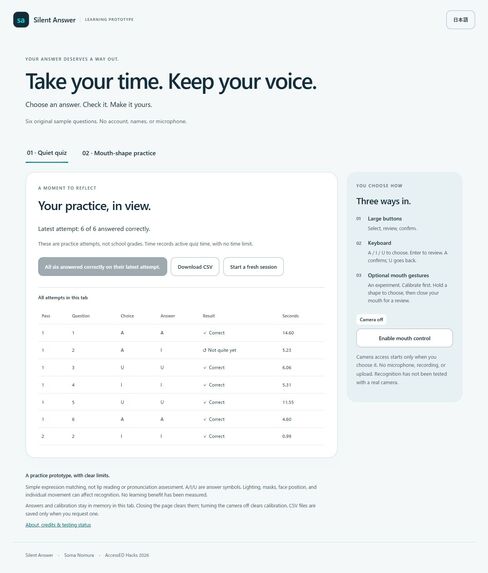
Actual local Computer Use screenshot using synthetic QA input; not a field result.
-
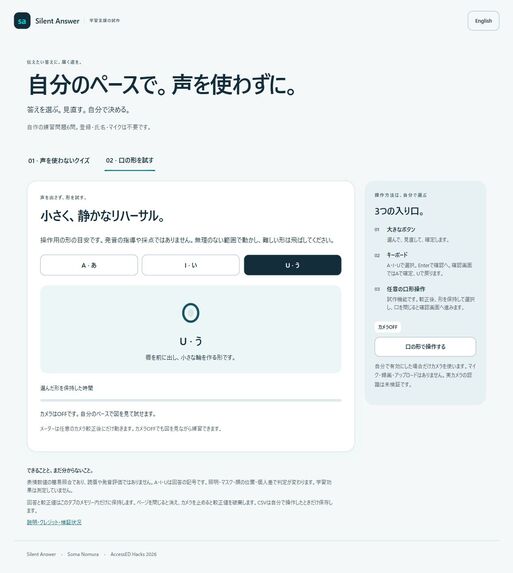
Actual local Computer Use screenshot using synthetic QA input; not a field result.
Inspiration
When my grandmother's voice grew weaker, family conversations became shorter. She did not have less to say; she had fewer ways to say it. That experience motivates my work on Kuchimoji, a silent input concept. For AccessED, I narrowed the question to learning: can someone participate in a small practice activity without being asked to speak?
The learner, barrier, and change
The intended learner is someone who cannot or does not want to answer aloud at that moment. A concrete, illustrative example is a three-choice science question during quiet independent study. In an oral-response activity, saying the answer is part of participation. Here, the learner selects a visible option, checks it on a separate review screen, confirms it, and receives an explanation without speaking. Large buttons and keyboard controls work without setup. An optional camera-gesture path is experimental and still needs real-camera validation.
This is a small practice prototype, not a tested classroom intervention or a claim about learning outcomes.
What it does
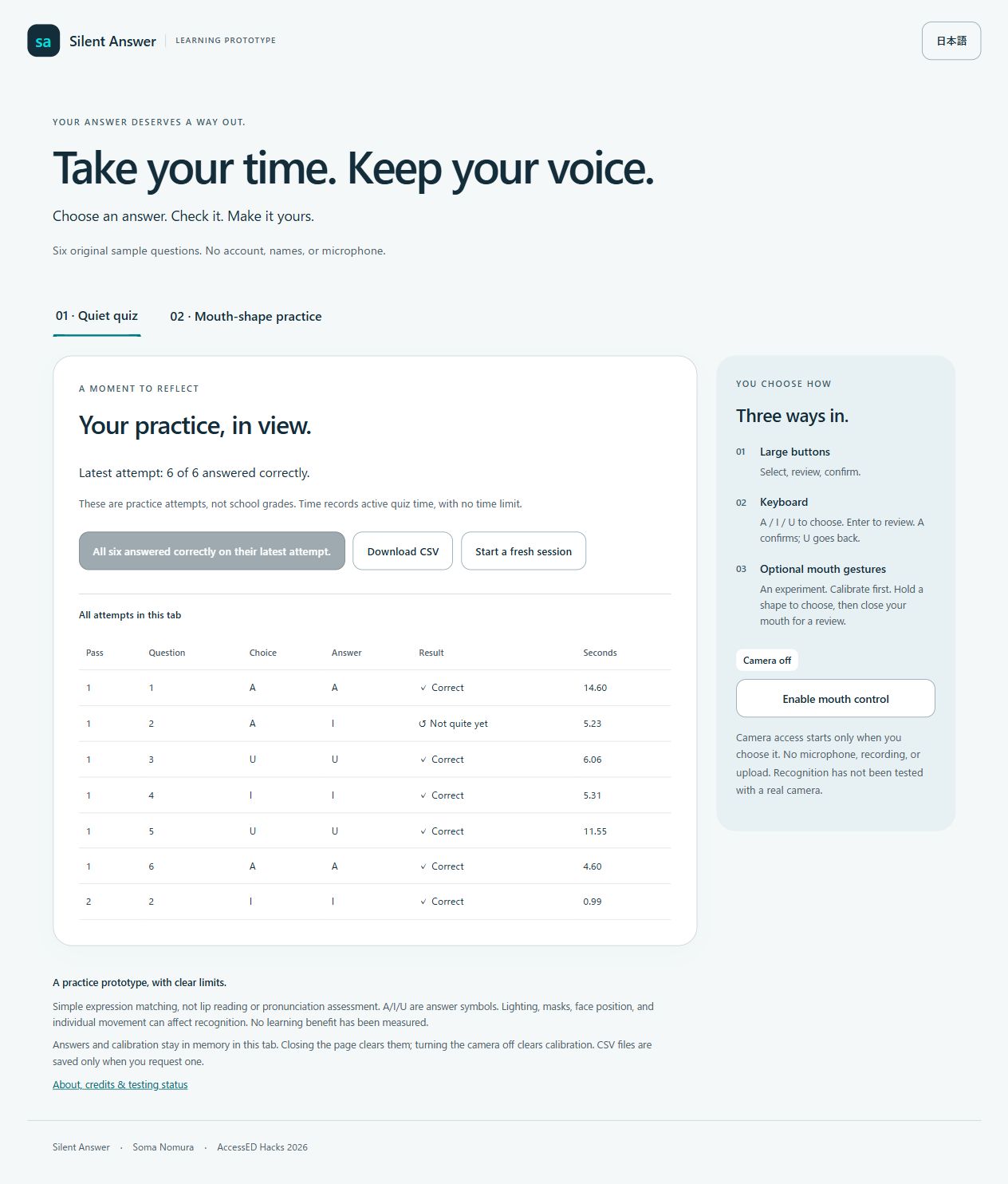
Silent Answer contains six original questions in English and Japanese. Every question has three answer symbols: A, I, and U. Selecting a symbol never scores an answer. The review screen lets the learner change their mind; only confirmation records an attempt.
After each confirmed answer, a short explanation supports reflection. At the end, learners can retry only questions whose latest attempt was incorrect. Earlier attempts remain visible, so a successful retry does not erase the route taken. An optional CSV contains question numbers, choices, correct answer symbols, pass numbers, and active quiz time. There is no countdown, learner-name field, or upload.
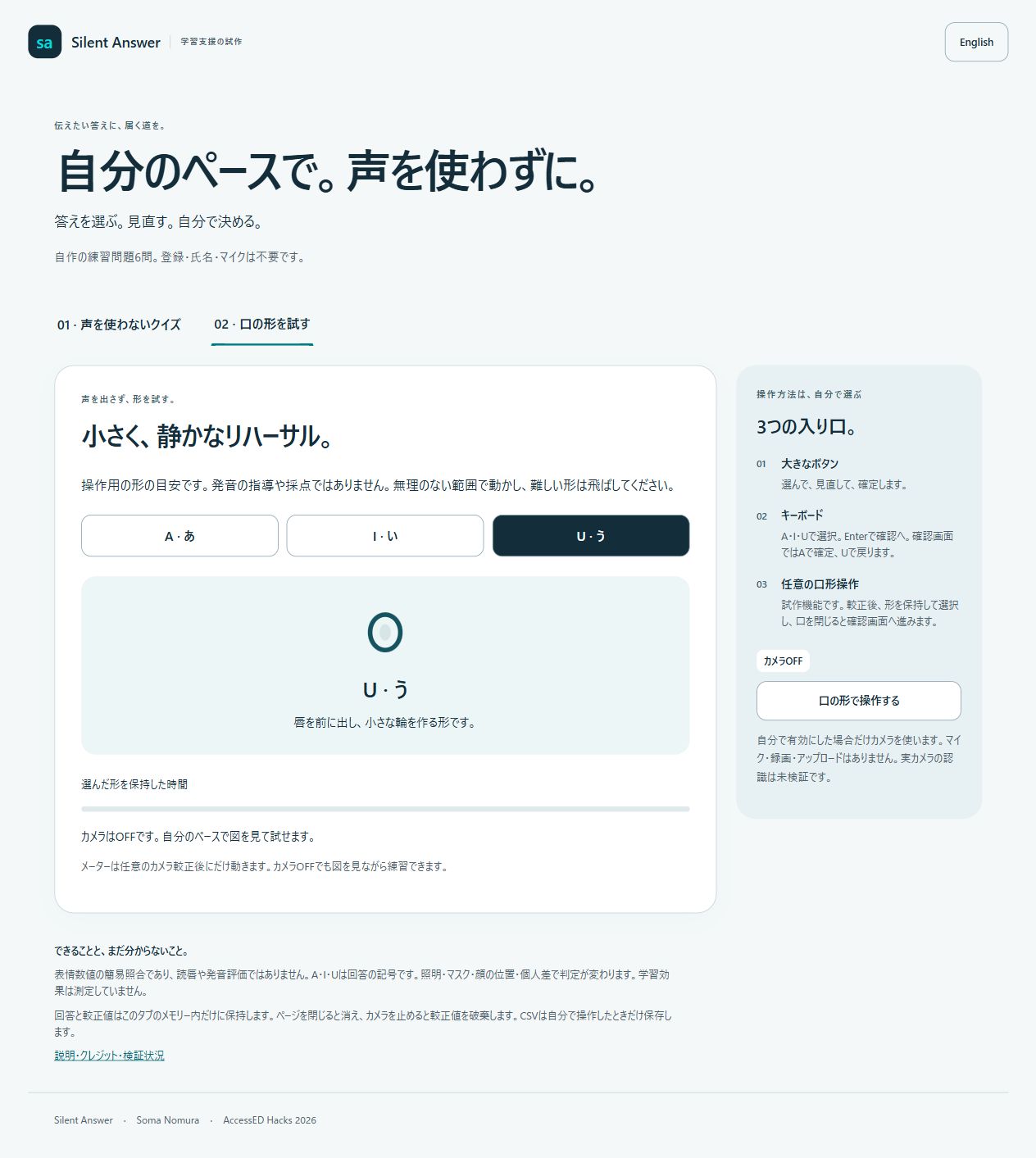
A separate practice screen shows original schematic mouth-shape cues. The optional calibrated meter indicates a held gesture, not pronunciation quality. The cards remain usable with the camera off.
How it is built
The app is static HTML, CSS, and JavaScript. A separate quiz state machine handles selection, confirmation, feedback, retry queues, and time accounting. Questions are local JSON. CSV is generated locally on request. The interface uses buttons, keyboard shortcuts, focus handling, text labels alongside color, responsive layouts, and reduced-motion support.
Optional mouth input uses self-hosted MediaPipe Tasks Vision 1.2.0. Four calibration samples—neutral, A, I, U—feed a simple expression-feature matcher. Ambiguous input does nothing. A deliberate neutral interval rearms gestures. After a selection, holding neutral opens review; it does not confirm or grade. The user must separately confirm with A or return with U.
Camera setup is explicit. The app requests video without microphone access, processes frames in the browser, and has no recording or upload endpoint. The camera stops when the tab is hidden or control is disabled. Calibration and answers are held only in tab memory. Files still load from the hosting service; offline installation is not implemented.
Event contribution and credits
The learning interface, six bilingual questions, quiz state machine, confirmation flow, retry history, CSV export, practice cues, documentation, and tests were prepared on November 3, 2026, during the event window.
The generic camera adapter, expression classifier, vendor files, server skeleton, and synthetic gesture tests are shared with Kuchimoji Steps, a separate guide-and-timer project prepared for LaunchPad Hacks. The optional input components are also reused in Quiet Signal for SafeSpace, a separate request-and-receipt rehearsal. Its workflow is not resubmitted here. MediaPipe is pre-existing third-party work. My broader interest in silent input predates this event; no prior Kuchimoji recognition model, MOUTHCODE code, dataset, or accuracy result is presented as this project's achievement.
I am entering individually as Soma Nomura. OpenAI Codex assisted implementation, original question drafting, translations, documentation, and tests. The initial brief came from a Claude-prepared submission kit. MediaPipe and model notices are included under Apache-2.0; the project code is MIT licensed. System fonts and original CSS drawings are used. There are no real student records or invented user testimonials.
Challenges and verification
Keeping the learner in control meant separating a tentative selection from a recorded answer. Retry also needed to preserve history while looking only at the latest attempt per question. Nineteen Node tests passed for these boundaries, CSV, time accounting, bilingual data, and synthetic gesture behavior; JavaScript syntax checks passed.
A separate Computer Use desktop check completed selection cancellation, all six questions, retry of only one deliberately missed question, a CSV with seven attempts, Japanese rendering, and practice-card controls. These were synthetic QA answers, not actual learner results. Mobile, real-camera, assistive-technology, and learning-benefit evaluations remain pending. Expression matching is not lip reading or pronunciation assessment and can fail with lighting, masks, face angle, device performance, or individual movement. No accuracy percentage is claimed.
What's next
Complete device and assistive-technology checks, then invite teachers and learners to try the workflow with consent. Their feedback should guide better input choices and a teacher-authored question format. I would evaluate the ability to complete the task before making any claim about improved learning.
Built with
HTML5, CSS3, JavaScript, JSON, MediaPipe Tasks Vision, WebAssembly, Node.js
Testing instructions
Open the demo. No sign-in or camera is needed. Use A/I/U or the buttons, review the chosen answer, and confirm. Deliberately miss one question, finish all six, and retry only that question. Download the CSV to inspect both passes. Switch to Japanese or open the shape-practice cards. Camera testing is optional and should be treated as an unvalidated experiment.
Try it out
https://silent-answer-2026.terraise.chatgpt.site
Public hosting status
The static application has been deployed publicly. Local Computer Use desktop checks used synthetic answers. The public hosting environment also passed a Computer Use desktop check of selection, review, and confirmation. Real-camera, mobile, assistive-technology, and learning-benefit evaluation remain pending.

Log in or sign up for Devpost to join the conversation.