-
-
Signify Chrome Extension Visual
-
Signify Logo
Inspiration
We were inspired by the challenges Deaf people and ASL learners face when accessing online videos. Captions alone often miss the nuance of ASL, making learning or enjoying content difficult. Our extension is designed to make YouTube fully inclusive, providing ASL-friendly captions and visual cues as an additional tool to support understanding, learning, and engagement. We aim to empower the Deaf community and ASL learners by giving them more ways to connect with educational and entertainment content on their own terms.
What it does
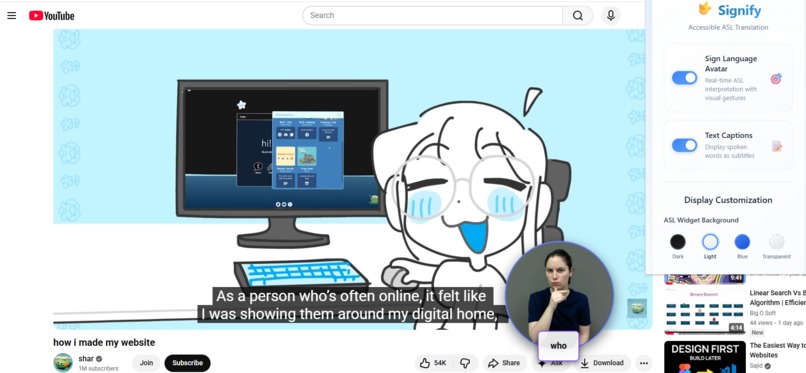
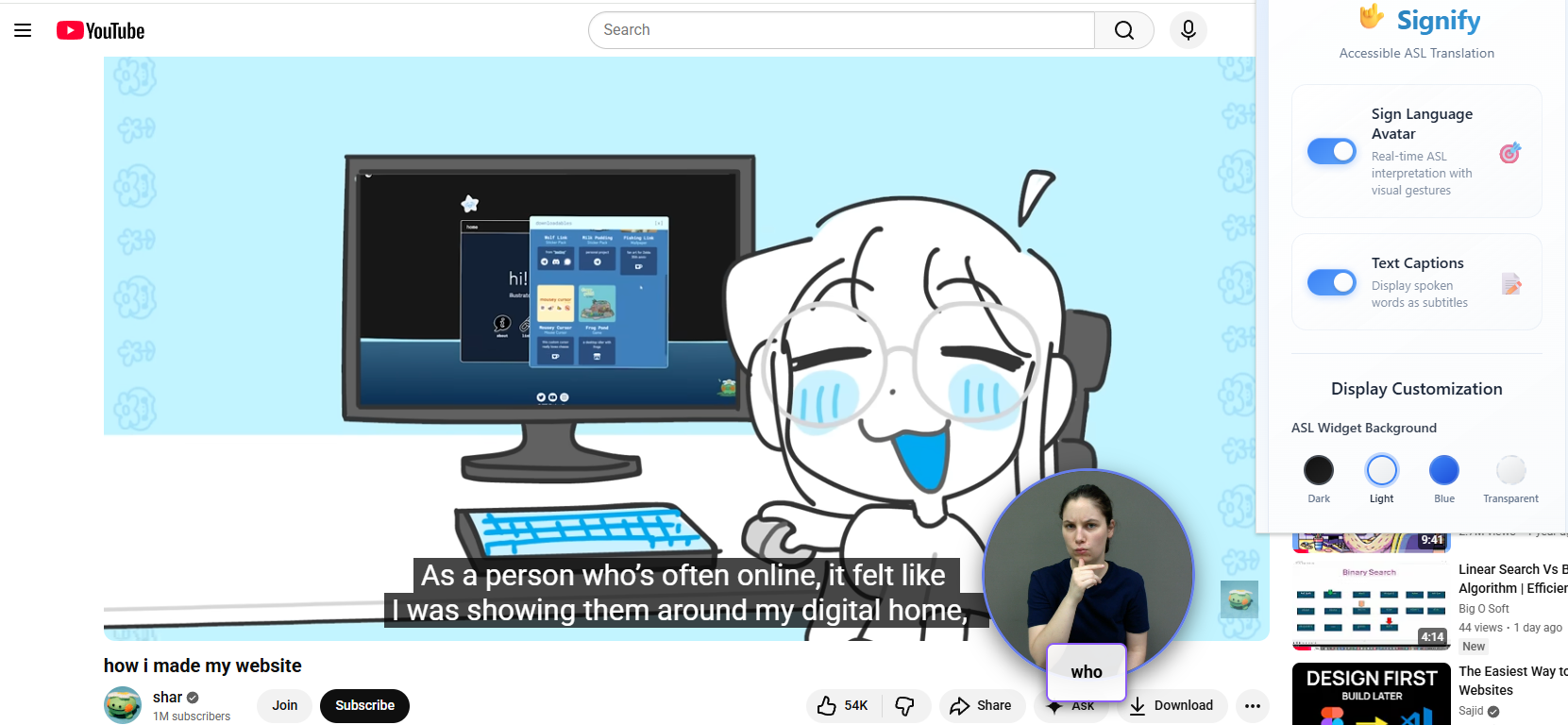
You install the Chrome extension on your browser. Once enabled, play any YouTube video and toggle the ASL widget. A small widget appears on the screen, providing real-time ASL translations of the spoken content so users can follow along, learn, and enjoy the video fully.
How we built it
Chrome Extension Built using Manifest V3, the extension uses a content script to extract YouTube captions in real time through a MutationObserver. A background service worker proxies media requests, and the popup UI provides simple toggle controls for enabling the ASL widget. Backend API A Node.js/Express backend processes caption text, cleans and normalizes language, and maps words to their ASL equivalents. It integrates the WLASL dataset of 2,000+ ASL word-level videos. Automated scripts were used to organize the dataset, create mappings, and filter high-frequency vocabulary for the MVP. ASL Avatar System A circular ASL video widget displays sign translations with smooth transitions, video preloading, and natural pauses between signs for better readability. As captions appear, the system converts English words into ASL glosses, retrieves the correct videos, and plays them in sequence with crossfades. Technical Flow The full pipeline includes real-time caption extraction from YouTube, gloss normalization and mapping, sequential ASL video playback, and media proxying to avoid mixed-content restrictions.
Challenges we ran into
Mixed Content Blocking: YouTube uses HTTPS but our backend was using HTTP, so Chrome blocked the videos. Fix: Added a proxy in the service worker that fetches videos and converts them to base64 so they load safely. Large and Incomplete Dataset (WLASL): The dataset is over 4.5GB and too big for GitHub. Out of the 11,000+ videos only about 2,000 videos are labelled with what word they map to. Fix Split the dataset into multiple commits. We only mapped to labelled videos Video Synchronization: ASL clips needed to play in the right order with correct timing and smooth transitions. Fix: Built a queue system with preloading, crossfades, and precise handling of video end events. Word Normalization (English → ASL Gloss): English words have many forms (“running,” “ran,” “runs”), but ASL glosses expect a base form. Fix: Built a normalization layer that maps different English word forms to a single standard gloss.
Accomplishments that we're proud of
WLASL Integration: Integrated 2,000+ ASL word-level videos to create a meaningful vocabulary base that supports real communication and understanding. Real-Time ASL Playback: Achieved real-time caption extraction and synchronized ASL video playback, allowing Deaf users and ASL learners to follow YouTube videos as they happen. Accessible ASL Widget: Built a clean, draggable ASL avatar widget with smooth transitions and natural pacing, improving clarity and readability for users. User-Centered Accessibility: Designed the tool specifically to support Deaf and hard-of-hearing users, offering an additional, more visual way to understand spoken content. Scalable Architecture: Built a stable, extensible system that can grow with more vocabulary, features, and improved ASL accuracy over time. Technical Innovation: Combined live captions with ASL video translation inside a simple Chrome extension—demonstrating a new, practical approach to accessibility on the web.
What we learned
We learned how to build a full Chrome extension using Manifest V3, including how service workers, content scripts, and message passing all work together. We gained a deep understanding of browser security rules—especially mixed content blocking—and how to safely work around them using a service-worker proxy and data URL conversion. We learned how to monitor YouTube’s DOM in real time with MutationObserver to reliably extract captions, and how to integrate a large ASL dataset by normalizing English words into ASL glosses and building fast lookup systems. We also discovered key differences between Mac and Windows behavior and adapted our code to handle platform-specific issues with robust error handling. We became comfortable with advanced media handling—preloading, synchronizing, and transitioning between video clips—to create smooth, accurate sign-language playback. We improved our user experience design skills by focusing on seamless transitions, visual feedback, and accessibility-centered interfaces. We implemented performance optimizations like caching, efficient media loading, and minimizing API calls while keeping the system responsive. Overall, we learned how to tackle complex engineering challenges within the restrictions of browser extensions, security policies, and an incomplete dataset—while still delivering a functional, meaningful, and accessible tool.
What's next for Signify
Custom ASL Avatar:We plan to move beyond limited video clips and develop a full ASL avatar that can sign any word and convey emotion for more natural communication. Platform Expansion: Extend support beyond YouTube to other major video platforms like Vimeo, Coursera, and Khan Academy to broaden accessibility across the web. Smarter ASL Generation: Integrate AI models such as SignLLM for real-time ASL avatar generation so full sentences and natural signing can be produced—not just word-level videos. Larger Vocabulary: Grow the ASL library with more words, phrases, and context-aware signing to improve accuracy and real-world usefulness. Public Release: Deploy the backend to the cloud and publish the extension to the Chrome Web Store, making installation seamless for users. User Customization: Add more control over caption styling, widget appearance, and playback speed to suit different accessibility needs. Offline & Faster Performance: Enable local caching of ASL videos for quicker loading and offline functionality. Community Contributions: Allow community-submitted ASL signs and feedback, helping the vocabulary expand in a user-driven, culturally-informed way. Multi-Language Sign Support: Expand beyond English to include other sign languages (like BSL or LSF) to support a more global audience.
Built With
- chrome
- css
- express.js
- html5
- javascript
- json
- kaggle
- node.js
- scripting


Log in or sign up for Devpost to join the conversation.