-
-
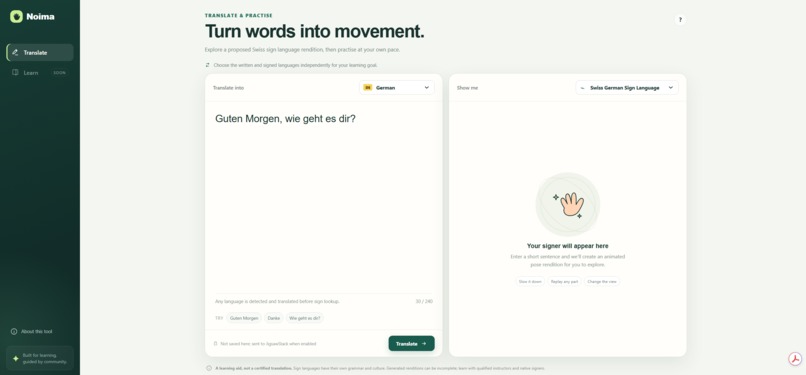
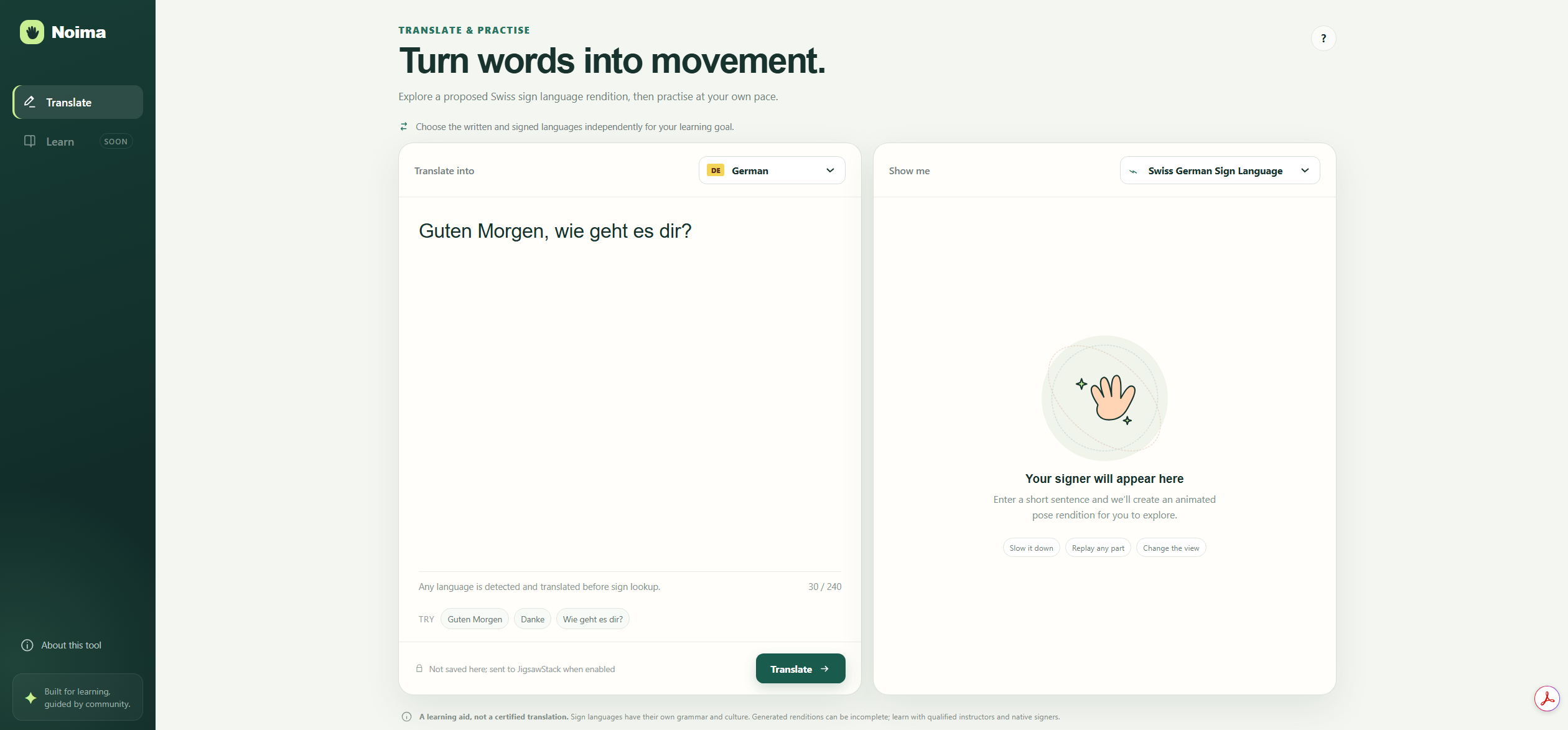
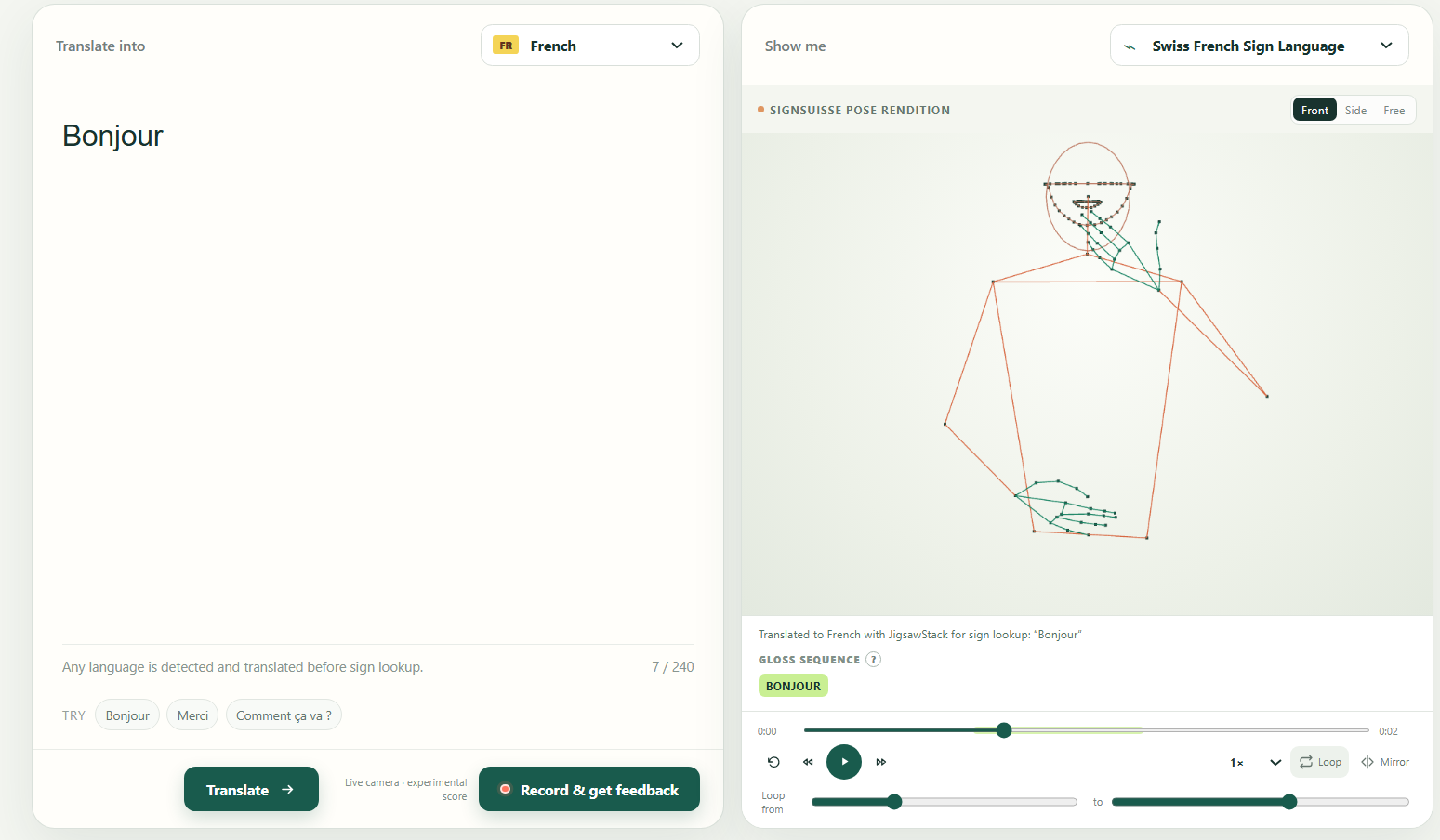
Front page of the website
-
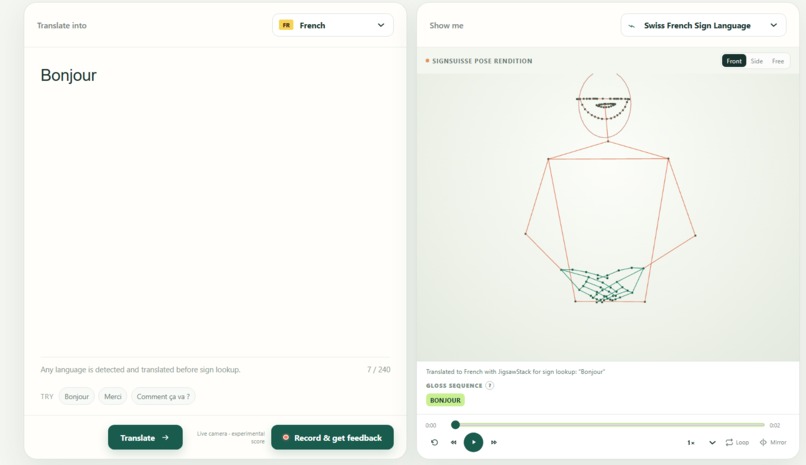
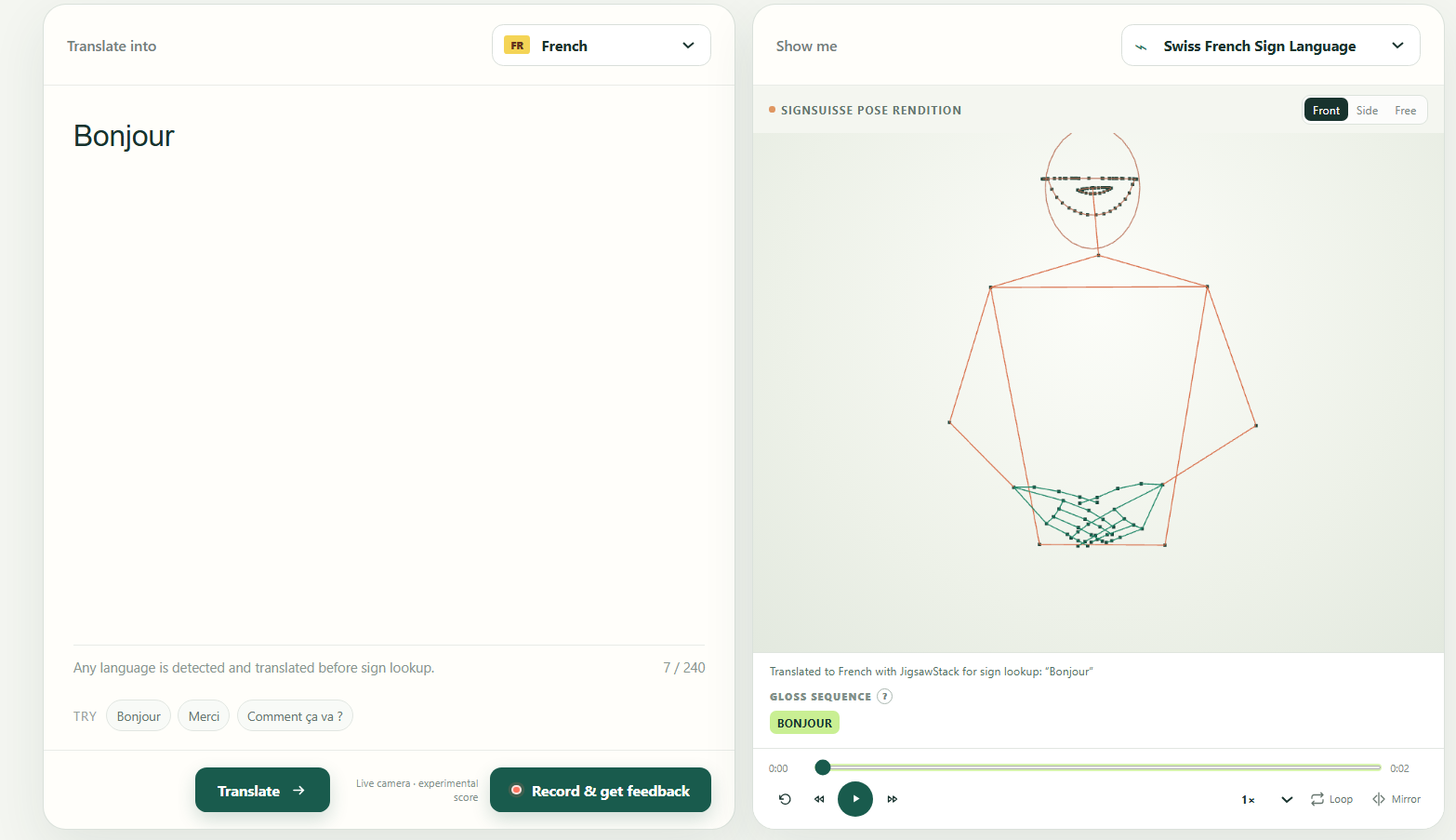
When the user translates text into pose
-
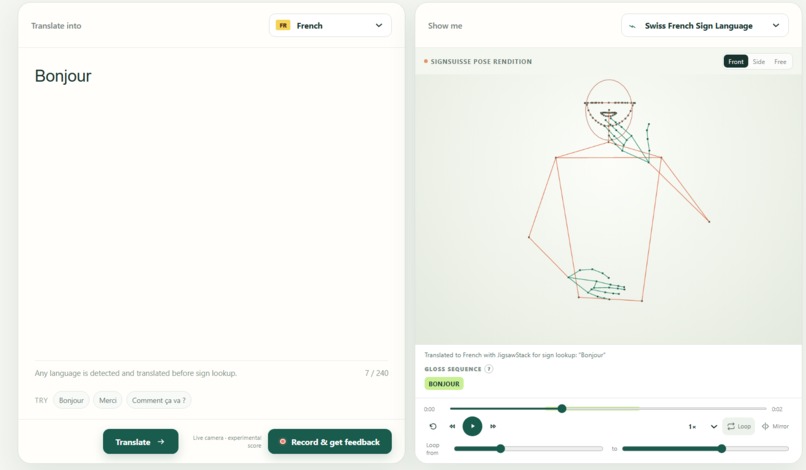
User can choose to loop the part that they want to watch
-
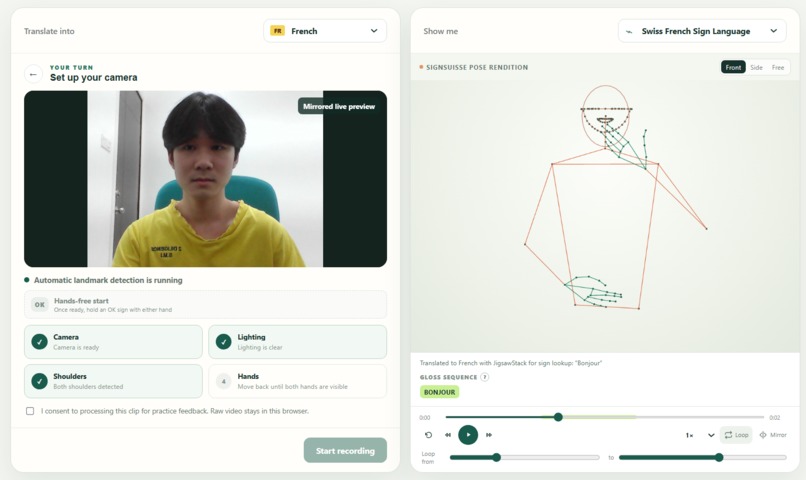
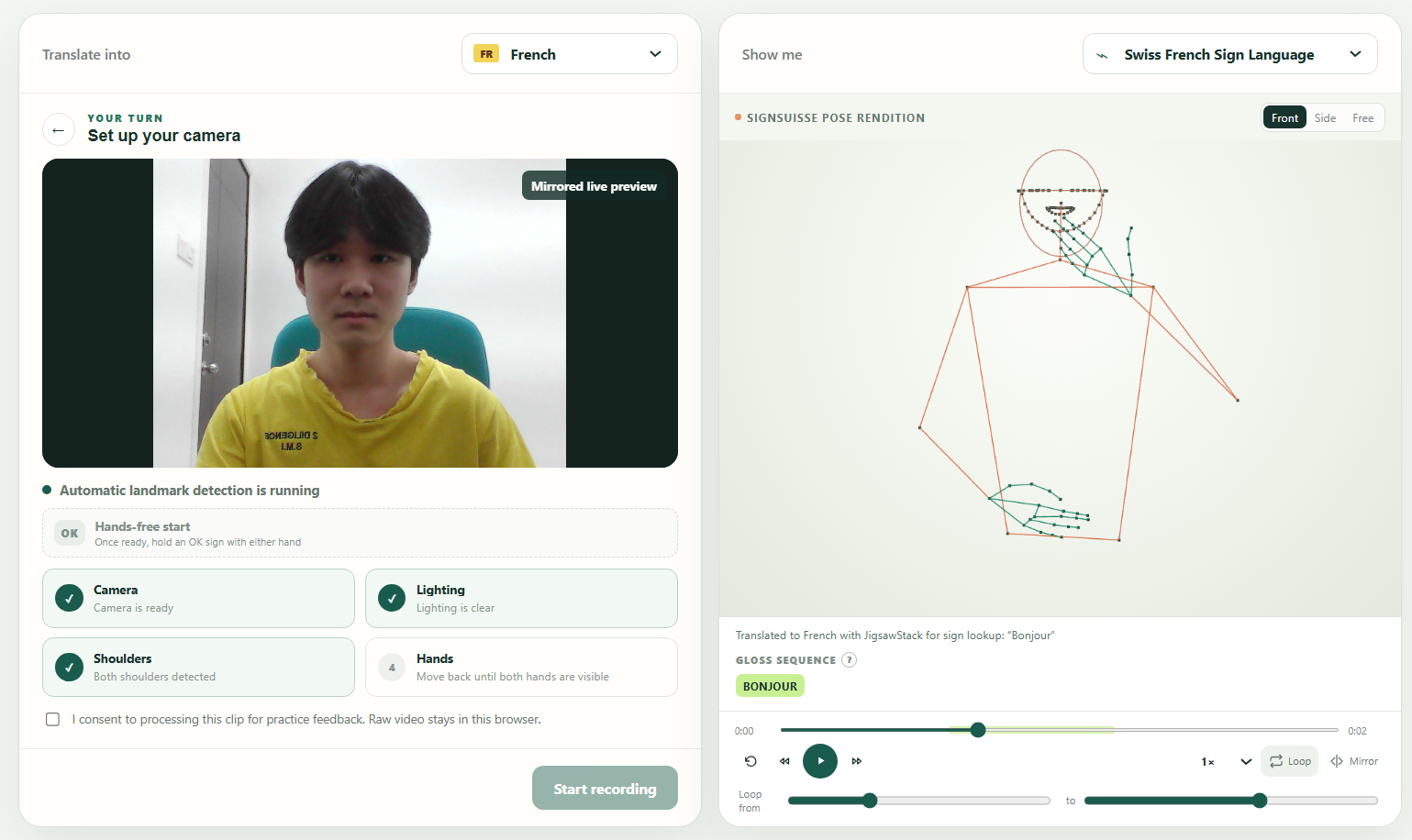
Checking for camera, lighting, and whether shoulder and both hands in frame
-
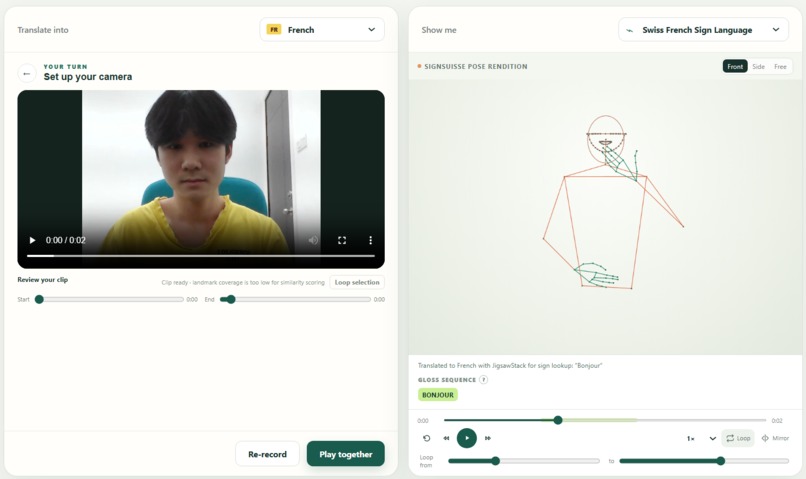
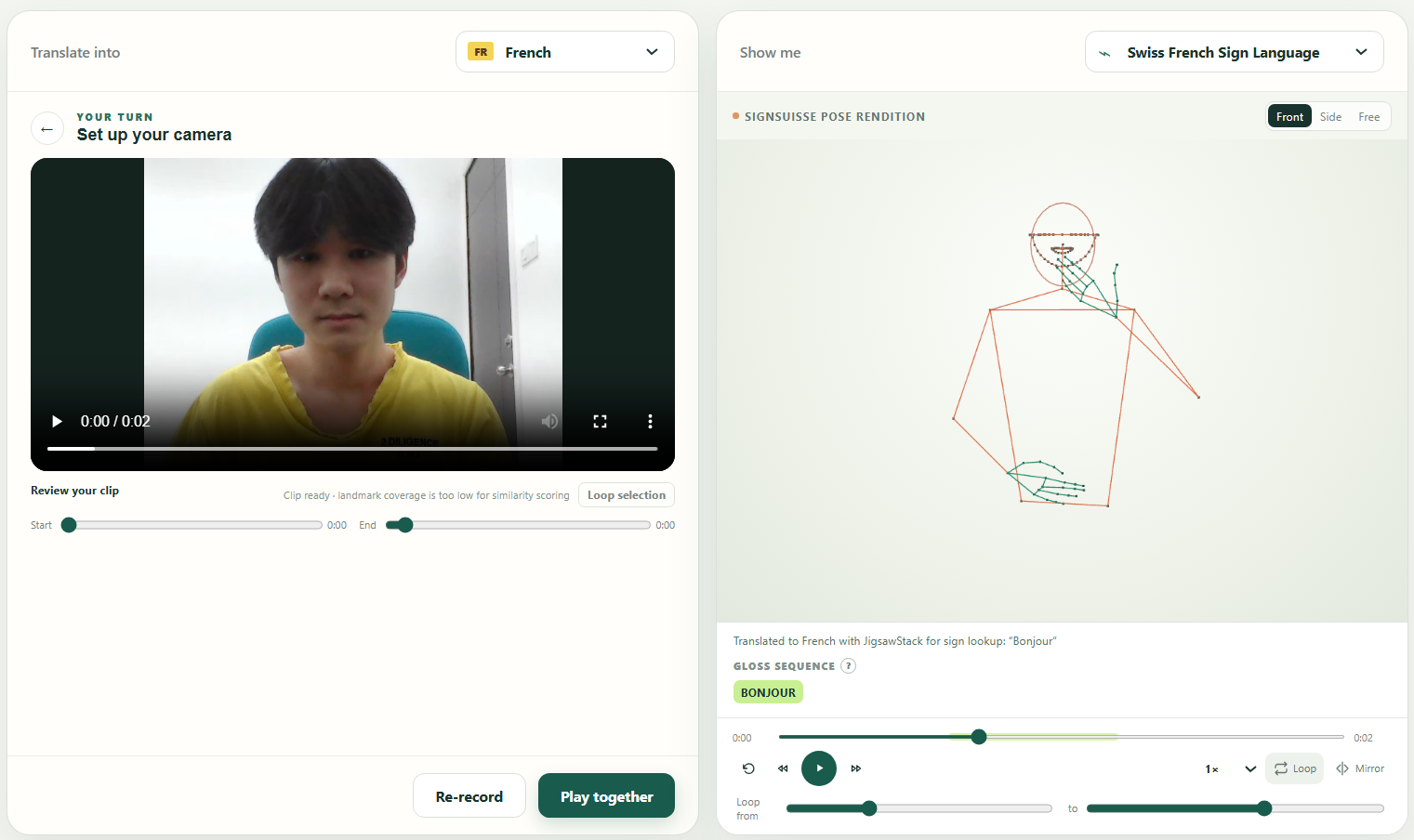
After recording the video, user can choose to rerecord or choose this clip here
-
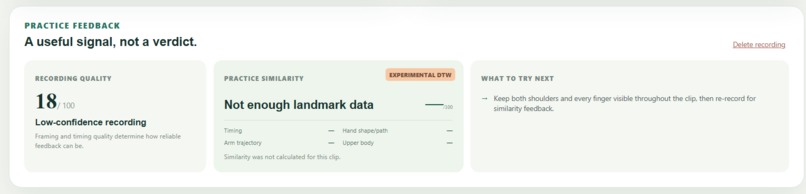
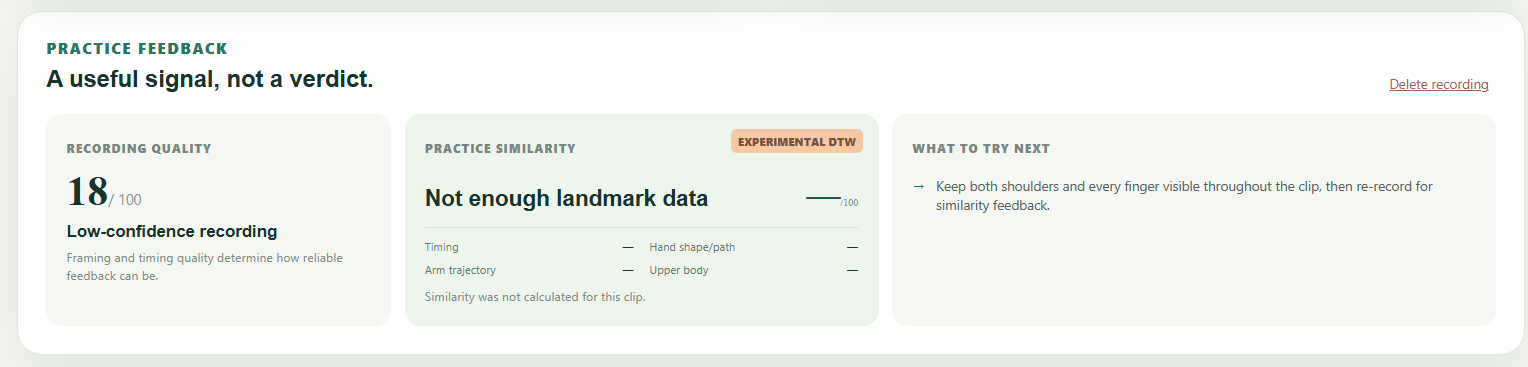
Scores given by our algorithm
Inspiration
I was talking to my friend the other day and we were talking about impressive projects to put on our resume, and he mentioned that he saw that someone worked on a project on detecting hands/pose on github. Then, the same night, I got an email from OpenAI about this hackathon at 4.30am. I woke up from my sleep and I thought of the project that my friend and I talked about. Then, I was thinking if it is possible to translate text to a 3D video of accurate pose/hand signs. I started researching till 7 am, and I read multiple papers and gone through some github repos like Prompt2Sign and spoken-to-signed-translation. I realized that it is possible but only for German, French and Italian. I spent my next day doing my research, but still couldn't find open-source repos on text to sign language for english (both American & British Sign Language). So, I decided to just work with what I have. Also, Noima (νόημα - “meaning” or “message.”) is just a simplified word for νοηματική γλώσσα (noimatikí glóssa) in Modern Greek for sign language.
What it does
Noima detects language that the user inputs and auto-translates it to the selected language (Italian/German/French) when the Translate button is clicked. Then, it renders a simplified 3D sign-language skeletal pose animation that the user can watch in different speeds (0.25x/0.5x/0.75x/1x/1.25x/1.5x), loop and mirror. For looping, user can choose start of loop/end of loop so that they can watch the same part again and again. After that, user can record a video on-site to get feedback from our algorithm. Before recording, our site checks that camera is working, lighting is sufficient, shoulder and both user's hands are in frame. Then, to free user from manually clicking start, we also allow users to show on OK-sign, to signify that they are ready. After the countdown, user can review their video and can choose to either upload it for evaluation or re-record. Lastly, after evaluation, a score of recording quality and practice similarity will be given and there will be breakdown in percentages of relevant components (Timing/Arm trajectory/Hand shape or path/Upper body) and a What to try next box that provides suggestion to improve user's score.
How we built it
1. End-to-end architecture
The system has four main layers:
User text
   ↓
Language translation and SignSuisse lexicon lookup
   ↓
Canonical pose sequence
   ↓
Three.js interactive signer
   ↓
MediaPipe learner tracking + constrained DTW assessment
We used:
- Flask and Python for the API and translation pipeline
- SignSuisse pose lexicons for real Swiss sign-language motion
- JigsawStack for automatic input-language detection and translation
- Three.js for real-time skeletal rendering
- MediaPipe Tasks Vision for webcam body and hand tracking
- Dynamic Time Warping (DTW) for motion-sequence comparison
The browser libraries, WebAssembly runtime, and landmark models are served locally, so the animation and camera-analysis features do not depend on a CDN.
2. Text and language processing
The user can type text in any language and select the written language associated with the target lexicon:
- German → Swiss German Sign Language (
sgg) - French → Swiss French Sign Language (
ssr) - Italian → Swiss Italian Sign Language (
slf)
When JigsawStack is configured, the Flask backend sends the text to its translation endpoint. We intentionally omit the source-language parameter so the service automatically detects the input language. It translates the result into German, French, or Italian before sign lookup.
Before processing, we:
- Apply Unicode NFKC normalization.
- Collapse repeated whitespace.
- Validate the 240-character limit.
- Confirm that the input contains at least one word.
- Select the relevant written-to-signed language configuration.
API credentials remain server-side and are loaded from environment variables.
3. Asynchronous translation jobs
Translation is exposed through two endpoints:
POST /api/translations
GET /api/jobs/{job_id}
The first endpoint validates the request, creates a UUID-based job, and starts processing in a background thread. The browser polls the job endpoint every 250 milliseconds and displays stages such as:
- Detecting and translating the language
- Creating the gloss sequence
- Looking up sign motion
- Preparing the pose animation
- Finalizing the animation
This separates the UI from potentially expensive translation and pose processing.
We also cache deterministic results. The cache key contains:
- Normalized text
- Written and signed language pair
- Translation-provider configuration
- SignSuisse index size and modification time
- Pipeline version
Changing the dataset or configuration therefore automatically invalidates old results.
4. Converting text into glosses
After language translation, we use the spoken-to-signed simple lemmatizer to transform the sentence into word-and-lemma pairs.
We then perform greedy longest-phrase matching against the SignSuisse index. Starting at each word, the system tests phrases from six tokens down to one token.
This matters because a phrase such as “GUTEN MORGEN” may have its own sign entry. Looking up “GUTEN” and “MORGEN” separately could produce a different and less appropriate sequence.
For each phrase, we search:
- The lexicon's written-word index
- The lexicon's gloss index
- The lemmatized form
When multiple entries exist, the official pose lookup logic selects the best-ranked row. Unmatched terms are preserved and returned to the interface as unsupported vocabulary.
Glosses are presented as sign labels, not as a claim that gloss notation represents the full grammar of a sign language.
5. SignSuisse pose integration
The application indexes 18,173 SignSuisse pose files:
- 9,030 SGG entries
- 6,410 SSR entries
- 2,733 SLF entries
The dataset is kept outside Git because its research licence restricts redistribution.
For every matched gloss, the backend:
- Loads the corresponding
.posefile. - Crops it using the entry's start and end timestamps.
- Concatenates multiple sign clips.
- Smooths transitions between clips.
- Corrects wrist and hand positioning.
- Converts the result into our browser-ready canonical schema.
Access to the pose loader is protected by a re-entrant lock because the shared upstream lookup and pose-processing objects are used by multiple translation jobs.
6. Canonical pose representation
Instead of converting signs into video, we send structured motion data to the browser.
Our versioned representation is identified as:
noima.canonical-pose/1.0
It contains:
- Frame timestamps
- Frames per second
- Total duration
- Coordinate-system metadata
- Body landmarks
- 21 landmarks for each hand
- Selected facial landmarks
- Gloss/sign index
- Source-file provenance
Coordinates are normalized into a pose-centred, Y-up coordinate system. Every animation frame therefore uses one consistent orientation and scale, regardless of the original source clip.
We preserve the source landmarks rather than retargeting them onto a humanoid avatar. This prevents an additional rigging layer from changing the original wrist paths, finger articulation, or timing.
Missing hand frames are reconstructed relative to their wrist anchor using a neutral hand configuration. This maintains visual continuity without inventing large arm movements.
The conversion also applies confidence-aware smoothing. Low-confidence changes are damped more strongly, while reliable motion is retained. A soft torso-contact constraint reduces extreme landmark intersections around the body.
If no compatible SignSuisse entry exists, the application generates deterministic procedural demonstration motion and labels it explicitly as a fallback. It is never presented as SignSuisse source motion.
7. Three.js signer
The frontend renders the canonical data directly with Three.js and WebGL.
The scene consists of:
- Body line segments
- Hand bone connections
- Facial feature loops
- Landmark points
- A perspective camera
- A root transform for mirroring and rotation
At each browser animation frame, we locate the two source keyframes surrounding the current playback time and linearly interpolate every body, hand, and facial landmark:
renderedPoint = pointA + α(pointB − pointA)
This produces smooth motion even when the browser display refresh rate differs from the source pose frame rate.
Because the source is structured motion rather than video, we can provide:
- Play and pause
- Timeline scrubbing
- 120-millisecond stepping
- Multiple playback speeds
- Custom loop intervals
- Horizontal mirroring
- Front and side presets
- Drag-to-rotate
- Scroll-to-zoom
- Gloss highlighting synchronized with playback
Three.js geometry buffers are rebuilt from the interpolated landmarks, so individual fingers and wrist movements remain visible.
8. Webcam readiness analysis
Practice analysis happens locally in the browser. Raw webcam video is not uploaded to the backend.
We use two MediaPipe models:
- Pose Landmarker, configured for up to two people
- Hand Landmarker, configured for two hands and 21 landmarks per hand
Before recording, each webcam frame is checked for:
- Exactly one detected person
- Both shoulders
- Required upper-body landmarks
- Both hands
- Every finger remaining inside the image
- Sufficient landmark confidence
- Suitable lighting and contrast
Lighting is evaluated by downsampling the frame to 64 × 48 pixels and calculating average luminance, luminance variance, and the proportion of clipped dark or bright pixels.
The recording button is enabled only after the readiness checks pass and the user provides consent.
For hands-free operation, we also detect an OK gesture. The detector compares the thumb-to-index distance with palm size and verifies that the remaining three fingers are extended. Holding the gesture across multiple frames begins a 3–2–1 countdown.
9. Recording lifecycle
Recording uses the browser's MediaRecorder API:
Checking → Countdown → Recording → Review → Assessment
The clip remains as an in-memory browser Blob. The learner can review it, adjust trim controls, loop a selected portion, or re-record it.
We collect landmark features during recording rather than processing raw pixels afterward. If both hands disappear continuously at the end of the clip, the application proposes trimming only that final invalid section. It does not automatically remove internal pauses or the start of the performance.
Returning to the text screen stops the camera, revokes the temporary Blob URL, clears feature arrays, and deletes the practice-session state.
10. Motion feature extraction
Raw screen coordinates cannot be compared directly because people appear at different positions, scales, and angles.
For each frame, we therefore:
- Find the midpoint between the shoulders.
- Translate all landmarks relative to that midpoint.
- Scale coordinates by shoulder width.
- Construct local X and Y axes from shoulder orientation.
- Project landmarks into this torso-relative coordinate system.
- Anchor hand depth to the corresponding pose wrist.
- Retain per-landmark confidence values.
The feature vector includes:
- Head and shoulders
- Elbows and wrists
- Hand trajectories
- All 21 landmarks from each hand
- Depth values
- Region labels and comparison weights
Hands and fingers receive the highest weighting, followed by wrists and arms, with the upper body receiving a smaller stabilizing weight.
The exact pose data rendered as the reference is also converted through the same feature-generation path. This ensures the learner is compared against what they actually saw.
11. Constrained Dynamic Time Warping
A simple frame-by-frame comparison would unfairly penalize someone who signs slightly faster or slower. We use multivariate Dynamic Time Warping to align the two sequences in time.
For reference frame \i\ and learner frame \j\, we calculate a confidence-weighted Euclidean feature distance:
$$ d(i,j)=\sqrt{ \frac{\sum_k w_k(x_{ik}-y_{jk})^2} {\sum_k w_k} } $$
DTW constructs a cumulative-cost matrix and finds the lowest-cost path through it. The path can move diagonally or repeat a frame from either sequence, allowing moderate timing differences.
We constrain the warping window to approximately 28% of the longer sequence. This prevents an unrealistically slow performance from being aligned to a very short reference.
We run DTW separately for:
- Overall motion
- Hands and fingers
- Wrist and arm trajectory
- Upper body
Timing similarity is additionally derived from the ratio between reference and learner durations. The system records where the highest aligned difference occurred and maps it to the corresponding gloss, enabling targeted feedback.
The resulting similarity values are marked as experimental and uncalibrated. They describe motion similarity only; they do not claim that the learner is correct, fluent, or linguistically accurate.
12. Privacy and deployment approach
The prototype is deliberately local-first:
- Raw webcam video stays in browser memory.
- MediaPipe inference runs through local WebAssembly.
- Models and JavaScript libraries are served locally.
- Temporary recording URLs are revoked when deleted.
- Translation credentials stay on the Flask server.
- SignSuisse assets are excluded from source control.
- Each rendition reports whether it came from real lexicon data or procedural fallback.
This architecture gave us one shared pose representation that supports translation, rendering, playback control, and learner assessment without generating videos or sending sensitive practice recordings to a server.
Challenges we ran into
1. Moving from a 3D avatar to a source-pose skeleton
Our original direction was to animate a complete 3D humanoid avatar. The SignSuisse dataset, however, provides timed landmark motion rather than animation authored for a specific character rig. Connecting those two representations requires a full retargeting system.
For every frame, we would have needed to convert landmark positions into stable joint rotations for the avatar's bone hierarchy. That involves solving several difficult problems:
- Mapping the dataset's landmark names and coordinate system onto the avatar's skeleton
- Solving inverse kinematics for the shoulders, elbows, wrists, and fingers
- Preserving bone lengths while the source landmarks contain noise or missing values
- Defining rotation axes and joint limits for every bone
- Handling differences between the source performer's proportions and the avatar's proportions
- Preventing elbows, wrists, and fingers from flipping between mathematically valid rotations
- Avoiding hand, arm, and torso intersections
- Retargeting facial landmarks onto blend shapes or facial bones
The difficult part was not rigid-body physics in the traditional sense. It was the kinematics, anatomical constraints, and retargeting required to make the avatar follow the source pose without visually distorting the sign.
This was especially important for sign language because small changes in hand shape, orientation, position, or movement can affect meaning. A visually polished avatar that subtly changes those features could be less useful than a simpler but more faithful representation.
We therefore changed the renderer to display the source pose directly. Three.js draws the body connections, all 21 landmarks for each hand, selected facial features, and the landmark points themselves. No humanoid rig or inverse-kinematics layer sits between the SignSuisse data and what the learner sees.
This decision reduced the number of transformations applied to the motion and let us preserve:
- Original wrist and elbow trajectories
- Individual finger articulation
- Source timing
- Left/right relationships
- Facial landmark movement when present
We still had to normalize coordinate axes, smooth noisy transitions, reconstruct missing hand frames relative to the wrist, and interpolate between timestamps. However, those operations work directly on the source landmarks and are easier to inspect than hidden bone rotations inside an avatar.
2. Designing a meaningful scoring system
Scoring was another technically difficult part because there is no single frame-by-frame definition of a “correct” performance. Two people can perform the same sign at different speeds, at different positions in the camera frame, and with different body proportions.
Our first requirement was therefore to make the comparison invariant to camera placement and body scale. We normalize every learner frame by:
- Using the midpoint of the shoulders as the coordinate origin.
- Scaling all distances by shoulder width.
- Constructing local coordinate axes from the shoulder line.
- Projecting body and hand landmarks into that torso-relative coordinate system.
- Anchoring each hand's relative depth to its corresponding wrist.
After normalization, a direct comparison was still insufficient. If the reference reaches a position at 1.2 seconds and the learner reaches it at 1.4 seconds, comparing equal timestamps produces a large error even if the movements are otherwise similar.
We solved this with constrained multivariate Dynamic Time Warping. DTW builds a cost matrix between the reference and learner sequences and finds the minimum-cost temporal alignment. It can repeat or skip positions in either sequence, allowing moderate speed differences.
We constrain the warping window to approximately 28% of the longer sequence. Without this restriction, DTW can create unrealistic alignments—for example, stretching one short movement across most of the learner's recording simply to reduce the mathematical distance.
The per-frame cost is a weighted Euclidean distance across the normalized landmark features:
$$ d(i,j)=\sqrt{ \frac{\sum_k w_k(x_{ik}-y_{jk})^2} {\sum_k w_k} } $$
Hands and fingers receive the highest weights, followed by wrist and arm trajectories. Head, shoulders, and upper-body landmarks provide lower-weight context. Learner landmarks with weaker detection confidence are down-weighted so that one unreliable point does not dominate the result.
We also run separate comparisons for overall motion, hands, trajectory, and upper body. This lets the interface produce more useful feedback than a single unexplained number.
The remaining challenge is calibration. A mathematical distance is not automatically a linguistic correctness score. Determining whether a particular distance should equal 60%, 80%, or 95% requires an instructor-reviewed dataset containing different signers, signing speeds, camera conditions, and representative learner errors.
For that reason, we label the current result as an experimental motion-similarity score. It does not claim that a user signed correctly or is fluent. The implementation is a technical comparison tool that can later be calibrated against qualified human evaluation.
3. Limited open-source language coverage
The open-source spoken-to-signed pipeline and SignSuisse lexicons available to this project did not provide an English-to-Swiss-sign-language pair. The supported source and target combinations were:
- German → Swiss German Sign Language (
de→sgg) - French → Swiss French Sign Language (
fr→ssr) - Italian → Swiss Italian Sign Language (
it→slf)
4. Working with incomplete and discontinuous pose data
Lexicon entries are individual recorded signs, but users enter sentences. Creating a sentence therefore requires cropping multiple pose clips and joining them into one continuous animation.
Naively placing clips next to each other produces discontinuities: the final wrist position of one sign may be far from the starting wrist position of the next. Missing or low-confidence hand landmarks can also cause fingers to collapse, jump, or disappear for a frame.
Our conversion pipeline handles this by:
- Cropping each source pose using its lexicon timestamps
- Concatenating matched poses in gloss order
- Applying transition smoothing between adjacent clips
- Dampening low-confidence point movement
- Applying wrist correction after concatenation
- Reconstructing missing hands from a wrist-anchored neutral configuration
- Applying a soft torso-contact constraint to extreme intersections
We store the original source-file provenance with the generated motion so a rendered segment can be traced back to the lexicon entry that produced it.
These operations improve continuity, but they do not add sign-language grammar that is absent from a lexicon-based sequence. That is why Noima describes the result as a proposed rendition rather than a certified translation.
Accomplishments that we're proud of
1. We built a complete text-to-motion pipeline
The strongest accomplishment is that Noima works as an end-to-end system rather than a collection of disconnected experiments. A user can enter text, select a language pair, receive a pose-based rendition, study it interactively, record an attempt, and receive motion feedback in one workflow.
The pipeline connects several technically different systems:
Language detection and translation
        ↓
Lemmatization and phrase matching
        ↓
SignSuisse pose retrieval
        ↓
Pose normalization and concatenation
        ↓
Three.js rendering
        ↓
MediaPipe feature extraction
        ↓
DTW motion comparison
Each stage uses a shared representation of the selected language pair, gloss sequence, timing, and pose data. This means the animation used for assessment is the same animation the learner studied—not a separately generated approximation.
2. We made the reference animation interactive
Because the result is rendered from pose data instead of a pre-rendered video, learners can control it in ways that are useful for practice.
The working player includes:
- Play, pause, and restart
- Timeline seeking
- Short forward and backward steps
- Variable playback speed
- Custom loop ranges
- Mirrored presentation
- Front and side views
- Drag rotation and zoom
- Gloss highlighting synchronized with the animation
The browser interpolates source landmarks between timestamps, so the animation remains smooth while seeking or playing at different speeds.
3. We achieved local, real-time body and hand tracking
The practice workflow runs MediaPipe Pose Landmarker and Hand Landmarker directly in the browser through WebAssembly. It detects the learner's upper body and both 21-point hands without sending webcam frames to the Flask server.
Before recording, the system provides live readiness checks for:
- Camera access
- Lighting and contrast
- Exactly one person in view
- Both shoulders in frame
- Both hands and all fingers in frame
- Landmark-detection confidence
These checks work well enough to prevent many unusable recordings before they happen. We are also proud of the hands-free start: once the learner is correctly framed, holding an OK gesture can trigger the recording countdown.
4. We built a motion comparison that handles timing differences
Our assessment does not compare raw video pixels or require the learner to move at exactly the same speed as the reference.
We created a shared feature space that normalizes both sequences by shoulder position, shoulder width, and torso orientation. We then use constrained multivariate DTW to align the learner and reference in time.
The comparison produces separate measurements for:
- Overall motion
- Hands and fingers
- Wrist and arm trajectory
- Upper body
- Performance timing
This is not yet a validated correctness score, but it works well enough to demonstrate that two performances can be aligned and compared despite moderate differences in pace, camera framing, and body size. We deliberately label the feedback experimental instead of overstating its accuracy.
What we learned
1. Building a web interface from the ground up
Before this hackathon, I had never worked with HTML or CSS. Building Noima taught me how a web page is structured, how browser elements communicate with JavaScript, and how CSS turns that structure into a responsive application.
I learned how to build and manage:
- Semantic HTML forms, buttons, panels, dialogs, and video elements
- Responsive layouts that change from two columns to a stacked mobile view
- Reusable visual states for loading, translation, recording, review, and results
- Accessible labels, keyboard controls, focus behavior, and live status messages
- CSS positioning and layering for camera overlays, countdowns, and animation controls
- Browser events for forms, sliders, pointer interaction, keyboard shortcuts, and media playback
One of the biggest lessons was that frontend development is not just making a page look good. The interface has to represent a real application state. In Noima, actions such as starting the camera, beginning a countdown, recording, reviewing, deleting, or returning to the text screen all require the UI and underlying resources to remain synchronized.
2. How real-time 3D rendering works
Before this project, I had not built a real-time 3D animation system. Through Three.js, I learned the basic structure of a 3D scene: cameras, coordinate systems, geometry, materials, transforms, and a continuous render loop.
I learned that animation data is different from a rendered image. The SignSuisse files contain landmark positions over time, so the browser must determine which frames surround the current playback time and interpolate between them. The renderer then rebuilds the body, hand, and facial geometry from those interpolated coordinates.
This also taught me how features such as mirroring, side views, rotation, and zoom can be implemented as transformations of the scene or camera rather than changes to the source animation.
3. Why avatar rigging and animation retargeting are difficult
Our early avatar approach taught me that displaying motion on a character is much more complicated than attaching coordinates to a model.
A 3D avatar normally has a bone hierarchy. Pose data gives us landmark positions, but an avatar needs joint rotations. Converting between them requires inverse kinematics, bone constraints, coordinate transformations, and careful handling of the avatar's proportions.
I learned about problems such as:
- Mapping source landmarks to a different skeleton hierarchy
- Converting positions into stable bone rotations
- Preserving fixed bone lengths
- Defining joint limits and anatomical constraints
- Preventing elbow, wrist, and finger rotation flips
- Retargeting motion between bodies with different proportions
- Avoiding intersections between the hands, arms, and torso
- Mapping facial landmarks to facial bones or blend shapes
This helped us understand that the problem was mainly one of kinematics and retargeting, not simply “adding physics.” It also led to an important engineering decision, when an abstraction changes the motion too much, displaying the original skeletal data can be more useful and honest than forcing it onto an unfinished avatar.
4. Real-time computer vision in the browser
Before this hackathon, I did not know that real-time pose and hand detection could run directly inside a web browser. MediaPipe showed us that browser-based computer vision can process webcam frames continuously using local models and WebAssembly.
I learned how a pose detector represents a person as landmarks with normalized coordinates, depth, visibility, and confidence values. I also learned that detecting a person is only the first step. A useful application has to interpret those results and decide whether:
- One or multiple people are visible
- Important joints are inside the camera frame
- Both hands and individual fingers are detected
- Detection confidence is high enough
- The lighting is sufficient
- A gesture is being intentionally held across multiple frames
Building the OK-gesture trigger was a good example. Instead of training another model, we used geometry: comparing the thumb-to-index distance with palm size and checking whether the remaining fingers were extended.
The project also taught me about the difference between image coordinates and meaningful motion features. Raw webcam coordinates change when the user moves closer to the camera, stands in a different location, or tilts their shoulders. Normalizing landmarks around the shoulder midpoint and scaling by shoulder width made those measurements much more comparable.
5. Dynamic Time Warping
I also learned about Dynamic Time Warping for the first time. The key idea is that two movements can have the same shape while happening at different speeds.
A normal frame-by-frame comparison assumes that frame 20 of the reference corresponds to frame 20 of the learner. DTW instead creates a matrix of possible frame pairings and searches for the lowest-cost path through it. That path can repeat or advance frames on either side, allowing the sequences to stretch in time.
Implementing DTW taught me about:
- Representing a pose as a multivariate feature vector
- Designing a weighted distance function
- Giving hand and finger motion greater importance
- Using confidence values to reduce the effect of unreliable landmarks
- Applying a warping window to prevent unrealistic alignments
- Backtracking through the cost matrix to recover the alignment path
- Finding the point in the sequence with the largest aligned difference
Most importantly, I learned that an algorithmic distance is not automatically a meaningful human score. Turning DTW distance into a reliable assessment requires labelled examples and comparison with qualified instructors. That is why Noima describes its current score as experimental motion similarity.
6. Connecting systems is often harder than building them separately
Noima combines natural-language translation, lexicon search, pose-file processing, 3D graphics, webcam recording, computer vision, and sequence alignment. Each technology has its own data structures and coordinate conventions.
A major lesson was that the interfaces between these systems matter as much as the systems themselves. We had to keep track of:
- Written-language codes and signed-language codes
- Words, lemmas, glosses, and source pose files
- Pose coordinate orientation and scale
- Timestamps and playback duration
- Body-relative and wrist-relative depth values
- Reference and learner landmark ordering
- Recording, analysis, and UI lifecycle state
Creating one canonical pose representation made these connections manageable. It gave the renderer and assessment system a shared definition of a frame and ensured that the learner was compared against the same motion displayed on screen.
What's next for Noima
1. Turning the Learn tab into a structured course
Noima already includes a Learn tab in the interface as the starting point for the next major feature. Instead of requiring learners to enter their own text every time, this section would provide a curated collection of sentences with animations prepared in advance.
Preprocessing the lesson animations would give us several benefits:
- Immediate playback without waiting for request-time pose generation
- Consistent, reviewed motion for every learner
- Known vocabulary and expected lesson difficulty
- Cached, compact animation files that load quickly
- Stable reference sequences for assessment and score calibration
The curriculum would begin with short, common expressions and gradually increase in length and complexity. A possible progression is:
- Greetings and single everyday signs
- Short introductions and basic questions
- Common two- and three-sign phrases
- Longer conversational sentences
- Less common vocabulary and more specialized topics
- Sentences with more difficult timing, hand shapes, spatial relationships, and non-manual signals
Difficulty should not be based only on sentence length. We would also consider vocabulary frequency, number of signs, use of both hands, movement range, hand-shape complexity, transitions, facial components, and the amount of spatial grammar involved.
The long-term experience would be similar to Duolingo's short, progressive lesson structure, but designed specifically around visual sign-language practice rather than adapting a spoken-language exercise directly.
2. Adding progression and gamification
We want practice to feel approachable enough that learners return regularly. The Learn section could organize lessons into levels, topics, and unlockable paths.
Potential progression features include:
- Daily practice goals and login streaks
- Experience points for completing lessons
- Lesson levels and topic-based paths
- Review queues for previously attempted sentences
- Personal best motion-similarity results
- Achievement badges for consistency and improvement
- Optional friend or community leaderboards
- Weekly practice challenges
The system should reward participation and improvement rather than presenting experimental scores as an authoritative ranking of signing ability. A leaderboard could therefore focus on completed practice sessions, consistency, or improvement, not simply who receives the highest computer-generated similarity score.
We would also build accessibility and flexibility into streak mechanics. Missing a day should not punish someone who cannot practise daily, and learners should be able to choose goals appropriate to their schedule and physical ability.
3. Improving and validating the scoring system
The current DTW implementation demonstrates that reference and learner movements can be normalized, temporally aligned, and compared. The next step is turning that technical measurement into feedback that is more reliable and useful.
That requires a consented validation dataset containing:
- Performances reviewed by qualified sign-language instructors
- Multiple people performing the same sentence
- Different signing speeds and body proportions
- Different cameras, backgrounds, lighting, clothing, and skin tones
- Correct examples and representative learner mistakes
- Examples across SGG, SSR, and SLF
- Different sentence lengths and difficulty levels
We could compare DTW distances and regional sub-scores with instructor ratings, then calibrate thresholds separately by language and lesson complexity. We would also test whether the scoring behaves consistently across different users and recording conditions.
Technical improvements could include:
- Velocity and acceleration features, not only landmark position
- Joint-angle and palm-orientation features
- More explicit hand-shape descriptors
- Separate dominant- and non-dominant-hand analysis
- Confidence-aware handling of temporarily missing landmarks
- Better detection of the active signing interval
- Sign-boundary-aware temporal alignment
- Per-lesson feature weights based on what distinguishes that sign
Instead of applying one universal comparison rule, each reviewed lesson could specify which features matter most. For one sign, palm orientation may be critical; for another, movement direction, location, or facial expression may carry more information.
4. Producing specific, personalized feedback
The current system can report broad differences such as hand shape, trajectory, upper-body movement, or timing. We want future feedback to identify what changed, where it happened, and what the learner can try next.
For example, rather than saying:
Your hand path differs from the reference.
Noima could say:
During the second sign, your right hand started too low and moved outward instead of toward the centre.
More detailed feedback could cover:
- Which hand differed
- Which sign or time interval contained the difference
- Whether the hand was too high, low, near, far, inward, or outward
- Whether the movement started early or late
- Whether the learner moved too quickly or slowly
- Which fingers or joints produced a different hand shape
- Whether the palm orientation differed
- Whether a two-handed sign became asymmetric
- Whether the hands left the camera frame
- Whether low detection confidence makes the feedback uncertain
To generate this, we could analyze the DTW alignment path and compare interpretable features around the highest-error intervals. Each feedback statement would require a confidence threshold so the application does not produce overly specific advice from weak landmark data.
Personalization could also use a learner's history. If someone repeatedly has difficulty with palm orientation but matches movement timing well, future lessons could prioritize orientation exercises and avoid repeating generic timing advice.
5. Returning to a complete 3D avatar
The source-pose skeleton is the right representation for the current prototype because it preserves the available motion without an unreliable retargeting layer. In the future, we would like to revisit the complete 3D signer once the animation system can preserve the linguistic details of the source.
A successful avatar pipeline would require:
- A standardized humanoid and finger-bone hierarchy
- A reliable landmark-to-bone mapping
- Stable inverse-kinematics or rotation-solving logic
- Anatomical joint constraints
- Wrist and finger orientation recovery
- Proportion-aware motion retargeting
- Collision reduction for the hands, arms, torso, and face
- Facial blend-shape or facial-rig animation
- Careful validation of handedness and coordinate orientation
Performance is equally important. The avatar must remain lightweight enough to run smoothly in an ordinary browser, including on lower-powered laptops and mobile devices.
Possible browser optimizations include:
- Compressed glTF/GLB models
- Draco or meshopt geometry compression
- KTX2-compressed textures
- A limited bone and blend-shape count
- Level-of-detail models
- Reused materials and minimized draw calls
- Precomputed animation tracks where possible
- GPU skinning and efficient matrix updates
- Lazy loading of the avatar and lesson animations
- A skeletal fallback for devices that cannot maintain the target frame rate
We would measure loading time, memory use, animation latency, and sustained frame rate rather than judging performance only on a development computer.
6. Reviewing lesson content with sign-language experts
The Learn experience should not be generated solely from lexicon entries. Longer sentences require grammar, transitions, facial expressions, and other non-manual signals that word-by-word pose concatenation may not represent correctly.
Before including a sentence as a fixed lesson, we would want it reviewed by native signers and qualified instructors for the relevant Swiss sign language. Their review would affect:
- Sentence selection and naturalness
- Gloss and pose sequence
- Sign boundaries and transitions
- Hand shape, location, movement, and orientation
- Facial expression and body posture
- Difficulty classification
- Acceptable variation between signers
- The feedback rules used for that lesson
This would let the Learn tab become more than a larger collection of automatic translations. It could become a structured learning product built around reviewed examples and meaningful progression.
7. Building a sustainable learning platform
Beyond the prototype, Noima would need persistent user data and a production-ready backend for lessons, progress, and social features. This could include:
- User accounts or privacy-preserving local profiles
- Lesson and curriculum versioning
- Progress synchronization across devices
- Secure storage of scores and practice history
- Explicit controls over whether recordings are ever retained
- Moderation and privacy controls for social features
- Analytics focused on lesson quality and learner improvement
- Offline caching for downloaded lesson packs
The next version of Noima would keep the current local-first approach for camera processing. Accounts and leaderboards would store lesson progress and derived results, while raw practice video would continue to stay on the learner's device by default.
8. Supporting more written and signed languages
Noima currently focuses on the three language pairs available through the SignSuisse resources: German and SGG, French and SSR, and Italian and SLF. A major next step would be expanding the platform beyond Switzerland.
Possible additions include:
- Japanese text and Japanese Sign Language (JSL)
- Korean text and Korean Sign Language (KSL)
- English text paired with American Sign Language (ASL), British Sign Language (BSL), or another explicitly selected regional sign language
- Other written and signed languages where suitable datasets and community partners are available
It is important that we do not treat sign language as a visual encoding of the nearby spoken language. ASL and BSL, for example, are distinct languages despite both being used in English-speaking regions. JSL and KSL also have their own grammar, vocabulary, cultural context, and non-manual signals.
Adding a language therefore requires more than translating the interface. For every new signed language, we would need:
- A legally usable pose or video dataset
- A written-text-to-gloss or text-to-sign model appropriate to that language
- Language-specific tokenization, lemmatization, and phrase matching
- A landmark schema that can be converted into Noima's canonical pose format
- Reviewed lesson sentences and difficulty levels
- Language-specific scoring calibration and acceptable-variation rules
- Native signers and qualified instructors involved in evaluation
The architecture already separates input translation, lexicon lookup, canonical pose conversion, rendering, and assessment. New language adapters could therefore produce the same canonical pose schema while preserving language-specific processing before that point.
Our long-term goal is for Noima to become a multilingual platform without collapsing different sign languages into one system. Expansion should happen one reviewed language at a time, based on dataset quality, licensing, technical compatibility, and participation from the relevant signing community.
Built With
- computer-vision
- css3
- flask
- html5
- javascript
- jigsawstack
- machine-learning
- mediapipe
- natural-language-processing
- node.js
- open-source
- pose-estimation
- puppeteer
- pytest
- responsive-web-design
- swiss-sign-language
- three.js
- webcam
- webgl


Log in or sign up for Devpost to join the conversation.