-
-
GDG profile
-
cloud-run
-
GenAI-SDK
-
Multimodal and Sub-agents capabilities
💡 Inspiration
Cooking is one of the few activities where your hands are always occupied and your attention is constantly split. You're chopping, stirring, watching the heat, and trying to remember what the recipe said. Every existing cooking app assumes you can stop what you're doing and look at a screen.
We wanted to build something that works with you while you cook, not something you have to pause to use.
What if your kitchen had a patient, knowledgeable friend standing next to you who could see what you see and talk to you hands free?
That question became Sigma.
🧑🍳 What It Does
Sigma is a real-time, multimodal AI cooking companion that runs entirely in the browser. You talk to it, it talks back. It watches your kitchen through your webcam and listens through your microphone simultaneously, so it always has context about what's in front of you.
There is no text box. Everything is hands free.
| What You Say | What Sigma Does |
|---|---|
| "Set a timer for 8 minutes" | A visual countdown appears on screen with a drain animation. When it hits zero, Sigma announces it's done with an alarm chime. |
| "Where's the garlic?" | Sigma captures a frame from your camera, runs object detection, and draws a bounding box directly on the image highlighting the object. |
| "I'm out of heavy cream" | Sigma searches the web for cooking substitutes via Google Search grounding, then runs a second vision pass on your camera to check which alternatives are already on your counter. |
| "How do I julienne carrots?" | Sigma captures your kitchen setup and generates a 4-step illustrated infographic using your actual scene as a visual reference. |
| "What do I need for this step?" | Sigma displays all the ingredients and tools needed with their quantities in a clean list widget. |
| Paste a YouTube tutorial URL | Sigma watches the entire video, extracts every step into a structured plan, and loads it into a progress tracker you navigate entirely by voice. |
The UI is a 2×2 widget grid: the live camera feed always occupies one slot, and the other three fill dynamically with whatever Sigma is working on timers, bounding box overlays, illustrated guides, substitute search results, or ingredient lists. Each widget has its own lifecycle: empty → loading → result → auto-dismiss.
🔧 How We Built It
Zero Backend Architecture
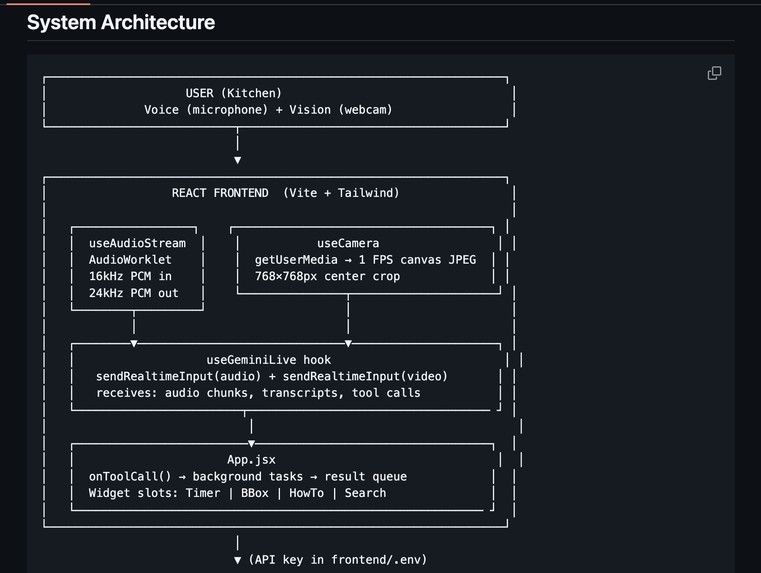
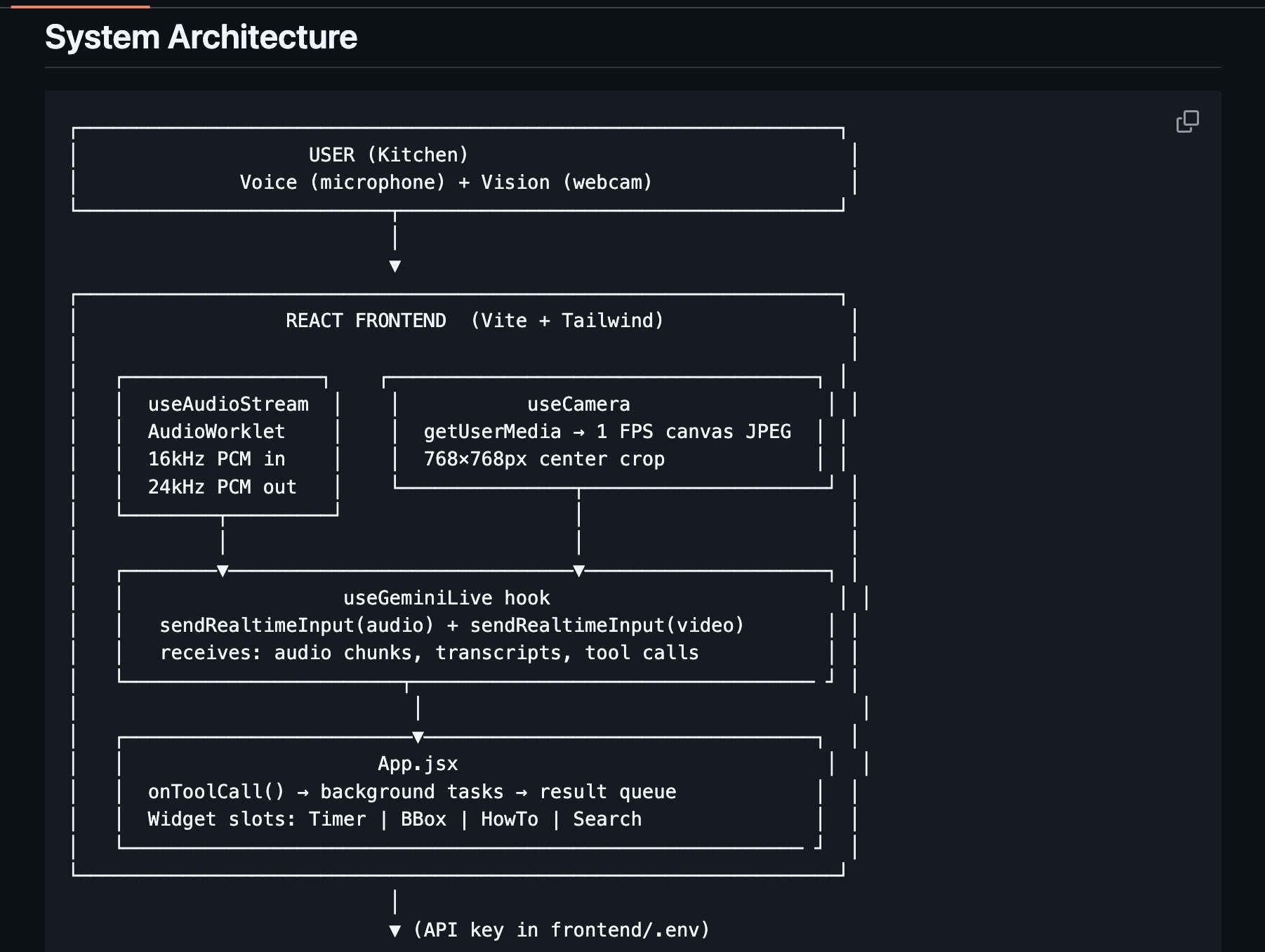
Everything runs client-side. The frontend is React 18 + Vite, connected directly to the Gemini Live API via the @google/genai JavaScript SDK. There is no server, no database, no infrastructure cost.
Real-Time Audio Pipeline
Two custom AudioWorklet processors handle bidirectional audio:
| Processor | Role |
|---|---|
pcm-recorder-processor.js |
Captures microphone input, converts Float32 → Int16, streams 16 kHz PCM chunks to Gemini every ~100ms |
pcm-player-processor.js |
Receives 24 kHz PCM output from Gemini, buffers it in a ring buffer (10s capacity), and converts Int16 → Float32 for smooth speaker playback |
Both processors include FFT analysers that feed a real-time 40-bar waveform visualization in the UI, so the user always knows whether Sigma is listening or speaking.
Camera Streaming
The camera captures one center-cropped frame per second at 768×768px (JPEG, 0.7 quality) and streams each frame alongside the audio in real time. For tool calls like find_object and how_to, a separate on-demand capture grabs the full native resolution frame for higher accuracy.
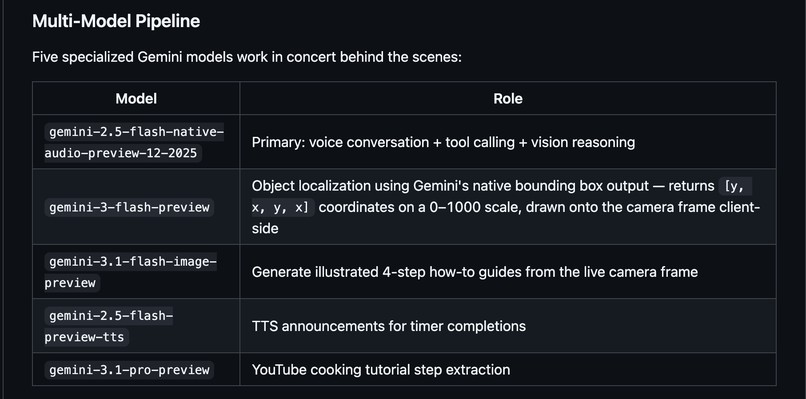
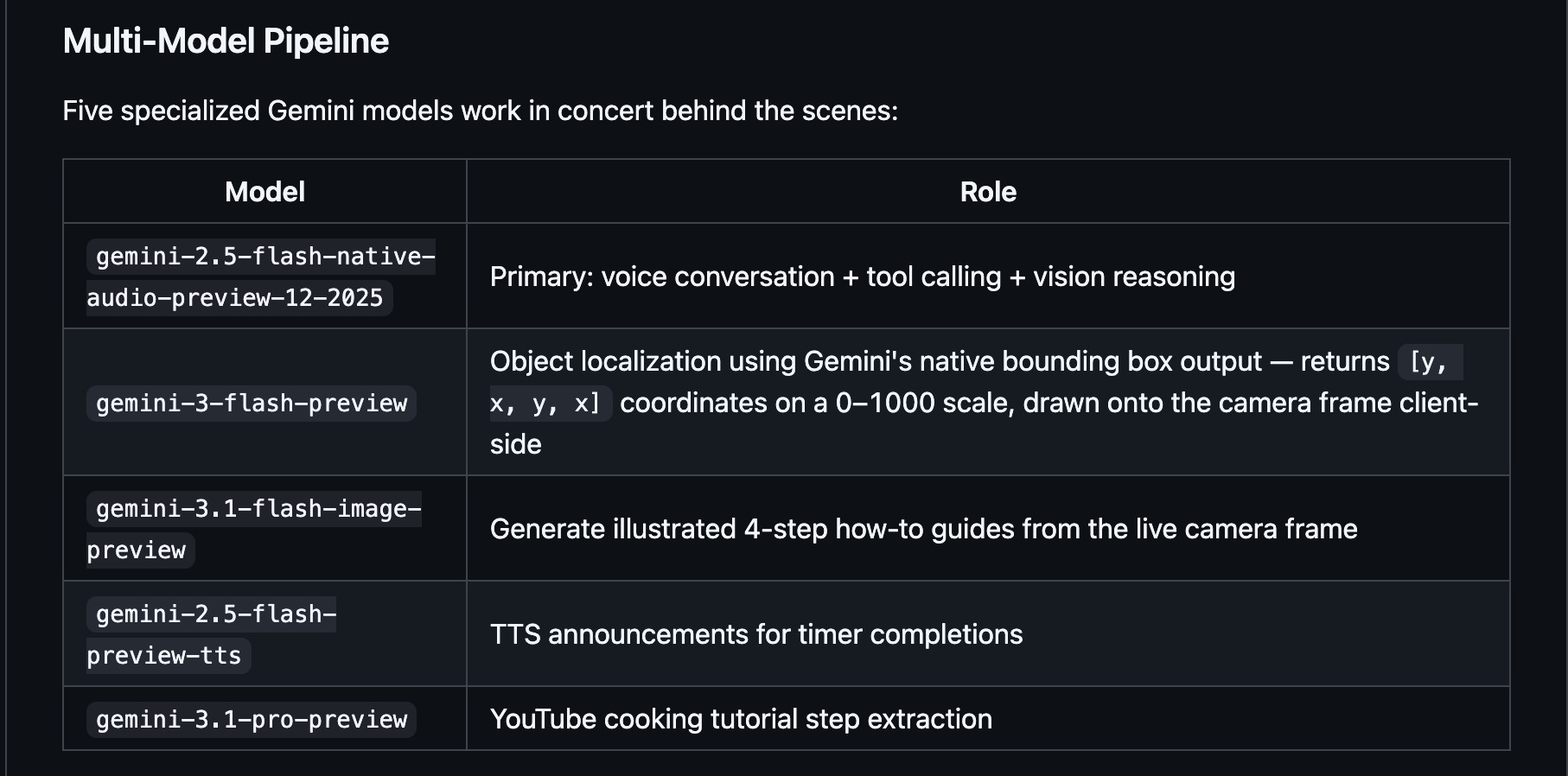
Four Models Working in Concert
The agent logic lives in App.jsx, which handles tool calls from the Gemini Live conductor and dispatches background tasks to three additional specialized Gemini models:
| Model | Role | Why This One |
|---|---|---|
Gemini Live 2.5 Flash (gemini-live-2.5-flash-native-audio) |
Conductor: bidirectional voice conversation + tool calling + vision | Native audio WebSocket, lowest latency, built-in session resumption, SlidingWindow compression |
Gemini 3 Flash Preview (gemini-3-flash-preview) |
Bounding box object detection + substitute search with Google Search grounding + kitchen vision checks | Fast enough for real-time detection. Returns structured JSON bounding boxes (0–1000 coordinate scale) that get rendered client-side with Canvas. Also handles Google Search grounding for substitute lookups and follow-up vision checks for ingredient availability. |
Gemini 3.1 Flash Image Preview (gemini-3.1-flash-image-preview) |
Illustrated how-to guide generation | Native image generation with legible text. Uses the actual camera frame as a visual reference to produce a 4-step landscape infographic that preserves the look of the user's real kitchen setup. |
Gemini 3.1 Pro Preview (gemini-3.1-pro-preview) |
YouTube tutorial analysis | Most capable multimodal model. Watches a full YouTube video (visual + audio + captions) and extracts structured step arrays with timestamps. Pro-level reasoning is needed for parsing unscripted tutorial content. |
The Result Injection Pattern
Background tasks can't block the conversation. When a tool call like find_object fires, the orchestrator:
- Responds immediately to Gemini with a placeholder ("Searching, I'll highlight it when found")
- Shows a loading widget with context-aware rotating messages
- Fires the sub-agent asynchronously via REST
- Enqueues the result when it returns
- Injects it on the next idle turn as a
[BACKGROUND_RESULT]message, which Sigma announces naturally
The result queue uses a FIFO pattern and only drains when the conductor's voice state is listening, preventing mid-sentence interruptions. From the user's perspective, Sigma says "Let me check...", keeps talking, and then a moment later says "Found it right by the cutting board!" with no perceivable seam between the models.
Session Resilience
The Gemini Live connection includes automatic reconnection with exponential backoff (up to 5 attempts), session resumption so context is preserved across brief disconnects, and SlidingWindow context compression to prevent degradation during long cooking sessions.
🧗 Challenges We Ran Into
Background Tasks Can't Block the Conversation
Tool calls like find_object spin up a second model, which takes 1–2 seconds. If we waited for the result before responding to the conductor, the session would go silent and feel broken. The fire-and-forget pattern with deferred result injection solved this, but getting the timing right without race conditions between concurrent tool calls was tricky. We had to carefully track voice state and only inject results when the conductor was idle.
Session Context Degrades Over Time
Long cooking sessions accumulate a large context window. Without the SlidingWindow compression config, Sigma would start forgetting earlier parts of the conversation mid-cook forgetting what recipe we're making, what timers are running, or which tutorial step we're on. Tuning the compression settings to preserve enough context without exceeding token limits required experimentation.
Bounding Box Accuracy on Kitchen Scenes
Kitchen counters are cluttered. Detecting a specific ingredient among a sea of bottles, containers, and utensils required careful prompt engineering. We settled on a structured JSON response schema with a 0–1000 coordinate scale, then render the boxes client-side using Canvas which also means we don't need any external Vision API.
🏆 Accomplishments We're Proud Of
Four Gemini models working in concert in a single seamless session, with no perceivable seam between them. Sigma says "Here's the salt it's right there on your counter!" and the user has no idea that a completely separate model just ran object detection and injected that result back into the conversation.
The hands-free UX actually works. Sigma's system prompt and personality design keep responses to 1–2 sentences, making it genuinely usable while cooking not just a demo. The barge-in detection lets users interrupt naturally, making interaction feel conversational rather than turn-based. Sigma stays silent when you're talking to yourself and only responds when addressed.
The substitute search is genuinely useful. Saying "I'm out of lemongrass" triggers a Google Search grounding call for alternatives, followed by a vision check that tells you which substitutes you already have on your counter. It's the kind of two-step reasoning that feels magical.
Tutorial mode is something we're especially proud of. Pasting a YouTube URL and having Sigma parse it into navigable steps, then guiding you through each one by voice while showing a progress bar, makes it feel like the video is actually talking to you.
📚 What We Learned
1. Multimodal design is a UX problem as much as a technical one. Having audio and vision simultaneously doesn't automatically create a good experience you have to design around the constraints of cooking. Every response has to be short. Every tool result has to be announced naturally, not read like a system log. The persona matters enormously: Sigma is warm, brief, and knows when to stay quiet.
2. The result injection pattern is the core architectural insight of this project. Keeping the Live session's conversational flow intact while running parallel async tasks required a clean queue abstraction. This pattern immediate acknowledgment → async processing → deferred result injection on idle is something we'd use in any future Live API project.
3. Context window management is a first-class concern.
We initially ignored it and hit degradation issues in sessions longer than 15 minutes. SlidingWindow compression is not optional for a real production assistant it's the difference between a demo and something that works through a full recipe.
4. One model can wear multiple hats. We originally planned separate models for bbox detection, substitute search, and vision checks. In practice, Gemini 3 Flash Preview handles all three with different prompts and tool configurations, keeping the architecture simpler and latency lower.
🔮 What's Next
Recipe Integration: Instead of just YouTube URLs, Sigma could ingest any recipe URL or photo and build the step-by-step plan automatically, with ingredient quantity tracking and smart substitutions throughout.
Proactive Coaching: Using the camera feed more aggressively to detect things like pan temperature (color/smoke), doneness cues, or dangerous situations like an unattended flame, and surfacing warnings without being asked.
Multi-Session Memory: Right now each session starts fresh. Adding a persistent memory layer would let Sigma remember your dietary preferences, the substitutions you've made before, and your skill level over time.
Mobile: The app is browser-based and works on mobile today, but a native app with background audio and a better camera interface would make the hands-free experience even more natural in a real kitchen.
Built With
- genai-sdk
- google-cloud-run


Log in or sign up for Devpost to join the conversation.