Inspiration
I'd never done digital forensics before. I didn't even know what steganography was when this hackathon started. That's exactly why I picked it. Forensics is a field that feels locked behind years of training: the real tools (Autopsy, Wireshark, Volatility) are walls of expert output that assume you already know what you're looking at. I wanted to learn how investigators actually recover hidden evidence, and build the tool that would teach that process to someone as new to it as I was. So Sift is two things at once: a real forensic tool, and the tutor I wish I'd had while building it.
What it does
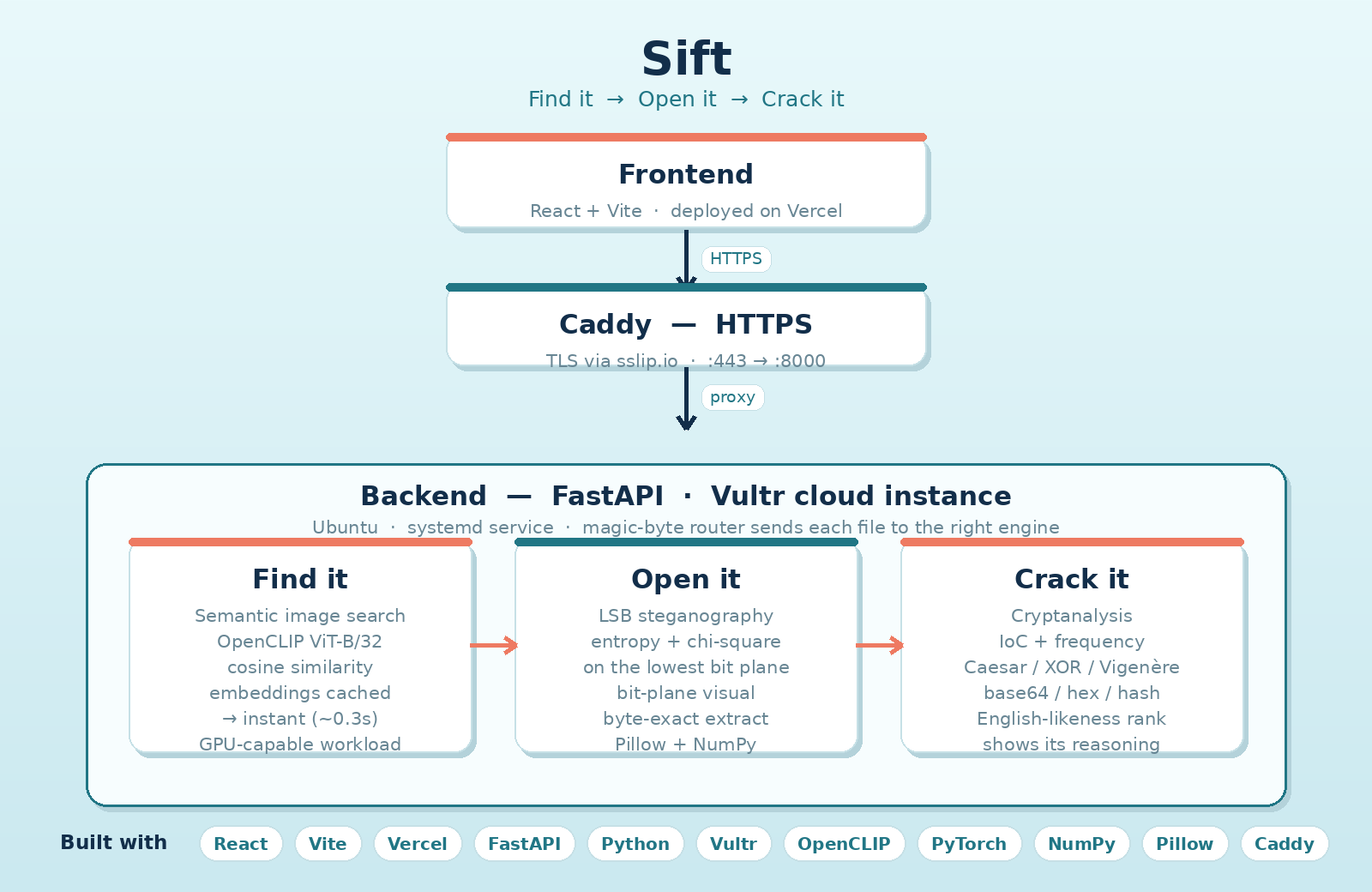
Sift runs a complete forensic investigation on digital evidence and explains every step in plain English. It follows the three stages of a real investigation:
- Find it — semantic search across 545 seized images. Type a plain description ("a dog", "shoes") and it ranks every image by meaning, not filename.
- Open it — steganography analysis. Detect and extract data hidden inside an innocent-looking photo.
- Crack it — cryptanalysis. Identify and break the encryption on the recovered message, without being given the key.
Drop in any file and Sift identifies its real type from the magic bytes (not the file extension) and automatically runs the right pipeline — images go to steganalysis + metadata, text goes straight to the cipher cracker. Every result is a Finding with a severity badge (icon + color + text), a one-line plain summary, the deep technical detail, and an expandable "How did we find this?" panel.
How it works — the technical core
Stage 1 — Semantic image search. Sift uses CLIP (OpenCLIP ViT-B/32), a model that turns both images and text into vectors ("embeddings") in a shared meaning space, so the vector for a dog photo sits close to the vector for the words "a dog." A search embeds the query and ranks every image by cosine similarity — the angle between vectors, where a smaller angle means a closer match. To stay fast, all 545 images are embedded once ahead of time and cached to disk, so a live search is just one query embed plus a matrix comparison (~0.3s on CPU) instead of re-analyzing the whole corpus.
Stage 2 — Steganography (LSB, entropy, chi-square). Each pixel's color is stored as numbers; the least significant bit (LSB) — the last bit — barely changes the color, so a message can be hidden by overwriting those bits across thousands of pixels, invisible to the eye. Sift detects this statistically: a clean photo's LSB layer has natural structure, but hidden data makes it look random — close to a 50/50 split of 0s and 1s with Shannon entropy near the 1.0-bit maximum. Sift computes the ones-ratio, a chi-square test against an even 50/50 split, and per-channel entropy, and renders the bit-plane image so you can literally see the hiding place. Extraction reads a 32-bit length header from the LSB stream, then recovers exactly that many bytes — byte-for-byte accurate. Critically, detection and extraction are independent: the statistical detector screens, and extraction confirms what's actually there — the same cheap-screen-plus-definitive-test design real forensic tools use.
Stage 3 — Cryptanalysis. The recovered payload is encrypted. Sift identifies the cipher from statistical fingerprints (Index of Coincidence, letter-frequency analysis) and breaks it, scoring every candidate by how English-like the result is:
- Caesar / ROT — brute-force all 25 shifts.
- Single-byte XOR — brute-force all 256 keys.
- Vigenère — the hard one: recover the key length via Index of Coincidence / Kasiski, then split the text into that many columns (each is a simple Caesar) and solve each with frequency analysis to recover the full keyword.
- Base64 / Base32 / hex auto-decoding, and hash identification (correctly flagged as one-way and unbreakable).
Every decryption comes with a human-readable "why" — e.g. "splitting into 8 columns restored English-like letter frequencies, so the key is 8 letters long."
Learn Mode — the education layer
Sift ships in two modes. Report Mode is the fast tool. Learn Mode turns the same engine into a hands-on forensics lesson: each stage opens with a plain-language explainer (what steganography is, what a cipher is, how semantic search works), every result gets a "what's happening right now" breakdown tied to the actual output, and a "Try it yourself" sandbox lets you hide your own message in an image and then detect and recover it — so you do real steganography yourself and understand it afterward. A beginner can switch to Learn Mode and come away actually understanding three techniques they'd never heard of.
Accessibility (A Sea for All)
Built accessibility-first: plain-language summaries alongside the technical detail, screen-reader support with semantic landmarks and an aria-live region that announces every result, labelled inputs, full keyboard navigation with visible focus, focus moved to the next stage when evidence is handed off, alt text on every image including the bit-plane view, and severity shown by icon + text + color — never color alone, so it's readable for colorblind users. It also respects light/dark mode and reduced-motion preferences.
How I built it
- Frontend: React + Vite, deployed on Vercel.
- Backend: Python + FastAPI on a Vultr Ubuntu cloud instance, served over HTTPS via Caddy (with an sslip.io hostname for a free TLS cert) and run as an always-on systemd service.
- AI: OpenCLIP for semantic search; embeddings precomputed and cached. CLIP embedding is a GPU-accelerated workload — exactly what Vultr Cloud GPUs are built for — so the pipeline uses CUDA automatically when available, but results are cached and served CPU-only to keep the live service fast and cost-efficient.
- Forensics: custom LSB steganography and cryptanalysis engines in pure Python (Pillow + NumPy) — no black-box library doing the hard part.
Challenges I ran into
- Learning the entire field from scratch — steganography, entropy, Index of Coincidence, and frequency analysis were all new to me.
- A subtle bug where the LSB length header was written little-endian but read big-endian, so extraction recovered nothing until I fixed the byte order.
- The Vigenère cracker failed on short messages: with an 8-letter key, a short note leaves too few letters per key position for frequency analysis to lock on. I fixed it by making the planted demo messages long enough (~45+ letters per key position).
- Deploying a real HTTPS backend so a Vercel page could call it without mixed-content errors — solved with Caddy + sslip.io.
What I learned
How digital investigators actually recover hidden evidence — and that the math behind it (entropy, Index of Coincidence, frequency analysis) is genuinely learnable in a weekend when it's explained well. Turning that realization into the product is the point of Sift.
How Sift maps to each track
Cipher Tech — Best Digital Forensics Hack. Real forensic analysis, not mock-ups: evidence identified by magic bytes, LSB steganalysis (entropy, chi-square, bit-plane visualization) with byte-exact payload recovery, feeding a cryptanalysis engine that identifies ciphers via Index of Coincidence + frequency analysis and breaks Caesar/ROT, XOR, Vigenère, base-N encodings and hashes — each candidate ranked with a readable reason.
MLH — Best Use of Vultr. Vultr is the backbone of this entire project — not a side feature, but where Sift actually lives and runs.
- The whole backend runs on Vultr. I provisioned a Vultr Ubuntu cloud compute instance and deployed the complete FastAPI application to it — every forensic engine (steganography, cryptanalysis, semantic search) runs there. This isn't a local demo; it's a real, publicly reachable service.
- Production-grade, always-on deployment. The API runs as a managed
systemdservice that auto-restarts on failure and survives reboots, so it stays live without supervision. I secured it with end-to-end HTTPS using Caddy as a reverse proxy, with a free TLS certificate via an sslip.io hostname — so the Vercel frontend can call the Vultr backend over a secure connection with no mixed-content errors. The firewall (ufw) is locked down to only the ports the service needs. - AI-driven workload — the Vultr Cloud GPU use case. Stage 1 is semantic image search over 545 images using OpenCLIP (ViT-B/32). Generating CLIP embeddings is a GPU-accelerated deep-learning workload — exactly the kind of AI application Vultr Cloud GPUs are built to power. The embedding pipeline (
build_embeddings.py) automatically uses CUDA when a GPU is available. - A deliberately cost-aware architecture. Instead of leaving an expensive GPU running to serve traffic, I compute the image embeddings once and cache them to disk. The live service then runs on an inexpensive Vultr CPU instance, where each search is just one text embedding plus a matrix multiply — about 0.3 seconds. This is the engineering judgment the Vultr track rewards: use GPU-class capability where it belongs (heavy batch compute) and serve it cheaply and instantly from cache.
/api/healthtransparently reports the runtime device and which device built the index. - Scalable by design. Because the search index is a cached matrix loaded once at startup, the service scales to far larger evidence sets with no architectural change — and the embedding step can be offloaded to a Vultr Cloud GPU instance for large corpora, then torn down to save credits.
In short: Vultr runs Sift's real backend — secured, always-on, and powering a genuine AI workload with an architecture built to be both capable and cost-efficient.
Technica — Best Education Hack / A Sea for All. Learn Mode teaches forensic science by doing — lessons at every step plus a hide-and-seek sandbox — and the whole UI is accessibility-first, making an expert-only field genuinely inclusive.
Accomplishment -- This is my first Solo hack. I'm so proud of being able to create a full end-to end pipeline of a project by myself and learning a lot in the process.
What's next
Memory and registry artifact analysis, file carving for deleted data, more cipher types, and bit-plane sonification so steganography analysis is usable without sight.


Log in or sign up for Devpost to join the conversation.