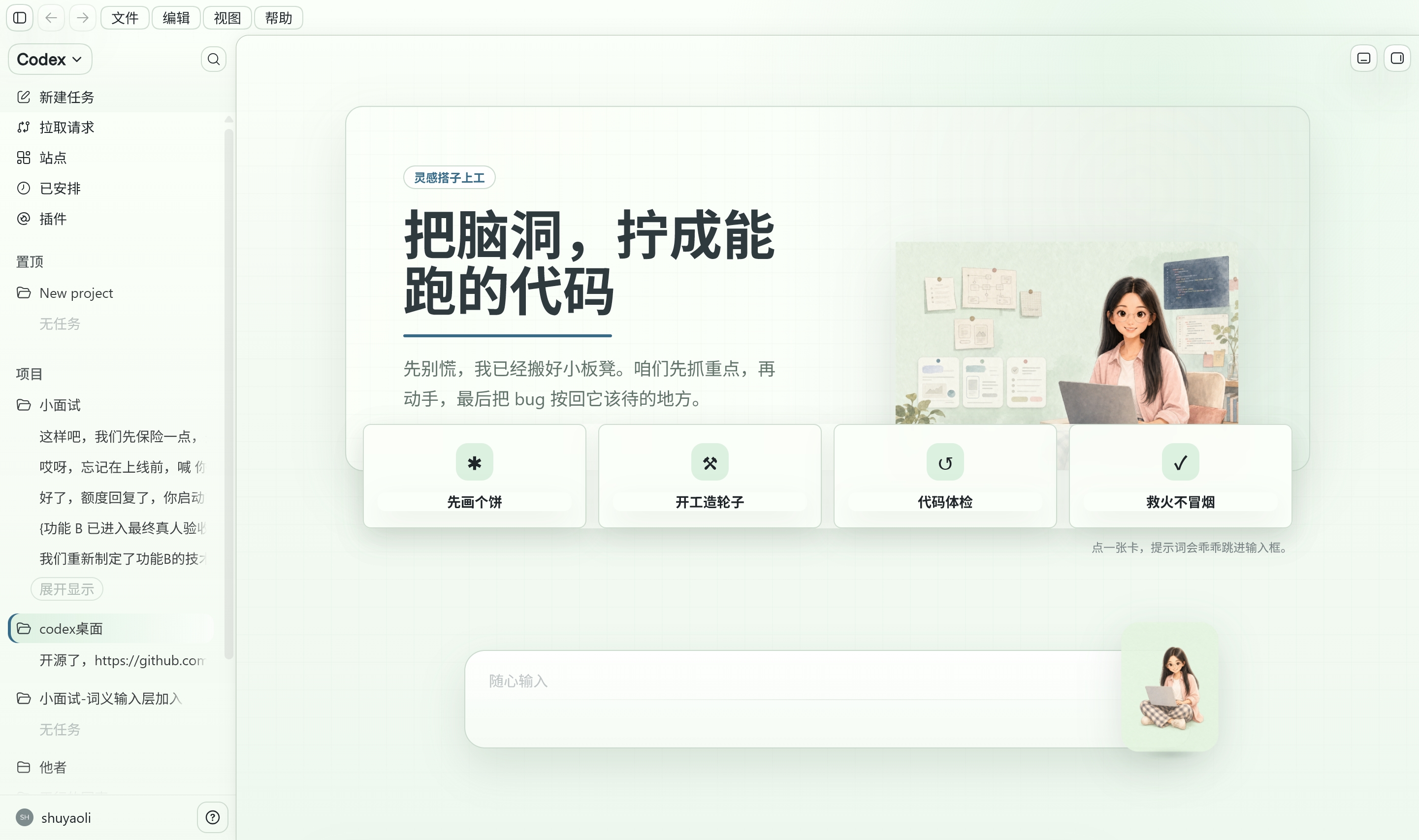
Inspiration
When I build a product with Codex, I can spend a long time focused on the screen while it thinks, edits files, runs commands, tests, retries, or waits for my approval. All of that information is available in the interface, but long development sessions can still feel quiet and mechanical.
The real reason I wanted to build Shuyao Companion was simple: having a little companion beside me while I code makes me happy. When she types while work is happening, pauses to think, reacts to an error, or celebrates a success with me, I feel less alone and more encouraged to keep going. I did not want a mascot that was only decorative. I wanted her behavior to be connected to the work so that the sense of companionship felt alive and truthful.
Shuyao was an original character identity that existed before Build Week. During Build Week, I turned that identity into a working Codex companion with a state system, validated packaging, tests, installation instructions, and rollback tools. The companion adds warmth without covering the code, terminal, composer, or approval controls that I still need to use.
What it does
Shuyao Companion translates Codex working states into visual feedback from an original animated character.
The source animation system contains nine states:
- Idle
- Wave
- Typing
- Thinking
- Executing
- Success
- Error
- Planning
- Walking
These states use 48 hand-reviewed animation frames. Together, they allow the companion to express when work is waiting, thinking, progressing, completing successfully, or encountering a problem.
The project also includes:
- A prebuilt Codex Pet v2 package
- A validated
1536 × 2288spritesheet - State mapping for the signals currently available in Codex Desktop
- Protection against duplicate native and fallback companions
- An isolated Windows sidecar integration path
- Automated package validation
- Nineteen regression tests
- Installation, testing, uninstall, and rollback instructions
The companion stays at the edge of the development workspace. It does not replace Codex controls, record keyboard content, collect conversations, or require a GPT-5.6 API call while running.
How I built it
I built the core version during OpenAI Build Week using Codex with GPT-5.6 Sol.
The project combines Python scripts for building and validating visual assets, JavaScript for state and runtime behavior, CSS for visual placement, PowerShell tools for launching and rollback, a Pet v2 manifest and spritesheet, and Git history documenting what was completed during the event.
Codex was my main engineering collaborator. I used it to inspect the repository and the observed Codex Desktop structure, plan a reversible integration approach, write and modify code, investigate bugs, create tests, validate the final package, and prepare release documentation.
GPT-5.6 Sol was used in the primary Codex build task. It contributed to the Pet v2 implementation, single-owner logic, the native/fallback isolation fix, preservation of new-task navigation, and the 19-test regression suite.
I made the final decisions about the product idea, the Shuyao character, the nine-state vocabulary, the interaction style, the privacy boundary, acceptable integration risk, visual quality, and whether each version was ready to release.
Challenges I ran into
One of the first problems was animation stability. In some early frames, the whole character moved vertically. This made actions such as walking and typing look blurry or as if the character was floating. I adjusted the canvas and ground line across the source frames, then added validation to check every Pet row.
The second major problem was duplicate rendering. Codex Desktop could display a native companion while a Chromium fallback layer also displayed another version, causing two overlapping companions to appear. The final implementation adds single-owner logic so only one visual companion is shown. The fallback layer is isolated without breaking its layout or interaction region, and regression tests check that the expected host-code structure remains preserved.
Another challenge was the difference between the nine source states and the smaller number of signals currently available through the observed Pet v2 behavior. Rather than pretending that every source state has an independent native event, I documented the mapping honestly. Executing and planning remain real animation states, while the current adapter may fold them into broader running or review signals.
Accomplishments I am proud of
- Nine preserved source animation states
- Forty-eight hand-reviewed animation frames
- A prebuilt Codex Pet v2 package
- A validated
1536 × 2288spritesheet - Stable-ground validation across all 11 Pet rows
- Single-owner protection against duplicate rendering
- Nineteen passing ownership and behavior regression tests
- A ready-to-test archive that does not require rebuilding the artwork
- Clear installation, testing, known-limitations, uninstall, and rollback documentation
- Source-only repository boundaries
The repository does not include official Codex application binaries, user conversations, user data, passwords, credentials, or API keys.
I am especially proud that the result is not only a concept image or design demonstration. It is a working and testable developer tool, while still preserving the emotional reason I wanted to make it: having a warm companion present while I create something.
What I learned
I learned that a visual companion is only helpful when it remains clear, stable, and reversible. Emotional value cannot come at the cost of workflow clarity. The companion should never cover important controls, make the interface harder to understand, or create a situation that cannot be safely undone.
I also learned that building inside another application requires careful boundaries. Drawing the character was only one part of the work. State mapping, duplicate ownership, installation safety, privacy, testing, and rollback were equally important.
Codex and GPT-5.6 helped me move much faster through repository inspection, implementation, debugging, testing, and documentation. At the same time, I still needed to make the product decisions, review the visual results, define acceptable risks, and decide which technical approach was suitable for release.
What's next for Shuyao Companion
The next step is to adapt Shuyao Companion to any stable and publicly documented custom-Pet or extension contract that Codex provides in the future.
I would also like to improve transitions between states, add more direction-specific artwork, support more independent development events when Codex exposes them, package the state runtime behind a documented extension boundary, reduce reliance on the experimental sidecar path, and make installation and removal even simpler.
The longer-term goal is not only to make coding agents easier to understand at a glance. It is to make the experience of building with them feel warmer, happier, and less lonely without distracting the developer from the actual work.
Built With
- css
- gpt-5.6
- javascript
- openai
- pillow
- powershell
- python

Log in or sign up for Devpost to join the conversation.