-
-
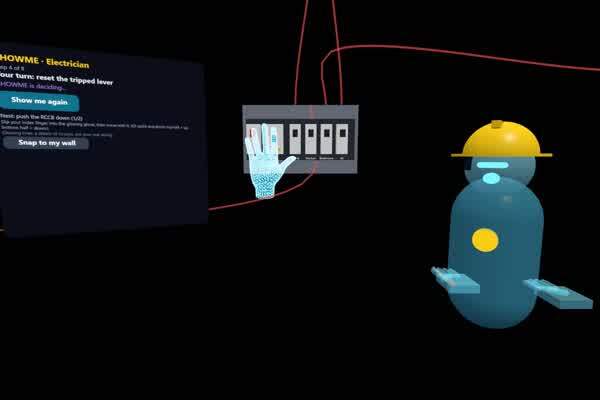
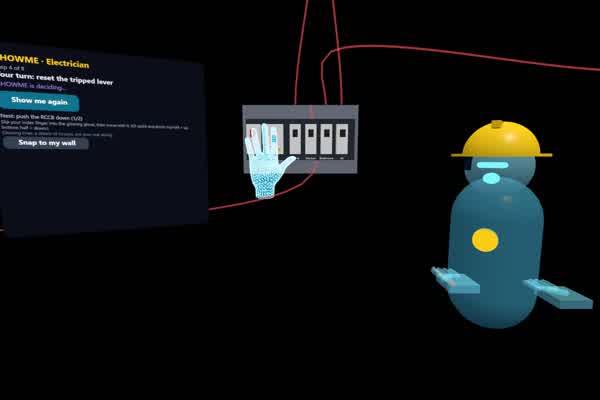
Electrician mission: the glowing hand shows the reset on a life-size breaker board, live AI decisions
Inspiration
Some people know exactly what they want to say, but the words get stuck. People who stutter, and many autistic people, are as capable as anyone. Often, though, a meeting, a phone call or a simple "hello" is the hardest part of their day. Others get stuck in a different way: the power trips and they don't know what to do, so they wait a whole day for help, or they try something unsafe.
We wanted one helper that does three simple things: show me, guide my hands, and speak for me.
What it does
SHOWME is a hands-first WebXR app. You use only your hands, with no controllers.
1. Speak through an avatar (Your voice) You type on a VR keyboard with your fingers, or pick a ready phrase like "Please give me a moment to respond." The avatar speaks your words out loud. You choose the tone (Calm, Warm, Gentle or Clear). You decide every word, and no AI changes what you say. Typing is never rushed, and there is no pressure to speak fast. Today the voice is the browser's built-in voice, and the talking face is a demo clip made beforehand from a photo. Making that face move live as you type is our next step.
2. Show and guide (Electrician and Plumber) SHOWME appears as an electrician or a plumber beside a life-size breaker board or tap. A glowing hand shows the movement, then your own hand does it. If you push the wrong way, an AI model picks the correction and says why. If it's beyond a householder, its hands fill in a service request for you to approve.
3. Delegate (AI representative) Teach a weekly task once. In a simulated meeting, the openly labelled AI representative answers only from facts you allowed. Anything that sounds like a promise always comes back to you. You can take over at any time.
4. Android phone camera (tested on a Samsung Galaxy M56) Open https://showme-lemon.vercel.app/arcam.html in Chrome on an Android phone and point the back camera at the real problem. After three safety checks, the AI looks at the photo, decides one step at a time, and puts the glowing glove on the right spot, such as the tripped lever. The phone tracks your real fingertip in the browser. When you push inside the glove, the camera sees it and the next step comes. You can type what happened, and the AI adapts. If the job needs a cover opened, it stops and tells you what to say to a professional. "Send to headset" brings the real photo and the steps into VR, where "Save as skill" keeps them (this works when the phone and the headset are on the same Wi-Fi and the same SHOWME server).
Every AI decision shows its reason and which model made it ("Decided by: gemini-…"). If the AI can't be reached, clearly labelled offline rules take over.
How we built it
three.js WebXR (immersive-ar, falling back to immersive-vr), hand tracking (poke, touch-and-slide, pinch-ray), plane detection, a VR keyboard, and speech synthesis. AI decisions run through a Vercel function using Google Gemini on the free tier, with JSON-schema answers that code checks before use (a safety boundary: levers and valves only, never covers or wires). The phone uses MediaPipe hand tracking in the browser. There are 131 automated tests. Everything was built and tested in the desktop preview and the Immersive Web Emulator. We do not own a Quest yet.
Challenges
No headset, so every interaction had to work with emulated hands. We also had to let an AI decide without letting it cross the safety line.
What's next
- A live talking face that shows feelings as you type (free open models such as LivePortrait or SadTalker).
- Your own voice.
- Testing with people who stutter and autistic users.
- Testing on a real Quest 3.
Hand interactions
Poke buttons and keys with your index finger. Touch a lever and slide your finger to push it. Pinch to point at far buttons. Your hand slips into a glowing glove that turns green when it matches.
Built With
- gemini
- javascript
- mediapipe
- three.js
- vercel
- webxr

