-
-
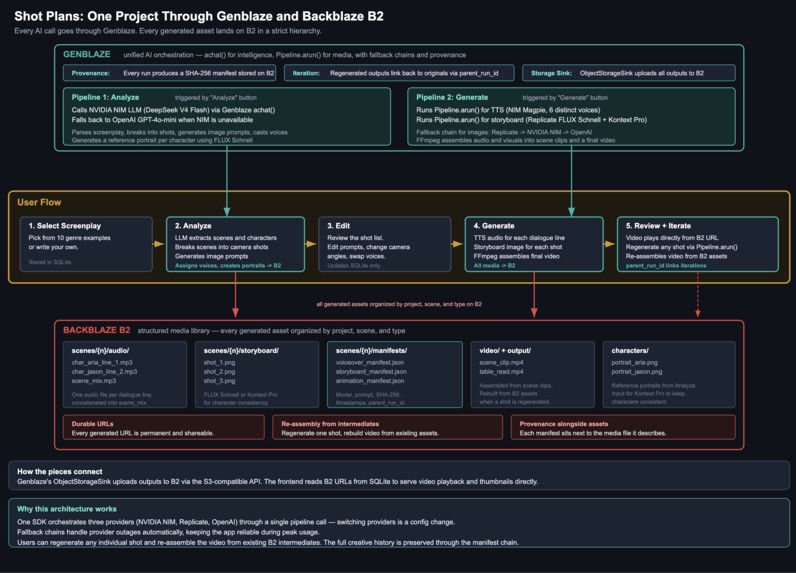
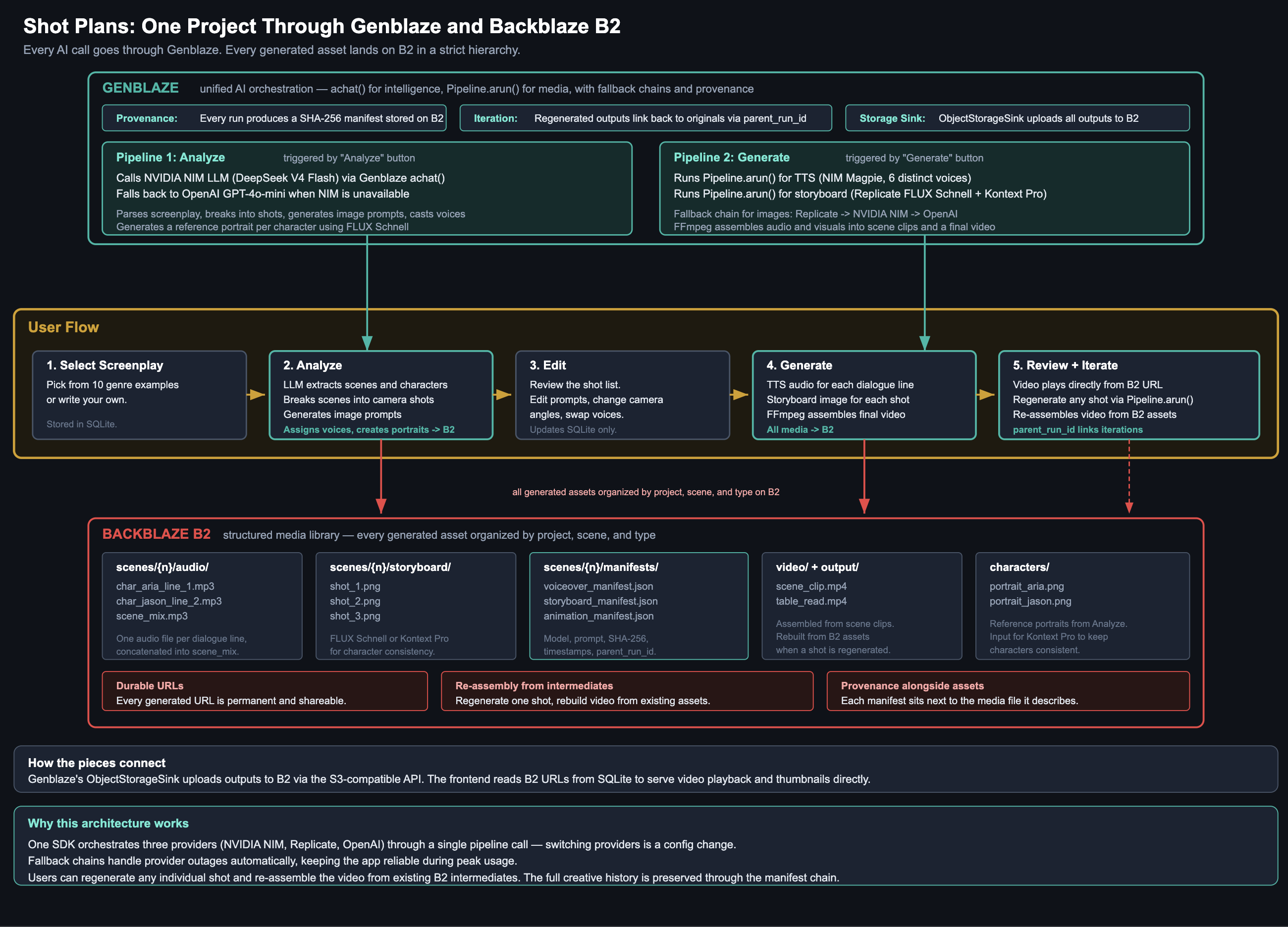
In detail app architecture
-
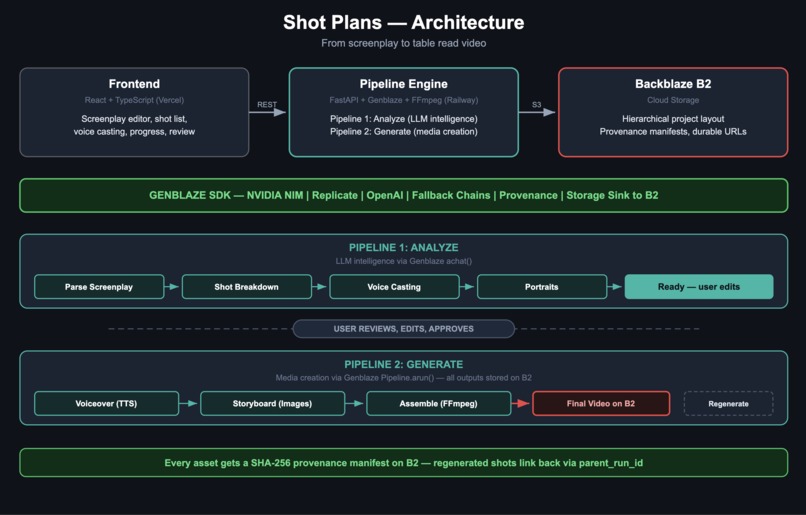
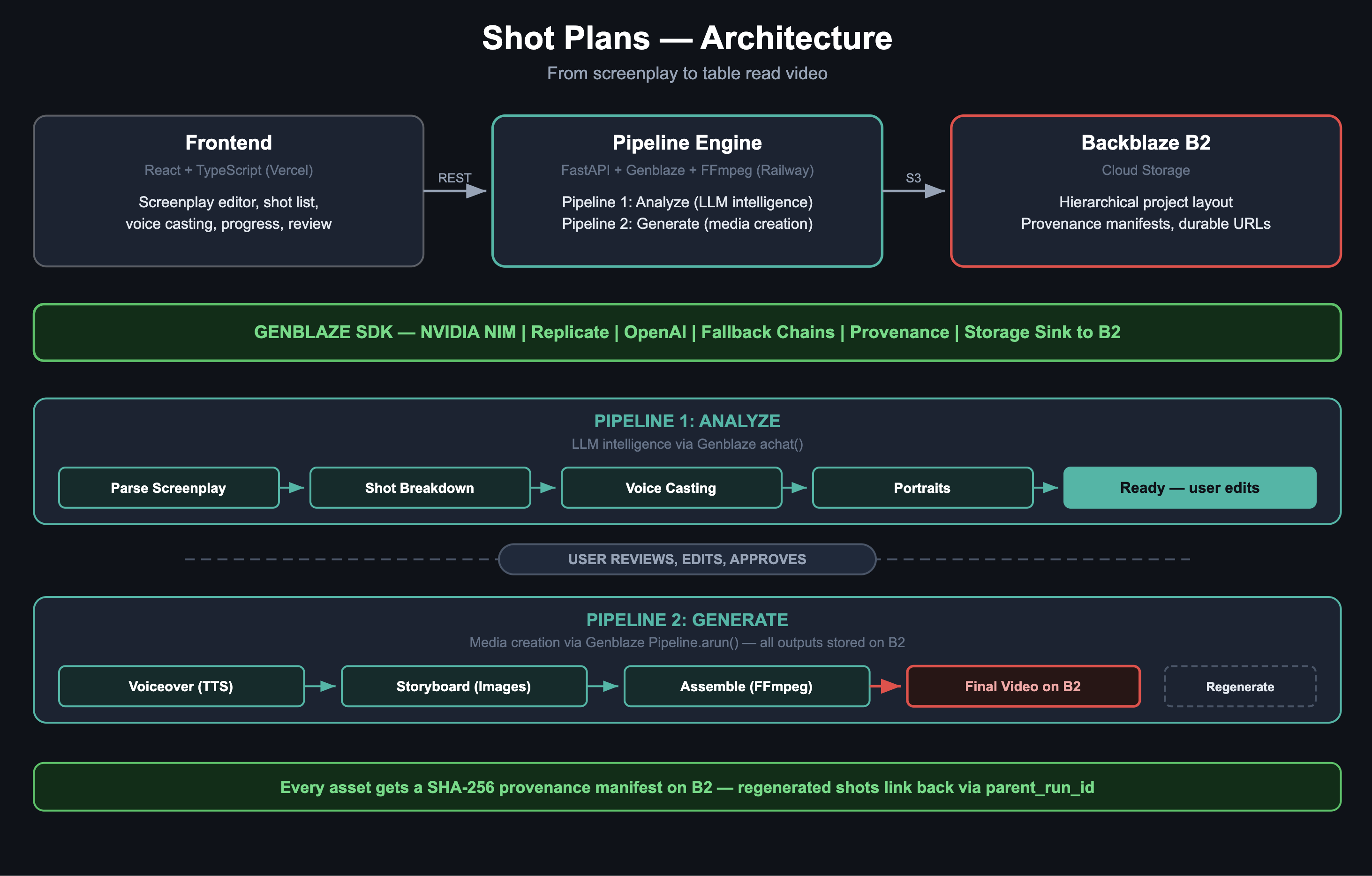
High level architecture
-
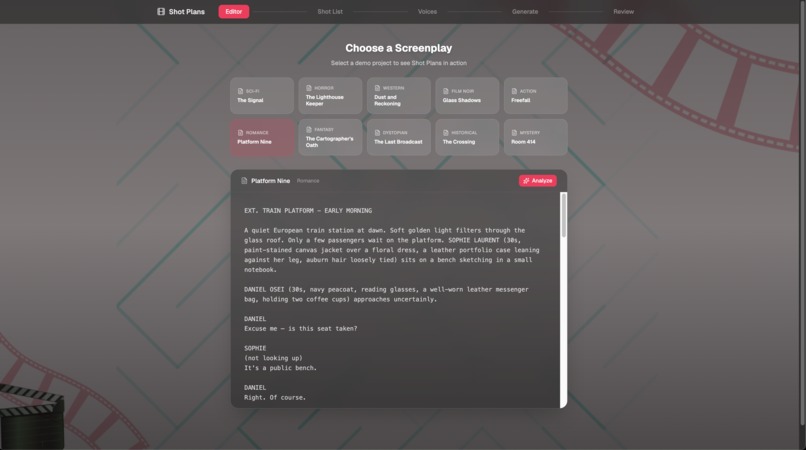
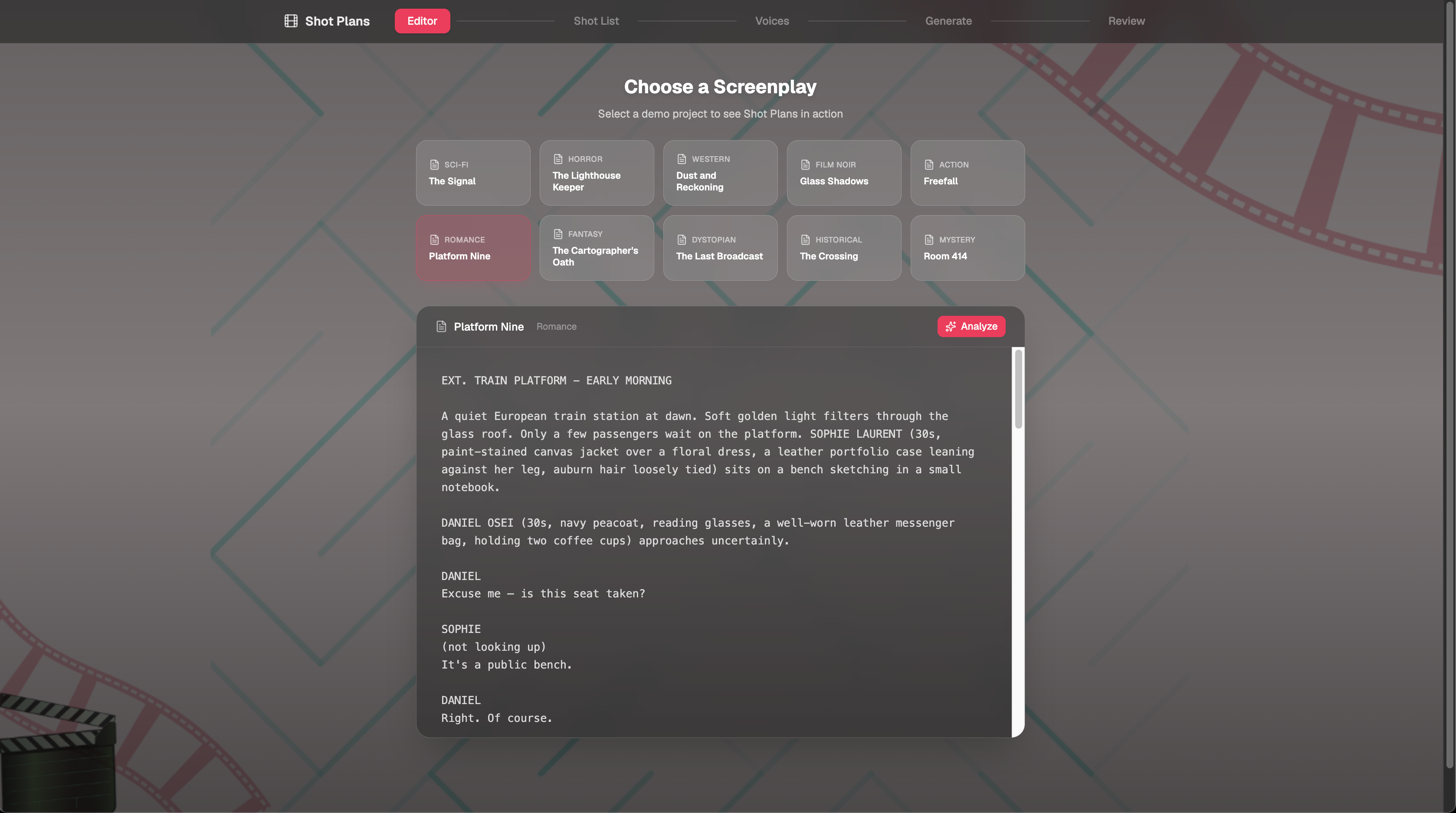
Select a screenplay and analyze
-
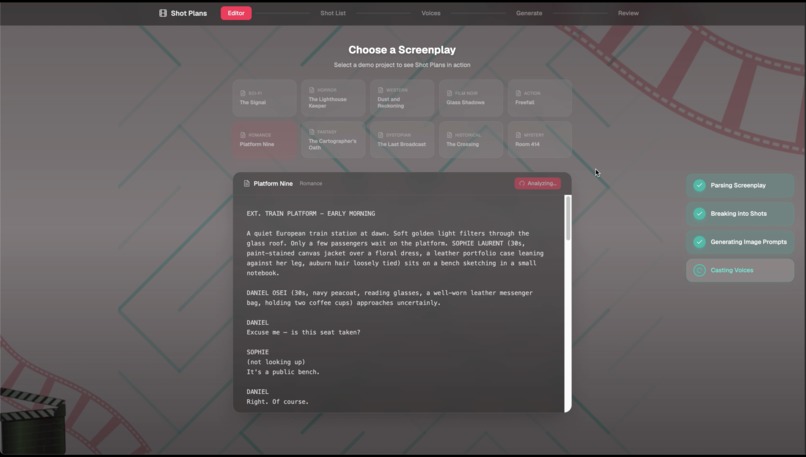
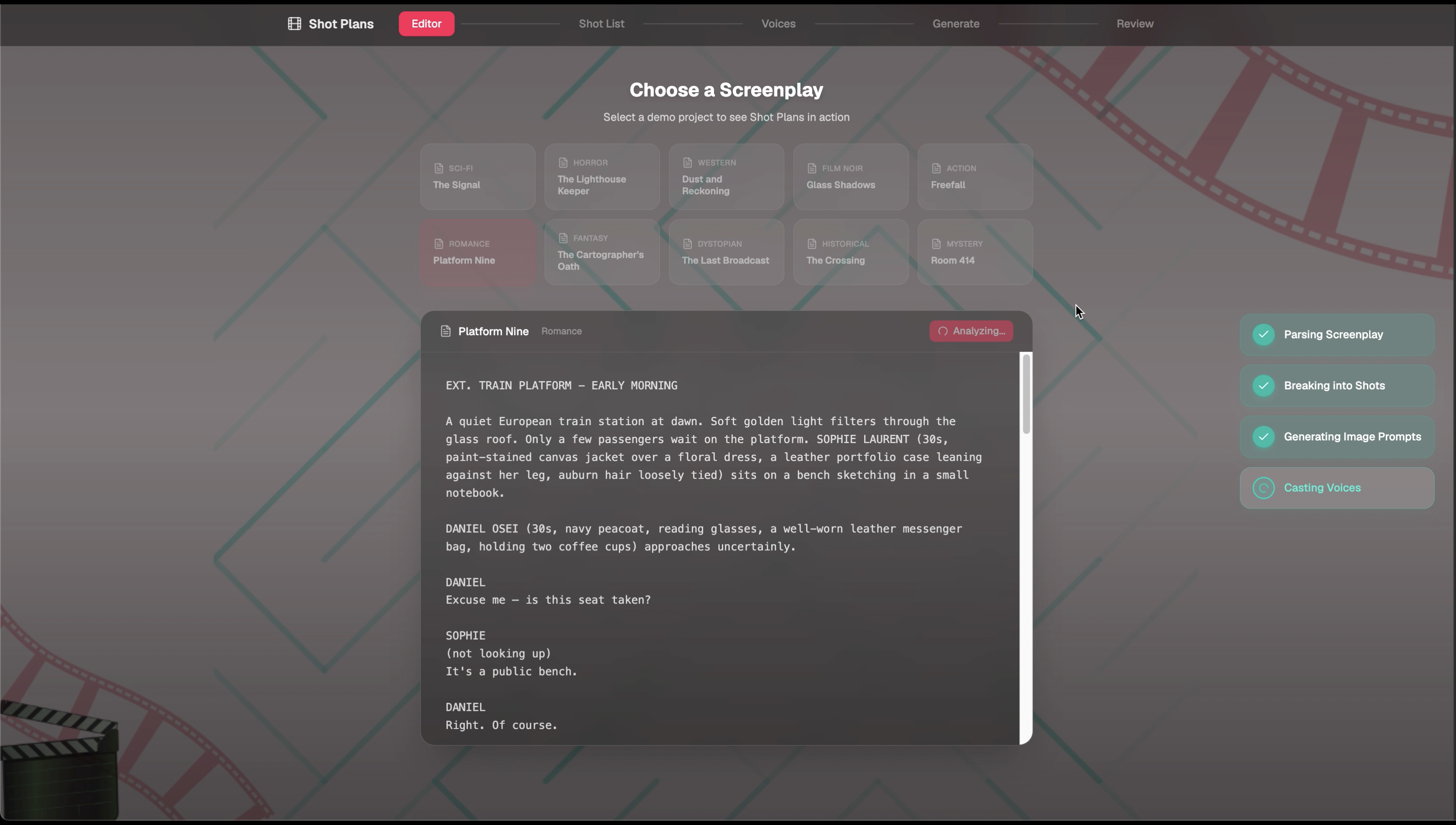
Pipeline 1: Parse screenplay > Break into shots > Generate image prompts > Cast voices
-
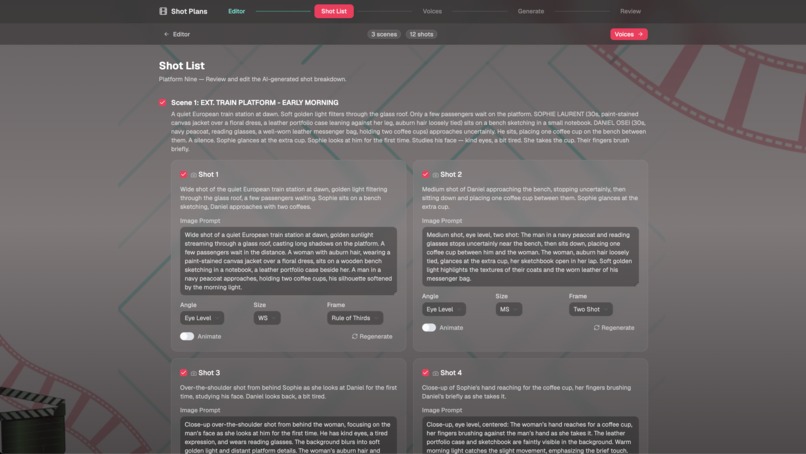
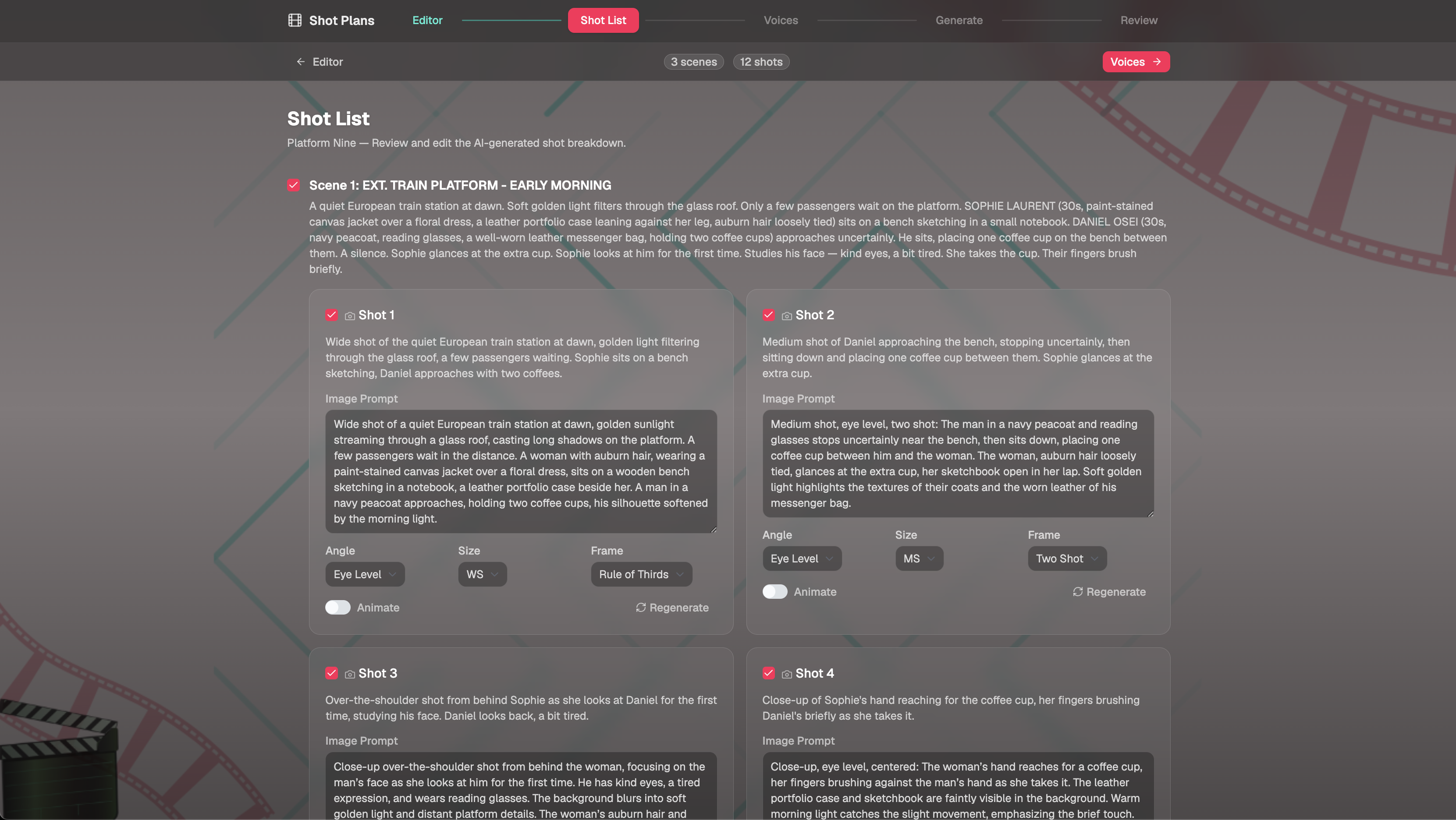
The shot list generated by Pipeline 1
-
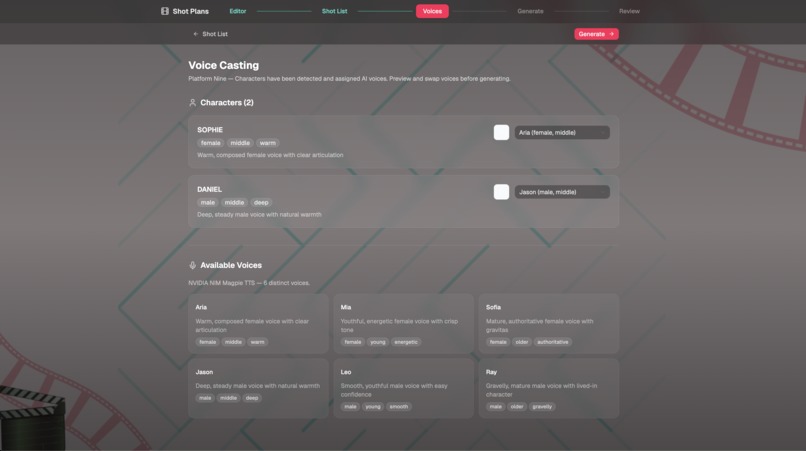
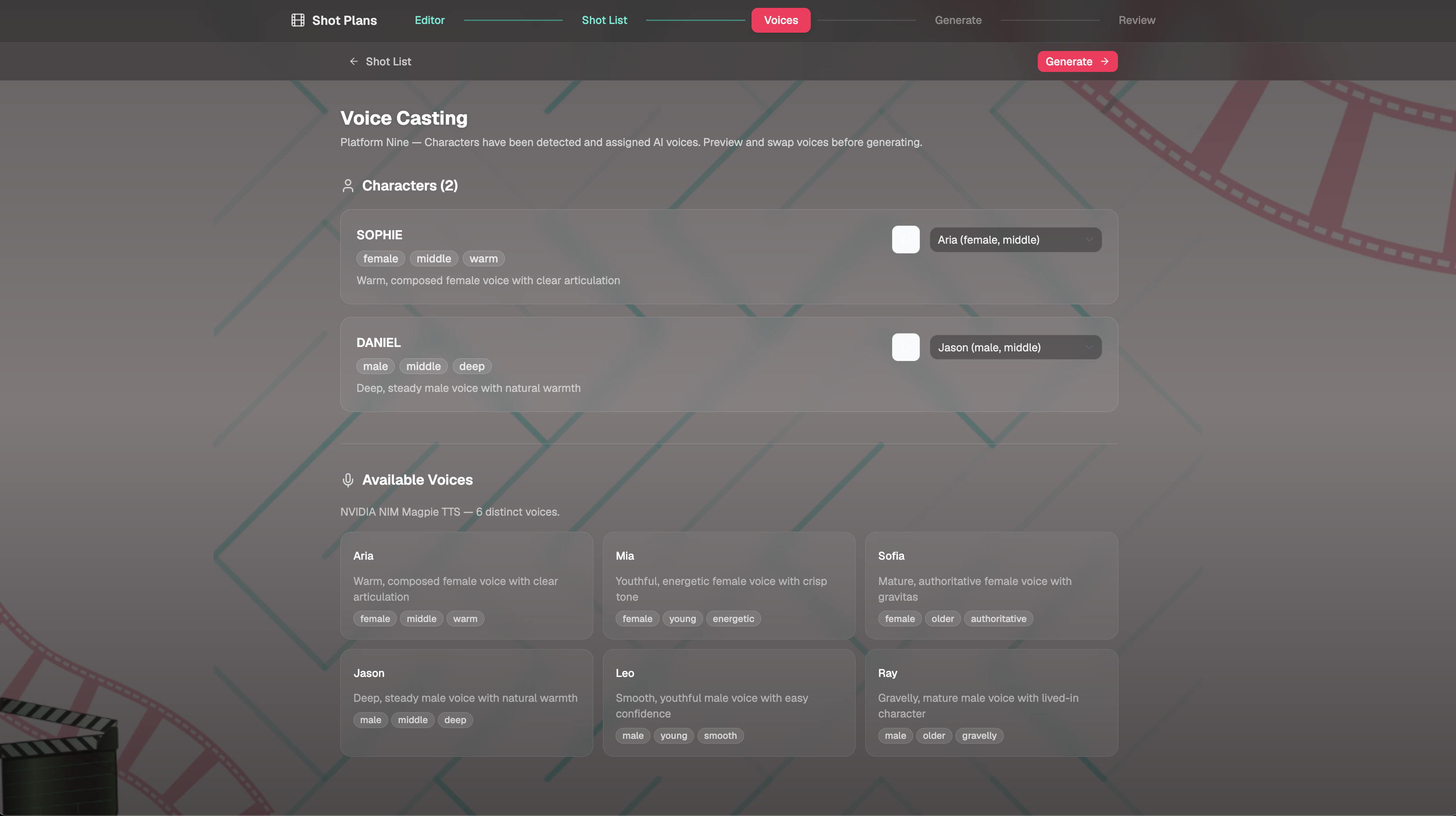
Voice casting
-
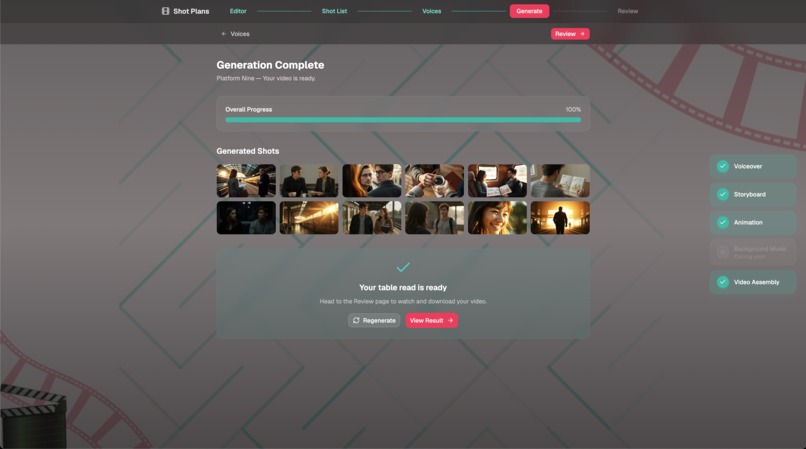
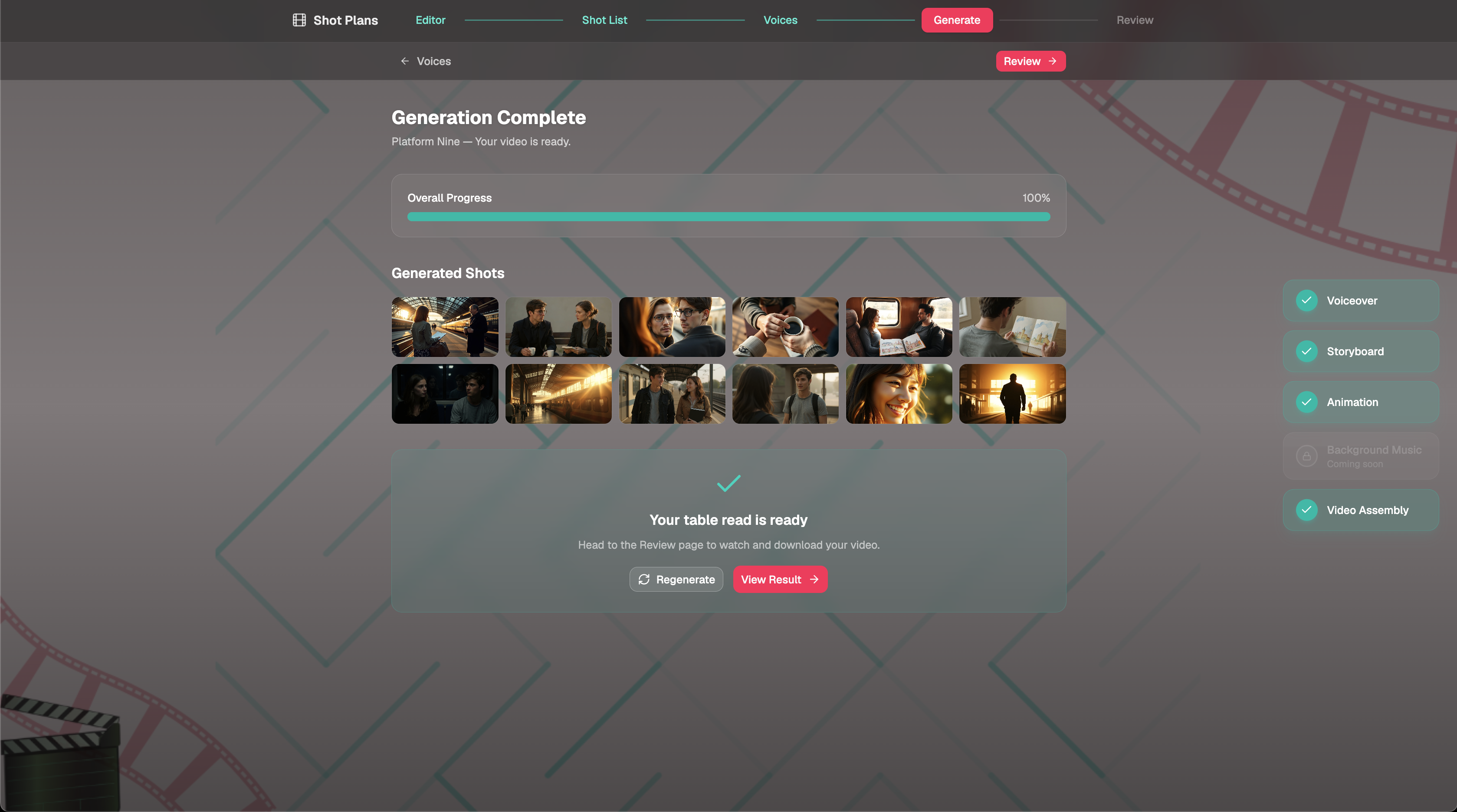
Pipeline 2: Generate Voiceover > Generate Storyboard > Animate > Assemble for the video
-
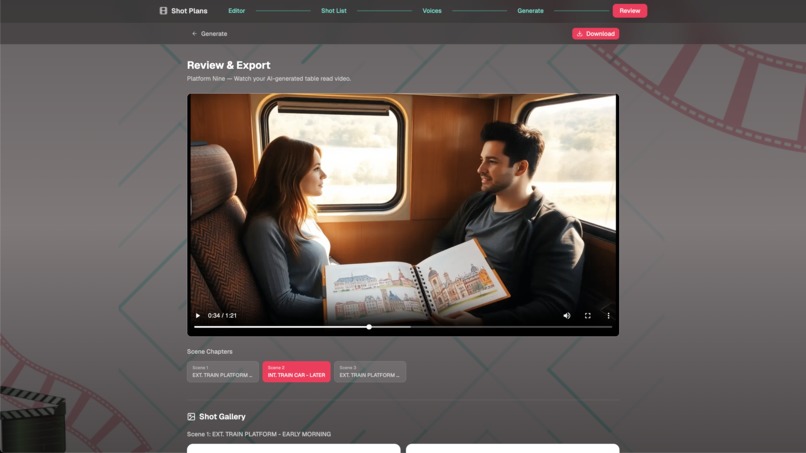
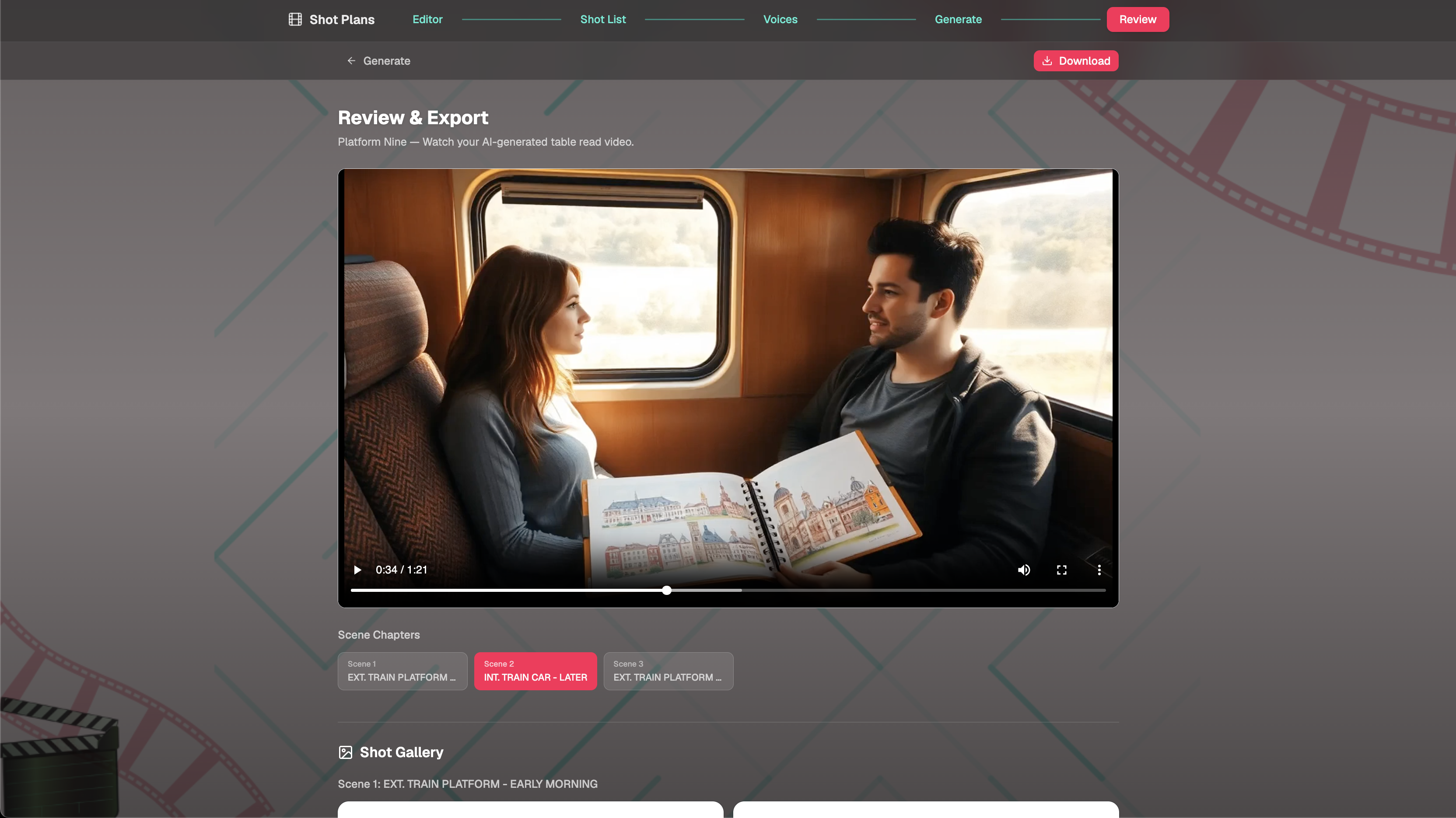
Final table read video
Inspiration
Before committing to full production, filmmakers and screenwriters need to visualize how a screenplay will look and sound. Traditional table reads require coordinating actors, storyboard artists, and schedules. For independent creators, film students, and small studios, that process is expensive and time-consuming — often skipped entirely.
I wanted to build a tool that gives any screenwriter an instant preview of their work: hear the characters speak, see the scenes visualized, and iterate on both before entering production.
What it does
Shot Plans takes a screenplay and transforms it into a complete table read video — multi-character voiceover with distinct voices, AI-generated storyboard visuals for every shot, and all of it assembled into a watchable, shareable video.
The output is a timed video where each scene plays out with storyboard images synced to character dialogue. Characters maintain visual consistency across shots (the same person looks the same throughout). Users can regenerate any individual shot and re-assemble the video without starting over.
How it works
- Write or select a screenplay in the editor
- Hit "Analyze" — AI parses it into scenes, breaks scenes into camera shots, generates image prompts, assigns character voices, and creates reference portraits for visual consistency
- Review the shot list — edit any image prompt, change camera angles, swap voice assignments
- Hit "Generate" — the system produces voiceover audio for every dialogue line, storyboard images for every shot, and assembles everything into a final video
- Review the result — watch the video, listen to individual shots, regenerate anything that needs adjustment
- Share — the final video lives on a permanent URL, ready to send to collaborators
How I built it
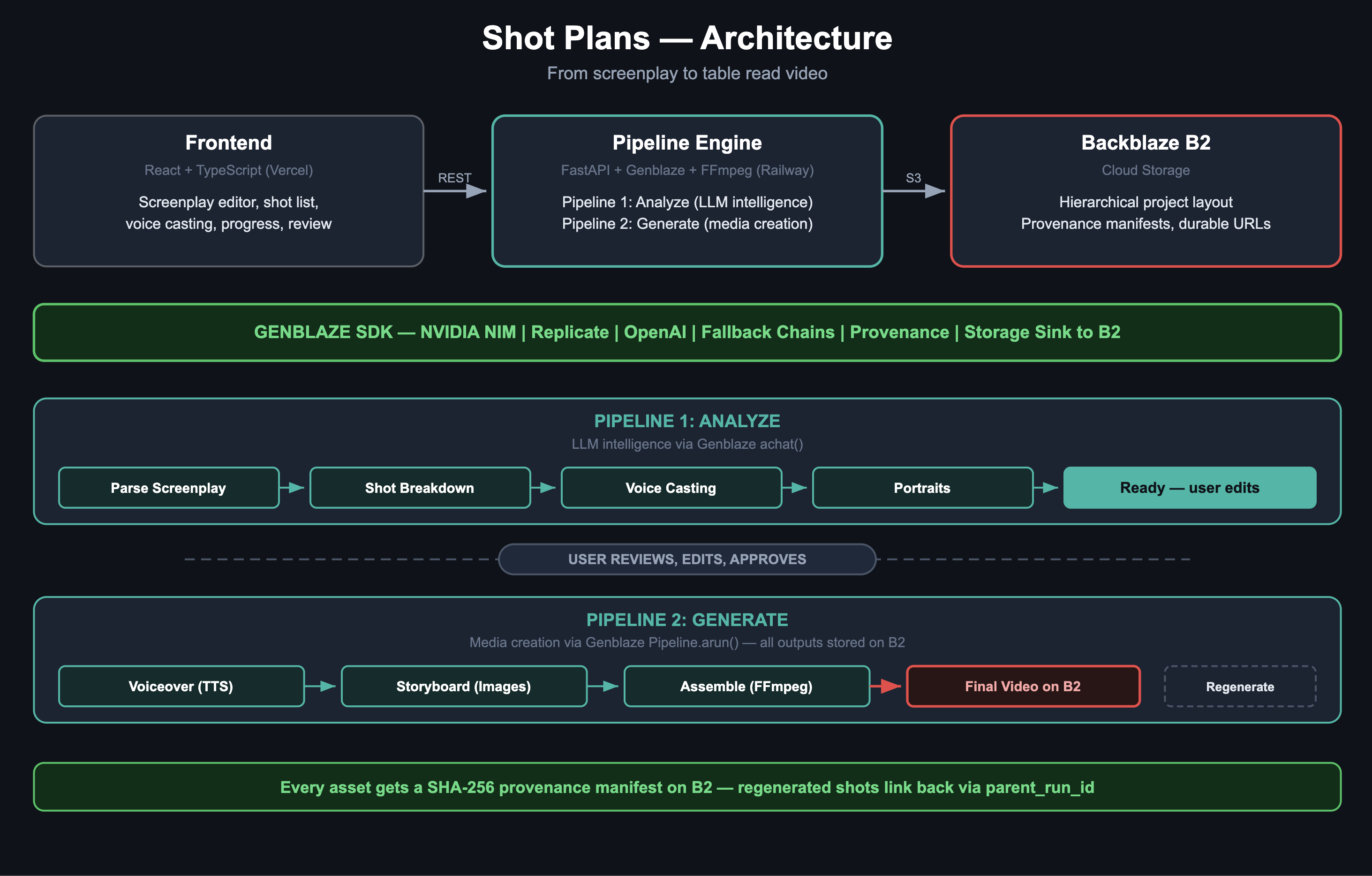
The app runs as two independent pipelines connected by a user editing step.
Pipeline 1 (Analyze) handles all intelligence work. When a user clicks Analyze, Genblaze's achat() function calls NVIDIA NIM's LLM to parse the screenplay, break scenes into shots, generate cinematic image prompts, and cast voices. It also generates a reference portrait per character using FLUX Schnell. The user then reviews and edits everything before proceeding.
Pipeline 2 (Generate) handles all media creation. When the user clicks Generate, Genblaze Pipeline.arun() orchestrates text-to-speech (NVIDIA NIM Magpie), storyboard image generation (Replicate FLUX with character consistency via Kontext Pro), and optional video animation. FFmpeg then assembles all generated assets into scene clips and a final video with title cards.
The frontend is React with TypeScript, deployed on Vercel. The backend is FastAPI with Python, deployed on Railway with FFmpeg installed. SQLite handles project state. The backend is always-on (no cold starts during judging), and the app ships with pre-generated example projects so judges can explore results immediately.
Fallback chains ensure reliability: if NVIDIA NIM goes down, the LLM routes to OpenAI. If Replicate fails for images, it falls back to NIM, then OpenAI. The app remains reliable regardless of individual provider availability.
How I used Genblaze
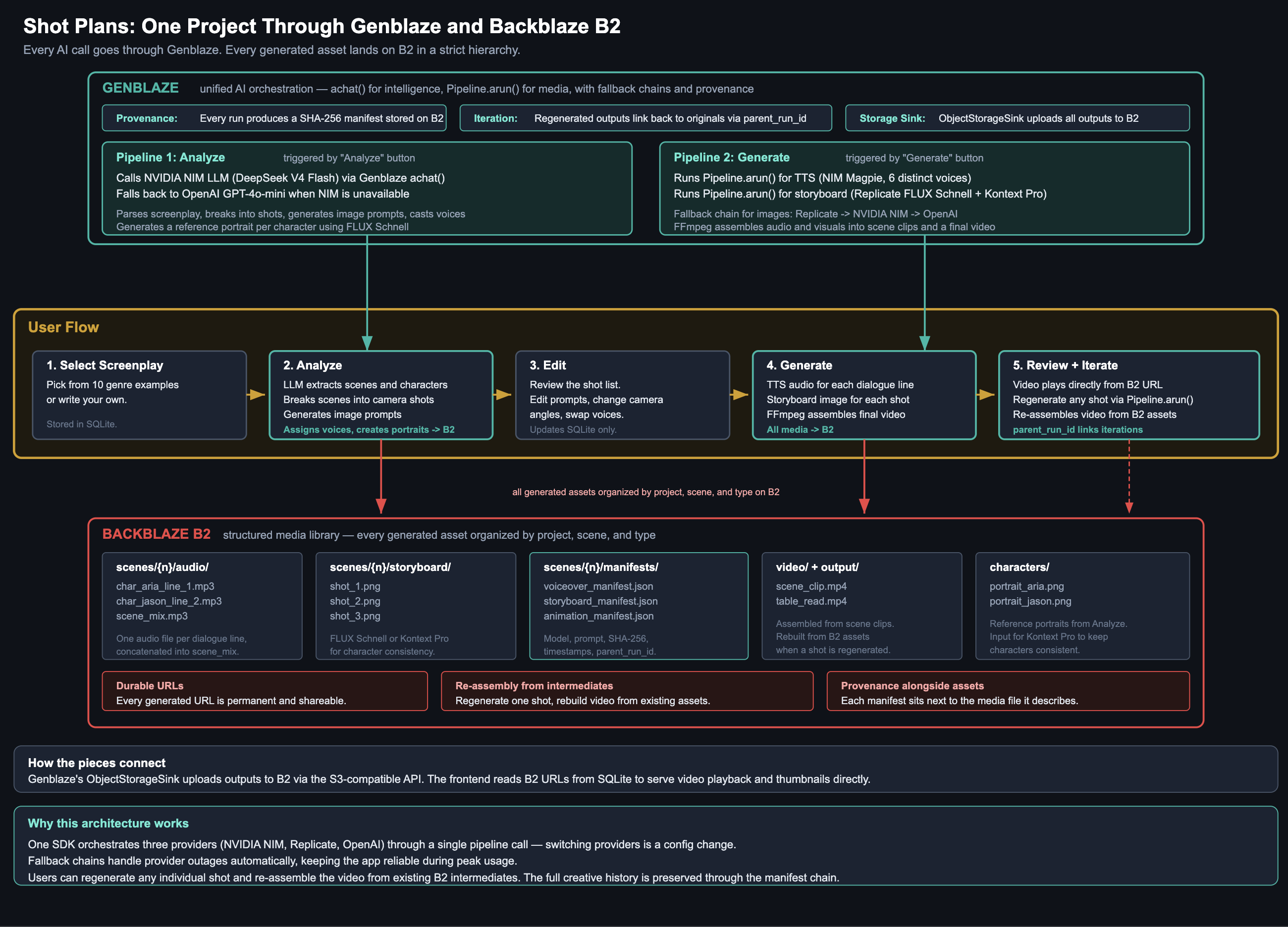
Genblaze is the orchestration layer for every AI operation in the app.
For intelligence (Pipeline 1): I use achat() for all LLM calls — parsing, shot breakdown, prompt generation, voice casting trait inference. One function, provider-agnostic. The same call works against NVIDIA NIM or OpenAI depending on availability.
For media generation (Pipeline 2): I use Pipeline.arun() with steps for TTS, image generation, and video animation. Each step declares a provider, model, and modality. The pipeline handles execution, asset collection, and manifest generation.
Fallback chains: The storyboard pipeline specifies fallback_models within NVIDIA NIM (FLUX Schnell -> SD 3.5 -> SDXL) and provider-level fallback (Replicate -> NIM -> OpenAI). If the primary fails, generation continues automatically through the chain.
Provenance manifests: Every Pipeline.arun() call produces a JSON manifest with the model used, the exact prompt, generation parameters, timestamps, and a SHA-256 hash of the output. These are stored on B2 alongside every asset. Genblaze handles provenance generation automatically as part of every pipeline run.
Iteration tracking: When a user regenerates a shot, the app passes the previous run's ID as context. The new manifest links back to the original via parent_run_id. The full creative history of any asset is traceable through the manifest chain.
Storage sink: Every pipeline run uses ObjectStorageSink pointed at Backblaze B2 with KeyStrategy.HIERARCHICAL. Generated files land in the correct project/scene/type folder automatically. One config line handles all upload logic.
How I use Backblaze B2
B2 serves as a structured media library that the entire pipeline depends on.
Hierarchical project layout: Every project on B2 follows a strict structure:
projects/{id}/scenes/{n}/audio/     -- voiceover per dialogue line
projects/{id}/scenes/{n}/storyboard/ -- image per shot
projects/{id}/scenes/{n}/video/     -- scene clips
projects/{id}/scenes/{n}/manifests/ -- provenance JSON per asset
projects/{id}/output/table_read.mp4 -- final assembled video
Provenance manifests live next to assets: Each manifest JSON sits alongside the media file it describes. Verifying what model and prompt produced any asset is one fetch away.
Re-assembly from intermediates: Because all intermediate assets (per-line audio, per-shot images) persist on B2, the app can re-assemble the final video after regenerating a single shot. No need to re-generate everything. The storage IS the pipeline's memory.
Durable URLs: B2 URLs don't expire. Once a table read video is generated, the shareable link works permanently — collaborators can review it days or weeks later without re-generating.
Genblaze's ObjectStorageSink handles all uploads automatically via the S3-compatible API. The pipeline places files in the correct location as part of its execution.
Providers and Models
Every call below runs through a Genblaze Pipeline. Model IDs are the ones configured in pipelines/config.py and pipelines/providers.py.
| Step | Provider | Model | Falls Back To |
|---|---|---|---|
| Screenplay parsing | NVIDIA NIM | deepseek-ai/deepseek-v4-flash |
gpt-4o-mini (OpenAI) |
| Shot breakdown | NVIDIA NIM | deepseek-ai/deepseek-v4-flash |
gpt-4o-mini (OpenAI) |
| Prompt generation | NVIDIA NIM | deepseek-ai/deepseek-v4-flash |
gpt-4o-mini (OpenAI) |
| Voice casting | NVIDIA NIM | deepseek-ai/deepseek-v4-flash |
gpt-4o-mini (OpenAI) |
| Character portraits | Replicate | black-forest-labs/flux-schnell |
NIM flux.1-schnell |
| Storyboard images | Replicate | black-forest-labs/flux-schnell |
NIM flux.1-schnell, then gpt-image-1-mini |
| Character-consistent images | Replicate | black-forest-labs/flux-kontext-pro |
falls back to plain flux-schnell |
| Voiceover TTS | NVIDIA NIM | nvidia/magpie-tts-multilingual |
none (6 voices: Aria, Mia, Sofia, Jason, Leo, Ray) |
| Video animation (optional) | NVIDIA NIM | nvidia/cosmos3-nano |
none |
| Background music | Replicate | meta/musicgen |
none (coming soon) |
Challenges and what I learned
Audio artifacts from TTS: NVIDIA NIM Magpie TTS produced high-pitched beeps at the end of generated clips due to sample rate mismatches. I solved this with audio resampling (44100Hz), highpass/lowpass filtering, and silence-detection-based trimming during FFmpeg assembly. The lesson: when chaining audio between AI providers and FFmpeg, sample rate normalization must happen at every boundary, not just the final encode.
Character consistency across shots: AI image generators produce different-looking people for the same character in every generation. I implemented a two-step approach: generate a portrait per character during analysis (FLUX Schnell), then use that portrait as a reference input for every storyboard shot featuring that character (FLUX Kontext Pro with edit-style prompting). This taught me that consistency in generative media is a pipeline design problem, not a model capability problem — the model is capable, but only if the pipeline feeds it the right context.
Multi-step pipeline orchestration: A single project requires 4 LLM calls (parse, breakdown, prompts, cast), then N TTS calls (one per dialogue line), N image calls (one per shot), and FFmpeg assembly. Any step can fail independently. I learned to design each pipeline step as idempotent — the user can re-analyze or re-generate without duplicating data or corrupting state.
Provider reliability on free tiers: NVIDIA NIM's free endpoints experience frequent overload (HTTP 529) during peak hours, which can cause the analysis pipeline to fail mid-execution. Genblaze's fallback chains route to alternative providers when available. If judges encounter this on the live app, the demo video shows the full working flow.
Note: I did not receive GMI Cloud credits during the hackathon, so all NVIDIA NIM usage runs on the free tier available at build.nvidia.com. This meant working within rate limits and building robust fallback paths to Replicate and OpenAI.
Built with
React, TypeScript, Vite, Tailwind CSS, FastAPI, Python, SQLite, FFmpeg, Genblaze SDK, Backblaze B2, NVIDIA NIM, Replicate, OpenAI, Vercel, Railway
Built With
- backblaze-b2
- fastapi
- ffmpeg
- genblaze-sdk
- nvidia-nim
- openai
- python
- railway
- react
- replicate
- sqlite
- tailwind-css
- typescript
- vercel
- vite

Log in or sign up for Devpost to join the conversation.