-
-
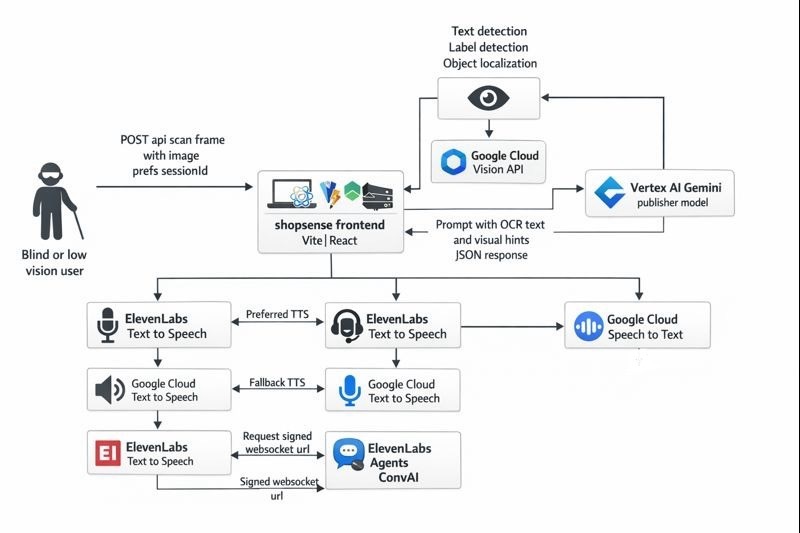
Architecture
-
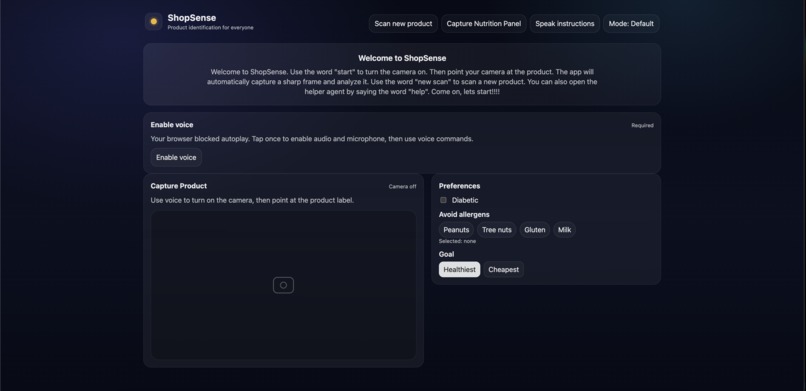
Landing Page
Inspiration
During my previous internship, one of my colleagues was blind. Watching how many everyday workflows quietly assume “just read the label” from picking the right product to checking allergens, sugar, or ingredients made the problem feel immediate and personal. It wasn’t only about convenience; it was about independence and safety. That experience sparked the idea for ShopSense: a blind-first assistant that can “look” at a product and speak back the information that actually matters.
What it does
ShopSense is a blind-first “scan → decide → speak” grocery assistant:
- Opens the camera and automatically captures a good frame when it’s sharp and stable. Extracts text when available (packaging) and still attempts identification when text isn’t available (loose produce).
- Generates a short, decision-grade result: product identity, risk level, key findings, and a spoken summary.
- Speaks the result immediately with natural-sounding voice.
How we built it
Frontend (Vite + React) Live camera preview + an auto-capture loop that checks blur/motion to avoid uploading unusable frames. A guidance loop that coaches the user when frames are blurry/moving and pauses scanning when a confident result is reached. Voice-command-first controls (start camera, new scan, nutrition mode, repeat, help). Optional conversation UI using the ElevenLabs React SDK.
Backend (Node/Express on Cloud Run) POST /api/scan-frame: accepts an image + user preferences + session id.
Google Cloud Vision:
- OCR (TEXT_DETECTION) when labels are visible
- label/object hints for cases like produce with minimal text
Vertex AI Gemini:
- consumes OCR + hints + preferences
- returns strict, small JSON (title, riskLevel, keyFindings, speakText, follow-up question)
ElevenLabs Text-to-Speech:
- converts speakText into MP3 audio for fast, natural voice output
- optional fallback to Google Cloud Text-to-Speech
Optional server-side Speech-to-Text (Google Cloud Speech-to-Text) for consistent voice commands across browsers.
Architecture (high-level workflow)
- Frontend captures a good frame → sends to backend
- Backend runs Vision (OCR + hints) → Gemini generates structured output
- Frontend requests TTS for the summary → plays audio
(Optional) Conversation mode: frontend gets a signed WebSocket URL from backend → connects to ElevenLabs Agents securely
Challenges we ran into
- Camera reliability & accessibility: Getting capture to feel fast without spamming uploads meant carefully tuning blur/motion checks and speaking coaching without overwhelming the user.
- Mobile browser constraints: iOS Safari requiring HTTPS for camera, plus audio autoplay restrictions that often need a user gesture.
- LLM output correctness: Ensuring Gemini always returns valid JSON (no markdown, no extra keys) required strict prompting and defensive parsing.
- Model availability differences: Not every project has access to every Gemini model/version; handling fallbacks and clear error messages matters.
- Latency + cost tradeoffs: OCR + LLM + TTS can add up; keeping payloads small and responses “decision-grade” is key.
- TTS edge cases: Handling API failures/rate limits and providing a fallback path so the user still gets spoken output.
Accomplishments that we're proud of
- Built a complete end-to-end blind-first loop: scan → understand → speak, with a UX centered on audio guidance.
- Designed the system to work even when OCR is weak by using vision hints for identification.
- Kept secrets server-side for conversational mode using a signed URL approach (safer than exposing keys in the client).
- Delivered structured results (risk level + key findings + speak text) that are easy to render and speak consistently.
What we learned
- Accessibility isn’t a “UI layer” — it’s a product architecture decision. Latency, error handling, and voice timing all affect usability.
- For real-world packaging, OCR alone is brittle; combining OCR with visual hints and a reasoning model produces better outcomes.
- Structured outputs (strict JSON) dramatically improve reliability for downstream UX compared to free-form text.
- “Helpful” voice output must be short, calm, and safety-first — especially for allergens and medical constraints.
What's next for ShopSense
- Better guidance + framing: More explicit “turn slightly left/right,” “move closer,” “find nutrition label” prompts, tuned per mode.
- Stronger personalization: Expanded preferences (more allergens, dietary rules, language support) and better follow-up questions when info is missing.
- On-device optimizations: Reduce latency by improving capture selection and minimizing unnecessary scans.
- Robust evaluation: Build a small test set of real grocery products and measure accuracy for identity + allergen detection + nutrition parsing.
- Production hardening: Better retries, caching, observability, and security (rate limiting, abuse protections, and tighter IAM).
- Expanded accessibility support: Multi-language voice, improved screen-reader navigation, and more explicit haptic/audio cues.

Log in or sign up for Devpost to join the conversation.