
Shopping New
This project is a web application built with Flask for the backend and uses SQLite as the database. The application provides an online store for products, allowing users to view products, add them to their favorites or basket, and make purchases.
Deployed Application
View the deployed site here.
Sign up and create new account or try this demo user:
- Username: mmmmm
- Password: 12345
Application Visuals


Responsive Design


🛠 Technologies Used
Backend:
Python
Flask
SQLite
Frontend:
HTML
CSS
Python
Bootstrap
Development and Deployment
Flask Debug Toolbar
Stripe for payment processing
Git
GitHub
Project Brief:
- Objective: Develop a web application for an online Shopping store.
- Backend: Use Python and Flask to create the application. Data is stored in a SQLite database.
- Frontend: Use HTML, CSS, Python and Bootstrap for the user interface.
Functionality: The application allows users to view products, add products to their basket or favorites, write reviews, and complete purchases.
Design: Ensure the application has a clean and user-friendly design.
Deployment: Deploy the application online to make it publicly accessible.
Build/Code Process:
Backend:
The backend is built using Flask and handles user authentication, product management, and order processing.
Database Models
The database contains several tables to manage users, products, reviews, baskets, orders, and favorites. Here are some key models:
import sqlite3

def init_db():
    conn = sqlite3.connect('productdb.db')
    dbCursor = conn.cursor()

    dbCursor.execute(
    """
        CREATE TABLE IF NOT EXISTS Users (
            user_id INTEGER PRIMARY KEY AUTOINCREMENT,
            username TEXT NOT NULL UNIQUE,
            password TEXT NOT NULL,
            email TEXT NOT NULL UNIQUE
        )"""
    )

    dbCursor.execute(
        """
            CREATE TABLE IF NOT EXISTS products (
            id INTEGER PRIMARY KEY AUTOINCREMENT,
            name TEXT NOT NULL,
            description TEXT NOT NULL,
            price REAL NOT NULL,
            image_url TEXT
        )"""
    )

    dbCursor.execute(
        """
            CREATE TABLE IF NOT EXISTS review (
            Review_id INTEGER PRIMARY KEY AUTOINCREMENT,
            user_id INTEGER,
            product_id INTEGER,
            name TEXT NOT NULL,
            description TEXT NOT NULL,
            FOREIGN KEY (user_id) REFERENCES Users(user_id),
            FOREIGN KEY (product_id) REFERENCES Products(id)
        )"""
    )

    dbCursor.execute(
        """
            CREATE TABLE IF NOT EXISTS Basket (
            basket_id INTEGER PRIMARY KEY AUTOINCREMENT,
            user_id INTEGER,
            product_id INTEGER,
            quantity INTEGER,
            FOREIGN KEY (user_id) REFERENCES Users(user_id),
            FOREIGN KEY (product_id) REFERENCES Products(id)
        )"""
    )

    dbCursor.execute(
        """
            CREATE TABLE IF NOT EXISTS Orders (
            order_id INTEGER PRIMARY KEY AUTOINCREMENT,
            user_id INTEGER,
            order_date DATETIME,
            total REAL,
            status TEXT,
            FOREIGN KEY (user_id) REFERENCES Users(user_id)
        )"""
    )

    dbCursor.execute(
        """
            CREATE TABLE IF NOT EXISTS OrderDetails (
            order_details_id INTEGER PRIMARY KEY AUTOINCREMENT,
            order_id INTEGER,
            product_id INTEGER,
            quantity INTEGER,
            price_at_time_of_order REAL,
            FOREIGN KEY (order_id) REFERENCES Orders(order_id),
            FOREIGN KEY (product_id) REFERENCES Products(id)
        )"""
    )

    dbCursor.execute(
        """
            CREATE TABLE IF NOT EXISTS Favorites (
            user_id INTEGER,
            product_id INTEGER,
            PRIMARY KEY (user_id, product_id),
            FOREIGN KEY (user_id) REFERENCES Users(user_id),
            FOREIGN KEY (product_id) REFERENCES Products(id)
        )"""
    )

    conn.commit()
    conn.close()

init_db()
Main Application Logic
The main application file, app.py, handles routes for displaying products, user authentication, basket management, and checkout.
from flask import Flask, render_template, request, redirect, url_for, session, flash
import sqlite3 as sql
import bcrypt
from flask_debugtoolbar import DebugToolbarExtension
import stripe
from flask_cors import CORS
import sys

print(sys.path)

app = Flask(__name__)
CORS(app)
app.debug = True
app.config['SECRET_KEY'] = 'your_secret_key_here'
stripe.api_key = 'your_stripe_secret_key_here'

@app.route('/')
def home():
    return render_template('home.html', title="Home Page")

@app.route('/products')
def products():
    members = get_members()
    return render_template('products.html', title="Products Page", members=members)

# Additional routes and functions for handling user login, registration, basket, favorites, and checkout

if __name__ == "__main__":
    app.run()
Frontend:
The frontend uses HTML, CSS, and Bootstrap to create a responsive and user-friendly interface. Templates are rendered using Flask's render_template method.
Base Template
The base.html template includes the common structure and styles for the application.
<!DOCTYPE html>
<html lang="en">
<head>
    <meta charset="UTF-8" />
    <meta name="viewport" content="width=device-width, initial-scale=1.0" />
    <title>{{ title | default('Wine Library') }}</title>
    <link href="https://cdn.jsdelivr.net/npm/bootstrap@5.3.3/dist/css/bootstrap.min.css" rel="stylesheet" />
    <link rel="stylesheet" href="{{ url_for('static', filename='css/style.css') }}" />
</head>
<body>
    <header>
        <!-- Navbar -->
    </header>
    <section>{% block content %}{% endblock content %}</section>
    <script src="https://cdn.jsdelivr.net/npm/bootstrap@5.3.3/dist/js/bootstrap.min.js"></script>
</body>
</html>
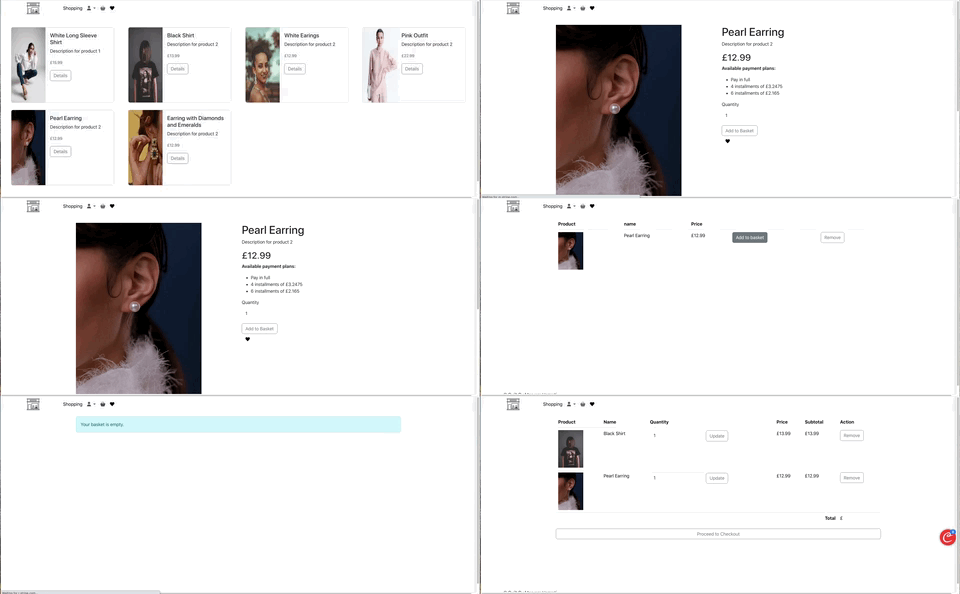
Product Card Component
The product card component displays each product along with its details and functionality. This includes viewing product details, adding products to the basket, adding products to favorites, and handling various user interactions.
Icons & Overlays
To enhance the user experience, custom icons have been integrated into the product card design. These icons provide visual cues for actions such as adding a product to the basket, adding to favorites, and viewing product details.
The following icons and functionalities are included:
- #### Add to Basket:
Represented by a shopping basket icon. Clicking this icon allows users to add the selected product to their basket. - #### Add to Favorites: Represented by a heart icon. Clicking this icon adds the product to the user's favorites list.
- #### View Details: Represented by a details button. Clicking this button navigates to the product detail page where users can view more information about the product.
By incorporating these thoughtfully designed visual elements, the application aims to create an intuitive and user-friendly experience. Users can easily identify and engage with the relevant icons, enabling them to perform actions such as adding products to the basket with ease.
Product Details and Adding to Basket
The product card component includes functionality for viewing detailed information about a product and adding the product to the basket. This is achieved through the following steps:
- #### View Product Details:
- When users click the "Details" button, they are redirected to the product detail page.
- The product detail page displays extensive information about the product, including its description, price, and available payment plans.
- #### Add to Basket:
Users can select the desired quantity of the product and click the "Add to Basket" button to add the product to their shopping basket.
This action triggers the "add_to_basket" function, which updates the basket with the selected product and quantity.
Code Snippet
Below is the HTML and JavaScript code used to implement the product card functionality:
<div class="card m-2" style="min-width: 350px; max-width: 650px;">
  <div class="row g-0">
    <div class="col-md-4 col-sm-12 row-md-12 row-sm-4" style="height: 300px">
      <img src="{{ member[4] }}" class="rounded-start" style="width: 100vw; height: 300px;" alt="Product Image" />
    </div>
    <div class="col-md-8 col-sm-12 row-md-12 row-sm-8" style="background-color: #f8f9fa; height: 300px;">
      <div class="card-body">
        <h5 class="card-title">{{ member[1] }}</h5>
        <p class="card-text">{{ member[2] }}</p>
        <p class="card-text">
          <small class="text-body-secondary">£{{ member[3] }}</small>
        </p>
        <a class="btn btn-outline-secondary" href="{{ url_for('product', member_id=member[0]) }}">Details</a>
      </div>
    </div>
  </div>
</div>
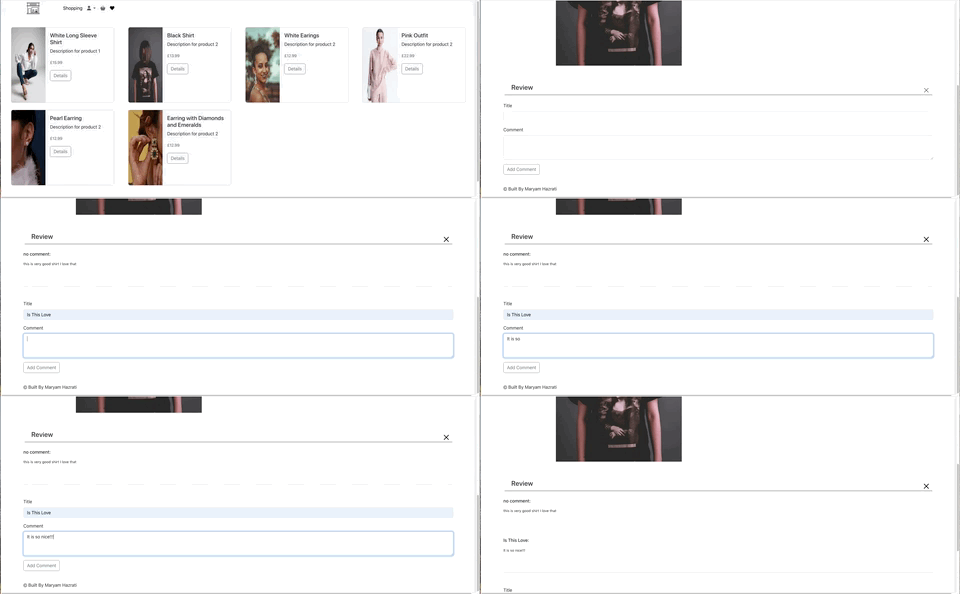
Review Section
The product detail page includes a section for customer reviews, allowing users to read and leave reviews for the product. This enhances user engagement and provides valuable feedback for potential buyers.
- #### Displaying Reviews:
- Reviews are displayed below the product details, with each review showing the title and content.
- Users can toggle the visibility of the review section by clicking an icon.
- #### Adding a Review:
Logged-in users can add their own reviews by filling out a form with the review title and content.
This action triggers the "update_comments" function, which updates the database with the new review.
Code Snippet
<div style="position:relative;">
  <h4 style="border-bottom:1px solid black; padding:0.5em 1em; margin:20px 3.5em;">Review</h4>
  <a onclick="toggleComments();">
    <img src="https://cdn-icons-png.flaticon.com/128/2952/2952084.png" id="toggleIcon" class="imageBrandNavbar" style="position:absolute; width:20px; height:20px; bottom:0.5em; right:3em;" />
  </a>
</div>
{% if comments %}
  <div id="commentsSection" style="display: none; height:100%; padding:0.5em 1em; margin:20px 4em; transition:1s ease;">
    {% for comment in comments %}
      <h6 class="mb-3">{{ comment[3] }}:</h6>
      <p style="height:100px; border-bottom:1px solid #d9d9d9; font-size:0.8em;">{{ comment[4] }}</p>
    {% endfor %}
  </div>
  {% if not session['logged_out'] %}
    <form action="{{ url_for('update_comments', user_id=session['user_id'], product_id=member[0]) }}" method="post" style="padding:0.5em 1em; margin:20px 4em;">
      <input type="hidden" name="action" value="update">
      <label for="name" class="form-label mb-2">Title</label>
      <input type="text" name="name" class="form-control mb-3" id="name">
      <label for="description" class="form-label mb-2">Comment</label>
      <textarea class="form-control mb-3" name="description" id="description" rows="3"></textarea>
      <button type="submit" class="btn btn-outline-secondary">Add Comment</button>
    </form>
  {% endif %}
{% endif %}
By implementing these features, the product card component provides a seamless and engaging shopping experience for users, allowing them to easily view product details, add products to their basket or favorites, and read or leave reviews.
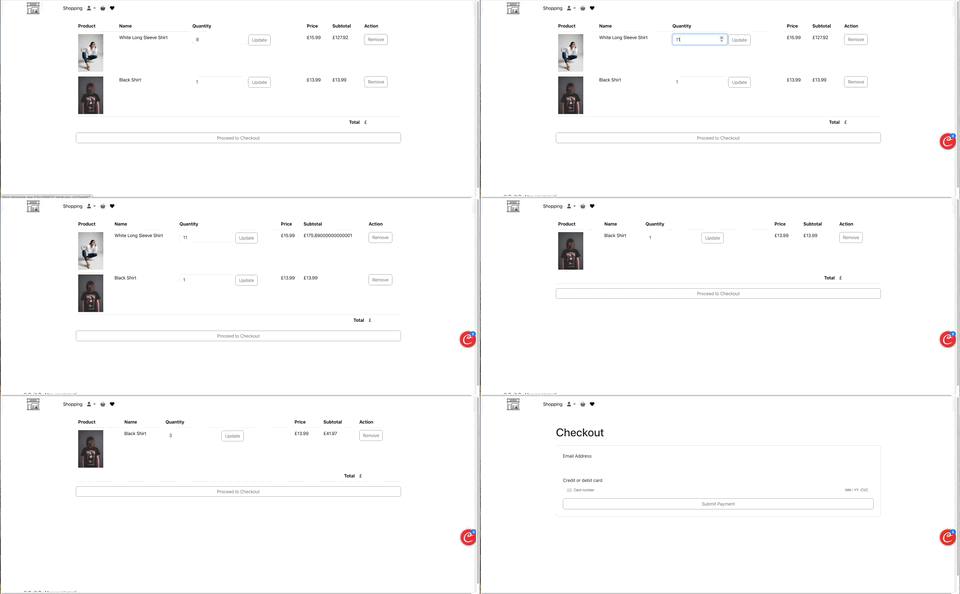
Basket Page
The Basket Page is a crucial part of the e-commerce application, providing users with a detailed overview of the products they intend to purchase. This section outlines the various functionalities available on the Basket Page, including updating product quantities, removing items, and proceeding to checkout.
Product Overview
Each product in the basket is displayed with the following details:
- #### Image:
A thumbnail image of the product for easy identification. - #### Name:
The name of the product. - #### Quantity:
An input field allowing users to update the quantity of the product. - #### Price:
The price per unit of the product. - #### Subtotal:
The total cost for the quantity selected. - #### Action:
Options to update the quantity or remove the product from the basket.
#### Functionalities
- #### Updating Product Quantity
- Users can change the quantity of each product directly from the basket. and content.
- The "Update" button next to the quantity input field triggers the update process.
- Upon clicking "Update", the subtotal and total price are recalculated to reflect the changes.
@app.route('/update-basket/<int:user_id>/<int:product_id>', methods=['POST'])
def update_basket(user_id, product_id):
    action = request.form.get('action')
    if action == 'update':
        new_quantity = request.form.get('quantity', type=int)
        try:
            with sql.connect('./productdb.db') as dbCon:
                cur = dbCon.cursor()
                # Update the quantity of the product in the basket
                if new_quantity > 0:
                    cur.execute('UPDATE Basket SET quantity = ? WHERE user_id = ? AND product_id = ?',
                                (new_quantity, user_id, product_id))
                    dbCon.commit()
                    flash('Basket updated successfully.', 'success')
                else:
                    flash('Quantity must be at least 1.', 'error')
        except Exception as e:
            flash(f'An error occurred: {e}', 'error')

    elif action == 'remove':
        try:
            with sql.connect('./productdb.db') as dbCon:
                cur = dbCon.cursor()
                # Remove the product from the basket
                cur.execute('DELETE FROM Basket WHERE user_id = ? AND product_id = ?',
                            (user_id, product_id))
                dbCon.commit()
                flash('Product removed from basket.', 'success')
        except Exception as e:
            flash(f'An error occurred: {e}', 'error')

    return redirect(url_for('basket', user_id=user_id))
- #### Removing Items
Each product has a "Remove" button to delete the item from the favorites list.
Clicking the "Remove" button removes the item from the favorites list.
{% for item in basketItems %}
                <tr>
                    <td><a href="{{ url_for('product', member_id=item[5]) }}" ><img src="{{ item[4] }}" class="img-fluid" style="width: 100px;"/></a></td>
                    <td class="favoritName">{{ item[0] }}</td>
                    <td>
                        <form action="{{ url_for('update_basket', user_id=session['user_id'], product_id=item[5]) }}" method="post">
                            <input type="hidden" name="action" value="update">

                            <input type="number" id="quantity" name="quantity" value="{{ item[2] }}" min="1" class="form-control" style="display: inline-block; width: auto;">

                            <button type="submit" class="btn btn-outline-secondary">Update</button>
                        </form>
                    </td>
                    <td>£{{ item[3] }}</td>
                    <td class="favoritSubtotal">£{{ item[2] * item[3] }}</td>
                    <td>
                        <form action="{{ url_for('update_basket', user_id=session['user_id'], product_id=item[5]) }}" method="post">
                            <input type="hidden" name="action" value="remove">
                            <button type="submit" class="btn btn-outline-secondary">Remove</button>
                        </form>
                    </td>
                </tr>
                {% endfor %}
Purchasing Process
The purchasing process involves several steps to ensure a smooth transaction for the user. This section outlines the steps involved from adding items to the basket to completing the purchase.
- #### Adding Items to Basket
- Users can browse products and add them to their basket using the "Add to Basket" button on the product cards.
- Each addition updates the basket and displays the selected items on the Basket Page.
def add_to_basket( user_id, product_id,quantity):
    try:
        with sql.connect('./productdb.db') as dbCon:
            cur = dbCon.cursor()
            # Check if the product is already in the basket
            cur.execute('SELECT quantity FROM Basket WHERE user_id = ? AND product_id = ?', (user_id, product_id))
            existing = cur.fetchone()

            if existing:
                # If the product is already in the basket, increase the quantity by 1
                new_quantity = existing[0] + quantity
                cur.execute('UPDATE Basket SET quantity = ? WHERE user_id = ? AND product_id = ?', (new_quantity, user_id, product_id))
            else:
                # If the product is not in the basket, insert a new record with quantity 1
                cur.execute('INSERT INTO Basket (user_id, product_id, quantity) VALUES (?, ?, ?)', (user_id, product_id, quantity))
                action = 'added to'
            dbCon.commit()
        return redirect(url_for('product' , member_id=product_id))
    except sql.Error as e:
        print(f"Error occurred: {e}")
        return None
- #### Reviewing Basket
The Basket Page provides a detailed overview of the selected products, allowing users to update quantities or remove items as needed.
The total cost is dynamically updated based on the user's adjustments.
- #### Proceeding to Checkout
Once the user confirms their selections, they click "Proceed to Checkout".
This action redirects the user to the checkout page where they can enter shipping and payment information.
 {% endfor %}
                <tr>
                    <td colspan="5" class="text-end"><strong>Total</strong></td>
                    <td>£{{ total_price }}</td>
                </tr>
            </tbody>
        </table>
        <div class="d-grid gap-2">
            <a href="{{ url_for('checkout', user_id=session['user_id']) }}" class="btn btn-outline-secondary">Proceed to Checkout</a>
        </div>
        {% else %}
        <div class="btn btn-outline-secondary" style="width:100%">Your basket is empty.</div>
        {% endif %}
    {% else %}
    <div class="btn btn-outline-secondary" style="width:100%">You are not login.</div>
    {% endif %}
- #### Completing the Purchase
On the checkout page, users enter their shipping address and payment details.
After confirming the details, users complete the purchase by clicking the "Submit Payment" button.
The system processes the payment and provides an order confirmation.
@app.route('/checkout', methods=['GET', 'POST'])
def checkout():
    if request.method == 'POST':
        # Process payment
        customer = stripe.Customer.create(
            email=request.form['email'],
            source=request.form['stripeToken']  # Obtained with Stripe.js
        )

        charge = stripe.Charge.create(
            customer=customer.id,
            amount=int(session['total_price'] * 100),  # Total price in cents
            currency='usd',
            description='Purchase Description'
        )

        # Clear the session cart
        session['cart'] = {}
        return render_template('confirmation.html', charge=charge)

    # Display checkout form
    return render_template('checkout.html', cart=session.get('cart', {}))
By providing a user-friendly interface and clear functionalities, the application ensures a seamless shopping experience from browsing products to completing a purchase. The detailed information on the Basket Page and Favorite Page enhances user convenience and satisfaction.
Wins & challenges
Wins:
The project significantly enhanced user engagement by providing a platform where users can add products to their favorites and baskets, write reviews, and complete purchases. This interaction not only enriches the user experience but also provides valuable feedback for potential buyers.
The integration of various technologies such as Flask for the backend, SQLite for database management, and Stripe for payment processing, showcased the project's robust architecture. This combination facilitated seamless data handling and transaction processing, contributing to a smooth user experience.
challenges:
Database Management:
Managing the SQLite database efficiently posed several challenges. Ensuring data integrity, especially with multiple related tables (users, products, baskets, orders, etc.), required meticulous attention to relationships and constraints. Handling simultaneous database access and updates without causing conflicts or data loss was crucial.
User Authentication and Security:
Implementing secure user authentication and authorization was complex. The use of bcrypt for password hashing and handling session management required careful handling to ensure security. Protecting routes and managing role-based access control to differentiate between regular users and admin roles added significant complexity.
Payment Processing:
Integrating Stripe for payment processing presented challenges, particularly in securely handling payment information and ensuring compliance with payment security standards. Ensuring a smooth and secure checkout process required thorough testing and error handling.
Key Learnings:
- One key learning was the importance of thorough testing throughout the development process. Implementing unit tests and integration tests early on helped identify bugs and issues before they became major problems. This proactive approach saved time and ensured a more stable and reliable application.
Unit Testing:
For the basket functionality, unit tests were created to ensure that the quantity updates and item removal worked correctly.
    def test_update_basket_quantity(self):
    response = self.client.post(
        '/update-basket/1/1',
        data={'action': 'update', 'quantity': 3},
        follow_redirects=True
    )
    self.assertIn(b'Basket updated successfully.', response.data)

    def test_remove_basket_item(self):
    response = self.client.post(
        '/update-basket/1/1',
        data={'action': 'remove'},
        follow_redirects=True
    )
    self.assertIn(b'Product removed from basket.', response.data)
Integration Testing:
For the user authentication feature, integration tests were written to verify that the login API endpoint worked correctly with the database and responded with appropriate status codes.
def test_login(self):
    response = self.client.post(
        '/login',
        data={'username': 'testuser', 'password': 'testpassword'},
        follow_redirects=True
    )
    self.assertEqual(response.status_code, 200)
    self.assertIn(b'Products Page', response.data)
Future Improvements:
- A significant future enhancement is to develop a comprehensive user profile feature. This would allow users to create and personalize their profiles, showcasing their purchase history and reviews. Additionally, integrating social features like following other users and commenting on profiles would increase engagement and community interaction.
Example:
Current Code: No user profile feature implemented.
Improved Code:
  def user_profile(user_id):
    user = get_user_by_id(user_id)
    orders = get_orders_by_user(user_id)
    reviews = get_reviews_by_user(user_id)
    return render_template('profile.html', user=user, orders=orders, reviews=reviews)

def get_user_by_id(user_id):
    with sql.connect('./productdb.db') as con:
        cur = con.cursor()
        cur.execute("SELECT * FROM users WHERE user_id = ?", (user_id,))
        return cur.fetchone()

def get_orders_by_user(user_id):
    with sql.connect('./productdb.db') as con:
        cur = con.cursor()
        cur.execute("SELECT * FROM orders WHERE user_id = ?", (user_id,))
        return cur.fetchall()

def get_reviews_by_user(user_id):
    with sql.connect('./productdb.db') as con:
        cur = con.cursor()
        cur.execute("SELECT * FROM review WHERE user_id = ?", (user_id,))
        return cur.fetchall()

Log in or sign up for Devpost to join the conversation.