-
-
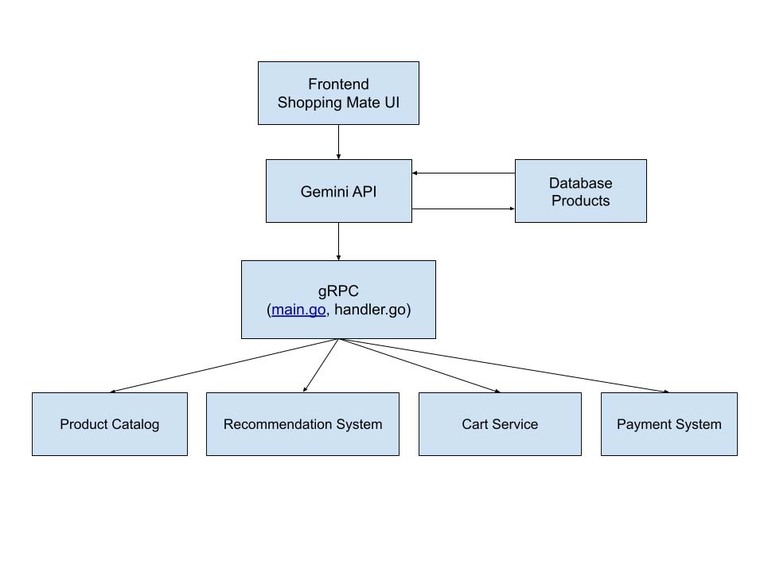
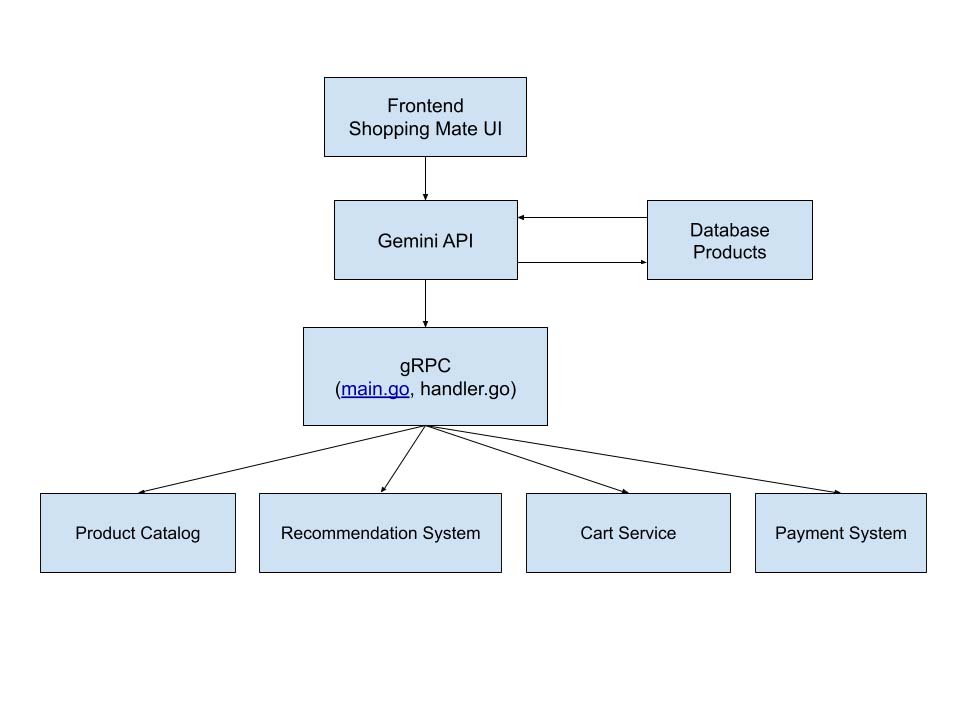
Architecture of shopping mate frontend-only
-
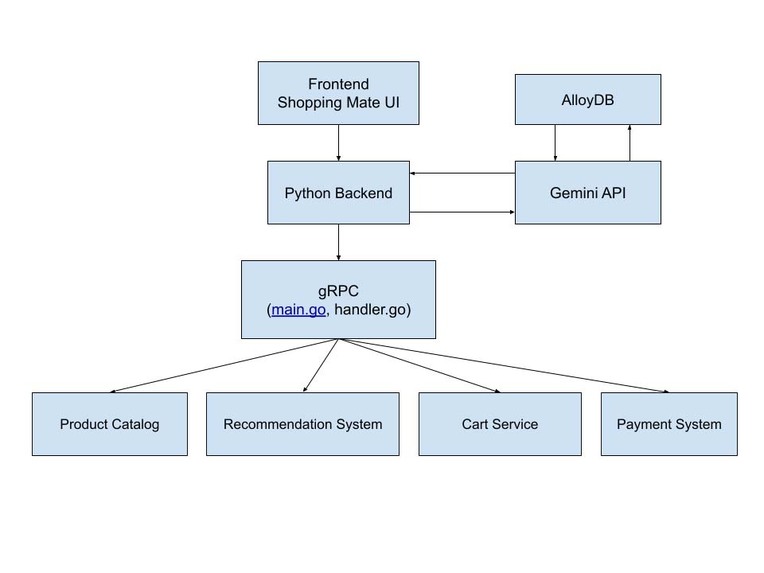
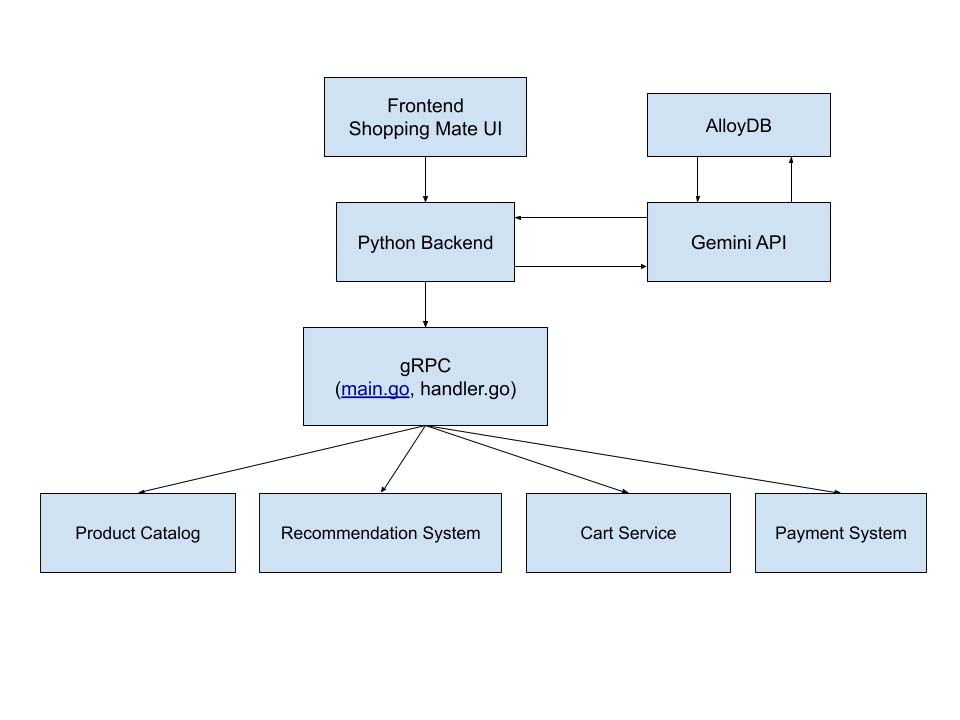
Architecture of shopping mate frontend-and-backend
-
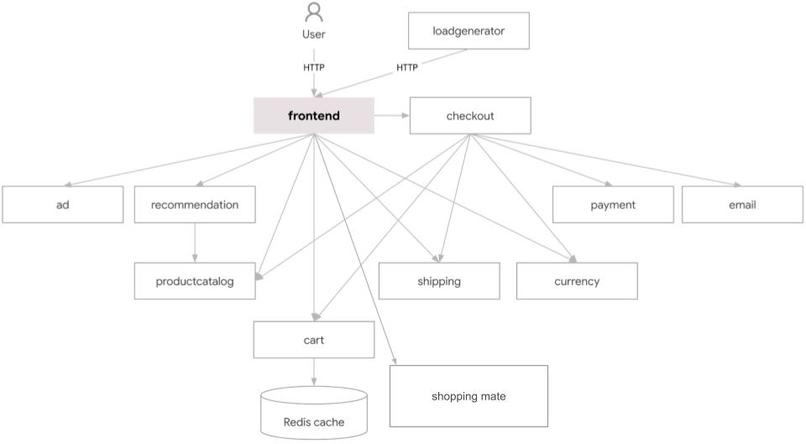
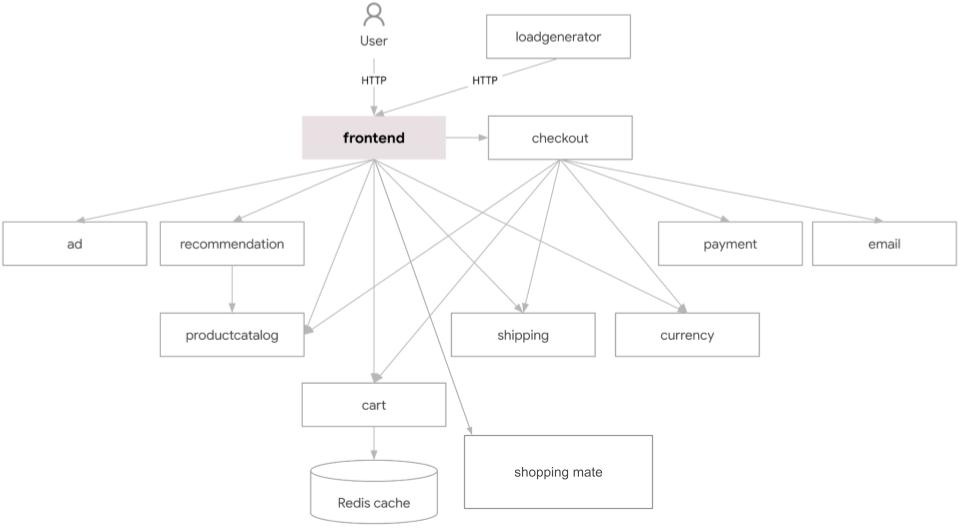
Architecture of microservices with shopping mate added
Inspiration
The idea for Shopping Mate AI Agent came from wanting to simplify the online shopping experience. Many users struggle with searching, comparing, and choosing products quickly. We wanted to explore how AI and cloud-native microservices could make shopping faster, personalized, and intuitive, all while leveraging GKE for scalability and reliability.
What it does
Shopping Mate AI Agent lets users interact with the Online Boutique demo through natural language commands. Key functionalities include:
- 🛒 Add products to the cart, view cart, or empty it
- 🔍 Smart product search
- ⚖️ Compare multiple products
- 🎁 Personalized gift recommendations based on user prompts (age, gender, interests)
- 🤖 Automated checkout
- 🧠 Contextual product suggestions during the shopping journey
What's different in idea and approach
Most shopping assistants provide basic search and recommendation features, but the gift recommendation system here is built on a unique approach.
Instead of just keyword-based suggestions, the AI first analyzes all messages in the conversation to fully understand the user’s intent. It then identifies key details such as age, gender, and interests of the recipient before recommending the most suitable gift.
This ensures that gift suggestions are not only relevant but also deeply personalized, making the shopping experience feel more human and intuitive.
How we built it
- AI Backend (
src/shoppingmate) – Python-based microservice handling natural language understanding, recommendations, and cart management. - Custom Handlers (
handler) – Translates user prompts into API calls for the microservices. - Routing (
main.go) – Connects handlers to Online Boutique services. - Kustomize Integration – Added
shoppingmatecomponent to deploy the AI microservice on GKE. - Technologies Used – GKE Autopilot, MCP for multi-cluster scaling, A2A for secure service communication, AlloyDB for product catalog data, Cloud Build + GitHub Actions for CI/CD.
Notes
Note: The frontend runs independently for testing, but the Python backend can also work alongside it in the same deployment.
- If you are bypassing the Python backend, please add the required environment keys to the frontend.
- If you are using the Python backend, ensure the environment keys are added to the
shoppingmate.yamlfile.
1. Page Reload on Operations
Please note that for certain actions like Add to Cart, Empty Cart, Checkout, and similar operations, the page will reload upon success. This behavior is necessary for the following reasons:
- The pre-built demo does not automatically update values without a page reload.
- These operations will not visually update in the demo without a reload, as it's designed for a more static view.
In a full implementation, you would typically use dynamic updates (like AJAX or state management) to reflect these changes without a full reload.
2. Session Usage
I have used session storage to keep track of:
- Cart details (such as added products).
- Messages from the Shopping Mate AI bot.
This allows data to persist across page refreshes or when navigating to new pages, preventing any loss of user information. The session storage ensures that the cart and bot messages remain intact, providing a smoother and more persistent user experience.
Challenges we ran into
- Integrating the AI agent with multiple microservices while keeping latency low.
- Scaling the AI microservice across clusters using MCP.
- Ensuring secure internal communication with A2A.
- Handling diverse user prompts accurately without storing sensitive user data.
Accomplishments that we're proud of
- Built a fully functional AI Shopping Assistant that extends the Online Boutique demo.
- Achieved seamless integration with existing microservices on GKE.
- Enabled personalized recommendations and automated checkout without storing user data.
- Successfully deployed the AI agent as a microservice with multi-cluster scaling and secure networking.
What we learned
- Hands-on experience deploying AI-driven microservices on GKE.
- Practical knowledge of multi-cluster deployment (MCP) and secure service-to-service communication (A2A).
- Learned how to design AI agents that bridge user intent with microservice APIs for real-world applications.
- Improved understanding of cloud-native architecture best practices for scalable e-commerce applications.
What's next for Shopping Mate AI Agent in Online Boutique Demo GKE
- Extend AI recommendations using real-time analytics and user behavior trends.
- Add support for voice commands alongside text prompts.
- Enhance multi-cluster scaling for higher traffic loads.
- Explore integration with external APIs for richer product and gift suggestions.
Built With
- a2a-(app-to-app-secure-communication)
- a2a-(app-to-app-secure-communication)-**ci/cd:**-cloud-build
- alloydb
- cloud-build
- github
- go-(backend-routes)
- google-gemini-1.5-flash
- google-gemini-1.5-flash-**database:**-alloydb-(product-catalog)-**cloud-&-deployment:**-google-kubernetes-engine-(gke-autopilot)
- google-kubernetes-engine-(gke-autopilot)
- html-templates
- javascript-(frontend)
- javascript-(frontend)-**ai-&-nlp:**-langchain
- langchain
- mcp-(multi-cluster-pods)
- python-(ai-backend)


Log in or sign up for Devpost to join the conversation.