-
-
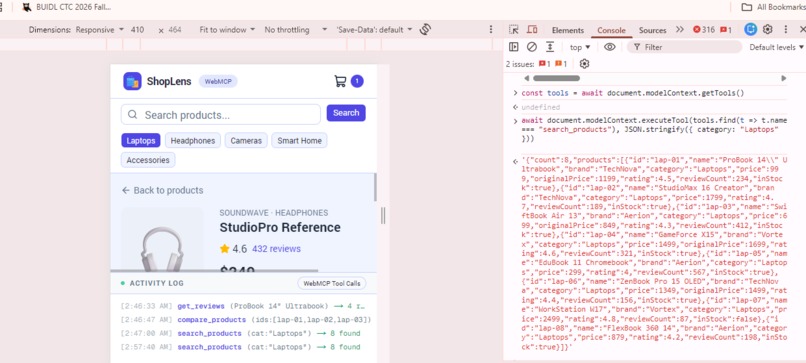
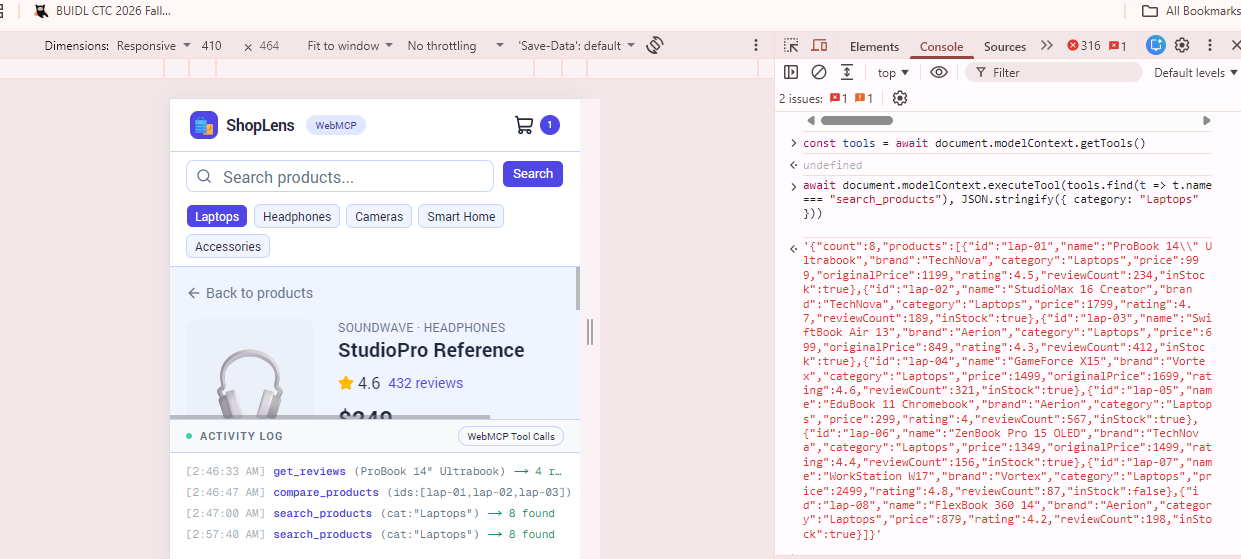
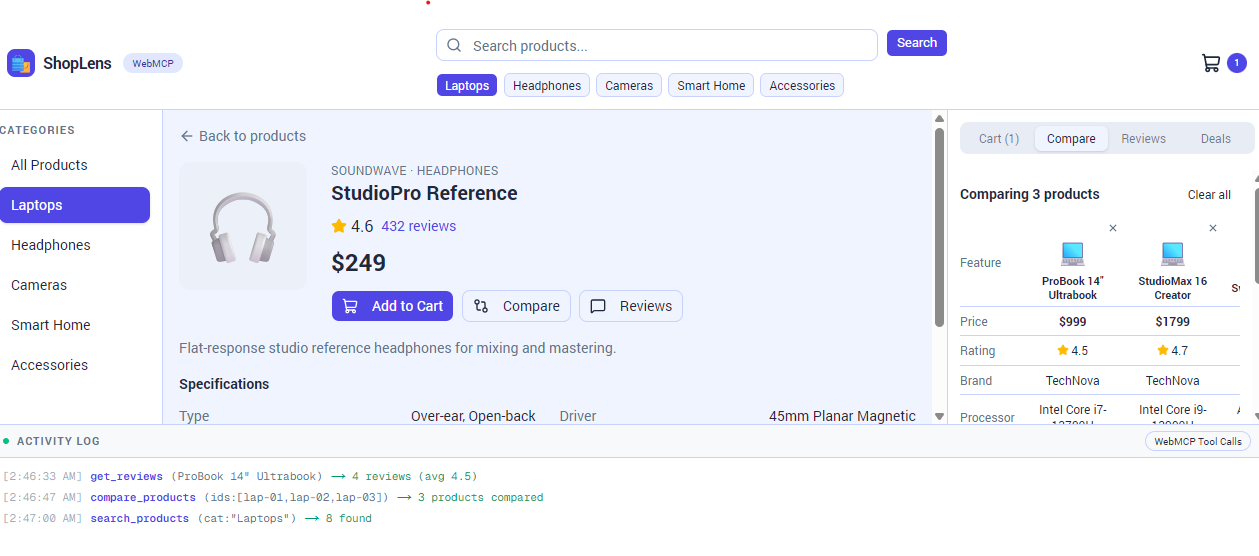
Search tool in action real time.
-
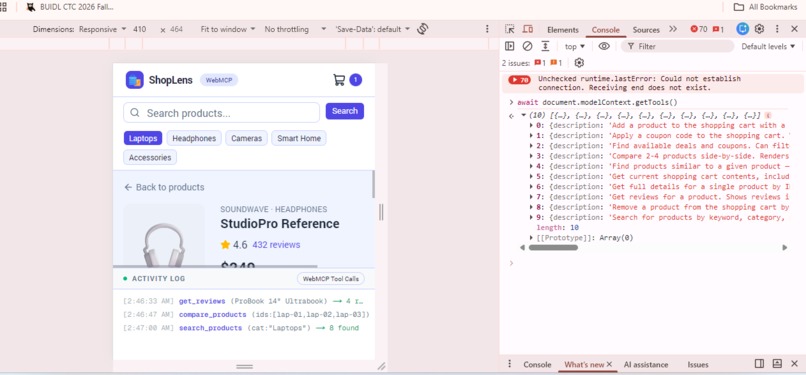
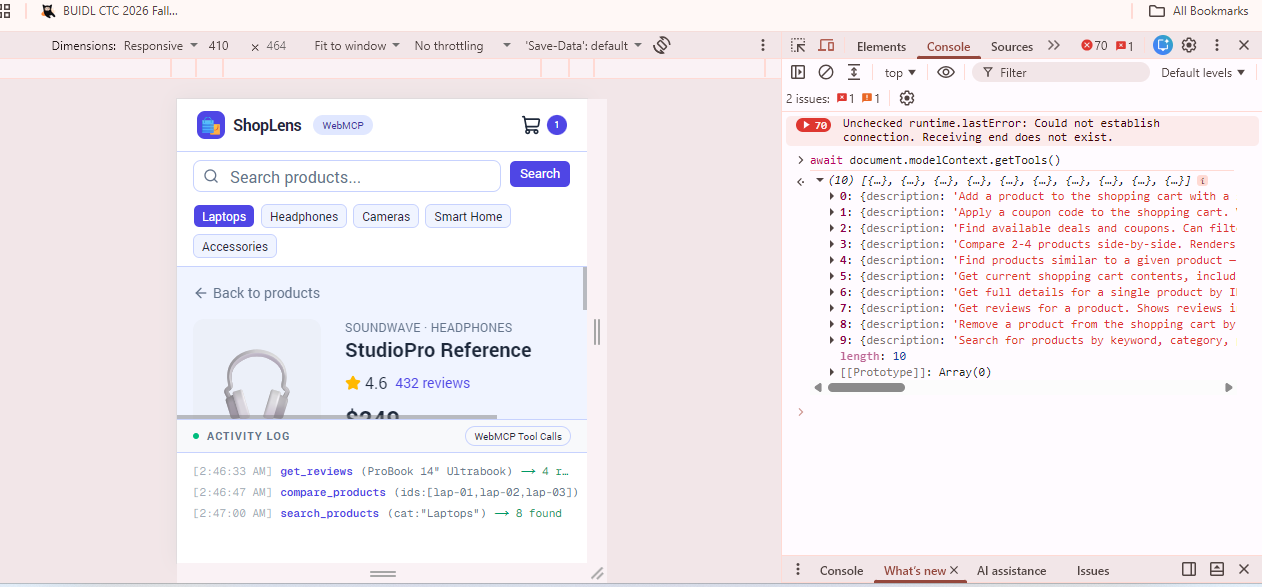
Fully functional 10 tools
-
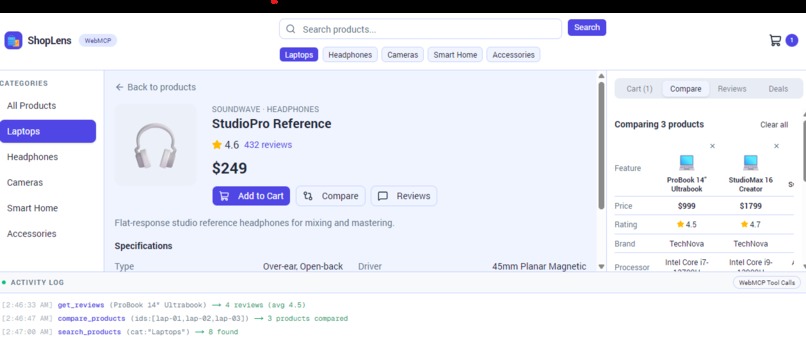
Activity log in real time
Inspiration
Online shopping is overwhelming. You open a store, scroll through dozens of products, compare specs in separate tabs, hunt for coupon codes, and try to figure out which product actually has good reviews. What if an AI could do all of that for you, right on the store's website?
That question led to ShopLens. The OpenAI WebMCP Challenge was the perfect opportunity to explore what happens when you give an AI agent real tools to interact with a website, not just read it, but actually take actions on it.
Shopping is something everyone does, and the pain points are universal. WebMCP makes it possible for an AI to become your personal shopper, searching, comparing, reading reviews, and managing your cart , all while you watch the UI update in real time.
What it does
ShopLens is a web-based shopping assistant that registers 10 structured tools using the WebMCP standard. When an AI agent like ChatGPT visits the site in its built-in browser, it discovers these tools and can use them to help the user shop.
The 10 tools:
search_products— search by keyword, category, price range, and minimum ratingget_product— view full product details including specs and stock statuscompare_products— compare 2 to 4 products side by side in a tableget_reviews— read reviews with average sentiment analysisfind_similar— find products similar to one the user likesadd_to_cart— add a product to the shopping cartremove_from_cart— remove a product from the cartget_cart— view cart contents with subtotal, discounts, and totalcheck_deals— find available coupon codes and dealsapply_deal— apply a coupon code to get a discount
The app has a live Activity Log at the bottom of the screen that shows every tool call the AI makes, with timestamps and results. This makes the WebMCP integration transparent and verifiable, you can see exactly what the AI is doing and when.
The product catalog includes 40 products across 5 categories (Laptops, Headphones, Cameras, Smart Home, Accessories), over 100 user reviews, and 8 coupon codes. Everything runs client-side with no backend required.
How we built it
The app is built with Next.js 16 (App Router, TypeScript). The UI uses Tailwind CSS and shadcn/ui for a clean, professional look. State management is handled by Zustand, which gives us a single store that both UI components and WebMCP tool handlers can access.
The WebMCP integration works through a WebMCPProvider component that wraps the app. On mount, it checks for document.modelContext, the WebMCP entry point. If present, it registers all 10 tools using document.modelContext.registerTool(). Each tool is a single object with a name, a natural-language description (so the AI knows when to use it), an inputSchema (JSON Schema defining accepted arguments), and an async execute function that manipulates app state and returns structured data to the AI. Unregistration is handled via AbortController signals for clean cleanup.
The key architectural decision was using Zustand's getState() in tool handlers. Since tool calls come from the AI agent (not from React event handlers), they run outside React's render cycle. getState() gives direct access to the store from anywhere, which made the WebMCP integration clean and straightforward.
The product data is bundled as TypeScript arrays, no database, no API, no loading states. The app deploys to any static hosting platform in seconds.
Challenges we ran into
The biggest challenge was getting the registerTool API format right. Chrome's WebMCP implementation expects a single ModelContextTool object with name, description, inputSchema, and an async execute function, not separate arguments. The early documentation was sparse, so we had to debug TypeError: The provided value is not of type 'ModelContextTool' by reading the Chrome source and experimenting. We also discovered that cleanup uses AbortController signals instead of an unregister() return value.
Another challenge was making tool handlers work correctly outside of React. WebMCP tool calls come from the AI agent, not from user clicks, so they execute in a different context than normal React event handlers. We solved this with Zustand's getState() pattern, which gives direct access to the store from anywhere.
Designing tool descriptions that an AI would understand and use correctly was harder than expected. The descriptions need to be specific enough that the AI picks the right tool, but general enough to work across different user requests. We iterated on the wording until the AI reliably chose the correct tool for each task.
Making the UI responsive to tool calls was also tricky. When the AI calls compare_products, the right panel needs to switch to the Compare tab and populate the table. When it calls add_to_cart, the cart badge in the header updates. Every tool call has UI side effects, and coordinating those through a single Zustand store required careful planning.
Accomplishments that we're proud of
We are proud of the Activity Log. It is the feature that makes the demo click. Without it, the tool calls are invisible, the UI just magically updates. With the Activity Log, every interaction is transparent. Judges and users can see exactly what tool was called, what arguments were passed, and what the result was, all with timestamps. It turns an abstract protocol into something you can watch happening in real time.
We are also proud of the tool design. The 10 tools cover a complete shopping workflow from discovery to purchase. They are not just CRUD operations, find_similar uses a scoring algorithm based on price proximity and shared tags, get_reviews includes sentiment analysis, and apply_deal validates coupon eligibility against the cart contents. Each tool is genuinely useful, not just a wrapper around a database query.
Finally, the fact that the entire app runs client-side with zero backend is something we are proud of. It deploys in seconds, works offline after first load, and has no infrastructure costs. The simplicity of the architecture is a feature.
What we learned
WebMCP changes how websites interact with AI. Instead of the AI scraping text from a page, the website offers structured tools that the AI can call with typed parameters and receive structured responses. The website becomes an active participant in the conversation, not a passive document.
We learned that tool descriptions are the most important part of the integration. The AI decides which tool to call based entirely on the description. A vague description means the AI won't use the tool. A description that's too narrow means the AI won't use it when it should. Getting this right is an art.
We also learned that transparency is everything when demoing AI integrations. The Activity Log was an afterthought at first, but it became the centerpiece of our demo. Being able to point at a log line and say "the AI just called search_products with these parameters and got these results" is worth more than any slide deck.
What's next for ShopLens
There are several directions ShopLens could go:
- Real product data — Connect to a real e-commerce API (Shopify, WooCommerce) instead of bundled data, so the AI shops across real stores.
- Multi-store support — Let the AI compare products across multiple WebMCP-enabled stores, finding the best price and reviews across the web.
- Checkout integration — Add payment tools so the AI can complete a purchase on behalf of the user, with confirmation steps.
- Personalization — Track user preferences over time so the AI gets better at recommending products the user will like.
- Voice interface — Combine WebMCP with a voice assistant so users can shop hands-free: "Hey, find me a birthday gift for someone who likes photography, under $300."
The bigger vision is that WebMCP becomes a standard that every e-commerce site supports. When that happens, AI agents won't need site-specific integrations — they'll visit any store, discover its tools, and shop on your behalf. ShopLens is a proof of concept for that future.
Built With
- css
- ext.js
- react
- shadcn/ui
- tailwind
- typescript
- vercel
- webmcp
- zustand

Log in or sign up for Devpost to join the conversation.