-
-
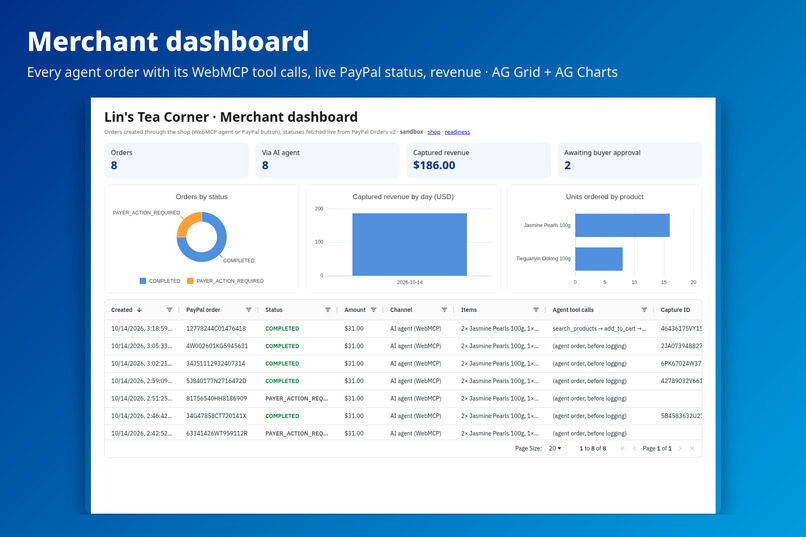
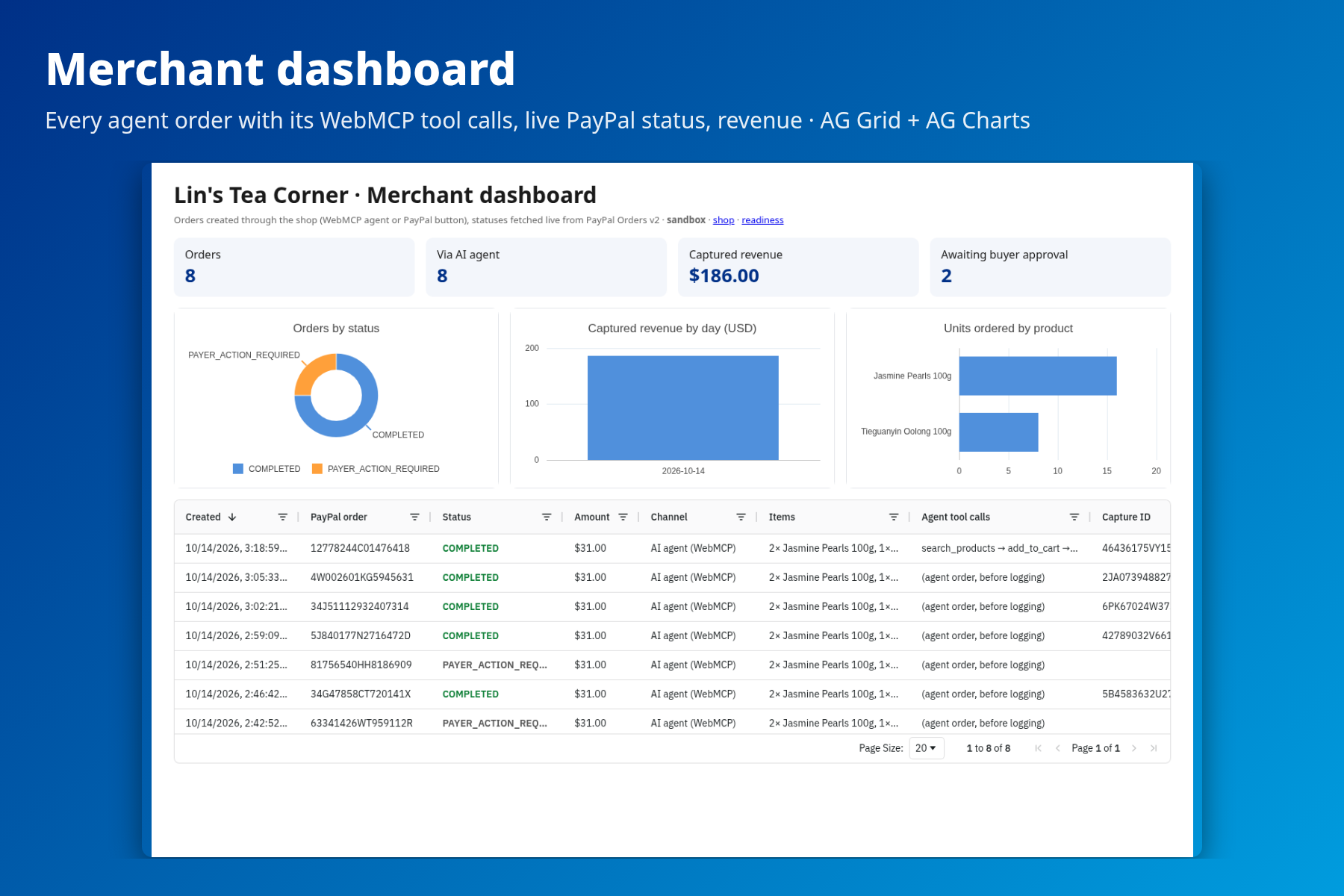
Merchant dashboard: every AI-agent order with its WebMCP tool calls and live PayPal status (AG Grid + AG Charts)
-
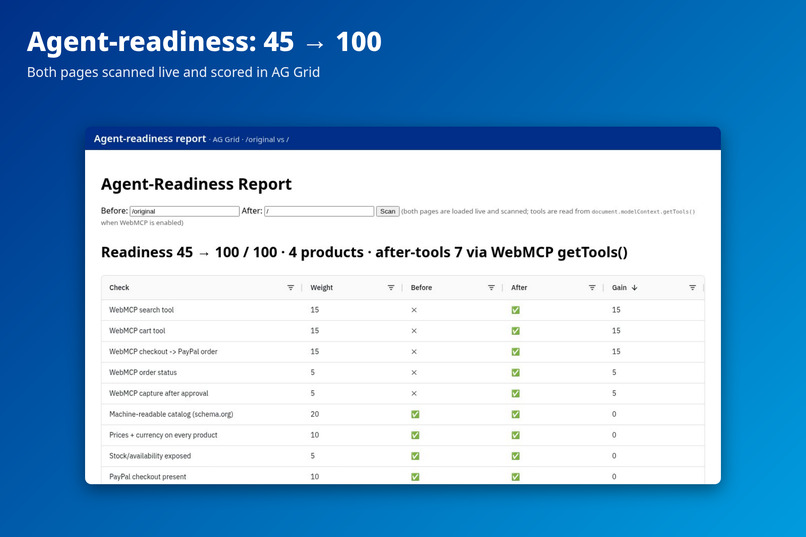
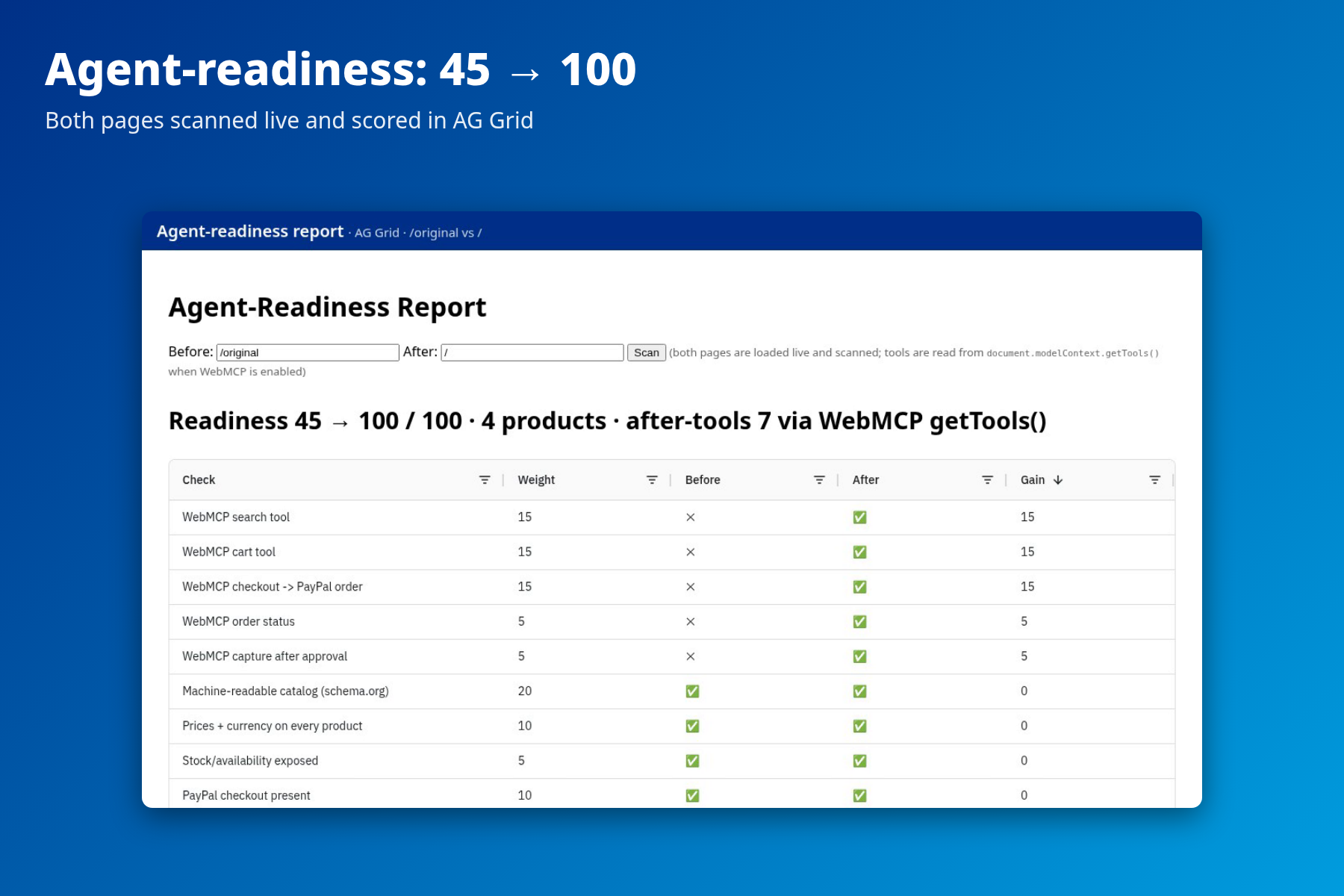
Agent-readiness report in AG Grid: 45 → 100 after conversion
-
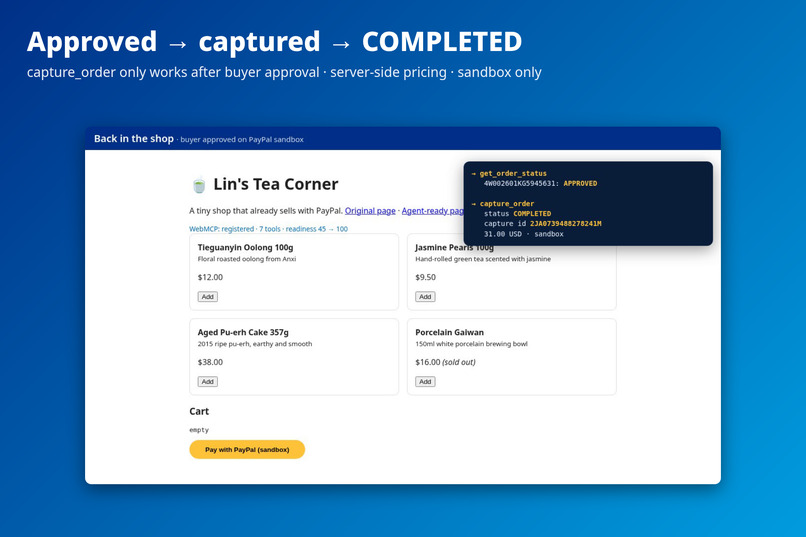
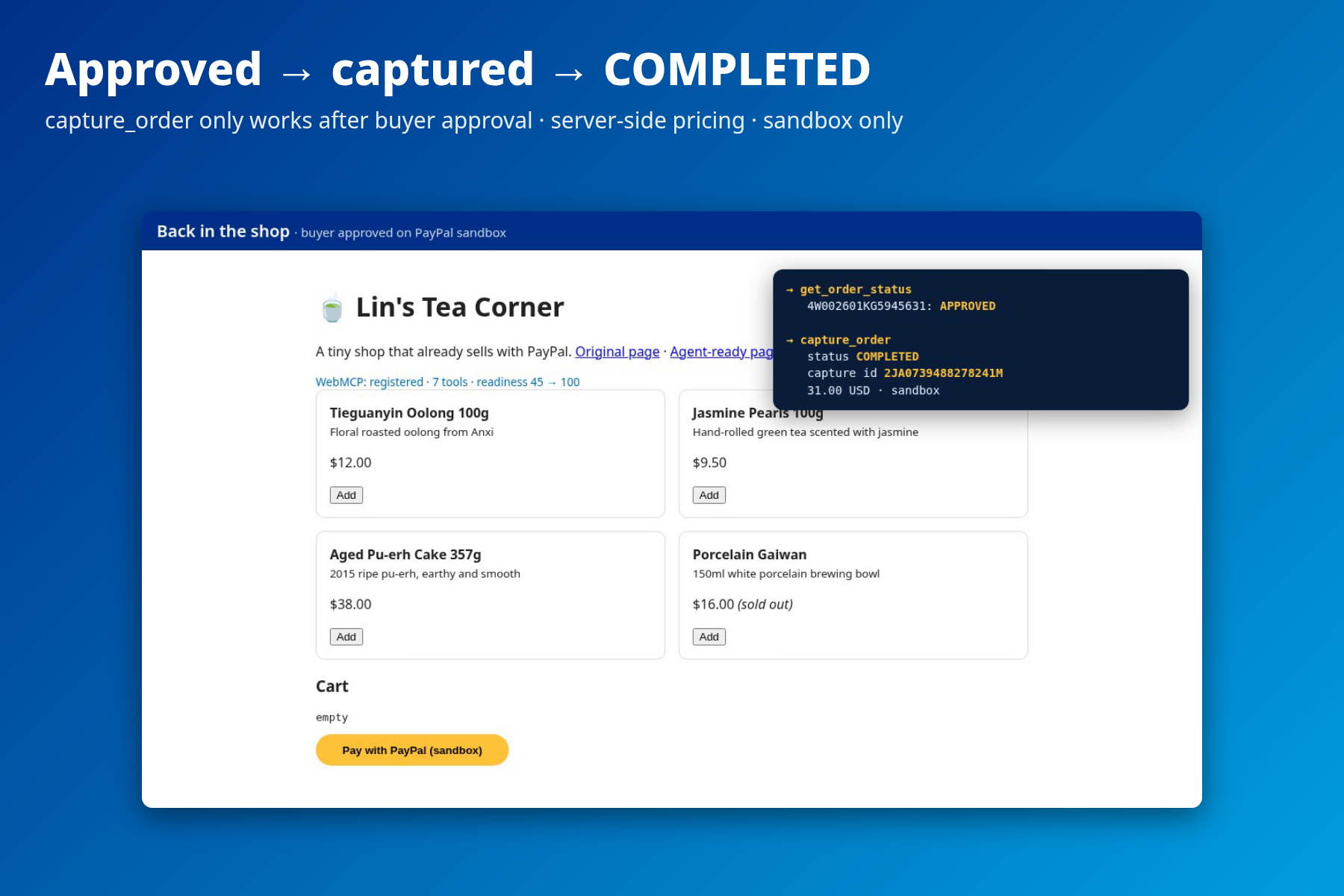
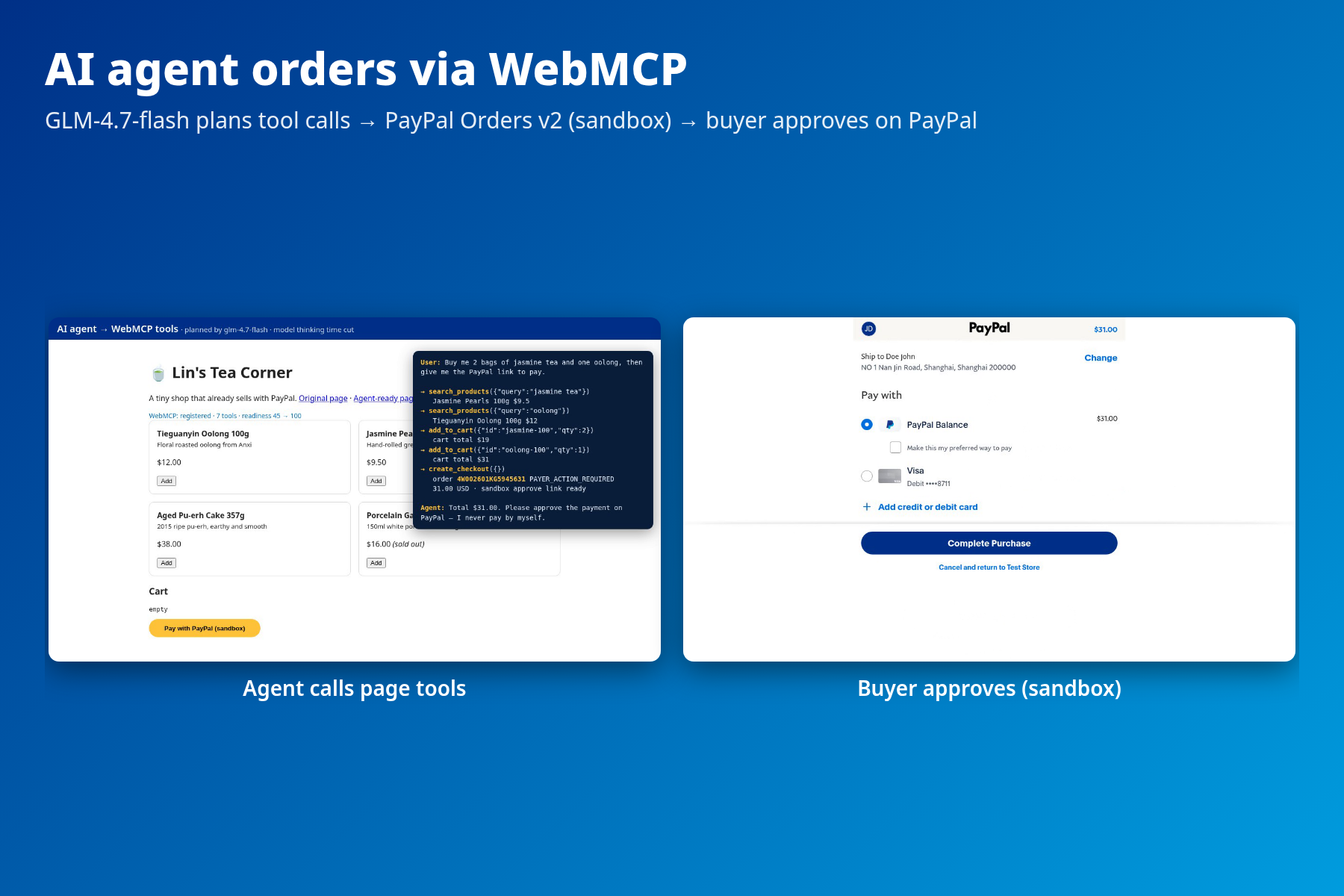
Buyer approves on PayPal sandbox, then capture_order completes the order (COMPLETED)
-
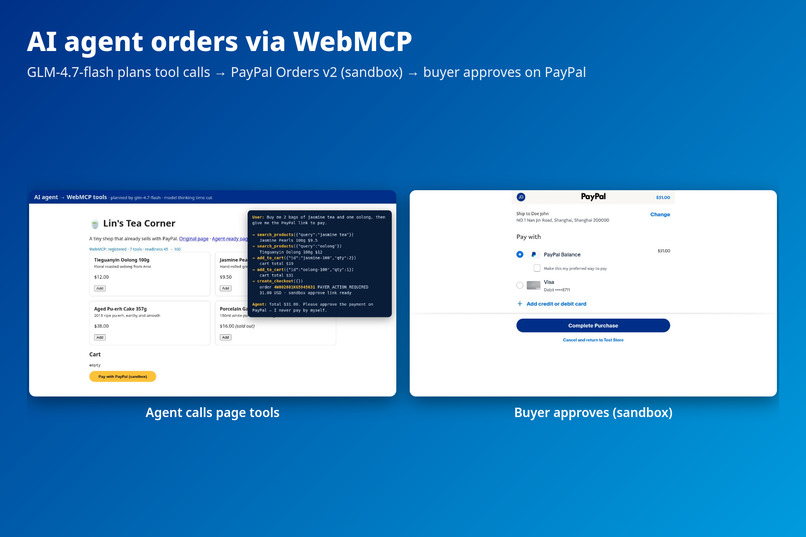
An AI agent orders through the shop's WebMCP tools and creates a PayPal checkout
-
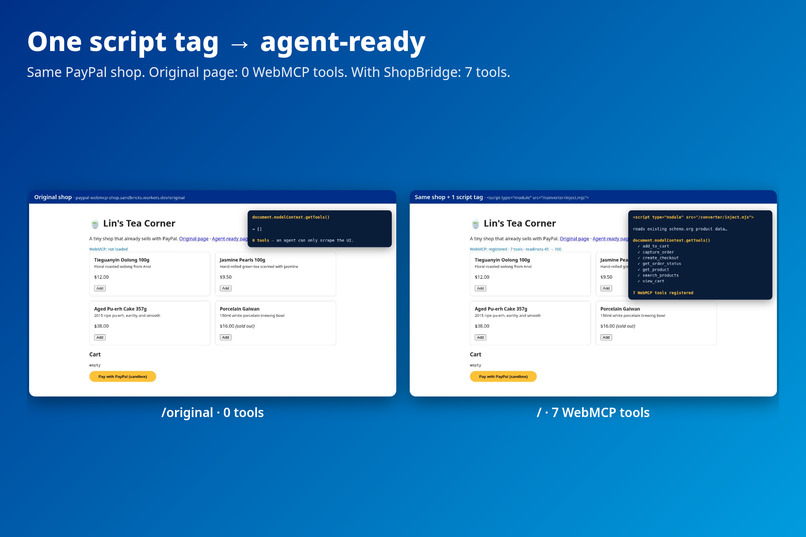
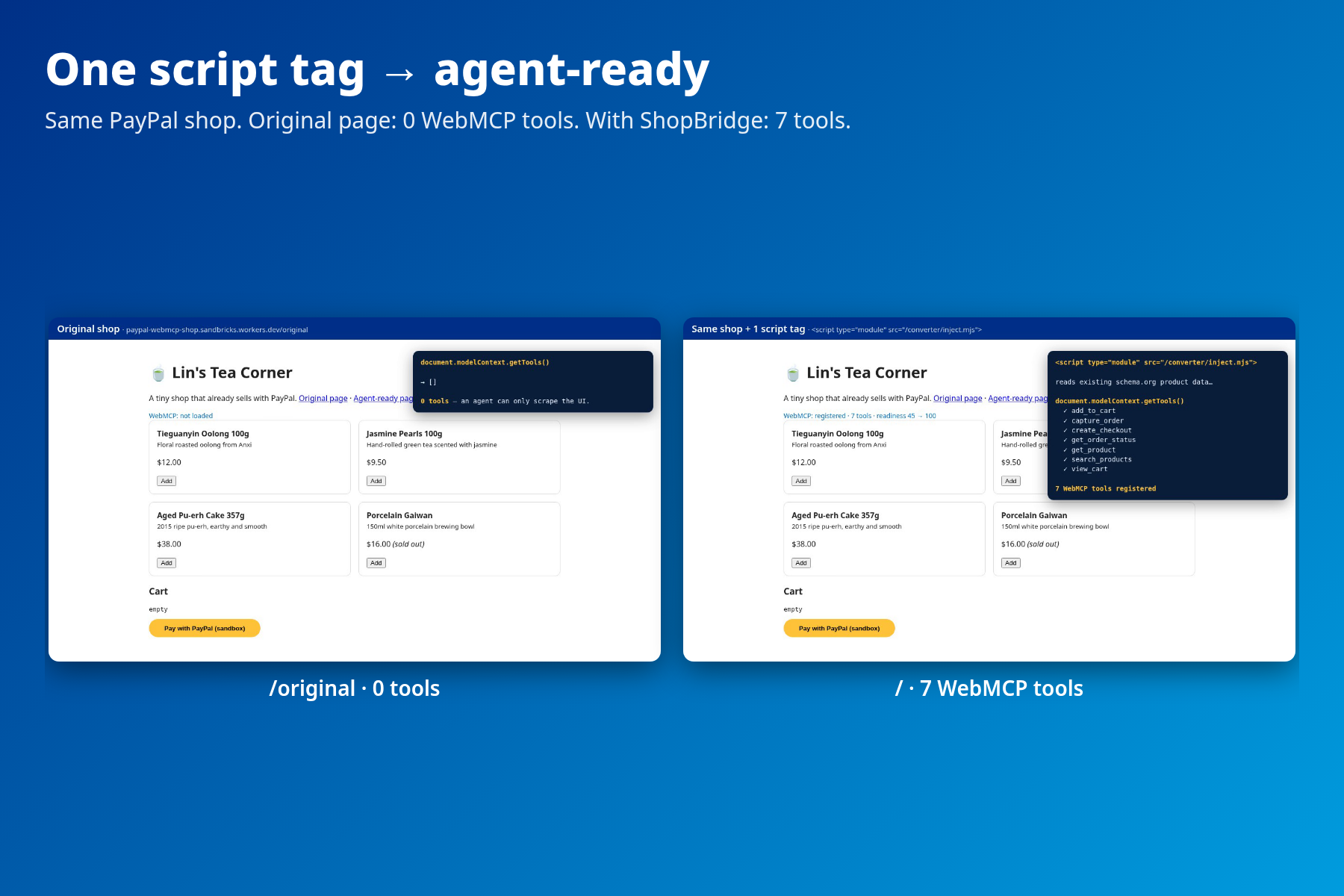
One script tag: original shop has 0 tools, converted shop has 7 WebMCP tools
Inspiration
Millions of small merchants sell through a simple PayPal checkout button. AI shopping agents are arriving fast, but on these sites they have to guess their way through buttons and forms, and often fail. Big platforms are getting agent-native integrations; the long tail of small PayPal shops is not. We wanted the smallest possible step for a small merchant: paste one script tag.
What it does
ShopBridge turns an existing PayPal shop into one that AI agents can order from directly, using WebMCP (document.modelContext.registerTool), the emerging web standard for exposing structured tools to in-browser agents.
- Converter (one
<script>tag). Reads the product data the shop already publishes (schema.org JSON-LD, with a microdata fallback) and registers 7 WebMCP tools:search_products,get_product,add_to_cart,view_cart,create_checkout,get_order_status,capture_order. - PayPal checkout for agents.
create_checkoutcreates a PayPal Orders v2 order (sandbox) and returns the approval link. The agent never pays: a human buyer approves on PayPal.capture_ordercompletes the order only after approval; the server refuses otherwise (HTTP 409). - AI agent runner. Playwright opens Chrome with WebMCP, reads the page's tools, converts them to OpenAI-style function calling, lets GLM-4.7-flash plan the shopping task from natural language ("2 bags of jasmine tea and one oolong"), and executes each call as a real WebMCP tool inside the page.
- Agent-readiness report (AG Grid). Loads the original page and the converted page live, reads their tools, and scores both: the sample shop goes from 45 → 100.
- Merchant dashboard (AG Grid + AG Charts). Every order is logged (Cloudflare Workers KV) with its channel (AI agent vs. PayPal button), items, amount and the exact WebMCP tool calls that produced it (e.g.
search_products → add_to_cart → create_checkout → capture_order). Statuses and capture IDs are refreshed live from PayPal Orders v2. KPIs, orders-by-status donut, captured revenue by day, units by product.
Safety by design: prices are always recomputed on the server from the shop's own catalog (client prices ignored, out-of-stock items dropped); the PayPal client refuses any non-sandbox host; credentials live only as Cloudflare Worker secrets.
How we built it
- Converter: dependency-free ES modules (
converter/core.mjs,converter/inject.mjs). The same catalog scanner runs in the browser and on the server, so the server prices orders from the shop's own markup. - Backend: one runtime-agnostic request handler (
lib/app.mjs) that runs on Node locally and on Cloudflare Workers in production; PayPal OAuth + Orders v2 create / get / capture with idempotency keys. - Agent: Playwright + Chrome (
--enable-features=WebMCPTesting), CDPWebMCP.enable/toolsAdded,modelContext.getTools()/executeTool(); Z.ai GLM-4.7-flash through an OpenAI-compatible API with retry and model fallback; a deterministic offline planner for tests. - Report & dashboard: AG Grid Community + AG Charts Community (both MIT, bundled locally; no Enterprise features). The dashboard reads an order log in Workers KV and refreshes non-final orders from PayPal.
- Tests: 12 Node tests: catalog scanning, every tool, out-of-stock handling, capture-only-after-approval, live-host refusal, server-side pricing, file allowlist, planner flow, order log + dashboard.
- Standards: implemented from public documentation only: the WebMCP spec/explainer and PayPal's public WebMCP and Store Sync docs. We have no official Store Sync onboarding, so ShopBridge does not call Store Sync's merchant Cart API; it follows the same idea (agent cart → PayPal Orders v2) directly in the merchant's page.
Challenges we ran into
- WebMCP is brand new: Chrome-only, behind a flag, and its API changed between versions. We probed
registerTool/executeTool/ the CDP events in Chrome 154 before designing around them. - Measuring "before" honestly: the report loads both pages one after the other in the same tab, because loading them in parallel let tools from one page show up in the other.
- Keeping the agent safe: the agent must never be able to pay or set prices, so payment approval stays with the human on PayPal and pricing stays on the server.
- Free-tier LLM latency and rate limits (HTTP 429): added retries and model fallback. In the demo video the model's thinking time is cut.
Accomplishments that we're proud of
- A real end-to-end flow on the live site: natural language → WebMCP tools → PayPal sandbox order → buyer approval → capture COMPLETED.
- Zero changes to the merchant's existing page beyond one tag; it reuses markup most shops already have for SEO.
- A measurable readiness score merchants can understand.
What we learned
- Structured product data that shops already publish for SEO is almost enough to make them agent-ready; the missing piece is actions (cart, checkout), which WebMCP provides.
- A clean split works well: the agent prepares, the human approves on PayPal, the server enforces.
What's next
- Shopify / WooCommerce / Wix plugins and a hosted script for no-code merchants.
- Use PayPal Store Sync officially once onboarded (catalog ingestion + Cart API), and PayPal's agent toolkit where it fits.
- Shipping, tax and variants in the tools; agent-vs-human conversion analytics in the dashboard.
- Readiness scanning for any URL as a free audit tool.
Try it out
- Hosted: open https://paypal-webmcp-shop.sandbricks.workers.dev in Chrome 149+ with
chrome://flags/#enable-webmcp-testingenabled. The status line shows the registered tools;/reportshows the readiness score;/dashboardshows the merchant order log;/originalis the unconverted shop. - Run the agent locally: see README (
node agent.mjs "..."). Without an LLM key it falls back to a deterministic planner. - Approving a sandbox payment: use the sandbox test buyer account in the testing instructions. Everything runs on PayPal's sandbox; no real money moves.
Built With
- ag-charts
- ag-grid
- chrome
- cloudflare-workers
- cloudflare-workers-kv
- glm-4.7-flash
- javascript
- json-ld
- kokoro-tts
- node.js
- paypal-orders-api-v2
- paypal-sandbox
- playwright
- schema.org
- webmcp
- z.ai

Log in or sign up for Devpost to join the conversation.