-
-
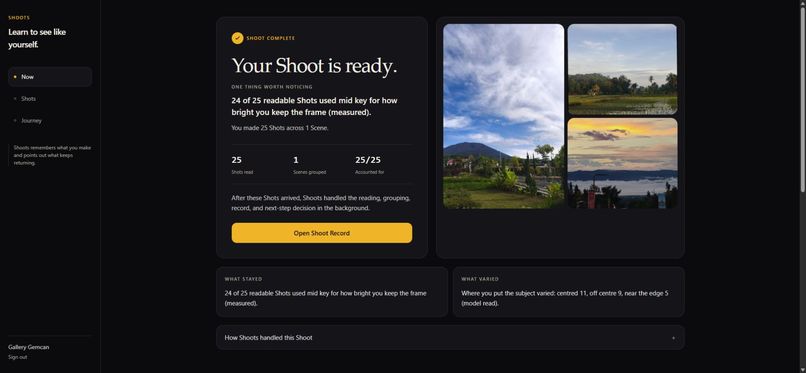
Live web: a completed 25-file test batch, all Shots accounted for, with its Shoot Record and the observations behind it.
-
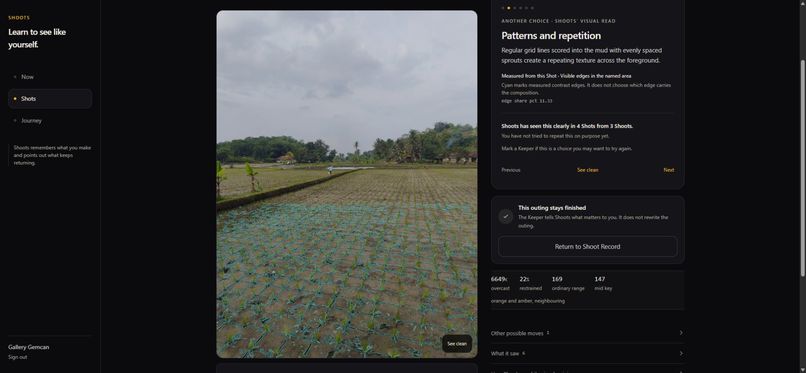
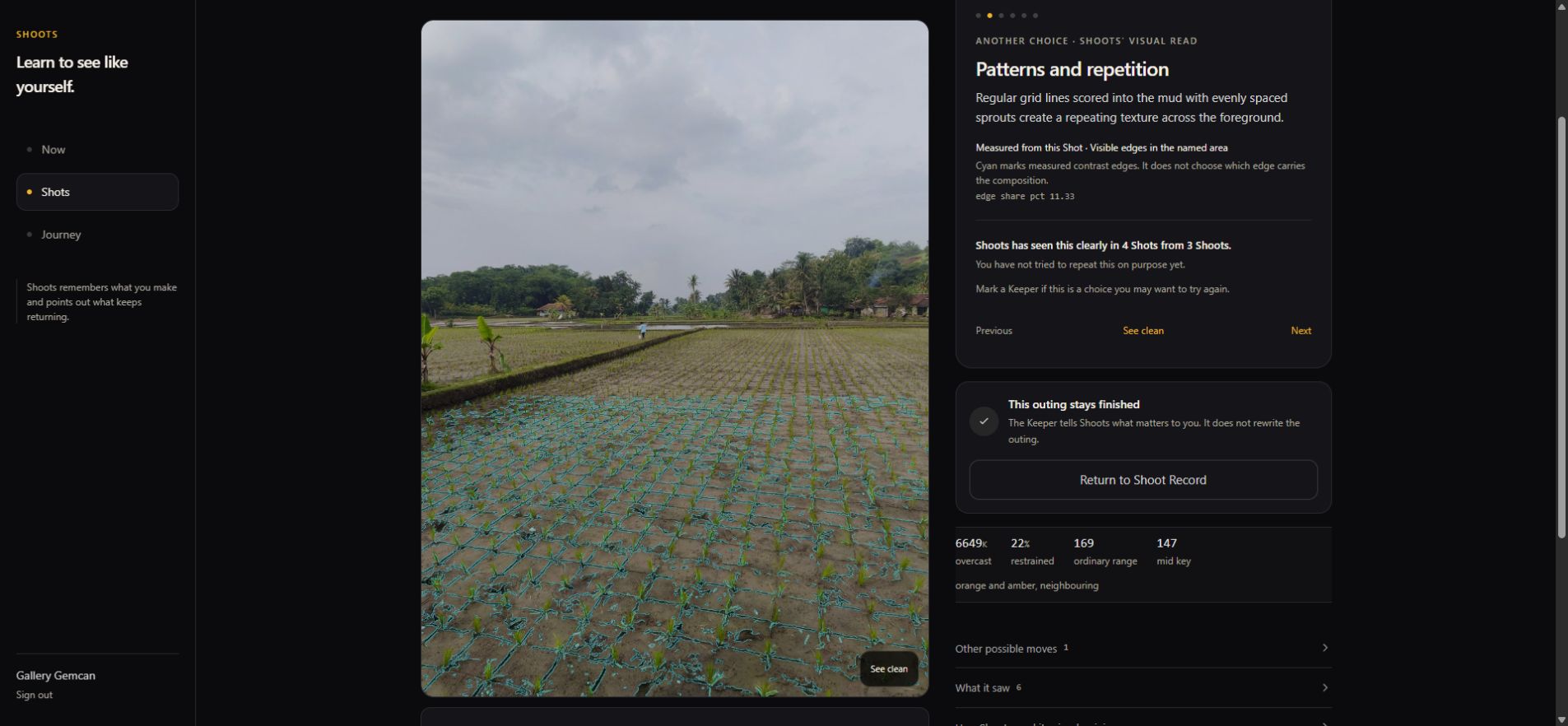
Live web: another rice-field Shot from the latest Shoot. Its pattern reading is linked to measured edges and earlier supporting Shots.
-
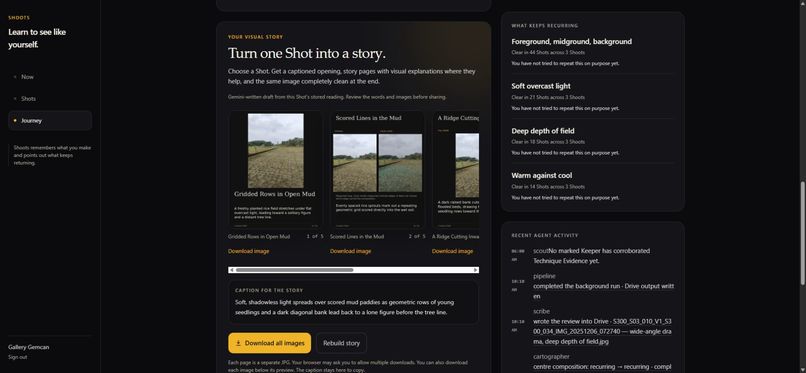
Live web: five Gemini-written story pages generated from the selected Shot and its stored Evidence, with image downloads.
-
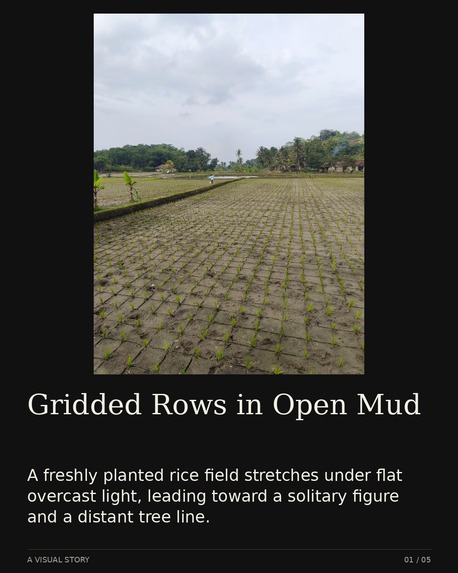
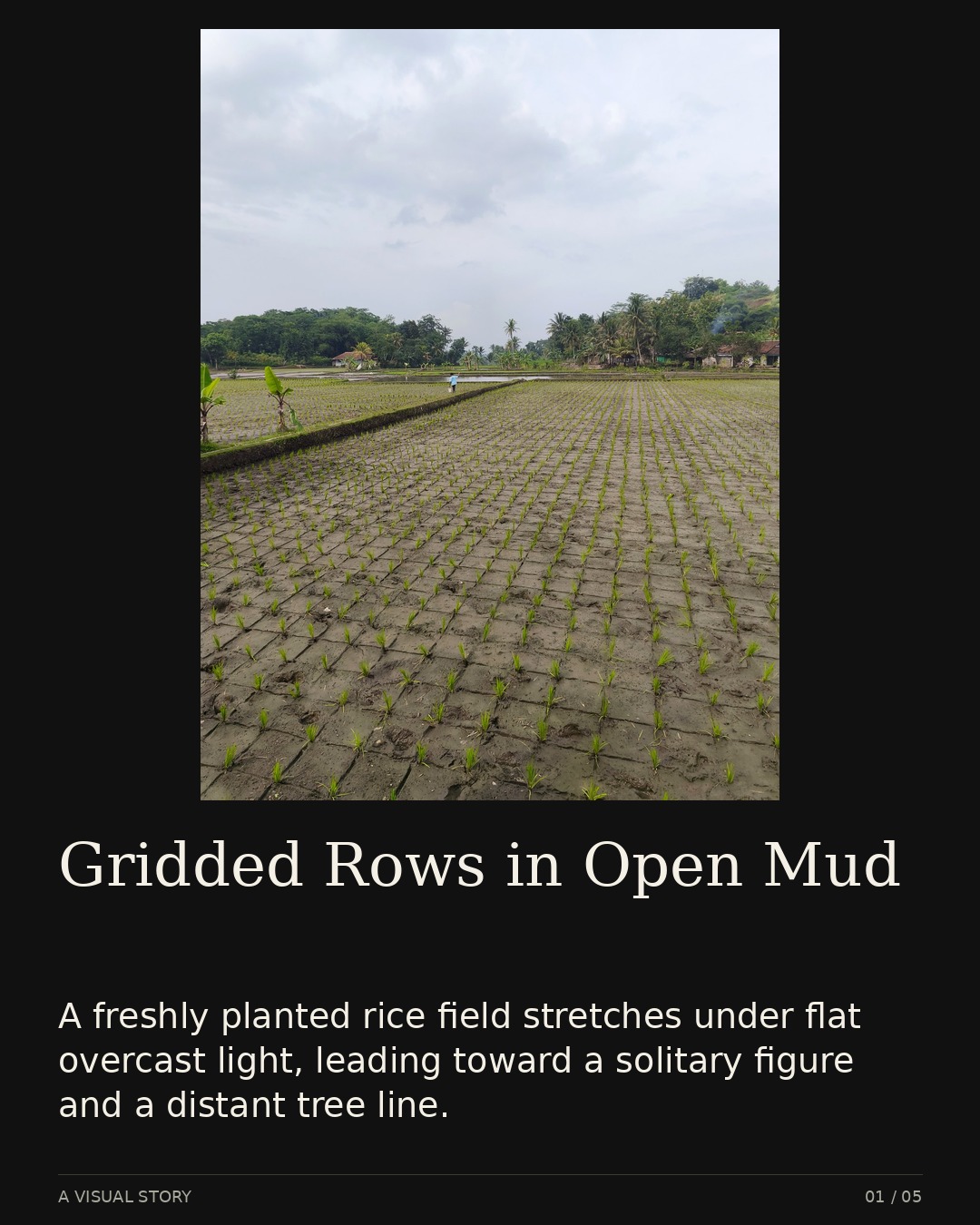
Actual JPG downloaded from the live app. The story opening uses the selected latest-Shoot image; the generated words are unchanged.
-
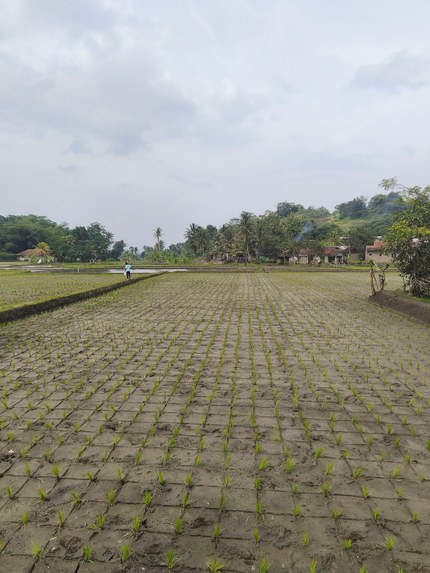
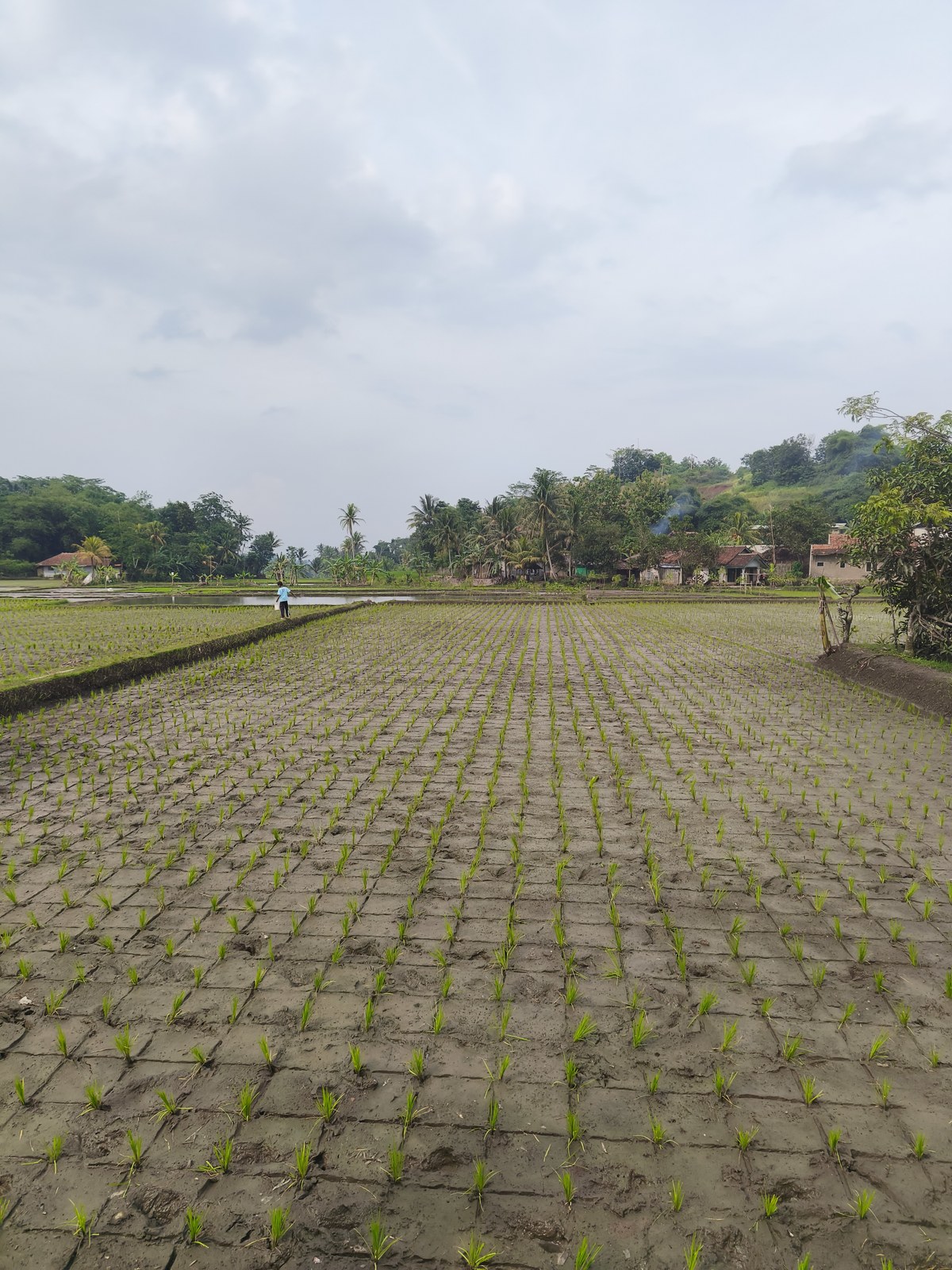
Before: the original rice-field Shot. Shoots keeps this image unchanged while preparing its reading and visual explanations.
-
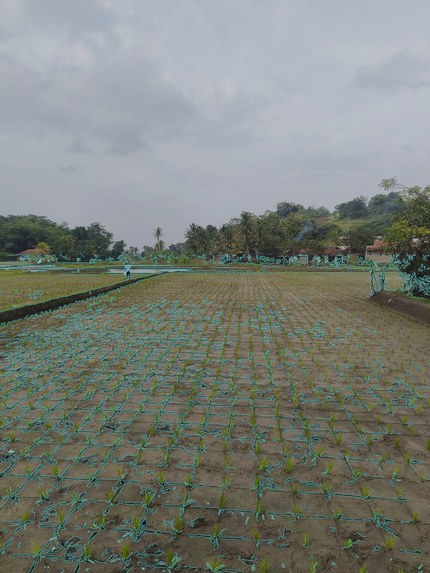
After: OpenCV contrast edges in the named pattern area. Cyan marks measured edges, not an aesthetic score or photographic intent.
-
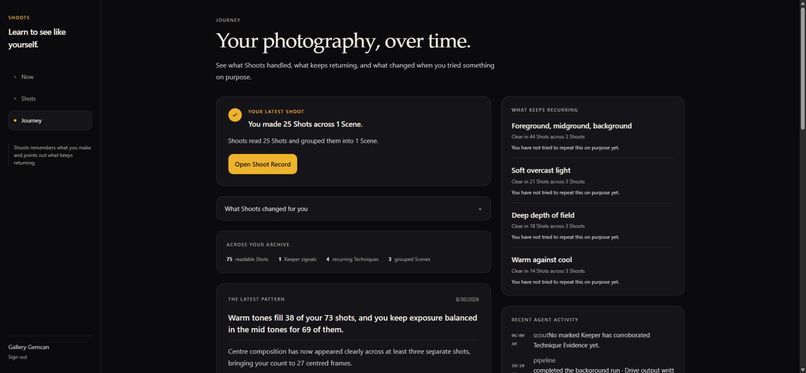
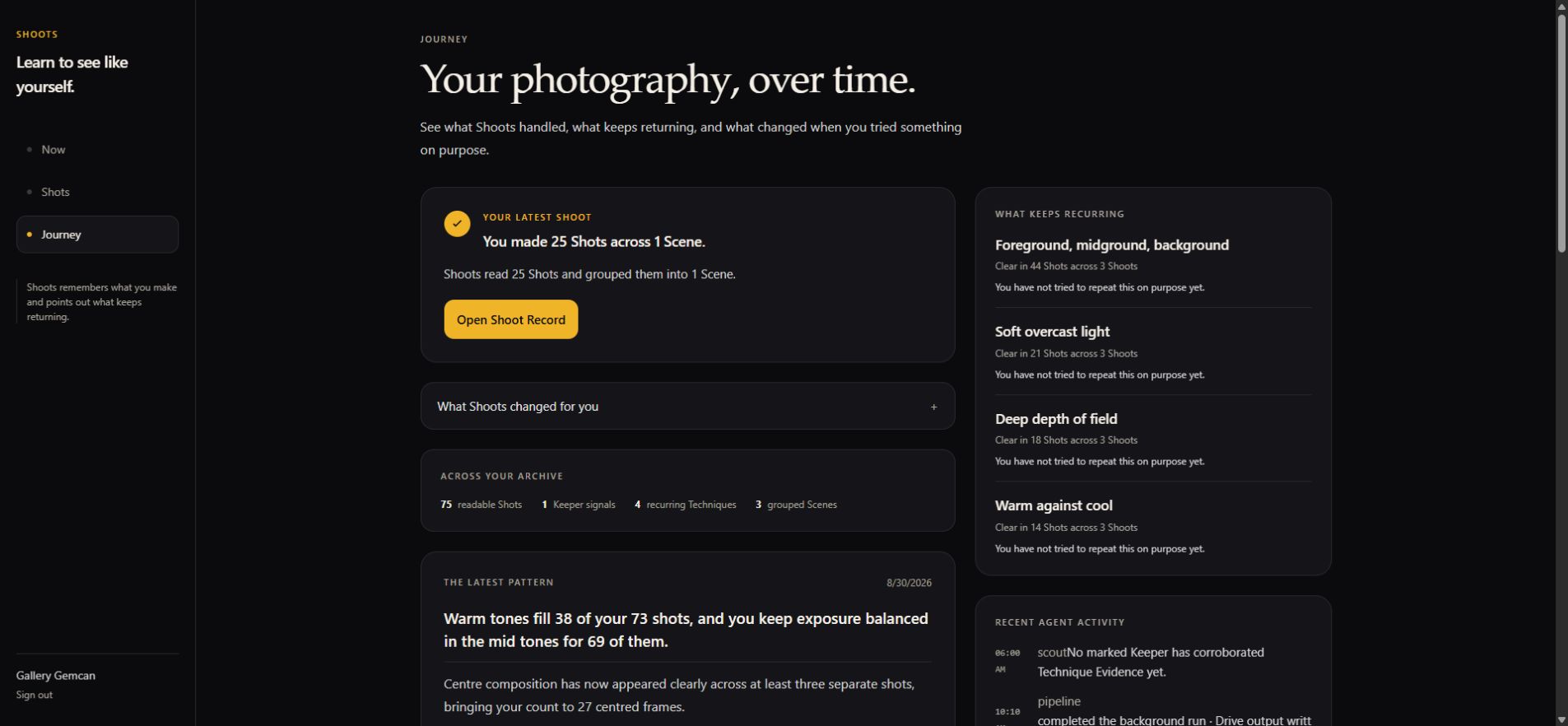
Journey links the finished Shoot to recurring Techniques. This account contains the disclosed 75-file workflow-test dataset.
-
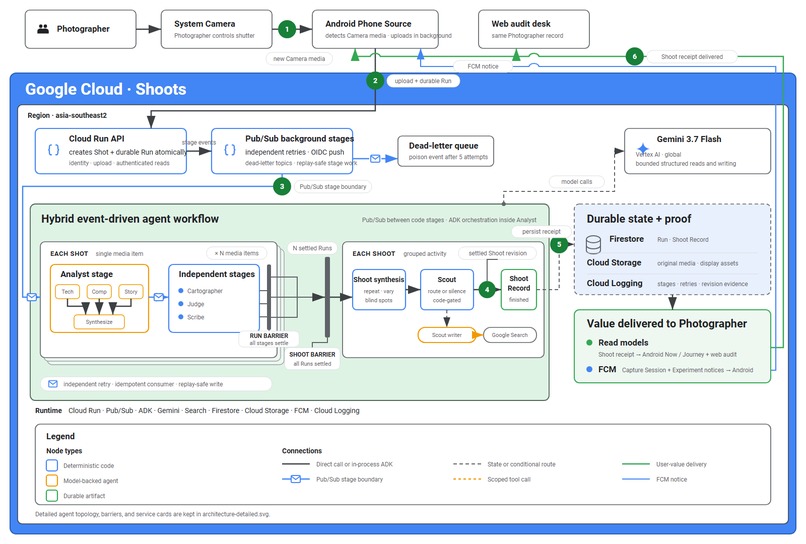
Hybrid event-driven workflow. Gemini reads and writes; code owns measurements, durable records, retries, and delivery.
-
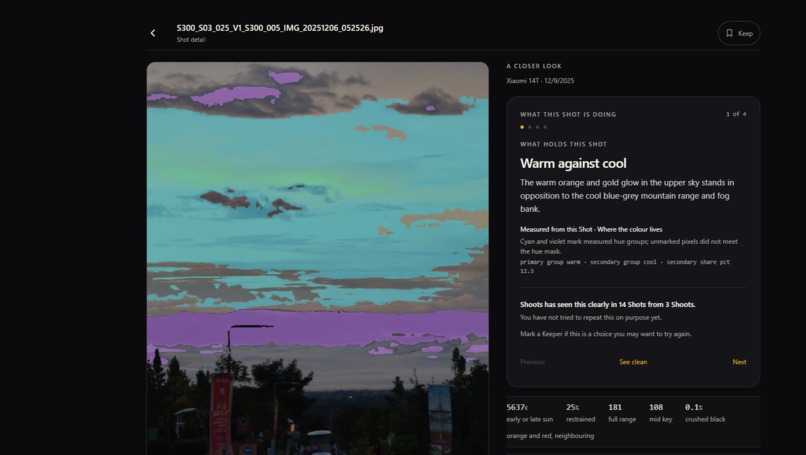
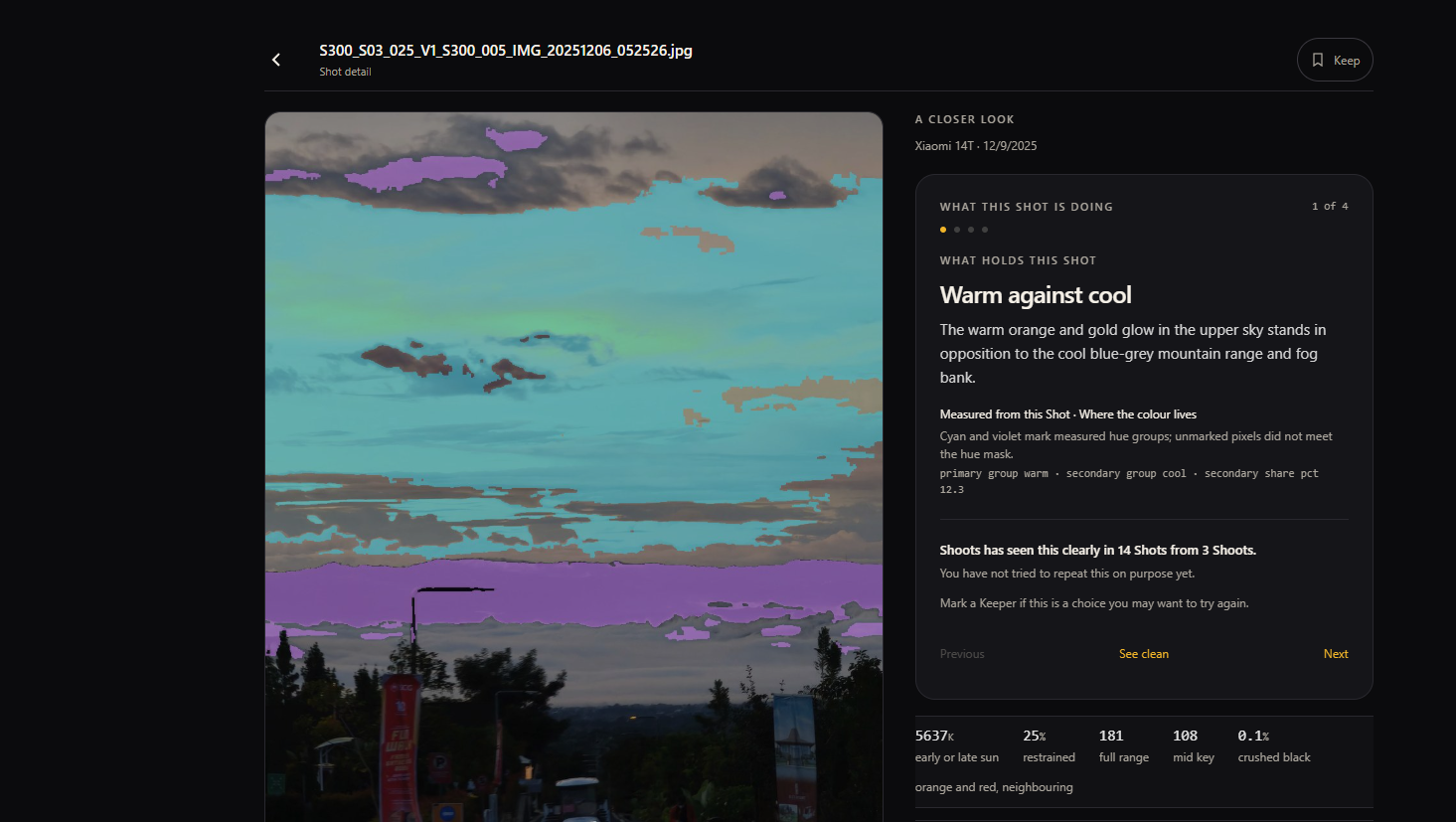
Warm against cool example
-
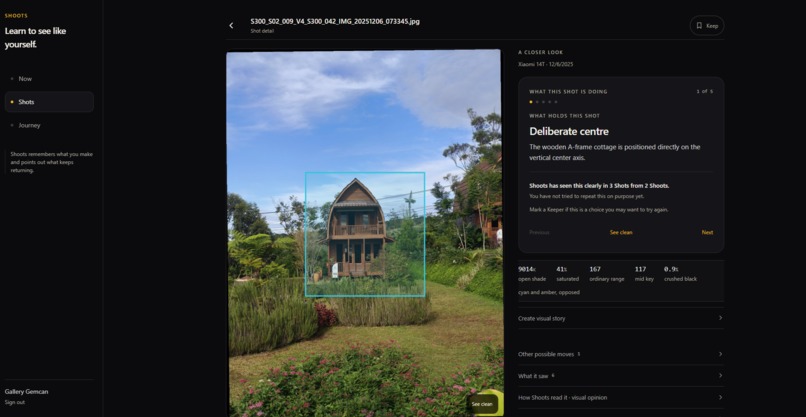
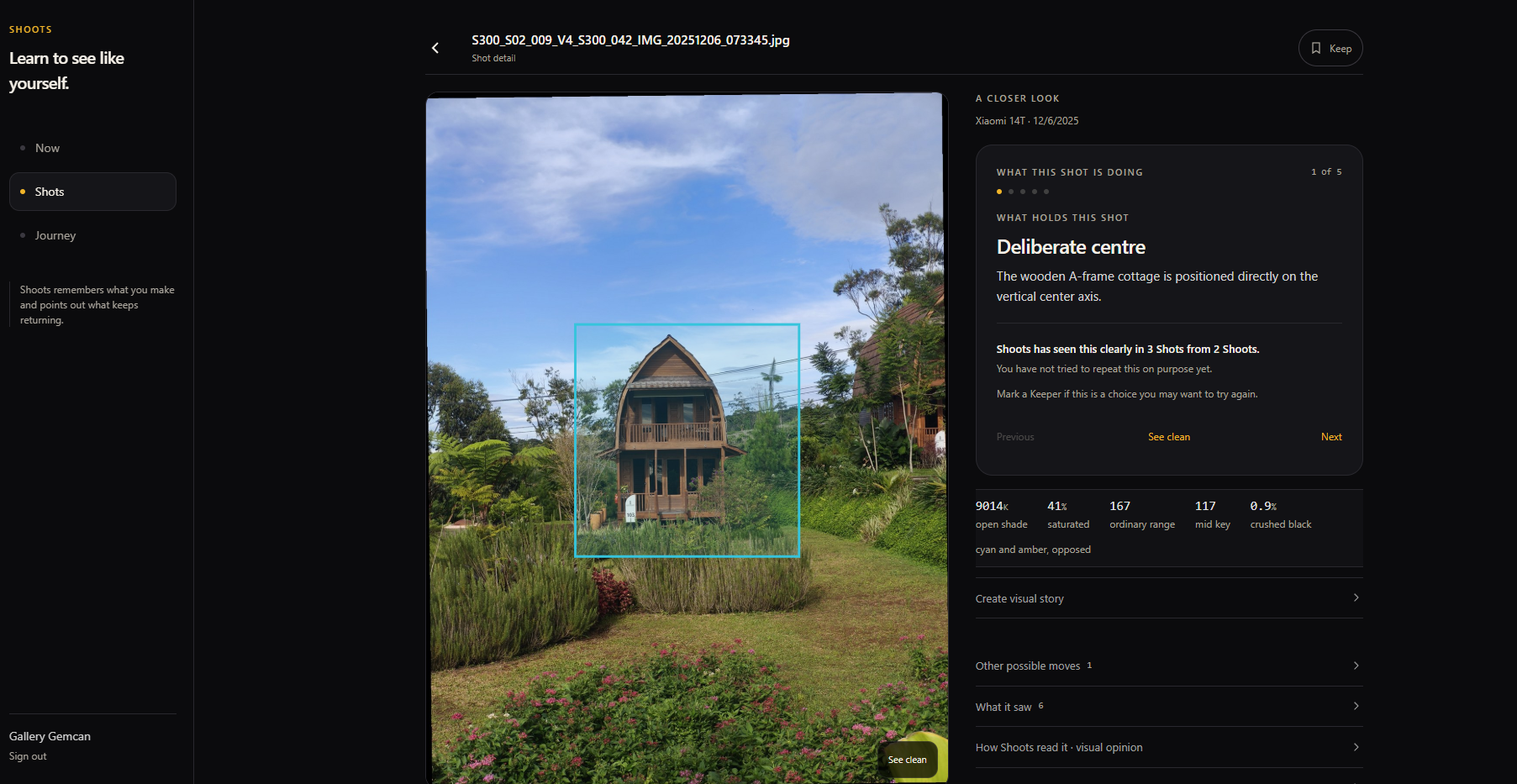
Using deliberate center technique example
Summary
1. What is this app?
Shoots is an Android and web photography Companion. It reviews my Shots, tracks Techniques and Tendencies over time, and offers optional Experiments based on my own work.
2. What problem am I trying to solve?
I love photography, but most of the time I just keep shooting. Sometimes my Shots feel boring or repetitive, and I feel like I've hit a plateau. I don't know what to change.
Community feedback takes time, and I have to pick Shots I'm not embarrassed to share. The AI feedback I've tried gives me text about one image, but I still don't know where to look or how my work is changing.
I want something that reviews all my Shots, points directly to what it's talking about, tracks patterns over time, and suggests what to try next.
3. What work does Shoots finish without me?
I keep taking photos normally. Shoots does the learning work I would never do myself: it keeps the full record, chooses one useful test, checks what happened, and remembers the result for next time
Once my import is accepted, I can leave the app.
Shoots reviews the Shots, updates my Technique Map and Journey, prepares a Shoot Record, and writes reviewed copies to Drive when connected. I don't prompt each Shot or maintain the record manually. I still choose what I value, which Experiment to try, and what to share.
4. How does it remember work and handle failures?
The hybrid event-driven architecture runs on Cloud Run.
Firestore stores my history and each Shot's Run. Pub/Sub stages retry independently, duplicate delivery does not create another Shot, and scheduled recovery revisits stalled work. Code owns state changes and supplies bounded history to Gemini. In production, Drive refresh tokens stay in Secret Manager.
5. Where is the proof that it works?
In the recorded production test, all 75 test files completed and 75 reviewed copies reached Google Drive.
Five Shots recovered through six automatic repair replays. The three test batches produced three settled Shoot Records.
Median backend Run time was 48.72 seconds. The slowest took 38 minutes 26 seconds, including recovery waits. The whole 75-file session took 40 minutes 7 seconds, from the first import request to the last Shoot Record, including gaps between imports and recovery.
A separate five-Shot metered sample estimates Gemini model processing at about $0.039 per Shot, or $2.95 for 75
The files included repeats and deterministic variations. This proves the recorded workflow and recovery. Long-term Photographer benefit still needs real-user follow-up. See What I tested below for the timing details and current model-quality and physical-Camera proof limits.
6. Who is this app for?
Beginners and photography hobbyists who want to understand how they shoot and try more Techniques. Think of it as a gym-tracking app for photography. It helps them:
- Understand the images they take at a technical level, not just by vibe or aesthetics
- See how an image would read under a different crop or angle, with a tested comparison
- Explore Experiments grounded in their own Shots
- Follow how their Technique choices evolve over time
- Upload images in bulk without doing technical review on each one
7. How is this different from a single-image AI critique?
Shoots connects feedback across Shots and outings. It combines deterministic measurements with labelled model interpretation, keeps the supporting Shots linked, and offers an optional Experiment. It tracks recurring choices and comparable Change without giving my photography an overall aesthetic score.
8. How do I start using it?
- On Android, approve future Camera imports and use the normal system Camera. Shoots uploads new Shots in the background.
- On the web, upload files or select existing files from Google Drive. Manual imports distinguish Mine from Inspiration. Only Mine updates my photography record.
9. Which agents and image-processing steps do the work?
Gemini interprets the Shots, computer vision measures their pixels, and deterministic code controls the workflow and memory.
- Measure the Shot. Read EXIF camera settings and use NumPy to calculate colour, luminance, saturation, and highlight clipping.
- Run a specialist panel. Google ADK runs three Gemini 3.7 Flash readers in parallel: Technician, Composer, and Storyteller. A Synthesizer combines their readings. Code checks their agreement and validates the structured output.
- Make the evidence visible. OpenCV uses Canny edge detection, Laplacian-based detail maps, and bounded image processing to create inspectable overlays. Gemini identifies regions; code renders the pixels. These measurements support the interpretation, not an artistic grade.
- Test suggested crops. Pillow renders the proposed crop. A separate Gemini evaluator compares it with the original, with at most two rounds. Unsupported suggestions are discarded. The photographer can inspect the result with a comparison slider.
- Remember and recommend. Update the Photographer's Technique Map and recurring Tendencies across Shots. Offer one optional Experiment when the evidence supports it. When the photographer explicitly attempts Reproduce, check its declared Criteria and save the results.
- Deliver actual files and records. Save reviewed copies to connected Google Drive, create Shoot Records, and prepare image-led Deconstruction drafts for the photographer to export.
Inspiration
As a hobbyist photographer, I can come home from a walk with about thirty images. I may know which one I love, but I cannot tell what made it work, how much of that came from me, or whether I could do it again.
So one question remains: am I improving, or am I just getting lucky?
I can post one image for feedback or upload it to an image-critique AI for a detailed analysis. Both may teach me something about that image, but neither compares it with the hundreds of images I have taken over time.
The closest answer I can imagine is a mentor who has followed my work over time. But that relationship still begins with a selection I make. I bring the images I already value, so the mentor sees a curated slice of my work, not how I actually shoot.
The missing piece was a record of how I actually shoot over time, including the images I normally leave out. That record could show which choices kept returning and give me a way to test whether a choice I valued was deliberate. I built ShootsAI to create that record quietly in the background, without turning photography into another task.
What it does
I upload still images, select files from Drive, or let Android import new Shots from my normal Camera after granting permission. For manual imports, I choose Mine or Inspiration. Only my own Shots update my photography record.
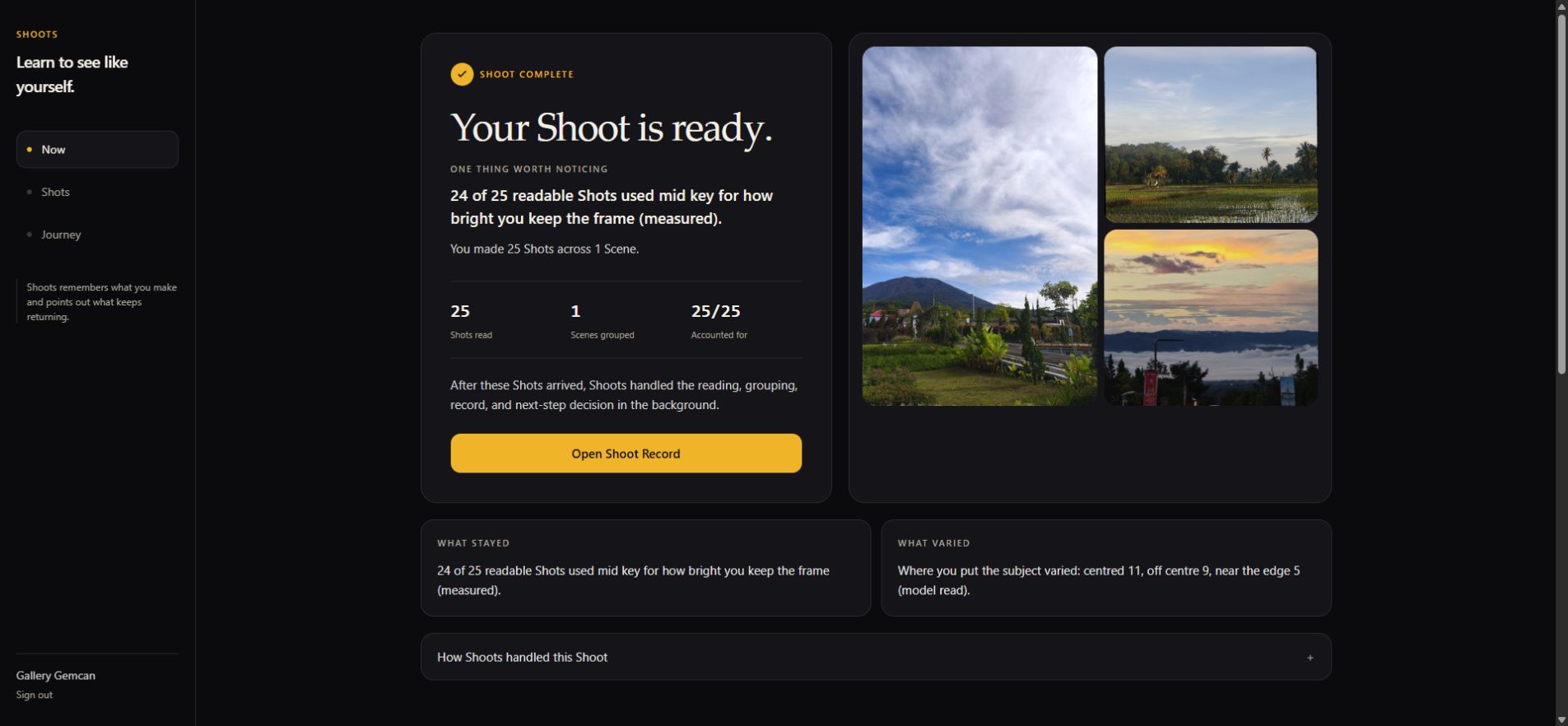
Now shows a finished review with its supporting Shots. This screenshot uses one completed 25-file batch from the workflow test below.
I can open a Shot and see where an observation applies. If a model-tested crop is available, a slider compares it with the original. Measurements and model opinions are labelled separately. Shoots does not give my photography an overall score.
A Shoot groups Shots from one period of Camera activity. Once the group is closed and every Shot is accounted for, its Shoot Record shows what repeated and what varied. The Technique Map tracks recurring Techniques; Journey connects them to earlier outings. I can follow each observation back to the Shots behind it.
When there is enough Evidence, Scout offers one Experiment idea. I can try it, ask for another available idea, or keep shooting. I don't have to answer a questionnaire first. Explore suggests Variations without grading them. Reproduce checks agreed Criteria only for Shots I choose to submit. A recorded Change means something was different, not automatically better.
The output includes reviewed copies in Drive and a Deconstruction draft: a visual story built from the stored Evidence. I choose a Shot I value as its cover, review the draft, and decide whether to download or share it.
How I built it
Shoots uses a hybrid event-driven agent architecture. Gemini 3.7 Flash handles visual interpretation and writing. Python code controls measurements, memory updates, retries, and file delivery.
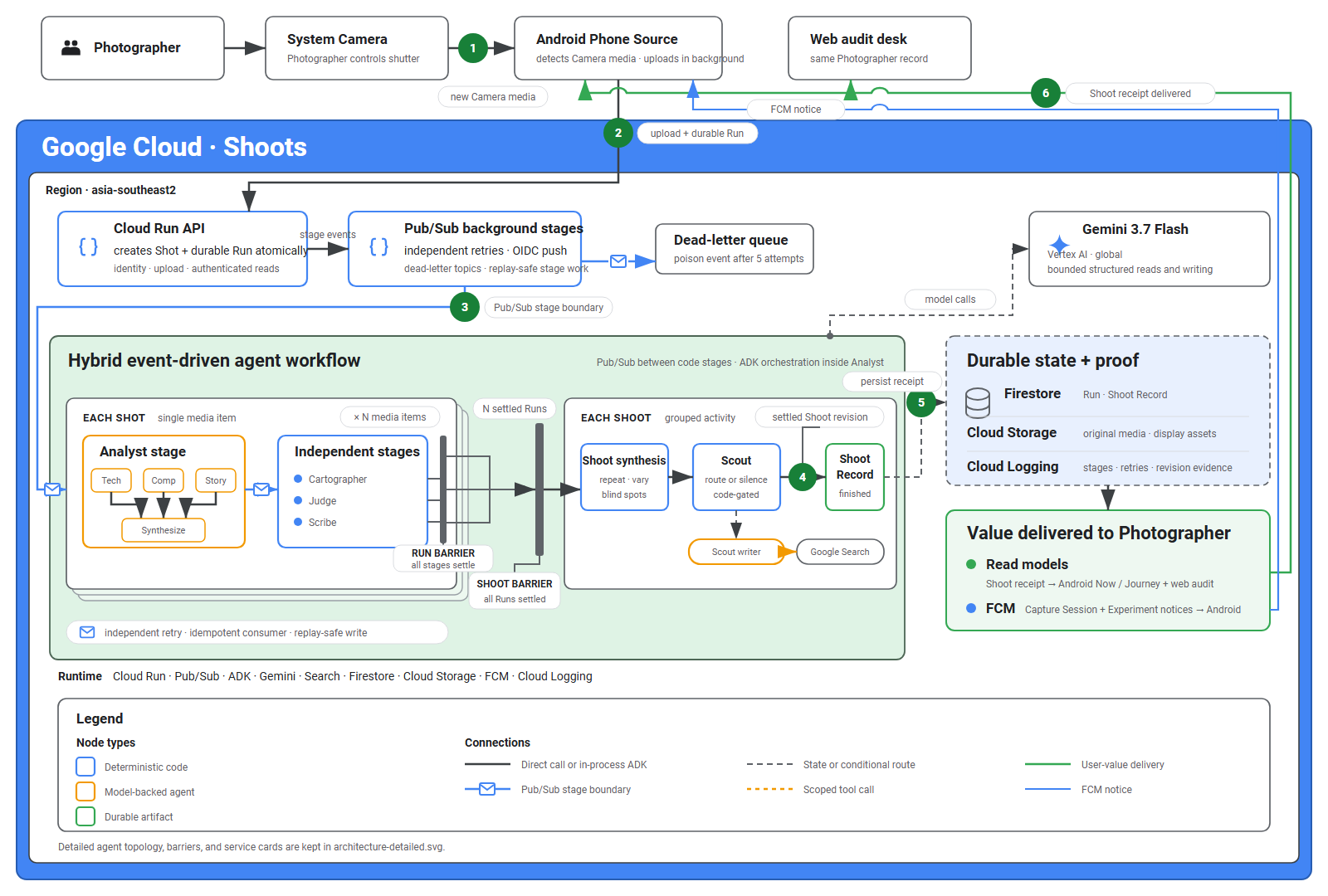
Models read and write. Code decides what gets stored, retried, and delivered.
Read the Shot and show the Evidence
Ingest reads EXIF camera settings and uses NumPy to measure colour, brightness, saturation, and highlight clipping. The Analyst uses Google ADK to run three specialist readers in parallel: Technician, Composer, and Storyteller. A Synthesizer combines their readings. Pydantic schemas and code check the output format, Technique ids, agreement, and image locations before storing the result.
Gemini identifies areas using grid cells. OpenCV produces the visual support, including Canny edge detection and Laplacian-based detail maps. The model never draws the pixels itself.
| Before: the original Shot | After: measured visual Evidence |
|---|---|
 |
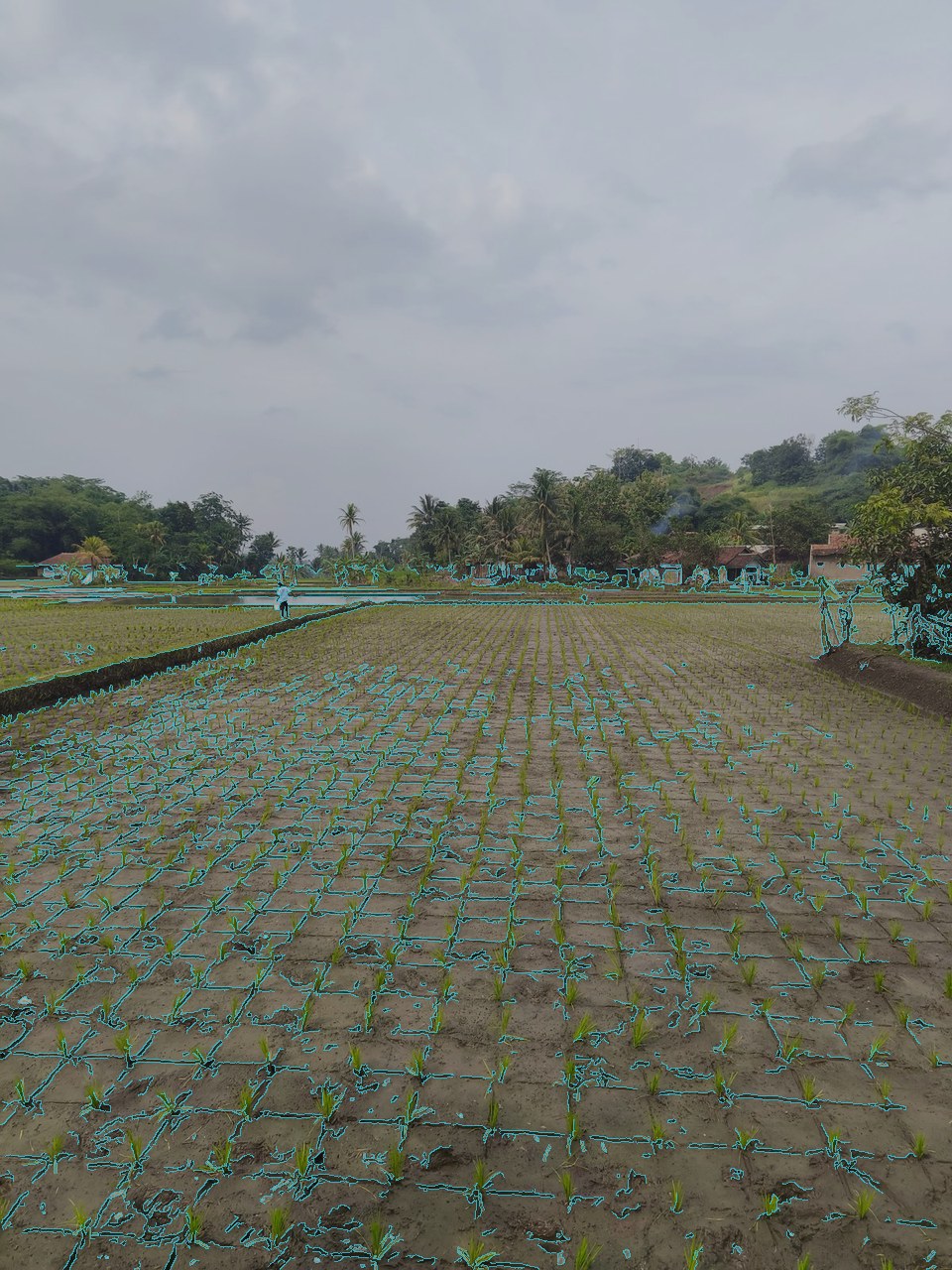 |
The cyan marks show measured contrast edges in the area Gemini identified. They help me inspect the pattern; they don't grade the composition. The original Shot stays unchanged. Click either image to see it full size.
For a suggested crop, Pillow renders the proposal and a separate Gemini evaluator compares it with the original. Code allows at most two rounds and drops suggestions that fail the check. I can inspect the result with the comparison slider.
Make a visual story I can take away
Scribe reads my selected Shot and its stored Evidence, then writes a short story about what is happening in the image. Pillow renders downloadable JPEGs with full-image and labelled detail pages, ending with a clean copy of the Shot. I review the draft and decide what to share.
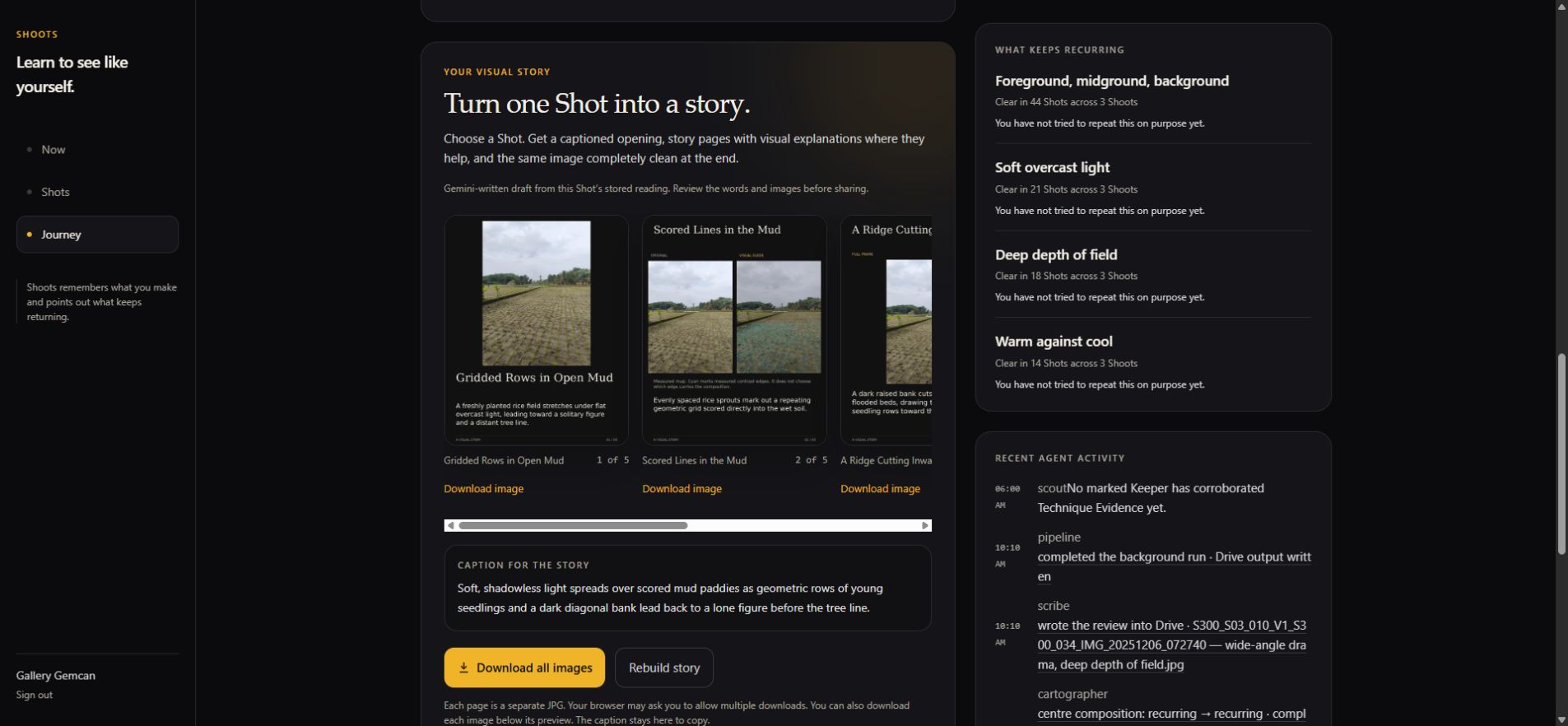
The live app generated five story pages for a different rice-field Shot. The server took 16.58 seconds for story generation, excluding the earlier Shot review. View the downloaded opening page, with the generated wording unchanged.
Remember the work and finish the job
Cartographer updates the Technique Map from stored Evidence. Scout uses that record to select a supported next step. Judge checks declared Reproduce Criteria against camera settings and the Analyst's Evidence; Gemini writes the feedback. Scribe prepares reviewed copies for Drive. Google Search grounding supplies sources when a Reproduce brief uses research.
FastAPI runs on Cloud Run. Firestore stores each Shot's Run and the Photographer's history; Cloud Storage holds the media. Pub/Sub moves work between stages. Each stage can retry without repeating completed work, and duplicate events don't create another Shot. Cloud Scheduler revisits stalled work. Failures that remain unresolved stay visible.
A Shoot Record waits until every Shot is accounted for. Late Shots produce a new revision. Each model call receives relevant saved history, so memory survives between visits without depending on a growing chat conversation.
Android uses Kotlin, Compose, MediaStore, Room, and WorkManager for Camera imports and queued uploads. The Vue 3 web client reads the same Photographer record. Drive credentials stay on the server in Secret Manager.
View the architecture diagram.
Challenges
Getting the whole workflow to finish without me
An image reading could finish while delivery or memory updates were still failing. I needed to track the whole job, not just the model response. Each Shot now has a saved Run showing what is finished and what still needs work. Retries resume the unfinished steps. The Shoot Record is only ready when every Shot is accounted for.
Keeping memory useful across Shoots
An early model guess should not become a fact just because a later agent remembers it. I kept measurements, model readings, and my own choices separate, with links to the source Shots. Inspiration never updates my photography record. Seeing a Technique recur does not mean I intended it or mastered it.
Checking agent suggestions against the actual image
A correctly formatted answer could still point at the wrong detail or suggest undoing a choice it had just praised. I added agreement checks across the readers, restricted visual marks to the supplied image locations, and made crops go through a separate comparison. These checks help catch mistakes; the visible Evidence still matters because the model can be wrong.
What I tested
Background workflow
I imported 75 test files from Drive in three batches of 25 on the deployed app.
| What I checked | Recorded result |
|---|---|
| Did every file finish? | 75 of 75 completed the background workflow. |
| Did it deliver the files? | 75 reviewed copies reached Google Drive. |
| Did it finish each batch review? | Three batches produced three Shoot Records 25 each. |
| Did it recover from failures? | Five failed Shots completed through six automatic retries. |
| How long did it take per Shot? | Median: 48.72 seconds. Slowest: 38 minutes 26 seconds, including recovery waits. |
| How long for all 75 files? | 40 minutes 7 seconds from the first import request to all three finished Shoot Records. |
| Estimated Gemini model cost per Shot | $0.039 from a separate five-Shot metered sample. |
| Estimated Gemini model cost for 75 | $2.95, calculated as 15 times that sample. |
Per-Shot time measures the backend workflow, excluding upload. The 75-file total includes the gaps between three separate imports and automatic recovery. After the final import finished. Shots process in parallel, so its processed efficiently.
What I learned
The real processing times changed the design. Review belongs in the background, with a clear record of what finished and what failed.
The first versions graded every Shot and made Experiments feel like homework. Using the app on a phone made that mistake obvious. Now the Experiment is optional, and ordinary shooting stays ordinary shooting.
Hobbyist don't like judged especially by LLM based on aesthetic or creative choice, so i prefer showing better actual technical evidence of techniques that can be explored, improve and review without spending time to measure one by one manually.
What's next
Use Shoots over months of real scale Camera histories and ask a practical question: does the suggested Experiment give a hobbyist something useful to try, or does it become another repetitive notification? Track whether they try it and find it helpful.


Log in or sign up for Devpost to join the conversation.