-
-
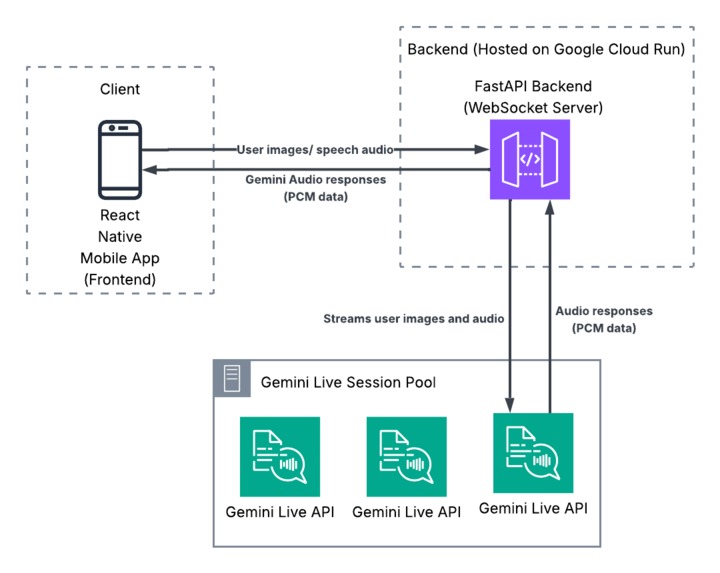
System architecture
-
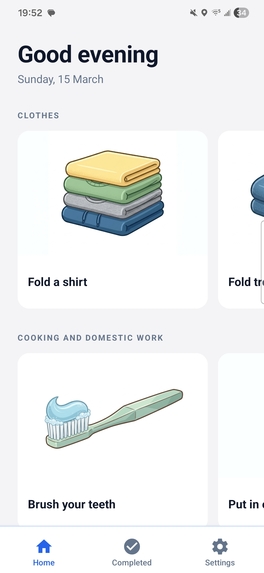
Home page
-
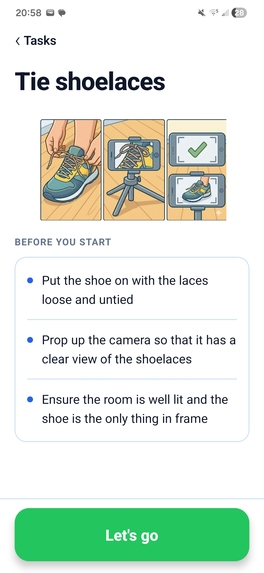
Task setup page
-
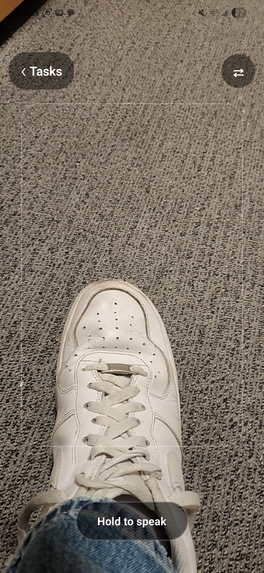
Task page
Inspiration
My inspiration for shoelace came as I started college and began the daunting challenge of completing simple household tasks on my own which I had once taken for granted. During this process, I struggled to navigate online guides which became difficult to track, or even useless, as soon as simple differences in setup such as differences in appliances were introduced.
Around the same time, my parents were discussing how my younger brother, who has Down Syndrome, often forgot important steps in tasks that others may see as simple day-to-day tasks. To address this, my parents had placed cards displaying each step that had to be taken in completing each task around our house.
What it does
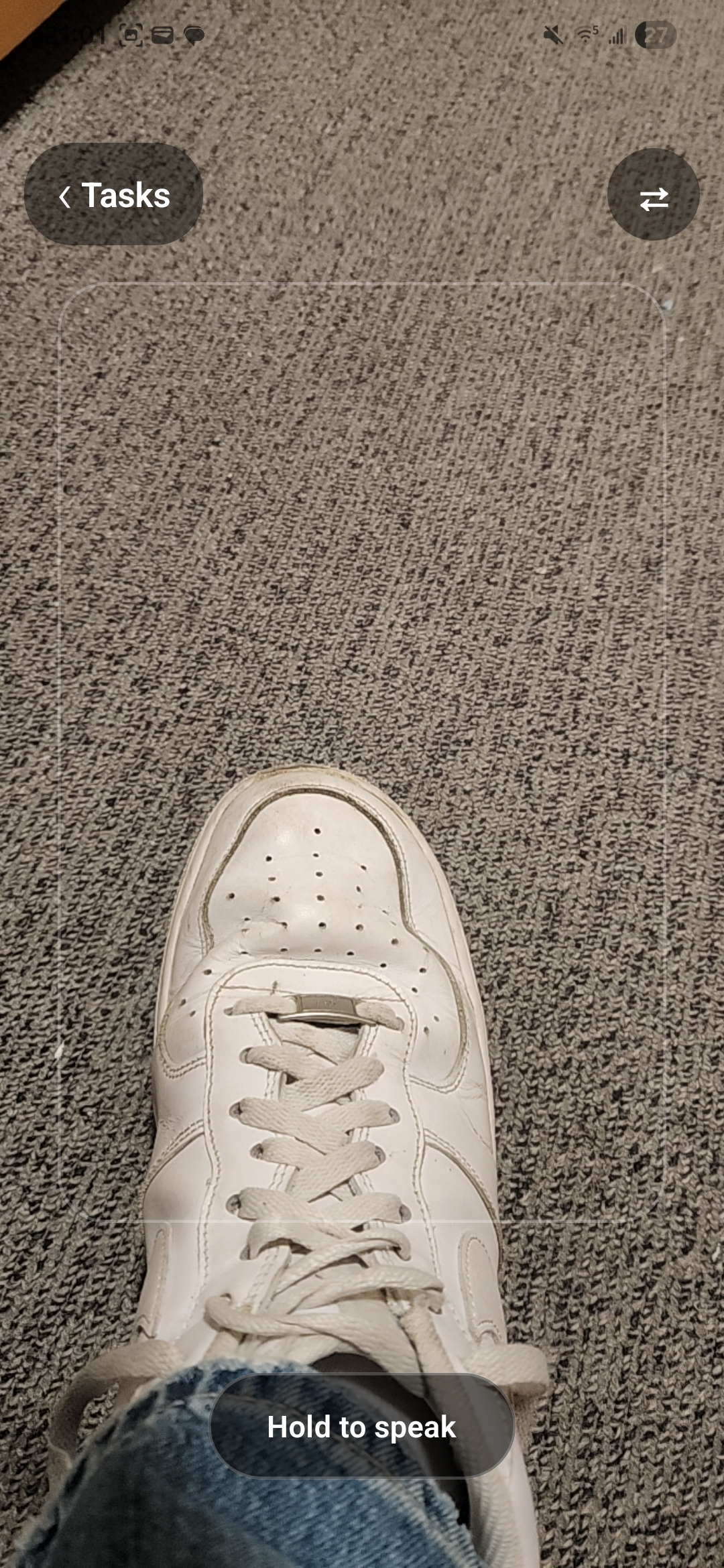
Shoelace addresses the problems above by using AI to guide users through these "simple household tasks". The app features a variety of tasks, from dressing a bed to tying your shoes. Once a user selects a task, their camera is activated and snapshots are sent to Gemini's Live Model at regular intervals. In this way, Gemini is able to guide the user through completing the task, adapting to different scenarios and setbacks along the way. In addition, the AI is able to recognise when the user has completed a task, allowing for the user to keep track of which skills they have learned through the app in the past.
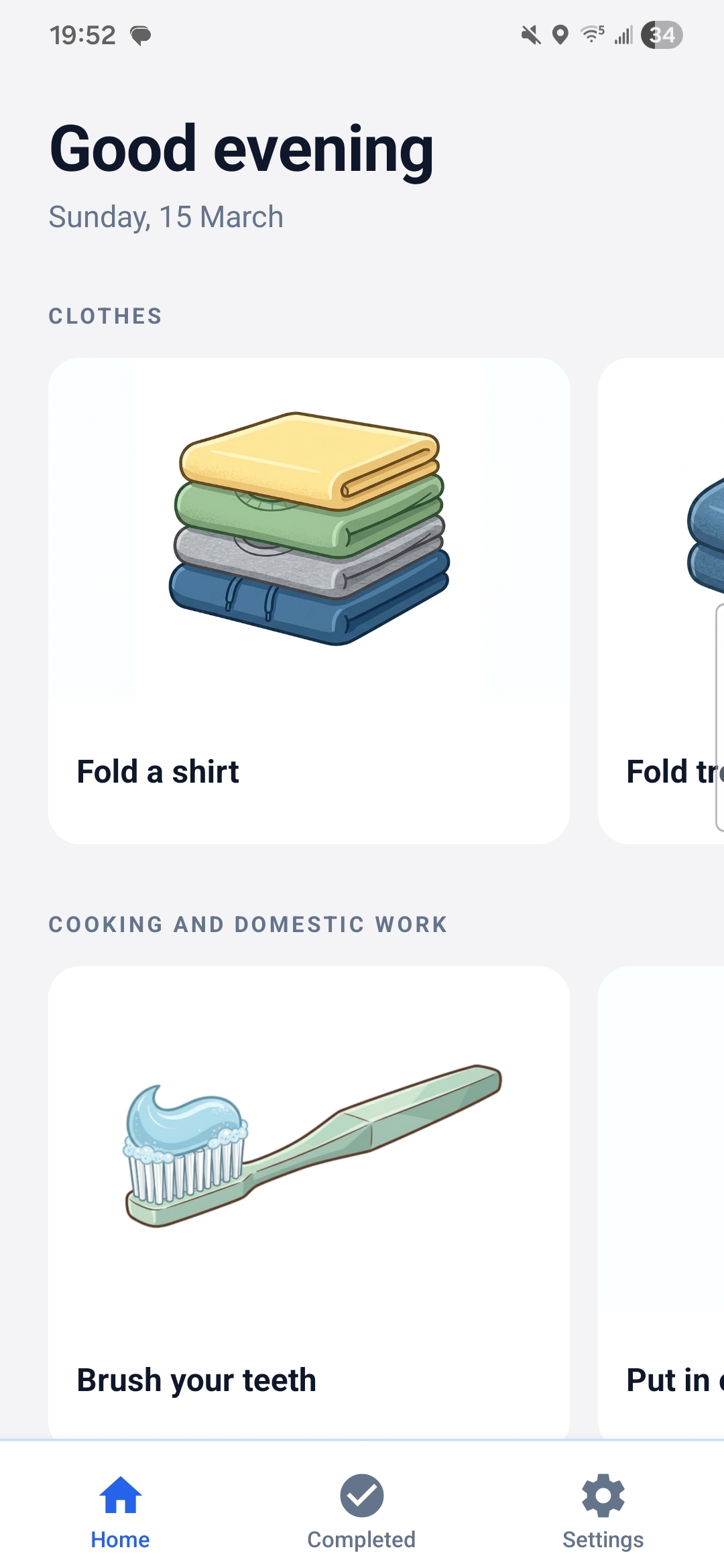
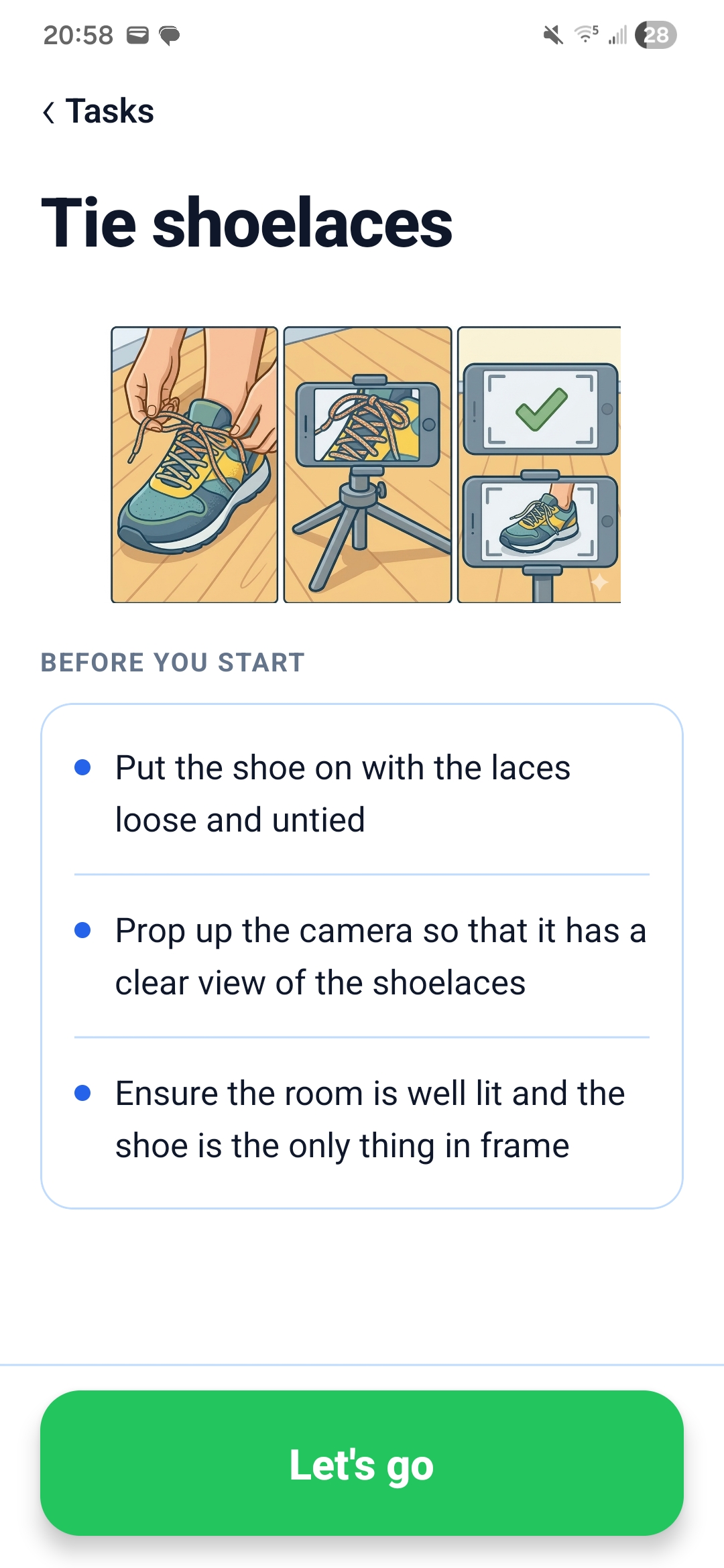
The app also features a series of accessibility features designed to make the app usable to individuals with physical or intellectual disabilties. In the settings menu there is an option to turn on captions for the AI responses. In addition, there is also images above each task and setup guides designed to make the app as usable as possible for a variety of individuals.
How I built it
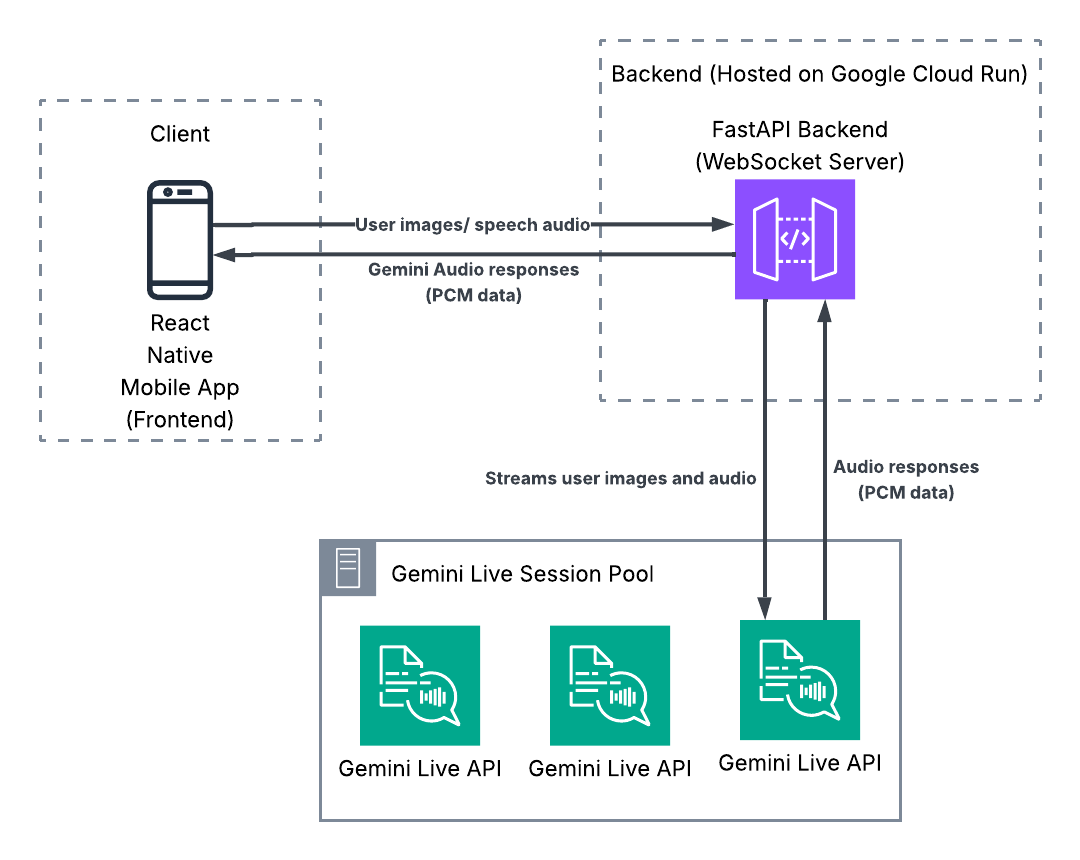
The frontend of shoelace is built using react native. When the user starts a task, the task selected is sent to the backend alongside a task-specific prompt and the user's uid. The backend was created with FastAPI and is hosted on Google Run. Once it receives the request from the client to create a session it initialises a live session with Google's Gemini 2.0 live model, this allows it to send back and forth low latency requests and responses. The model is initialised with a system prompt and also receives the correct task-specific prompt which allows it to understand which steps it needs to guide the user through in addition to possible sources of errors.
At regular intervals, the frontend takes the user's camera input and sends it to the backend. The backend compresses the images it receives and sends these images to the model. It receives a response containing the next instructions for the user from the AI model in audio format and it then streams this to the frontend where it is played to the user. Once the model recognises that the user has completed the task it responds with a code word which, when recognised in the transcription by the backend, causes a message to be sent to the frontend which marks the task as complete.
Challenges I ran into
One major challenge I ran into throughout the process was latency between the server and the frontend. This had the knock-on effect of making the AI responses irrelevant to what the user was currently doing. I solved this by introducing a pooling system for Gemini sessions. This reduces the latency involved in initialising a new Gemini session each time a user begins a task.
Another latency related challenge I faced was due to the fact I was collecting all response audio in a buffer before sending it to the frontend. While this made it easier to play the audio on the frontend, it also had the added side effect of increasing the time between a request being made and a response being played to the user. To solve this I changed the backend to stream raw PCM data to the frontend. This allowed me to take advantage of the Gemini API's Live functionality. This came alongside other challenges however related to audio clipping and playing over itself. Through trial and error I eventually overcome these issues, resulting in a significantly improved user experience.
Accomplishments that I'm proud of
One item in particular that I am proud of is the wide range of tasks available on the app and the quality of the AI responses. This process required a large amount of tweaking prompts and changes to improve latency so I am extremely proud that I managed to adjust the AI to work in such a large number of scenarios.
I am also extremely proud of how accessible and user friendly the home page is. When creating cover images for each task. I aimed to create icons which functioned in a similar way to daily schedule cards which are used by individuals with disabilities such as Down Syndrome, ADHD, and Autism to follow a daily routine and complete tasks. I generated the cover images for each task using Nano Banana 2 and they turned out extremely well.
Lastly, I am most proud of the positive impacts I have seen my app have firsthand. Since creating my app, my younger brother has been able to use the app to complete simple tasks on his own, reducing the workload of my parents and showing the potential that my app has.
What I learned
Prior to making shoelace, I had very little experience working with Gemini's API and I did not even realise that the live agent features existed. Since then, I have gained significant experience in crafting prompts, creating data pipelines and understanding the ways to gain the best responses possible out of Gemini's AI API. Similarly, I along the way I improved my skills in working with React Native and FastAPI. This was also my first time using Docker and deploying agents to Google Cloud Run which is something that definitely impressed me and I am looking forward to using these technologies again on products in the future.
What's next for shoelace
Over the next number of months I plan to keep developing and working on shoelace. One feature I would love to add is a "Carer mode" feature which would allow parents and carers to set daily routines for individuals with intellectual disabilities or progressive brain disorders. As part of this mode, the app would track which tasks the user had completed each day, and if any remained outstanding the carer would be notified so they could take steps to address these.
Similarly, I would also like to expand the app to a wider audience. From my experiences, I understand that an app like shoelace can be applicable to people with a wide range of abilities to learn new skills. I would love to expand the app to tasks such as cooking, putting on makeup or even sports activities such as perfecting a golf swing.
Built With
- expo.io
- fastapi
- gemini
- gemini-live-agent
- google-cloud-run
- nano-banana-2
- python
- react-native
- typescript

Log in or sign up for Devpost to join the conversation.