-
-
Code screenshot

Note: The thing I forgot to mention in the video that using ctime library I noted the entry time and on average 3 days of usage duration i am also quoting an expected return of the container.
Chapter 1: Introduction to Project 1.1-Project Description
The provided C++ program is a Container Management System that allows users to allocate, display, and manage containers. It supports both undamaged and damaged containers, offering features like enqueuing damaged containers for repair. The system's core structure includes classes for container management, a queue for damaged containers, and a menu- driven interface for user interaction. This program serves as a basic foundation for container management and can be extended to include more advanced features and error handling.
1.2-Project Application
The Container Management System is a software application designed to streamline the allocation, monitoring, and maintenance of containers. It simplifies container management for organizations that need to track various container attributes, including client information, location, status (damaged or undamaged), and availability dates. Users can allocate new containers, view the existing container information, and efficiently manage damaged containers. This application enhances container organization and simplifies the repair process.
1.3 Scope
The scope of the Container Management System includes creating a software application that facilitates the allocation and monitoring of containers, with a focus on both damaged and undamaged containers. The system allows users to allocate containers, view container details, enqueue damaged containers for repair, and repair them. The application aims to streamline container management, making it more efficient and organized for users and organizations dealing with containers.
Chapter 2: Project Functionalities
- Functionalities
The Container Management System includes the following key functionalities:
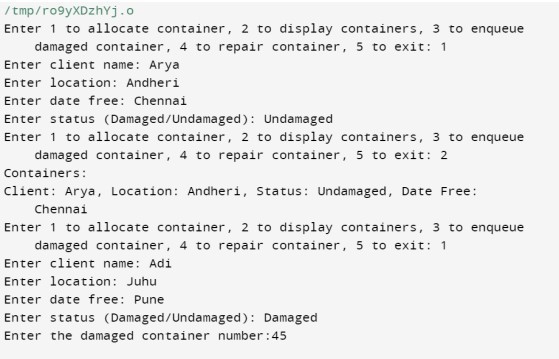
- Allocate Containers: Users can allocate containers by providing details such as client name, location, date of availability, and the status (damaged or undamaged).
- Display Containers: The system allows users to view the details of all allocated containers, including client name, location, status, and availability dates.
- Enqueue Damaged Containers: Damaged containers can be enqueued for repair by specifying their container numbers.
- Repair Containers: Users can dequeue damaged containers from the repair queue to mark them as repaired and make them available for allocation again.
These functionalities provide a comprehensive system for managing containers efficiently, particularly for organizations that need to keep track of their container assets and repair damaged containers.
- Users
The Container Management System can be used by various users within an organization,  such as:
- Container Managers: These individuals are responsible for overseeing and managing the allocation of containers, tracking their status, and ensuring that damaged containers are properly repaired and reintegrated into the system.
- Administrators: Administrators have the authority to configure and maintain the system, including setting user permissions, managing user accounts, and ensuring data integrity.

- Warehouse Staff: Warehouse personnel can use the system to allocate containers for different clients, update container information, and mark containers as
 damaged when necessary.
 - Repair Technicians: Technicians responsible for repairing damaged containers can access the system to check which containers need repair and mark them as repaired when the task is completed.![ref1]
- Reporting Personnel: Users responsible for generating reports and analyzing container data can utilize the system to access container information and track historical data.

- Auditors or Compliance Officers: These users can use the system to ensure that the container management processes are compliant with industry regulations and
 standards.
Chapter 3: Abstract Data Structure
- Data structures required and its suitability
The Container Management System can effectively use various data structures:
- Linked List: For storing and managing container data due to its dynamic nature.
- Queue: Ideal for managing damaged container repair orders (FIFO).

- Hash Table or Dictionary: Provides quick access for container retrieval using unique identifiers.

- Arrays or Dynamic Arrays: Suitable for lists and reports.
- Graph or Tree Structures: For modeling complex container relationships.
- Stack: Useful for tracking function calls and operations.

- Queues: Manage user input and background tasks for orderly processing.
- ADT of each data structure
the abstract data types (ADTs) for the mentioned data structures: 
Linked List:
- ADT Name: List
- Key Operations: Insert, Delete, Search, Retrieve, Traverse
Queue:
- ADT Name: Queue
- Key Operations: Enqueue, Dequeue, Peek, IsEmpty, Size
Hash Table or Dictionary:
- ADT Name: Associative Array or Dictionary
- Key Operations: Insert, Delete, Lookup
Arrays or Dynamic Arrays:
- ADT Name: Array
- Key Operations: Insert, Delete, Access, Search, Size
Graph or Tree Structures:
- ADT Name: Graph or Tree
- Operations vary based on specific type
Stack:
- ADT Name: Stack
- Key Operations: Push, Pop, Peek, IsEmpty, Size
Queues (User Input and Background Tasks):
- ADT Name: Queue
- Key Operations: Enqueue, Dequeue, Peek, IsEmpty, Size
4.2 Screenshots

Chapter 5: Learning, Conclusion and Future Scope
- My learning
This code example demonstrates: 
- Object-Oriented Programming (OOP) principles, with classes and objects.
- Use of data structures like linked lists and queues for managing containers.
- Menu-driven user interaction for container allocation and management.

- Basic exception handling for error control.
- Encapsulation and reusability through class design.
- Control flow for program operation.
It provides a foundation for container management and can be extended for more complex  applications.
- My experience
- Object-oriented programming

- Data structures (linked lists and queues)
- Exception handling
- User interaction design
- Dynamic memory management
- Software design
- Testing and validation
- Problem-solving
- Teamwork and communication
- User-centric development
- Conclusion
In conclusion, the provided code example represents a Container Management System implemented in C++. It showcases a range of experiences and skills gained by a team working on this project, including proficiency in object-oriented programming, the use of data structures, effective exception handling, user interaction design, dynamic memory management, software design, testing, problem-solving, teamwork, and a user-centric approach to development. This experience equips the team with valuable knowledge and expertise that can be applied to future software development endeavors.
- Future scope
The Container Management System can be expanded and improved in several ways:
- User Authentication and Security: Implement user authentication and access control to ensure data security and privacy.

- Data Persistence: Integrate a database for storing container information, allowing
 data retrieval across sessions.
 - User Interface Enhancement: Develop a more user-friendly graphical user interface (GUI) for better usability and visual appeal.

- Notification System: Implement notifications and alerts to keep users informed of important events and changes in container status.

- Performance Optimization: Optimize the system for efficient management of a large number of containers.

- Mobile Accessibility: Create a mobile application for on-the-go container management.

- API Integration: Develop an API for integration with other systems, such as logistics or supply chain management software.

- Reporting and Analytics: Add advanced reporting and analytics capabilities for data-driven decision-making.

- Multi-Platform Compatibility: Ensure compatibility with various operating
 systems and platforms.
 - Scalability: Design the system to accommodate growing container management needs.![ref2]

Log in or sign up for Devpost to join the conversation.